

It’s no secret that in order for a software company to be successful, it needs to have a robust quality assurance (QA) and continuous testing process in place. In fact, these processes are essential for any company that wants to ensure the quality of its products and protect its reputation.
In this blog post, we’ll discuss the importance of QA in software development, along with how to use ClickUp and PractiTest together to help your team improve its testing process and workflow.
This Article Contains:

 Summarize this article for me please
What is Quality Assurance and why do you need it for your business?
No software is perfect. Even the most well-designed and meticulously coded applications will have some flaws. That’s why it’s crucial to have a quality assurance (QA) process in place to find and fix these issues before they become problematic for users.
Quality Assurance (QA) is the process of ensuring that your software is secure, stable, and meets all of your customer’s requirements.
In the software industry, quality assurance (QA) and continuous testing are two of the most critical aspects of the development process. By ensuring that products are of the highest quality, QA helps protect its reputation and bottom line.
Additionally, by running tests continuously, developers can catch defects and issues early on in the development cycle before they have a chance to cause significant problems.
Still not convinced? These are just a few of the many benefits of QA:
- Reduces software development and business risks
- Increases customer satisfaction and experience
- Save time and money
- Maintains product quality
- Ensures security
- Protects brand reputation
Summarize this article for me pleaseWhat is PractiTest?
PractiTest is an end-to-end test management platform that covers your entire QA process of Requirements, Tests, Test-runs, and Issues, and allows users to create, run, and manage all their tests and QA efforts in one place. It gives you control of the entire testing process—from manual testing to automated testing and CI. Use PractiTest as your centralized hub for all quality assurance and testing information.
Here are the entities and modules that are available in PractiTest:
- Requirements
- Tests
- Test Sets
- Test Instances
- Runs
- Issues
- Reporting
- Dashboard
- TaskBoard
Designed for testers by testers, PractiTest can be customized to your team’s ever-changing needs and lets you orchestrate your QA efforts in real-time. With fast professional and methodological support, you can make the most of your time and release products quickly and successfully to meet your user’s needs.
Benefits of PractiTest
- Clear visibility of all your testing efforts in one place
- Increased efficiency using reusable tests
- To run the tests, add them to a test set which is a group of test instances that have a reason to be run together
- Reduced time to market and improved ROI
- End-to-end traceability with complete Requirements fulfillment and coverage
Summarize this article for me pleaseWhat does the ClickUp-PractiTest integration do and how does it work?
PractiTest and ClickUp integration lets you manage all your tasks and tests seamlessly, and improves team communication and collaboration.
Bring your developers into one Workspace with everything they need to get the job done, bridge the gap between development teams, and organize all of your company’s workflows. ClickUp even lets non-technical teams connect and work within the same platform!
Here are a few features in ClickUp that teams can take advantage of to improve their workflow and processes:
- Docs with collaboration detection and editing
- Whiteboards for visual collaboration; connect ideas and turn them into tasks
- Assign Multiple Assignees to delegate work and establish responsibilities
- Add watchers to tasks to inform team members of any changes or updates
- Use the in-app Chat view to discuss ideas, resolve issues, and more
- Create Custom Fields to display and sort important information
- Set Custom Task Statuses to fit any workflow and to show what stages the tasks are in
- Build customizable Dashboards with real-time reporting
Once you’ve established a streamlined workflow in ClickUp, connect it to PratiTest to help maintain overall testing visibility, keep teams in sync, and assure full QA coverage and project manager control over the project state at all times.
PractiTest makes the Agile testing process simple and effective with its dynamic filters, versatile customization settings, and informational dashboard. As a result, teams including Research and Development (R&D) and Quality Assurance (QA) can communicate more effectively with each other and work collaboratively throughout the software development process.
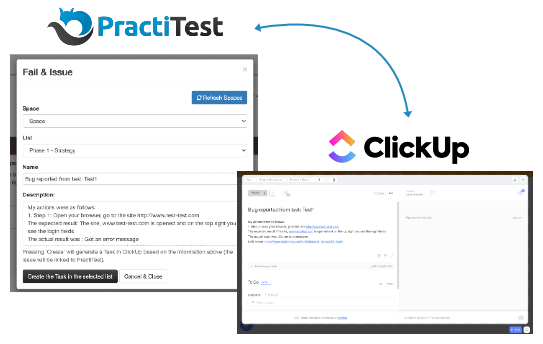
With this integration, users can report and sync any issue from your PractiTest run directly to a ClickUp task. All information from the run will be automatically populated in the ClickUp task, and changes in the task name, status, and description will be reflected in PractiTest—talk about efficiency! 😎
Three key benefits of the ClickUp-PractiTest integration:
1. Report and sync ClickUp tasks to PractiTest test management tool to ensure full QA coverage and better team communication
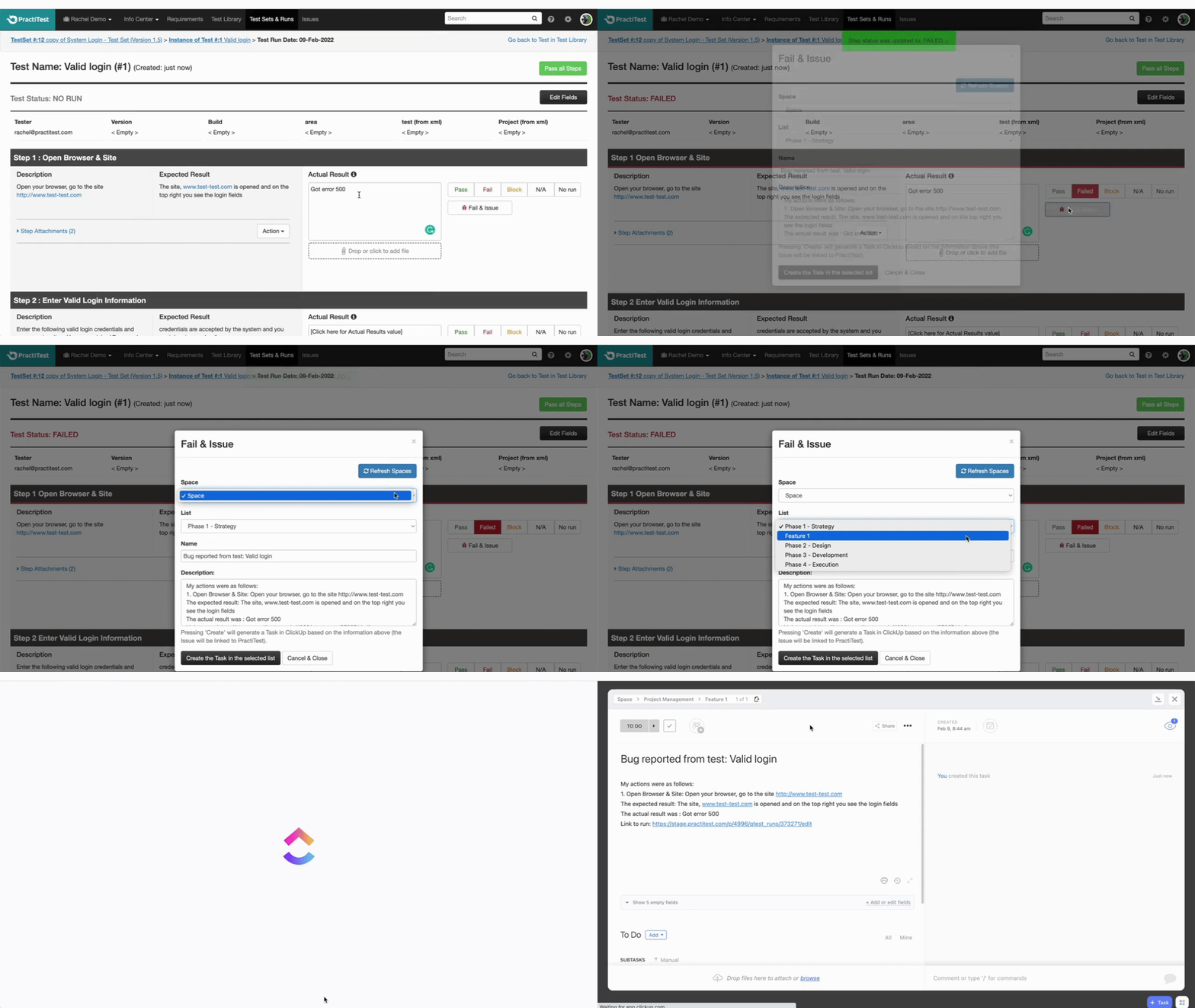
When running a test, you can set any step status to either pass, fail, blocked, NA, and No run. You can also choose Fail & Issue which reports a bug directly from the run to the issues module in PractiTest. In the issue module, you can define workflows for issues and manage them.
If you press the Fail & Issue button in a run and you have an integration with a bug tracker or a project management platform such as ClickUp, the system will create a task in ClickUp with all the run data and will sync the task to a PractiTest issue.
- Run your tests in PractiTest and report tasks to ClickUp directly from your run
- Choose the space and the list you want to report your task to
- Tasks reported from PractiTest will contain all the run information including previous steps and actual results
2. Live synchronization between PractiTest issues and runs to ClickUp tasks
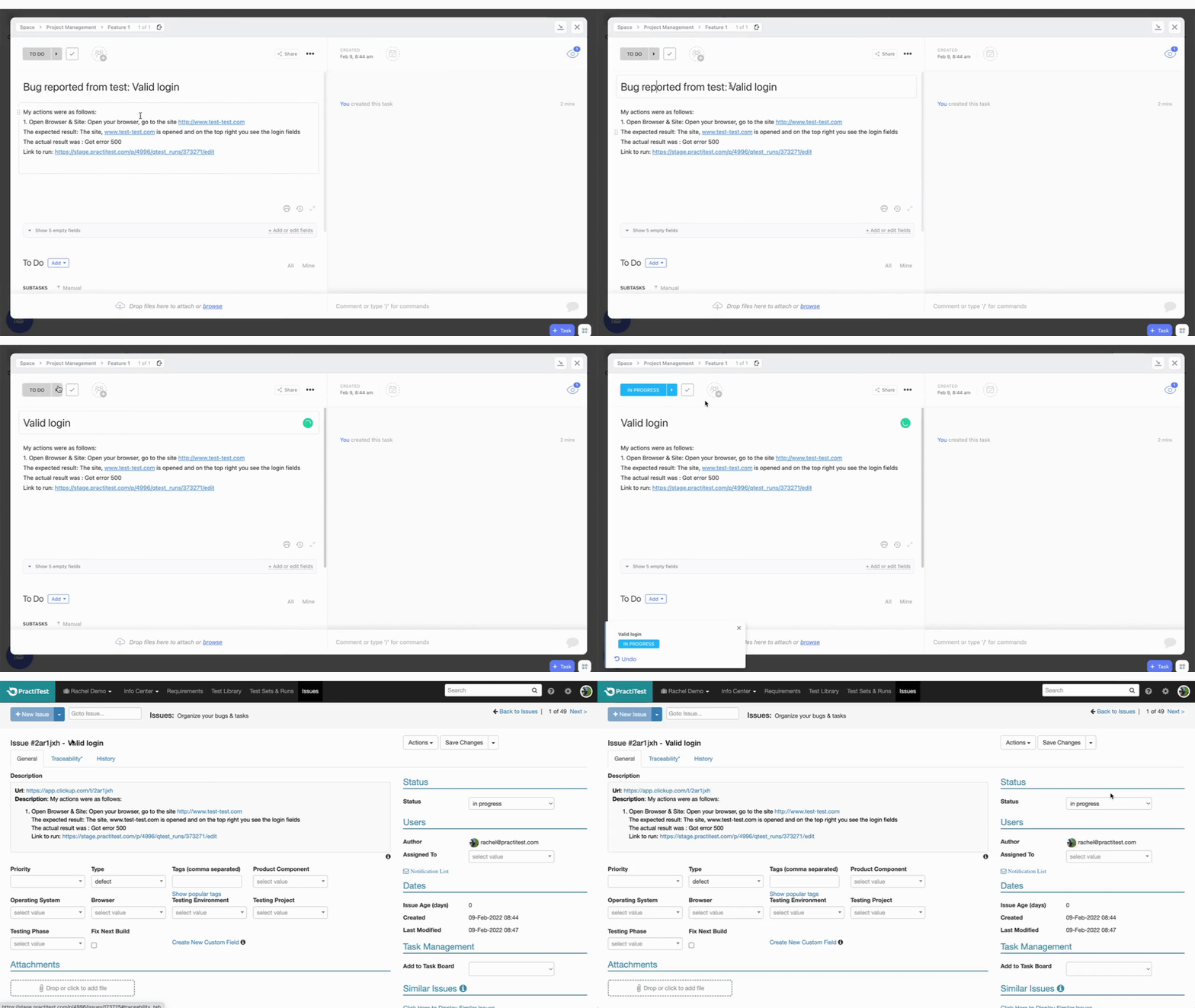
All tasks that were reported from PractiTest will be synced back to PractiTest and each change to the task name, description or status will be automatically updated in PractiTest as well.
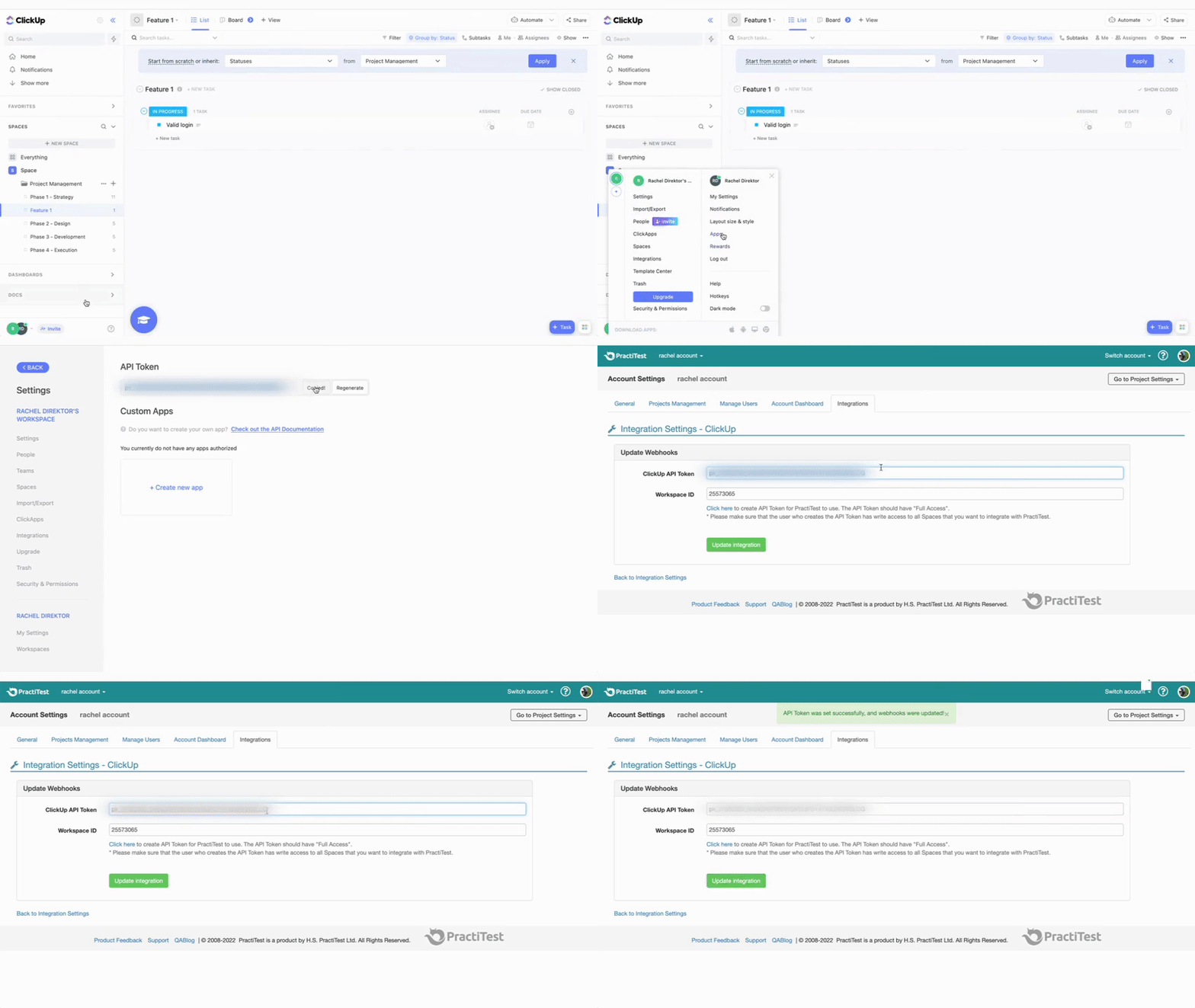
3. Easy and quick configuration
Configure the workspace you want to integrate to PractiTest in less than 5 minutes and start working straight away.
 Summarize this article for me please
Ready to connect ClickUp to PractiTest?
Implementing effective QA and testing processes can ensure that your software is of the highest quality and meets or exceeds customer expectations, but this process can be quite complex and tedious as there are many steps and people involved.
It’s a good thing PractiTest, an end-to-end test management platform, exists to help users create, run and manage all their tests and QA efforts in one place.
And when connected to ClickUp, you can then bring all your work in one place. Manage your tests and tasks all in the same app—that’s the beauty of integrating these two powerful software together. 😌 🙌


Everything you need to stay organized and get work done.


