







Still downloading templates?
There’s an easier way. Try a free AI Agent in ClickUp that actually does the work for you—set up in minutes, save hours every week.
Sorry, there were no results found for “”
Sorry, there were no results found for “”
Sorry, there were no results found for “”
Managing a construction project means keeping track of timelines, crews, budgets, safety checks, and shifting site conditions—all at once. 🏗️
When information is scattered across emails, spreadsheets, and separate tools, communication slows, and delays pile up fast.
That’s where Smartsheet construction templates come in. They streamline organization from the first bid to the final walkthrough, so you spend less time building systems and more time building the project.
In this guide, we’ll highlight the best Smartsheet construction templates for teams in the field—and introduce a smarter alternative with dynamic templates for teams that want to move faster and collaborate better.
Here’s what good Smartsheet construction templates consist of:
➡️ Also Read: How to Use Smartsheet for Project Management
| Template Name | Download Template | Ideal For | Best Features | Visual Format |
|---|---|---|---|---|
| Construction Documentation Tracker (Smartsheet) | Download this template | Project teams, managers | Centralized doc storage, color-coded status, easy sharing | Smartsheet Sheet |
| Construction Budget Template (Smartsheet) | Download this template | Contractors, finance teams | Track estimated/actual costs, expense categories, variance alerts | Smartsheet Sheet |
| Construction Schedule with Gantt (Smartsheet) | Download this template | Project managers | Gantt chart, drag-and-drop scheduling, milestones | Smartsheet Gantt Chart |
| Incident Report Log with Form (Smartsheet) | Download this template | Safety officers, site supervisors | Built-in form, incident log, instant sharing | Smartsheet Sheet + Form |
| Machine Maintenance Schedule (Smartsheet) | Download this template | Maintenance crews, supervisors | Maintenance calendar, task assignment, inspection logs | Smartsheet Sheet |
| Telecommunications Construction Estimator (Smartsheet) | Download this template | Telecom estimators, project leads | Cost breakdowns, built-in formulas, printable sheets | Smartsheet Sheet |
| Equipment Schedule (Smartsheet) | Download this template | Site leads, fleet supervisors | Asset allocation, usage tracking, maintenance status | Smartsheet Sheet |
| Subcontractor Documentation (Smartsheet) | Download this template | Construction managers, compliance officers | Track credentials, compliance, contract dates, alerts | Smartsheet Sheet |
| Safety Issue Submission (Smartsheet) | Download this template | Safety managers, site workers | Issue reporting form, photo uploads, resolution tracking | Smartsheet Sheet + Form |
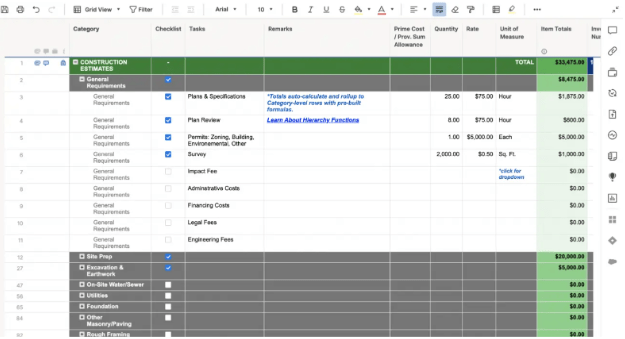
| Construction Estimator (Smartsheet) | Download this template | Contractors, estimators | Estimate builder, document storage, quote generation | Smartsheet Sheet |
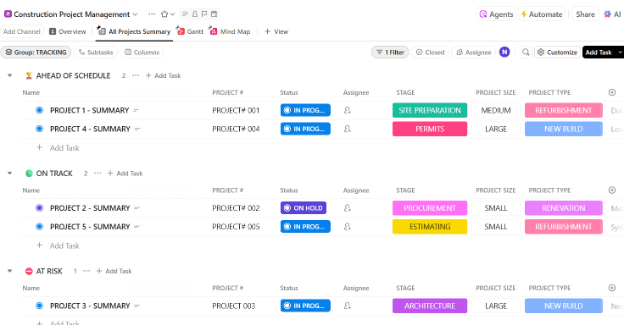
| ClickUp Construction Project Management Template | Get free template | Construction leads, PMs | All-in-one dashboard, RFIs, permits, project status, real-time updates | ClickUp List, Board, Doc |
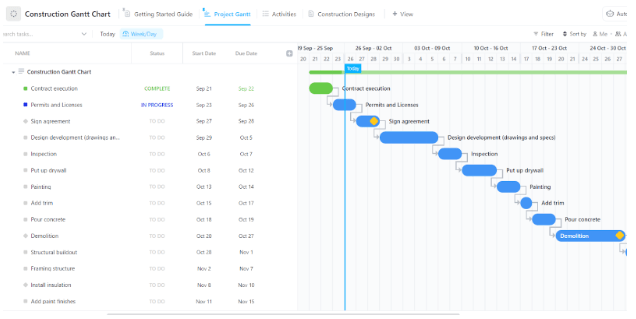
| ClickUp Construction Gantt Chart Template | Get free template | Construction businesses, PMs | Visual timelines, dependencies, Docs integration | ClickUp Gantt, Docs |
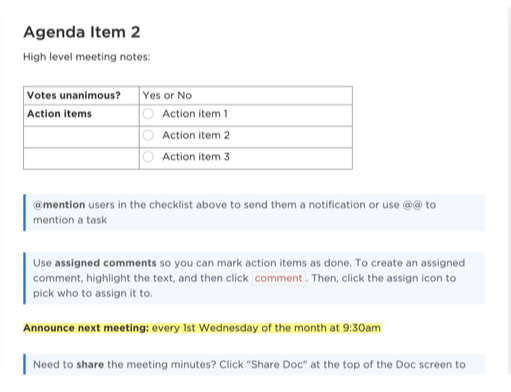
| ClickUp Construction Meeting Minutes Template | Get free template | Site leads, project owners | Structured notes, task assignment, reusable sections | ClickUp Doc |
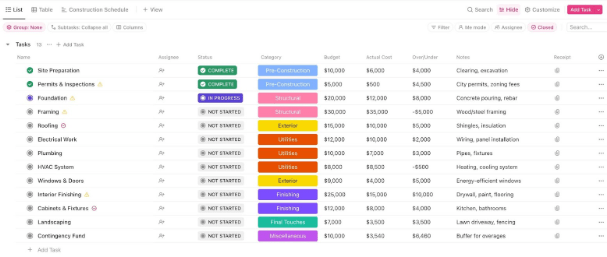
| ClickUp Construction Budget Template | Get free template | Contractors, project managers | Real-time budget tracking, custom statuses, schedule view | ClickUp List, Board |
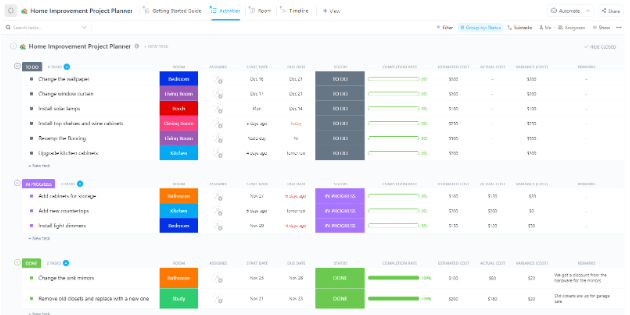
| ClickUp Home Improvement Project Planner Template | Get free template | Homeowners, renovation teams | Kanban board, timeline, notes, cost tracking | ClickUp Board, Timeline |
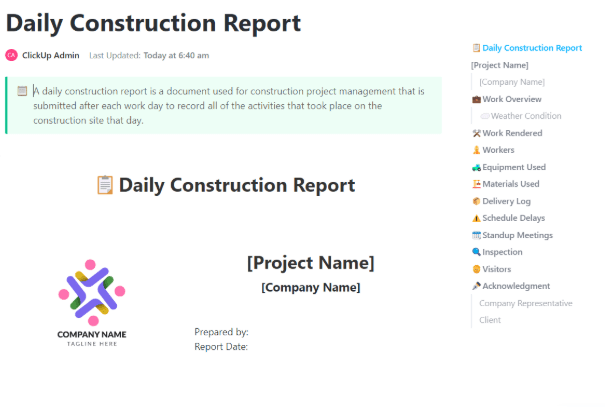
| ClickUp Daily Construction Report Template | Get free template | Construction teams, site managers | Daily logs, visual status, inspection tracking | ClickUp List, Doc |
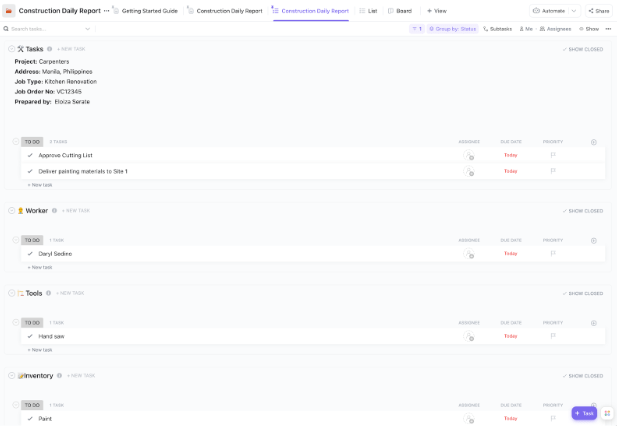
| ClickUp Construction Daily Report Template | Get free template | Teams needing detailed daily reporting | Workforce, tools, inventory, meetings, audit-ready | ClickUp List, Doc |
| ClickUp Construction Management Plan Template | Get free template | Construction managers, contractors | Timeline, Kanban, Gantt, role assignment | ClickUp List, Board, Gantt |
| ClickUp Construction Emergency Action Plan Template | Get free template | Site supervisors, safety officers | Emergency procedures, contacts, easy updates | ClickUp Doc |
| ClickUp Construction Management Template | Get free template | Construction teams, PMOs | Multi-project tracking, docs, budget, schedule | ClickUp List, Board, Calendar |
Here are the best Smartsheet construction templates to check out:
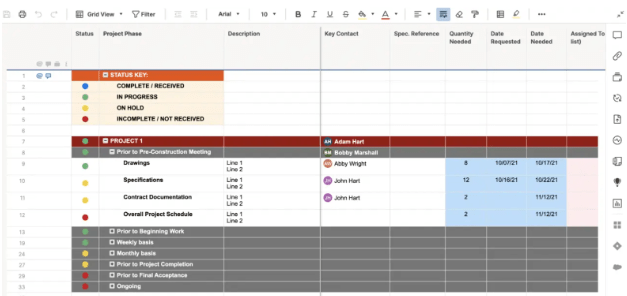
The Construction Documentation Tracker Template by Smartsheet helps you manage project paperwork without digging through folders or chat threads.
It’s built to keep blueprints, inspection reports, and schedule updates neatly organized and easily accessible. Your team and stakeholders always know precisely where to find the latest version of every document.
🔑 Ideal for: Project teams and managers who want a reliable system to manage construction documentation.
🎥 In construction, documentation isn’t just paperwork—it’s your safety net. This video shows how AI tools can streamline documentation, reduce errors, and keep project records accurate and accessible.
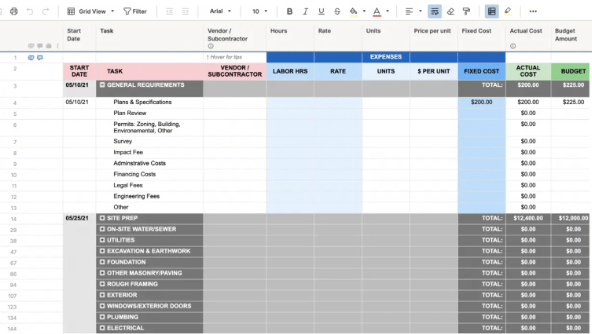
Every construction project depends on numbers adding up, and this Smartsheet Construction Budget Template helps ensure they do. It provides a centralized platform to track estimated and actual costs line by line.
Track spending categories like labor, materials, subcontractor costs, and more with real-time visibility. The layout is clear and customizable, and helps you spot budget variances early.
🔑 Ideal for: Contractors, site managers, and finance teams managing construction costs in real time.
➡️ Also Read: Best Construction Project Management Software
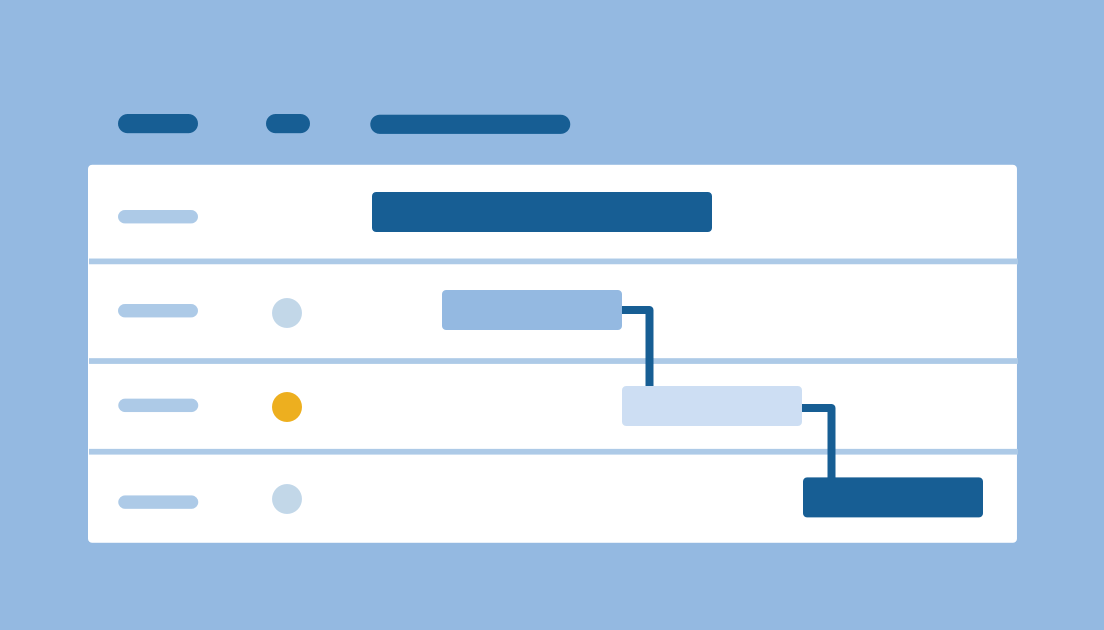
The Smartsheet Construction Schedule with Gantt Template makes it easy to visualize timelines and dependencies. It displays your entire plan on a clear Gantt chart, helping you see when each phase starts, ends, and connects.
Whether you’re beginning construction or nearing project handoff, this template helps you spot delays early and keep your team accountable to the plan.
🔑 Ideal for: Project managers who want a straightforward way to plan, adjust, and communicate project timelines.
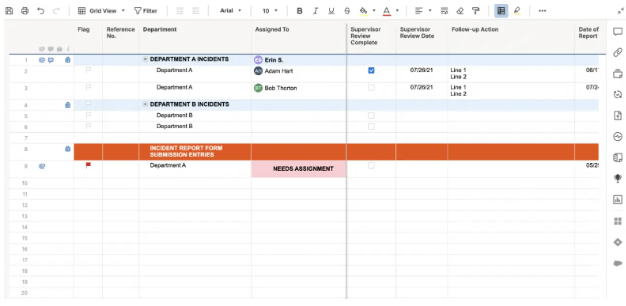
Every workplace needs a simple and reliable way to document incidents, and the Smartsheet Incident Report Log with Form Template provides just that. It’s designed to capture what happened, who was involved, when it occurred, where, and the steps that followed.
The format ensures consistent and efficient reporting, facilitating data recording to analyze trends and enhance safety procedures.
🔑 Ideal for: Site supervisors and safety officers who want to handle incident documentation consistently.
➡️ Also Read: How to Export Data from Smartsheet into Other Apps
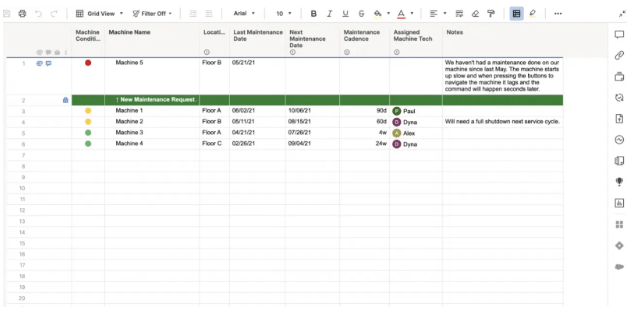
The Smartsheet Machine Maintenance Schedule Template makes it simple to keep equipment running smoothly. It helps you plan and track regular upkeep for your machines, filtering between daily checks, monthly servicing, or annual overhauls.
With this, assign each task to the right person, set reminder dates, and record results or notes after every maintenance.
🔑 Ideal for: Maintenance crews and site supervisors who want reliability without equipment downtime.
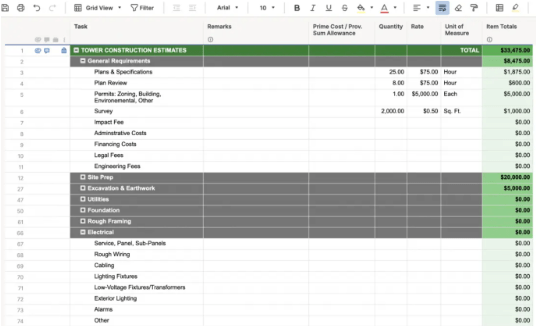
Do you need accurate budgeting for telecom installations? The Telecommunications Construction Estimator Template by Smartsheet is purpose-built for telecom infrastructure projects.
Built-in formulas handle totals and markups, ensuring your material, labor, and equipment costs remain accurate. It lets you break down costs by installation type, labor rates, trenching volume, tower height, and equipment needs—ensuring every detail is accounted for before bidding or building.
🔑 Ideal for: Estimators and project leads working on network expansion, fiber deployment, or tower builds.
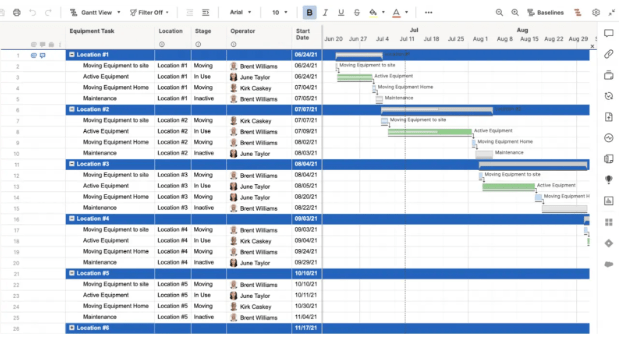
Struggling to figure out where your equipment is or if it’s even available? The Smartsheet Equipment Schedule Template brings clarity to your construction asset management.
It helps teams coordinate asset allocation across job sites, avoid double bookings, and plan for equipment needs. From excavators and cranes to small tools, you can log what’s in use, what needs repair, and what’s ready to roll.
🔑 Ideal for: Site leads and fleet supervisors who want better insight into equipment inventory and usage.
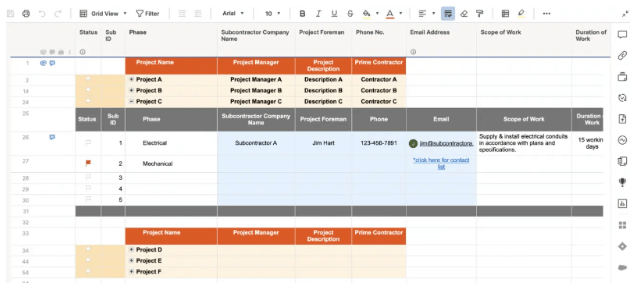
The Smartsheet Subcontractor Documentation Template centralizes all vendor agreements, compliance statuses, certificates, and contact details in one clean, shared sheet.
It helps you track who has been approved, whose insurance is up to date, and which documents are still pending. Automated alerts remind you of expiration dates, ensuring smooth renewals and onboarding.
🔑 Ideal for: Construction managers and compliance officers looking to manage subcontractor documentation.
➡️ Also Read: How to Use ChatGPT for Construction Efficiency
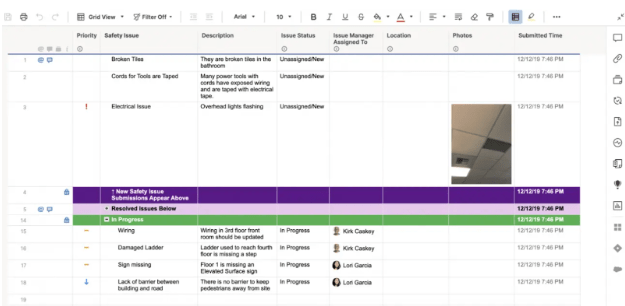
The Smartsheet Safety Issue Submission Template streamlines how your team reports and tracks safety hazards on-site. Using a form, it captures essential details, such as issue location, severity, description, and photos.
Reports are sent to the right people, so action happens fast. Everything you need to manage hazards and track resolutions is in one place.
🔑 Ideal for: Safety managers, site supervisors, and frontline workers looking to identify and fix hazards on the spot.
Building accurate estimates is a critical part of every construction project, and this Smartsheet Construction Estimator Template gives you a solid foundation to do just that.
It helps teams map out expected costs in a structured and organized manner. The built-in formulas and categories enable faster calculations, while editable columns allow you to tailor them to your unique project types.
🔑 Ideal for: Contractors, estimators, and project managers who want to streamline the development and sharing of construction quotes.
🔎 Did You Know? Construction productivity has barely improved in 20 years! It only grew by about 10% from 2000 to 2022, or roughly 0.4% per year. This lags far behind the overall economy, which grew by 50%, and the manufacturing sector, which improved by 90% during the same period. This ongoing challenge shows why improving processes and tools in construction is more important than ever.
Smartsheet is a widely used project management software. But like any tool, it comes with trade-offs. Here are some limitations that teams often face when using Smartsheet:
| Feature/Capability | Smartsheet Templates | ClickUp Templates |
|---|---|---|
| Template Format | Spreadsheet-style sheets with built-in formulas | Fully customizable tasks, views, and Docs |
| Real-time Collaboration | Basic sharing and commenting | Live editing, @mentions, Docs, Chat, and integrated communication |
| Visual Layouts | Gantt, Grid, Card, Calendar | Gantt, List, Board, Calendar, Timeline, Workload |
| Mobile Usability | Limited editing on mobile app | Fully functional mobile app with task, doc, and time tracking support |
| Offline Access | Very limited | Select offline access for Docs and Tasks (mobile support improving) |
| AI Features | Not available | ClickUp Brain for task generation, summarization, and automation |
| Daily Logs and Reporting | Manual setup required | Prebuilt templates for Daily Reports, Emergency Action Plans, and Budget Logs |
| Document Management | Attachments only | ClickUp Docs, nested pages, real-time editing, and shareable links |
| Automations | Yes (advanced plans only) | ✅ Built-in Automations with triggers, conditions, and actions |
| Price | Per-user pricing; advanced features gated | Free plan with construction templates + scalable paid tiers |
| Ideal For | Teams comfortable with spreadsheets | Teams needing AI, templates, and all-in-one flexibility |
Looking for more flexible, collaborative, and AI-ready alternatives to Smartsheet? ClickUp is the everything app for work, designed to move faster than spreadsheets. From daily reporting to RFIs, budget tracking, and subcontractor coordination, ClickUp lets you manage construction workflows in one unified space without third-party apps or offline workarounds.
With ClickUp Docs for proposals, ClickUp Brain for AI-powered updates, automations, and real-time collaboration, this product turns static templates into smart systems that grow with your project.
Explore these ready-to-use construction templates from ClickUp and take your site operations to the next level.👇
The Construction Project Management Template by ClickUp helps you manage all aspects of your construction project. Everything lives in one place, from tasks and timelines to subcontractors and permits.
It’s easy to assign work, follow up on what’s behind, and share updates without back-and-forth. Your construction project management becomes simpler as you see exactly where things stand and who’s responsible.
🔑 Ideal for: Construction leads who want to bring all moving parts of projects into one smooth system.
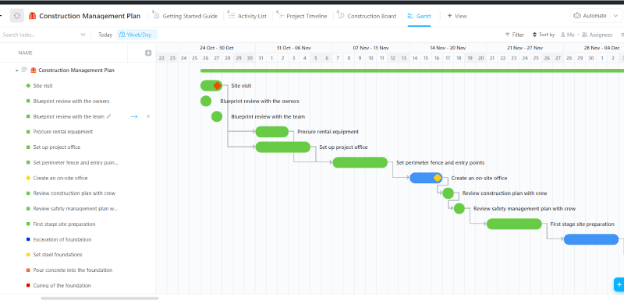
Is keeping track of construction timelines a project in itself? You’re not alone! The ClickUp Construction Gantt Chart Template helps you visualize it all.
It lays out every phase of your construction project in one easy-to-follow timeline, so you don’t have to keep everything in your head (or on your clipboard). And because it’s not just a chart, you can store plans, assign people, and track progress.
🔑 Ideal for: Construction businesses that want to visualize their project in one timeline.
📢 ClickUp Callout: Create, collaborate, and organize all project documents like specs, checklists, and meeting notes alongside tasks with ClickUp Docs. With live editing, structured formatting, and shareable links, it’s easy to keep everyone informed and working together in one place.
ClickUp Construction Meeting Minutes Template takes the stress out of remembering who said what (and who promised to do it). It allows you to quickly capture notes, decisions, and action items as they occur.
With this, you can run meetings with structure and assign follow-ups on the spot. You can tag team members, track votes, set deadlines, and create a public link to share the document.
🔑 Ideal for: Site leads and project owners who want every meeting to be productive and stay on track.
📮 ClickUp Insight: 1 in 4 employees uses four or more tools just to build context at work. A key detail might be buried in an email, expanded in a Slack thread, and documented in a separate tool, forcing teams to waste time hunting for information instead of getting work done.
ClickUp converges your entire workflow into one unified platform. With features like ClickUp Email Project Management, ClickUp Chat, ClickUp Docs, and ClickUp Brain, everything stays connected, synced, and instantly accessible. Say goodbye to “work about work” and reclaim your productive time.
💫 Real Results: Teams can reclaim 5+ hours every week using ClickUp—that’s over 250 hours annually per person—by eliminating outdated knowledge management processes. Imagine what your team could create with an extra week of productivity every quarter!
The ClickUp Construction Budget Template gives you a clear, organized space to plan your budget, track expenses, and compare actual costs to what you expected.
Everything from labor and equipment to materials and permits is here and easy to update as the project progresses. With Custom Fields for every detail, you can sort or filter however you like.
🔑 Ideal for: Contractors and project managers who want a clear handle on their budgeted vs. actual expenses.
Renovating a space requires more than just inspiration; it requires a plan that’s easy to follow. And the ClickUp Home Improvement Project Planner Template helps you make that plan!
It helps you stay on top of tasks, timelines, and budgets without switching between apps or using sticky notes. With this, organize activities by room, compare estimated versus actual costs, and track your progress.
🔑 Ideal for: Anyone managing a home improvement project looking for complete visibility from start to finish.
The ClickUp Beginner-Friendly Daily Construction Report provides a clear and organized way to document everything on-site, including weather conditions, equipment usage, materials delivered, and personnel attendance.
Unlike high-level summaries, this one helps field leads log real-time details like weather conditions, deliveries, crew shifts, and safety checks.
With structured layouts and embedded Documents, you can efficiently keep your daily logs organized and audit-ready.
🔑 Ideal for: Construction teams who want an efficient, professional way to track and share daily site activity.
ClickUp Advanced Construction Daily Report Template with Custom Fields helps project managers compile field data into high-level summaries for leadership, clients, or stakeholders.
It transforms what happened on-site into a structured report with visual indicators for progress, issues, and risks—no spreadsheets needed.
With live links and centralized views, your daily updates become transparent, professional, and easy to share.
🔑 Ideal for: Construction teams who need comprehensive daily reporting to keep stakeholders aligned and projects moving smoothly.
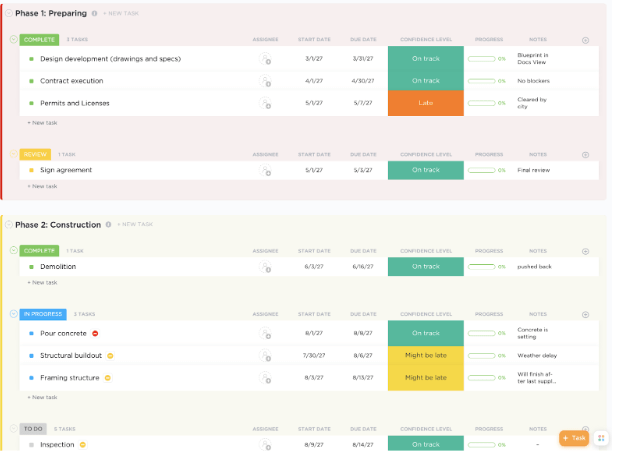
Wondering how to keep every phase of a construction project aligned, on budget, and moving forward without confusion? The ClickUp Construction Management Plan Template gives you a high-level overview of the entire build, start to finish.
Use it to manage permitting, materials, crews, deadlines, and subcontractors across pre-construction, active work, and project closeout.
Unlike basic task lists, this template links Docs, Gantt charts, and schedules into one flexible workspace.
🔑 Ideal for: Construction managers, general contractors, and project leads who want a centralized, real-time planning tool.
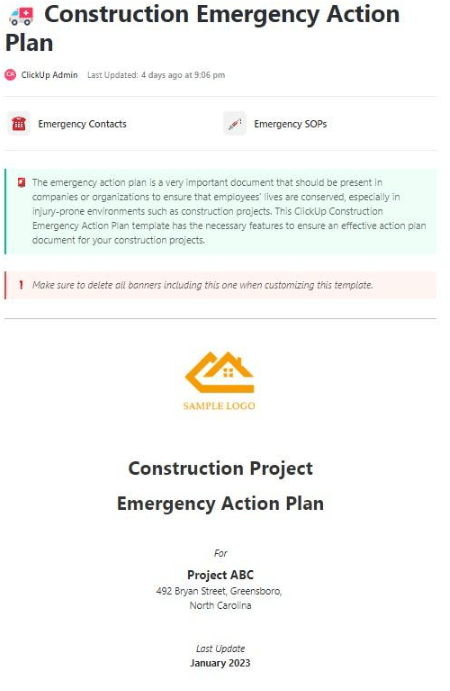
Emergencies on a construction site aren’t just possible—they’re expected. That’s why having a solid emergency plan in place is critical. The ClickUp Construction Emergency Action Plan helps you outline guidelines for addressing issues that arise.
From injuries and fire hazards to severe weather or equipment failures, it lets you build a clear, shareable response plan tailored to your site and project. It’s also easy to update as your site evolves, so everyone stays informed and safe.
🔑 Ideal for: Site supervisors and safety officers who need a reliable emergency plan.
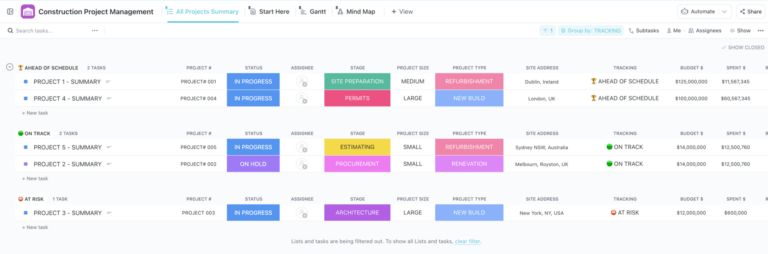
The ClickUp Construction Management Template is your team’s all-in-one workspace for planning, scheduling, tracking, and managing everything related to your construction projects.
It allows you to categorize your projects into three phases: Preparing, Construction, and Finalize, each with views such as list, board, budget, and schedule. This way, you always stay on top of task status, progress, the person responsible, and projected vs. actual construction costs.
🔑 Ideal for: Construction teams managing multiple projects looking for a simple way to stay aligned and on track.
➡️ Also Read: How to Start a Construction Company: The Ultimate Guide
Smartsheet construction templates structure complex workflows, reduce costly miscommunication, and help teams stay aligned across every build stage. From tracking equipment usage to managing subcontractor documentation, having the right templates ensures your construction projects progress smoothly.
🚀 Want a better way to manage it all? ClickUp gives construction teams flexible views, AI-powered features, and ready-to-use templates built for the job site. Plan smarter, track real-time progress, and deliver confidently—all in one platform.
👉 Start using ClickUp for free today!
1. Are Smartsheet construction templates free?
Some Smartsheet templates are free, while others may require a paid plan. Be sure to check the access level for each specific template.
2. Can I share Smartsheet templates with subcontractors?
Yes, Smartsheet templates can be shared with external stakeholders via email or shared links, but access may depend on permission settings and plan type.
3. What’s the difference between Smartsheet and ClickUp templates?
Smartsheet offers spreadsheet-style templates, while ClickUp provides customizable, real-time workspaces with built-in Docs, Automations, and AI Agents—ideal for construction teams looking to scale or digitize.

© 2026 ClickUp

There’s an easier way. Try a free AI Agent in ClickUp that actually does the work for you—set up in minutes, save hours every week.