


Sorry, there were no results found for “”
Sorry, there were no results found for “”
Sorry, there were no results found for “”
The construction industry, often seen as slow to embrace change, is undergoing a major transformation. Cutting-edge technologies like AI, machine learning, generative AI (GenAI), robotics, augmented reality (AR), and virtual reality (VR) are shaking things up.
These innovations are exactly what the industry needs to tackle its long-standing productivity challenges. And the timing couldn’t be better. The world relies on construction to step up, with global capital investments needing to rise by 20-30% annually to meet 2050 net zero goals, resulting in a net zero impact on the environment.
Integrating AI into your construction company is essential in this landscape, and the simplest way to start is with ChatGPT.
Imagine construction professionals spending more time on the job site and less on administrative tasks. That’s exactly what AI brings to construction. It makes construction projects more efficient, safer, and cost-effective.
By integrating AI into everyday operations, construction companies can improve their processes, reduce manual errors, and focus on building.
Take Caterpillar Inc., for example. They’ve adopted AI to prevent component failures and add value to every asset. With AI-driven technology, sensors on their machinery collect real-time data on temperature, vibration, and sound.
These sensors provide an ongoing snapshot of the equipment’s health, and AI algorithms analyze the data to identify patterns and predict when a machine might fail. This allows Caterpillar to reduce downtime, extend the lifespan of machinery, and cut maintenance costs.
Generative AI tools like ChatGPT can also be of help. Here’s how:
ChatGPT, an advanced chatbot based on a powerful AI language model, processes vast amounts of text-based input to generate human-like responses. Built on natural language processing (NLP) technology, its artificial intelligence language model can:
ChatGPT prompts are user inputs that guide the AI’s output. These could be specific inputs such as, “Create a daily task list for me to effectively manage construction material procurement, managing workers’ project schedules at the construction site with three ongoing activities: interior design, painting, and excavation.” or broader research historical data-oriented questions, like “What are the latest trends in pool construction?”
💡Pro Tip: The impact of ChatGPT in construction industry use cases is limited to your prompt’s effectiveness. For ChatGPT to work well, you must ensure your prompts are:
ChatGPT is more than just a chat tool. It’s a versatile assistant that can solve problems and bring a fresh perspective to construction challenges. Whether you’re a project manager managing a tight budget, coordinating teams to improve communication, or ensuring compliance, ChatGPT can help save time and effort with innovative solutions.
Let’s explore seven key ChatGPT for construction use cases.
When it comes to construction, managing costs is crucial. You must generate cost estimates to be aware of your spending and closely monitor it.
ChatGPT can simplify this complex process by:
📌 Example prompt and output: “Generate cost estimates for building a 10,000 sq. ft. office space, including material, labor, permits, and contingencies. Assume mid-range finishes and include potential cost-saving alternatives for flooring and HVAC.”

Construction site management is all about coordinating the many moving parts of a project—people, resources, and activities—at the job site. While a construction professional would start the process on-site, it starts long before construction begins by planning, assessing risks, aligning stakeholders, securing permits, and organizing resources to ensure a smooth project execution.
Here’s how ChatGPT adds value here:
📌 Example prompt and output: “Create a daily task plan for a construction site with three ongoing activities: excavation, concrete pouring, and material delivery. Include a strategy to minimize downtime and handle delays due to late material deliveries.”

A construction site is a space where accidents do happen. If appropriate regulations are not maintained, construction workers can harm themselves. Proactive risk assessment is important, and ChatGPT does that as well.
It can help by:
📌 Example prompt and output: “Analyze a scenario where a construction site is prone to flooding during monsoon months. Provide a risk assessment and suggest mitigation strategies, including cost estimates for flood-proofing measures.”

You’ve just hired a group of new workers for a large-scale site, and the clock is ticking to get them up to speed quickly. Instead of spending days on one-on-one training or drowning in piles of manuals, ChatGPT can make onboarding faster and more efficient by:
📌 Example prompt and output: “Draft a 5-day training plan for onboarding new site supervisors. Include modules on safety, team management, and using digital tools for site monitoring.”

👀Did You Know? Using real-time data to create targeted training programs can boost workplace safety by as much as 30%.
You’re managing a busy construction site; probably two or more projects are running side by side. Things are moving fast, and you’re juggling multiple teams and paperwork. While you’re trying to keep everything aligned, a minor slip-up, like missed details or a communication breakdown, could lead to expensive delays.
ChatGPT can handle project-related communication and documentation tasks so you can focus on what truly matters, keeping everything running smoothly without missing a beat.
Use ChatGPT to:
📌 Example prompt and output: “Prepare a project progress summary for a client unfamiliar with construction terms. Use layman’s language to explain the completion status of each phase and next steps.”

When it comes to construction projects, client trust is everything. But with so many moving parts, keeping clients in the loop can be tough without overloading your team. ChatGPT can bridge the communication gap and ensure clients stay informed and engaged without disrupting your day-to-day operations.
Here’s how ChatGPT can make client engagement smoother:
📌E xample prompt and output:“Write a professional email informing stakeholders of a two-week project delay due to a crane malfunction. Include a summary of the issue, proposed solutions, and a revised timeline.”
Ensuring that all your projects meet legal and safety requirements can be difficult with constantly changing laws and codes. ChatGPT can be your go-to assistant for navigating this complex landscape.
Here’s how ChatGPT can help with compliance and regulation:
📌 Example prompt and output: “Summarize the building code requirements for fire safety in commercial buildings in California. Highlight key areas to consider during the design phase.”

Integrating ChatGPT in the construction process can improve productivity, reduce risks, and focus on what you do best—building remarkable structures.
ChatGPT is powerful, no doubt about that. However, it can not solve every problem. It has limits, particularly when things get real on the construction site.
Here’s where ChatGPT might fall short:
ChatGPT is great once you provide all your information. However, that’s one more step in your workflow. Wouldn’t using AI in your construction workflow management software be better?
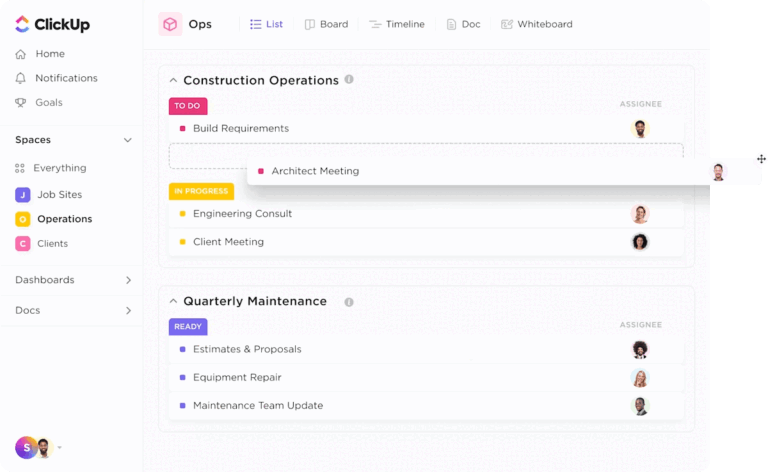
ClickUp’s Construction Project Management Software is an all-in-one productivity platform for construction teams. It helps them brainstorm, plan, and execute projects more efficiently.
ClickUp Brain, its AI assistant, is fully integrated into the platform. It can offer real-time, contextualized responses to all your queries instead of generic ones like ChatGPT.

Here’s how ClickUp Brain is better than ChatGPT:
But ClickUp Brain isn’t the only helpful tool ClickUp offers. The ClickUp Construction Project Management Template will help you track and simplify all your construction projects, from pre-sales to delivery.
With this construction template, you can:
One of ClickUp’s standout features is ClickUp Automations. Use it to automate repetitive administrative tasks for construction teams, like scheduling inspections or updating project statuses without manual input.
👉🏼 For example, you’re building a multi-story office building. When the concrete pouring for the second floor is marked complete, ClickUp Automation can automatically assign the electrical inspection task to the site supervisor to maintain the project schedule, set a due date for the inspection within 48 hours, and notify the supervisor via email or mobile app.

With over 100 pre-built automation templates in ClickUp, teams can automate tasks like assigning safety checks at the end of each workday, updating project timelines after material deliveries are logged, or generating daily progress reports for stakeholders.
With ClickUp, you can easily ensure that all construction team members know what to do. Then, you can quickly assign each action item to your team members with just a few clicks!

Suppose you’re managing the construction sites of a new office building and are responsible for installing the electrical wiring.
You break down the project into smaller tasks like “Install main electrical panel,” “Run wiring through walls,” and “Test electrical systems.” Each ClickUp Task is assigned to the respective crew members, such as the electrical team and safety inspection specialists.
For the “Install main electrical panel” task, you create a ClickUp Task Checklist with items such as “Check electrical blueprints,” “Ensure proper equipment,” and “Verify all safety procedures and protocols.” As the team progresses, they check off each item to ensure everything is done correctly and nothing is overlooked.
Midway through the installation, you realize you need more help to complete the “Run wiring through walls” task before the end of the day. With ClickUp Multiple Assignees, you quickly add extra workers to the task, ensuring that the wiring gets done on time and the team stays on track.
Another standout feature is ClickUp Dependencies, which helps you visualize and track the connections between tasks and resources to avoid potential roadblocks before they happen.

Here’s how it can help with your record-keeping to keep your team on track:
You did all of this manually, right? But you can do this with ClickUp Brain by sending just one message to the AI assistant. It automates all of these tasks using natural language commands and frees up your time to focus on more strategic aspects of your job.
ClickUp Docs will help you document it all and share it with everybody for real-time collaboration; multiple team members can:
When others work on the same document, use ClickUp’s Collaboration Detection feature to get alerts.

You can communicate with your team members within the ClickUp platform using ClickUp Chat. The chat window is built right inside ClickUp, so you never have to jump between apps to ask questions or share updates with your team.
Here’s what Giuliano Peressini, CTO (Chief Technical Officer) at Casagrande, has to say about using ClickUp,
ClickUp is always a very good choice whenever information has to be shared between multiple people at the same time and whenever different teams are working on the same subject from different points of view.
ClickUp Chat is a powerful AI collaboration tool that links your team’s conversations to date information on relevant tasks, docs, and projects. This ensures every discussion stays contextual, keeping your team aligned on announcements, updates, and key decisions.
Plus, whenever a team member reaches out, ClickUp Brain will instantly suggest a reply. This saves you time and effort, as you don’t have to craft a response from scratch—just review the suggestion, and you’re good to go.

AI is set to transform construction, bringing smarter, more efficient ways to handle projects. Key trends could include:
Deloitte reports that AI and advanced data analytics could lead to cost savings of 10% to 15% for construction project management. These technologies help teams generate more accurate estimates, potentially reducing budget and timeline deviations.
The deployment of drones and robots for surveying and material transport is rising. This automation reduces labor costs and enhances operational efficiency. For instance, AI-powered robots are being utilized to cut timber for house construction, transforming building sites into portable “micro factories”.
AI-driven systems can monitor conditions continuously, reducing accidents and ensuring compliance with safety regulations. Studies suggest that AI can cut energy consumption and carbon emissions in buildings by at least 8% by 2050.
Combining AI with IoT devices will allow real-time site monitoring, optimize resources, and improve decision-making. AI-powered risk assessment tools could prevent 4,500 injuries and 50 fatalities each year, saving $90 million by reducing workday losses.
AI will revolutionize design by creating cost-effective, innovative solutions based on multiple variables, improving creativity and structural integrity.
As construction teams set the sequence relationships on 3D models and AI tools are used to create various schedule simulations for delivering projects and teams also generate 5D models by adding cash flow information to these models
Picture transforming a simple 2D floor plan into a fully detailed 3D model at the push of a button. AI makes it possible. This technology lets architects and engineers quickly visualize and refine designs, making it easier to make smarter decisions early in the process.
With AI’s ability to spot potential design flaws before construction even starts, it saves time and cuts down on costly changes down the line. Plus, with over 95% accuracy in converting data, AI helps optimize resources, streamline planning, and keep costs in check, making your project smarter, faster, and more efficient.
Over time, AI and foundation models will become increasingly multi-modal, combining text, images, 2D plans, BIM data, and structured data. Those advances will enable more automated AI-powered workflows, prediction, and efficiency across conceptual design, estimation, project planning, coordination, project management, and field management. We live in interesting times.
The future of construction will rely heavily on those who can easily adapt AI to their workflows. Leading the way is ClickUp, one of the best construction management software out there. By integrating AI into their workflows, construction project managers are not just automating tasks—they’re unlocking new opportunities for creativity, insight, and engagement.
Sign up to ClickUp today and build better, faster!

Manasi Nair
Max 18min read

Arya P Dinesh
Max 26min read

Sean Hardy
Max 26min read

© 2026 ClickUp





