


Slack and email are freeways connecting your teams to collaborate and exchange ideas.
But the question is Slack vs Email—which is the best tool for team communication?
Choosing one over the other communication tools will limit your options. Both Slack and email are essential for workplace communication and executing daily tasks. When used together correctly, they are excellent enablers to balance the communication load and streamline the whole process.
The better questions to ask are:
- What are the strengths of Slack and Email?
- When should you prefer Slack over Email or vice versa?
- What are the pros and cons of each communication tool?
These are more practical questions; knowing their answers will help establish a solid internal and external communication strategy.
Both tools have unique strengths and limitations. Capitalize on their strengths to establish a solid internal and external communications pipeline and strategy across different channels.
All you need is to figure out how you and your team can effectively switch between Slack and Email to maximize collaboration and productivity.
In this blog, we tackle the above questions to clarify Slack and Email better.
Slack vs. Email: Which Communication Tool is the Best?

 Summarize this article for me please
Comparison between Slack and Email
Let’s start by looking at the differences between Slack and Email. Slack is a short-form communication medium, while Emails are for more detailed conversations.
Let’s explore the nuanced capabilities of both collaboration platforms.
| Feature | Slack | |
| Real-time communication | Slack is more like an instant messaging app—it enables real-time discussions | Email is more asynchronous. Ideal for discussing ideas that need more depth and are not urgent, particularly |
| Communication style | More suitable for informal communication | Email works both for formal and informal communication; having said that, it’s more famous for formal communication, like official announcements |
| Collaboration | With Slack, you can collaborate with different teams across different time zones, whether they are internal or external | Email is ideal for one-to-one or one-to-many kinds of communication |
| Organization | Organize your conversations in channels | Organize your emails into folders and categories |
| Response time | Due to the real-time nature, the response time is usually quicker | The response time can vary as emails as people check them less frequently |
Summarize this article for me pleaseWhen to use Email vs. When to use Slack
When should you and your team use email instead of Slack? Let’s look at different scenarios where Slack can be a better alternative to email and vice-versa.
When to use email
More than 4 billion people use email. You only need to know their email address to start a conversation with a new person. Email is primarily free for sending messages.
The most significant advantage of email is that it allows you to connect with people across the globe. Think of it as a free collaboration platform.
You can have critical business discussions with people residing on the farthest ends of the globe. Factors like time zones, online or offline status, the number of new messages, and delivery status are not barriers to conducting business.
Email campaigns
The most significant advantage of email is that you can access people across the globe when you have their email addresses. They don’t necessarily have to be online to receive your message; they can check their email on any device.
After you hit the send button, you know they will get the email. Moreover, you can simultaneously email many professionals without revealing their identity. Integrate project management software with email to share ideas, plan email campaigns, and start conversations with potential clients.
Emails are ideal for communicating with large groups of customers and potential audiences.
Communication analytics
You need access to analytics to learn how well your email campaign performed. An email client like Gmail has extensive built-in analytics functions that provide data on the email campaign’s performance, such as email open rate, response time, and engagement.
Moreover, you can integrate Gmail with other third-party tools for advanced tracking and in-depth reporting.
Official announcements
When making official announcements, meticulous attention to tone, grammar, and punctuation is crucial. For instance, in a company-wide internal communication, each line carries the weight of an official statement.
The internal comms email must emphasize the importance of the message to employees. In this case, the aim is to entice employees to read and understand the email’s content. Since such communications don’t focus on or even require responses, instead focusing on information dissemination, Email would be the ideal tool for this kind of communication.
When to use Slack
Slack is not far behind in popularity, as over 10 million people use it daily. Slack is where all kinds of office conversations happen: project updates, internal communications, or water cooler conversations.
The clean interface, modern outlook, and the power to express yourself using emojis have made it popular, especially among the younger generations.
Transparent and organized communication
Juggling multiple projects while managing their communication through email leads to confusion. Slack project management’s top-notch support is one of the primary reasons many workplaces prefer it over other communication tools.
Slack channels make it convenient to discuss the nuances of a project, answer customer and stakeholder queries quickly, send files, and keep the conversations centered. This feature is so powerful for keeping track of all the activities and communication of a project in a single platform.
Slack is the right tool for remote work teams that handle multiple projects in different locations and time zones.
Instant team collaboration
Unlike Email, where the conversation is asynchronous, Slack is an excellent platform for getting things done instantly. With real-time collaboration, the immediate response of team members is gauged on chat to make quicker decisions.
Slack is a clear winner for urgent team communication in the Slack vs Email competition.
Team building
Modern workplaces are about more than accomplishing tasks. Leaders today are keen on building strong teams.
The informal appearance of Slack makes it an excellent tool for team-building activities and internal comms. Your employees can express themselves openly with custom emojis, GIFs, and images.
When a new member joins a team, Slack as a team communication app helps break the ice by building a friendly rapport with the new employees and making them feel welcome with warm, informal interactions.
Summarize this article for me pleasePros and Cons of Using Email
Let’s summarize the last section to understand the significant pros and cons of emails:
Pros
- Widespread adoption: Everyone uses email, this gives you broad access and compatibility to target users across devices
- Multiple people: Engage numerous people, both internal and external, with a single email without necessarily revealing identity. Excellent for running marketing campaigns using email marketing software
- Compliance: Emails are great for documenting records that are useful for legal and compliance purposes
- Structured formatting: Emails are great for creating a structured format using bullet points, images, and headers
- Attachments: Sharing supporting documents, images, and other files as email attachments is simple. You don’t have to switch to a different tool
Cons
- Overload and clutter: A high number of emails leads to cluttered inboxes and information overload
- Limited collaboration: Emails do not offer features to instantly collaborate on a new idea, task, or inspiration. Besides, a lot of helpful information gets buried in email threads
- Read receipt: By default, read receipt is not turned on in emails. Therefore, you never know for sure if the reader has read your messages after it was delivered to their email inbox
- Spam: Since people get spam, they can end up ignoring important emails unless they are diligent about filtering emails
- Notification customization: There are limited options to customize notifications
Summarize this article for me pleasePros and Cons of using Slack
Here is a list of the pros and cons of Slack:
Pros
- History: It’s easy to search the history of conversations, find references and past discussions
- Customizable notifications: Customize notifications preferences; receive notifications on the most urgent tasks and snooze the others
- Integrations: Slack integrates with a long list of external tools, which further makes collaboration and communication easy
- Custom emojis: Users create their emojis to chat-off topic ideas
- Threads: Threads keep all the conversations in one place and neatly organize your Slack message, especially in remote work where you can create named threads for different types of conversations
Cons
- Learning curve: Users who are unfamiliar with how real-time collaboration tools work might take some time to get familiar with Slack
- Paid features: As your team grows, you might have to upgrade your subscription to access advanced functionalities
- Notification overload: Despite customized notifications, there can be too many notifications to distract you from work
- Storage limitations: In the free version, the storage options are limited. To use more storage, you will need to pay more
- Formatting challenges: To format a new message in a certain way, users need to learn to use specific commands
Summarize this article for me pleaseSlack vs Email: What is the best option for you?
By now, you have a clear idea about different scenarios in which each tool is helpful to communicate ideas. Choose the team communication tool based on your requirements.
Which option from Slack vs. Email will work best for your organization depends on different factors such as:
Team size and structure
Slack will be a great choice if your employees work in small teams focusing on specific business functions. Slack keeps things agile, helps to make decisions faster, and gets things done quickly.
Email is a better choice for larger teams where employees must follow many protocols and manager or stakeholder approvals are required to execute things. Sticking to a chain of command is more important.
Accessibility
In a remote working setting, where teams do not meet each other in person, communication takes center stage for all things work. Slack is ideal for real-time collaboration, and features like Huddle get everyone on board instantly without delays.
Emails also play a crucial role here, as official announcements and updates are shared through this medium. As emails don’t need immediate attention, remote teams split their communication between these tools for specific purposes.
Organization culture
What kind of culture does your organization support? For example, if the culture supports informal discussions and quick actions, Slack is the right choice.
But if the emphasis is more on following a formal structure and documentation, then Email is a better pick.
Document sharing
Organizations share documents for collaboration, reporting, and communication. If your internal teams collaborate on almost all kinds of documents, then Slack makes it easy as they can create specific channels and discuss ideas.
On the other hand, Email can be reserved for sharing updates, press releases, and reports.
Integrations
With integrations, you can connect Slack and Email to your existing tools to streamline the workflow. Slack triumphs here as it supports multiple tools for integration.
For example, your project management software with Slack and your team will get real-time notifications (which they can customize according to their priority).
You can do this via Email—however, the options are limited, and the notifications will be asynchronous.
Summarize this article for me pleaseMeet ClickUp: Your Solution to the Slack vs. Email Debate

What if we tell you there is one platform that centralizes all the messages from Slack and Email? Enter ClickUp—a Slack alternative.
Set up Slack and ClickUp integration to use Slack with ClickUp. Manage all your chats regarding project management, create new tasks, and manage their due dates and statuses.
Pull out critical messages on Slack and turn them into tasks. Moreover, share task updates on Slack channels within ClickUp to keep everyone updated.
Centralize your email project management with ClickUp. Integrate your email account to send emails from ClickUp, create tasks, and set automation. While you send emails, tag your team members to keep them updated.
Once you receive an urgent email from a client, assign the task to a team immediately, ensuring there is no time gap in executing the client request.
The ClickUp Chat View takes things up by a notch by letting you create channels, mention team members, and assign action items.

This channel is also helpful in embedding spreadsheets and videos so that your team doesn’t have to open another application.
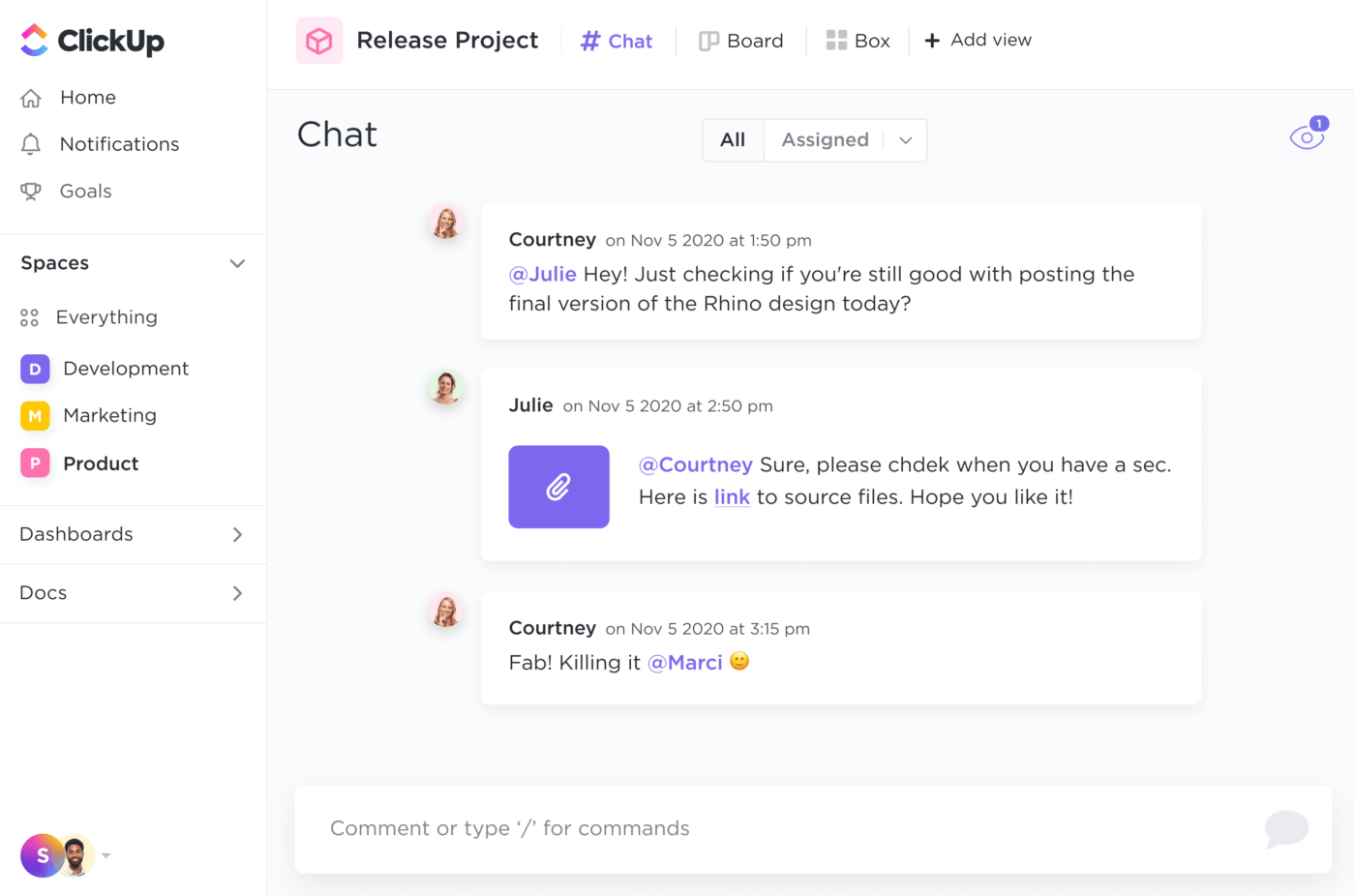
Use slash commands to format your text as a bullet list or banner. Have complete control over who has access to these channels and messages to include only the relevant people for a specific purpose.
Summarize this article for me pleaseGet Started with ClickUp Today
ClickUp is the best choice to streamline communication from Slack and Email and centralize them for better management and tracking.
Improve your team communication directly from ClickUp using the screen-sharing feature. Invite team members to specific chats, tag colleagues on relevant threads, and ensure all communication happens on a need-to-know basis.
Embed all types of content within your ClickUp Docs, from spreadsheets and PDFs to web pages, reports, spreadsheets, and videos.
Use ClickUp Whiteboards to brainstorm with your remote team. Turn ideas into coherent actions using the creative canvas.
ClickUp’s communication plan templates help you develop an effective communication framework for internal and external comms. Use ClickUp AI as your writing assistant to fill in the details so that your message is clear, concise, and conveys your intended message.
Cut down the time-consuming process of switching between tools to manage team communication with ClickUp.
Sign Up for ClickUp’s free forever plan to get started.


Everything you need to stay organized and get work done.

Recent Articles
Marketing Agency Productivity: Where Your Margin Actually Goes 
Marketing Agency Productivity: Where Your Margin Actually Goes
8 Communication Strategies That Actually Fix Team Chaos 
8 Communication Strategies That Actually Fix Team Chaos
What Is Tacit Knowledge? Definition, Benefits and Examples
What Is Tacit Knowledge? Definition, Benefits and Examples
