






Still downloading templates?
There’s an easier way. Try a free AI Agent in ClickUp that actually does the work for you—set up in minutes, save hours every week.
Sorry, there were no results found for “”
Sorry, there were no results found for “”
Sorry, there were no results found for “”
4 in 5 Sales and Finance leaders routinely miss a sales forecast.
And it doesn’t take a massive miss for things to spiral out of control. Imagine a mid-market team forecasting $5M in new revenue for the quarter, then landing just 10% short. That’s $500K that never shows up. If your gross margin is 80%, that’s roughly $400K in lost gross profit that Finance may already have planned for.
Then the scramble kicks in: sales leaders chase late-stage deals, reps try to pull timelines forward, and discounting becomes the fastest lever to “save the quarter.” If average discounts creep from 10% to 18%, that’s another $400K in value erased.
That’s why modern forecasting needs more than spreadsheets and gut feel. It needs real-time signals and a system that can turn those signals into action.
This guide shows you how to use Salesforce Einstein Copilot for sales forecasting—so you can surface at-risk deals earlier, understand what’s driving pipeline health, and move faster from “insight” to “next step.”
Agentforce is Salesforce’s agentic AI experience suite. Among other enterprise use cases, it helps you interact with forecasting and pipeline insights using natural language, grounded in your CRM data.
Using Agentforce, sales teams can easily predict revenue by analyzing opportunity history and customer activity. It’s built for sales reps, managers, and operations teams who need faster, more accurate pipeline visibility without spending hours in spreadsheets.
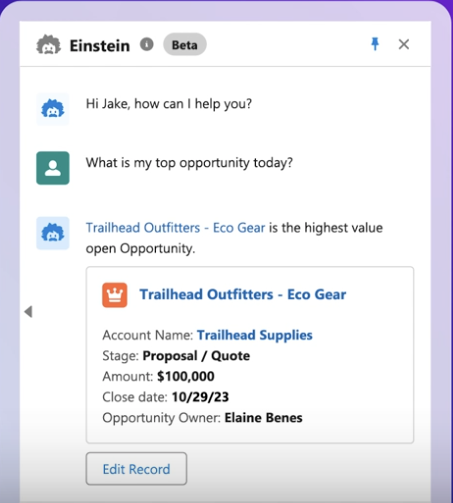
You can ask it questions in plain English, like “Which of my deals are at risk of slipping this quarter?” and get an answer based on your team’s real-time data. Unlike a static report you pull on Monday morning, these AI-assisted predictions update as deals progress, giving you a living, breathing view of your pipeline.
Agentforce uses machine learning models trained on your team’s historical data. It analyzes past wins and losses, deal velocity through stages, and customer engagement signals. Then it scores current opportunities and predicts their likelihood of closing. The system’s greatest strength? It lies in identifying the patterns that lead to a win for your business.
These predictions aren’t a one-and-done snapshot. They update continuously as real-time data comes in. When a rep logs a call, a customer opens an email, or a new stakeholder joins a meeting, the model recalculates the opportunity’s health score. If a key decision-maker suddenly goes quiet, the score will reflect that increased risk.
When you ask Agentforce a question, it synthesizes all these signals into a clear, conversational answer. You can ask, “What’s my forecast looking like for Q3?” and get a summary that highlights at-risk deals, trending opportunities, and recommended actions to get things back on track—all grounded in your actual sales activity.
📚 Also Read: How to Train Your Own AI
So, what makes Agentforce a powerful tool for sales forecasting? You’ve got three core capabilities to thank. Each one tackles a specific frustration in the traditional forecasting process.
Instead of relying on a rep’s gut feeling, Einstein Opportunity Scoring assigns a health score from 1–99 to each opportunity. This score represents the AI’s confidence that the deal will close based on historical patterns and current deal health.
🌟 A higher score means the deal shows more of the positive signals that have led to past wins.
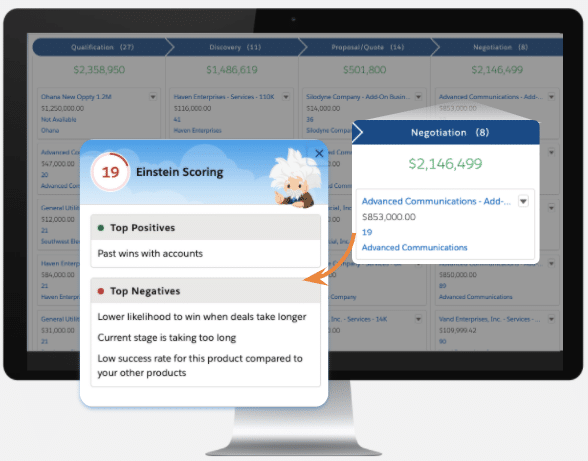
To make this score actionable, it provides insight cards that explain why a deal is trending in a certain direction. You might see alerts like:
This transparency takes the guesswork out of pipeline reviews.
As a sales leader, you know that one of the biggest reasons forecasts become inaccurate is that reps get busy and forget to log their activities. Einstein Activity Capture in Agentforce solves this. It can sync emails, calendar events, and calls directly to the relevant opportunity record in Salesforce.
And why does this matter? Because a complete dataset leads to more accurate predictions. When every touchpoint is logged, the machine learning model has more information to work with, allowing it to spot subtle trends you might otherwise miss.
⚡️ Bonus: It also frees up your sales reps from tedious manual data entry, which is a win for both productivity and data hygiene.
Automating repetitive manual work is just one way to use AI in sales. Curious about the others? Watch this video to find out! 🎥
Agentforce Actions are pre-built or custom prompts that allow you to trigger tasks directly from the conversational interface. They’re shortcuts that bridge the gap between insight and action.
📌 For example, after reviewing an opportunity summary, you could use an Action to:
These actions cut down on context switching. Instead of spotting an insight and then clicking around Salesforce to act on it, you can take the next step right from the conversation. Admins can also tailor the action library to match your team’s exact sales process.
📮ClickUp Insight: Context-switching is silently eating away at your team’s productivity. Our research shows that 42% of disruptions at work come from juggling platforms, managing emails, and jumping between meetings. What if you could eliminate these costly interruptions?
ClickUp unites your workflows (and chat) under a single, streamlined platform. Launch and manage your tasks from across chat, docs, whiteboards, and more—while AI-powered features keep the context connected, searchable, and manageable!
The upside of Agentforce Assistant looks a little different depending on your role. But the common theme is the same: less update-chasing, more clarity, and faster follow-through.
Reps are on the front lines, and their biggest challenge is often figuring out where to focus their time. Agentforce helps surface which opportunities need attention—so reps can prioritize the deals that are most likely to move (or most at risk of stalling).
With AI-generated summaries and a more complete activity history (especially when Einstein Activity Capture is configured), reps spend less time on admin work and more time actually selling. They can also ask for quick context before a call—like a deal recap, recent activity, or what changed since the last touchpoint—so they show up sharp and prepared.
Managers are responsible for the team’s goals, but they often feel like they’re flying blind, constantly chasing reps for updates. Agentforce’s AI benefits sales managers with real-time pipeline visibility.
They get early warnings on at-risk deals, which means coaching conversations can happen when they can still make a difference, not after a deal is already lost. When leadership asks for a forecast roll-up, managers can generate it on demand instead of spending hours compiling spreadsheets.
Accurate sales forecasts have a ripple effect across the entire organization.
📚 Also Read: Salesforce vs. ServiceNow
Getting started with Agentforce requires admin access in Salesforce. The steps are straightforward, but it’s worth doing them carefully so the assistant has the right permissions and the right data to work from.
This enables the core Einstein layer Agentforce builds on.
You’ll be prompted to review and accept Salesforce’s data usage terms, which is standard for AI features that learn from your data.
💡 Pro Tip: Make sure your org has the right Sales Cloud configuration and any required Einstein/AI features enabled before rolling it out broadly.
Once enabled, you’ll see agents listed at the bottom of the screen.
Next, give the right users access—starting with sales reps and managers. Assign the Agentforce/Copilot-related permission sets available in your org (Salesforce naming can vary slightly by edition and release).
If you have a Salesforce admin or sales ops specialist who will be customizing the experience, you can also assign them admin-level permissions.
Also, double-check that users have access to the objects Agentforce Assistant needs to be useful—like Opportunities, Accounts, Contacts, Activities, and forecasting-related fields.
From the agent list:
This takes you into Agentforce Builder, where you can configure what the assistant can do—and what actions it’s allowed to take.
Agentforce is most valuable when it doesn’t just answer questions, but helps users take the next step. Review the out-of-the-box Topics + Actions available for Sales Cloud, then customize them based on how your team sells.
👀 Did You Know? In Agentforce Builder, a Topic is a configuration that:
So instead of the assistant being a “do anything” chatbot, Topics make it more like a specialized teammate with clear responsibilities.
You might create a Topic called “Forecast & pipeline health” where the agent can handle requests like:
And under that Topic, you’d attach the Actions it needs to do the work (pull Opportunities, summarize activity, update forecast category, draft a follow-up).
In short:
✅ Topics = what the agent should handle
✅ Actions = what the agent can do about it
Agentforce Assistant becomes significantly more useful when:
🔑 Best practice: It’s always a good idea to test any customizations in a sandbox environment before rolling them out to your entire team.
Implementing an AI tool isn’t a magic bullet. To get the most out of AI-powered sales forecasting, you need to pair it with strong operational habits.
🧠 Fun Fact: Only 35% of sales professionals completely trust the accuracy of their CRM data.
An AI model is only as smart as the data it learns from. If the opportunity records in your CRM are incomplete or outdated, your forecasts will be unreliable.
Your sales stages should clearly convey where a deal is in the buying process. Map each stage to a corresponding forecast category—like Pipeline, Best Case, Commit, or Closed—so that Agentforce’s summaries align with how your team talks about the funnel.
This mapping should be reviewed quarterly to ensure your stages still reflect reality.
Don’t just trust the AI’s predictions blindly. Validate them. Each quarter, compare Agentforce’s predicted close rates against your actual results to track forecast accuracy over time.
This will help you calibrate expectations and identify areas where the model might be underperforming. For example, you might find it’s less accurate for a certain product line or in a new market. This is valuable feedback for coaching and process improvement.
👀 Did You Know? Gartner found that analytics programs led directly by Chief Sales Officers (CSOs) are 2.3× more likely to achieve higher forecast accuracy than those run by others.
📚 Also Read: Sales Forecast Templates
Like any AI-powered forecasting layer, Agentforce works best when the foundations are already solid. Here are a few limitations to keep in mind as you roll it out.
Agentforce can surface insights and answer forecasting questions, but it can’t fix messy inputs. If reps aren’t logging activities or updating opportunities, the AI has nothing to analyze, and its predictions will be useless.
Agentforce is designed to be helpful in Salesforce. All the insights and summaries it generates live inside the Salesforce ecosystem. This makes it difficult for stakeholders in finance, operations, or leadership who don’t have or use a Salesforce license.
Sharing pipeline context often still means exporting data, sending screenshots, or translating Salesforce updates into another system. And the result is often productivity losses due to Work Sprawl (when work activities + context live across multiple tools that don’t talk to each other).
📮 ClickUp Insight: Our AI maturity survey highlights a clear challenge: 54% of teams work across scattered systems, 49% rarely share context between tools, and 43% struggle to find the information they need.
When work is fragmented, your AI tools can’t access the full context, which means incomplete answers, delayed responses, and outputs that lack depth or accuracy. That’s work sprawl in action, and it costs companies millions in lost productivity and wasted time.
ClickUp Brain overcomes this by operating inside a unified, AI-powered workspace where tasks, docs, chats, and goals are all interconnected. Enterprise Search brings every detail to the surface instantly, while AI Agents operate across the entire platform to gather context, share updates, and move work forward.
The result is AI that’s faster, clearer, and consistently informed, something disconnected tools simply can’t match.
Using Agentforce comes with an action gap. While it’s great at telling you what’s happening—like flagging an at-risk deal—it doesn’t manage the follow-up work. Creating tasks, setting reminders, and coordinating with other teams still need a system to manage execution.
To get the most value, teams usually need to configure permissions, tune actions, and align the experience to their sales process. That’s not a one-time setup—it takes ongoing maintenance as workflows evolve, fields change, and teams scale.
💬 These limitations are why teams often complement Agentforce with a more comprehensive work management platform (like ClickUp!)
The biggest challenge with any forecasting tool is to turn insights into action.
While Einstein Copilot for sales forecasting surfaces critical information, that information often gets trapped in Salesforce, creating a disconnect between knowing and doing. Bridge the gap between insight and action with a Converged AI Workspace like ClickUp.
ClickUp brings all your work apps, data, and workflows into a single secure platform where Contextual AI serves as an embedded intelligence layer. 🛠️
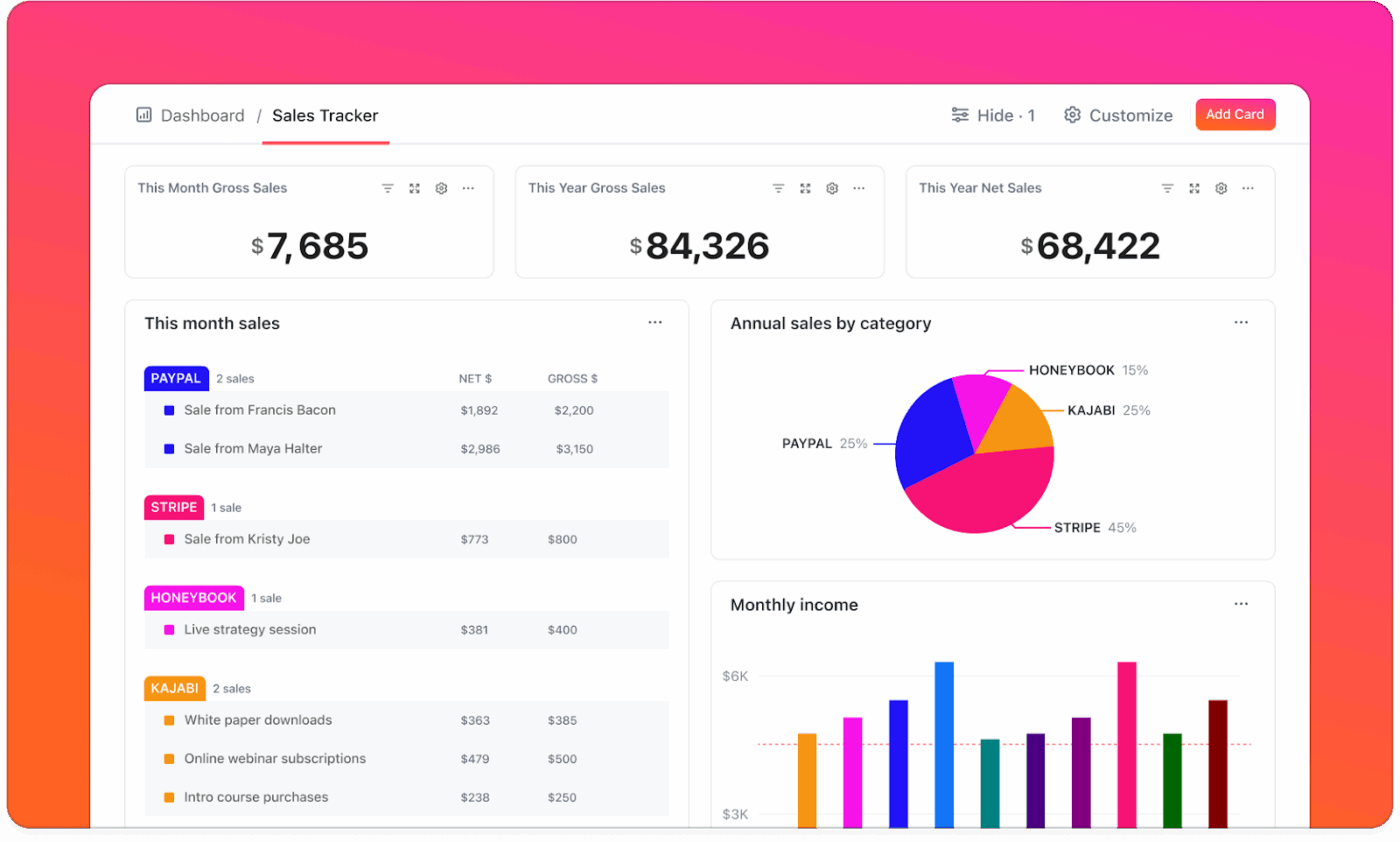
Not everyone who needs to weigh in on the forecast lives in Salesforce all day—especially finance, ops, and leadership. Instead of forwarding screenshots or exporting reports that go stale immediately, you can build shareable, always-current views of the work behind the number using ClickUp Dashboards.
This gives stakeholders a clear picture of:
Your finance and leadership teams need to see the forecast, but they don’t live in Salesforce. Build dynamic, shareable pipeline views with ClickUp Dashboards instead of exporting stale reports. These dashboards provide a high-level, visual representation of your pipeline’s health by pulling in data from across your workspace. You can share them with anyone, regardless of whether they have a Salesforce license.
Agentforce Assistant can flag risk. But it doesn’t manage execution on its own.
ClickUp bridges that gap by converting insights into concrete tasks—with owners, due dates, and visibility.
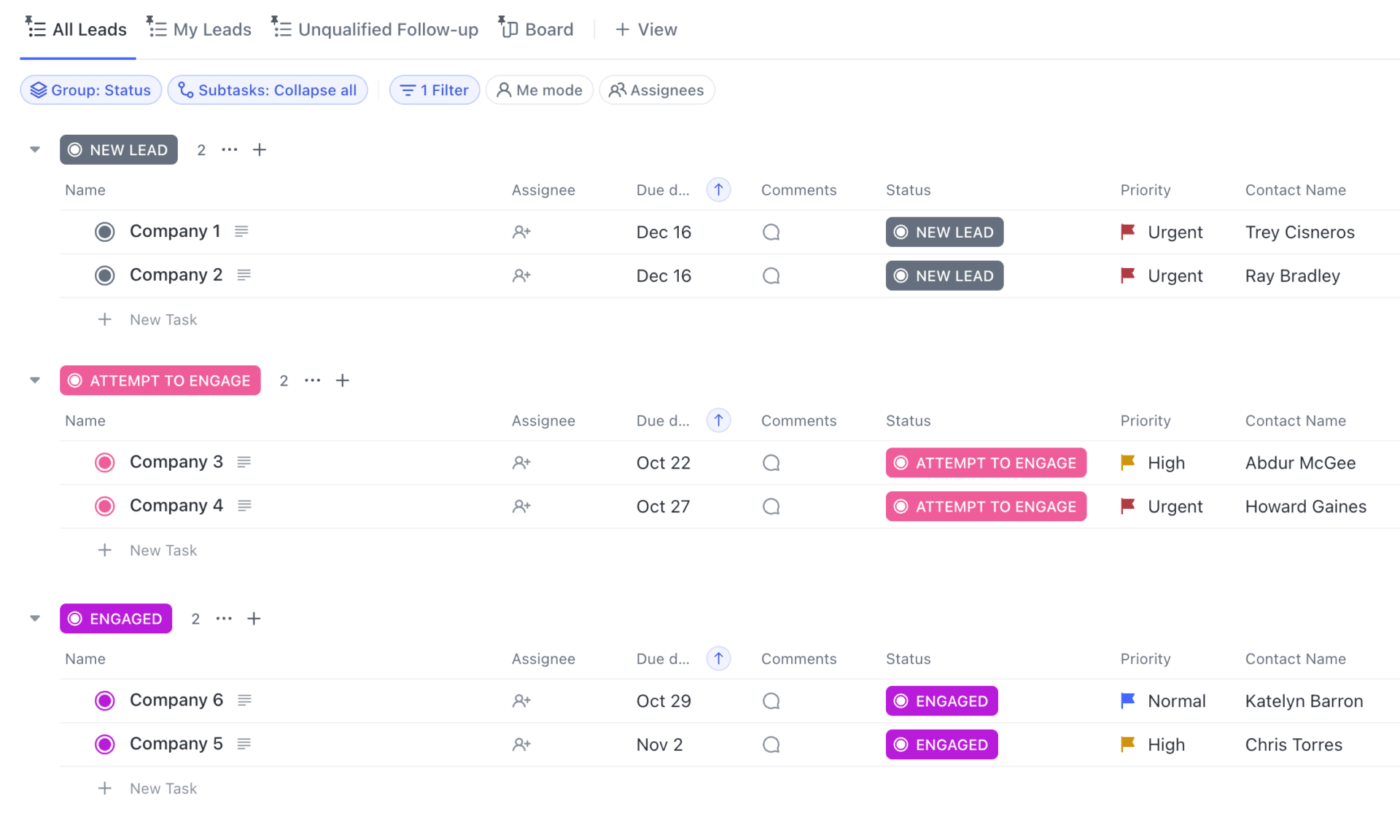
📌 For example:
With ClickUp Automations, you can even standardize these workflows, so follow-ups happen consistently, and not only when someone remembers to get them moving.
💡 Pro Tip: Want to go one step further than “create a task”? Pair those triggers with ClickUp Super Agents—AI teammates inside ClickUp that can take action across your workspace using your real context (tasks, Docs, comments, fields, and connected tools).
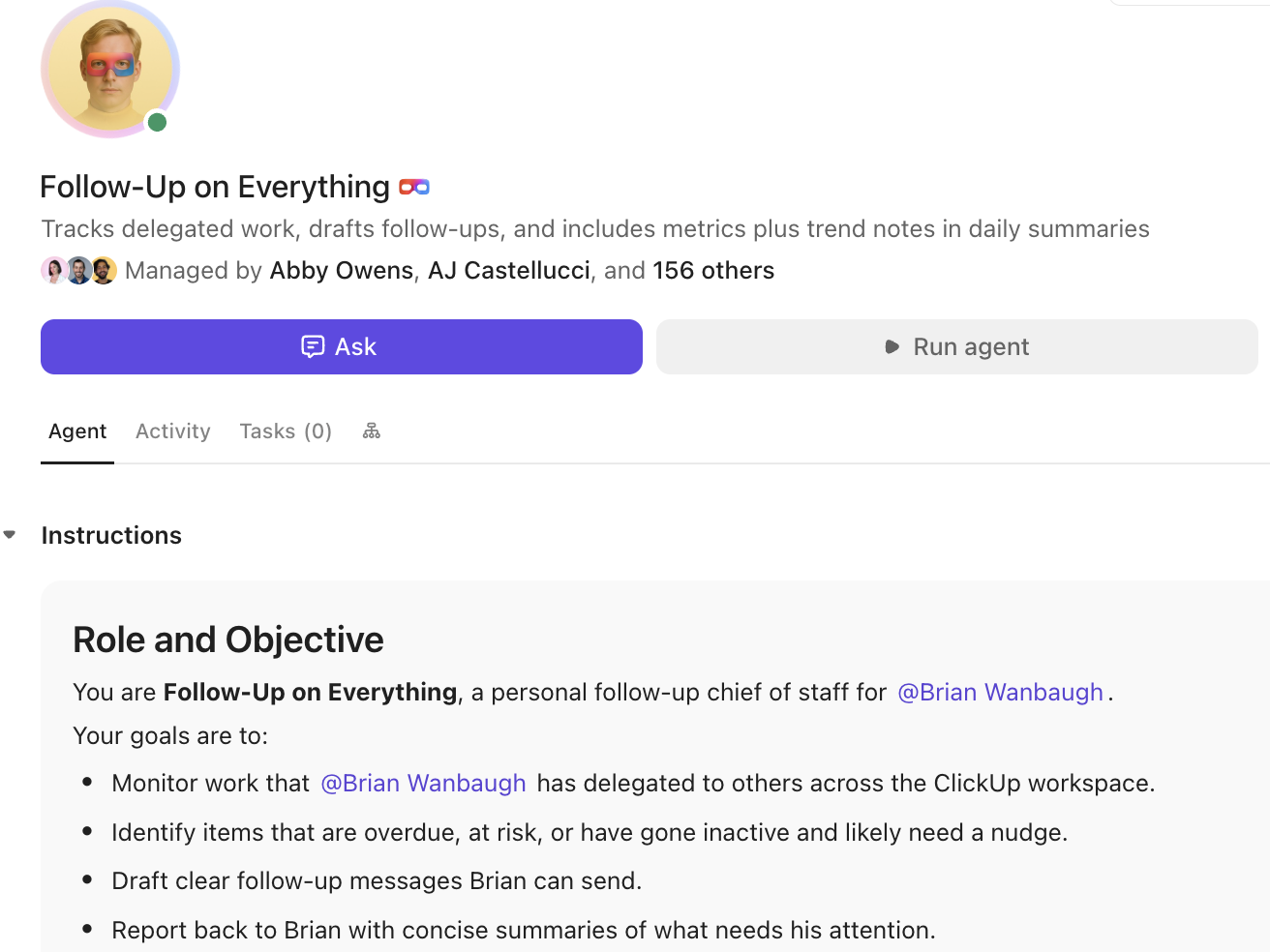
📌 For example, when Salesforce flags a deal as At Risk, a Super Agent can automatically:
Forecasting breaks down when critical context is scattered across too many places: Salesforce notes, email threads, Slack messages, call summaries, and random docs. Reps end up wasting as much as 60% of their time hunting for details instead of moving deals forward.
ClickUp helps teams centralize the conversation and the work in one app.
With the ClickUp Salesforce Integration, teams can connect Salesforce records to the ClickUp Workspace. Search for and preview Salesforce records like opportunities and contacts without switching tabs, so deal context stays accessible while work gets done.
And with ClickUp Brain‘s context-aware AI assistance, reps can:
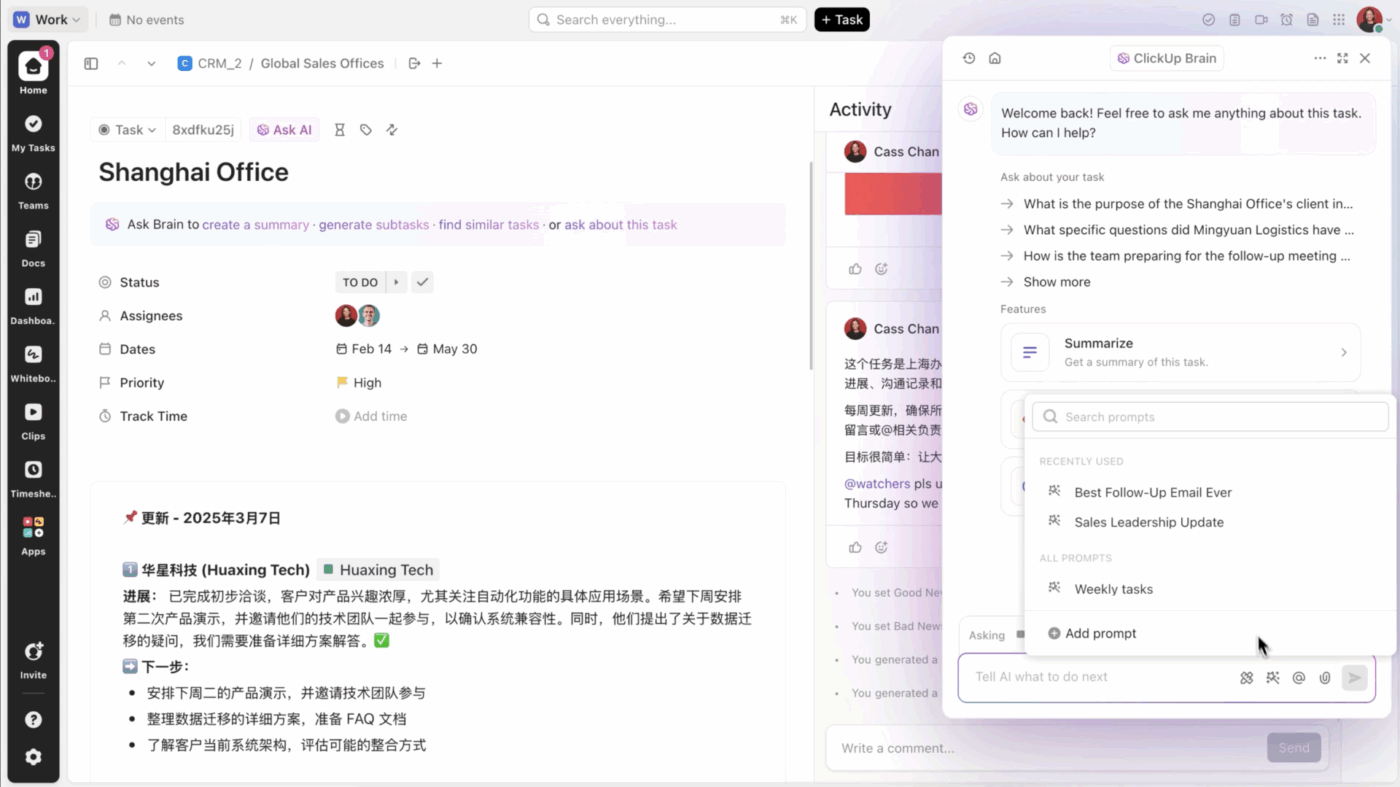
You can even @mention ClickUp Brain in a task comment or chat thread to get a summary of a deal’s status.
💡 Pro Tip: If your team constantly loses time to “Where was that thread?” and “What’s the latest on this deal?”, ClickUp Brain MAX is a game-changer. This desktop AI Super App doesn’t just summarize what’s inside ClickUp—it helps you search across your ClickUp workspace and connected apps (such as Salesforce, Slack, email, and Google Docs) from one place.
Forecasts aren’t just numbers—they’re stories: what’s moving, what’s stuck, and what needs a decision. But that narrative often gets trapped in meetings, Slack messages, or one-off decks.
Instead, teams can create a living forecast doc in ClickUp Docs that stays up to date and ties directly to the execution work behind it. ClickUp Comments and approvals are built right in, creating a single source of truth for all your forecast discussions.
Accurate sales forecasting comes down to three things: clean data, a consistent process, and timely action on insights. AI assistants like Agentforce are a huge help, reducing manual work and spotting signals that humans might miss. But they work best when you pair them with disciplined pipeline hygiene.
The real gap in forecasting is between knowing a deal is at risk and actually doing something about it.
When you combine forecasting insights with a system built for execution, you can move from reactive end-of-quarter scrambling to a repeatable rhythm. This is how you build the muscle to hit your targets with confidence.
Want to start spotting risk early and act faster? Extend your forecasting workflow beyond Salesforce.
Einstein Forecasting is a predictive analytics feature that generates automated forecast numbers, while Copilot (now Agentforce) is a conversational AI assistant that lets you ask questions and get summaries about your forecast.
Not directly. Agentforce’s responses are contained within Salesforce, so sharing them with external stakeholders typically requires exporting the data or creating separate reports.
For the most reliable predictions, Agentforce needs complete opportunity records, a history of logged activities like emails and calls, and your organization’s historical win/loss data.
AI-powered forecasting provides continuous, objective updates based on real-time data, whereas manual methods are static and rely on the subjective assessments of individual sales reps.

© 2026 ClickUp

There’s an easier way. Try a free AI Agent in ClickUp that actually does the work for you—set up in minutes, save hours every week.