
Sorry, there were no results found for “”
Sorry, there were no results found for “”
Sorry, there were no results found for “”
It’s difficult to take meeting notes and engage in discussions simultaneously. Thankfully, AI note-taking devices like Plaud Note have made our lives much easier. They enable voice recording and audio transcribing with advanced AI.
However, Plaud Note is a physical note-taking device that works better suited for students, educators, doctors, consultants, and other professionals who want to record face-to-face conversations or phone calls.
But what about recording virtual meetings or web conferences? Plaud Note doesn’t work well for that. Plus, it doesn’t list the important action items. So, what should you use instead?
In this blog post, we have discussed the top 10 Plaud Note alternatives to help you manage meeting notes efficiently.
Here are the 10 best Plaud Note alternatives in 2025:
Plaud Note is a small (credit-card sized), AI-powered voice recorder designed to record meetings, calls, and lectures. It features dual-mode recording, allowing you to record both ambient sounds and phone calls.
The device uses OpenAI’s Whisper model for transcribing recordings into text, and ChatGPT to summarize notes. Plaud Note comes with accessories like a magnetic case, a USB charging adapter, and a Type-C conversion adapter, making it an efficient hardware tool for recording and transcribing audio.
As seen in almost every tech device, benefits come with certain drawbacks. Some of the limitations of Plaud Note include:
Here are some of the best Plaud Note alternatives with different note-taking strategies and features:
Let’s say you use Plaude Note to record a client meeting. Midway through the meeting, you realize that you forgot to press the record button or your Note is running out of battery. Important points are not recorded and you will have to rack your brain later to write the action items.
ClickUp saves you this hassle. It is the everything app for work that combines note-taking and project management—all powered by AI.
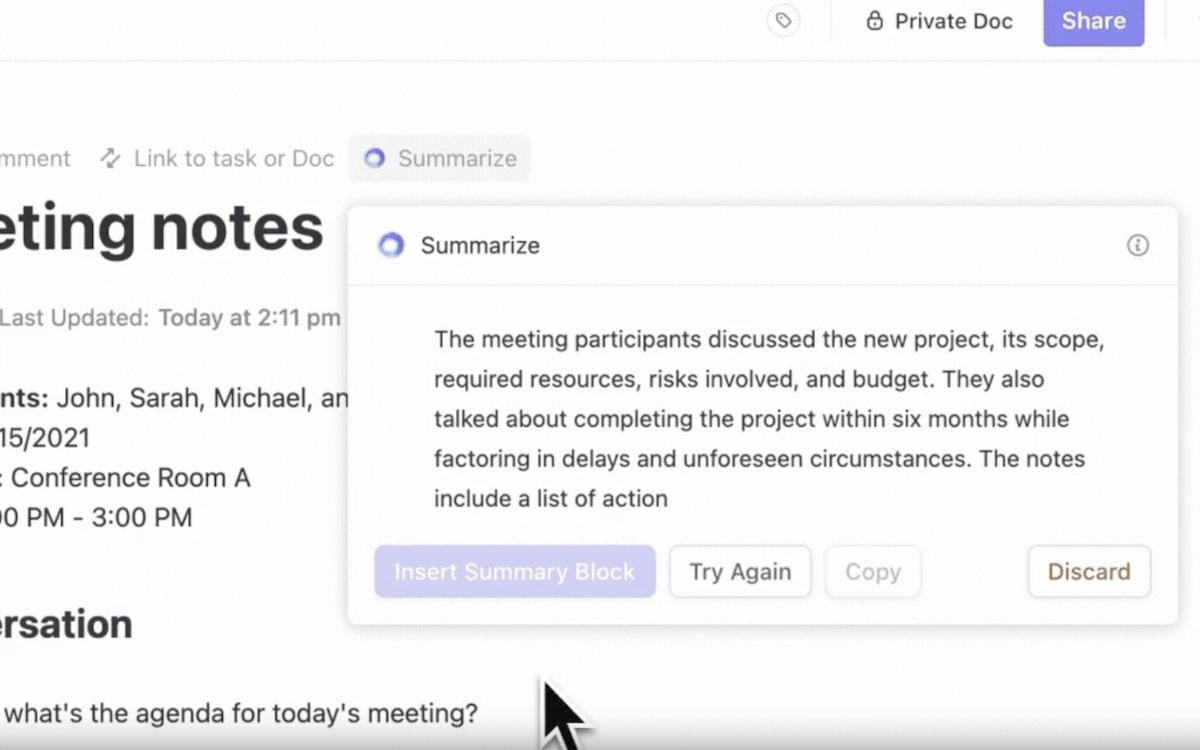
ClickUp’s AI Notetaker integrates with Zoom, Google Meet, or Microsoft Teams meetings, transcribes the entire meeting discussion, and creates smart summaries. The AI note-taking software goes a step further and lists the action items, too. This way, you don’t have to read the meeting transcript or summary to figure out what you need to do next.

Wait, it gets more interesting! You can turn all the action items into tasks and track them in ClickUp. This makes it easier to get things rolling.
Plus, the meeting transcript, audio file, and summary are saved in ClickUp Docs so you can refer to them later. Easily add comments or assign action items to team members directly within Docs.

Want to crosscheck something from your meeting notes? You don’t have to sift through manuscripts. ClickUp Brain, ClickUp’s AI Assistant, enables you to search transcripts for any specific detail.
You can also use ClickUp Brain to transcribe audio files, summarize meeting discussions, and translate notes.
If you are looking for a tool to jot down thoughts and ideas, ClickUp helps with that too. With ClickUp Notepad, you can take notes, format them properly, convert them into tasks, and access them easily from the browser or mobile app.
Need some help getting started with managing meeting notes? Try ClickUp Templates. The ClickUp Meeting Notes Templates helps you organize meeting guidelines and notes in a single doc.
To organize personal notes, use the ClickUp Cornell Notes Template. It provides a simple table layout to arrange information neatly. Plus, the ClickUp Knowledge Base Template works great for creating an extensive library of project notes or resources.
This is the special advantage of ClickUp: offering most of the tools needed for organizing the projects in one place. It doesn’t only allow the managing and assignment but also offers other tools in the same environment such as Documents, where one can take notes and make reports, and integration with calendar and emails, all in one place. No need to use external programs or different apps for every function.
Learn how to leverage AI for meeting notes!👇

Notion is a project management tool that helps you organize notes, track tasks, and create checklists. You can use it to centralize meeting notes and action items, manage meeting transcripts, and update task lists so the entire team stays informed.
Customize a meeting note template or a simple Notion doc to take live notes during a meeting. Plus, Notion’s AI tool automatically lists action items and important information from meeting notes. However, unlike Plaud Note, Notion doesn’t record meeting notes. So, if you are looking for a tool with both note-taking and project-management features, Notion might not be ideal for you.
I use Notion literally to track everything in my personal and professional life. It’s incredibly versatile—you can create notes, manage projects, build databases, and organize tasks all in one place. I love how customizable it is, allowing me to tailor it to my exact needs, whether for goal tracking, meeting notes, or content planning.

Coda is a document collaboration software that enables you to manage meeting notes, project information, and action items in one place. You can use templates with building blocks, such as voting tables, to record meeting decisions quickly. Coda’s note-taking templates also come with emojis to record the participants’ sentiments and make decisions accordingly.
While you take live meeting notes, Coda’s AI tool automatically analyzes important points and highlights them at the top of the document. You can integrate Zoom, Google Calendar, and Teams to organize meetings and recordings efficiently.
It has tons of possibilities. You can write documentation, create (complex) tables, create pages inside pages, mention people and pages, integrate with Miro, Google Sheets/Docs/etc, insert images, links… I think it is the most complete tool I have ever used. Some features and possibilities are not very clear and intuitive. Although the interface is very user-friendly, you have to figure out how to use certain functions.
✨Fun Fact: 95% of professionals are open to letting AI avatars take over meeting tasks. This shows the growing importance of AI tools in making meetings more productive.

Obsidian is a personal note-taking and knowledge management tool that helps you organize your thoughts in a flexible, creative way. It uses simple Markdown text language, which makes it easy to create mind maps for your notes and see how they connect.
This makes it especially useful for writers, researchers, and thinkers who want to visualize and link ideas. Obsidian also lets you organize your notes using tags. You can also drag and drop the notes to add them to separate folders.
Obsidian is the best note-taking app that I have used and the ability to connect notes and organise them into a personal wiki makes it very useful. The community is overwhelming because the numerous plugins can get out of hand.
🧠 Did you know? Obsidian offers over 500 community plugins. You can use the plugins to tailor your note-taking experience extensively, from integrating task management systems to visualizing your notes.

Avoma is one of the best alternatives to Plaud for businesses looking for an AI-powered meeting assistant. It automatically records sales calls, transcribes meetings and calls in real time, and generates smart chapters so you can easily find relevant information.
Plus, Avoma’s AI tool automatically detects key topics discussed in client meetings and stores them in your database. The platform offers features like speech recognition, AI transcription, agenda management, and action item tracking. Avoma also integrates with popular tools like Salesforce, HubSpot, and Zendesk Sell.
Avoma is a great tool since it eliminates the need for detailed note taking during meetings (or really any note taking at all). It effectively captures a transcript of the meetings and summarizes the key points and purpose so that it’s easy to understand what was discussed and with what tone.
📮 ClickUp Insight: 83% of knowledge workers rely primarily on email and chat for team communication.
However, nearly 60% of their workday is lost switching between these tools and searching for information. With an everything app for work like ClickUp, your project management, messaging, emails, and chats all converge in one place! It’s time to centralize and energize!

Evernote is a digital note-taking app that allows you to add text, photos, PDFs, and receipts to store all information in one place. It helps you stay organized with its AI-powered search, file attachments, and reminders features. Plus, Evernote’s collaboration features make it easy to take and edit meeting notes in real time.
You can add keywords, titles, dates, and tags to your notes and create filters for quick access. Evernote also enables you to scan documents and save them as notes so you have all the necessary files in one place. Its most useful feature is the ability to create tasks inside your notes for better context.
Consolidating note formation at an amazing rate has become much easier and efficient, which is fascinating. We have managed to maintain a high level of performance while keeping track of numerous notes for each specific event and organizing them using notebooks and tags to make pertinent information easier to find is prevalent. Keeping everyone on the same page and up to date with managing projects, meetings and daily activities is easy with Evernote.
📖 Read More: How to Take Notes From a Video?

Bear is a simple and aesthetic note-taking app for Apple users. It allows you to easily note down and organize your ideas, tasks, and projects with text, photos, tables, and to-do lists in one note. Bear uses Markdown formatting, making it easy to format and organize your notes in a clean and flexible way.
The best part is that you can add sketches to your notes using the Apple pencil or your finger. Want to export your notes to some other platform or get them printed? Download them in PDF, Word doc, HTML, or JPG formats.
You can create voice notes or append text to existing notes on Bear using your voice on your Apple Watch. Bear will then transcribe your speech into text within the note.
I like the fact that the Bear app is minimal on purpose. So there are very few distractions if you’re using the app to take down notes, ideas or create content for your blog. It is super easy to use, offers many optimizations and also comes with a whole lot of keyboard shortcuts. I don’t like the default option of the notes being saved to icloud storage.

Like Plaud Note, HiDock is also a portable AI note-taker that combines laptop docking features with Bluetooth call recording, allowing you to capture voice calls or virtual meetings. It records, transcribes, and summarizes meeting discussions using the GPT-04 model.
You can use its AI-powered voice marks to highlight key points and edit speaker names in meeting notes for better clarity. HiDock also enables you to transfer notes easily to Notion or Google Docs, without the need for manually copying and pasting the notes.

AudioPen helps you turn unorganized voice notes into clear, summarized text.
Simply record your voice, and AudioPen will remove fillers like “ummms” and “like” while organizing your thoughts into neat, readable notes. It allows you to customize the style of your notes, with options to copy the style of famous writers like Shakespeare.
Supporting multiple languages and offering Zapier integration, AudioPen makes it easy to export your notes to over 5000 apps, including Notion, for seamless note management.

The FoCase REC is a simple hardware solution for recording calls on both iPhone and Android devices. Using advanced vibration technology, it captures sound from your earpiece and turns it into clear audio recordings. This device works with a wide range of apps, including WhatsApp, allowing you to record calls from various sources.
It works great for professional use—just stick it to the back of your phone, press the button, and start recording. FoCase Rec ensures high-quality call recordings with a user-friendly design and broad compatibility.
All the above Plaud Note alternatives offer some core capabilities. Notion, Coda, and Evernote work best for organizing and filtering notes. Other tools, such as Avoma and HiDock work better if you need an AI assistant to transcribe and summarize your meetings.
However, if you are looking for an app that does everything—generates meeting transcripts, summarizes discussions, translates meeting minutes, and automatically creates action items for meeting notes, ClickUp is the one you need.
It offers AI note-taking, task tracking, and project management features so you have everything in one platform, reducing the need to switch apps. Result? Quick action and better efficiency. Sign up for ClickUp today and make your meeting more productive!

Pavitra M
Max 12min read

Praburam Srinivasan
Max 10min read

© 2026 ClickUp