






Still downloading templates?
There’s an easier way. Try a free AI Agent in ClickUp that actually does the work for you—set up in minutes, save hours every week.
Sorry, there were no results found for “”
Sorry, there were no results found for “”
Sorry, there were no results found for “”
Organizations that invest in continuous improvement processes are up to 80% more productive and often see noticeable efficiency gains within weeks, all from small, consistent changes that stick.
The engine behind those gains? The PDCA cycle—Plan, Do, Check, Act.
The concept is simple. The challenge?
Applying it consistently across multiple teams and projects to meet specific needs. That’s where PDCA templates come in handy. They remove the guesswork, turn big goals into repeatable workflows, and give you a roadmap to test, learn, and improve.
Stick with us as we explore free PDCA templates to help you optimize every step of the process.
A PDCA template is a pre-built framework that breaks the Plan-Do-Check-Act cycle into simple, repeatable steps. Use it to identify possible solutions, test them, measure their impact, and implement effective strategies.
Think of it like a GPS for process improvement—it provides clarity, ensures alignment, and makes it easier to implement PDCA consistently across your organization to achieve continuous improvement.
Instead of starting from scratch each time something goes wrong, these templates help you:
📌 Example: Take Nike. When this footwear manufacturing company faced backlash over poor working conditions, it didn’t settle for quick fixes. It used the PDCA cycle to reevaluate its production process, introducing factory scorecards and lean training programs.
The result? A more accountable and efficient system that helped boost Nike’s brand value from $28 billion in 2015 to $42 billion in 2021. Here’s how Nike used the PDCA model:
| PDCA Phase | Nike’s Approach |
|---|---|
| Plan | Identified risks in factory conditions and set measurable improvement goals. |
| Do | Rolled out incentives, trained local leaders, and launched pilot programs. |
| Check | Monitored factory performance, analyzed feedback, and tracked results. |
| Act | Doubled down on successful strategies and scaled them across operations. |
💡 Did You Know? The Deming Cycle, also called the PDCA Cycle or Deming Wheel, was popularized by quality management pioneer Edward Deming. It’s a continuous improvement framework that follows four stages: Plan, Do, Check, Act.
A PDCA template is more than a checklist—it’s your team’s improvement engine. The right one helps you act quickly, capture lessons that matter, and make meaningful changes—even when priorities shift or resources are scarce.
Here’s what separates a forgettable template from one your team will rely on:
📍 Best Practice: Capture version history by documenting what changed, what worked, and what didn’t. This approach improves the problem-solving process and supports data-driven decision-making. Here’s how to track project progress the smart way:
| Template name | Download template | Ideal for | Best features | Visual format |
|---|---|---|---|---|
| ClickUp PDCA Process Whiteboard Template | Get free template | Ops leads, improvement managers, agile teams | Visual PDCA stages; live collaboration; iteration history for audits/compliance | ClickUp Whiteboard |
| ClickUp Action Plan Template | Get free template | Project managers, team leads | Convert plans to time-bound tasks; owners & due dates; status tracking with custom fields/views | ClickUp List/Board/Calendar |
| ClickUp Change Management Plan Template | Get free template | HR & operations heads (enterprise) | Scope & impact definition; resistance analysis; training & adoption tracking | ClickUp List/Doc |
| ClickUp Change Management Plan Timeline Template | Get free template | Transformation leads, project coordinators | Gantt timelines & dependencies; live progress; auto-shifted schedules | ClickUp Gantt/Timeline |
| ClickUp Project Management Risk Analysis Template | Get free template | PMO, engineering managers, quality leaders | Risk register; severity/likelihood scales; linked mitigation tasks | ClickUp List/Dashboard |
| ClickUp Process Audit and Improvement Template | Get free template | QA, compliance, operations | Guided workflow audits; smart checklists; data-backed recommendations | ClickUp List/Doc |
| ClickUp Audit Program Template | Get free template | Internal auditors, compliance teams, quality managers | Program structure with tasks & deadlines; Open/Complete statuses; findings & corrective actions | ClickUp List/Dashboard |
| ClickUp Root Cause Analysis Template | Get free template | Business analysts, QA specialists, ops teams | Multiple RCA techniques; action items from validated causes; standardized approach | ClickUp Whiteboard/Doc |
| ClickUp 5 Whys Template | Get free template | Product, CX, operations leads | Step-by-step visual chain; task linking; history of past analyses | ClickUp Whiteboard |
| ClickUp Gap Analysis Template | Get free template | Strategic planners, performance managers | Current vs future state comparison; benchmarks; targeted action plans | ClickUp Doc/Board |
| ClickUp Project Charter Template | Get free template | Project managers, improvement leads | SMART objectives; stakeholder approvals; decision structures across PDCA | ClickUp Doc |
| ClickUp Project Tracker Template | Get free template | Project managers, department heads | Centralized dashboard; Gantt dependencies; workload/RAG indicators; time tracking | ClickUp List/Gantt/Dashboard |
| ClickUp Task Management Template | Get free template | Implementation teams | List/Board/Box/Calendar views; workload & capacity; dependencies & calendars | ClickUp List/Board/Box/Calendar |
| ClickUp Project Retrospective Template | Get free template | Internal auditors, compliance teams, and quality managers | What-went-well/learned format; sentiment capture; instant follow-up tasks | ClickUp Doc/List |
| ClickUp Decision and Change Log Template | Get free template | Change managers, project leads, PMO | Record what/why/who; timeline of updates; clear ownership & rationale | ClickUp List |
| ClickUp Quality Control Checklist Template | Get free template | Quality managers, floor supervisors, ops | Custom inspection workflows; severity/status fields; corrective-action linkage | ClickUp List/Form |
No matter where you’re starting—solving recurring issues, improving cross-functional handoffs, or rolling out a new process—PDCA templates give you the structure to move fast.
As teams scale and priorities shift, real-time visibility becomes even more essential. That’s where ClickUp comes in—bringing your PDCA cycles to life with collaborative tools, task-level ownership, and repeatable workflows that scale.
Ready to transform how your team solves problems and implements change? These free PDCA templates will help you get started and continue to improve at every step:
Ever feel like your improvement initiatives lose momentum between planning and execution? When your team’s efforts are scattered across disconnected docs or buried in meetings, context slips—and so does progress.
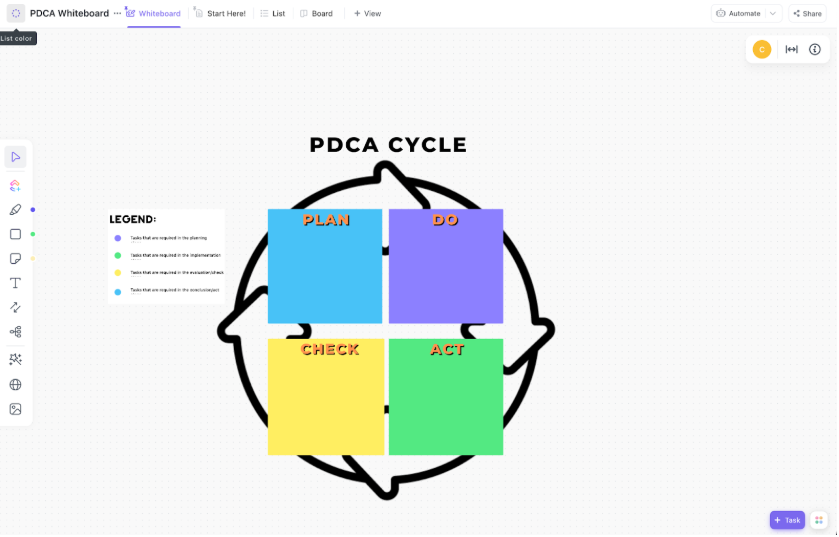
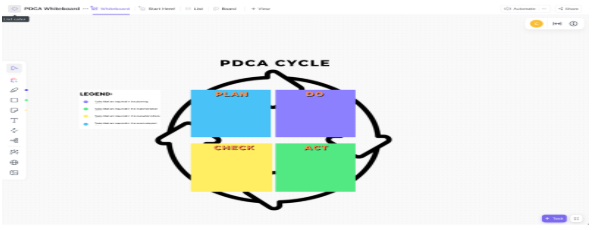
The ClickUp PDCA Process Whiteboard Template fixes this by turning the theoretical PDCA model into a dynamic, collaborative workspace. It creates a single visual workspace where teams map out the complete PDCA cycle—from identifying problems to executing solutions.
🔑 Ideal for: Ops leads, improvement managers, and agile teams looking for a flexible PDCA planning space.
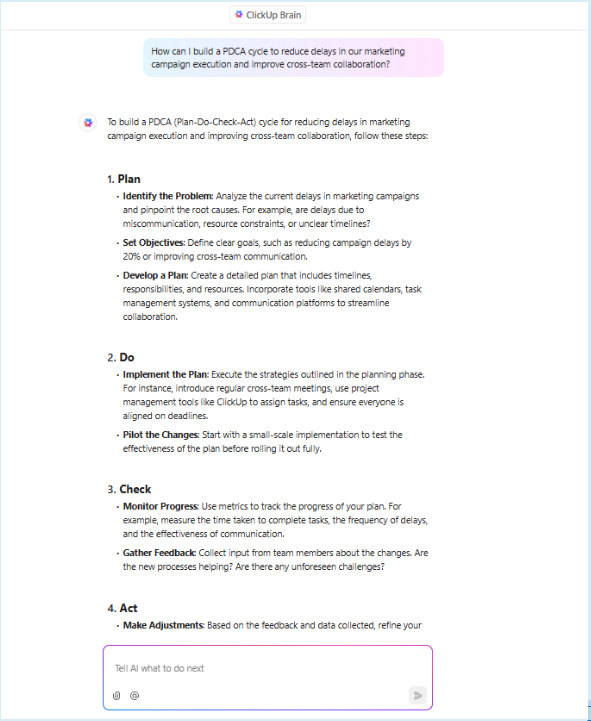
💡 Pro Tip: Want to take your PDCA process one step further? Let ClickUp Brain automate the busywork, so your team can focus on what matters—problem-solving and process improvement. Here’s how:
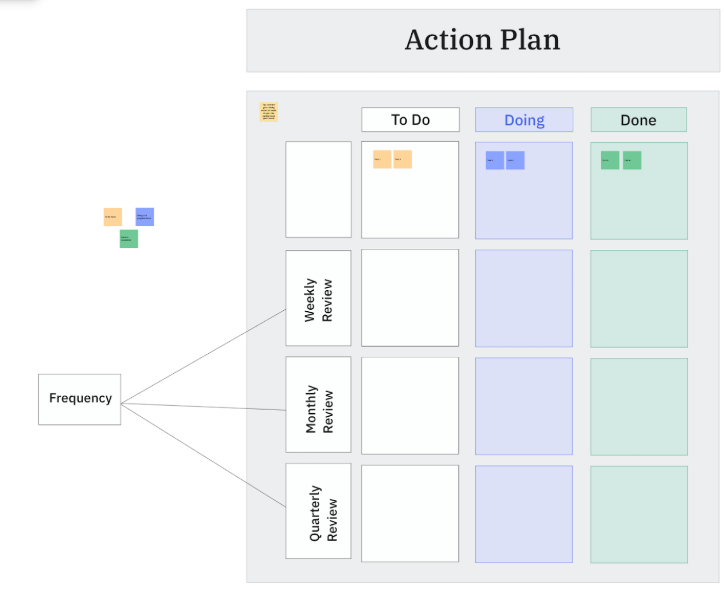
Nearly 70% of change initiatives fail—not due to bad ideas, but poor execution and unclear goals. This ClickUp Action Plan Template bridges the gap between the planning and doing phases of your PDCA cycle.
It transforms high-level improvement initiatives into focused, actionable tasks—with clear owners, deadlines, and success metrics. Prioritize tasks based on effort and impact, helping teams focus on quick wins while aligning longer-term actions with strategic goals.
Check out how clickUp makes prioritizing tasks a breeze with AI 👇
And with real-time status tracking and visual progress updates, you’ll know what’s done—and what’s next—at a glance.
🔑 Ideal for: Project managers and team leads translating PDCA goals into trackable action items in both large and small-scale initiatives.
➡️ Also Read: Top Continuous Improvement Tools & Software
Ready to make big changes in your organization, but don’t know where to begin? You’re not alone—only 38% of employees support organizational change today.
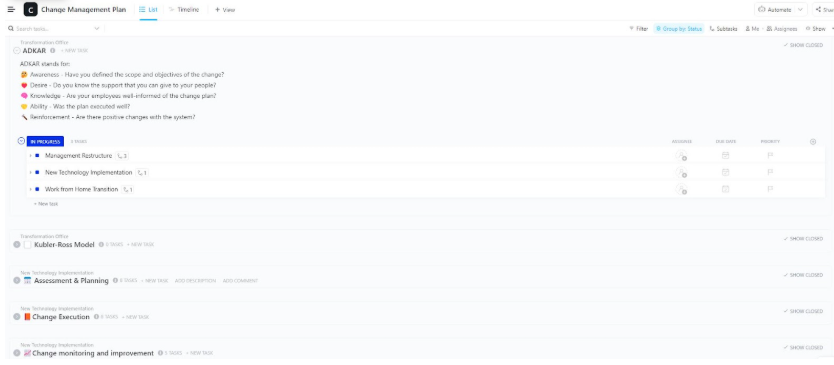
There’s a reason change management feels overwhelming—shifting processes, aligning teams, and tracking adoption takes serious coordination. The ClickUp Change Management Plan Template gives you the structure to navigate even the most complex transitions.
It guides you through creating a comprehensive strategy that aligns perfectly with the PDCA methodology. Identify stakeholders, analyze potential resistance points, and develop targeted communication plans to drive adoption.
🔑 Ideal for: HR and operations heads in enterprise environments overseeing digital transformation or large-scale process changes using a structured, PDCA-based approach.
Change cannot be put on people. The best way to instill change is to do it with them. Create it with them.
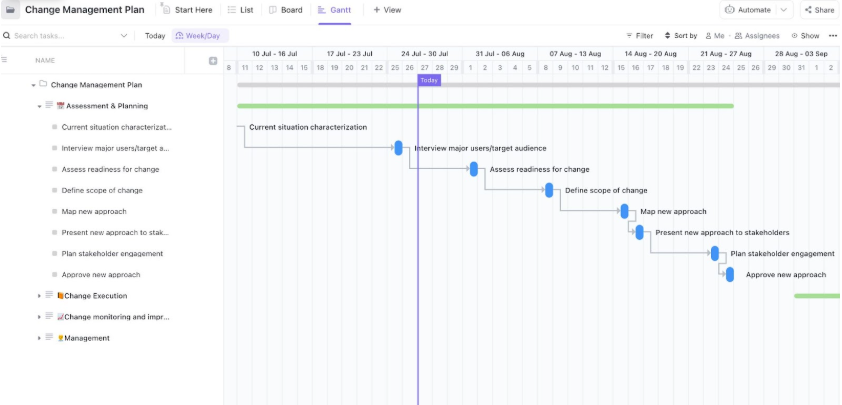
And the best way to do that? Start with the ClickUp Change Management Plan Timeline Template—a collaborative, time-bound roadmap designed to move teams forward together.
With its built-in Gantt chart view, you’ll spot dependencies, timelines, and potential bottlenecks at a glance. From task ownership to the next steps, it aligns teams around each PDCA phase—so execution feels like a team effort, not a top-down directive.
🔑 Ideal for: Project coordinators or transformation leads rolling out multi-phase PDCA initiatives with tight timelines and cross-team dependencies.
💡 Pro Tip: Want to build a change-resilient culture alongside your PDCA process? Follow these 5 Dos to boost adoption and confidence across the board:
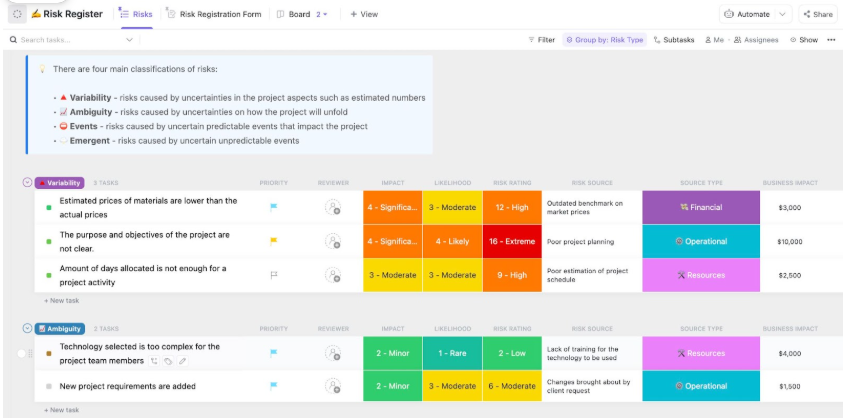
When improvement projects go off track, it’s rarely the plan that’s the problem—it’s the risks no one saw coming. The ClickUp Project Management Risk Analysis Template gives you a strategic head start, so your team stays ahead of issues instead of scrambling to fix them.
Built for real-world complexity, it helps you identify, sort, and tackle risks early. From scope creep to budget blowouts, it classifies risks into four buckets—variability, ambiguity, events, and emergent risks—so you can act with intention.
🔑 Ideal for: PMO teams, engineering managers, and quality leaders focused on improving service quality and preventing process disruptions from day one.
If you’re passionate about process improvement, chances are you’ve used Six Sigma tools, and PDCA is one of its cornerstones.
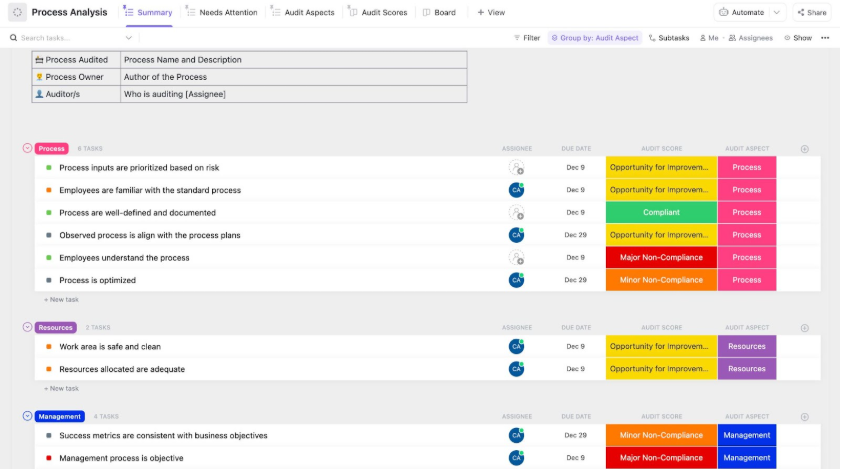
The ClickUp Process Audit and Improvement Template brings that framework into action. It helps you spot inefficiencies, close compliance gaps, and drive continuous improvement without the guesswork.
Whether you’re in manufacturing, healthcare, IT, or finance, it walks you through a structured loop to assess what’s working, fix what’s not, and keep a clear PDCA record for audit readiness, contributing to quality management.
🔑 Ideal for: Quality assurance teams, compliance officers, and operations managers running regular audits or optimizing workflows in regulated industries.
🧠 Fun Fact: Six Sigma started at Motorola in the ’80s to cut defects—and now it powers efficiency in every industry. Want to apply it fast? Check out these Six Sigma templates now!
Audits don’t have to be overwhelming. Whether you’re checking for internal compliance, prepping for ISO certification, or managing supplier audits, structure is everything.
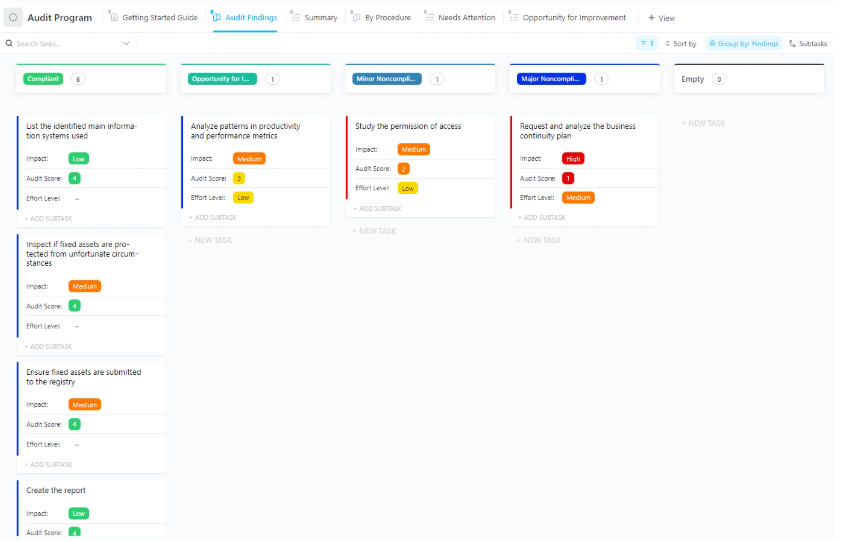
With the ClickUp Audit Program Template, you get just that—a clear, repeatable system to guide every PDCA phase with less stress and more control.
Map out your entire audit program, assign tasks, track status, and document findings—all while keeping stakeholders in sync. With automated updates and built-in reporting tools, you’ll always have a real-time pulse on progress, risks, and resolutions.
🔑 Ideal for: Internal auditors, compliance teams, and quality managers conducting recurring audits across departments or suppliers.
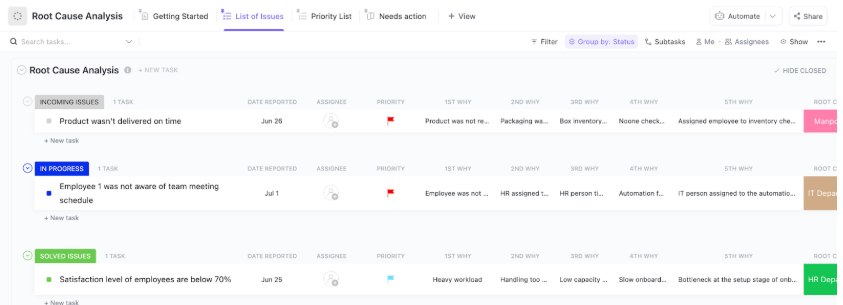
Surface-level fixes don’t solve long-term problems. That’s why the ClickUp Root Cause Analysis Template helps you dig deeper. Instead of jumping to conclusions, guide your team through a step-by-step investigation to identify the actual reasons behind recurring issues.
Troubleshooting a product failure, uncovering process inefficiencies, or analyzing customer complaints? This template enables repeatable and actionable analysis.
It’s built to support the Check and Act phases of your PDCA cycle—turning insights into sustainable improvements.
🔑 Ideal for: Business analysts, QA specialists, and operations teams focused on reducing defects, eliminating inefficiencies, and improving long-term performance.
🎁 ClickUp Hack: Get to the real root faster—use these expert tips for smarter analysis:
When a problem keeps resurfacing, it’s rarely just one thing—it’s a chain.
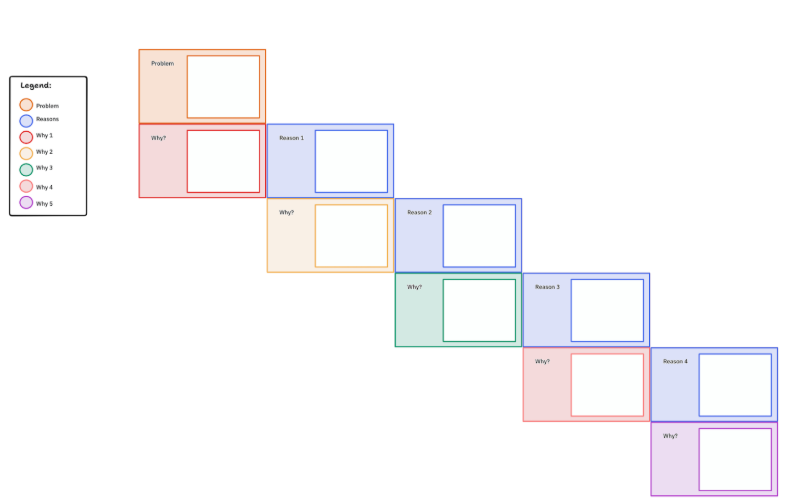
The ClickUp 5 Whys Template helps you connect the dots—one “why” at a time—until you reach the root cause. It guides teams through a clear, collaborative breakdown that links surface symptoms to deeper issues.
It’s a perfect tool for teams that think out loud, solve problems in real-time, or need a lightweight approach that doesn’t compromise on depth. Whether you’re resolving workflow bottlenecks or customer complaints, it turns team insights into focused, follow-up actions.
🔑 Ideal for: Product teams, CX specialists, and ops leads using retros, workshops, or one-on-ones to dissect recurring issues and drive smarter improvements.
🔎 Did you know? Sakichi Toyoda invented the 5 Whys in the 1930s, and Toyota turned it into a global problem-solving powerhouse. Now, it’s every team’s go-to move for stopping recurring issues at the source.
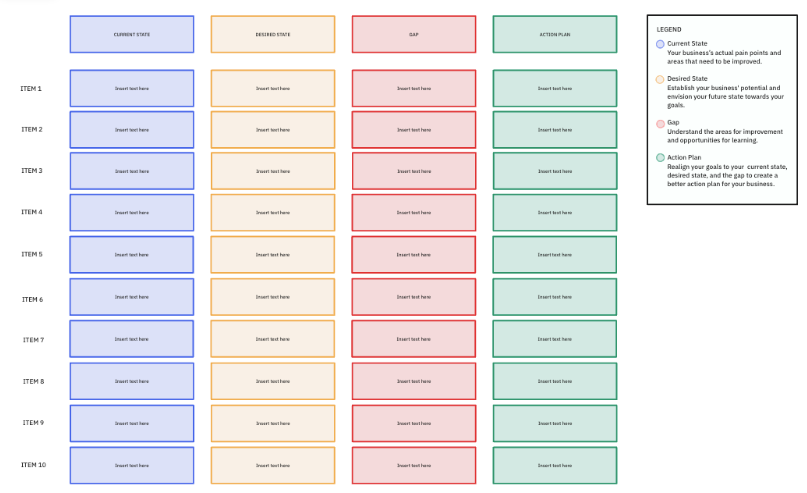
Clarity is key in any process improvement journey, and that starts with knowing the difference between your current state and your ideal outcome. The ClickUp Gap Analysis Template helps you map both clearly and build an actionable plan to close the distance.
It breaks down your current baseline, defines future targets, and highlights what’s missing—all within the context of your PDCA framework. Use it to streamline the ‘Plan’ phase, align stakeholders, and turn insights into an impactful action plan.
🔑 Ideal for: Strategic planners, performance managers, and process improvement leads identifying gaps across teams, KPIs, or systems before launching initiatives.
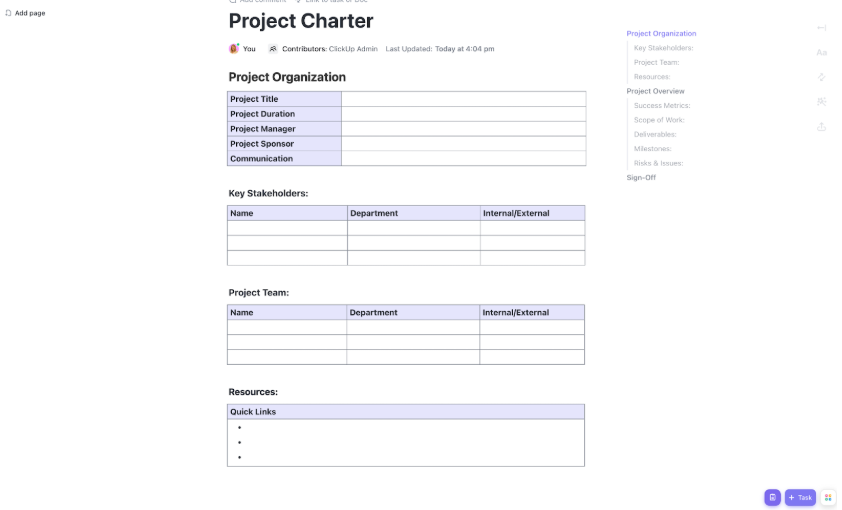
37% of improvement projects fail due to unclear objectives and boundaries. The ClickUp Project Charter Template keeps your PDCA efforts from falling into that trap.
In the Plan phase, lay out objectives, define deliverables, and clarify roles—all in one intuitive doc. For the Do phase, assign responsibilities and set timelines to drive focused execution.
During ‘Check’, the charter becomes your reference point. Are you hitting your goals? Is your team aligned with the project scope? And during ‘Act’, use the success criteria to assess results and refine your next move.
🔑 Ideal for: Project managers, improvement leads, and cross-functional teams launching initiatives that demand clarity, alignment, and measurable results.
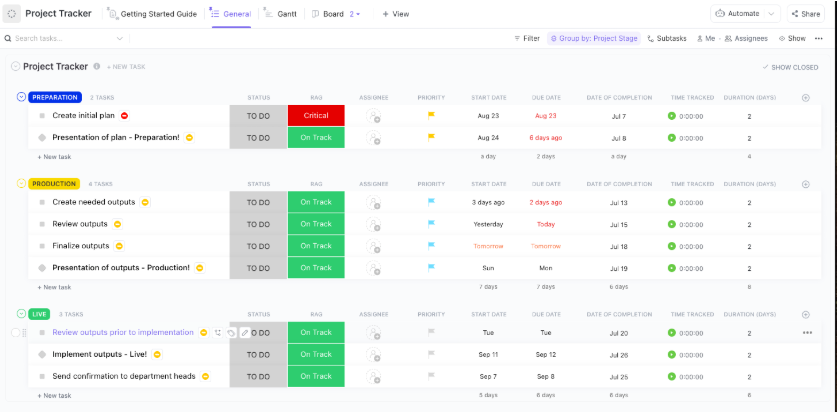
When projects scale, tracking every moving part—from deadlines to deliverables—gets tricky fast. The ClickUp Project Tracker Template gives you total visibility across your PDCA cycle by centralizing timelines, task ownership, and progress tracking.
Use the Gantt view to map dependencies and stay ahead of bottlenecks. Switch to the assignee view to balance workloads and prevent burnout. With custom fields for project stages, timeframes, and risk (RAG) indicators, you’ll always know where things stand.
The best part? Built-in time tracking and performance data enable managers to compare actual progress with expected progress at any point.
🔑 Ideal for: Project managers and department heads managing cross-functional projects who need clear insights and agile adjustments in the PDCA model.
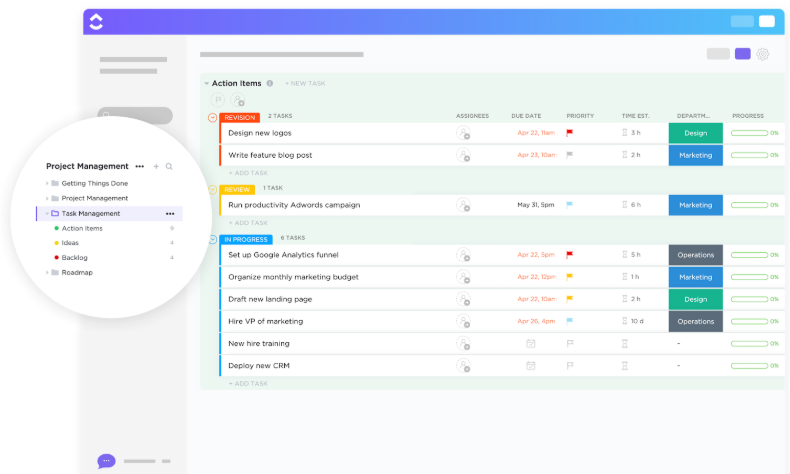
The Do and Check phases are where improvement plans live or die, and it all hinges on execution. That’s where the ClickUp Task Management Template shines—turning strategy into synchronized, visible action.
Switch between List, Board, Box, and Calendar views to organize tasks by status, priority, team, or deadline. Spot blockers instantly, reassign functions on the fly, and keep teams focused without missing a beat.
Whether you’re launching a sprint, managing day-to-day ops, or reviewing progress mid-cycle, this template ensures every task is visible and accountable.
🔑 Ideal for: Implementation teams who need flexible PDCA project templates to manage workflows, assign responsibilities, and keep improvement cycles moving forward.
📮ClickUp Insight: 92% of knowledge workers risk losing important decisions scattered across chat, email, and spreadsheets. Without a unified system for capturing and tracking decisions, critical business insights get lost in the digital noise. With ClickUp’s Task Management capabilities, you never have to worry about this. Create tasks from chat, task comments, docs, and emails with a single click!
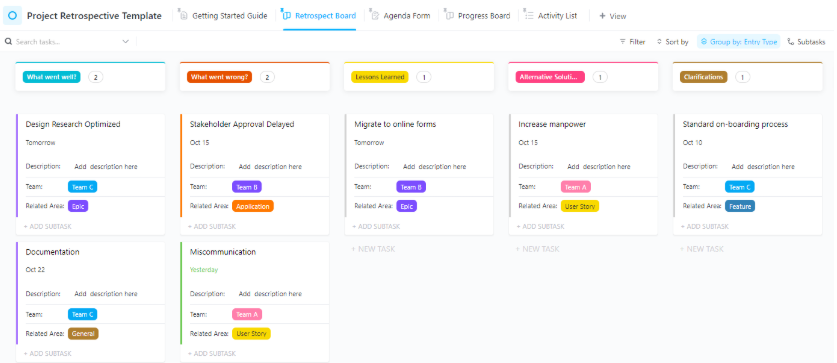
The most valuable insights in any PDCA cycle don’t come during the project—they come after. The ClickUp Project Retrospective Template helps your team reflect on what worked, what didn’t, and what to do better next time.
Perfect for the Check and Act phases, this template offers a clear framework to track outcomes, highlight wins and blockers, and turn feedback into progress. Customize prompts, capture sentiment, and assign follow-ups—so nothing valuable slips through the cracks.
🔑 Ideal for: Scrum masters, agile teams, and improvement leaders using PDCA retrospectives to close feedback loops and build a culture of continuous improvement.
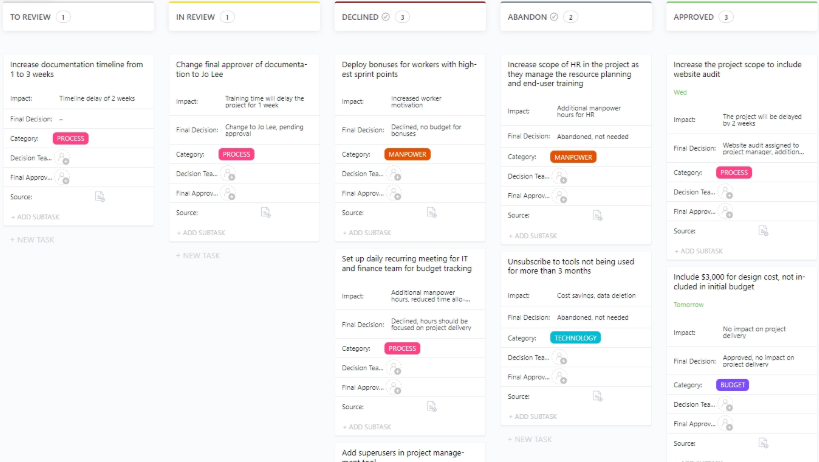
Decisions fuel progress—but without a clear log, even smart choices can trigger confusion, scope creep, or misalignment. The ClickUp Decision and Change Log Template is an ideal tool for recording, reviewing, and revisiting shifts as they occur.
It’s handy during the Do and Check phases of your PDCA cycle—when initiatives are in motion and adjustments are inevitable. Document context, capture approvals, and track downstream impacts with precision.
🔑 Ideal for: Change managers, project leads, and PMO teams managing PDCA reports with frequent pivots, stakeholder reviews, and evolving scopes.
➡️ Also Read: Process Map Templates for ClickUp, Excel, and Word
Quality control isn’t a formality—it’s your frontline defense against costly errors.
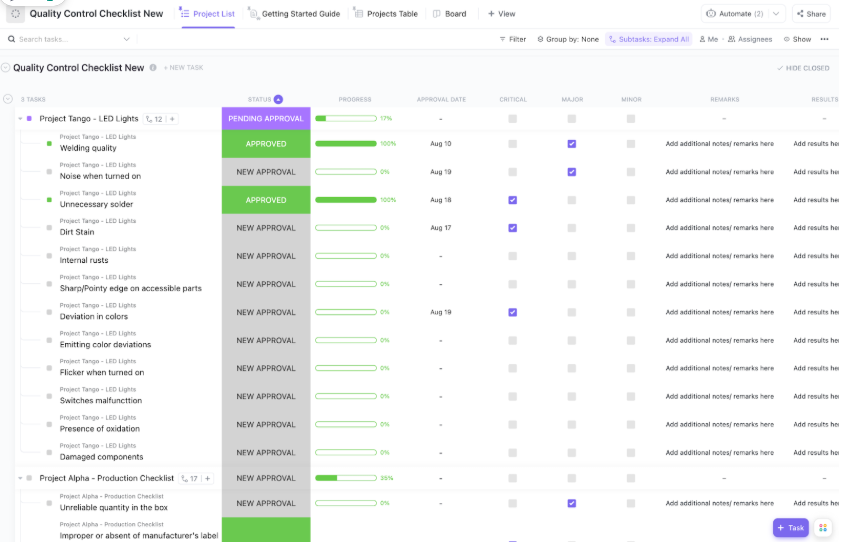
The ClickUp Quality Control Checklist Template gives your team the tools to stay sharp across every phase of execution. Standardize inspections, reduce variability, and capture results in real time to keep your processes on track and your outcomes consistent.
Built for the Do and Check phases of your PDCA cycle, this template makes every inspection count—without slowing teams down.
🔑 Ideal for: Quality managers, floor supervisors, and ops teams using PDCA project templates to standardize inspections and prevent defects before they derail progress.
🎁 Bonus: Need inspiration? Check out these real-world PDCA examples that drive results:
Power Move: Start small—choose one pressing issue, apply the PDCA method using the templates above, and let compounding improvements take care of the rest.
Continuous improvement doesn’t have to be complex—it just needs the right system. With ClickUp’s free PDCA templates, you get more than checklists. You get a complete ecosystem to plan smarter, execute faster, and track outcomes in one place.
But ClickUp doesn’t stop at templates. It’s the everything app for work that combines tasks, documents, goals, whiteboards, and AI into one powerful platform.
Whether you’re refining processes, managing change, or scaling success, ClickUp helps your team improve continuously—and work more efficiently.
Try ClickUp for free and start improving with purpose today!

© 2026 ClickUp

There’s an easier way. Try a free AI Agent in ClickUp that actually does the work for you—set up in minutes, save hours every week.