Sorry, there were no results found for “”
Sorry, there were no results found for “”
Sorry, there were no results found for “”
Are you tired of taking notes in meetings only to lose them later?
Many people face this challenge, but there’s a simple solution to enhance your note-taking experience.
Enter OneNote—a powerful digital note-taking app that offers a flexible and intuitive platform for Microsoft account holders. With OneNote, you can easily create, organize, and manage your notes and ideas, transforming the chaos of note-taking into an organized process.
The best part? It syncs across all your devices, so your notes are always with you—at home, in the office, or on the go.
Read on as we take you through free OneNote meeting templates and some alternative options to help you stay organized, simplify your note-taking, and effortlessly track your progress.
An ideal OneNote template captures all critical information and keeps it well-organized. It should be customizable to meet the unique needs of different types of meetings, providing flexibility.
The layout of these templates should be clean and straightforward, allowing you to track discussions and decisions easily.
Here are the key sections an ideal template should include:
When you use free OneNote templates, it’s important to note that only the desktop version of OneNote for Windows fully supports templates.
Here’s how you can use them:
Whether managing meetings or projects, OneNote templates can help you maintain consistency and organization. You can access your templates across all devices using a Microsoft account.
Now, let’s explore some standard business templates you can use:

This basic OneNote meeting template is designed to help you effectively organize and document your meetings. It features sections for the meeting title, date, time, agenda, attendees, and action items.
For team meetings, you can use this template to outline objectives, assign action items to team members, and record any decisions made. This creates a clear record of the meeting, helping you stay aligned with your team’s goals.
Ideal for: Managers, marketers, and team leaders who need a straightforward way to keep meetings organized and track follow-ups.

This template offers a structured layout for capturing and organizing notes. It features sections for the meeting title, date, time, location, attendees, agenda items, action items, important dates, announcements, discussion points, a summary, and details about the next meeting.
Use this template for weekly team meetings to create a checklist for agenda items, assign action items, document discussion points, and summarize key decisions.
Ideal for: Team members, project coordinators, and department heads who need a flexible and organized approach to informal meetings while encouraging collaboration and clarity.

The Personal Meeting Notes template lets you quickly capture and organize your thoughts during meetings. It features sections such as ‘Most Important Points,’ ‘My To-Dos,’ and ‘Questions Requiring Follow-up,’ making it particularly useful for personal meetings or informal team discussions.
This template can be used during a team meeting to discuss a new project. It lists critical decisions and notes any questions that require further exploration.
Ideal for: Team leads and individual contributors who want to stay organized and focused during meetings, ensuring they capture essential details and effectively follow up on action items.

The Detailed Meeting Notes template offers a robust structure to organize your meeting notes efficiently. It includes sections for meeting details, attendees, announcements, action items, a summary, and information about the next meeting.
This comprehensive layout allows you to track attendees, record important announcements, review the status of past tasks, and address any issues that arise during discussions. Additionally, the template helps you summarize key points and plan for upcoming meetings.
Ideal for: Project managers, marketing teams of all sizes, and content strategists looking to implement comprehensive content strategies and organize their meeting notes effectively.

The Formal Meeting Notes template is designed to streamline the process of taking and organizing meeting minutes. With this template, you can efficiently capture key points in their respective sections.
After the meeting, you can enhance the notes by adding further details, assigning action items, and sharing the finalized minutes with your team. This way, it ensures a complete record of discussions while clearly outlining responsibilities for accountability.
Ideal for: Team executives and formal committees will find this template ideal for accurate meeting documentation and future reference.
In addition to these five templates, consider exploring OneNote meeting agenda templates. These are designed to help you organize your meeting objectives, outline key discussion points, and ensure that all participants are aligned on the agenda.
Read More: How to Prepare for a Meeting in 5 Steps
While Microsoft OneNote is a useful note-taking app, its limitations can affect its effectiveness for meeting management.
Here are some key drawbacks:
While OneNote allows you to take notes, create to-do lists, and assign tasks, it lacks robust task management features compared to dedicated project management tools.
There is no built-in method for monitoring action items or tracking their status over time, forcing users to rely on other meeting tools, such as Google Calendar, to manage deadlines and follow-up tasks.
Navigating through different pages and sections can get tricky as your notes pile up. This makes finding key points or essential information hard, especially when managing several meetings or projects. Users often need extra time to organize their notes to make them easier to find.
While OneNote provides several meeting templates, they can be challenging to customize for more complex meetings. The options may be insufficient if your agenda items or note-taking process require specific formatting. For instance, if you need tailored formatting for various meeting types, OneNote’s built-in templates might lack the necessary flexibility.
In such cases, you may need to create a new page or extensively modify the template to meet your specific project management or business needs. As a result, for intricate or large-scale organizational requirements, you may need to turn to other tools to address these limitations in OneNote Templates.
💡Pro Tip: Teams can hold various types of meetings, such as onboarding meetings, one-on-one meetings, check-in meetings, and brainstorming sessions. Before heading into a meeting, select a template that aligns with its purpose.
Here’s how to do it:
While OneNote templates are a handy tool for basic meeting note-taking, its limitations may surface when managing more complex requirements. In these instances, using a robust all-in-one productivity tool like ClickUp can significantly enhance your meeting management experience.
ClickUp is a comprehensive project management software that offers a suite of feature-rich tools for task management, team collaboration, goal-setting, communication, and more.
Additionally, ClickUp offers a range of customizable meeting templates that serve as enhanced alternatives to OneNote templates. These templates are designed to streamline meeting processes, allowing for easier note organization, progress tracking, and seamless collaboration.
Here are some top picks:
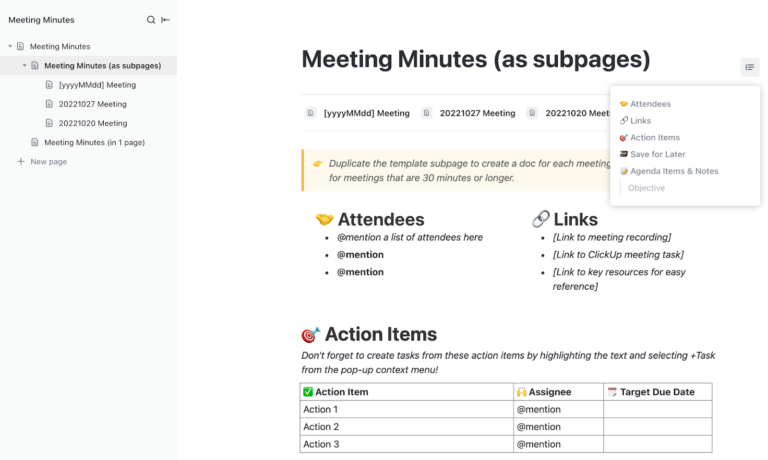
ClickUp’s Meeting Minutes Template streamlines note-taking and organizes information for team meetings. Pre-built pages allow users to document agendas, attendees, action items, and critical decisions efficiently.
As a robust alternative to OneNote, it helps teams track meeting details and assign tasks effectively. Additionally, it enhances collaboration by allowing real-time updates and sharing, ensuring everyone stays informed and accountable.
Ideal for: Team leads, marketers, and departments that need structured note-taking during meetings. It allows for seamless task delegation and follow-up to address all action items efficiently.
The ClickUp Meetings Template streamlines meeting processes, improves collaboration, and ensures that important details are covered. Whether your meetings are brainstorming sessions or structured discussions, this adaptable template keeps everything organized.
You can easily modify sections to fit your meeting goals and share the agenda with attendees beforehand so everyone can come prepared.
You can also assign clear action items and deadlines within the agenda, keeping everyone accountable. Plus, the template includes space for outlining follow-up actions after the meeting.
Ideal for: Project managers conducting structured weekly check-ins. It ensures that all action items are assigned to team members.
The ClickUp Meeting Report Template improves communication by closing feedback loops between teams and clients. It offers custom fields for efficient note-taking, ensuring all details are captured.
The template also allows users to outline agendas, summarize discussions, and assign responsibilities, fostering clarity and accountability.
Ideal for: Project managers and marketing teams who must enhance communication and accountability during client and internal meetings.
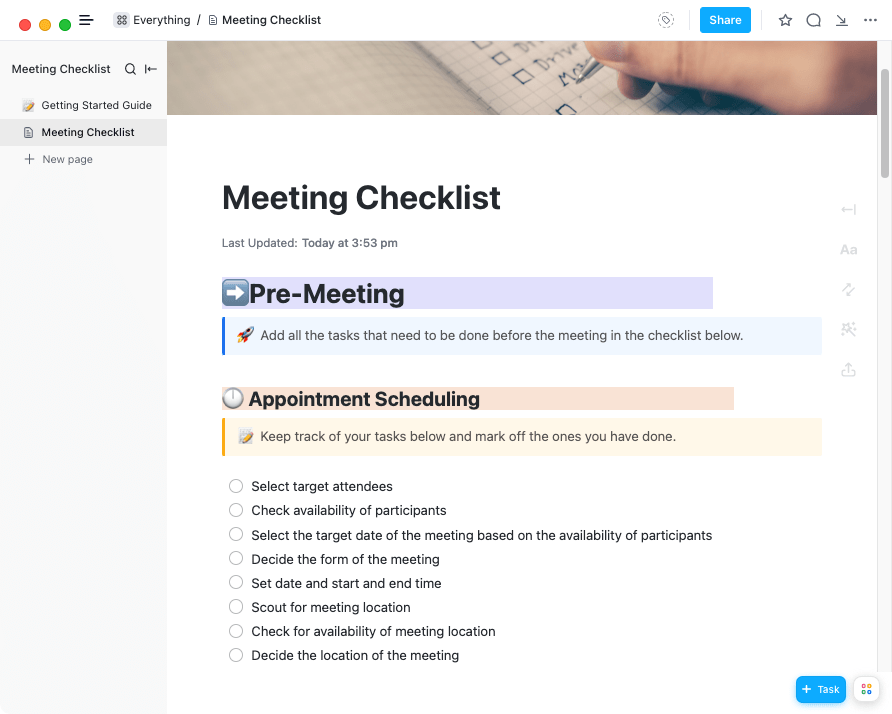
The ClickUp Meeting Checklist Template is designed to enhance meeting preparation and organization. It provides a structured way to outline agenda items, ensure all necessary materials are ready, and assign pre-meeting tasks. This checklist helps teams stay aligned and productive during meetings by confirming that all relevant points are covered.
Ideal for: Administrative professionals, marketing managers, and project coordinators who need a structured approach to prepare for meetings.
The ClickUp Meeting Notes Template allows users to efficiently organize discussions, track action items, and document key decisions all in one place. It promotes clarity and accountability and ensures everyone stays informed and aligned by enabling easy sharing of notes with attendees post-meeting. This template is particularly beneficial for teams of all sizes, keeping meetings focused, organized, and productive.
Ideal for: Teams aiming to enhance meeting documentation. For example, during a weekly meeting, your team can use it to outline the meeting agenda, capture notes, and assign action items to members, ensuring clarity and accountability.
🧠Remember: Team meetings don’t have to be monotonous. All you need to do is have a solid strategy for enhancing engagement.
Here’s what you can do:
With ClickUp’s Meeting Tracker Template, teams can maintain comprehensive records of meetings. This template allows users to monitor meeting dates, attendees, and action items, ensuring accountability and effective follow-ups. By providing a structured format for documentation, it enhances organization and productivity within teams.
Ideal for: Team leads and managers across various business sizes can use this template to improve communication and clarity.
ClickUp’s Meeting Roster Template enables teams to manage attendance and foster engagement during meetings. Users can easily track participant information, monitor attendance, and collect feedback to enhance accountability and communication.
This template is a comprehensive remote attendance solution for teams with hybrid or remote employees. It allows you to track and engage virtual participants seamlessly, log attendance, assign specific roles such as facilitator, timekeeper, or notetaker, and maintain a systematic approach to your meetings.
Ideal for: Organizations managing both in-person and remote meetings. Team leaders can use it to ensure all attendees are accounted for, assign roles effectively, and streamline communication.
The ClickUp Meeting Note Style Template allows you to document key discussion points, decisions, and action items in an organized format. This template makes it easy to refer back to past notes for review.
It also promotes collaborative note-taking, ensuring team members can contribute in real-time and stay aligned on outcomes, enhancing accountability and communication. This optimizes the meeting process and helps ensure everyone stays informed and engaged.
Ideal for: Project strategists and managers who must document discussions effectively and ensure team alignment on project goals.
The ClickUp One-on-one Meeting Template enhances effective one-on-one meetings between managers and team members. It provides a structured framework for documenting discussion points, setting goals, and tracking action items. This template improves communication and accountability, ensuring both parties remain aligned on objectives and progress.
Ideal for: Project managers can use this template during monthly performance reviews to note key points, track action items, and confirm that all necessary participants are present and informed.
ClickUp’s All-Hands Meeting Template is designed to streamline large team gatherings, enabling effective communication and collaboration. It allows users to organize agendas, document discussions, and track action items, ensuring all team members remain informed and engaged.
This template is particularly beneficial for aligning goals, sharing updates, and fostering a sense of community within organizations. It also encourages remote participation, making it accessible for distributed teams.
Ideal for: Company-wide meetings, engaging all team members, from managers to executives.
No matter how effective your note-taking process is, there’s always room for improvement. On this note, OneNote templates help you organize notes and create meeting agendas.
However, if you’re looking for more comprehensive project management and note-taking features, ClickUp is the better choice. With customizable templates and tools for tracking action items and decisions, ClickUp enhances collaboration and productivity. It helps you optimize meeting management while easily integrating into your overall workflow. So why wait? Sign up on ClickUp and elevate your meeting management experience today!

PMO Team
Max 9min read

Praburam Srinivasan
Max 16min read
Praburam Srinivasan
Max 21min read

© 2026 ClickUp