
Kanban Board Examples: 5 Real Boards You Can Copy
Five kanban boards from software, marketing, HR, support, and design teams. Each uses a different column structure built for how that type of work actually moves.
Software Development Sprint Board
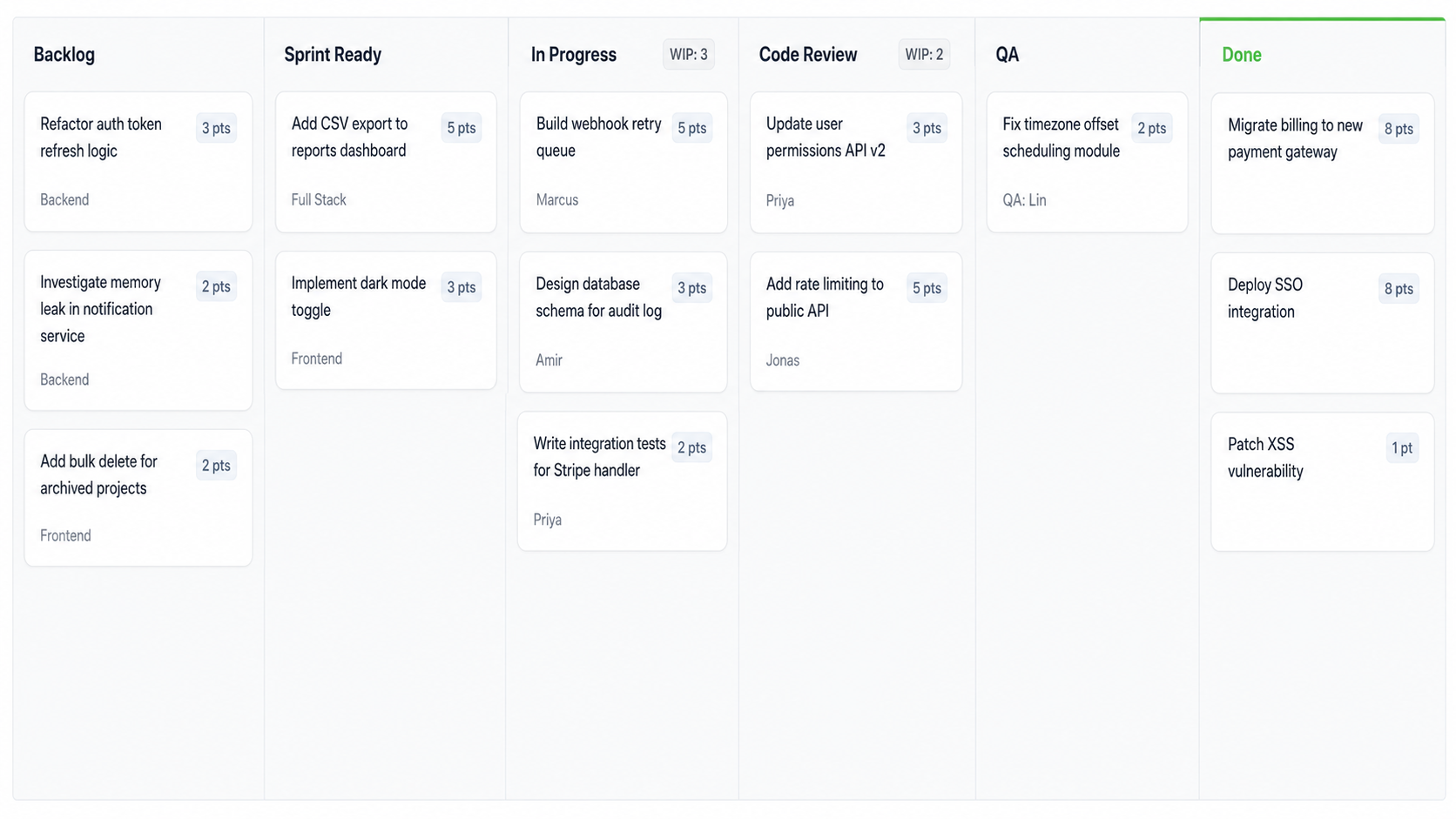
Why This Column Structure Works
his team split \”In Progress\” from \”Code Review\” into separate columns after discovering pull requests were sitting 24 to 48 hours before anyone picked them up. After the split, average review time dropped from 36 hours to under 8.
WIP limits of 3 on In Progress and 2 on Code Review match the team’s actual capacity: three developers work features simultaneously while two reviewers rotate daily. The Backlog column has no limit because it functions as a parking lot, not an active work stage. Story points on every card help the team gauge whether they are pulling sustainable amounts of work each cycle.
Content Marketing Pipeline
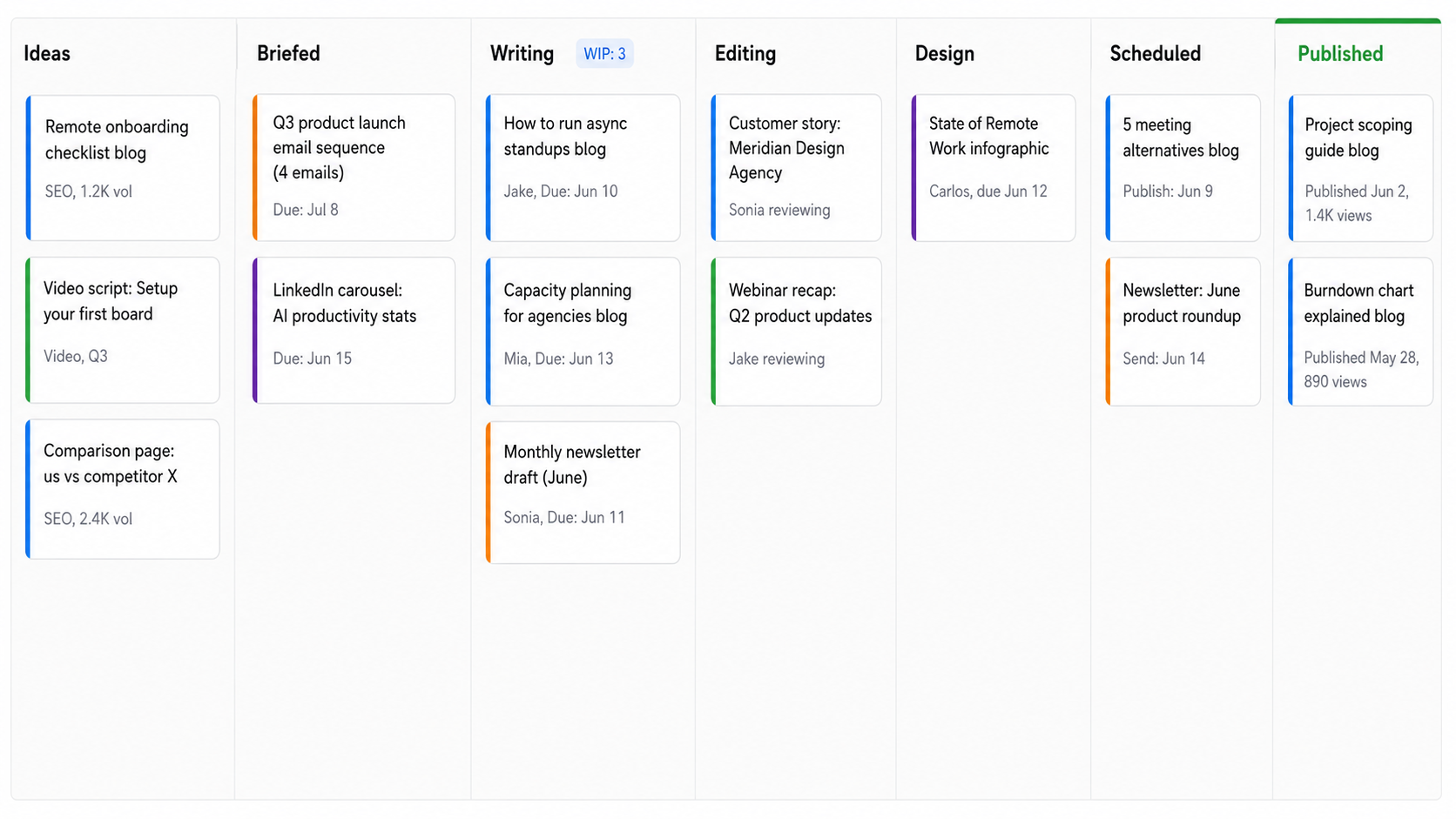
Why Seven Columns Is Not Too Many
Each column represents a genuine handoff between people. Writer to editor, editor to designer, designer to scheduler. Without explicit columns for each handoff, cards stall in a generic “In Progress” with no visibility into who is blocking whom.
The Published column keeps recently shipped content visible with view counts, closing the feedback loop. An underperforming post triggers a retrospective that feeds new ideas back into the pipeline. The WIP limit of 3 on Writing prevents writers from juggling too many drafts, which the team learned leads to shallow first drafts that require heavier editing cycles.
HR Employee Onboarding
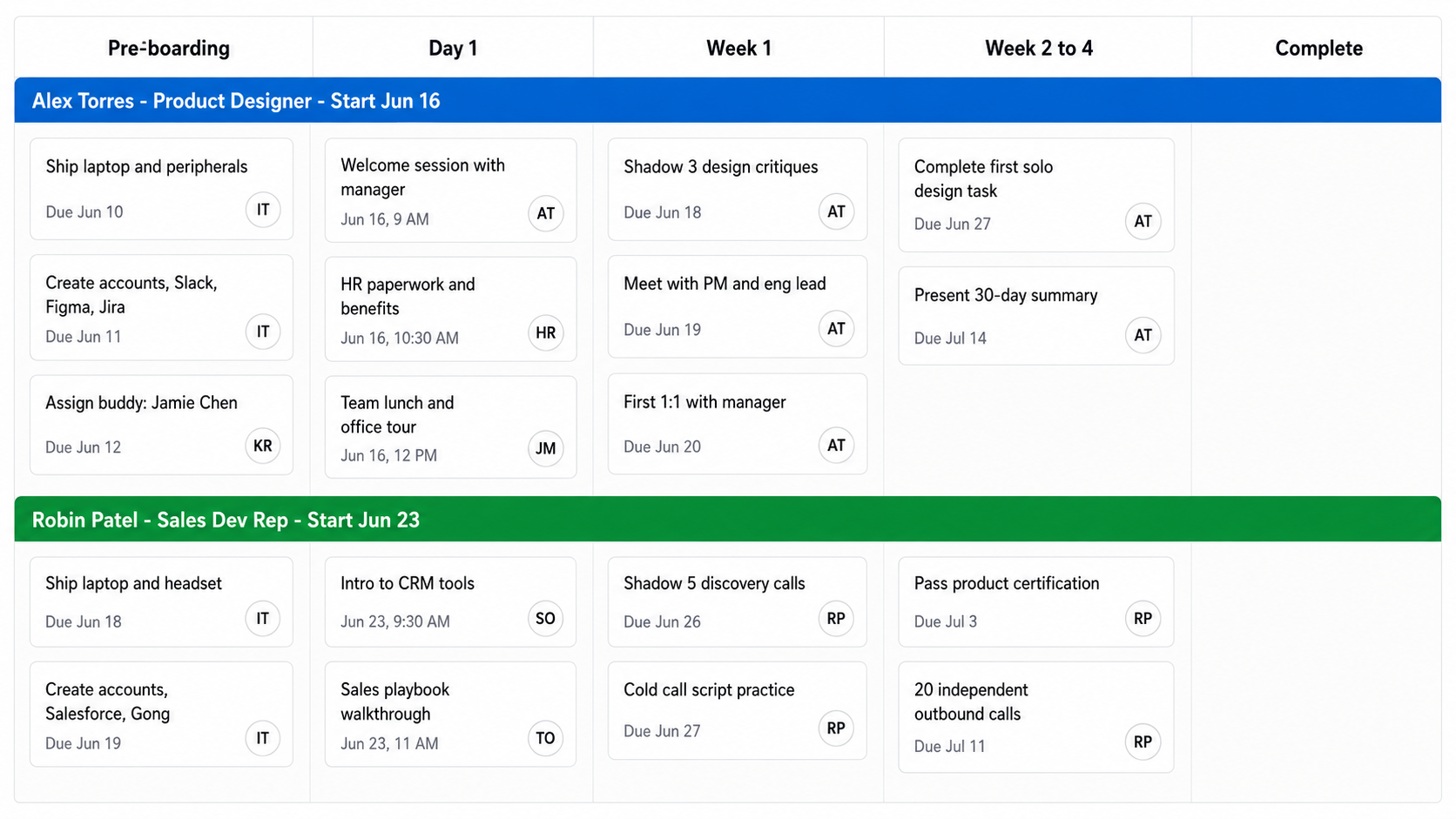
Time Phases Replace Task Categories
This board uses calendar milestones as columns instead of workflow stages. Pre-boarding, Day 1, Week 1, Week 2 to 4, Complete. That structure works because onboarding is inherently sequential: a new hire cannot shadow design critiques in Week 1 if their accounts were not created during Pre-boarding.
Swim lanes divide the board by person rather than task type. Each hire’s row shows their progress through the same milestone sequence, making it obvious when someone falls behind. Every task includes the responsible person’s name because onboarding involves coordination across IT, the hiring manager, the assigned buddy, and the new hire themselves.
Customer Support Triage
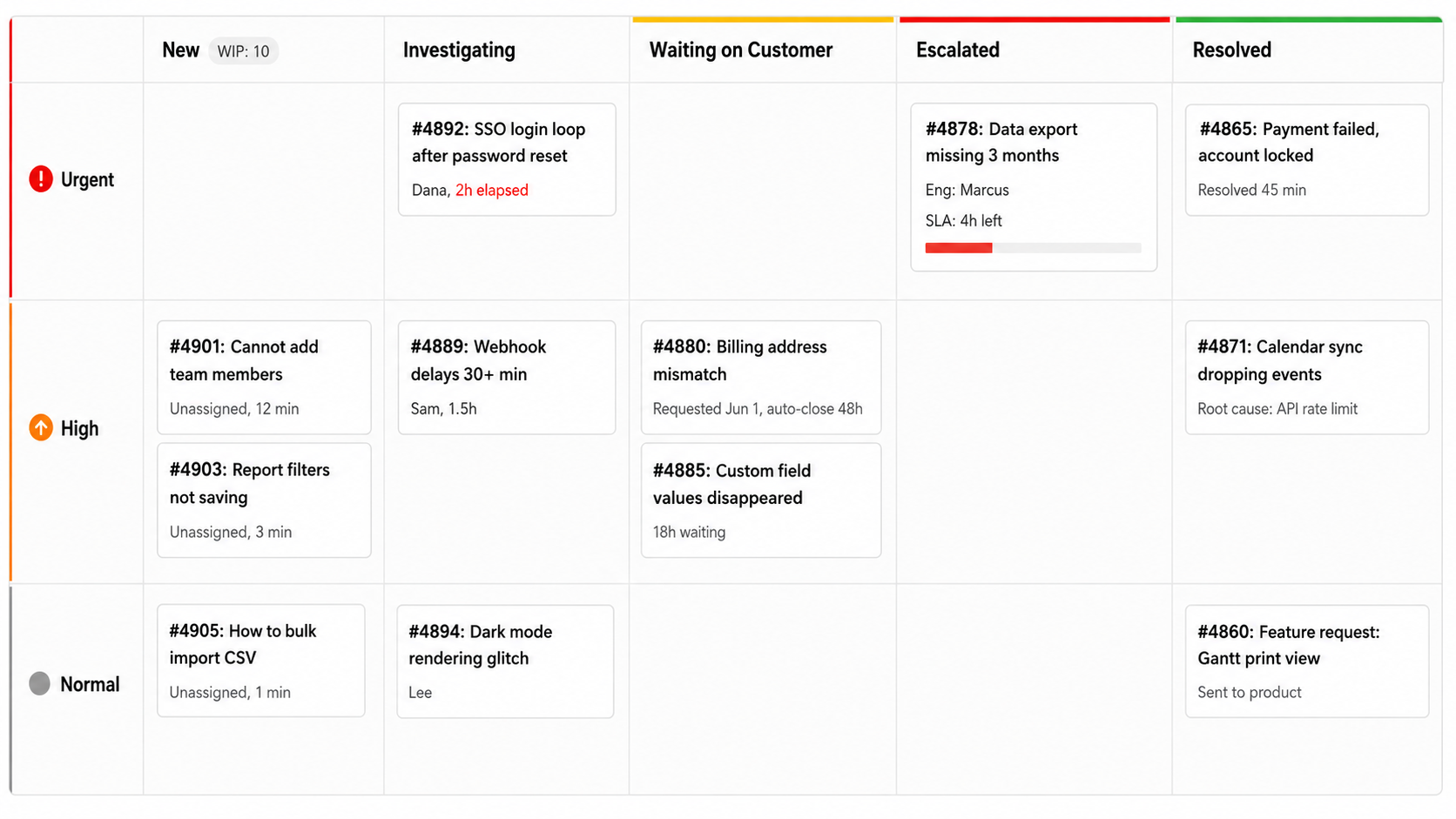
Priority Swim Lanes and Blocked Work Separation
Priority swim lanes (Urgent, High, Normal) layer on top of the column structure so agents scan Urgent first, then work downward. The “Waiting on Customer” column is the critical design choice here: it removes blocked tickets from the active investigation queue without losing track of them. An auto-close timer of 48 hours without response prevents zombie tickets from accumulating.
The Escalated column routes to engineering with SLA countdowns, creating a dual-timer system (one for initial response, one for escalation resolution) that shows management where delays actually originate. The WIP limit of 10 on New forces triage: if more than 10 unassigned tickets exist, someone stops investigating and starts routing before the queue grows.
Product Design Workflow
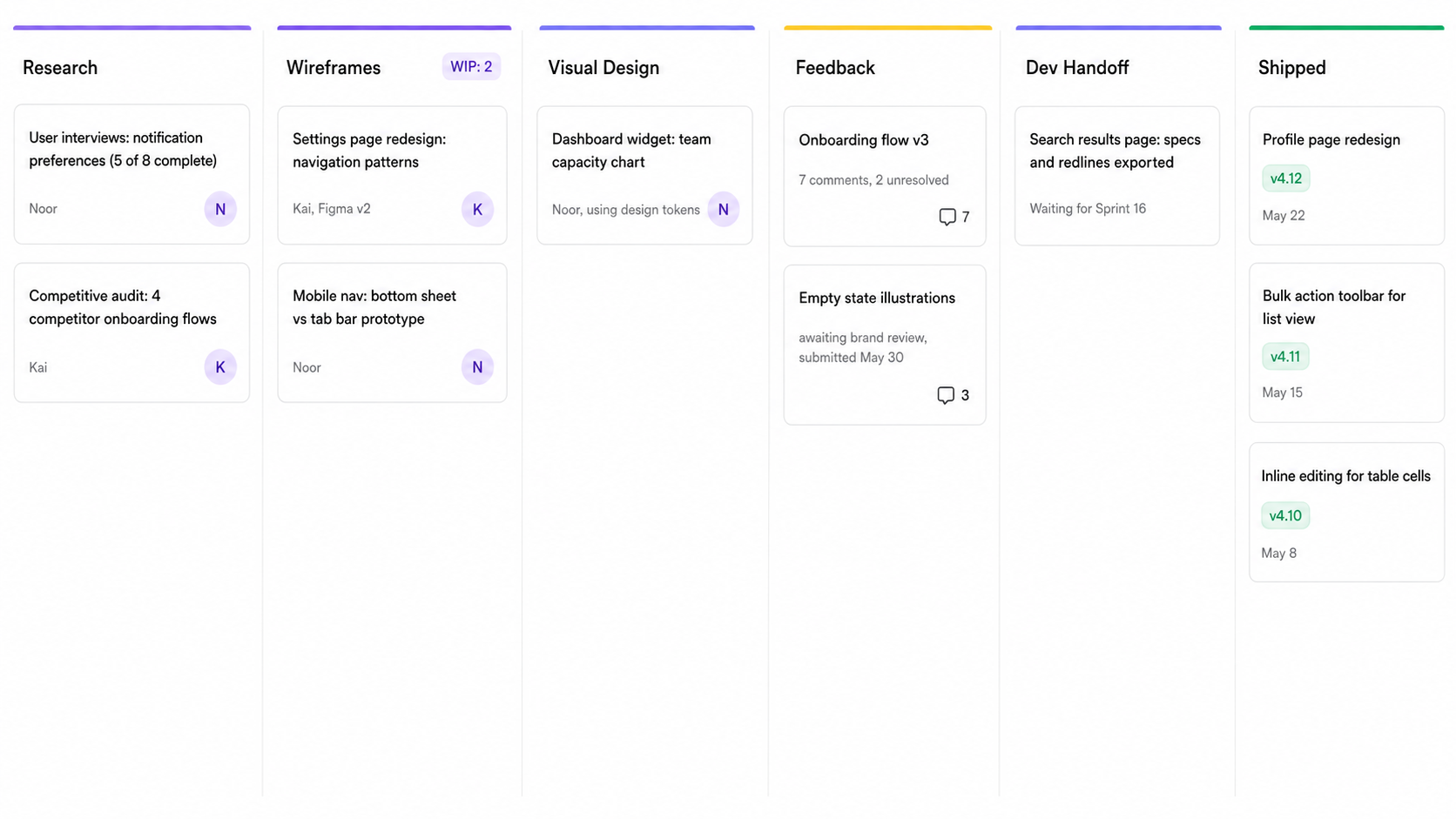
Feedback as a Stage, Not an Interruption
The Feedback column sits after Visual Design because feedback is an expected part of the process, not a disruption. Designers address comments in that column before advancing to Dev Handoff. Cards only move backward to Wireframes if feedback reveals a fundamental structural problem, not a color or spacing tweak.
The WIP limit of 2 on Wireframes reflects a design-specific constraint: context switching between exploratory wireframe sessions degrades creative output significantly. The Shipped column keeps version numbers and dates visible as a team accomplishment log, which proves useful during retrospectives when the team needs to recall what actually shipped versus what got stuck.
What Makes This Example Work
Three patterns separate these boards from the ones that become dumping grounds.
Column names describe stages, not statuses. “Code Review” and “Investigating” tell you what action is happening. Vague columns like “In Progress” or “Pending” hide where work actually sits. Every board above uses columns that answer: what is someone doing with this card right now?
WIP limits target bottlenecks, not everything. The dev board caps Code Review at 2 because handoffs stall there. The support board caps New at 10 to force triage. The design board caps Wireframes at 2 because context switching kills creative work. WIP limits go where your team’s work piles up, not on every column.
Card detail matches decision complexity. Support tickets show elapsed time and SLA countdowns because agents need that to prioritize. The HR board shows dates and owners because onboarding is calendar driven. The marketing board shows view counts in Published to close the feedback loop. Add the metadata your team needs to make the next decision about that card, and nothing else.
Common Questions About Kanban Board Examples: 5 Real Boards You Can Copy
How many columns should a kanban board have?
Most effective boards use 4 to 7 columns. Fewer than 4 usually means you are hiding stages inside a single column, which makes bottlenecks invisible. More than 7 creates overhead where people spend more time moving cards than doing work. Start with your actual workflow stages, run it for two weeks, then merge any columns where cards never accumulate.
Can I use the same kanban board structure across different teams?
Rarely without modification. Column structures need to match how work actually flows through a specific team. A marketing team’s “Design” column has no equivalent on a support board. Start with one of the examples above that matches your workflow type, then adjust the columns based on where cards pile up or skip stages entirely.
What is the difference between a kanban board and a Scrum board?
A kanban board runs continuously with no fixed iterations. Cards enter from the left and exit from the right as work completes. A Scrum board resets every sprint: the team pulls a fixed set of items into the sprint, works them to Done, then clears the board and starts again. The software development board above blends both approaches, which is common in practice.