

Sorry, there were no results found for “”
Sorry, there were no results found for “”
Sorry, there were no results found for “”
Most developers who build a Hugging Face summarization script hit the same wall: the summary works perfectly in their terminal. But it rarely connects to the actual work it’s supposed to support.
This guide walks you through building a text summarizer with Hugging Face’s Transformers library, then shows you why even a flawless implementation can create more problems than it solves when your team needs summaries that actually connect to tasks, projects, and decisions.
Teams are drowning in information. You’re facing lengthy documents, endless meeting transcripts, dense research papers, and quarterly reports that take hours to manually digest. This constant information overload slows down decision-making and kills productivity.
Text summarization is the process of using Natural Language Processing (NLP) to condense this content into a short, coherent version that preserves the most critical information. Think of it as an instant executive brief for any document. This NLP summarization technology generally uses one of two approaches:
Extractive summarization: This method works by identifying and pulling the most important sentences directly from the source text. It’s like having a highlighter automatically pick out the key points for you. The final summary is a collection of original sentences.
Abstractive summarization: This more advanced method generates entirely new sentences to capture the core meaning of the source text. It paraphrases the information, resulting in a more fluid and human-like summary, much like how a person would explain a long story in their own words.
You see the results of this everywhere. It’s used to condense meeting notes into action items, distill customer feedback into trends, and create quick overviews of project documentation. The goal is always the same: get the essential information without reading every single word.
📮 ClickUp Insight: The average professional spends 30+ minutes a day searching for work-related information. That’s over 120 hours a year lost to digging through emails, Slack threads, and scattered files. An intelligent AI assistant embedded in your workspace can change that. ClickUp Brain delivers instant insights and answers by surfacing the right documents, conversations, and task details in seconds, so you can stop searching and start working.
💫 Real Results: Teams like QubicaAMF reclaimed 5+ hours weekly using ClickUp, over 250 hours annually per person, by eliminating outdated knowledge management processes.
Building a custom text summarization model from scratch is a massive undertaking. It requires enormous datasets for training, powerful and expensive computational resources, and a team of machine learning experts. This high barrier to entry keeps most engineering and product teams from ever getting started.
Hugging Face is the platform that solves this problem. It’s an open-source community and data science platform that gives you access to thousands of pretrained models, effectively democratizing LLM summarization for developers. Instead of building from the ground up, you can start with a powerful model that’s already 99% of the way there.
Here’s why so many developers turn to Hugging Face: 🛠️
Pre-trained model access: The Hugging Face Hub is a massive repository of over 2 million public models trained by companies like Google, Meta, and OpenAI. You can download and use these state-of-the-art checkpoints for your own projects.
Simplified pipeline API: The pipeline function is a high-level API that handles all the complex steps, like text preprocessing, model inference, and output formatting, in just a few lines of code.
Model variety: You aren’t locked into one option. You can choose from a wide range of architectures like BART, T5, and Pegasus, each with different strengths, sizes, and performance characteristics.
Framework flexibility: The Transformers library works seamlessly with the two most popular deep learning frameworks, PyTorch and TensorFlow. You can use whichever one your team is already comfortable with.
Community support: With extensive documentation, official courses, and an active community of developers, it’s easy to find tutorials and get help when you run into issues.
While Hugging Face is incredibly powerful for developers, it’s important to remember that it’s a code-based solution. It requires technical expertise to implement and maintain. This isn’t always the right fit for non-technical teams who just need to summarize their work.
🧐 Did You Know? Hugging Face’s Transformers library made it mainstream to use state-of-the-art NLP models with a few lines of code, which is why summarization prototypes often start there.
So you’ve decided to use Hugging Face, but what’s the actual technology doing the work? The core technology is an architecture called the Transformer. When it was introduced in a 2017 paper titled “Attention Is All You Need,” it completely changed the field of NLP.
Before Transformers, models struggled to understand the context of long sentences. The Transformer’s key innovation is the attention mechanism, which allows the model to weigh the importance of different words in the input text when processing a specific word. This helps it capture long-range dependencies and understand context, which is crucial for creating coherent summaries.
The Hugging Face Transformers library is a Python package that makes it incredibly easy for you to use these complex models. You don’t need a Ph.D. in machine learning. The library abstracts away the heavy lifting.
Two of the most popular models for summarization are BART and T5. BART (Bidirectional and Auto-Regressive Transformer) is particularly good at abstractive summarization, producing summaries that read very naturally. T5 (Text-to-Text Transfer Transformer) is a versatile model that frames every NLP task as a text-to-text problem, making it a powerful all-rounder.
🎥 Watch this video to see the best AI PDF summarizers compared—and learn which tools deliver the fastest, most accurate summaries without losing context.
Ready to build your own summarizer example? All you need is some basic Python knowledge, a code editor like VS Code, and an internet connection. The entire process takes just four steps. You’ll have a working summarizer in minutes.
First, you need to install the necessary libraries. The main one is transformers. You’ll also need a deep learning framework like PyTorch or TensorFlow. We’ll use PyTorch for this example.
Open your terminal or command prompt and run the following command:

Some models, like T5, also require the sentencepiece library for their tokenizer. It’s a good idea to install it as well.

💡 Pro Tip: Create a Python virtual environment before installing these packages. This keeps your project dependencies isolated and prevents conflicts with other projects on your machine.
The easiest way to get started is by using the pipeline function. It automatically handles loading the correct model and tokenizer for the summarization task.
In your Python script, import the pipeline and initialize it like this:

Here, we’re specifying two things:
The task: We tell the pipeline we want to perform “summarization”.
The model: We choose a specific pretrained model checkpoint from the Hugging Face Hub. facebook/bart-large-cnn is a popular choice trained on news articles and works well for general-purpose summarization. For quicker testing, you could use a smaller model like t5-small.
The first time you run this code, it will download the model weights from the Hub, which might take a few minutes. After that, the model will be cached on your local machine for instant loading.
To make your code clean and reusable, it’s best to wrap the summarization logic in a function. This also makes it easy to experiment with different parameters.
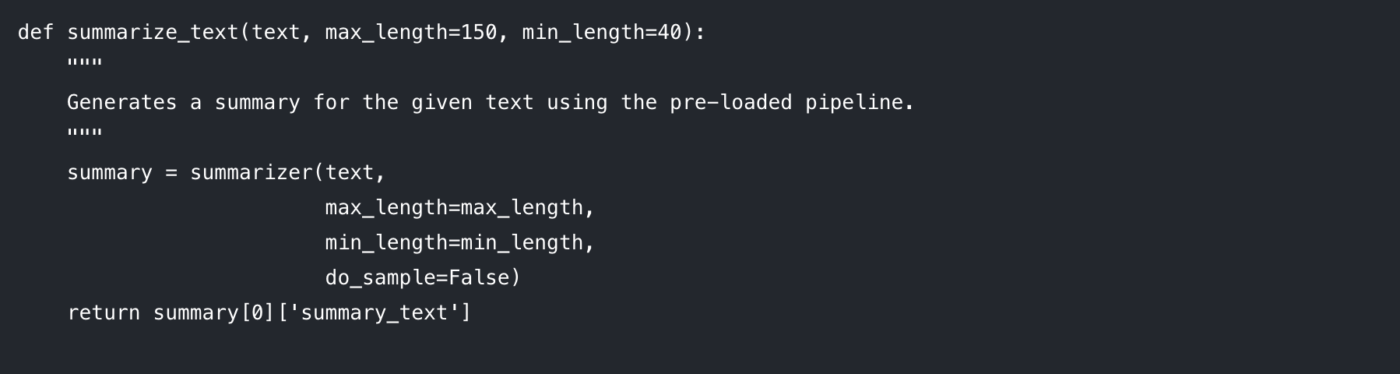
Let’s break down the parameters you can control:
max_length: This sets the maximum number of tokens (roughly, words) for the output summary.
min_length: This sets the minimum number of tokens to prevent the model from generating overly short or empty summaries.
do_sample: When set to False, the model uses a deterministic method (like beam search) to generate the most likely summary. Setting it to True introduces randomness, which can produce more creative but less predictable results.
Tuning these parameters is key to getting the output quality you want.
Now for the fun part. Pass your text to the function and print the result. 🤩
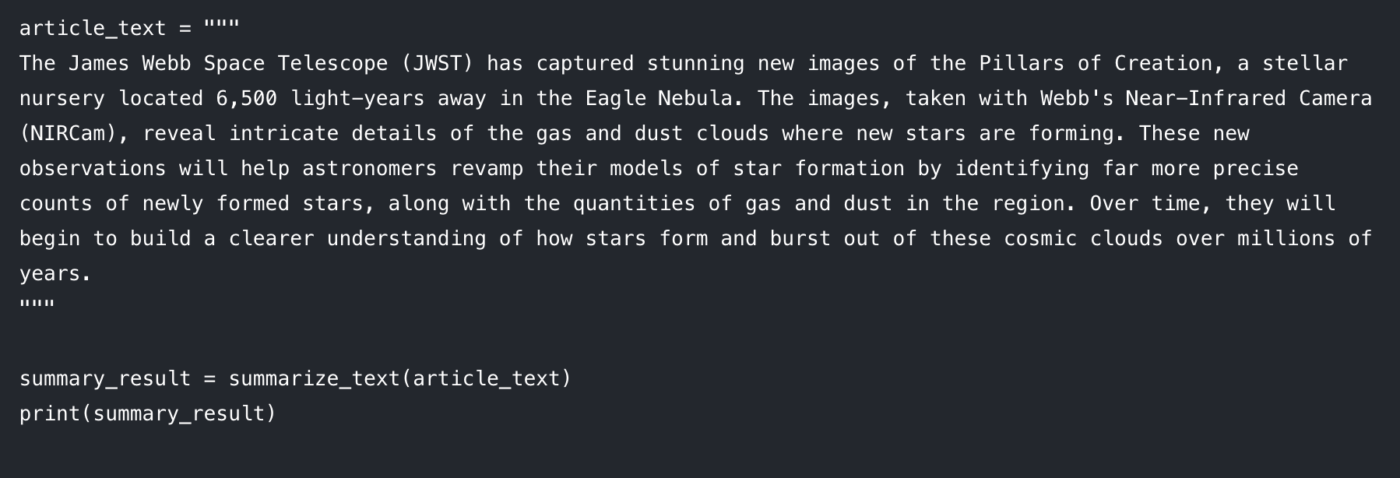
You should see a condensed version of the article printed to your console. If you run into issues, here are some quick fixes:
Input text is too long: The model might throw an error if your input exceeds its maximum length (often 512 or 1024 tokens). Add truncation=True inside the summarizer() call to automatically cut off long inputs.
Summary is too generic: Try increasing the num_beams parameter (e.g., num_beams=4). This makes the model search more thoroughly for a better summary but can be slightly slower.
This code-based approach is fantastic for developers building custom apps. But what happens when you need to integrate this into a team’s daily work? That’s where the limitations start to show.
Hugging Face is a great option when you want flexibility and control. But once you try to use it for real team workflows (not just a demo notebook), a few predictable challenges show up fast.
Most summarization models have a fixed max input length. For example, facebook/bart-large-cnn is configured with max_position_embeddings = 1024. That means longer docs often require truncation or chunking.
If you only need a quick baseline, you can enable truncation in the pipeline and move on. But if you need faithful long-document summaries, you typically end up building chunking logic and then doing a second pass, a “summary of summaries,” to stitch the results together. That is extra engineering, and it is easy to get inconsistent output.
Abstractive models can sometimes hallucinate, generating text that sounds plausible but is factually incorrect. For business-critical use, that creates a problem: every summary needs manual verification. At that point, you are not really saving time, you are just moving the work to a different part of the process.
A Hugging Face model only knows about the text you feed it. It has no understanding of your project’s goals, the people involved, or how one document relates to another, lacking the contextual intelligence of modern systems. It can’t tell you if a summary from a customer call contradicts the project requirements doc, because it lives in isolation.
Generating a summary is usually the easy part. The real friction is what comes next.
Where does the summary go? Who sees it? How does it turn into an actionable task? How do you connect it to the work that triggered it?
Solving that “last mile” means building custom integrations and glue code. That adds developer work up front, and it often creates a clunky workflow for everyone else.
A Python-based approach is mostly accessible to people who can code. That creates a practical barrier for marketing, sales, and operations teams, which means adoption stays limited.
It also comes with ongoing maintenance: managing dependencies, updating libraries, and keeping everything working as APIs and models evolve. What starts as a quick win can quietly become another system to babysit.
📮 ClickUp Insight: 42% of disruptions at work come from juggling platforms, managing emails, and jumping between meetings. What if you could eliminate these costly interruptions? ClickUp unites your workflows (and chat) under a single, streamlined platform. Launch and manage your tasks from across chat, docs, whiteboards, and more, while AI-powered features keep the context connected, searchable, and manageable.
Even if your summarization script works perfectly, your team can still lose time because the output is disconnected from where work actually happens.
That is context sprawl, when teams waste hours searching for information, switching between apps, and hunting down files across disconnected platforms.
This is where a converged workspace changes the game. Instead of generating summaries in one place and trying to “move them into work” later, a converged system keeps projects, documents, and conversations together, with ClickUp Brain embedded as the intelligence layer. Your summaries stay connected to tasks and Docs, so the next step is obvious, and the handoff is immediate.
A summarization script can work perfectly and still fail your team in one annoying way: the summary ends up living somewhere separate from the work.
That gap creates context sprawl, where information is scattered across docs, chat threads, tasks, and “quick notes” in tools that do not connect. People spend more time finding the summary than using it. The real win is not just generating a summary. It is keeping that summary attached to decisions, owners, and next steps where work actually happens.
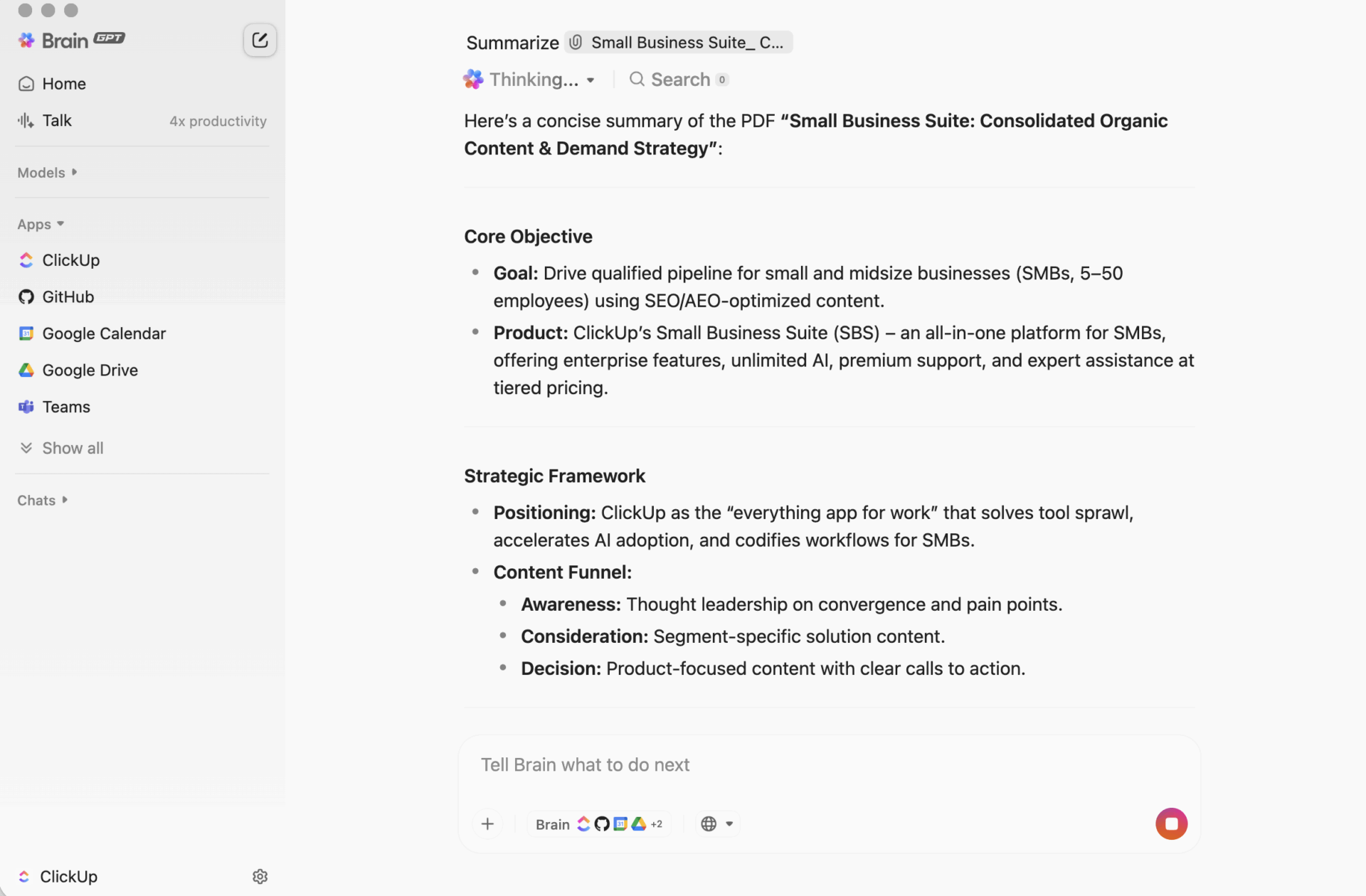
That is what ClickUp Brain does differently. It summarizes tasks, documents, and conversations inside the same workspace where your projects live, so your team can understand something and act on it without jumping tools.

ClickUp BrainGPT: interact with summaries using natural language
On desktop, BrainGPT is the conversational interface for ClickUp Brain. Instead of opening scripts, notebooks, or external AI tools, your team can ask for what they need in plain language, directly in ClickUp.
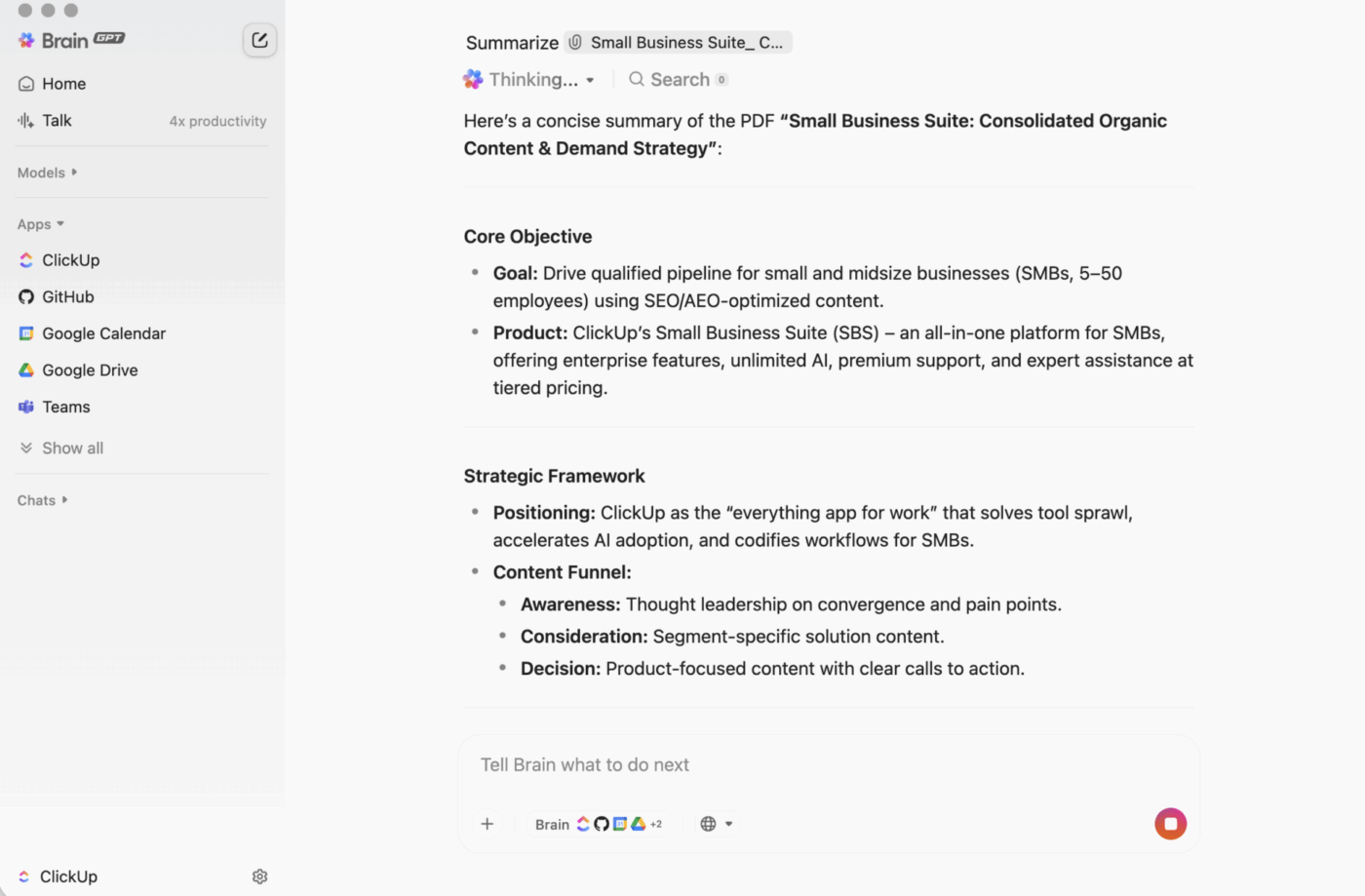
You can type (or use talk-to-text) to:
Because ClickUp Brain is working inside your workspace, the output is grounded in live context: task descriptions, comments, subtasks, linked Docs, and project structure. You are not pasting text into a separate tool and hoping nothing important gets missed.
A developer-built workflow can generate strong summaries. The friction shows up after that, when someone has to copy the output into the place where the work happens, then translate it into tasks, then chase follow-through.
ClickUp Brain closes that loop:
No coding required
Anyone on the team can summarize a Doc, a task thread, or a messy set of comments without installing anything or writing code.
Context-aware summaries
ClickUp Brain can include the parts people usually forget: decisions buried in comments, blockers mentioned in replies, subtasks that change the meaning of “done.”
Summaries live where the work lives
You can catch up inside a task, add a summary at the top of ClickUp Docs, or quickly recap a discussion without creating another “summary doc” nobody checks.
Less tool sprawl
You do not need separate scripts, Jupyter notebooks, API keys, or a workflow that only one person understands. Your Docs, Tasks, and summarization all stay in the same system.
This is the practical advantage of a converged workspace: summarization, action, and collaboration happen together instead of being stitched together after the fact.
This is the practical advantage of a converged workspace: summarization, action, and collaboration happen together instead of being stitched together after the fact.
Here are a few common patterns teams use:
| Capability | Hugging Face (code-based) | ClickUp Brain |
|---|---|---|
| Setup required | Python environment, libraries, coding | None, built-in |
| Context awareness | Text only (what you pass in) | Full workspace context (tasks, Docs, comments, subtasks) |
| Workflow integration | Manual export/import | Native: summaries can become tasks and updates |
| Technical skill needed | Developer-level | Anyone on the team |
| Maintenance | Ongoing model and code upkeep | Automatic updates |
Summaries are useful. The hard part is making sure they consistently turn into follow-through, especially when volume scales.
That is where ClickUp Super Agents come in. They can use summarized information and move work forward based on triggers and conditions, inside the same workspace.
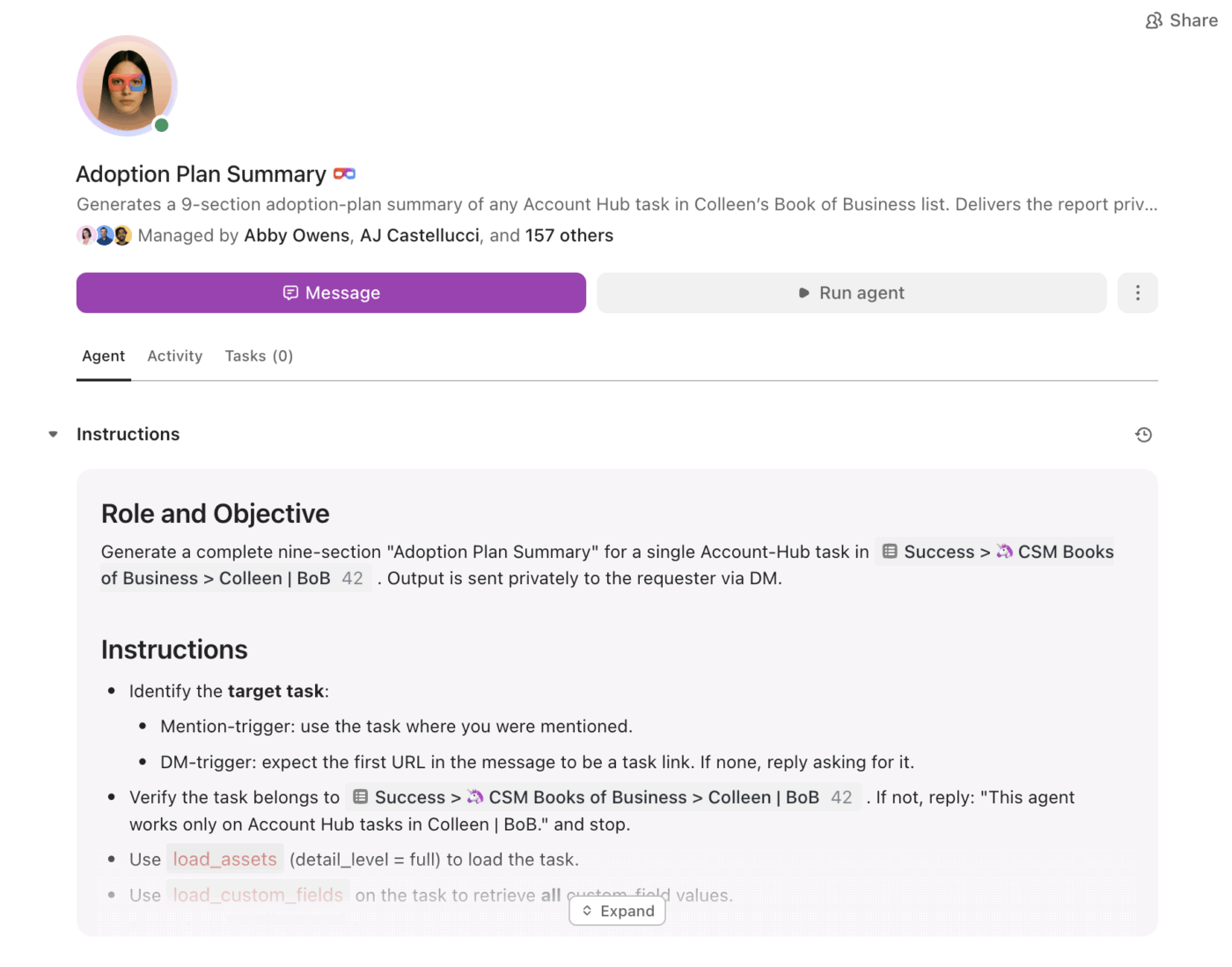
With Super Agents, teams can:
Instead of a summary sitting as static text, agents help ensure the summary becomes a plan, and the plan becomes progress.
Hugging Face Transformers are great when you need a custom app, a bespoke pipeline, or full control over model behavior.
But for most teams, the bigger problem is not “Can we summarize this?” It is “Can we summarize this and immediately turn it into work, with owners, deadlines, and visibility?”
If your goal is team productivity and fast execution, ClickUp Brain gives you summaries in context, right where work happens, with a clear path from “here’s the gist” to “here’s what we are doing next.”
Ready to skip the setup and start summarizing where your work actually lives? Get started for free with ClickUp and let Brain handle the heavy lifting.

© 2026 ClickUp




