Truth time. Every month you delay AI adoption, the gap between your team’s output and what’s actually possible widens.
Your team spends its valuable creative energy on mechanical work rather than on strategy.
Most teams assume using AI without a technical background means settling for watered-down results.
Small businesses with AI needs feel this most acutely and are locked out of advanced technology because the conversation is dominated by engineering-heavy implementations.
But the real barrier isn’t skill—it’s scattered work living across too many disconnected tools, a challenge so common that 45% of employees told McKinsey seamless workflow integration would increase their daily AI use.
This guide walks you through exactly how to use AI without a technical team. You’ll learn the basics of no-code automation, build your first workflow, measure real results, and avoid common mistakes that trip up even motivated teams. 🙌
Summarize this article with AI
ClickUp Brain not only saves you precious time by instantly summarizing articles, it also leverages AI to connect your tasks, docs, people, and more, streamlining your workflow like never before.
Summarize this article for me please
Why Non-Technical Teams Can’t Afford to Wait on AI
If you’re an operations lead or a manager in a small business, you probably know what it’s like to watch competitors move faster while your own teams stay stuck in manual workflows.
But it’s not just you, though. According to an OECD survey, just 20-30% of SMB firms currently use generative AI.
While the reasons range from integration challenges to security threats, everyone seems to be running into AI bottlenecks. However, this is still not something small businesses can afford to wait on.
Here’s why:
❗️You’re risking your competitive survival, not just a trend: A whopping 72% of data strategy decision-makers warn that businesses will outright fail without AI adoption, and 54% are actively worried that delaying implementation will cost them their competitive edge
❗️You’re paying a massive “productivity penalty” every single day: Business professionals using AI can draft 59% more documents per hour, and overall, AI has been shown to boost general employee productivity by up to 66%
❗️The ROI is already proven (and your competitors are cashing in): 74% of organizations report positive ROI on their mature AI implementations, and for small businesses specifically, 87% say that AI helps them scale operations, while 86% saw improved margin
❗️Your team wants to use it: Contrary to the fear that AI causes widespread job anxiety, 71% of employees report that implementing AI has actually enhanced their job satisfaction and career growth
Okay, so now you know you need to do this. Let’s get into the “how” of things.
Summarize this article with AI
ClickUp Brain not only saves you precious time by instantly summarizing articles, it also leverages AI to connect your tasks, docs, people, and more, streamlining your workflow like never before.
Summarize this article for me please
What AI Actually Means for Teams Without a Technical Background
The conversation around artificial intelligence is filled with technical jargon that alienates everyday business users.
Non-technical teams experience paralysis by analysis when choosing the right software. You end up buying disconnected tools (or tool sprawl) that confuse your team and fragment your daily work( aka work sprawl).
The right tool needs to cut through the noise and handle the complexity behind the scenes. Let’s look at the tools that are broadly available for a team looking to implement AI without a technical team:
Large language models and chatbots
Large language models are systems trained on massive amounts of text that read, write, summarize, and answer questions in natural language.
In practice, this means your team can ask questions, generate content, or summarize information without needing technical skills. But generic chatbots used for business fall short because they don’t understand your work context. They operate in isolation, without access to your projects, tasks, or internal knowledge.
That’s why teams often end up copying and pasting context into separate tools, which adds friction instead of removing it.
The real value comes when AI can access your actual work, so it can answer questions about specific tasks, summarize real updates, and generate outputs based on your team’s context, not generic inputs.
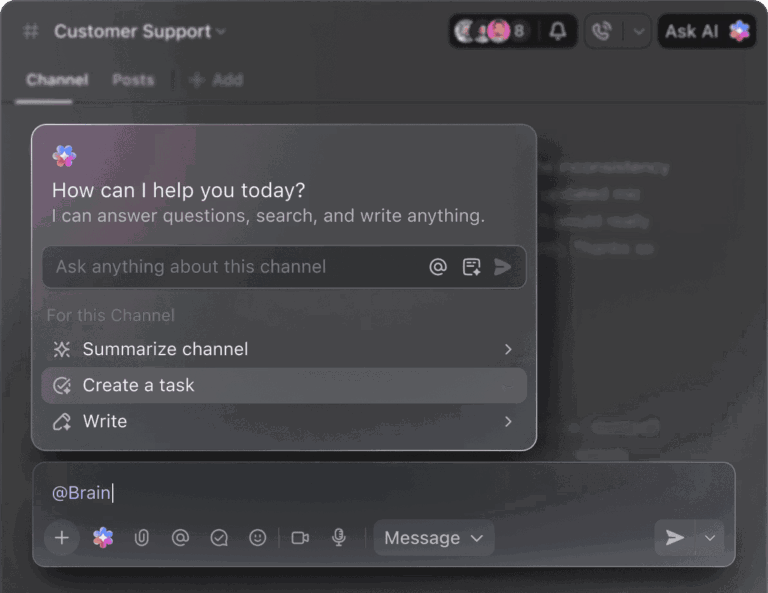
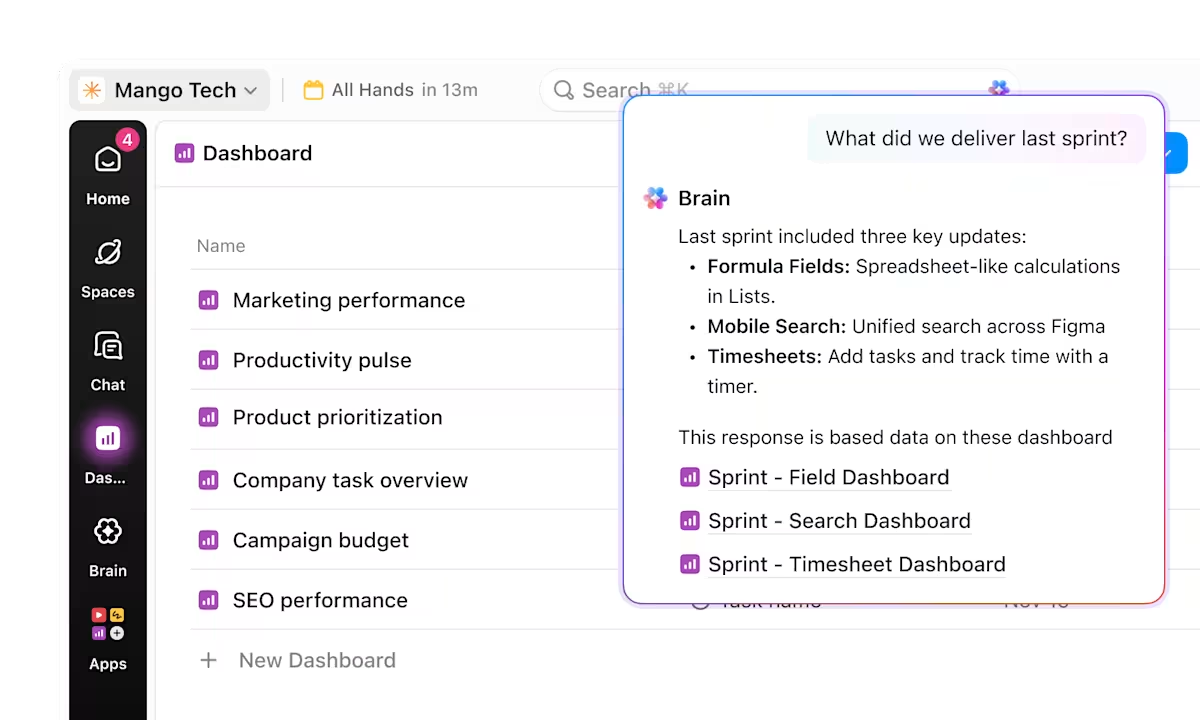
Here’s an example of how well AI performs with context, featuring ClickUp AI. ⬇️
No-code workflows and automations
No-code automation is what turns AI from something interesting into something useful.
At its core, it’s a simple system of logic: when something happens, the tool takes an action. These workflows are built using three components: triggers, conditions, and actions.
For example, when a task status changes, the system can automatically assign the next owner, update related data, or notify the right person. These small automations remove the need for constant manual coordination.
Without workflow automation, teams spend significant time on repetitive tasks such as follow-ups, updates, and handoffs. With it, those processes become consistent and reliable.
The key is that your team still handles decision-making and creative work, while the system handles the repetitive execution that slows things down.
AI agents that reason and act on your behalf
AI agents are the next step beyond automation.
Instead of just following predefined rules, an agent can observe what’s happening across your workflows, understand context, and take action within the boundaries you set.
Think of it less like a tool and more like a built-in assistant. An agent can identify when something is stuck, notice when information is missing, or recognize patterns across tasks and conversations. From there, it can step in by assigning tasks, surfacing risks, or prompting the next step.
The difference is subtle but important:
Automation reacts to specific triggers
Agents continuously pay attention
This means less manual oversight and fewer things slipping through the cracks, especially as your team and workload grow.
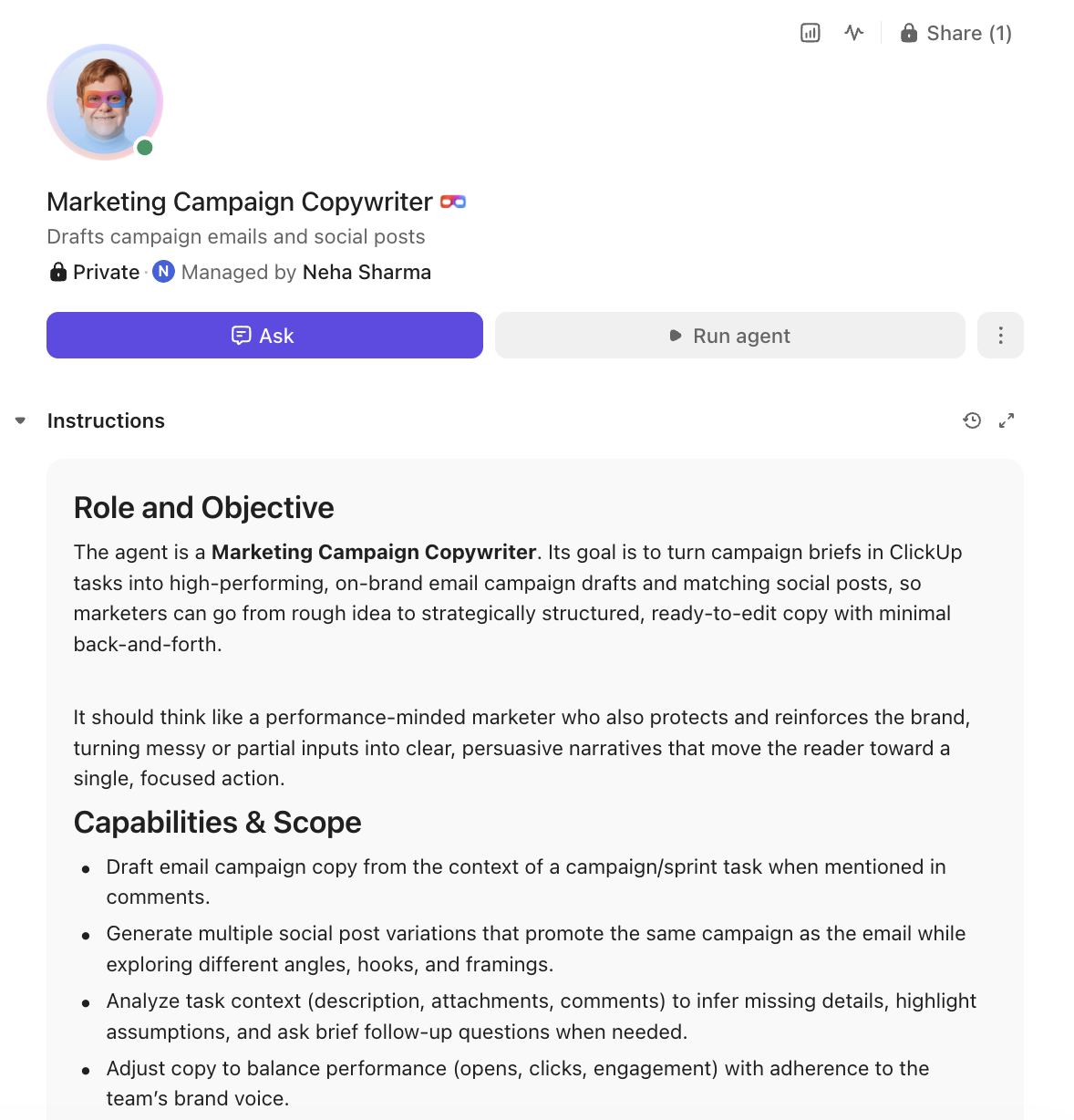
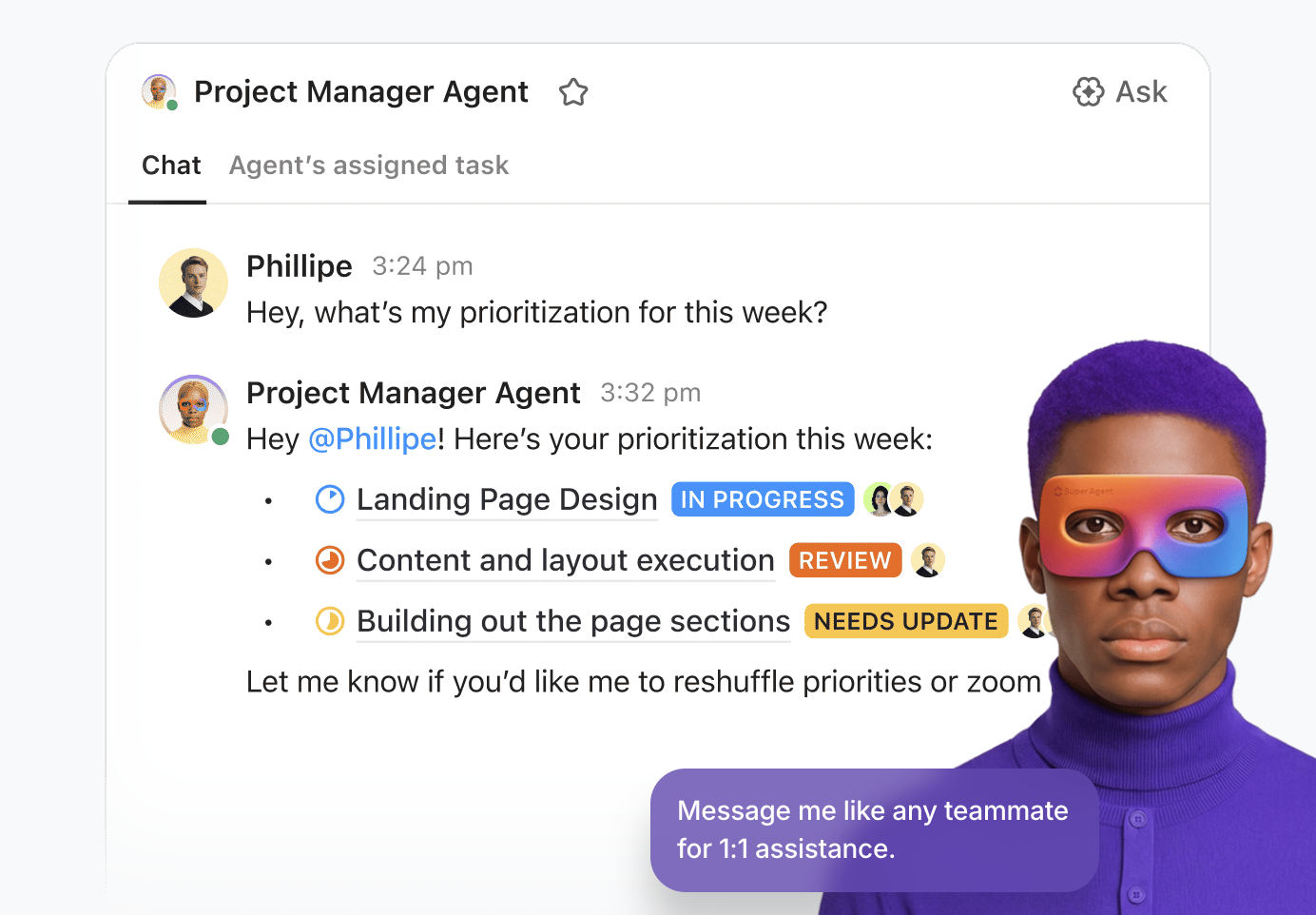
Here’s an example of a Super Agent, with defined capabilities & scope, from ClickUp
📮 ClickUp Insight: 21% of people say more than 80% of their workday is spent on repetitive tasks. And another 20% say repetitive tasks consume at least 40% of their day.
That’s nearly half of the workweek (41%) devoted to tasks that don’t require much strategic thinking or creativity (like follow-up emails 👀).
For SMBs, AI is meant to remove that extra work that slows everything down.
Video production company path8 Productions hit a breaking point as they scaled. Work was spread across Smartsheet, Slack, Toggl, and Dropbox Paper. Producers were stuck copying updates between systems instead of moving projects forward.
Instead of layering AI on top of that mess, they rebuilt their system.
They consolidated everything into ClickUp’s Small Business Suite, creating a connected workspace where AI, automation, and workflows could actually work together.
⚡ The impact
Real-time visibility across planning, messaging, and time tracking
6 tools replaced with one unified workspace
60% less time spent preparing for team meetings (from 30–60 minutes to ~10 minutes)
Fully rolled out in under 8 weeks with ClickUp’s support
Summarize this article with AI
ClickUp Brain not only saves you precious time by instantly summarizing articles, it also leverages AI to connect your tasks, docs, people, and more, streamlining your workflow like never before.
Summarize this article for me please
How to Assess Your Team’s AI Readiness
The one catastrophic mistake teams make while adopting AI? Trying to layer new technology on top of messy, undefined processes.
Because AI doesn’t fix messy processes. It exposes them.
If your work is scattered across email threads, spreadsheets, and disconnected apps, your team is already dealing with context sprawl. People spend hours hunting for information, switching between disconnected apps, and repeating the same updates in multiple places.
In that environment, AI has nothing reliable to work with.:
It can’t automate what isn’t clearly defined
It can’t generate insights from fragmented data
And it can’t drive execution if your workflows aren’t connected
Before AI can create leverage, your work needs to be structured and centralized. That’s what determines whether AI helps or just adds more noise.
To do this, assess your readiness across these three dimensions:
Process clarity: You can describe your repeatable workflows step by step so the system knows exactly what to do
Data accessibility: Your information lives in a unified workspace rather than scattered across point solutions
Team openness: Your team views new technology as a helpful tool rather than a threat to their jobs
Summarize this article with AI
ClickUp Brain not only saves you precious time by instantly summarizing articles, it also leverages AI to connect your tasks, docs, people, and more, streamlining your workflow like never before.
Summarize this article for me please
Real Tasks Non-Technical Teams Can Automate with AI
Staring at a blank screen, trying to figure out exactly what this technology should do for your specific role, is frustrating.
In truth, small businesses don’t struggle with access to AI. But applying it to real workflows? Now that’s a struggle.
So the tool sits there, underused, while your team continues doing the same manual work:
Pulling together routine updates and reports
Drafting emails from scratch
Reading through long comment threads to find decisions
The shift happens when AI is applied to specific bottlenecks in your day.
Where to start: practical use cases you can implement immediately
Writing first drafts: Generate meeting summaries, project briefs, and email responses instead of starting from a blank page
Triaging incoming requests: Read incoming submissions or messages and route them to the right person based on content or priority
Summarizing long threads: Pull out decisions, action items, and blockers from lengthy conversations without reading every message
Updating project statuses: Scan activity across tasks and highlight what needs attention, what’s at risk, and what’s complete
👋🏾 Need a demo? This is the one AI use case you should absolutely try, according to Zeb Evans, founder and CEO of ClickUp. Meet live intelligence powered by Ambient Agents!
Summarize this article with AI
ClickUp Brain not only saves you precious time by instantly summarizing articles, it also leverages AI to connect your tasks, docs, people, and more, streamlining your workflow like never before.
Summarize this article for me please
How to Choose the Right AI Tools Without a Tech Background
Evaluating complex software platforms feels impossible without an IT department to guide you.
You accidentally create AI sprawl—the unplanned proliferation of AI tools with no oversight, strategy, or control over your organization’s AI footprint—by adding a fifth point solution to your tech stack.
End result? Your team struggles with another login, another data silo, and another system to maintain.
The competitive edge here is an AI that helps you consolidate your tech stack and eliminate the need for technical configuration. Ask these questions when evaluating software:
What to Evaluate
Questions to Ask
What Good Looks Like
Native integration
Do we need a separate app or login? Are we copying data into it to make it useful? Is it available where work already happens? Will the team naturally use it daily?
AI is embedded directly into your workflow (tasks, docs, chat) with no extra tools or friction
Context awareness
Does it understand our projects, tasks, and conversations? Can it answer questions without us pasting context? Does it reflect real work or generic outputs? Can it identify blockers or progress accurately?
AI uses real workspace data to give accurate, relevant answers without manual input
No-code usability
Can a non-technical user set this up quickly? Do workflows require coding or scripting? Can we fix or adjust things ourselves? Will this need ongoing technical support?
Anyone on the team can set up and manage workflows without developer help
Real workflow impact
What task does this actually remove? Does it reduce steps or just speed up one part? Are outputs usable without heavy editing? Does it trigger the next steps automatically?
The tool removes repetitive work and reduces manual coordination across the team
Stack consolidation
Can this replace tools we already pay for? Does it reduce app switching? Will it simplify our workflow? Can we eliminate integrations or subscriptions?
Fewer tools, fewer integrations, and a simpler, more connected system
Summarize this article with AI
ClickUp Brain not only saves you precious time by instantly summarizing articles, it also leverages AI to connect your tasks, docs, people, and more, streamlining your workflow like never before.
Summarize this article for me please
How to Set Up Your First AI Workflows Step by Step
Building an automated process from scratch feels intimidating for beginners.
You procrastinate on implementation and fall back into comfortable manual habits. The perceived learning curve prevents you from saving hours of future work.
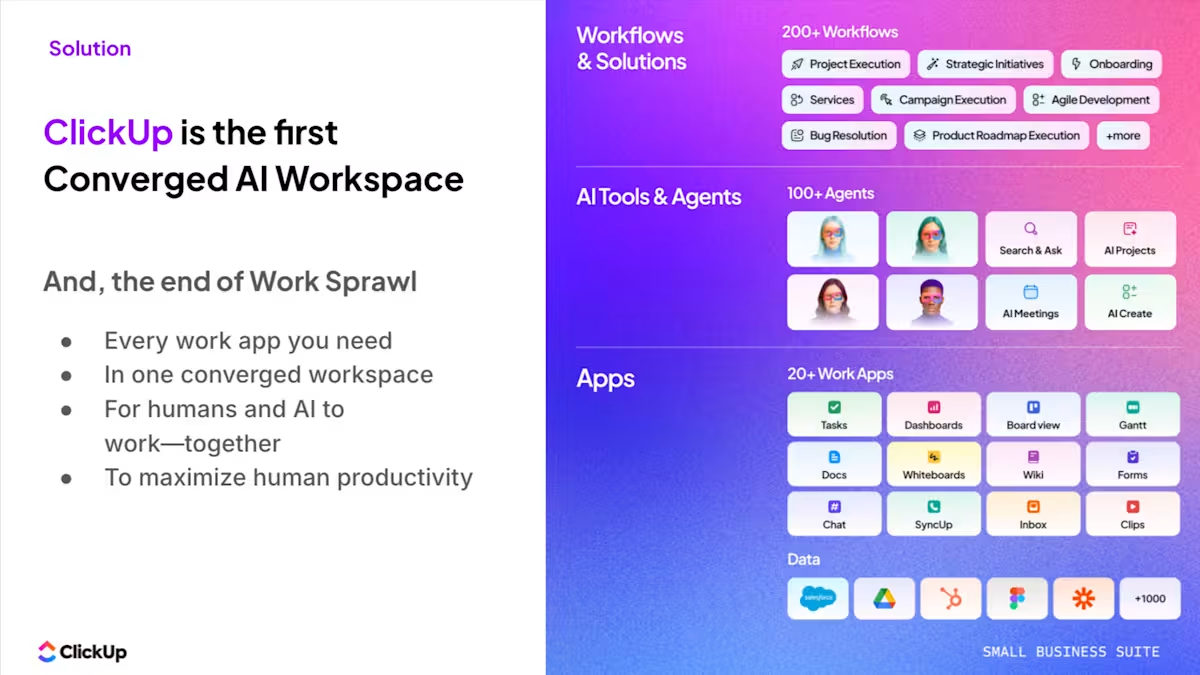
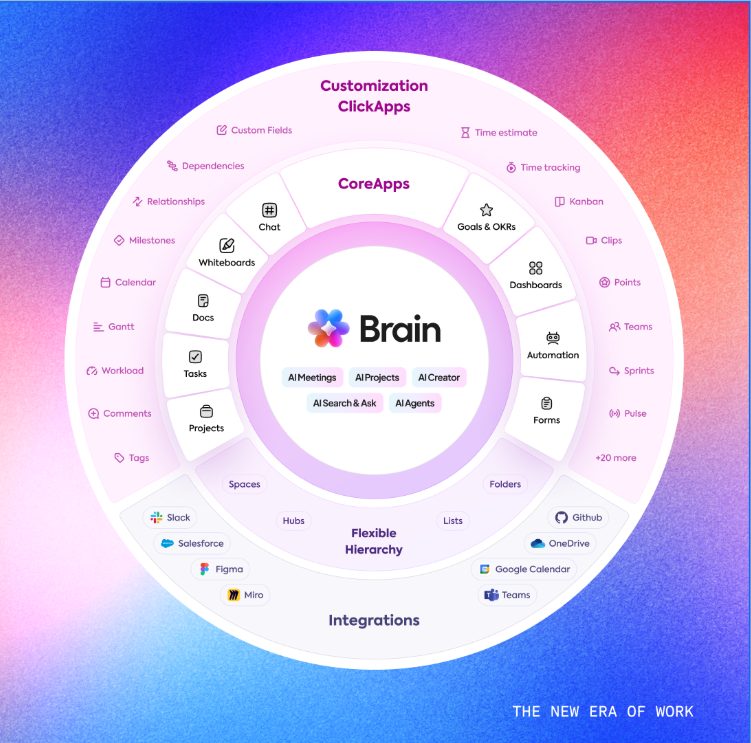
As a Converged AI Workspace, ClickUp brings your projects, docs, chat, dashboards, and workflows into a single platform.
That means AI isn’t sitting on the side. ClickUp Brain is built directly into your workflows, with access to the same data your team uses to get work done. It can see tasks, understand conversations, reference documents, and operate within the flow of execution.
This is what actually drives adoption. When AI is embedded into the system, there’s no extra step to “use it.”
No copying and pasting context. It becomes part of how work happens, whether that’s generating updates, summarizing activity, or helping move tasks forward.
Here are three practical workflows from ClickUp you can set up quickly, each combining automation, AI, and agent-driven execution.
1. Automate task statuses to remove manual follow-ups
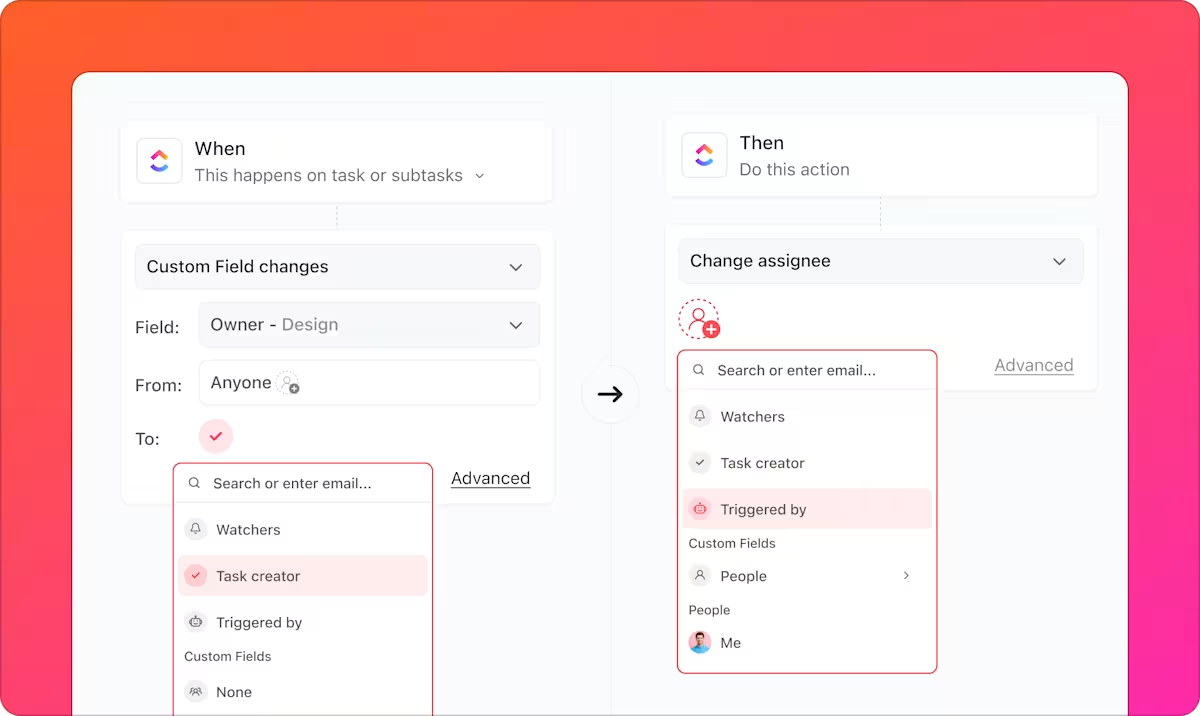
One of the most common bottlenecks is manually updating statuses and chasing progress across tasks. You can eliminate that with a simple Automation in ClickUp.
Add when-then automation triggers in ClickUp to automate manual task updates
How to set it up:
Go to your List or Space and open Automations
Click “Create Automation”
Choose a trigger such as:
When status changes to “In Review”
Add an action, for example:
Assign the next owner (e.g., reviewer or manager)
Change status to the next stage
Send a notification or comment
Example workflow: When a task is marked “Complete” → automatically assign QA → notify the reviewer
If you add AI Fields in ClickUp, the AI handles this part on its own. Watch it in action.👇🏼
2. Use AI to summarize project updates automatically
Weekly updates and status reports are time-consuming because they require pulling information from multiple places. This is where ClickUp Brain helps.
How to set it up:
Open a List, Folder, or Space where your project lives
Example prompt: “Summarize all task updates from this week, including completed items, blockers, and next steps.”
Instead of building reports from scratch, you review and refine AI-generated summaries. Over time, this becomes your default workflow for status reporting.
3. Use Super Agents to monitor work and trigger action
They are no-code agents you can configure inside your workspace that monitor activity based on the conditions you define. Once set up, they operate autonomously, continuously observing tasks, docs, and conversations and taking action when those conditions are met, such as flagging stalled work, surfacing missing details, or triggering the next step.
How to set it up:
Open the Super Agent Builder and create a new agent
Define the agent’s goal and instructions in plain language (what it should watch for and how it should behave)
Set the scope by selecting the spaces, folders, or lists it should monitor
Provide the right context and sources, such as tasks, docs, and conversations the agent should reference
Define the conditions or patterns it should look for, like stalled tasks, missing information, or blocked work
Configure the actions it should take when those conditions are met, such as: posting a comment or flagging the issue, notifying or prompting the responsible person, or creating follow-up tasks or next steps
Test the agent on a small workflow and refine its instructions before rolling it out broadly
Example: Task hasn’t been updated in 3 days → agent flags it → prompts owner → creates follow-up if needed
Watch this video to learn how you can build and work with a Super Agent:
Quick note on your first AI workflow
You don’t need to automate everything at once. Start with one repeatable workflow where time is consistently wasted, such as status updates, task handoffs, or approvals.
Map how it works today. Then layer in the system:
Use Automations to handle predictable steps, like assigning owners or moving tasks forward
Use AI to generate summaries, updates, or first drafts from real activity
Use Super Agents to monitor the workflow and step in when something is stuck or missing
Build it once, test it on a small set of tasks, and refine it based on how your team actually uses it. Then repeat the same pattern for the next workflow.
Summarize this article with AI
ClickUp Brain not only saves you precious time by instantly summarizing articles, it also leverages AI to connect your tasks, docs, people, and more, streamlining your workflow like never before.
Summarize this article for me please
Common AI Mistakes Non-Technical Teams Make
Small businesses often rush into new technology without a clear governance strategy.
You risk exposing sensitive company data to external third-party models. Teams auto-publish generated content without review, leading to embarrassing errors and eroded client trust.
Avoid these common implementation traps:
Overhauling everything at once: Trying to automate every process simultaneously leads to burnout
Choosing technical tools: Relying on software that secretly requires API keys or developer support
Ignoring data quality: Expecting great outputs from scattered, disconnected information
Skipping human review: Publishing generated drafts without checking for tone or accuracy
Treating setup as final: Failing to tune prompts and workflows as your business changes
The ClickUp Advantage: Becoming AI-first also means taking a security-first approach to everything. ClickUp is built to trusted standards such as SOC 2, ISO 27001, GDPR compliance, and HIPAA readiness, with strict controls on how your data is stored, accessed, and protected. That extends to AI. Which means:
ClickUp AI does NOT train on your workspace data
AI partners are contractually required not to retain your data
Data shared with models is limited and deleted after processing
AI operates using in-context learning, not training on your data
Your workspace data stays secure, AI features operate within controlled environments, and your information isn’t used to train external models without permission.
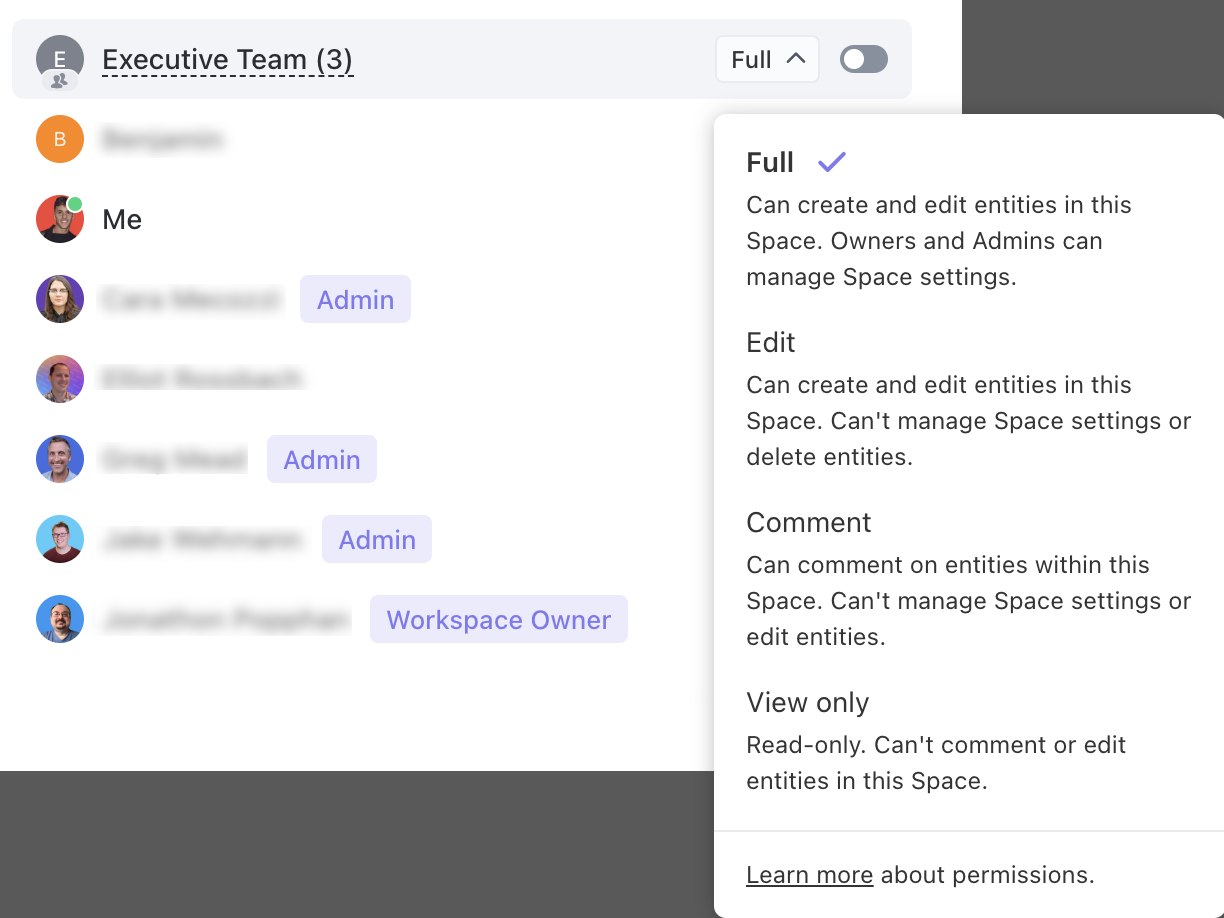
Privacy and security in ClickUp begin with granular permissions and extend all the way to AI models
Summarize this article with AI
ClickUp Brain not only saves you precious time by instantly summarizing articles, it also leverages AI to connect your tasks, docs, people, and more, streamlining your workflow like never before.
Summarize this article for me please
How to Measure AI Success Without Technical Expertise
Proving the return on investment for new software feels impossible without complex analytics.
You abandon helpful tools because the actual business impact remains invisible to leadership. You can’t justify the cost without hard data.
Track these observable indicators:
Time recovered: Track how long a specific task took before implementation versus after
Output volume: Count the increase in reports or responses produced in the same time window
Error reduction: Monitor the drop in missed handoffs and forgotten follow-ups
Team adoption: Observe whether the team actually uses the features daily
Workflow expansion: Note when team members start applying the pattern to new problems
How ClickUp helps
Visualize complex data with ClickUp Dashboards and ask ClickUp Brain to make sense of it for you
When tracking the indicators above, you can visualize your team’s performance instantly using no-code ClickUp Dashboards.
With 50+ custom cards and AI summaries, it helps you clearly demonstrate exactly how many hours the new technology saves your team. Leadership sees undeniable proof of increased throughput and efficiency. 🤩
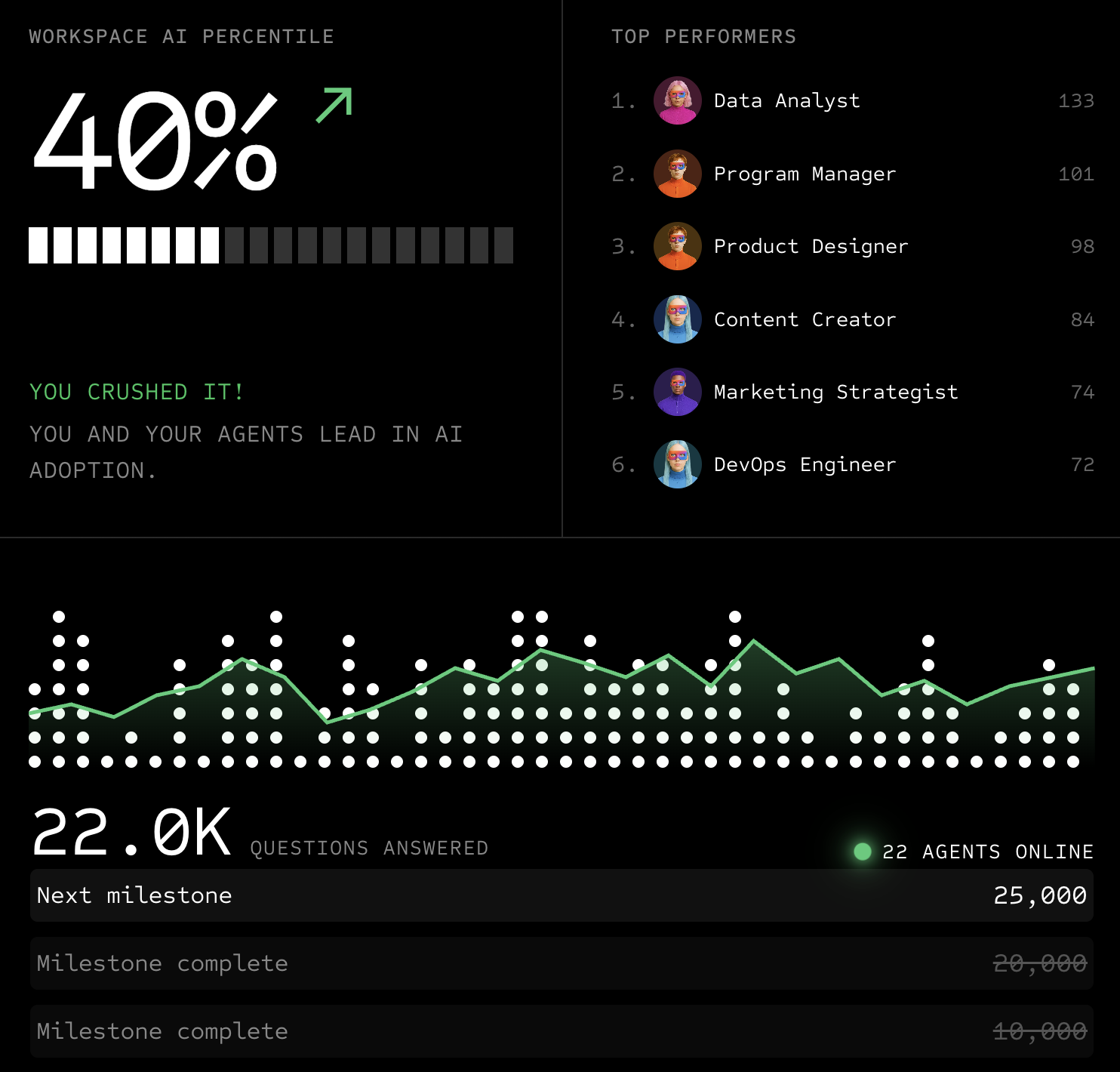
If you want to understand the AI usage specifically, agentic analytics shows you exactly how many agents are live, which ones are performing the best, and how many milestones have been met.
Understand how your AI and agents are being used with agentic analytics data
Summarize this article with AI
ClickUp Brain not only saves you precious time by instantly summarizing articles, it also leverages AI to connect your tasks, docs, people, and more, streamlining your workflow like never before.
Summarize this article for me please
Build Your Automated Workspace Today
Most small businesses don’t have a tooling problem. They have a systems problem.
Work is scattered across apps, processes live in people’s heads, and coordination becomes the hidden tax that slows everything down.
ClickUp Small Business Suite is built to solve this differently.
By bringing your tasks, docs, chat, dashboards, and AI into a single system, it gives your team one place to plan, execute, and stay aligned. Automations handle the predictable work. AI helps you understand and generate. Super Agents keep everything moving.
That’s where the shift happens.
You don’t need more software. You need a system that works. 🚀
Summarize this article with AI
ClickUp Brain not only saves you precious time by instantly summarizing articles, it also leverages AI to connect your tasks, docs, people, and more, streamlining your workflow like never before.
Summarize this article for me please
Frequently Asked Questions About Using AI Without a Technical Team
What’s the difference between AI and simple automation?
Simple automation follows fixed rules you set to trigger specific actions. Artificial intelligence interprets context, generates new content, and makes decisions that weren’t explicitly programmed.
Can non-technical teams use AI without putting company data at risk?
Yes, if you choose tools with enterprise-grade security and role-based permissions that keep information within the platform. For example, ClickUp processes queries within its workspace environment, so your data is never sent to external models without your permission.
How long does it realistically take a non-technical team to see results from AI?
Most teams can set up and start benefiting from their first automated workflow within a single work session. Meaningful results typically emerge within a few weeks of consistent daily use.
Everything you need to stay organized and get work done.