







Still downloading templates?
There’s an easier way. Try a free AI Agent in ClickUp that actually does the work for you—set up in minutes, save hours every week.
Sorry, there were no results found for “”
Sorry, there were no results found for “”
Sorry, there were no results found for “”
AI bias may seem like a tech problem. But its effects do show up in the real world and can often be devastating.
When an AI system leans the wrong way, even a little, it can lead to unfair outcomes.
And over time, those small issues can turn into frustrated customers, reputation problems, or even compliance questions you didn’t see coming.
Most teams don’t set out to build biased AI. It happens because the data is messy, the real world is uneven, and the tools we use don’t always think the way we expect. The good news is you don’t need to be a data scientist to understand what’s going on.
In this blog, we’ll walk you through what AI bias actually is, why it occurs, and how it can manifest in everyday business tools.
AI bias is when an artificial intelligence system produces systematic, unfair outcomes that consistently favor or disadvantage certain groups of people. These aren’t just random errors; they are predictable patterns that get baked into how the AI makes decisions. The cause? AI learns from data that reflects existing human bias, other unconscious biases, and societal inequalities.
Think of it like this: if you train a hiring algorithm on ten years of company data where 90% of managers were men, the AI might incorrectly learn that being male is a key qualification for a management role. The AI isn’t being malicious; it’s simply identifying and repeating the patterns it was shown.
Here’s what makes AI bias so tricky:
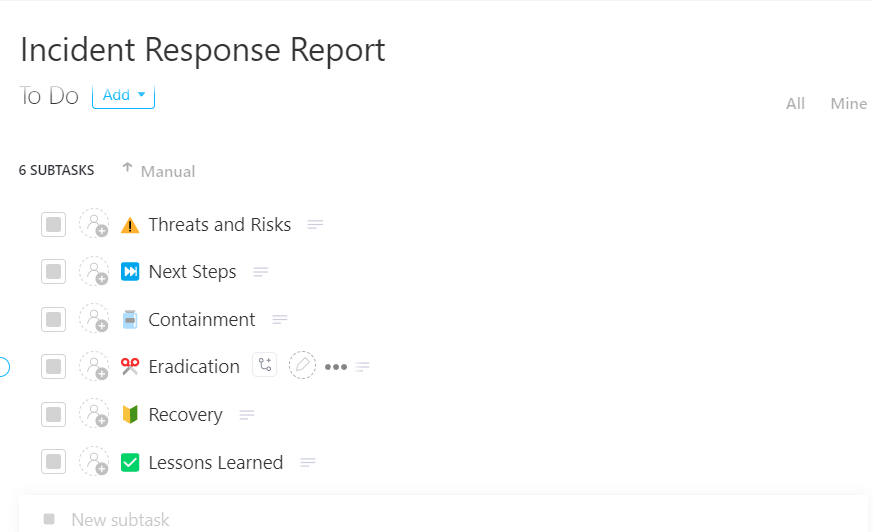
ClickUp’s Incident Response Report Template provides a ready-made structure for documenting, tracking, and resolving incidents from start to finish. Record all relevant incident details, maintain clearly categorized statuses, and capture important attributes like severity, impacted groups, and remediation steps. It supports Custom Fields for things like Approved by, Incident notes, and Supporting documents, which help surface accountability and evidence throughout the review process.
📖 Read More: How to Perform Risk Assessment: Tools & Techniques
When your AI systems are unfair, you risk harming real people’s lives.
This, in turn, exposes your organization to serious business challenges and can even destroy the trust you’ve worked hard to build with your customers.
A biased AI that denies someone a loan, rejects their job application, or makes an incorrect recommendation brings with it serious real-world consequences.
Emerging industry standards and frameworks now encourage organizations to actively identify and address bias in their AI systems. The risks hit your organization from every angle:
When you get bias mitigation right, you build AI systems that people can actually rely on. Fair AI opens doors to new markets, enhances the quality of your decisions, and demonstrates to everyone that you’re committed to running an ethical business.
📮 ClickUp Insight: 22% of our respondents still have their guard up when it comes to using AI at work. Out of the 22%, half worry about their data privacy, while the other half just aren’t sure they can trust what AI tells them.
ClickUp tackles both concerns head-on with robust security measures and by generating detailed links to tasks and sources with each answer.
This means even the most cautious teams can start enjoying the productivity boost without losing sleep over whether their information is protected or if they’re getting reliable results.
Bias can sneak into your AI systems from multiple directions.
From the moment you start collecting data to long after the system is deployed, this element remains somewhat steady. But if you know where to look, you can target your efforts and stop playing an endless game of whack-a-mole with unfair outcomes.
Sampling bias is what happens when the data you use to train your AI doesn’t accurately represent the real world where the AI will be used.
For example, if you build a voice recognition system trained mostly on data from American English speakers, it will naturally struggle to understand people with Scottish or Indian accents, similar to how LLMs favor White-associated names 85.1% of the time in resume screening. This underrepresentation creates massive blind spots, leaving your model unprepared to serve entire groups of people.
Algorithmic bias happens when the model’s design or mathematical process amplifies unfair patterns, even if the data seems neutral.
A person’s zip code shouldn’t decide if they get a loan, but if zip codes in your training data are strongly correlated with race, the algorithm might learn to use location as a proxy for discrimination.
This problem becomes even worse with feedback loops—when a biased prediction (such as denying a loan) is fed back into the system as new data, the bias only intensifies over time.
Every choice a person makes while building an AI system can introduce bias.
This includes deciding what data to collect, how to label it, and how to define “success” for the model. For instance, a team might unconsciously favor data that supports what they already believe (confirmation bias) or give too much weight to the first piece of information they see (anchoring bias).
Even the most well-intentioned teams can accidentally encode their own assumptions and worldview into an AI system.
📖 Read More: 10 Project Governance Templates to Manage Tasks
Real companies have faced major consequences when their AI systems showed bias, costing them millions in damages and lost customer trust. Here are a few documented examples:
One of the most cited cases involved a major tech company scrapping an internal AI recruiting system after it learned to favor male candidates over women. The system was trained on a decade of resumes where most successful applicants were men. So it began penalizing resumes with words like “women’s,” even downgrading graduates from women’s colleges.
This shows how historical data bias, when past patterns reflect existing inequality, can sneak into automation unless carefully audited. But, as automated recruiting with AI becomes more prevalent, the scale of the problem becomes even bigger.
🌼 Did You Know: Recent data shows that 37% of organizations now “actively integrating” or “experimenting” with Gen AI tools in recruiting, up from 27% a year ago.
Research led by Joy Buolamwini and documented in the Gender Shades study revealed that commercial facial recognition systems had error rates up to 34.7% for dark-skinned women, compared with less than 1% for light-skinned men.
This again is a reflection of unbalanced training datasets. Bias in biometric tools has even more far-reaching effects.
Police and government agencies have also encountered issues with biased facial recognition. Investigations from The Washington Post found that some of these systems were much more likely to misidentify people from marginalized groups. In several real cases, this led to wrongful arrests, public backlash, and major concerns about how these tools affect people’s rights.
Health AI systems designed to predict which patients need extra care have also shown bias.
In one well-documented case, a widely used healthcare prediction algorithm ran into a significant error. It was supposed to help decide which patients should receive extra care, but ended up systematically giving lower priority to Black patients, even when they were equally or more sick than white patients.
That happened because the model used healthcare spending as a proxy for medical need. Because Black patients historically had lower healthcare spending due to unequal access to care, the algorithm treated them as less in need. As a result, it steered care resources away from those who actually needed them most. Researchers found that simply fixing this proxy could significantly increase access to fair care programs.
Concerns about these very issues have led civil rights groups to press for “equity-first” standards in healthcare AI. In December 2025, the NAACP released a detailed blueprint calling on hospitals, tech companies, and policymakers to adopt bias audits, transparent design practices, inclusive frameworks, and AI governance tools to prevent deepening racial health inequities.
AI and automated decision-making don’t only shape what you see on social media, they’re also influencing who gets access to money and on what terms.
One of the most talked-about real-world examples came from the Apple Card, a digital credit card issued by Goldman Sachs.
In 2019, customers on social media shared that the card’s credit-limit algorithm gave much higher limits to some men than to their wives or female partners. This happened even when the couples reported similar financial profiles. One software engineer said he received a credit limit 20 times higher than his wife’s, and even Apple co-founder Steve Wozniak confirmed a similar experience involving his spouse.
These patterns sparked a public outcry and led to a regulatory inquiry by the New York State Department of Financial Services into whether the algorithm discriminated against women, highlighting how automated financial tools can produce unequal outcomes.
Speech recognition and automated captioning systems often don’t hear everyone equally. Multiple studies have shown that these tools tend to work better for some speakers than others, depending on factors like accent, dialect, race, and whether English is a speaker’s first language.
That happens because commercial systems are usually trained on datasets dominated by certain speech patterns—often Western, standard English—leaving other voices underrepresented.
For example, researchers at Stanford tested five leading speech-to-text systems (from Amazon, Google, Microsoft, IBM, and Apple) and found they made nearly twice as many errors when transcribing speech from Black speakers compared with white speakers. The issue occured even when subjects were saying the same words under the same conditions.
When captions are inaccurate for certain speakers, it can lead to poor user experiences and inaccessibility for people who rely on captions. Worse, it can contribute to biased outcomes in systems that use speech recognition in hiring, education, or healthcare settings.
Each of these examples illustrates a distinct way bias can be embedded in automated systems, through skewed training data, poorly chosen proxies, or unrepresentative testing. In every case, the results aren’t just technical—they shape opportunities, undermine trust, and carry real business and ethical risk.
📖 Read More: Risks vs. Issues – What’s the Difference?
| Where bias appeared | Who was affected | Real-world impact |
|---|---|---|
| Recruiting algorithms (scrapped AI hiring tool) | Women | Resumes were downgraded based on gendered keywords, reducing access to interviews and job opportunities. |
| Facial recognition systems (Gender Shades + wrongful arrest cases) | Dark-skinned women; marginalized racial groups | Far higher misidentification rates led to wrongful arrests, reputational harm, and civil rights concerns. |
| Healthcare risk prediction algorithms (University of Chicago study) | Black patients | Patients were deprioritized for extra care because healthcare spending was used as a flawed proxy for medical need, worsening health inequities. |
| Credit-limit algorithms (Apple Card investigation) | Women | Men received dramatically higher credit limits than equally qualified female partners, affecting financial access and borrowing power. |
| Speech recognition & auto-captions (Stanford ASR study) | Speakers with non-standard accents; Black speakers | Nearly double the error rates created accessibility barriers, miscommunication, and biased outcomes in tools used in hiring, education, and daily digital access. |
There’s no single magic bullet to eliminate AI bias.
Effective bias mitigation requires a multi-layered defense that you apply throughout the entire AI lifecycle. By combining these proven strategies, you can dramatically reduce the risk of unfair outcomes.
Representative data is the absolute foundation of fair AI.
Your model can’t learn to serve groups of people it has never seen in its training. Start by auditing your existing datasets to find any demographic gaps Then make a conscious effort to source new data from those underrepresented populations.
When real-world data is hard to find, you can use techniques like data augmentation (creating modified copies of existing data) or synthetic data generation to help fill in the gaps.
🚧 Toolkit: Use ClickUp’s Internal Audit Checklist Template to map out your auditing process.
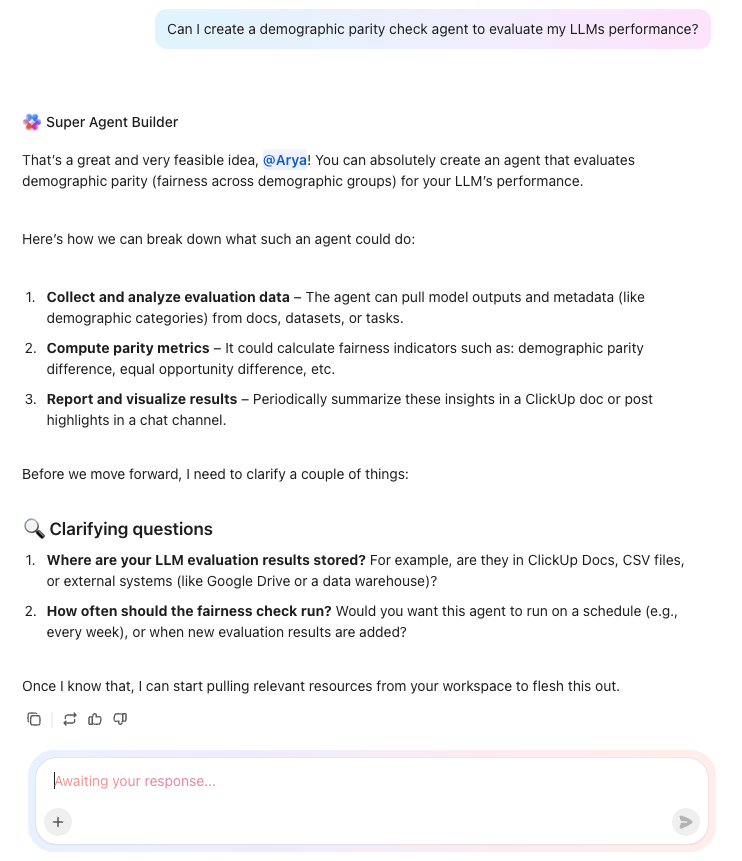
You have to systematically test for bias to catch it before it does real harm. Use fairness metrics to measure how your model performs across different groups.
For example, demographic parity checks whether the model yields a positive outcome (such as a loan approval) at equal rates across groups, while equalized odds checks whether the error rates are equal.
Slice your model’s performance by every demographic you can—race, gender, age, geography—to spot where accuracy drops, or unfairness creeps in.
Automated systems can miss subtle, context-specific unfairness that a person would spot right away. A human-in-the-loop approach is crucial for high-stakes decisions, where an AI can make a recommendation, but a person makes the final call.
This is especially important in areas such as hiring, lending, and medical diagnosis. For this to work, your human reviewers must be trained to recognize bias and have the authority to override the AI’s suggestions.
You can also use technical methods to directly intervene and reduce bias. These techniques fall into three main categories:
These techniques often involve a trade-off, where a slight decrease in overall accuracy may be necessary to achieve a significant gain in fairness.
💟 Bonus: BrainGPT is your AI-powered desktop companion that takes AI bias testing to the next level by giving you access to multiple leading models—including GPT-5, Claude, Gemini, and more—all in one place.
This means you can easily run the same prompts or scenarios across different models, compare their reasoning abilities, and spot where responses diverge or show bias. This AI super app also allows you to use talk-to-text to set up test cases, document your findings, and organize results for side-by-side analysis.
Its advanced reasoning and context-aware tools help you troubleshoot issues, highlight patterns, and understand how each model approaches sensitive topics. By centralizing your workflow and enabling transparent, multi-model testing, Brain MAX empowers you to audit, compare, and address AI bias with confidence and precision.
If you don’t know how your model is making decisions, you can’t fix it when it’s wrong. Explainable AI (XAI) techniques help you peek inside the “black box” and see which data features are driving the predictions.
You can also create model cards, which are like nutrition labels for your AI, documenting its intended use, performance data, and known limitations.
📮ClickUp Insight: 13% of our survey respondents want to use AI to make difficult decisions and solve complex problems. However, only 28% say they use AI regularly at work. A possible reason: Security concerns!
Users may not want to share sensitive decision-making data with an external AI.
ClickUp solves this by bringing AI-powered problem-solving right to your secure Workspace. From SOC 2 to ISO standards, ClickUp is compliant with the highest data security standards and helps you securely use generative AI technology across your workspace.
A strong AI governance program creates clear ownership and consistent standards that everyone on the team can follow.
Your organization needs clear governance structures to ensure someone is always accountable for building and deploying AI ethically.
Here are the essential elements of an effective AI governance program:
| Governance element | What it means | Action steps for your organization |
|---|---|---|
| Clear ownership | Dedicated people or teams are responsible for AI ethics, oversight, and compliance | • Appoint an AI ethics lead or cross-functional committee • Define responsibilities for data, model quality, compliance, and risk • Include legal, engineering, product, and DEI voices in oversight |
| Documented policies | Written guidelines that define how data is collected, used, and monitored across the AI lifecycle | • Create internal policies for data sourcing, labeling, privacy, and retention • Document standards for model development, validation, and deployment • Require teams to follow checklists before shipping any AI system |
| Audit trails | A transparent record of decisions, model versions, datasets, and changes | • Implement version control for datasets and models • Log key decisions, model parameters, and review outcomes • Store audit trails in a central, accessible repository |
| Regular reviews | Ongoing assessments of AI systems to check for bias, drift, and compliance gaps | • Schedule quarterly or semiannual bias assessments via robust LLM evaluation • Retrain or recalibrate models when performance drops or behavior shifts • Review models after major data updates or product changes |
| Incident response plan | A clear protocol for identifying, reporting, and correcting AI bias or harm | • Create an internal bias-escalation workflow • Define how issues are investigated and who approves fixes • Outline communication steps for users, customers, or regulators when needed |
💡Pro Tip: Frameworks like the NIST AI Risk Management Framework and the EU AI Act, with fines up to 7% of annual turnover, can provide excellent blueprints for building out your own governance program.
ClickUp’s converged AI workspace brings all the moving parts of your AI governance program into one organized workspace.
Your teams can manage tasks, store policies, review audit findings, discuss risks, and track incidents without bouncing between tools or losing context. Every model record, decision log, and remediation plan stays linked, so you always know who did what and why.
And because ClickUp’s AI understands the work inside your workspace, it can surface past assessments, summarize long reports, and help your team stay aligned as standards evolve. The result is a governance system that’s easier to follow, easier to audit, and far more reliable as your AI footprint grows.
Let’s break it down as a workflow!
Begin by creating a dedicated space in ClickUp for all governance-related work. Add lists for your model inventory, bias assessments, incident reports, policy documents, and scheduled reviews so every element of the program lives in one controlled environment.
Configure Custom Fields or AI Fields to track fairness metrics, bias scores, model versions, review status, and risk levels. Use role-based permissions to ensure that only authorized reviewers, engineers, and compliance leads can access sensitive AI work. This creates the structural foundation that competitors’ point tools and generic project platforms can’t offer.
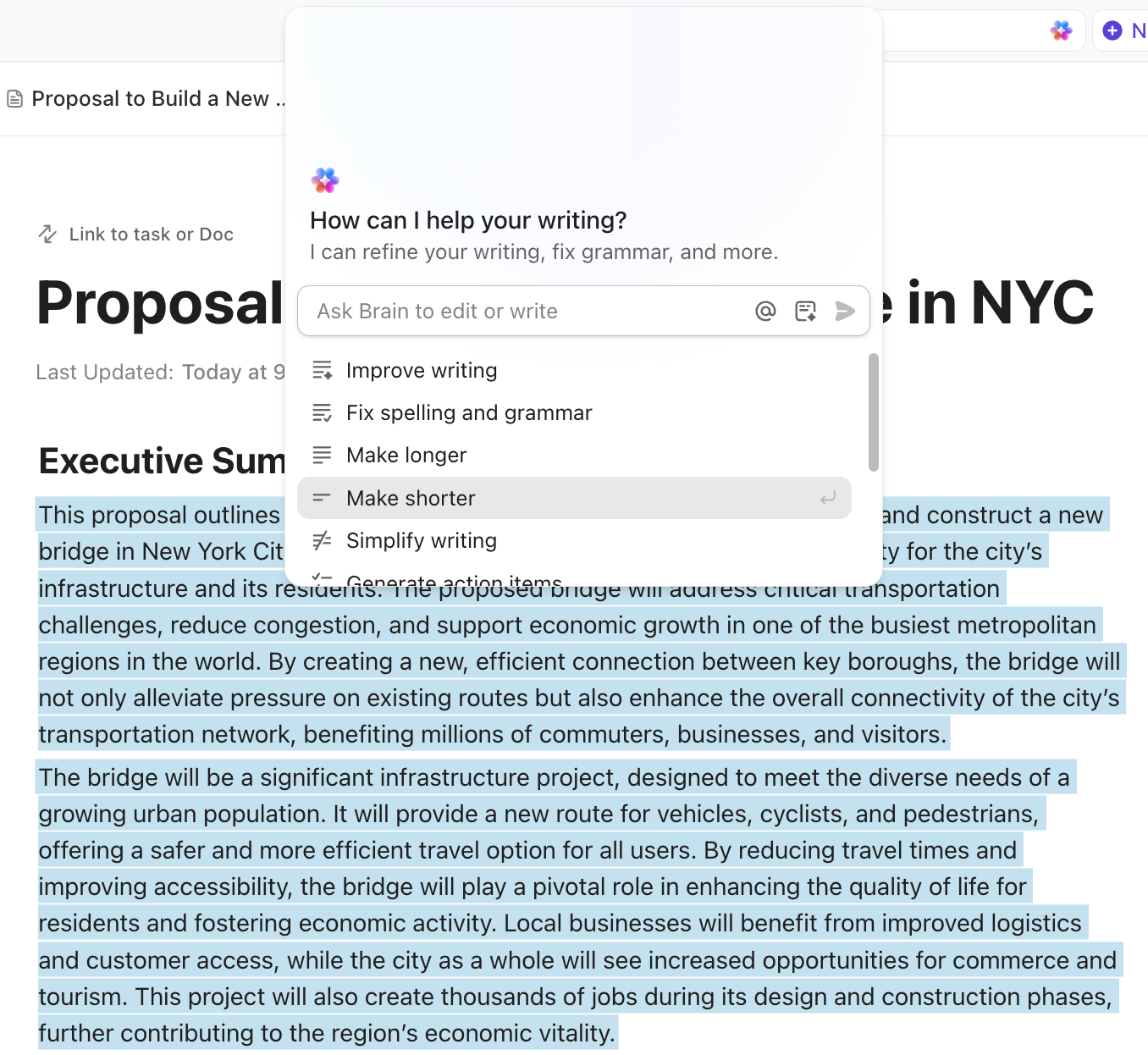
Next, create a ClickUp Doc to serve as your living governance playbook. This is where you outline your bias evaluation procedures, fairness thresholds, model documentation guidelines, human-in-the-loop steps, and escalation protocols.
Because Docs stay connected to tasks and model records, your teams can collaborate without losing version history or scattering files across tools. Next, ClickUp Brain can help summarize external regulations, draft new policy language, or surface prior audit findings, making policy creation more consistent and traceable.
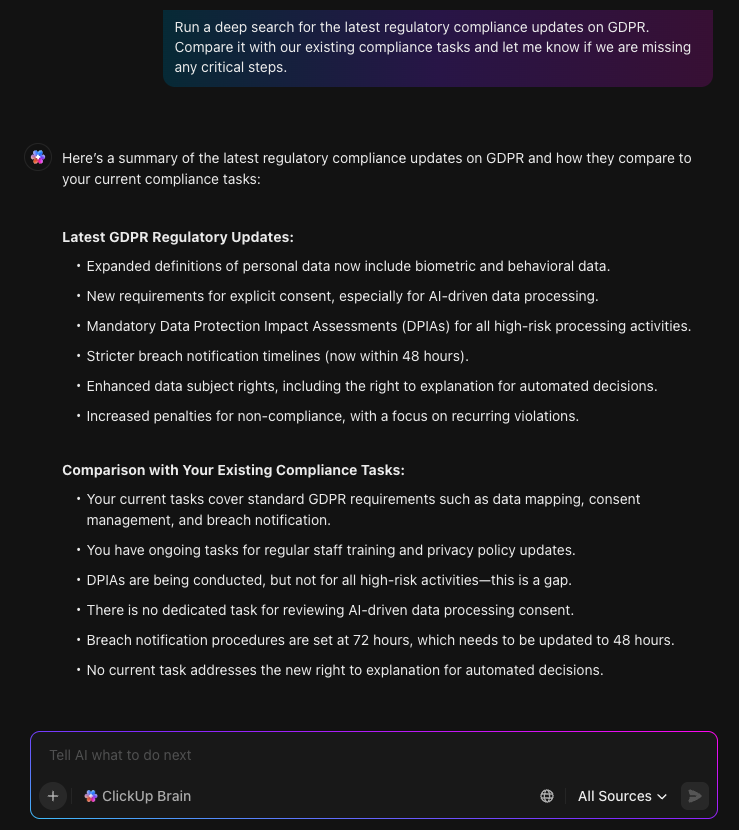
Because it can search the web, switch between multiple AI models, and synthesize information into clear guidance, your team stays on top of emerging standards and industry changes without leaving the workspace. Everything you need, policy updates, regulatory insights, and past decisions, comes together in one place, making your governance system steadier and far easier to maintain.
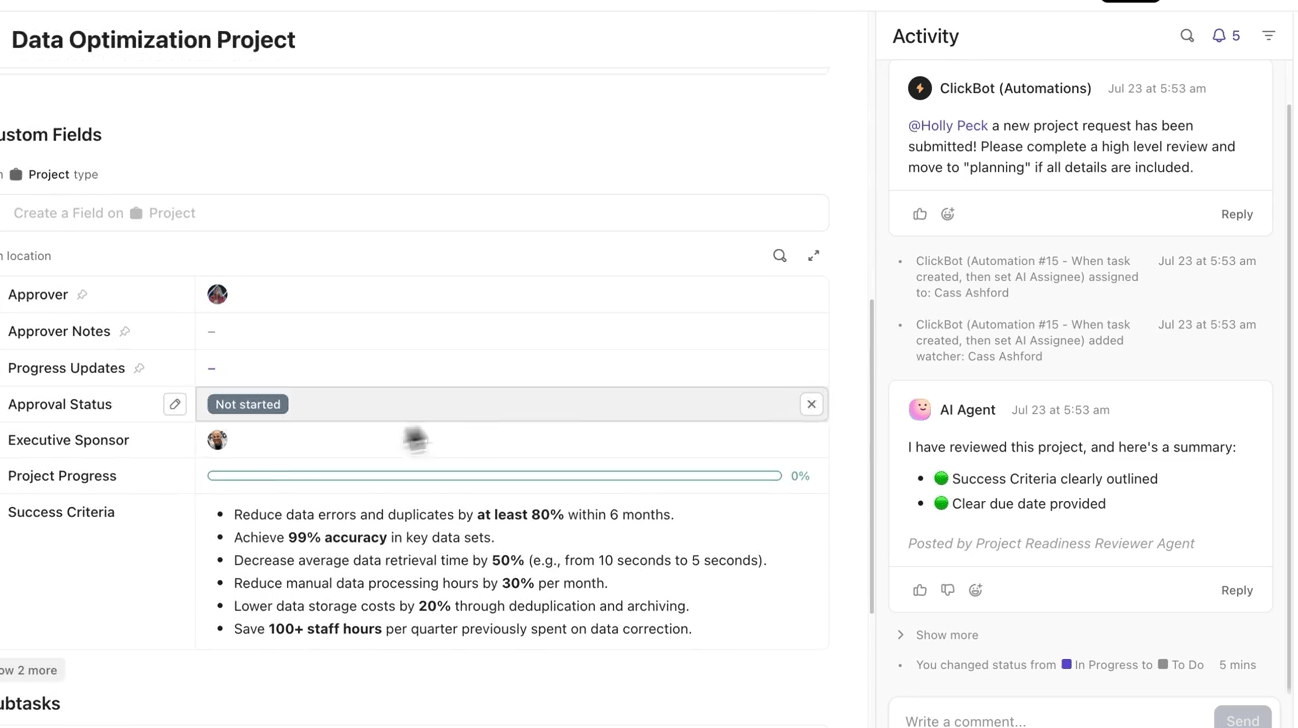
Each model should have its own task in the “Model inventory” list so ownership and accountability are always clear.
Easily track every bias incident as an actionable item by using ClickUp Tasks and ClickUp Custom Fields to structure your bias assessment workflows and capture every important detail.
This way, you can track the bias type, severity level, remediation status, responsible team member, and next review date, ensuring every issue has clear ownership and a deadline.
Attach datasets, evaluation summaries, and lineage notes so everything sits in one place. Automations can then alert reviewers whenever a model moves to staging or production.
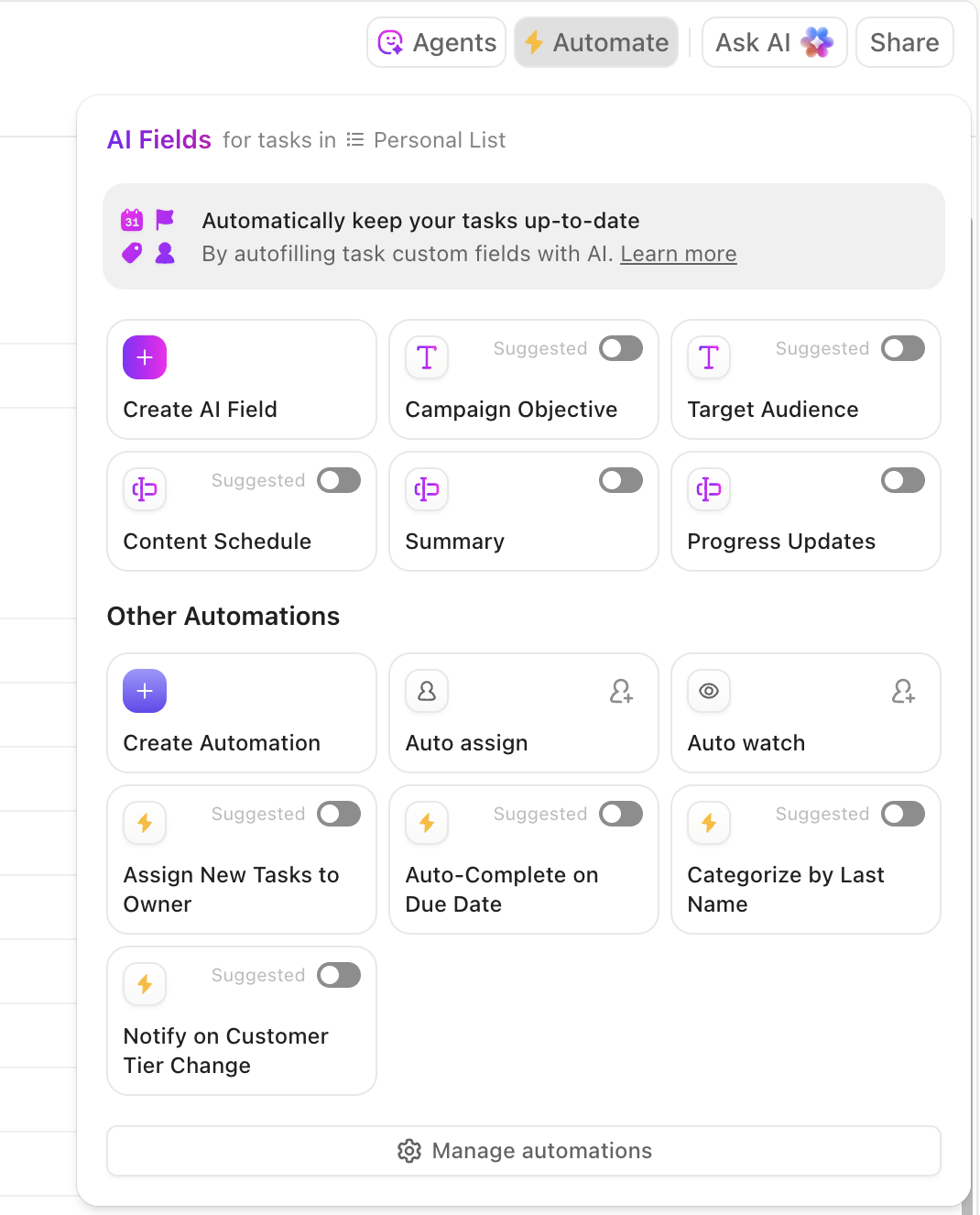
Bias audits should happen both on a recurring schedule and in response to specific triggers.
Set up simple rules via ClickUp Automations that automatically trigger review tasks whenever a model reaches a new deployment milestone or a scheduled audit is due. You’ll never miss a quarterly bias assessment again, as Automations can assign the right reviewers, set the correct deadlines, and even send reminders as due dates approach.
For event-based audits, ClickUp Forms make it simple to collect bias incident reports or human feedback, while reviewers use Custom Fields to log fairness gaps, test results, and recommendations. Each form subission is routed to your team as a task, which creates a repeatable audit lane.
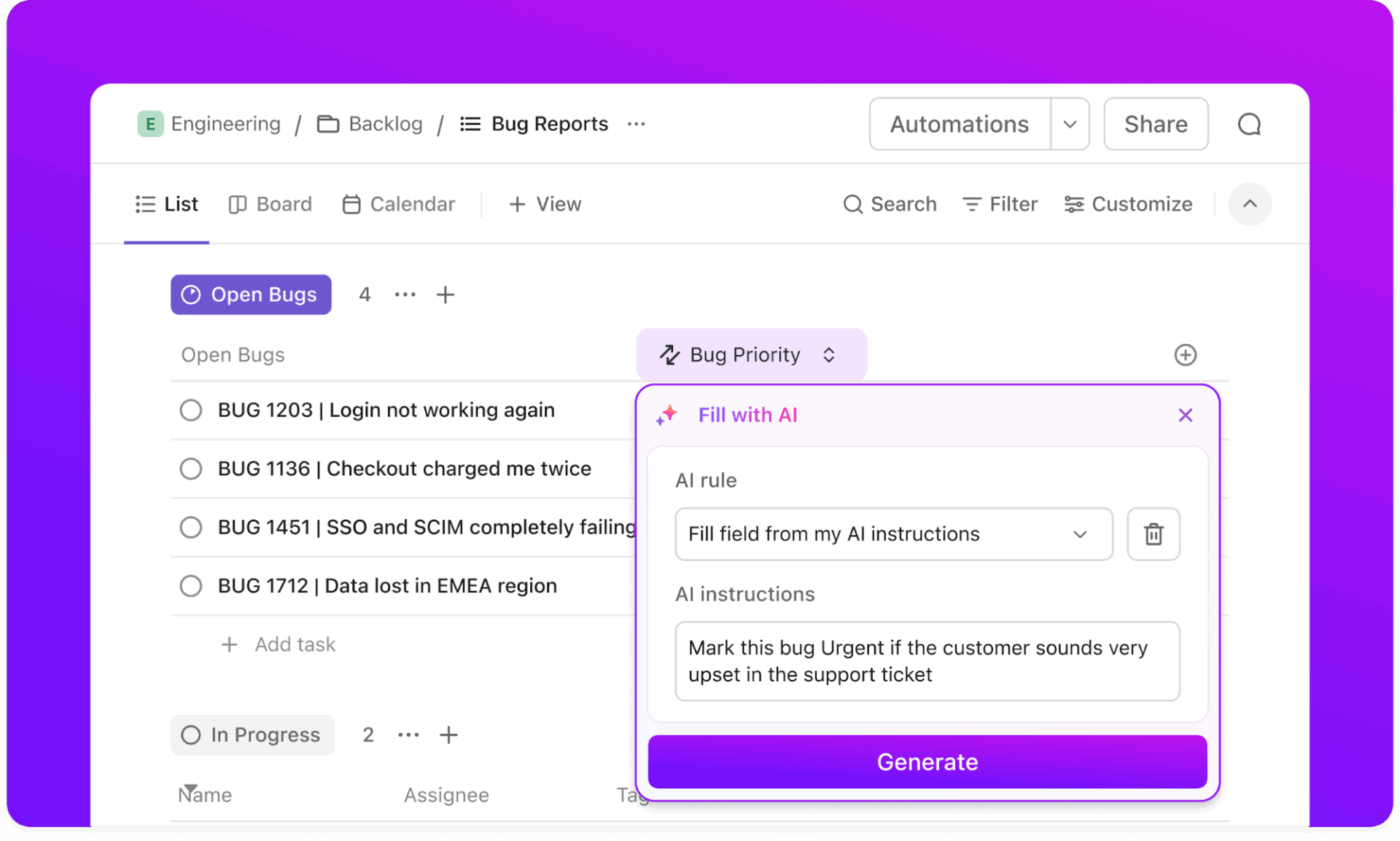
When a bias issue is identified, create an incident task that captures the severity, impacted groups, model version, and required mitigation work. AI Agents can escalate high-risk findings to compliance leads and assign the right reviewers and engineers.
Each mitigation action, test result, and validation step stays linked to the incident record. ClickUp Brain can generate summaries for leadership or help prepare remediation notes for your governance documentation, keeping everything transparent and traceable.
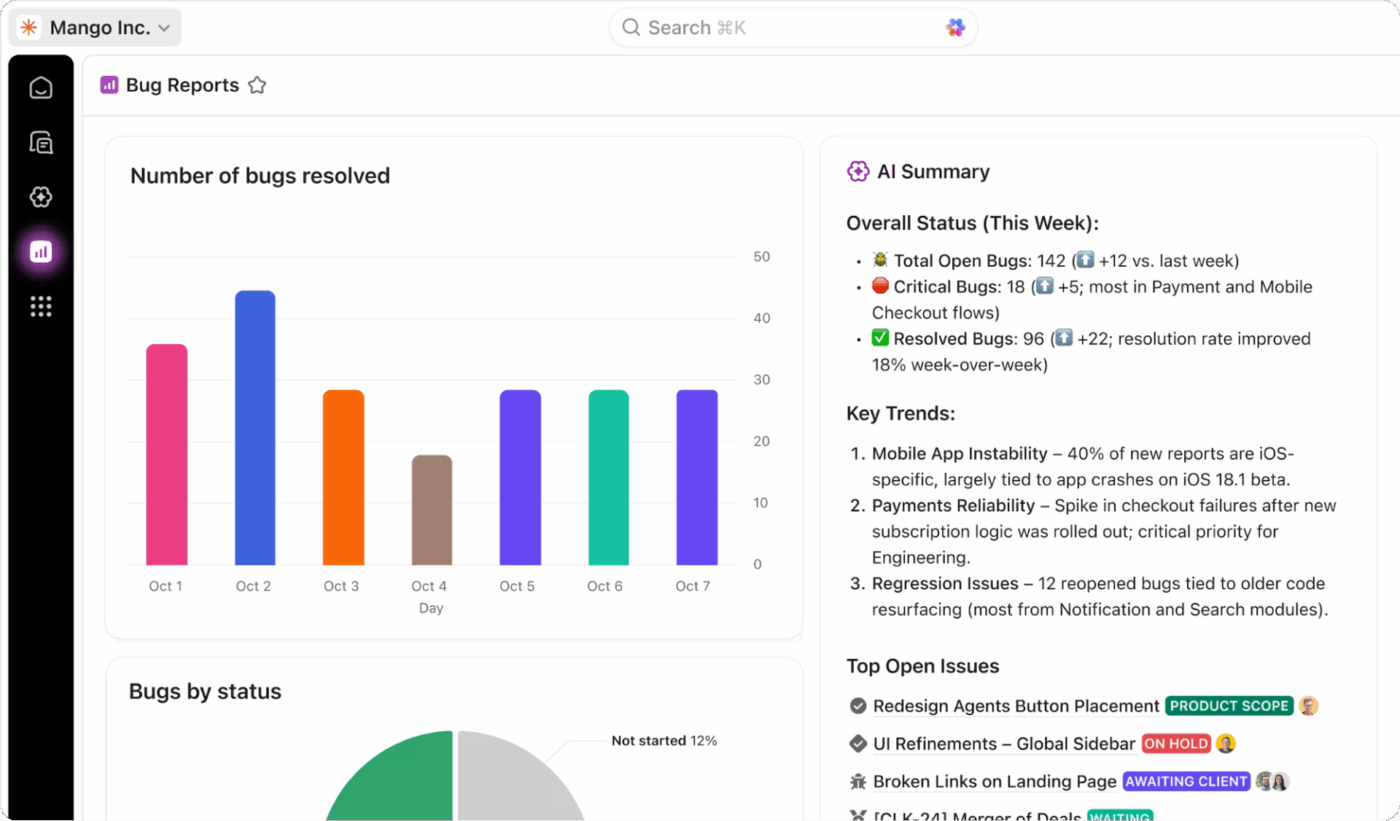
Finally, build dashboards that give leaders a real-time view of your bias mitigation program.
Include panels showing open incidents, time to resolution, audit completion rates, fairness metrics, and compliance status across all active models. The no-code Dashboards in ClickUp can automatically pull data and update tasks as work progresses, with AI summaries built into your dashboard view.
📖 Read More: How to Overcome Common AI Challenges
Your work isn’t done when the AI model goes live.
In fact, this is when the real test begins. Models can “drift” and develop new biases over time as the real-world data they see begins to change. Continuous monitoring is the only way to catch this emerging bias before it causes widespread harm.
Here’s what your ongoing monitoring should include:
| Practice | What it ensures |
|---|---|
| Performance tracking by group | Continuously measures model accuracy and fairness across demographic segments so disparities are detected early |
| Data drift detection | Monitors changes in input data that may introduce new bias or weaken model performance over time |
| User feedback loops | Provides clear channels for users to report biased or incorrect outputs, improving real-world oversight |
| Scheduled audits | Ensures quarterly or semiannual deep dives into model behavior, fairness metrics, and compliance requirements |
| Incident response | Defines a structured process for investigating, correcting, and documenting any reported bias events |
💟 Bonus: Generative AI systems, in particular, need extra vigilance because their outputs are far less predictable than traditional machine learning models. A great technique for this is red-teaming, where a dedicated team actively tries to provoke biased or harmful responses from the model to identify its weak spots.
For example, Airbnb’s Project Lighthouse is a great industry case study of a company implementing systematic, post-deployment bias monitoring.
It is a research initiative that examines how perceived race may affect booking outcomes, helping the company identify and reduce discrimination on the platform. It employs privacy-safe methods, partners with civil rights groups, and translates the findings into product and policy changes, enabling more guests to navigate the platform without encountering invisible hurdles.
Building fair, accountable AI is an organizational commitment.
When your policies, people, processes, and tools work in harmony, you create a governance system that can adapt to new risks, respond to incidents quickly, and earn trust from the people who rely on your products.
With structured reviews, clear documentation, and a repeatable workflow for handling bias, teams stay aligned and accountable, rather than reacting in crisis mode.
By centralizing everything inside ClickUp, from model records to audit results to incident reports, you create a single operational layer where decisions are transparent, responsibilities are clear, and improvements are never lost in the shuffle.
Strong governance doesn’t slow innovation; it steadies it. Ready to build bias mitigation into your AI workflows? Get started for free with ClickUp and start building your AI governance program today.
A great first step is to conduct a bias audit of your existing AI systems. This baseline assessment will show you where unfairness currently exists and help you prioritize your mitigation efforts.
Teams use specific fairness metrics, such as demographic parity, equalized odds, and disparate impact ratio, to quantify bias. The right metric depends on your specific use case and the kind of fairness that is most important in that context.
You should always add a human review step for high-stakes decisions that significantly affect a person’s life or opportunities, such as in hiring, lending, or healthcare. It’s also wise to use it during the early deployment of any new model when its behavior is still unpredictable.
Because generative AI can produce a nearly infinite range of unpredictable responses, you can’t just check for accuracy. You need to use active probing techniques like red-teaming and large-scale output sampling to find out if the model produces biased content under different conditions.

© 2026 ClickUp

There’s an easier way. Try a free AI Agent in ClickUp that actually does the work for you—set up in minutes, save hours every week.