






Still downloading templates?
There’s an easier way. Try a free AI Agent in ClickUp that actually does the work for you—set up in minutes, save hours every week.
Sorry, there were no results found for “”
Sorry, there were no results found for “”
Sorry, there were no results found for “”
Claude Enterprise is being adopted across industries for one reason: it helps teams handle high-volume knowledge work faster, with stronger context, and better security controls than consumer AI tools.
But the real value isn’t in isolated outputs. It’s in repeatable workflows, where AI supports writing, analysis, customer communication, engineering, and internal operations at scale.
This guide covers the most common Claude Enterprise use cases, with practical examples of how organizations apply Claude to reduce manual work, improve decision-making, and keep execution moving.
Claude Enterprise is Anthropic’s AI assistant designed for businesses. It provides the advanced AI capabilities of models like Claude 3.5 Sonnet but with the security and administrative features that organizations need to deploy AI safely across their teams. Think of it as the business version of the Claude you might use personally—built for organizations that need oversight, compliance, and team-wide collaboration.
The platform includes features built specifically for cross-functional teams. Extended context windows allow teams to analyze entire documents without losing critical details mid-conversation. Single Sign-On (SSO) and SCIM support enables secure user management that integrates with your existing identity infrastructure. An admin console provides the oversight that IT and security departments require to manage AI usage at scale.
These capabilities mean your teams get powerful AI assistance while your company’s data remains protected and governed by your policies. The distinction between consumer AI tools and enterprise solutions often comes down to these governance and security features that organizations need before deploying AI broadly.
Your team is likely already experimenting with free AI tools scattered across departments, but leadership remains hesitant to approve enterprise investment without understanding what makes a paid solution worth the cost.
The primary reason enterprises choose Claude is to transition from scattered, unsecured AI usage to a centralized, safe environment. This addresses the widespread problem where every employee uses different tools, creating security vulnerabilities, inconsistent outputs, and ungoverned data exposure.
You can feed Claude much longer documents—like full research papers, lengthy legal contracts, or comprehensive technical specifications—and maintain complex conversations without the AI losing track of critical details. This capability transforms how teams work with dense documentation.
The platform includes SOC 2 compliance and contractual guarantees that your data won’t be used to train Anthropic’s models, giving your security team the assurances they need to approve deployment.
Shared workspaces preserve conversation history, allowing teams to build on each other’s work rather than everyone starting from scratch with each new interaction.
Usage analytics and governance features let you see who is using the tool and how, which helps justify the investment to leadership and enables appropriate access management.
You’ve invested in a powerful AI tool, but the productivity gains you expected haven’t materialized. This commonly happens when teams lack clear frameworks for applying AI to their daily workflows, turning expensive subscriptions into glorified chatbots that see sporadic, inconsistent use.
Understanding specific use cases helps teams transition from casual AI experimentation to systematic integration that drives measurable results.
Without defined use cases, organizations typically encounter several predictable problems. Adoption becomes inconsistent—some team members use the tool daily while others ignore it entirely, creating skills gaps and uneven productivity improvements. Leadership struggles to justify the investment because there’s no clear connection between AI usage and concrete business outcomes. Context sprawl emerges as teams waste hours searching for information across disconnected apps, hunting down files, and repeating updates across multiple platforms while AI conversations happen in complete isolation from project plans, historical documents, and institutional knowledge.
The real breakthrough happens when AI becomes a native feature within your existing work environment rather than another separate tool requiring its own window, login, and learning curve. When AI has full context of your projects, documents, and team communication, it generates more relevant and actionable results.
📌 ClickUp Insight: 88% of survey respondents use AI for personal tasks, yet over 50% avoid using it at work. The three main barriers? Lack of seamless integration, knowledge gaps, and security concerns. ClickUp Brain addresses all three by embedding AI directly into your workspace with enterprise-grade security.
The following represent the most common ways organizations deploy Claude Enterprise to solve real business problems. Each use case becomes significantly more powerful when AI has access to existing work context—project history, team documents, and task details—enabling more relevant and actionable outputs.
Marketing and communications teams are typically buried under mountains of repetitive writing tasks. Drafting blog posts, creating social media updates, and writing internal announcements consumes hours that could be spent on strategy and creative development. This content bottleneck slows campaigns and accelerates team burnout.
Claude Enterprise can accelerate these workflows by handling first-pass work on many writing tasks. Document drafting generates initial versions of reports, proposals, and internal memos that teams can then refine. Summarization condenses long documents, meeting transcripts, and research papers into actionable briefs. Tone and style adaptation rewrites content for different audiences, transforming technical documentation into executive summaries or customer-facing materials. Translation and localization creates content variations for global teams operating across languages and markets.
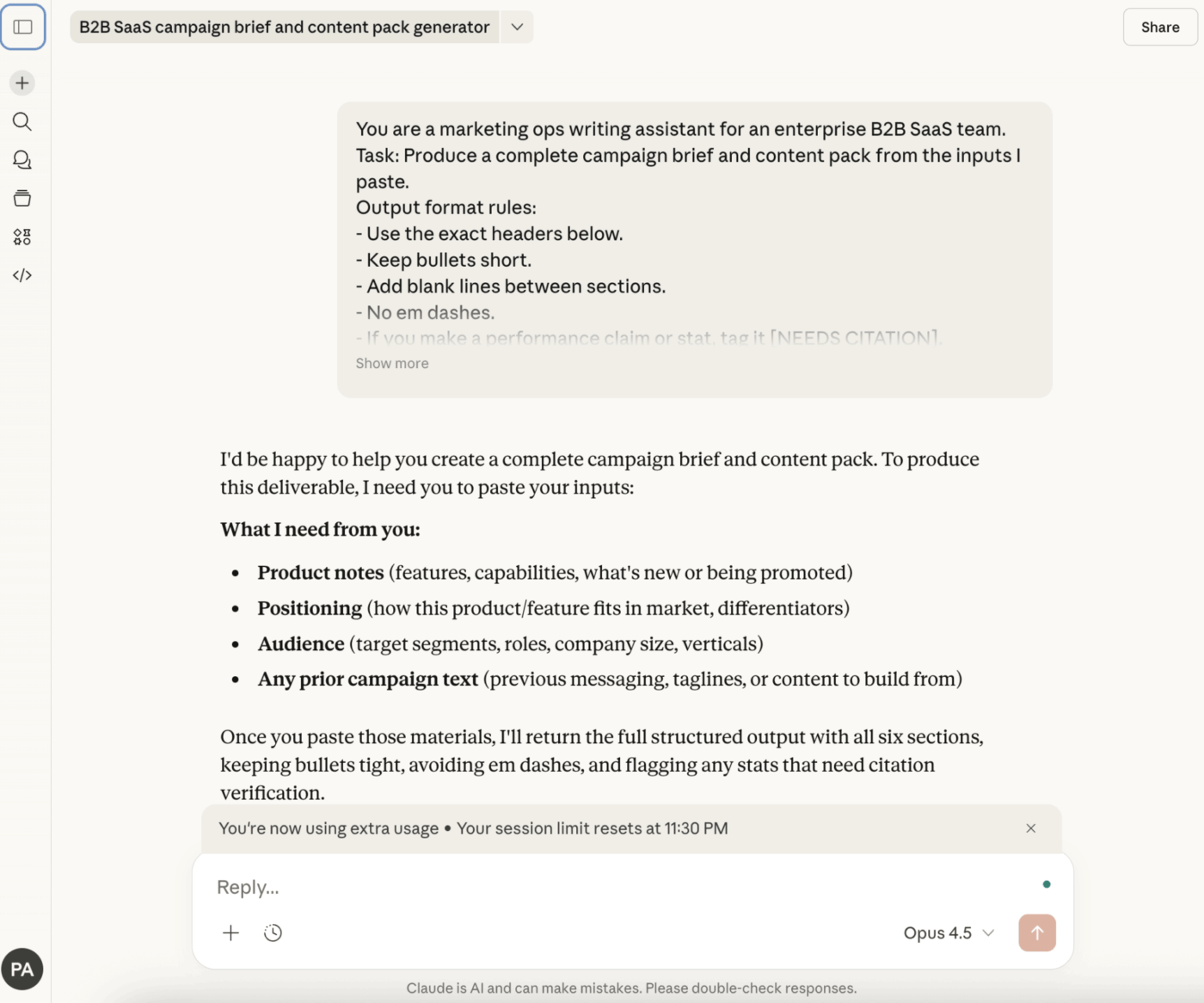
A marketing team might use Claude to generate a campaign brief draft, but the process still requires copying that output from Claude and pasting it into a separate document for editing and collaboration. ClickUp Docs combined with ClickUp Brain eliminates that friction—producing more relevant first drafts because the AI already understands project context, and enabling teams to draft, edit, and publish without leaving their project workspace.
ClickUp + Contextual AI = Measurable transformation
According to a Forrester Economic Impact™ study, teams using ClickUp saw 384% ROI and saved 92,400 hours by year 3.
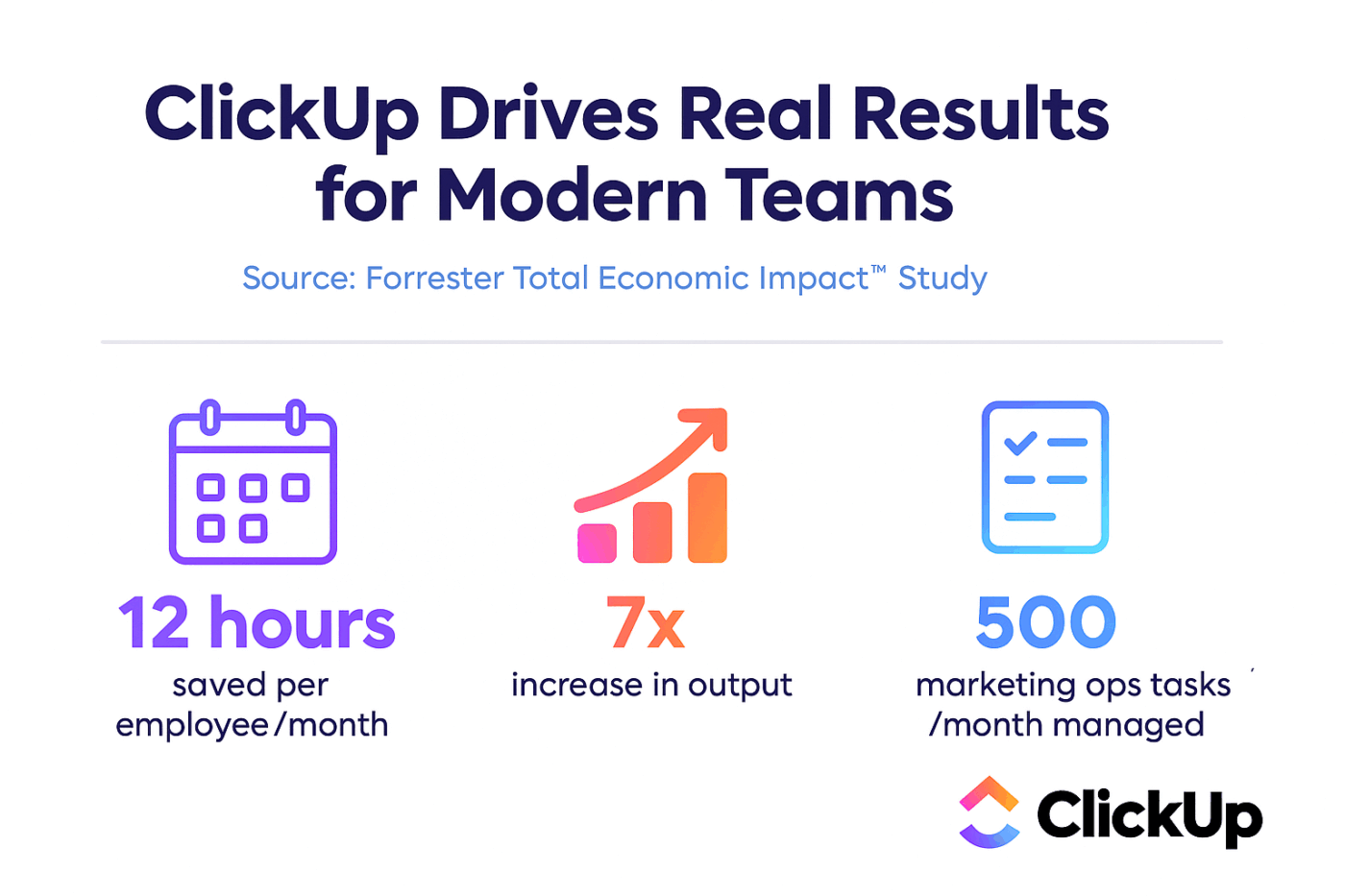
When context, workflows, and intelligence live in one place—teams don’t just work. They win.
Developers constantly jump between code editors, GitHub, Slack, and project management tools. This context switching destroys focus and fragments the deep work sessions that complex development requires. Productivity drops, potential bugs slip through pull request reviews, and documentation becomes an afterthought that rarely gets completed.

Claude Code, the developer-focused version, addresses these specific workflows. Writing unit tests shifts from manual per-function creation to batch generation with full codebase context. Pull request review transforms from tedious line-by-line reading to AI-assisted summarization with automatic flagging of potential issues. Documentation that previously got skipped can now be generated directly from code context.
You can use Claude for scaffolding new features, writing boilerplate code, and refactoring legacy systems. However, these activities still occur in separate windows from project plans and task management. ClickUp’s integration with GitHub and GitLab links commits and pull requests directly to tasks, tracking all work in one place. Summarizing technical discussions within tasks using ClickUp Brain keeps AI-generated insights connected to actual development workflows rather than scattered across disconnected tools.
Research often ends with “someone needs to build this.” ClickUp’s CodeGen capabilities help teams move faster by turning technical findings into usable starting points, like drafting API outlines, writing quick scripts, or generating implementation checklists directly inside the workspace. Instead of copying specs into another tool, engineers can go from insight to first draft without losing context.

Support teams drowning in ticket volume create frustrated customers waiting for responses and burned-out agents answering the same questions repeatedly. Generic chatbots often make situations worse, frustrating customers with irrelevant responses and generating additional work for human agents who must clean up after failed automation attempts.

Claude’s more nuanced language understanding addresses these challenges differently than traditional rule-based chatbots. Ticket triage and routing automatically categorizes incoming requests and directs them to appropriate teams based on content analysis rather than simple keyword matching. Response drafting generates personalized first-response drafts for agents to review and send, reducing time-to-response without sacrificing quality. Knowledge base deflection answers common questions by pulling information from existing documentation, handling routine inquiries without human involvement. Sentiment analysis flags tickets needing urgent attention based on customer tone and escalation signals.
Even with AI assistance, human-in-the-loop remains essential for complex issues. The goal is making agents faster and more effective, not replacing the human judgment that complex customer situations require.
💡 Pro Tip: Automatically create and assign support tickets from forms or emails using ClickUp Automations. Then instantly search past resolutions and draft responses using ClickUp Chat and ClickUp Brain—all within the same workspace where product and engineering teams track related bugs and feature requests.
Analysts and strategists spend more time hunting for information and manually extracting data from PDFs than actually analyzing findings. This tedious work creates bottlenecks that delay critical business decisions and waste valuable expert time. Insights get buried in unstructured documents while competitor analysis moves at frustratingly slow pace.

Claude Enterprise excels at these tasks, especially with extended context windows capable of processing entire lengthy reports in single conversations. Literature review summarizes academic papers, industry reports, and competitive intelligence into digestible insights. Data extraction pulls structured information—names, dates, financial figures—from unstructured documents like contracts and invoices. Comparative analysis synthesizes findings from multiple sources into cohesive summaries that enable informed decision-making.
The friction point remains that insights generated in Claude still require manual transfer into briefs, presentations, or project plans. Keeping all source materials in ClickUp Docs and querying your entire knowledge base with natural language through ClickUp Brain eliminates this handoff. Highlighting any text and automatically creating tasks from findings connects research directly to execution.
“Where’s that file?” “Who made this decision?” “What’s our policy on this?” If these questions echo through your organization daily, it’s because company knowledge is scattered across Slack, email, shared drives, and—worst of all—individual employees’ memories.
This fragmentation makes onboarding new hires nightmarish and creates organizational vulnerability when employees leave and take institutional knowledge with them.

Claude can help by creating a conversational search layer over documentation through retrieval-augmented generation (RAG), allowing the AI to answer questions based on your actual documents rather than general training data.
But building and maintaining a separate knowledge base requires constant updates and management overhead. Your work itself is your knowledge base. Keeping projects, tasks, and documents unified in ClickUp means ClickUp Brain already knows your work context—no separate teaching or configuration required because the AI lives where work happens.
ClickUp’s Enterprise Search goes beyond keyword lookups. It lets teams search across Docs, tasks, chat, and connected tools like Google Drive, Slack, and GitHub from one place, so research and decisions don’t disappear into separate systems.

Legal teams face mounting pressure to review contracts faster while maintaining the thoroughness that risk management requires. Manual contract review consumes enormous time, especially when identifying specific clauses, comparing terms against company standards, or flagging potential compliance issues across hundreds of documents.

Claude’s extended context window enables processing entire contracts in single sessions, identifying relevant clauses and comparing language against established templates. Risk flagging surfaces potentially problematic terms that require attorney attention. Compliance checking compares document language against regulatory requirements and internal policies.
This capability accelerates the review process without replacing legal judgment—attorneys spend time on analysis and negotiation rather than initial document scanning.
Meetings generate enormous amounts of information that quickly becomes lost or forgotten. Attendees take inconsistent notes, action items get buried in conversation, and follow-up becomes haphazard because nobody has a clear record of decisions made and responsibilities assigned.

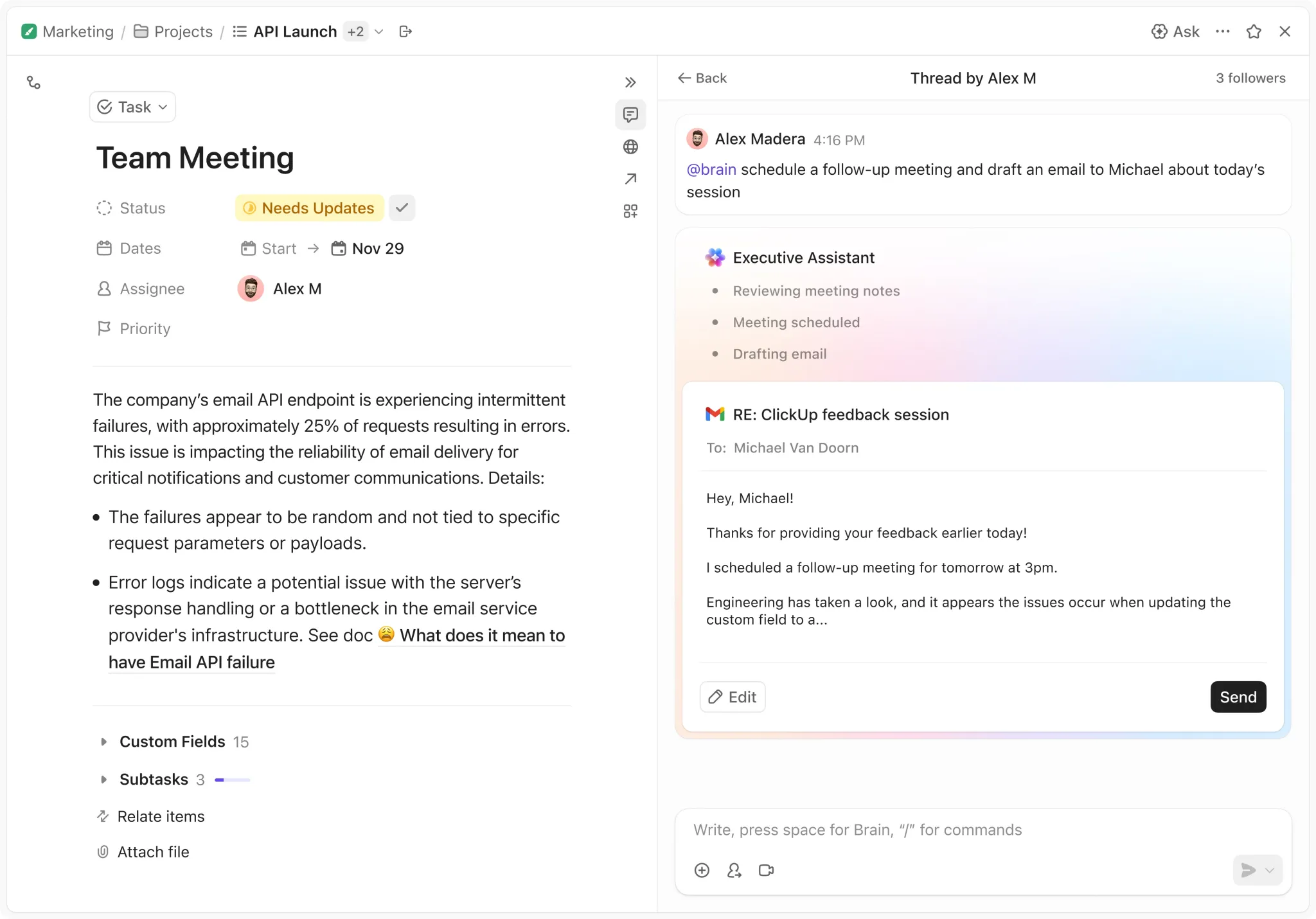
Claude can transform meeting transcripts into structured summaries highlighting key decisions, action items, and discussion points. However, those action items still exist only as text until someone manually creates tasks and assigns them to responsible parties.
🔍 Did You Know? 42% of work disruptions come from juggling platforms, managing emails, and jumping between meetings. ClickUp Brain can convert meeting summaries directly into assigned tasks with deadlines, eliminating the manual handoff that lets action items fall through cracks.
Strategic initiatives require synthesizing information from multiple sources—market research, competitive intelligence, internal performance data, and stakeholder input. Gathering and organizing this information manually consumes weeks that could be spent on actual strategic thinking.

Claude can help teams structure strategic frameworks, summarize relevant data sources, and draft initial planning documents. SWOT analyses, competitive comparisons, and market opportunity assessments can be accelerated through AI assistance.
The challenge is connecting strategic plans to actual execution. Plans created in AI chat windows need translation into project structures, milestones, and accountable tasks before they drive organizational action.
Creating effective training materials requires transforming institutional knowledge into structured learning experiences. This typically involves subject matter experts spending hours documenting processes they perform automatically, often producing materials that quickly become outdated as processes evolve.

Claude can help structure training content, generate quiz questions, and create step-by-step procedures from expert input. The AI can also adapt existing materials for different audiences or learning formats.
Connecting training content to the actual tools and processes being taught maximizes effectiveness. When training materials live alongside the work they describe, updates happen naturally as processes evolve.
Responding to RFPs requires rapidly assembling relevant company information, case studies, and capability descriptions while tailoring everything to specific client requirements. Teams often recreate similar content for each proposal because finding and adapting previous responses proves too time-consuming.

Claude can help draft proposal sections, summarize case studies, and ensure response completeness against RFP requirements. The AI’s ability to maintain context across long documents helps ensure consistency throughout lengthy proposals.
Building a searchable library of proposal components and case studies in ClickUp Docs makes this content immediately available to ClickUp Brain, which can then surface relevant materials and help draft tailored responses without starting from scratch each time.
You’ve paid for the tool, but six months later only a handful of people are using it consistently. The subscription is becoming expensive shelf-ware, and leadership questions the ROI of AI investments.
This story repeats across organizations that lack clear adoption plans.
Don’t make everyone figure out effective prompting independently. Create and share team-specific prompt templates for common tasks, reducing the learning curve and ensuring consistent quality across the organization.
Find power users excited about AI and empower them to train peers. Organic adoption driven by enthusiastic internal advocates typically outperforms top-down mandates.
Create clear rules about what information is and isn’t appropriate to share with AI tools. This clarity enables confident usage rather than cautious avoidance driven by uncertainty about policies.
Use admin dashboards to identify who is using the tool and where adoption gaps exist. This visibility enables targeted training interventions rather than generic organization-wide initiatives.
This is the most important step. The biggest value unlock happens when AI outputs flow directly into task creation, documentation, and project updates—eliminating the manual transfer that creates friction and drop-off.
You can spend months building custom integrations to connect AI to workflows, or you can use a platform where those connections already exist natively. ClickUp Brain embedded directly in Tasks, Docs, and Chat provides AI assistance in context while eliminating copy-paste busywork.
Even powerful AI chat tools have inherent limitations that affect how organizations can deploy them effectively.
The primary frustration organizations encounter is that Claude Enterprise remains a standalone tool. It functions as a chat interface rather than a work hub—any output, whether project plans, summaries, or idea lists, requires manual transfer to wherever work actually gets managed. Context requires manual input because you must feed documents and explain projects in every new conversation; the AI has no persistent memory of team structure, goals, or deadlines. There’s no native project management capability—you can ask Claude to help plan projects, but it cannot create tasks, assign them to team members, or track progress. Integration requires API development or third-party connectors, adding complexity and cost to any attempt at workflow connection.
These limitations create an “execution gap” where great AI-generated ideas never become actionable tasks that get done.
Initial excitement about new AI tools eventually fades. Teams realize they’re managing yet another disconnected application, and work becomes more fragmented rather than more streamlined.
This realization triggers searches for alternatives, usually driven by specific frustrations.
AI sprawl emerges as organizations accumulate AI tools without oversight or strategy, wasting budget and creating security risks. Work sprawl fragments activities across disconnected tools—Claude for AI, Slack for chat, Asana for tasks, Notion for docs—with context scattered everywhere and no single source of truth.
The execution gap becomes visible when AI-generated plans die in chat windows because there’s no straightforward path to turn them into actionable projects with owners and deadlines. Leadership lacks visibility into how AI actually impacts project outcomes because AI tools remain disconnected from project management systems. New hires face onboarding friction as they must learn five different tools and spend weeks piecing together context from all of them.
The problem isn’t Claude itself—it’s the disconnected workflow architecture that prevents AI from delivering its full potential value.
A Converged AI Workspace—a single, secure platform where projects, documents, conversations, and analytics live together with contextual AI embedded as the intelligence layer—solves the fragmentation problem that limits standalone AI tools. Rather than adding another disconnected application to your tech stack, ClickUp brings work and AI into one unified environment where context flows naturally between every feature.
The fundamental difference between ClickUp Brain and standalone AI tools is context awareness. ClickUp Brain isn’t a separate tool requiring manual integration—it’s an AI assistant embedded directly into tasks, documents, projects, and team communication with automatic access to your organizational knowledge.

When you ask ClickUp Brain a question, it already knows your project structures, task histories, document contents, and team assignments. You don’t need to re-explain your company’s goals, paste in background information, or describe project status in every conversation. The AI understands context because it lives where your work lives, eliminating the setup overhead that makes standalone AI tools feel disconnected from actual workflows.
This contextual awareness means responses are immediately relevant and actionable. Ask “What’s blocking the product launch?” and ClickUp Brain can analyze task dependencies, identify overdue items, and surface relevant discussion threads—all without you needing to manually gather and input that information.
The execution gap—where great AI-generated ideas die in chat windows—disappears when AI and work management share the same platform. ClickUp Brain doesn’t just generate plans and summaries; it can act on them directly within your workspace.

Meeting summaries become project plans with assigned tasks in single clicks. Research findings transform into tracked action items with owners and deadlines. Content drafts flow directly into ClickUp Docs where teams can collaborate, comment, and refine without copy-paste friction. Strategic recommendations connect to the actual projects and milestones they should influence.

This tight integration means AI assistance produces work outputs rather than just conversation outputs. The insights you generate have clear paths to implementation, and the work that results remains connected to the AI assistance that created it—providing visibility into how AI contributions flow through to completed deliverables.
Finding information shouldn’t require remembering which tool contains what you need. ClickUp’s unified search spans tasks, documents, chat messages, and connected applications through a single interface. ClickUp Brain enhances this capability with natural language queries that understand intent rather than requiring exact keyword matches.
Ask “What did we decide about the pricing model last quarter?” and ClickUp Brain can surface relevant task discussions, document sections, and chat threads without you needing to specify where that information might live. This eliminates the archaeological expeditions through multiple tools that currently consume hours of knowledge worker time each week.

The search capability extends to connected integrations as well. Information from GitHub, Slack, Google Drive, and other connected tools becomes searchable within ClickUp, creating a true single source of truth that reduces context switching and information fragmentation.
Every disconnected tool in your stack creates overhead—subscription costs, training requirements, integration maintenance, and the cognitive load of remembering which tool handles which function. ClickUp consolidates capabilities that typically require separate subscriptions into one platform.
Project management, documentation, real-time chat, whiteboarding, time tracking, goal management, and AI assistance all live within ClickUp. Teams that previously maintained separate subscriptions for Asana, Notion, Slack, Miro, and Claude can consolidate into a single platform that handles all these functions with native integration between them.
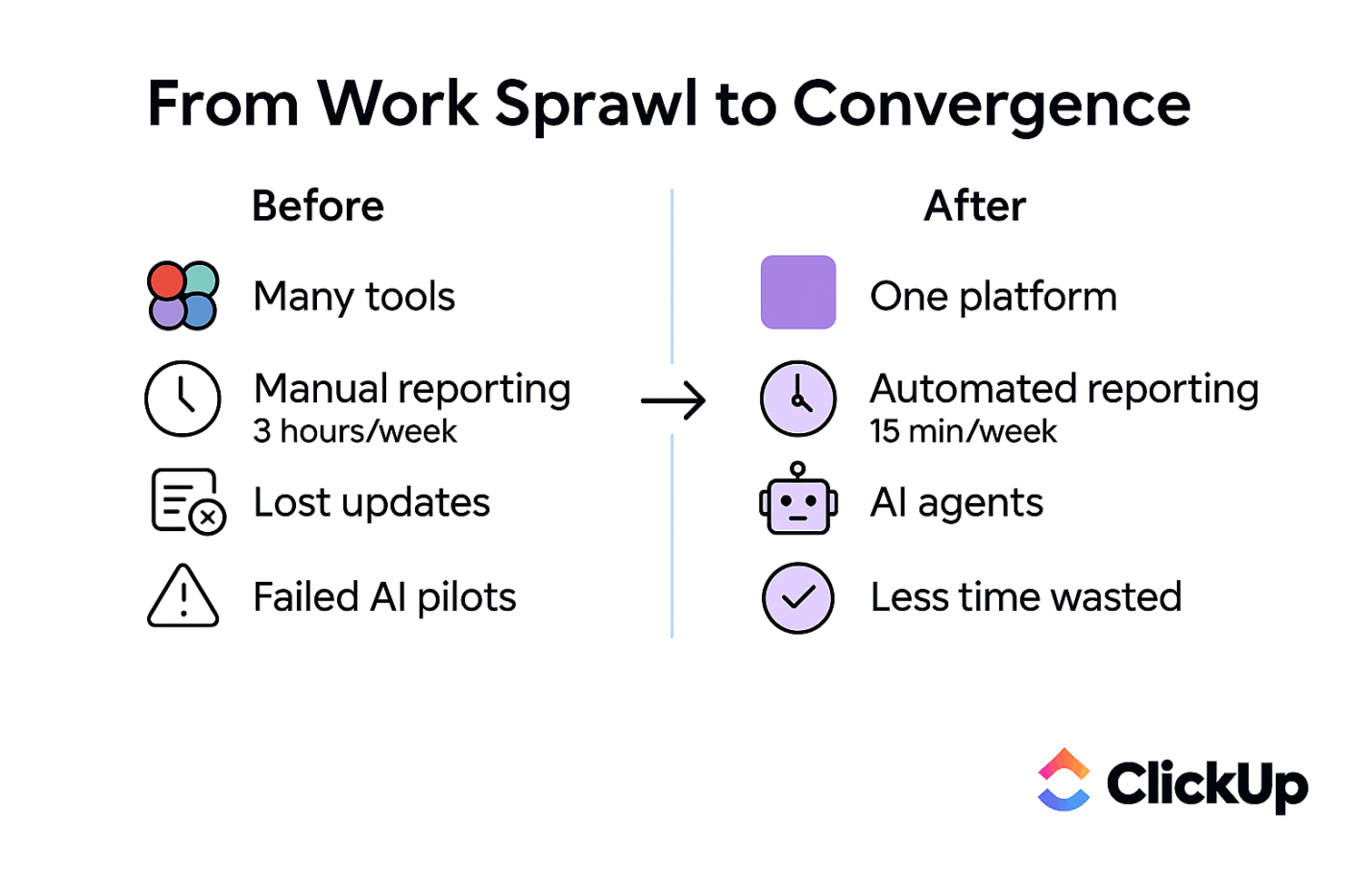
This consolidation produces cost savings, but the larger benefit is workflow simplification. When your AI assistant, your task management, your documentation, and your team communication share the same platform, work flows naturally between functions without the friction of tool boundaries.
Super Agents help close the research-to-execution gap without relying on someone to play project manager for the research.
For example: when a new research doc lands in a “Research Inbox,” an Agent can
(1) extract key claims and risks into a standard summary
(2) route items tagged “Needs Verification” to an owner
(3) create follow-up tasks with due dates for anything marked “High Impact.” The result is fewer dropped insights and fewer manual handoffs, with the logic visible inside the workflow.

ClickUp Brain MAX takes AI assistance outside the ClickUp workspace through a desktop application that brings contextual AI to your browser and other daily workflows. The capability includes voice-to-text functionality that works in any text field, allowing you to dictate emails, messages, and documents with AI assistance regardless of which application you’re currently using.

This extension means your AI companion travels with you across your digital workday rather than requiring you to switch to a specific application whenever you need AI assistance. The desktop app maintains connection to your ClickUp workspace context, so the AI understands your projects and priorities even when you’re working in other tools.

ClickUp provides the security and administrative capabilities that enterprise deployments require. SOC 2 Type II compliance, SSO integration, SCIM provisioning, and granular permission controls give IT and security teams the governance features they need to approve organization-wide deployment.
Admin dashboards provide visibility into usage patterns, helping leadership understand adoption rates and identify teams that might benefit from additional training or support. Data residency options and retention policies can be configured to meet regulatory requirements across different jurisdictions.
Unlike standalone AI tools that require separate security evaluation and governance frameworks, ClickUp’s AI capabilities inherit the platform’s existing security posture. Organizations already using ClickUp for project management can extend into AI-powered workflows without introducing new security considerations or vendor relationships.
AI success in the enterprise isn’t just about having the smartest model. It’s about whether AI is actually connected to the way work gets done. Claude Enterprise can deliver powerful outputs across writing, coding, research, and support, but real ROI depends on what happens next.
The teams seeing the biggest results treat AI as part of the workflow, not a separate chat window. They reduce manual handoffs, build repeatable systems, and connect insights directly to execution.
That’s where a Converged AI Workspace like ClickUp becomes strategic. When AI lives alongside your tasks, docs, projects, and team collaboration, ideas don’t stall in conversation; they turn into trackable work instantly.
The future of enterprise AI belongs to organizations that close the execution gap, embedding intelligence directly into the systems where work moves forward. Get started with ClickUp!
What’s the difference between Claude Pro and Claude Enterprise?
Claude Pro is designed for individual users who need higher usage limits and priority access, while Claude Enterprise is built for organizations and adds team collaboration features, administrative controls, usage analytics, and enterprise-grade security including SOC 2 compliance and data handling guarantees.
Can Claude Enterprise integrate with project management tools like ClickUp?
Claude Enterprise can connect to other tools via its API, but this typically requires custom development work or third-party integration platforms. Alternatively, platforms like ClickUp provide native AI capabilities already integrated with project management, eliminating the need for separate integration projects.
Which teams benefit most from Claude Enterprise use cases?
Teams handling high volumes of writing, research, coding, or customer communication—such as marketing, engineering, legal, and support teams—typically see the fastest return on investment from Claude Enterprise deployment.
Is Claude AI secure enough for enterprise workflows?
Claude Enterprise is designed with business security requirements in mind, offering SOC 2 compliance, configurable data retention controls, and contractual commitments not to use customer data for model training. Security teams should review these features against their specific organizational requirements.
How do you measure ROI from Claude Enterprise?
Effective ROI measurement requires connecting AI usage to concrete business outcomes—time saved on specific tasks, quality improvements in deliverables, or throughput increases in processes like content creation or code review. Organizations that integrate AI with their project management systems can more easily track these metrics because work outputs remain connected to AI assistance.

© 2026 ClickUp

There’s an easier way. Try a free AI Agent in ClickUp that actually does the work for you—set up in minutes, save hours every week.