






Still downloading templates?
There’s an easier way. Try a free AI Agent in ClickUp that actually does the work for you—set up in minutes, save hours every week.
Sorry, there were no results found for “”
Sorry, there were no results found for “”
Sorry, there were no results found for “”


Your legacy systems are maxed out, and you know it better than anyone else.
They’re slow, they can’t handle the massive amounts of data flowing in today, and they definitely weren’t built to integrate with AI.
It’s easier said than done. You have to migrate everything—years of critical data and processes—with zero disruption to your operations.
In this blog, we share which AI stack is right for teams migrating from legacy tools. We cover the basics + how to build the tech stack.
Legacy systems might have been the definition of fast a decade ago. But today, they’re synonymous with slow performance, broken workflows, reduced efficiency, data siloes, and poor UX.
While moving away from them is the right call, the migration path is riddled with key challenges:
However, don’t let that deter you from shifting to AI tools. See it as a prime opportunity to modernize your operations, secure systems, and double down on agility.
In fact, the right AI tools simplify migration. They don’t force your teams to rebuild everything.
Simply plug and play your existing workflows, connect legacy data sources, automate manual work, and create unified visibility across departments.
Let’s dig into how some companies across various industries successfully made the leap from legacy systems to modern AI stacks:
CEMEX, a major construction material company, established an internal marketing agency, CEMEX Content Studio. However, their marketing team was slowed down by disconnected tools, manual handoffs, and the lack of a standard process for project requests.
To fix this, CEMEX’s entire 50-person marketing team migrated to ClickUp’s unified AI stack. They automated project intake, linked cross-functional tasks, and introduced real-time dashboards for complete project visibility.
🎯 Results: 15% reduction in time-to-market; Project handoff time cut down from hours to seconds
Here’s what Oscar Aguilar, CEMEX’s Marketing Project Manager, said:
It’s been great, because the whole team follows up on their daily tasks in ClickUp,” says Oscar. “Before the automations, whenever a copywriter finished a task, we had to manually communicate up the chain of command that the copy was ready. That could take 36 hours.
Perhaps the most significant and visible example of a legacy-to-AI transition is the modernization of McDonald’s menus and ordering systems.
With AI integrated into both their mobile app and in-store kiosks, McDonald’s can analyze how customers interact with their menus—where people click, what they pause on, and how they navigate through the ordering process.
They used these insights to refine layouts, enhance product placement, and suggest relevant add-ons, making the ordering experience faster and far more intuitive.
🎯 Results: 20% increase in digital order volume
The Cleveland Clinic successfully expanded its telehealth services by modernizing outdated computer systems through the integration of AI.
They implemented AI-driven tools to integrate and unify patient data scattered across legacy systems. This meant healthcare providers could reliably and instantly view comprehensive patient records during any virtual appointment.
🎯 Results: 25% increase in telehealth adoption
When you’re moving off legacy systems, it’s easy to get lost in the noise of emerging AI technologies.
You won’t need every single AI tool out there, but a few that work well together to power your operations and support business goals.
Enter: AI stack.
AI stack refers to a carefully designed collection of AI-powered tools that work together to automate workflows, analyze data, generate content, and simplify communication.
An AI stack is made up of different layers, pretty much like a sandwich. Each layer contains tools and frameworks that perform a crucial function.
The three core layers of an AI stack are:
🧠 Fun Fact: The Y2K Crisis was a global panic. People feared that when the year 2000 arrived, the system would read ‘00’ as 1900. This was because programmers saved memory by only recording the last two digits of the year (e.g., 1998 was stored as just 98).
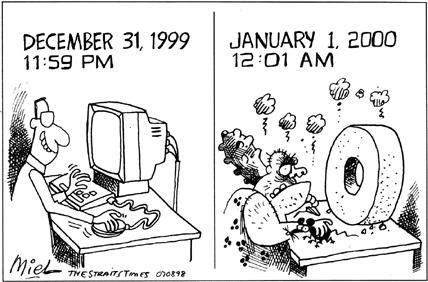
Instead of rewriting billions of lines of code to store four digits (1998 > 1998), which would’ve been a costly ask, companies found a quick fix: Windowing. They picked a cutoff year (say, 1950) and hardcoded the system with a simple rule: If the two-digit year is 50 or higher, assume the century is 20. Otherwise, assume the century is 21.
While this worked temporarily, it also meant that when the year 2050 arrives, it would be read as 1950 by the system!
Here’s how AI stacks and traditional software stacks are different:
| Aspect | AI stack | Traditional software stack |
| Core function | Learns from data, adapts, makes predictions, automates decisions | Follows fixed rules written by developers |
| Core components | Data warehouses, data pipelines, ML frameworks, GenAI tools | Structured databases, rule-based engines, SQL servers, COTS software |
| Data usage | Continuously consumes real-time data | Uses static data inputs |
| Evolution over time | Improves continuously as models learn | Remains unchanged unless developers manually enhance it |
| Handling complexity | Manages multi-step, dynamic workflows | Handles linear, rule-based workflows |
| Scalability | Scales as data and usage grow | Scales through more infrastructure |
In a modular AI stack, you combine independent components (or AI tools) instead of relying on one rigid system.
It’s a highly scalable system as you can swap, upgrade, or downgrade tools without rebuilding everything from scratch. Plus, if a tool becomes too costly or limited, you can replace just that component without disrupting your entire AI setup.
📮 ClickUp Insight: While 35% of our survey respondents use AI for basic tasks, advanced capabilities like automation (12%) and optimization (10%) still feel out of reach for many.
Most teams feel stuck at the “AI starter level” because their apps only handle surface-level tasks. One tool generates copy, another suggests task assignments, a third summarizes notes—but none of them share context or work together.
When AI operates in isolated pockets like this, it produces outputs, but not outcomes. That’s why unified workflows matter.
ClickUp Brain changes that by tapping into your tasks, content, and process context—helping you execute advanced automation and agentic workflows effortlessly, via smart, built-in intelligence. It’s AI that understands your work, not just your prompts.
Not every legacy system demands an instant AI upgrade. Some tools still serve their purpose well, and forcing AI into the wrong places can create more complexity than value.
That said, let’s go through the unmistakable signs when you must migrate to AI systems:
This is the classic symptom: information constantly gets stuck or requires manual transfer between different systems. You spend more time moving data around than actually using it.
You have to wait hours or even days for basic reports to be generated. Your critical decisions are always based on old information, as your system is not fast enough to process the volume of incoming data quickly.
Marketing has its tools, sales has theirs, operations has another set—and none of them communicate properly. Without a shared view of crucial data, you end up losing context or duplicating work.
If your analysts spend weeks cleaning data, reconciling spreadsheets, or manually identifying trends, your system isn’t supporting the business—it’s slowing it down.
Modern AI stacks enhance decision-making by incorporating forecasting, anomaly detection, and automated recommendations.
You’re constantly paying for custom fixes, support hours, or niche specialists just to keep things running. Plus, your tools struggle to integrate with newer apps or break whenever an update occurs.
This continuous cost of patching, maintaining, and manually setting up integrations is financially unsustainable.
🧠 Fun Fact: The Mechanization of Contract Administration Services (MOCAS) system, first deployed in 1958 by the U.S. Department of Defense, is one of the world’s oldest pieces of active software. It is still running today and is responsible for managing data related to $1.2 trillion in defense contracts.
To migrate from legacy tools to an AI stack, a structured approach is necessary.
This calls for evaluating critical systems, setting clear AI goals, preparing for data modernization, adopting the right AI technologies, and carefully monitoring the entire transition.
Let’s walk through all these steps in detail.
Start by assessing how your legacy systems handle day-to-day work.
Break your current ecosystem into three parts:
🎥 Bonus: Watch this short video to learn six different types of process mapping strategies and how to use ClickUp for each one:
Based on your audit, list all the problems you’ve uncovered across your existing workflows.
Group them together into relevant categories. It could be: reporting and analytics, team communication, project management, etc.
Set clear, measurable goals for each category. In other words, what improvement do you want to achieve when you introduce automation or intelligence into that part of the workflow?
If reporting and analytics is one category, you can have AI goals like, Cut report generation time to under 10 minutes or Dashboards must refresh automatically every 15 minutes. Similarly, for team communication, you can set goals like Reduce time spent searching for info by 50%.
💡 Pro Tip: Attempting a full overhaul from the start leads to confusion and stalled adoption. Start with the low-hanging fruit. Identify 1-2 categories that cause the most frustration for your team. These are your pilot workflows—the first areas where you’ll introduce AI and automation for gradual migration.
Once you’ve identified what needs to be changed in your current system, it’s time to sort, clean, and structure your data.
Here’s a step-by-step workflow:
| Step | What it involves |
|---|---|
| Gather | Locate all data scattered across old systems including spreadsheets, databases, shared drives, email attachments, exported reports, customer records, and more |
| Categorize | Group data into clear buckets like customer, finance, legal, or marketing, and break each category down further by type, such as reports, contracts, project briefs, or creative assets |
| Declutter | Remove duplicates, outdated versions, unnecessary documents, and unused files while archiving only what’s still important for long-term reference |
| Standardize | Fix inconsistent file names, update outdated or incomplete fields, and create standard formats for structuring key documents across teams |
Your files are now all sorted and ready to move down the migration path.
🚀 The ClickUp Advantage: Use ClickUp Tasks to manage and track every piece of data you own. Here’s how:
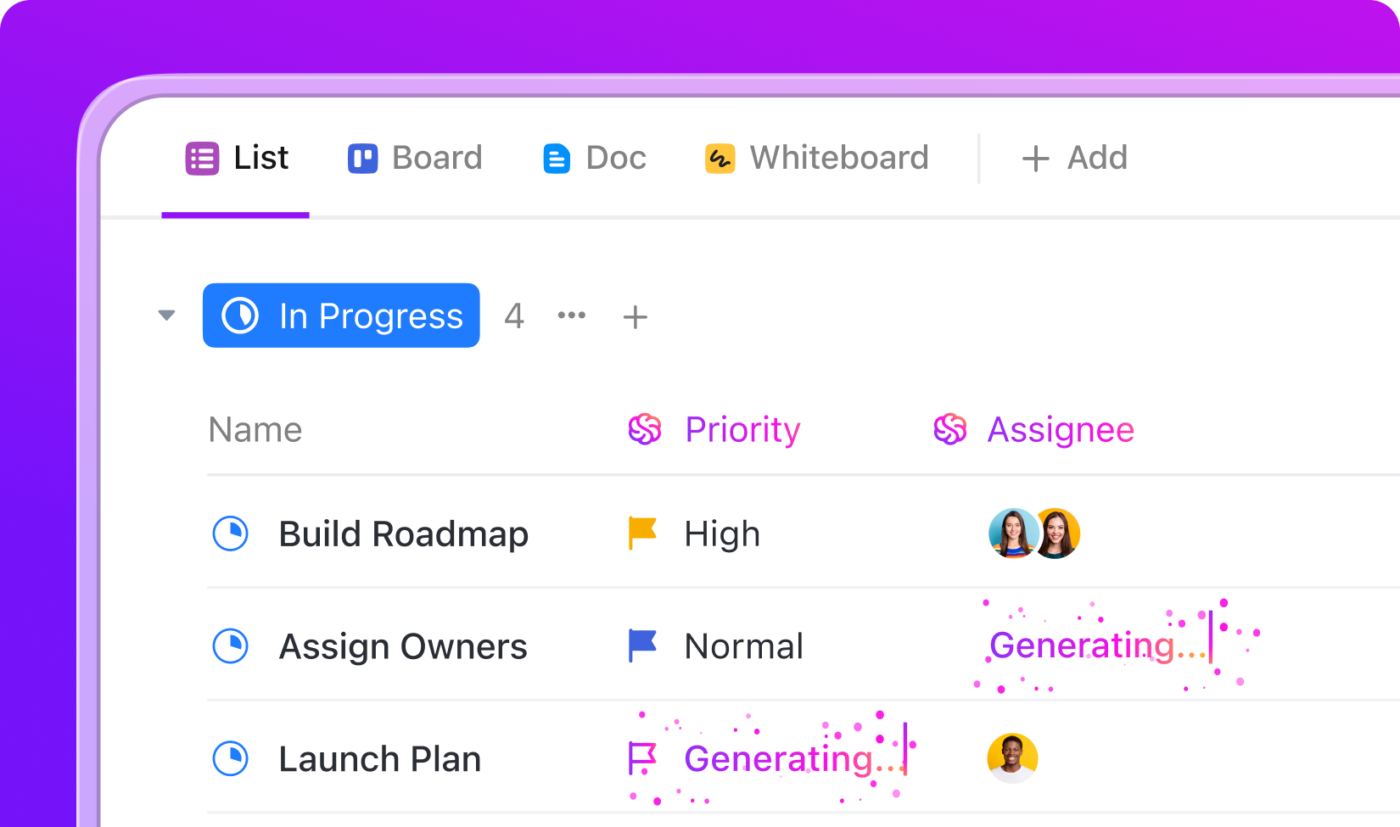
📚 Read More: How to Organize Your Digital Files Efficiently
When evaluating AI tools, factor in your pilot workflows. Don’t forget to plan for the other processes you’ll migrate later.
It’s crucial to avoid technical debt, which happens when you invest in temporary or half-baked solutions. That said, here are some basic artificial intelligence capabilities worth considering for your modern tech stack:
Choose a user-friendly platform that offers multiple AI capabilities under one roof. This increases cost savings and minimizes the learning curve for your team.
Take ClickUp Brain, for example. It bundles many AI jobs into one system, so you don’t need separate tools for building your migration workflow.
With Brain, you can:
This lets your teams move faster through cleanup, preparation, and migration without adding fragmented AI tools to an already complex tech stack.
Pair this with ClickUp Automations to handle routine admin work using a powerful Agentic AI. Set up automations, such as “When a task moves to ‘Submitted’, auto-add the reviewer and notify them.”
ClickUp’s AI Agents take AI integration and automation to the next level. They continuously monitor your workspace, make data-driven decisions, and adapt actions to ensure business continuity even when you’re unavailable.
Work sprawl is real, and it’s one of the biggest reasons teams fail to see the benefits of their AI investments.
If your team members still have to jump between five platforms just to finish a task or chase down a file, your AI stack isn’t effective enough. To get the most out of your modernization efforts, ensure seamless integration between all components of your AI stack and existing systems.
Look for cloud-native AI tools that can plug directly into the core systems of your existing tech stack, like your CRM software or marketing platform. Also prioritize strong API support, native integrations, and no-code automation as they minimize disruption and migration complexity.
ClickUp BrainGPT is built to solve this. This AI super app unifies all your tasks, docs, goals, whiteboards, dashboards, projects, AI, and external apps into one connected platform.
With ClickUp Enterprise AI Search, you can quickly find a file, task, or piece of information across your entire converged workspace, including ClickUp and integrated third-party app services.
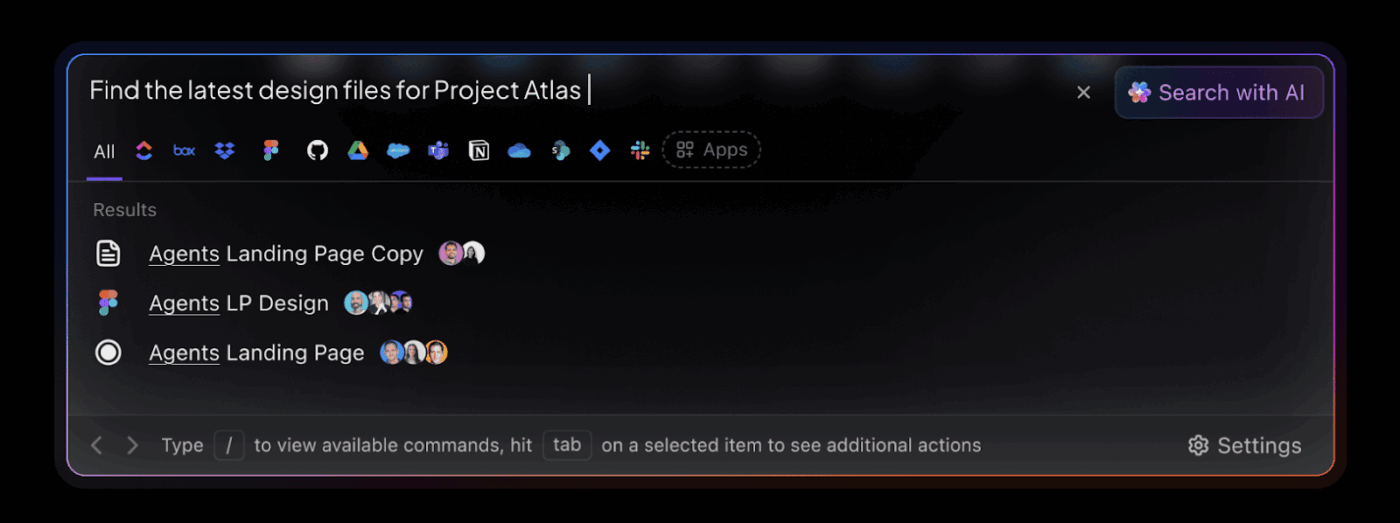
👀 Did You Know: ClickUp offers 1000+ native integrations for robust cross-platform support. Just select which tools you want for work, toggle them on, and connect them to your ClickUp Workspace in a whiff.
No need to hire a developer or change legacy code in your old system.
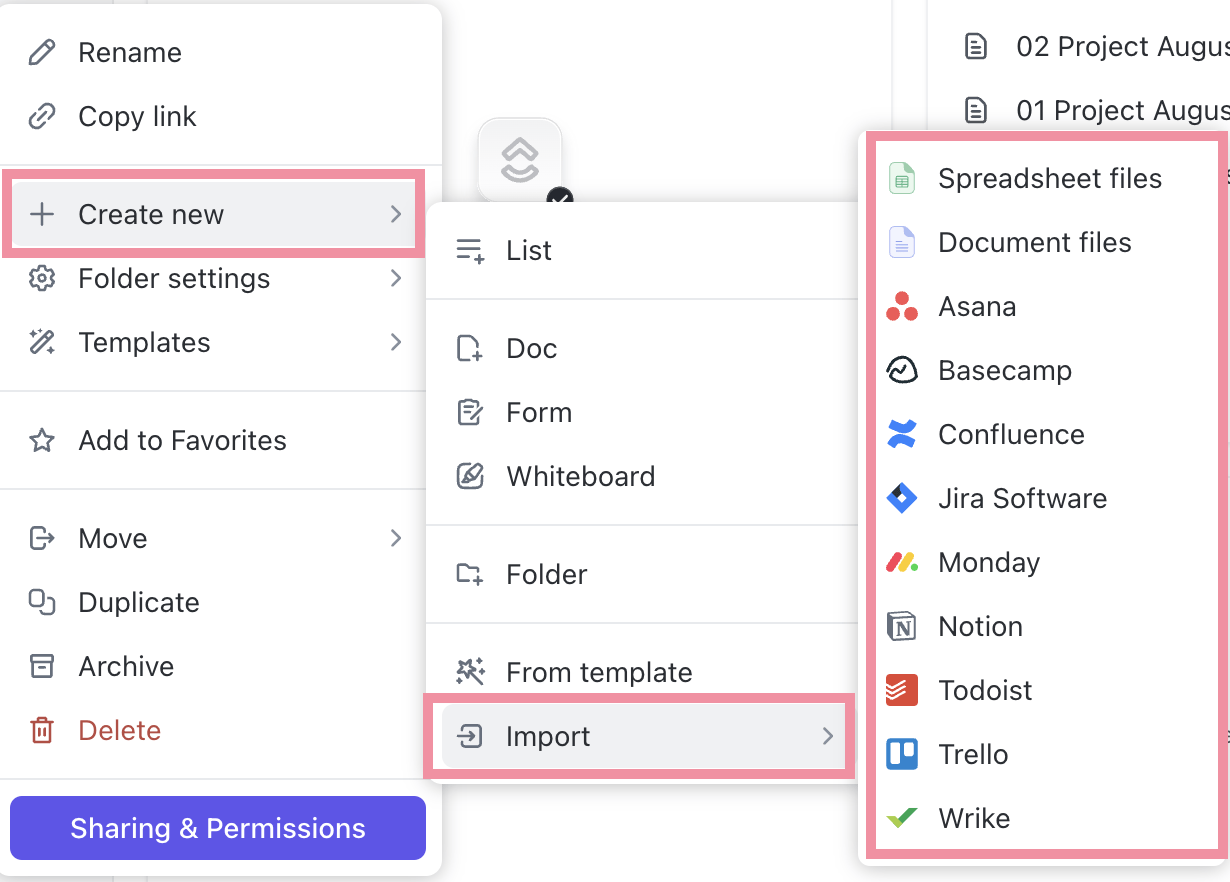
Track the measurable targets you defined earlier (in Step 2) to see how well your AI stack is performing.
Compare your new numbers with your legacy baseline to identify where the gains are strongest and where adjustments are needed.
Next, ensure your pilot performs consistently. Gradually migrate more of your enterprise operations to the newly built intelligent systems. This paves the way for complete digital transformation.
🚀 The ClickUp Advantage: Migrate from chaotic spreadsheet-based reporting to automated performance monitoring with ClickUp Dashboards.
Track key metrics visually using dashboard widgets, such as progress bars for completion rates, heatmaps for workflow bottlenecks, pie charts for workload distribution, and velocity charts for project predictability.
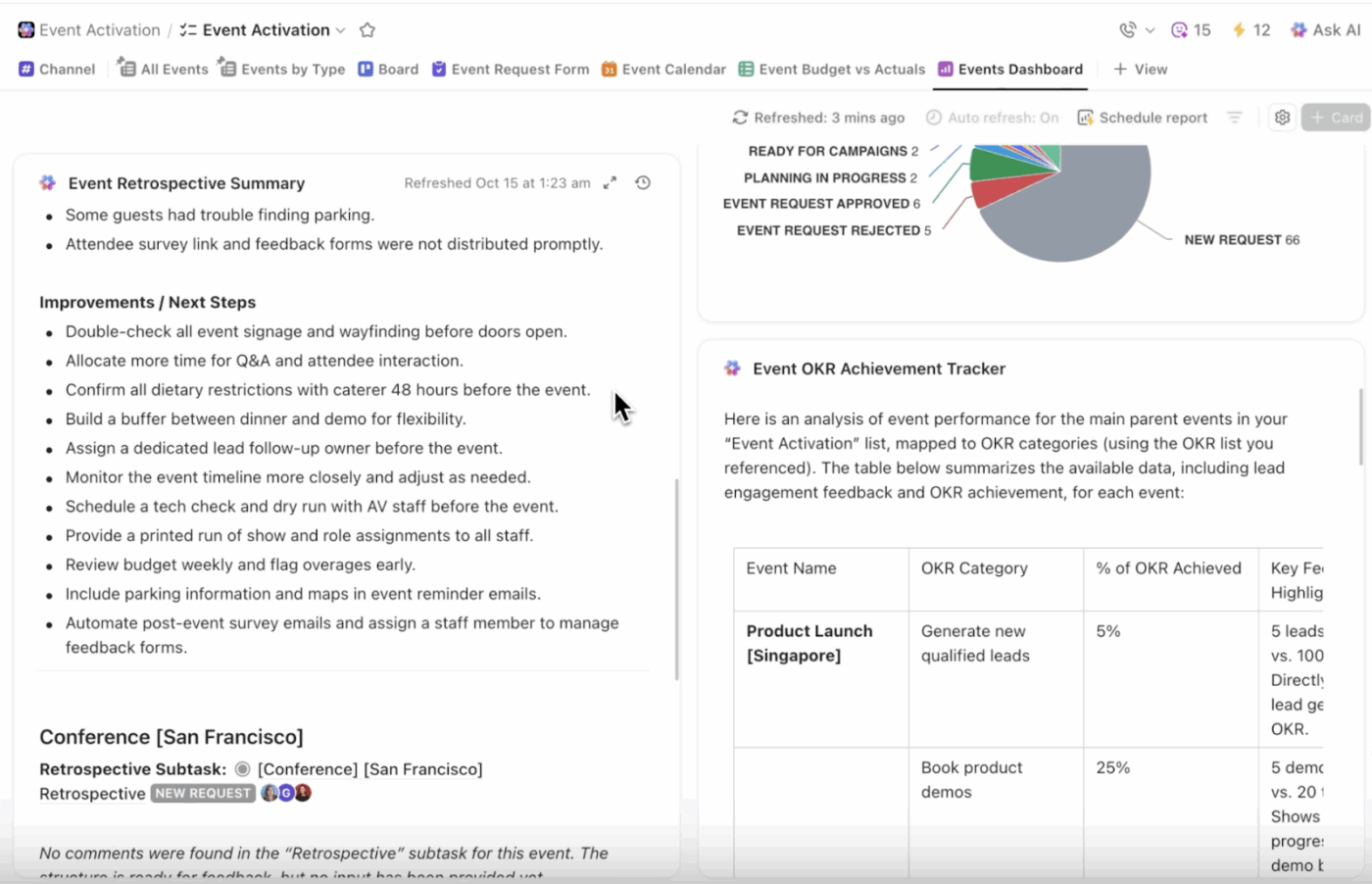
AI Cards embed Brain-powered advanced analytics directly in Dashboards—dynamic summaries, predictions, and actions from live data. For example, an AI card can generate a concise update for a senior, explaining the overall status of your migration initiatives, key progress, and any immediate risks.
📚 Read More: How to Create a Change Management Checklist
See the example AI stacks below to get an idea of how to merge different AI tools and maximize their value for your team:
ClickUp Tasks + Brain → Route escalations to the right owner, auto-tag issues, summarize long threads, suggest replies, create follow-up tasks
Zendesk → Ticket intake, customer history tracking, CSAT capture, multi-channel inbox
ClickUp Dashboards → Churn alerts, health scoring, customer sentiment insights, usage trend analysis, NPS insights
Gong → Analyze call transcripts automatically, flag angry customer calls, identify common product complaints, and auto-score agent empathy
ClickUp Tasks + Brain → Prioritize bug reports, summarize long code review threads, automate task creation from error logs, generate project status updates
GitHub Copilot → Autocomplete code, suggest implementations, generate unit tests, refactor functions, explain legacy code
Datadog → Monitor application performance, detect unusual system errors, analyze root causes, monitor server resource usage
ClickUp Docs → Create product requirements, technical specs, API documentation, release notes
ClickUp Tasks + Brain → Automate budget request intake, summarize complex financial reports, track audit requirements, generate weekly finance updates
QuickBooks → Record transactions, categorize expenses, reconcile bank feeds, generate P&L statements, manage invoices
Anaplan → Build financial models, create multi-scenario forecasts, align budget drivers across teams, roll up plans by entity
Tipalti → Capture invoices by OCR, handle multi-currency payouts, screen for sanctions, alert on duplicate or suspicious invoices
ClickUp Tasks + Brain → Generate campaign briefs, draft follow-up emails, prioritize leads using notes, summarize discovery calls, create task lists from meeting recaps,
ClickUp Docs → Record brand guidelines, maintain messaging frameworks, store persona docs
HubSpot → Capture leads, track deal stages, send automated sequences, log email opens, score leads
Canva → Design social creatives, build ad variations, create sales decks
Let’s take a look at common AI adoption challenges that many organizations encounter when migrating from legacy applications, along with practical solutions:
| Common mistakes | Solutions |
| Not running a deep audit across legacy systems | Visually map all your legacy apps, workflows, and databases. This helps you correctly identify gaps and define specific, measurable AI goals to start with |
| Trying to upgrade everything at once | Start with 1–2 high-impact workflows. Prove value, refine the process, and scale gradually |
| Adding too many AI tools at once | Prioritize tool consolidation and choose software that offers multiple AI capabilities within one platform. This prevents overlapping features and AI sprawl |
| Failing to gather feedback during pilot runs | Set up regular check-ins with users trying the new workflows to enhance product adoption. Only scale the migration once everyone is comfortable using it |
Here are some undeniable strategic benefits that an AI-enabled stack offers:
👀 Did You Know: The “Ironies of Automation” principle states that the better an automated system performs, the less prepared the human operator is for the rare moments of failure.
By removing humans from routine tasks, automation ensures that when a catastrophic, non-routine error finally occurs, the human called upon to fix it has lost the crucial operational skills needed to intervene successfully.
Digital transformation is a basic requirement for any business today.
For medium- and large-scale businesses, this means not only moving away from paper-based systems but also fully integrating AI to achieve the desired business outcomes.
ClickUp, the everything app for work, acts as your modern AI stack. It extends full AI integration—including Generative AI, Agentic AI, and Conversational AI—to power your entire enterprise operations.
ClickUp Brain, Automations, and the Converged AI Workspace together provide a seamless, intelligent system to accelerate your path to modernization.
Ready to migrate from your legacy systems and build your future-proof stack? Sign up for ClickUp to get started.
An AI stack is the layered setup of data systems, AI models, and applications that together automate workflows, provide intelligent assistance, and boost productivity. During migration from legacy systems, a well-built AI stack helps scale workflows easily, minimize disruption, enable cross-platform support, and preserve business logic.
Legacy system modernization starts by identifying the specific problems your legacy systems create, then matching each problem to an AI capability that solves it. Choose tools that integrate with your existing ecosystem, support future scalability, and offer multiple capabilities in one place so your stack stays focused, simple, and easy to maintain.
The biggest challenges include skipping a deep audit of legacy systems, trying to upgrade everything at once, adding too many AI tools with overlapping features, and not collecting feedback during pilot runs.
ClickUp offers powerful AI integration while centralizing communication, tasks, and documents in one hub. ClickUp Brain, its native AI assistant, offers capabilities such as intelligent task routing, generative AI assistance, text summarization, and knowledge management. ClickUp Automations automate routine admin tasks like creating tasks, assigning work, sharing progress updates, and drafting weekly reports.
Ensuring data security during migration is a must for regulated industries. To do so, first classify the data by sensitivity and define the appropriate access controls before moving anything. Use secure integrations, encryption, and role-based permissions when connecting new AI tools. Finally, review all third-party AI policies, and monitor who accesses what.

© 2026 ClickUp

There’s an easier way. Try a free AI Agent in ClickUp that actually does the work for you—set up in minutes, save hours every week.