

Sorry, there were no results found for “”
Sorry, there were no results found for “”
Sorry, there were no results found for “”
AI tools are multiplying faster than design reviews on a Monday morning. 🚀
Each one promises to cut your design time in half, instantly whip up high-quality assets, or somehow unlock 10x creativity. The real question is, do you need every single one of those tools?
Nope.
What you really need is a handful of AI applications that work well together and support your creative process from start to finish. In other words, an AI stack.
Let’s take a closer look at this setup and explore how you can build or choose the perfect stack for your team!
The exact tools in an AI tech stack will vary depending on your team’s goals and priorities.
That said, a great AI stack for any creative work always has five key components:
These are AI software that help you quickly brainstorm, create, and edit your creative assets in just a few minutes. While the output usually needs a bit of refining (it’s not always perfect right out of the box), it speeds up your content production.
Here are some common AI content creation tools you should consider adding:
📝 Quick Note: AI content creation tools mix traditional AI (like machine learning and predictive analytics) with newer generative AI models. For example, Grammarly uses traditional AI for editing tasks like grammar and tone checks, but their newer features use generative AI to create brand-new content from scratch.
Not talked about as much, but it’s one of the most important parts of your AI tech stack.
An AI asset library automatically tags, groups, and categorizes your assets the moment you upload them. This makes it a breeze to store and organize all your creative files.
Searching for files gets way simpler, too! Instead of remembering exact file names or digging through folder locations, type a natural language query like: “Show me all the holiday campaign images that have a red background.” And voila!
Another huge plus? These tools can delete duplicate assets, so you don’t waste hours manually cleaning up your storage.
✅ Fact Check: 83% of employees end up recreating files that already exist! Why? Because they simply can’t find the originals in their current system. That constant duplication is a massive drain on productivity. That’s precisely why an AI asset library is critical—it solves the findability problem instantly.
Artificial intelligence simplifies team communication in two main ways:
📮 ClickUp Insight: Nearly 20% of our survey respondents send over 50 instant messages daily. This high volume could signal a team constantly buzzing with quick exchanges—great for speed but also ripe for communication overload.
With ClickUp’s integrated collaboration tools, like ClickUp Chat and ClickUp Assigned Comments, your conversations are always linked to the right tasks, enhancing visibility and reducing the need for unnecessary follow-ups.
Your design team needs a smart project management system just as much as engineering or product teams do. Especially if you’re an agency juggling different clients—AI can manage the chaos for you.
With an AI-powered project management tool, you can automatically:
📚 Read More: We Tested the 10 Best AI Tools for Product Managers
Not sure whether you should build an AI stack from the ground up or just choose one?
Here’s a quick rule of thumb to help you decide:
Once you’ve made that call, it’s time to get moving.
Let’s walk you through how you can actually build or choose your AI stack step-by-step:
Take stock of the types of assets your team produces most often.
Do you lead a purely content-focused team that delivers blog posts and copy with occasional visual elements? In this case, a lightweight design stack is enough. One that offers simple AI image generation.
Or is your team design-heavy—producing brand identities, campaign visuals, UI mockups, product illustrations? Then you need product design tools in your tech stack to support fast iteration and multi-export workflows.
Compare each AI tool on the one thing it’s fundamentally supposed to do.
📌 Example: If you have five text-to-image generators on your list, look at how fast and accurate each one is at actually generating images.
Remember, a complicated tool that no one uses is a money drain. Pick something user-friendly that your designers, writers, editors, etc., can start using in minutes, not weeks.
Next, factor in the scalability to meet future workload, team capacity, and additional charges.
Data privacy is just as important here. Check whether the tool offers encryption, compliance certifications, and granular user permissions. Make sure you can easily restrict data sharing for training AI models.
But do you know what the real deal-breaker is? Integrations.
Every tool you add to your AI stack should integrate with the others and your existing system for smooth data flow.
📮ClickUp Insight: 70% of respondents say they keep tabs open because they plan to “get back to them later.” We’ve heard that before. 🤭
Ironically, 30% say that they would feel relieved if they lost all those previous tabs in a browser crash, for instance.
That’s Zeigarnik effect at work. Our brains latch onto unfinished tasks, turning every tab into a cliffhanger. You feel busy, even when nothing’s actually moving forward.
As a Converged AI Workspace, ClickUp keeps your priorities front and center. Ask ClickUp Brain to surface your daily or weekly priorities, or run real-time web searches to find relevant information right when you need them. Now you can close tabs without closing loops. 🕊️
Multiple tools in your design AI tech stack lead to tool sprawl, which drains productivity, budget, and focus. It will turn into work sprawl, where your files, updates, and decisions are scattered across apps, chat threads, and inboxes.
Guess the impact of this problem? A staggering loss of $2.5 trillion in global productivity every year.
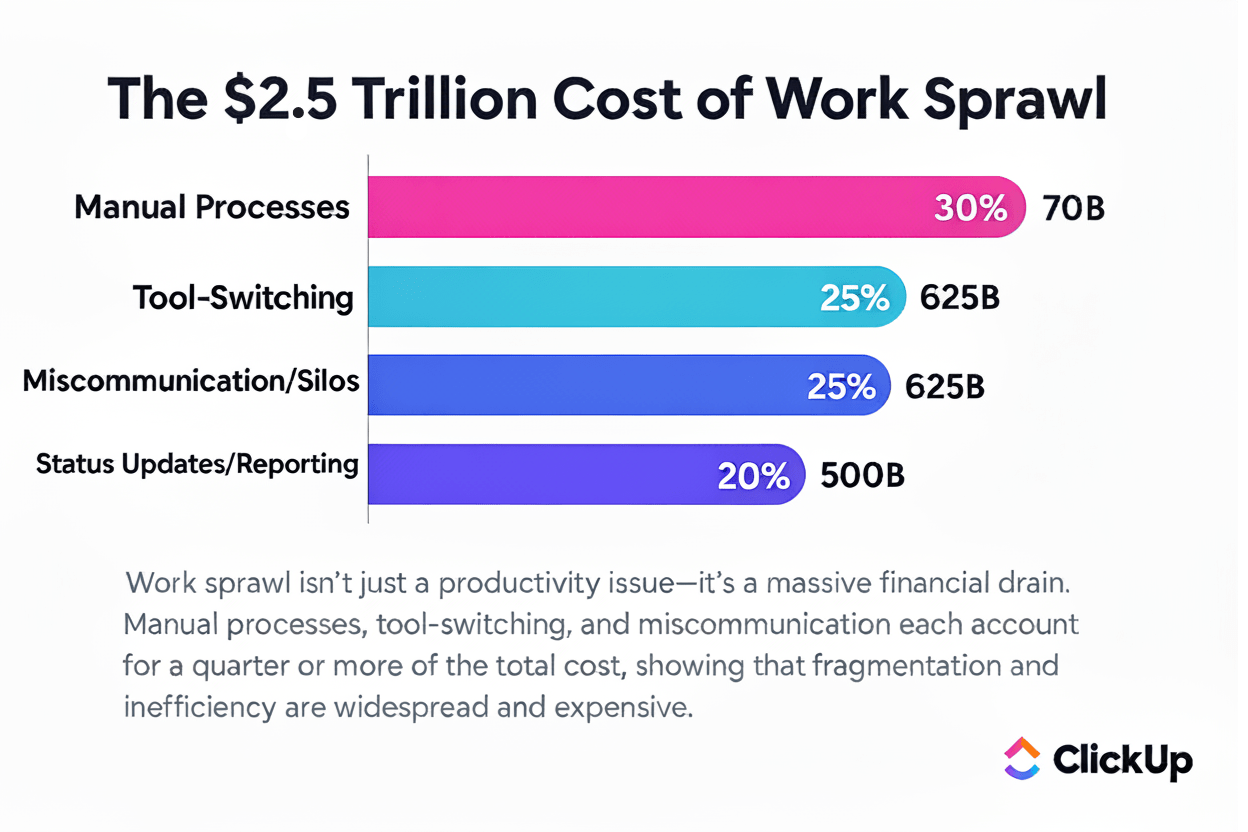
To avoid this, once your AI stack is in motion, you will need a single orchestration layer to connect your efforts across tools and departments.
ClickUp becomes that orchestration layer.
The world’s first Converged AI Workspace connects apps and workflows into a unified platform.
What does that even mean for you? 👇
📮 ClickUp Insight: Low-performing teams are 4 times more likely to juggle 15+ tools, while high-performing teams maintain efficiency by limiting their toolkit to 9 or fewer platforms. But how about using one platform?
As the everything app for work, ClickUp brings your tasks, projects, docs, wikis, chat, and calls under a single platform, complete with AI-powered workflows. Ready to work smarter? ClickUp works for every team, makes work visible, and allows you to focus on what matters while AI handles the rest.
Once your AI stack is ready, roll it out in phases to ease adoption and performance testing.
Start with tasks that offer immediate value. It could be synthesizing user search or automating parts of the design handoff process. Then refine the workflows.
Or if your team is small, deploy the AI stack for just one project.
Use these wins to build stakeholder buy-in before expanding AI adoption.
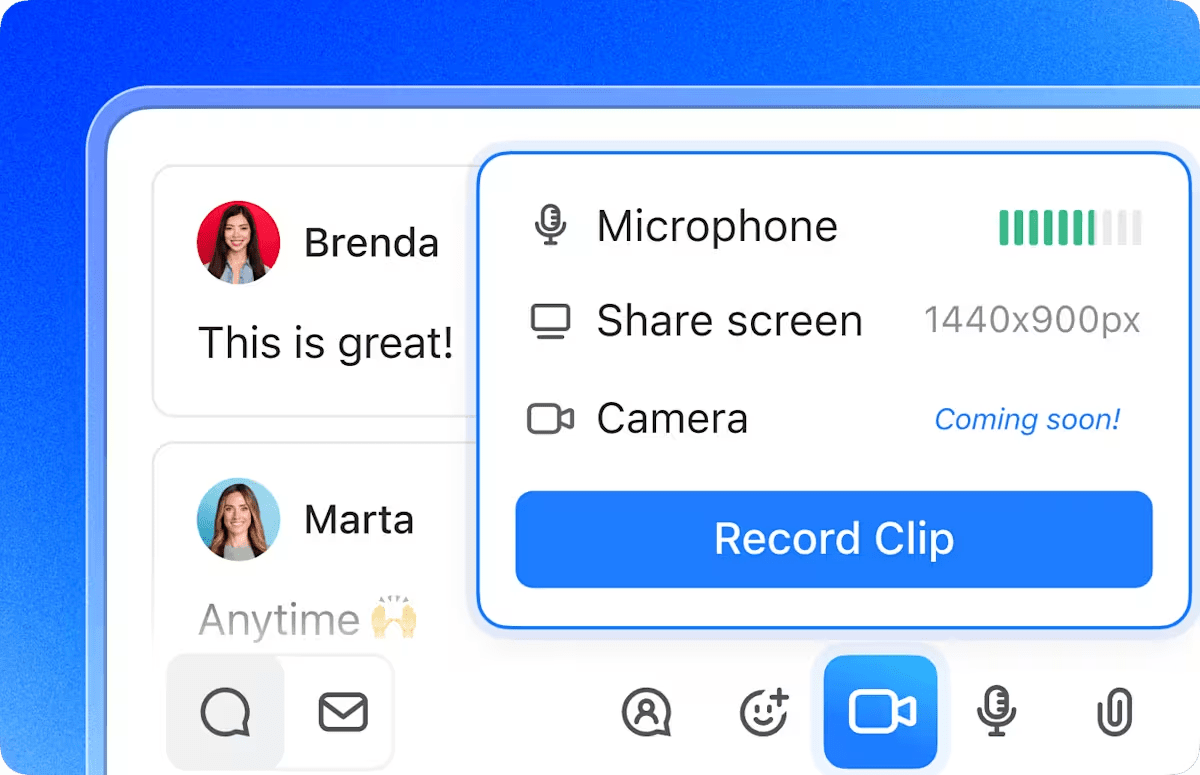
💡 Pro Tip: Use ClickUp Clips to quickly capture screen recordings and create product walkthroughs for training team members. You can embed these Clips right into ClickUp tasks or Docs, or just share them via links.
Moment of truth! You need to ask these questions:
Track this progress from day one—not just during your initial pilot, but continuously. This way, you can proactively spot when certain tools stop working effectively or when new needs pop up that require more advanced solutions.
⭐ Bonus: Here are the key metrics you should track:
We’ve curated a foundational AI tech stack for your design and creative teams. Feel free to add or swap out tools based on what you need:
This layer fuels early-stage creative thinking and speeds up content creation for your design teams. It helps designers move from blank canvas to usable concepts faster, whether that’s visual direction, campaign ideas, or copy drafts.
Start with ChatGPT to brainstorm design concepts, campaign ideas, marketing roadmaps, creative directions, etc
Key features:
Pricing: Free; paid plans start at $20 per month per user
Use Midjourney as your go-to AI design tool for quick image or art generation. For every prompt you enter, it instantly creates four image variations, which is fantastic for rapid iteration in those early stages.
Key features:
Pricing: Starts at $10 per month per user
Switch to Jasper to generate written content such as ad copy, social media captions, YouTube scripts, product descriptions, resumes, LinkedIn posts, and more.
Key features:
Pricing: Starts at $69 per month per user
This layer will help you move faster from concept to execution. It automates repetitive design tasks, enabling rapid iteration across formats and channels.
Use Figma AI to generate layouts, refine components, and speed up iteration without leaving their core design environment.
Key features:
Pricing: Free; paid plans start at $20 per month per user
If you’re an Adobe user, Adobe Firefly allows you to generate and edit images, video clips, storyboards, brand assets, marketing templates, and more within the Adobe ecosystem.
Key features:
Pricing: Starts at $9.99 per month per user
Canva’s Magic Studio is useful for quick graphic creation, bulk edits, and fast-turnaround content.
Key features:
Pricing: Free; paid plans start at $12.99 per month per user
Managing creative workflows can get overwhelming if you’re not a pro at project management. You’ve got deadlines shifting, clients updating their requirements, and team members stuck in endless loops of feedback.
To manage all that, jump into ClickUp, the everything app for work.
ClickUp’s Design Project Management Software is built exactly for this.
It comes pre-built with all the key components of a powerful design AI tech stack, thus connecting every stage of your design process and reducing AI sprawl.
Start with ClickUp’s Creative Request Form Template to easily gather, monitor, and manage every single creative request.
Break down projects into simple, actionable items using ClickUp Tasks. Add due dates, dependencies, assignees, and custom statuses to each one, so everyone is crystal clear on their responsibilities and deadlines.
Then use ClickUp Brain, the integrated AI assistant, to brainstorm and fine-tune ideas, generate structured design briefs, and produce marketing content on the go.
You can also get it to create visual design mockups, mood boards, and concept sketches with natural-language prompts. No fancy prompt engineering needed.
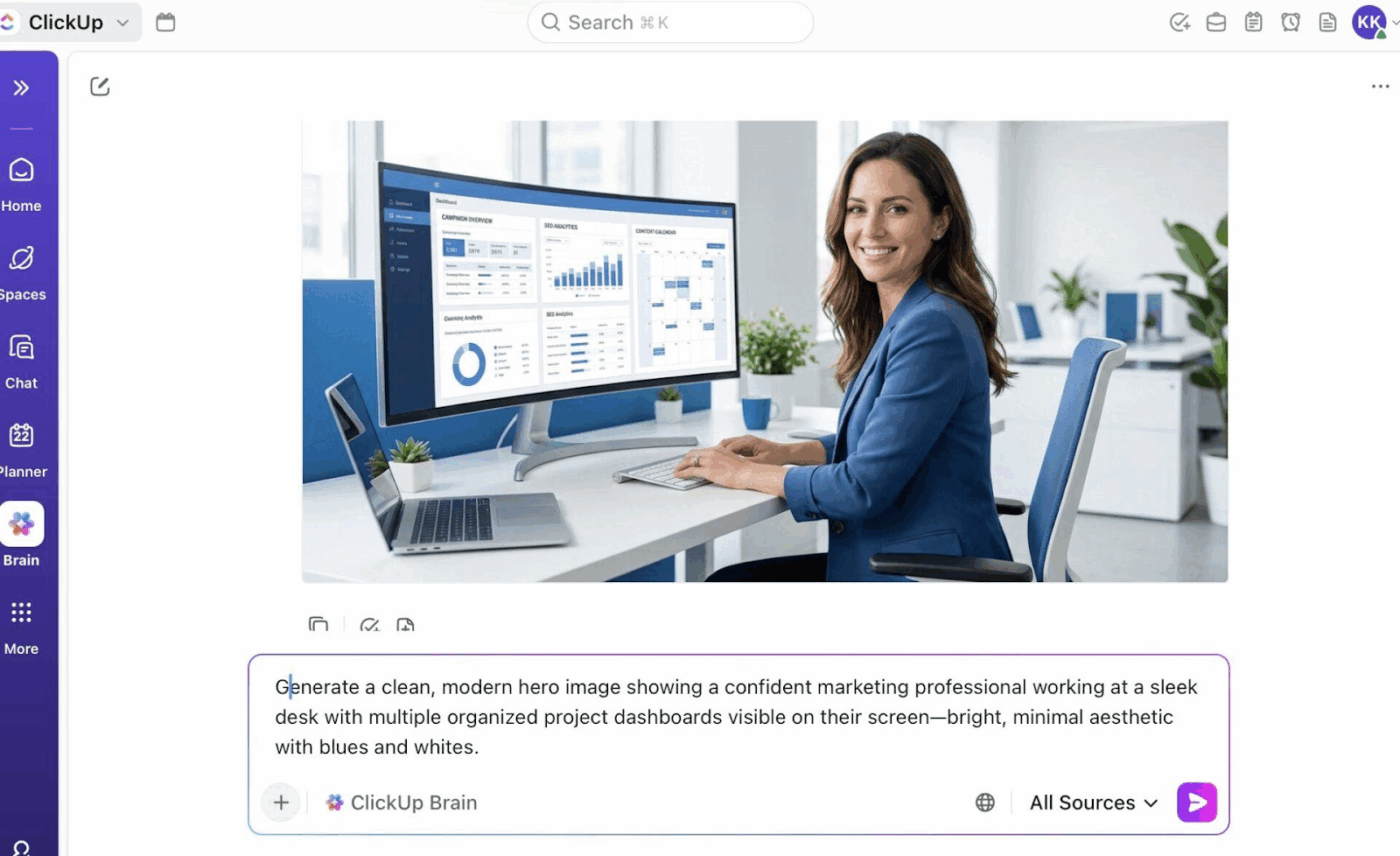
What’s more, ClickUp Brain eliminates the context overload that slows most design cycles.
Since the AI assistant understands your workspace, it can explain the intent behind a brief, summarize feedback trends, or highlight what changed between version V2 and V8 of an asset.
📌 Try This Prompt:
Summarize all feedback across V3 to V5 of the homepage banner, list what’s still pending, and tell me if anything conflicts with our brand guidelines document.
ClickUp Chats can be your new fav instant messaging platform. Since it’s built right into the ClickUp workspace, you no longer have to leave work to connect with others.
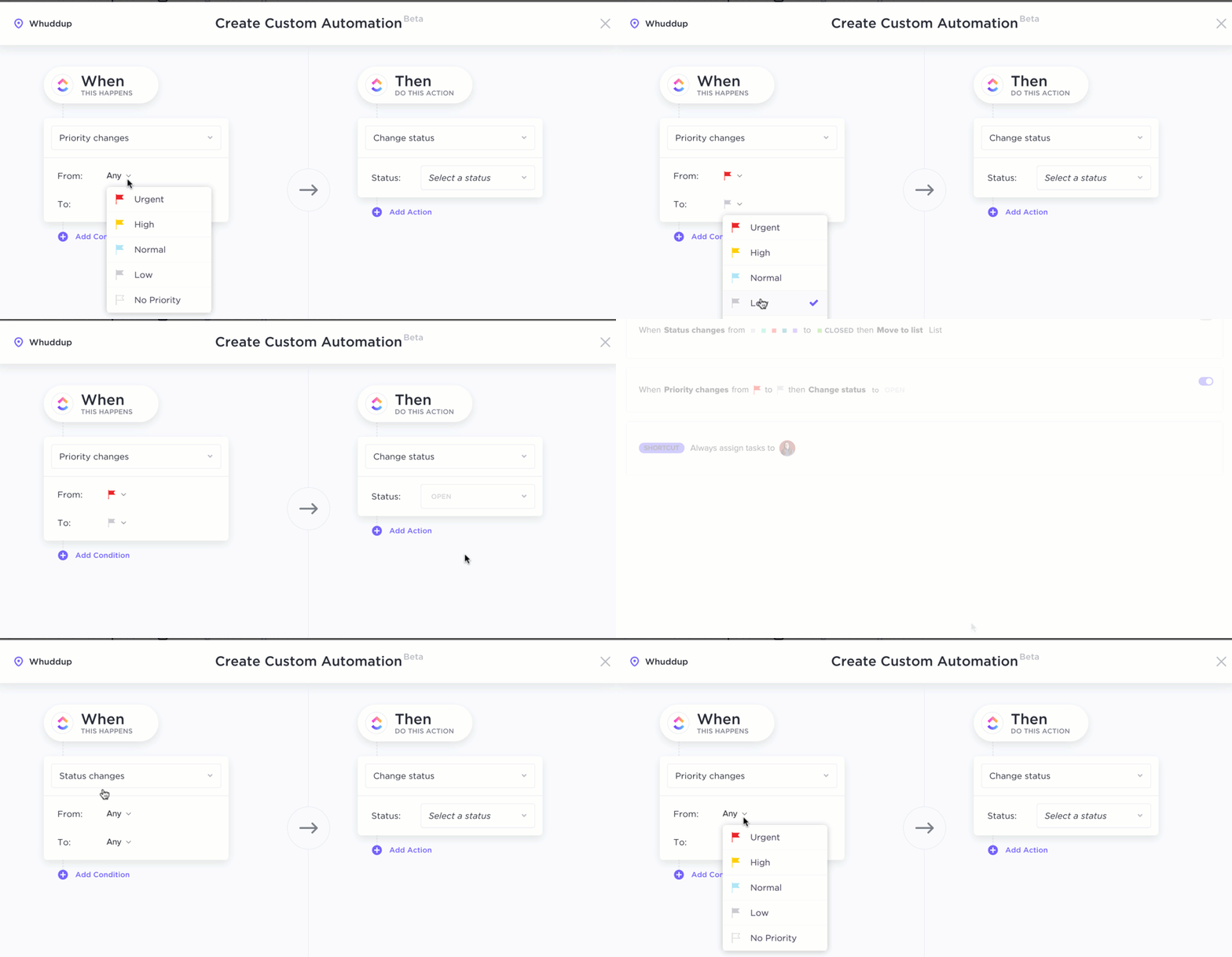
⭐ Bonus: Set up ClickUp Automations to eliminate repetitive, manual work from your internal processes. For example, you can create a no-code automation that instantly notifies the approver whenever a task status is updated. That way, nobody has to waste time constantly checking for updates.
Pricing:
These tools give design teams a single place to collect input, track versions, and move assets toward approval without confusion or rework.
For reviewing video assets, use Frame.io. You can add frame-by-frame annotations and even draw directly on the video with precise, timestamped comments.
Key features:
However, it starts to fall short when you need to manage feedback on other types of creatives, like content copy, or for general team communication.
Pricing: Free; paid plans start at $15 per month per user
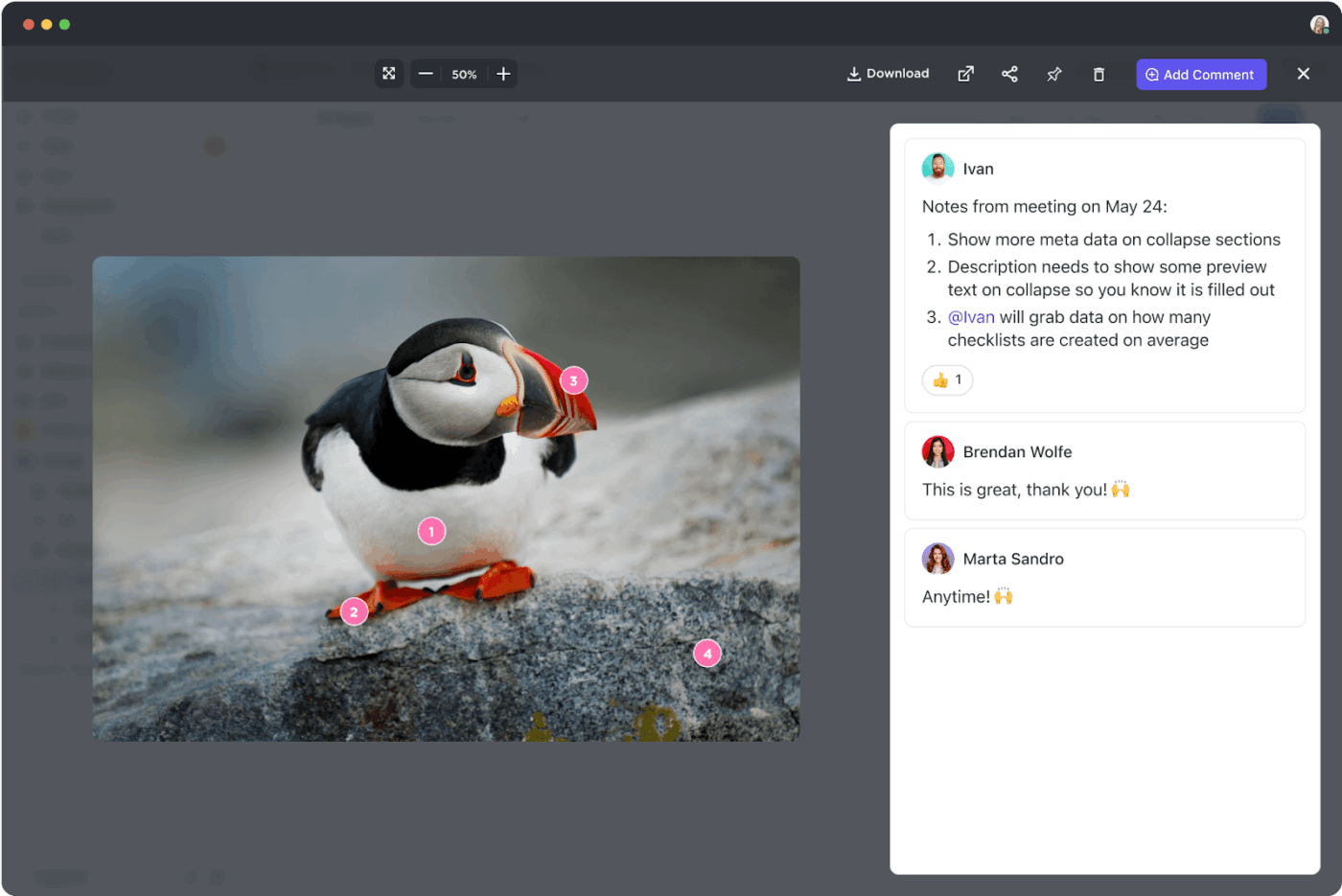
Not only can you (or your clients) add detailed comments on videos, images, and documents, but ClickUp actually centralizes and connects all that feedback directly to your main workspace.
Using ClickUp’s Proofing feature, reviewers can add, assign, or resolve comments on any PNG, GIF, or PDF file without leaving ClickUp.
With ClickUp for design reviews, assign feedback directly to a team member from the comment itself, turning passive suggestions into actionable items.
Key features:
Pricing: Free with ClickUp Business and Enterprise plans
You want the creative assets to stay organized and accessible for reuse. This layer helps you with that. This way, you deliver the right assets to the right people without having to constantly dig through folders or deal with outdated links.
Bynder is a digital asset management (DAM) system for organizing, storing, and managing large volumes of creative assets. You can store and share images, videos, logos, and branding materials across teams and clients.
Key features:
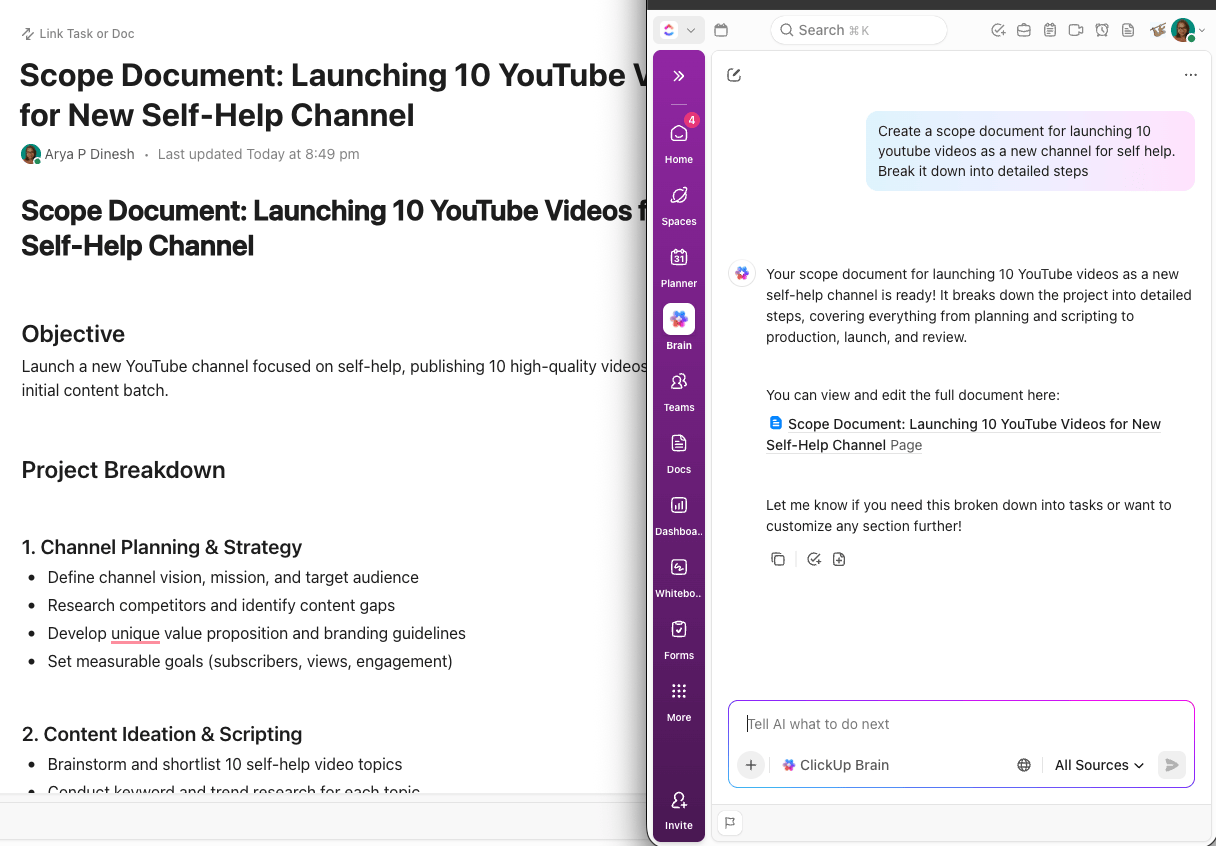
Use ClickUp Docs + Brain combination to create and store brand guidelines, design systems, creative briefs, and delivery notes.
Key features:
Pricing: Free with all ClickUp plans
Integrations with Google Drive and Dropbox mean you can upload and access all your assets lightning-fast.
All project information—ideas, tasks, files, feedback, and approvals—lives within ClickUp, so your team always has a clear, searchable record of every step.
⭐ Bonus: Imagine never having to manually sort files into the right folders or merge duplicate files in your workspace?
With ClickUp Super Agents, that’s totally possible!
For example, you could create a File Classification Super Agent in ClickUp that automatically analyzes file content and metadata to sort files into the right folders.
Curious to learn more? Watch this video to see just how easy it is to set up Super Agents in ClickUp!
The final piece of the puzzle? A robust project analytics tool that helps you monitor team capacity, track project performance, and report on key insights.
ClickUp Dashboards offer the perfect way to do this (without the need for a separate analytics tool).
Build custom project management dashboards using simple drag-and-drop widgets and AI cards to track every facet of your team’s performance.
By centralizing these insights, you can quickly assess whether your AI tech stack is paying off in terms of speed, output quality, team adoption, and collaboration.
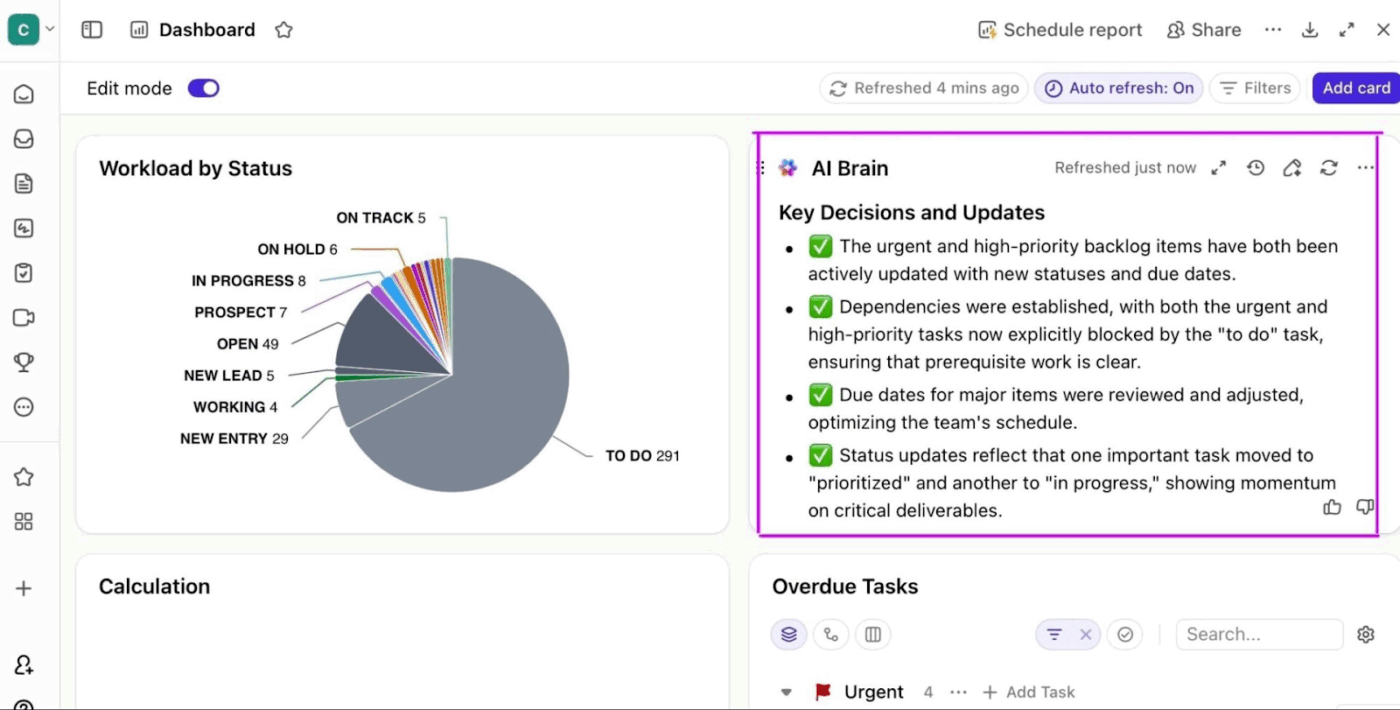
You can build custom visualizations using a variety of AI Cards to track and optimize every part of your AI tech stack. Some examples include:
You can also use built-in AI Cards to surface insights such as where feedback cycles are slowing down, which assets are stuck in review, or which designers are overloaded. AI Cards can even flag anomalies such as unusually high revision counts or missed deadlines.
And because dashboards auto-refresh and can send scheduled summaries, design leads don’t need status meetings just to understand the blockers.
Pricing: Free with ClickUp Business and Enterprise plans
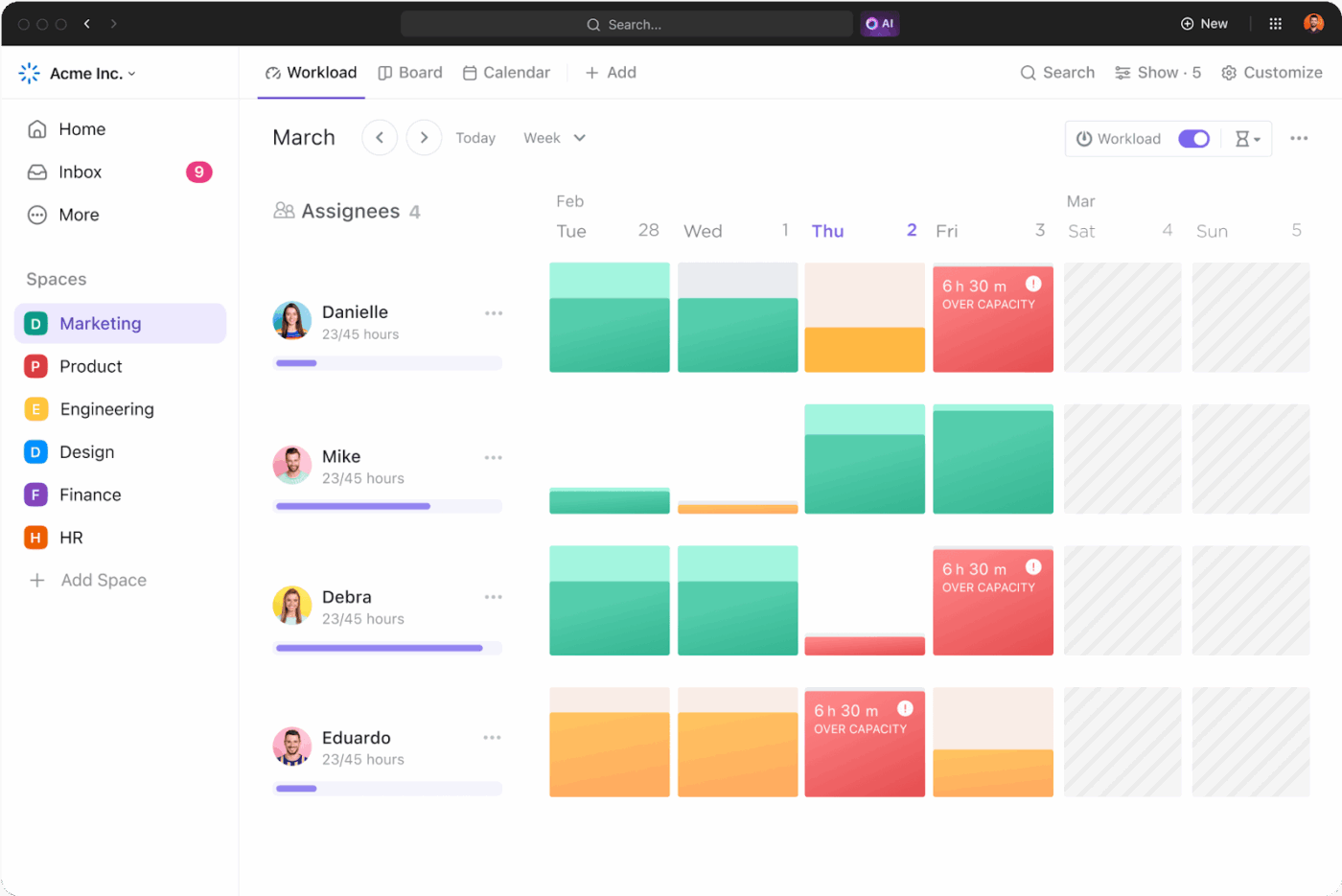
⭐ Bonus: ClickUp’s Workload View shows you each team member’s current tasks. You know who is overworked and can allocate resources accordingly.
The red shows overcapacity, the green shows optimal capacity, and the orange indicates they have bandwidth to take on more work.
🚀 ClickUp Advantage: Bring every creative tool into one workspace with ClickUp Integrations.
ClickUp connects seamlessly with 1,000+ tools, from Figma, Adobe, and Canva to Slack, Google Drive, Dropbox, and Notion.
Your files, feedback, calendars, messages, and design prototypes all flow into one unified workspace, eliminating cross-tool chaos.
Automate handoffs, sync updates instantly, and keep every creative asset tied to the right task or project. No rebuilding your stack. No context switching. Just smoother, smarter workflows end-to-end.
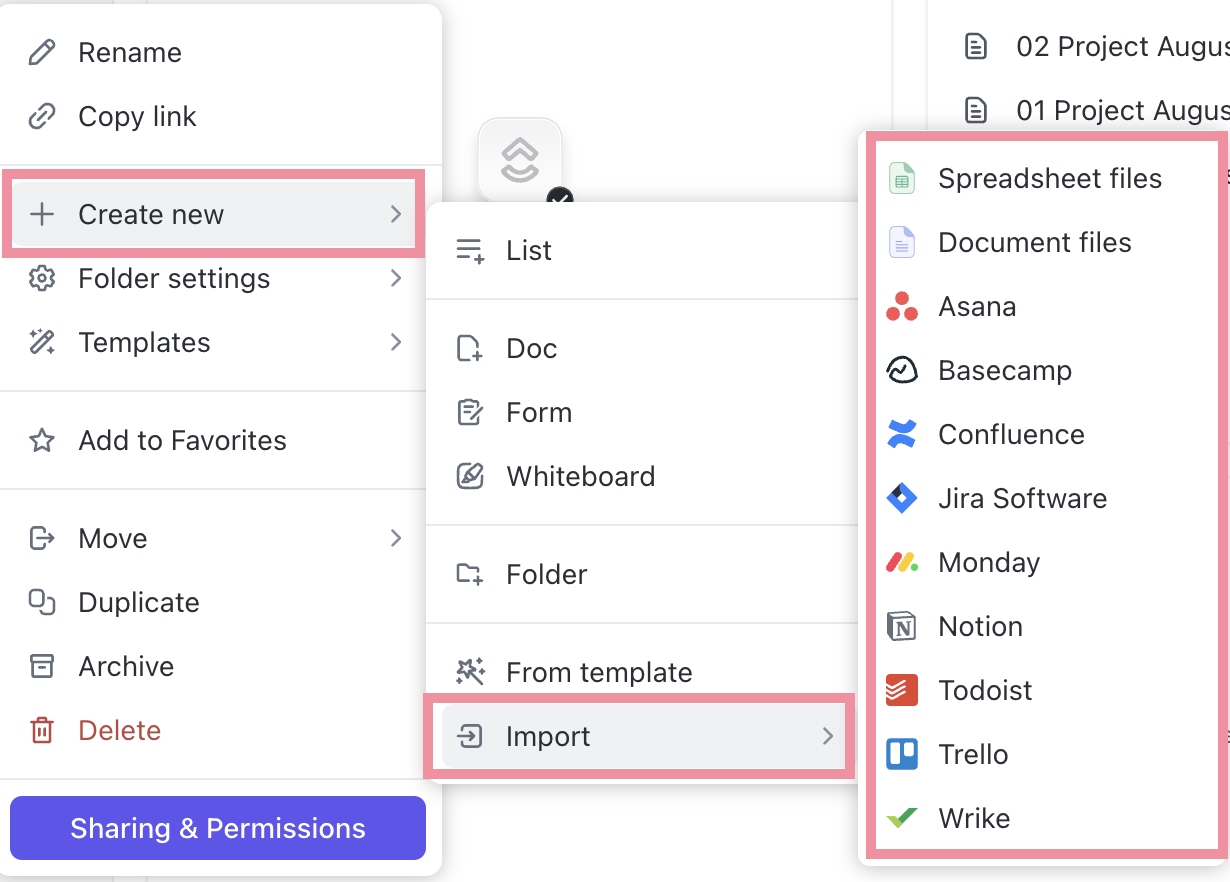
In the AI stack for design and creative teams, the workflow orchestration layer will hold everything together, and ClickUp plays that role.
ClickUp BrainGPT is built for this—to eliminate AI sprawl.
It brings multiple AI capabilities into a single desktop workspace, so designers don’t have to juggle separate tools for ideation, writing, search, and updates.
Here’s how design teams use it:
With BrainGPT, ClickUp becomes the command center for design work. Ideas flow into tasks, feedback turns into action, and assets move to delivery without manual coordination or constant status checks.
As one Reddit user put it:
“Has access to you (sic) ClickUp so makes work much more streamlined. Can easily create tasks, update them etc. Very handy…It allows to use different AI models, which for some people can be a big thing, for me not so much, but I will give credit for this…It can access your other apps, for example, I have my drive synced, and it’s so much quicker to find a spreadsheet or something through Brain Max then (sic) opening drive, looking for it etc.”
If you’re already using too many AI tools, here’s how to cure it before things spiral out of control 👇
Maybe you’re wondering whether an AI stack for creative work will actually make you more productive.
Or questioning the need to build an integrated AI stack for creative teams when you could just buy a couple of tools instead!
Here’s how an AI tech stack accelerates revenue growth and why it’s worth every penny.
Generative AI, smarter automation, and centralized project management together speed up your creative operations.
This empowers different teams to launch campaigns sooner, respond to trends on time, test more ideas, and capitalize on sales windows.
The right AI tools can deliver near-publish-ready drafts in one go. This drastically cuts revision rounds and helps you launch campaigns on time (or even ahead of schedule).
👀 Did You Know? Long before today’s AI art generators, British-born artist Harold Cohen built AARON—one of the first autonomous art-making programs. His AI-generated paintings were exhibited at major museums, including the Tate Gallery.
You know where most creative teams lose time? Brainstorming ideas, researching, and turning those abstract thoughts into tangible art.
An integrated AI stack removes these creative blocks by helping teams quickly explore new directions and collaborate during brainstorming sessions, resulting in much better ideas.
🧠 Fun Fact: The First 5000 Days by Beeple—a digital collage of 5,000 images was auctioned by Christie’s and sold for $69 million.
What’s intriguing is that the bidding started at just $100, yet it ultimately fetched a staggering sum despite being a digital file that can easily be copied or viewed by anyone online
Nothing slows down creative output like bad visibility into your campaigns.
Both ideas and energy slip away as you spend more time hopping between tools, finding the right files, and keeping everyone on the same page.
An integrated AI stack fixes this. It provides a single unified workspace that automatically organizes assets and tracks progress, so you can finally focus on the real work.
AI can enforce brand rules, maintain tone, keep colors and styles aligned, flag incorrect assets, and generate content that stays on-brand across every channel.
This brand consistency improves campaign performance and helps you acquire customers more efficiently.
🧠 Fun Fact: Banksy, the anonymous British street artist known for his sharp, satirical murals, once snuck his own artwork into the British Museum without permission.
The work “Wall Art or Peckham Rock” stayed there for three days before the staff realized it was unauthorized.
📚 Read More: Best AI Tools for E-commerce to Drive Sales
Before we finish up, let’s quickly look at three things you absolutely need to avoid when you’re putting together your creative AI stack:
| ❌ Common mistakes | ✅ Solutions |
| Getting a separate AI tool for every small task | Evaluate and pick tools that cover multiple needs and fit seamlessly into your existing workflow |
| Replacing everything at once | Roll out your AI tech stack in phases. Start with one workflow or team, and then expand as you see success |
| Skipping performance checks | Treat your AI stack like any core investment: regularly measure the ROI, track key metrics, and adjust tools that aren’t delivering the expected results |
📚 Read More: AI Tools for Manufacturing Teams and Projects
With generative AI making it easy for anyone to generate designs and creatives, the real question is: How do you stand out?
The answer is simple: By leveraging artificial intelligence wisely at every step of your creative workflow.
By smartly integrating AI into your work, you stop delivering lackluster AI-generated content that everyone else is making. Instead, you unlock your team’s maximum potential and reach peak creative capacity as AI takes over broken communication, repetitive work, and project management.
ClickUp makes it a breeze to add AI and automate different parts of your workflow without adding more tools to your stack.
Brainstorm ideas, collaborate with your team, design creatives, ask clients for feedback, track projects, and report on insights—all from a single, AI-driven workspace.
To get started, sign up for ClickUp for free.
An AI stack is a set of AI tools that work together to support every stage of the creative workflow—ideation, design or content creation, collaboration, proofing, asset management, and project delivery. Think of it as a connected workspace that helps your team work faster, rather than multiple standalone tools that lead to context switching.
AI speeds up brainstorming and generates first drafts, saving time. It can also handle repetitive tasks like bulk editing, organizing files, updating statuses, sending reminders, and sharing progress updates.
When looking for an AI tool for design collaboration, prioritize unified communication and proofing features. We recommend using ClickUp to simplify real-time collaboration and centralized feedback for your design team. For instance, multiple team members can use ClickUp Whiteboards simultaneously to brainstorm creatives and new ideas. You can send instant messages to individual members as well as create dedicated channels for different projects using ClickUp Chats. ClickUp’s Proofing features enable reviewers and clients to add annotations to creative assets such as images, videos, and documents.
ClickUp serves as the central hub for all creative work. It connects your design tools, AI tools, tasks, assets, briefs, and feedback in one place. This gives teams a single system to plan, track, collaborate, and automate different stages of their creative process without juggling multiple platforms.
Teams stay creative by using AI as a starting point—not the final answer. AI helps break creative blocks, spark new directions, and handle repetitive work, but the team still guides the ideas, refines concepts, and brings human judgment to the final output. AI speeds up the process; it doesn’t replace creative thinking.

© 2026 ClickUp





