






Still downloading templates?
There’s an easier way. Try a free AI Agent in ClickUp that actually does the work for you—set up in minutes, save hours every week.
Sorry, there were no results found for “”
Sorry, there were no results found for “”
Sorry, there were no results found for “”
Let’s say you have a leadership meeting in two hours and your VP wants to know if the Q3 initiative is on track. You open five different tabs, ping three project managers, scroll through last week’s chat threads, and piece together a confidence level that is, honestly, a guess dressed up as a number.
This is a visibility problem, and it lives at the director level because the tools most organizations run on were built for individual contributors. AI-driven resource management exists to fix exactly that, giving directors a real-time, portfolio-wide picture of capacity, risk, and delivery without the scramble.
This guide covers how it works, why it matters, and how to use it inside ClickUp.
Most resource management processes were built for project managers and team leads, not for someone overseeing 5-15 teams at once. The tools most organizations run on were never meant for that vantage point, and the gaps they leave behind are where resource management quietly falls apart. 🛠️
🧠 Fun Fact: Workplace studies show that modern work involves frequent interruptions and switching between tasks, making workflows fragmented and harder to manage. This is why resource planning needs to account for interruptions, not just task duration.
The phrase ‘AI-powered’ is attached to everything right now, including tools that are barely more than automated reminders. For resource management, the distinction matters. A glorified to-do list does not help a director understand whether their portfolio is on track.
Genuine AI-driven resource management continuously analyzes workload patterns, predicts where capacity will tighten, surfaces dependency risks before they cause delays, and gives you the information to make allocation calls in real time. Here’s a closer look. 👀
Static resource allocation is the traditional model where you assign people to projects at the start of a quarter and check in periodically. It treats capacity as a fixed input, assuming you can allocate once and hope the plan holds. Dynamic capacity intelligence flips this entirely.
AI continuously recalculates available capacity based on what’s happening. It adjusts when tasks complete faster or slower than expected, new work enters the pipeline, people go on leave, or dependencies shift.
| Dimension | Static allocation | Dynamic capacity intelligence |
| Update frequency | Monthly or quarterly | Continuous, as work data changes |
| Basis | Planned availability | Actual work patterns and velocity |
| Risk detection | After deadlines slip | Before constraints materialize |
| Adaptability | Requires manual replanning | Adjusts automatically to changing conditions |
Most directors currently rely on status snapshots like Monday morning dashboards, Friday end-of-day reports, and weekly syncs. These tell you where things stand right now but say nothing about where they’re headed.
AI-driven predictive insights analyze velocity trends, historical patterns, and known upcoming commitments to forecast future bottlenecks.
A status snapshot might say a team is at a comfortable resource utilization rate this week. A predictive model sees that three large deliverables converge in two weeks, a key contributor has scheduled time off, and a dependency from another team is trending behind. The director who sees the prediction can act now, while the director with only the snapshot finds out too late.
To see how AI tools work in practice for resource and project management, watch this video:
AI-driven resource management works by ingesting data from across the work environment, including task completion rates, time-in-status patterns, and assignment history. It identifies patterns that humans simply cannot see at scale.
For example, AI might detect that every time a specific team takes on more than three concurrent projects, their average cycle time doubles. Or it might flag that a specific dependency between the design and engineering teams consistently adds five days to any project. These insights only emerge from analyzing work patterns across the entire portfolio.
📮 ClickUp Insight: While 40% of employees spend less than an hour weekly on invisible tasks at work, a shocking 15% are losing 5+ hours a week, equivalent to 2.5 days a month!
This seemingly insignificant but invisible time sink could be slowly eating away at your productivity. ⏱️
Put ClickUp’s Time Tracking and AI assistant to work and find out precisely where those unseen hours are disappearing. Pinpoint inefficiencies, let AI automate repetitive tasks, and win back critical time!
AI-driven resource management surfaces the right data at the right time, so the four problems that show up on your calendar every week stop being inevitable:
Answering ‘do we have bandwidth for this?’ should not require pinging five project managers and waiting for inconsistent answers.
AI-driven capacity planning continuously analyzes current workloads, historical throughput, and planned work to show you where teams are approaching their limits before you make a commitment you cannot keep
When priorities shift, you need to know immediately what breaks and what slides. AI lets you model scenarios against live data and see the ripple effects across your entire portfolio in minutes, well before a two-day spreadsheet exercise would even get started.
🚀 ClickUp Advantage: Leaders review workloads, priorities, and timelines manually, which slows down allocation and creates gaps in utilization.

ClickUp AI Fields solve this by adding intelligence directly to your task data. They analyze task details, timelines, and activity, then generate real-time insights that help you act faster.
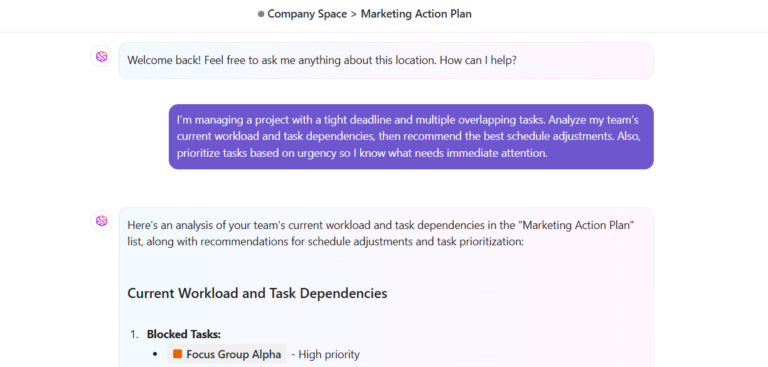
For example, suppose you manage multiple client projects and need to rebalance workload across your team. You can set up an AI Field that evaluates task urgency and effort, then labels tasks as:
Now when you open your task list, you don’t need to interpret each item manually. The prioritization already exists.
Individual teams report they are on track. Cross-functional deliverables miss dates anyway.
AI analyzes flow across your portfolio and pinpoints exactly where work stalls, whether that is a shared resource stretched across four projects or a handoff sitting untouched for 10 days. Bottleneck identification gets specific, not anecdotal.
AI-driven reporting on strategic initiatives gives you a real-time picture of how likely each initiative is to land on time, based on actual velocity, remaining scope, and resource availability. You present a picture that leadership can trust.
📮 ClickUp Insight: Only 15% of managers check workloads before assigning new tasks. Another 24% assign tasks based solely on project deadlines.
The result? Teams end up overworked, underused, or burned out.
Without real-time visibility into workloads, balancing them isn’t just hard—it’s almost impossible.
ClickUp’s AI-powered Assign and Prioritize features help you assign work with confidence, matching tasks to team members based on real-time capacity, availability, and skills. Try our AI Cards for instant, contextual snapshots of workload, deadlines, and priorities.
💫 Real Results: Lulu Press saves 1 hour per day, per employee using ClickUp Automations—leading to a 12% increase in work efficiency.
Every director knows the feeling of making a resourcing call and genuinely not knowing if it was the right one until two weeks later. That lag between decision and feedback is just what resource management has always felt like without the right information layer.
Here is what changes when AI is running underneath your workload management process:
| Dimension | Without AI | With AI |
| Capacity visibility | Manual rollups from reports; updated weekly at best | Continuous, real-time capacity view across all teams |
| Risk detection | Discovered when deadlines slip or teams escalate | Surfaced proactively through pattern analysis |
| Reallocation speed | Days of back-and-forth to assess impact and get buy-in | Minutes to model scenarios against live data |
| Executive reporting | Aggregated status updates with subjective confidence | Data-backed delivery confidence scores with clear risks |
| Meeting load | Weekly syncs with every manager to gather updates | AI-generated status insights reduce sync meetings |
| Decision quality | Based on lagging indicators and incomplete information | Based on leading indicators and full portfolio context |
🚀 ClickUp Advantage: Capture decisions instantly and keep work moving using Talk to Text in ClickUp Brain MAX. Let’s say you finish a weekly resource review. Instead of writing summaries manually, you can dictate: ‘Summarize today’s resource changes and highlight any risks for the mobile app project.’

ClickUp Brain generates a clean summary based on your input and existing task context. You can share that instantly with stakeholders.
Learn more about using AI voice typing in ClickUp to save time here:
AI-driven resource management doesn’t replace the director, but it removes the parts of the job that shouldn’t require your judgment in the first place. Chasing project reports, manually reconciling capacity updates, and building slide decks from fragmented data aren’t strategic work. They’re pure administrative overhead that keeps you in the weeds.
Keep your focus on high-level strategy by centralizing team communication so context is always one click away. When AI handles the information-gathering burden, your day-to-day identity shifts dramatically.
When AI handles the information layer, three things shift:
The director role was always supposed to operate at this level. AI finally makes it possible to do that consistently.
🔍 Did You Know? Ever noticed how adding more people to a project sometimes makes things even slower? That’s a well-known principle, called Brook’s Law. It was introduced by Fred Brooks in The Mythical Man-Month. New team members need time to get up to speed, and suddenly everyone is spending more time coordinating than actually working, so instead of speeding things up, progress can stall.
ClickUp is the world’s first Converged AI Workspace, where your tasks, timelines, and documentation stay connected. Contextual AI works inside your workflows, which means every insight ties directly to real work. That’s what makes resource decisions faster and far more reliable.
Here’s how ClickUp’s Resource Management Software helps directors boost productivity. 📈
Capacity planning usually breaks at one point: connecting real workload data to future decisions. Teams either rely on static reports or gut calls, which leads to overloading the same people or missing risks early.

ClickUp Brain fixes this because it works directly on top of your actual workspace data. It pulls context from tasks, timelines, docs, and historical activity, then turns that into usable insights without requiring manual analysis.
For example, suppose you want to understand upcoming workload pressure across your team. You can ask: ‘Which team members are at risk of being overloaded next week based on current tasks and deadlines?’
ClickUp Brain evaluates:
It then highlights where capacity is likely to break. This works because ClickUp Brain automatically analyzes project data and surfaces insights such as bottlenecks and workload trends.
Even strong planning fails if you can’t see how work is distributed across your team.

ClickUp Workload View gives you a clear visual of who has capacity and who doesn’t. You can see assignments, effort levels, and availability in one place.
For instance, suppose you notice one designer handling significantly more tasks than others. You can rebalance work directly from the view before it affects delivery.
Watch this video to understand how it can support your work:
A ClickUp user shares:
I use ClickUp to centralize tasks, documents, track goals, and manage other project activities. It saved my time by around 30% with its workflow automation and resource management features. I like its deep customization and flexibility. It’s very good at time tracking, and the hierarchy views allow us to departmentalize our operations very efficiently. The initial setup was quite easy for my team.
Planning works well until execution starts. That’s when delays happen, priorities shift, and manual coordination slows everything down. ClickUp AI Super Agents keep your resource strategy active during execution. They monitor task activity and take action based on predefined logic.

For example, suppose a task gets marked as ‘high priority’ and assigned a tight deadline. An AI Agent can:
Agents also help maintain consistency across workflows.
Let’s say a project crosses a risk threshold. An Agent can trigger escalation, adjust priorities, and ensure the right people step in immediately.

After reallocating resources, you need immediate visibility into what changed. ClickUp Dashboards pull live data from tasks, time tracking, and workload so you can monitor impact without building reports manually.
For example, suppose you shift two developers to speed up an AI feature. You can set up a dashboard that shows:
You can spot quickly if progress improves or if another team slows down.

ClickUp AI Cards remove the need to manually scan dashboards for issues. They analyze your workspace data and highlight what needs attention.
They can surface signals like:
For instance, suppose one developer handles most backend work. An AI Card can flag that workload imbalance before it affects delivery. You can redistribute tasks immediately.
The best directors already think in systems, capacity, and outcomes. The missing piece has always been visibility. When you can see what is happening across your portfolio in real time, every decision gets faster, more confident, and easier to defend upward.
AI-driven resource management gives you the information layer your role has always needed but rarely had.
ClickUp brings that information layer to life. With ClickUp Brain answering portfolio-wide questions in seconds, Workload View surfacing capacity before it becomes a crisis, and Dashboards keeping leadership aligned without manual reporting, everything your team produces lives in one place with AI running across all of it.
Sign up for ClickUp today! 🤩
AI-driven resource management uses machine learning to analyze workload data, predict capacity constraints, and recommend allocation decisions in real time. It replaces manual reports and reactive planning with continuous, forward-looking intelligence.
AI gives directors portfolio-wide visibility into real capacity and surfaces risks before they escalate. This enables scenario planning against live data so resource decisions are proactive rather than reactive.
Traditional resource management software simply tracks assignments and availability based on manual inputs. AI resource management tools go further by analyzing patterns, predicting bottlenecks, and generating forward-looking capacity insights automatically.
No, AI handles the data gathering, pattern recognition, and forecasting that directors shouldn’t be doing manually. This frees leaders to focus on strategic allocation decisions that require human judgment and organizational context.

© 2026 ClickUp

There’s an easier way. Try a free AI Agent in ClickUp that actually does the work for you—set up in minutes, save hours every week.