






Still downloading templates?
There’s an easier way. Try a free AI Agent in ClickUp that actually does the work for you—set up in minutes, save hours every week.
Sorry, there were no results found for “”
Sorry, there were no results found for “”
Sorry, there were no results found for “”
Picture this: You run a bakery and want to figure out how many blueberry muffins to bake every morning.
You check your daily average from the past week: 20 muffins. You decide to bake 30, just to be safe.
Clever math, right?
Here’s the catch: If it suddenly rains and foot traffic drops, you’re stuck with a bunch of wasted muffins. But if a local influencer gives you a shoutout and a crowd shows up, you’re sold out by noon.
Long story short, relying strictly on past performance is the worst way to predict future demand. Countless factors influence customer demand, and you must analyze them all in real time to get an accurate forecast.
In this post, we break down how artificial intelligence enhances demand forecasting along with practical use cases. Stick around—we also show how to streamline the whole process using ClickUp. 💫
Demand forecasting involves predicting how much of your product or service will be needed in the future. You look at internal and external data to plan inventory, capacity, production schedules, and supply chain operations beforehand.
There are two main ways to do this:
👀 Did You Know? Walmart built its own AI forecasting system using multi-horizon neural networks to predict future demand across stores. Combined with agentic AI, the system monitors inventory in real time and automatically triggers restocks when demand spikes.
Traditional forecasting works fine for products with stable demand patterns. But it falls short in volatile market dynamics where consumer behavior shifts overnight.
This is where AI makes all the difference:
📮 ClickUp Insight: 30% of workers believe automation could save them 1–2 hours per week, while 19% estimate it could unlock 3–5 hours for deep, focused work.
Even those small time savings add up: just two hours reclaimed weekly equals over 100 hours annually—time that could be dedicated to creativity, strategic thinking, or personal growth.💯
With ClickUp’s Super Agents and ClickUp Brain, you can automate workflows, generate project updates, and transform your meeting notes into actionable next steps—all within the same platform. No need for extra tools or integrations—ClickUp brings everything you need to automate and optimize your workday in one place.💫
Real Results: RevPartners slashed 50% of their SaaS costs by consolidating three tools into ClickUp—getting a unified platform with more features, tighter collaboration, and a single source of truth that’s easier to manage and scale.
Here’s how different industries use AI to accurately predict demand, boost customer satisfaction, and gain a competitive edge:
AI systems in retail analyze sales history, promos, pricing shifts, and regional buying habits to create product-level forecasts.
Teams then use these insights to optimize inventory management, allocate resources across locations, create more efficient shift schedules, clear seasonal stock, and adjust prices in real time.
Brands also use AI to launch new products by comparing their DNA (style, price, material, color, etc.) to similar past products. This helps estimate sales before the first unit is even sold.
📌 Example: An apparel brand launches a new jacket with no sales history. AI analyzes the jacket’s DNA (color, fabric, and price) against thousands of past items. It predicts a 40% higher demand in Seattle than in Los Angeles, driven by climate and style trends.
Car manufacturers use AI to sync complex production schedules with shifting consumer demand. These systems analyze economic indicators, fuel prices, and EV incentives to predict which models will sell in specific markets.
AI also forecasts the need for spare parts. By monitoring sensor data across entire fleets, it can predict exactly which components will fail and where they’ll be needed, allowing for leaner inventory and faster repairs.
📌 Example: A car manufacturer uses AI to monitor rising lithium prices and new government tax credits for electric cars. Based on these trends, the AI predicts a 25% surge in demand for the hybrid SUV model over the next quarter. It immediately notifies the battery supplier to ramp up production and updates the factory schedule to build more hybrids instead of gas models.
Businesses use AI-based demand forecasting to sync the entire supply chain—procurement, production, and logistics.
Here’s how:
📌 Example: An electronics manufacturer uses AI to track demand for their new laptop. When a port strike is predicted in Asia, the AI immediately forecasts the impact on part availability and suggests rerouting shipments to an alternative port in Europe. This real-time adjustment keeps the production line moving.
AI-enabled demand forecasting helps balance patient safety with operational costs. By analyzing historical patient data alongside external factors such as flu trends and local weather, hospitals can shift from reactive crisis management to proactive resource planning.
This allows facilities to predict ER surges, adjust ward availability, and prevent stockout of critical drugs.
📌 Example: A large hospital network uses AI with access to real-time data to prep for flu season. By tracking live pharmacy sales of over-the-counter children’s cough medicine, the AI predicts a 30% jump in pediatric admissions for the following week. The hospital proactively opens an extra wing and orders additional nebulizers and oxygen supplies four days before the rush hits.
Since electricity can’t be stored easily at scale, AI helps energy companies match production with consumption in real time.
It can analyze past usage alongside live weather data and local events to balance grid loads, prevent blackouts, and schedule maintenance without disrupting the supply.
📌 Example: A utility uses AI to analyze live weather and industrial activity data before a heatwave. The AI predicts a 25% demand spike on Tuesday afternoon that would normally cause a blackout. It automatically schedules a large discharge from regional battery storage to hit the grid exactly at 2:00 PM and balance the load.
AI-based forecasting models help airlines, hotels, and travel agencies predict demand surges and slumps with precision. For this, they cross-reference historical booking patterns with real-time variables like competitor pricing, local events, and search activity.
This allows hospitality teams to optimize pricing strategies, housekeeping or crew schedules, and amenity usage (e.g., how many guests will likely use the spa or order room service).
📌 Example: A luxury cruise line uses AI to predict a 40% drop in bookings for Caribbean routes due to an active hurricane season forecast. It automatically shifts marketing budget to promote Mediterranean itineraries, while adjusting staffing and food supplies for the remaining Caribbean voyages.
📚 Read More: How to Use AI in Marketing: Effective Examples
We’ve seen how AI improves demand forecasting and how different teams use it. But is it really that profitable?
Let’s find out:
👀 Did You Know? Before launching New Coke in 1985, Coca-Cola ran 200,000 taste tests showing that 53% preferred the new formula. However, the research missed one detail: emotional attachment to the original. The backlash was so severe that Coke was forced to bring back the original formula almost immediately.
While AI offers accurate predictions and real-time insights, it also has its drawbacks:
| Limitations | What it means |
| Data quality issues | AI needs clean, consistent data. If your records are outdated or full of errors (like duplicates), your forecasts will be wrong |
| Model drift | As market conditions or consumer behavior change, AI models “drift” and lose accuracy over time |
| Illusion of precision | Highly precise demand forecasts (e.g., “exactly 452 units needed for next quarter”) create a false sense of certainty in an unpredictable world |
| Black swan events | AI excels at predicting patterns, but struggles with events with no history (like a global pandemic or a natural disaster). It fails to react until significant damage is done |
| Lack of transparency | Some AI models (like deep learning) are so complex that it is difficult for humans to understand why a specific prediction was made. Many teams override AI suggestions as they simply don’t trust them |
Even the most accurate forecast goes in vain if the operational steps—like ordering inventory, scheduling labor, or adjusting production—are not carried out.
Or worse, you might already be acting on demand forecasts without realizing your execution is broken.
You must know the common execution failures before implementing demand forecasting 👇
📌 Example: If the marketing team triggers a massive sale but doesn’t tell the logistics team to prepare more trucks, the execution fails.
If the AI predicts a surge in demand for a specific item, that information must reach the people who can actually do something about it. When teams don’t communicate, demand signals become distorted.
👀 Did You Know? Organizational silos have been undermining collaboration for decades.
Studies show that 67% of collaboration failures are caused by siloed teams, and 70% of CX leaders see silos as the biggest barrier to great service.
As far back as 2002, 83% of executives acknowledged silos in their companies, with 97% saying they hurt business performance.
Execution also falls apart when different teams are rewarded for different outcomes.
For instance, your sales team wants to ensure they never run out of stock, so they tend to over-forecast. Meanwhile, the operations and finance teams might keep it much more balanced to keep storage costs as low as possible.
Even if a forecast is correct, it’s of no benefit if you don’t restock shelves as predicted. Or if the logistics team fails to deliver on time due to unforeseen disruptions, such as weather or traffic disruptions.
👀 Did You Know? Lenovo coordinates more than 2,000 global suppliers using its homegrown AI solution, Supply Chain Intelligence (SCI). By anticipating supply and potential risks, SCI has helped Lenovo boost revenue by 4.8% and slash manufacturing and logistics costs by 20%.
ClickUp is a powerful project management software that empowers different teams to predict, track, and adjust demand forecasts.
The converged AI workspace blends together numerous advanced AI capabilities for real-time forecasting.
Below is a detailed breakdown.👇
Manually feeding customer data into your AI forecasting models is a total hassle.
You pull insights from disconnected tools—like spreadsheets, CRMs, and social media platforms. Then, clean and merge everything just to model demand.
ClickUp unifies all your demand-related data under one roof automatically. Here’s how:

ClickUp Forms let you collect both quantitative and qualitative data to forecast demand more accurately. Capture customer feedback, monitor buyer intent, run a market research process, or collect on-ground sales reports from teams.
Since these forms are fully customizable, you can tailor every field to fit your research needs. Plus, conditional logic makes your forms truly dynamic—show or hide questions based on previous answers for a personalized experience.
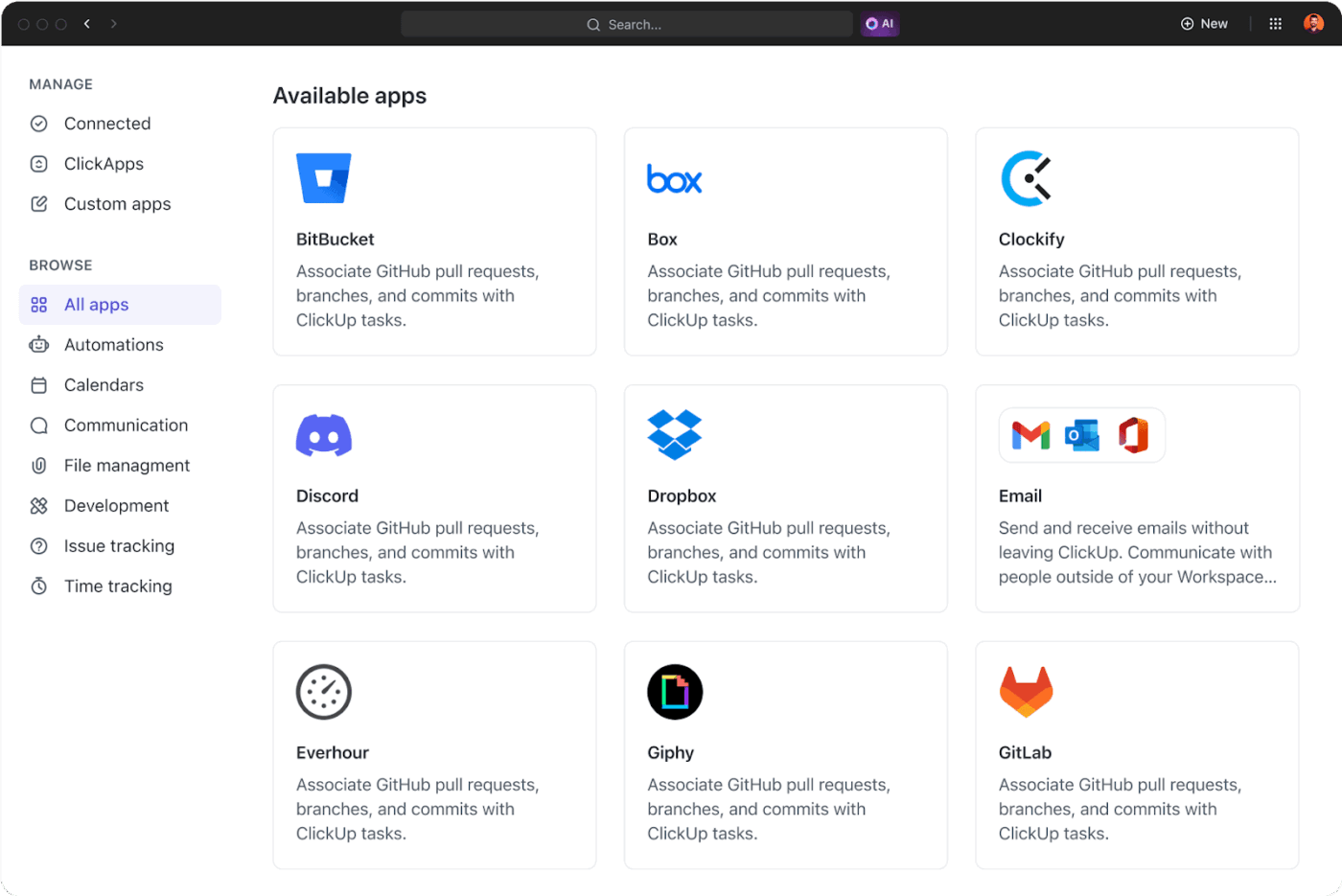
Pull live data from 1000+ tools into one unified system using native ClickUp Integrations. These are completely no-code—you can toggle them on/off with a single click!
This lets you automatically import past sales data from HubSpot, website traffic from Google Analytics, customer engagement data from Intercom, and inventory updates from Shopify—all straight into ClickUp.
💡 Pro Tip: Use ClickUp’s Custom APIs to integrate niche or proprietary software without heavy development. This ensures every relevant data source is integrated into your demand forecasting workflow.
The right AI solution doesn’t just forecast demand in real time.
Instead, it embeds itself in your workflow to understand context, flag risks, simulate demand scenarios, and offer suggestions based on your actual resources.
ClickUp AI layers this deep, actionable intelligence into your workspace:
ClickUp Brain is the platform’s contextual AI assistant—built directly into your workspace to eliminate context switching, speed up analysis, and tackle AI sprawl.
Unlike generic AI-based demand forecasting tools, ClickUp Brain understands your projects, remembers context, and connects data across tasks, docs, goals, chats, dashboards, etc.
Here’s how teams use contextual AI to level up their demand forecasting:
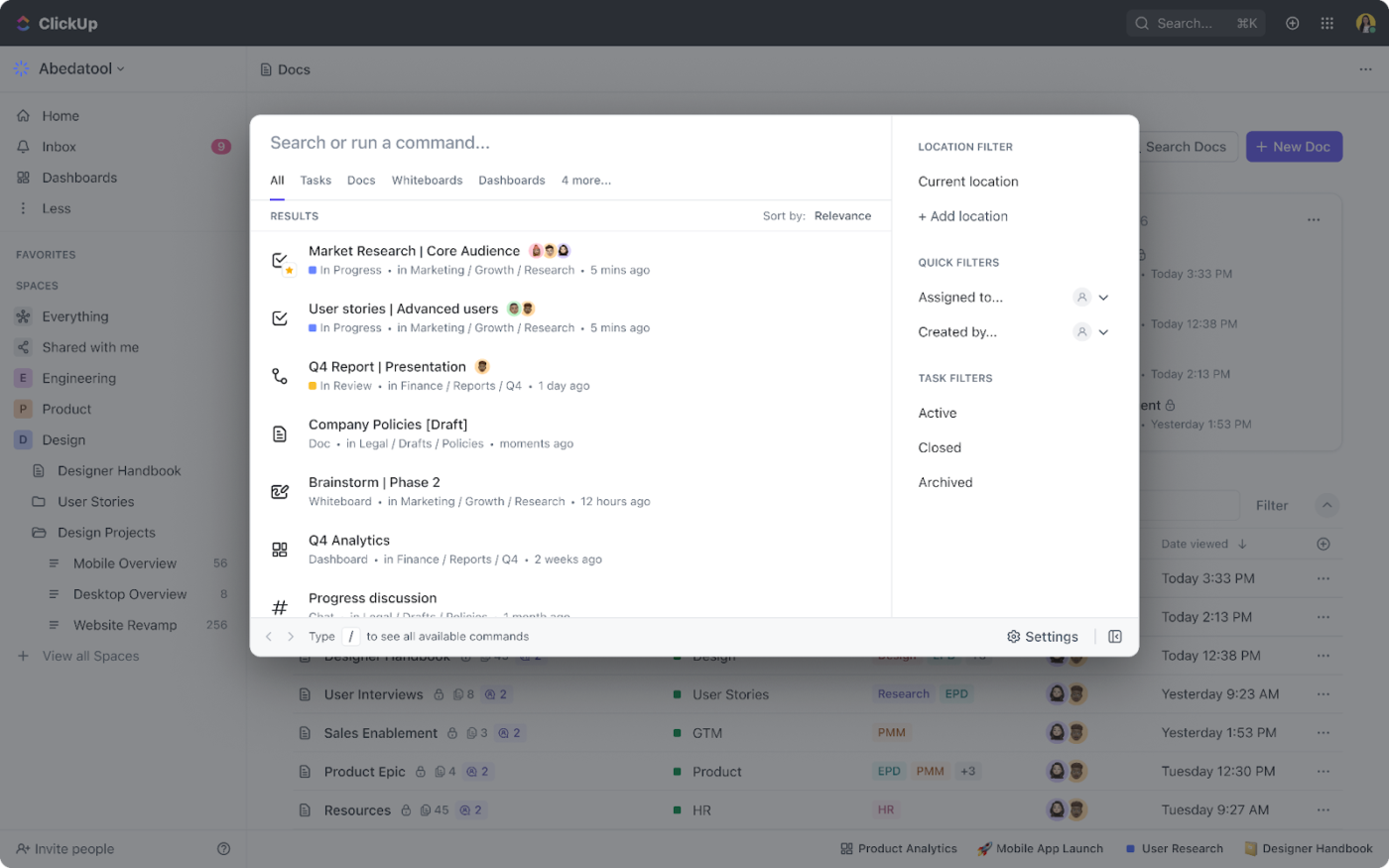
ClickUp Brain MAX takes all the capabilities of Brain and brings them right to your desktop—no need to juggle browser tabs. You can ask, analyze, and act on insights while staying connected to your everyday work.
Here’s how it helps you work smarter:
✅ Fact Check: As per McKinsey, companies using AI-driven forecasting can reduce excess inventory levels by 20-30%. This proves that accurate predictions translate directly into leaner, more efficient supply chains.
For forecasts to actually guide smart decisions, every team member needs access to the full picture: supporting reports, market research, budgets, resource plans, etc.
ClickUp gives you this central space to create, organize, and connect all your demand forecasting materials so that every stakeholder is on the same page.
Choose from 15+ customizable ClickUp Views—like Board, Timeline, Gantt, and List—to visualize your data exactly how you need it.
For starters, the ClickUp Workload View and Teams Hub provide a crystal-clear view of team capacity, resource utilization, and bandwidth across projects. Each team member’s availability is shown using color-coded bars: green for available, yellow for nearing limit, and red for overloaded.
So, if the forecast predicts a spike in orders next month, you can quickly see whether your team has the capacity to handle it. If not, simply drag and drop tasks to rebalance responsibilities and extend due dates for optimal resource forecasting.
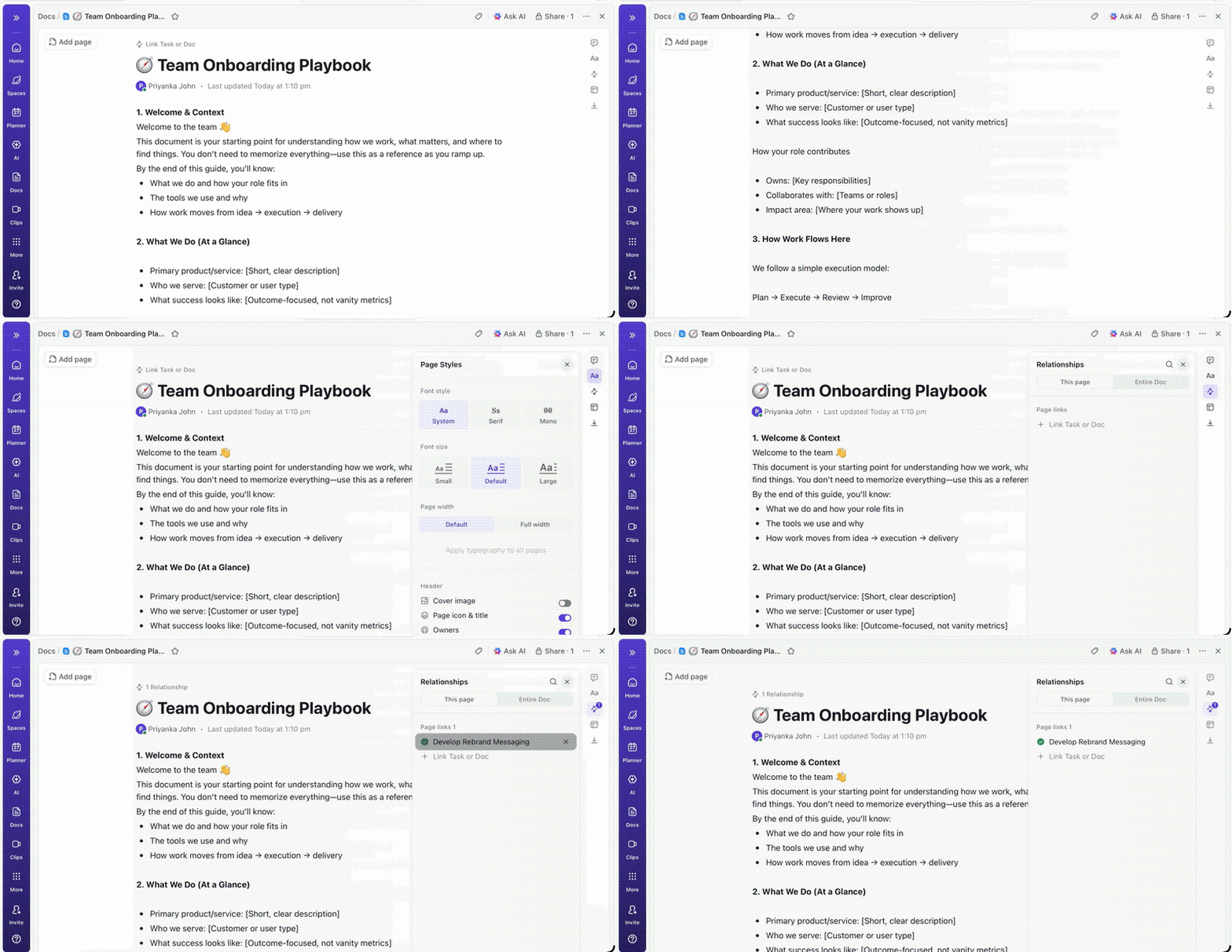
ClickUp Docs serves as your central knowledge hub. Use them to document demand assumptions, upload research, and keep strategy reports accessible in one place.
You can use Docs to store and manage:
Every ClickUp Doc is collaborative by design—multiple team members can edit simultaneously, comment inline, and link Docs directly to relevant tasks. Permissions and sharing controls keep sensitive forecasting data secure while still making it accessible to the right stakeholders.
🧠 Fun Fact: In 1957, the Ford Edsel failed even though it had correctly predicted rising middle-class incomes. The problem? It took 10 years of planning and research to launch. By the time the car hit showrooms, buyer tastes had shifted, and the 1958 recession slashed sales by over 40%. Ford had the data, but the timing was dead wrong.
Sales, marketing, operations, and finance all play a role in turning forecasts into results.
The problem?
Planning usually happens in one tool, communication in another, and execution somewhere else.
ClickUp eliminates that chaos by giving every team a shared workspace to plan, execute, and adjust strategies together:
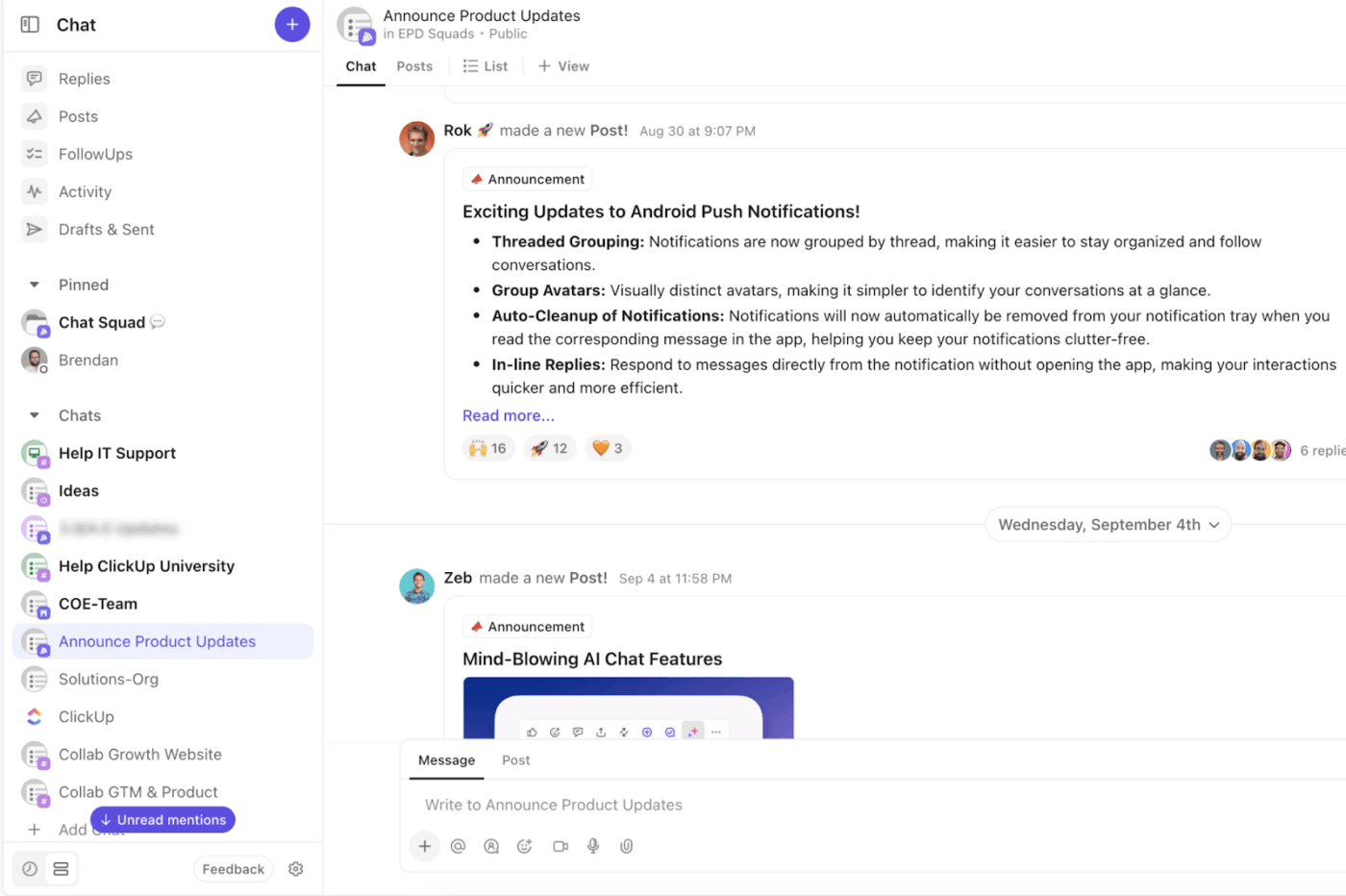
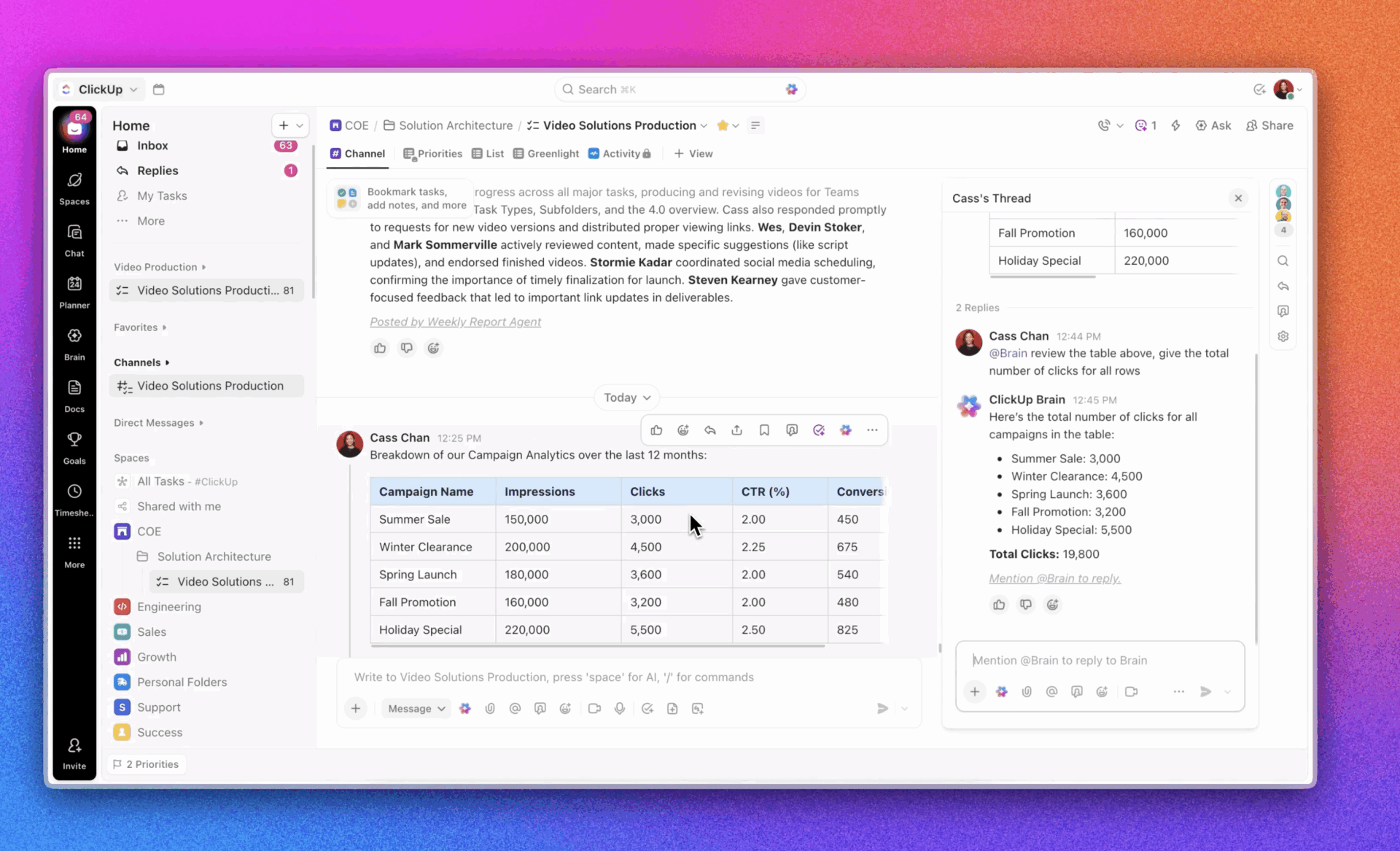
ClickUp Chat enables real-time communication in the same workspace where you work. Set up dedicated channels so teams can drop quick updates, tag colleagues, share files, and link tasks or feedback.
ClickUp Brain takes this further: You can generate AI replies, summarize threads, refine your messages, or even translate chats to keep global teams aligned.
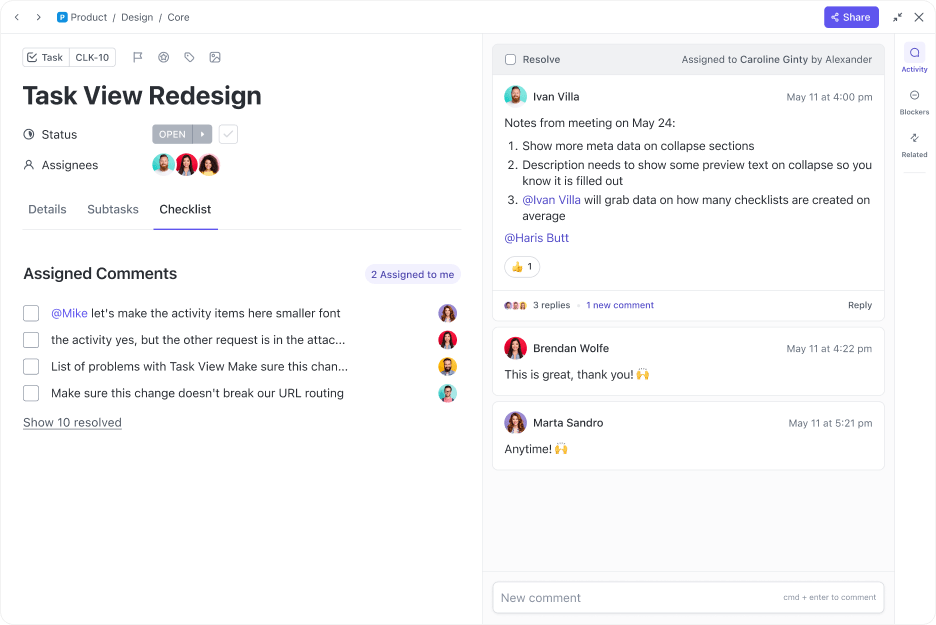
Tag a specific team member and turn your comment into an actionable item with ClickUp Assign Comments. This comes in handy during demand-planning cycles, when feedback crosses multiple departments.
For example, if Marketing notices a surge in interest and needs Finance to review the budget, they can tag Finance directly in the relevant comment thread instead of starting a separate task or email chain.
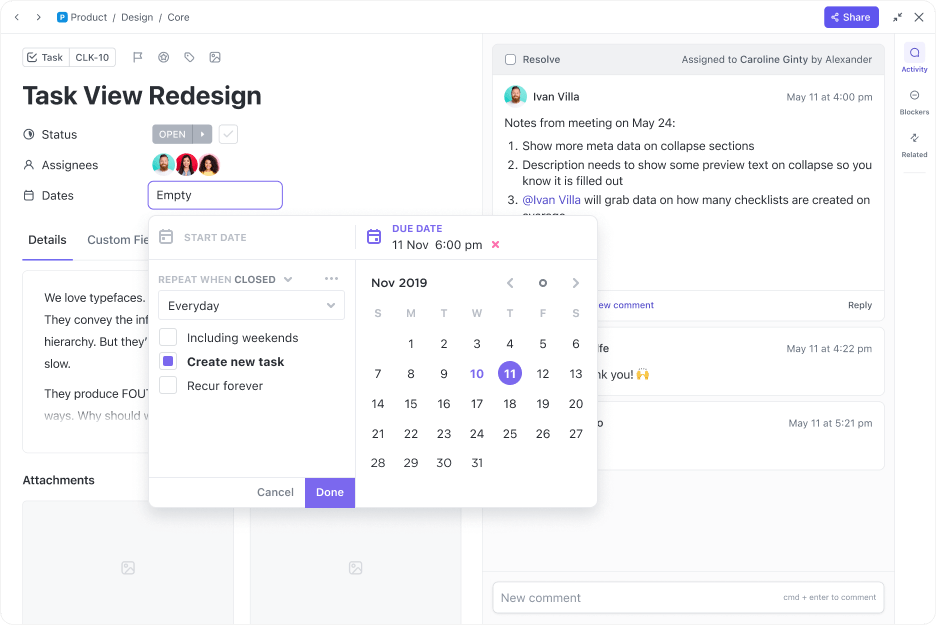
Once forecasts are finalized, use ClickUp Tasks to distribute responsibilities and track execution.
Create a task like “Adjust campaign targets based on Q2 forecast,” add a description, list subtasks, and set due dates. You can also link relevant docs and set dependencies to keep work in the right sequence.
Since Brain is integrated into your tasks, you can use it to summarize updates, rewrite task descriptions, or generate QA checklists automatically.
📚 Read More: Best AI Marketing Tools to Stay Productive
Once demand shifts, teams must instantly update timelines, budgets, and resourcing. But doing this manually across multiple platforms is slow and prone to error.
ClickUp lets you automate demand forecasting from end to end. Let’s explore how:
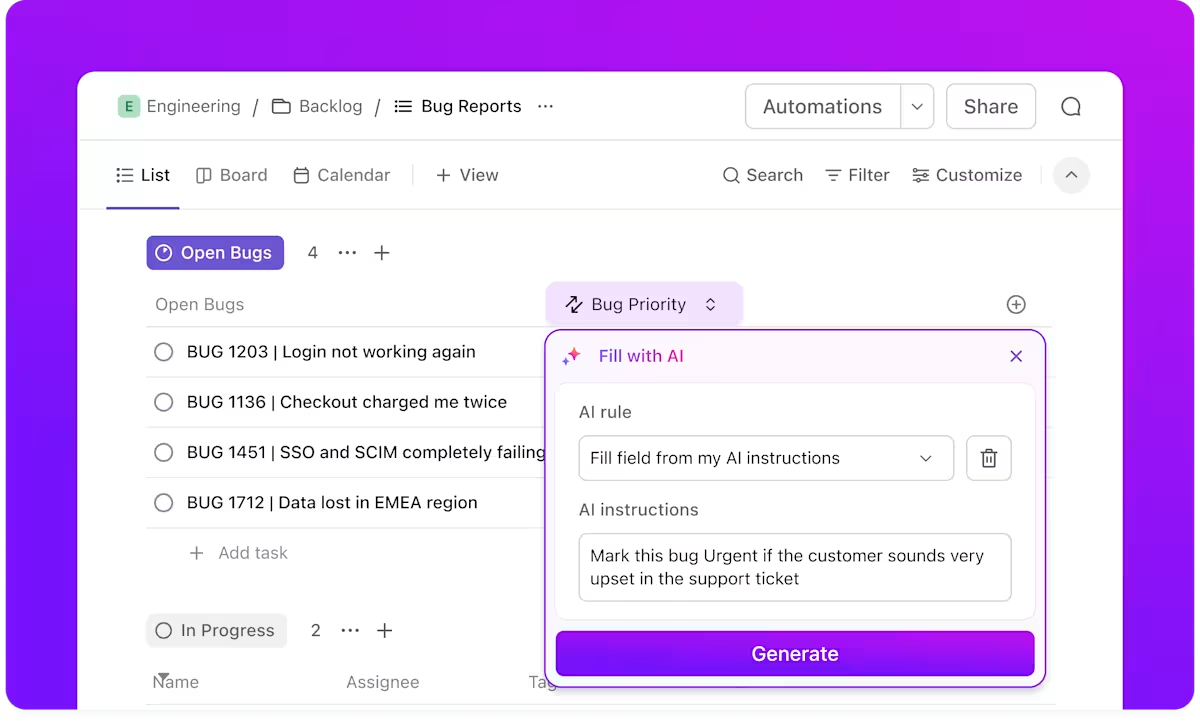
Use ClickUp Automations to create rule-based workflows that save hours of manual effort. Define triggers, conditions, and actions to ensure your forecasting process keeps running smoothly—even when nobody’s manually updating things.
For example, you can automate tasks like:
ClickUp offers two easy ways to build automations:
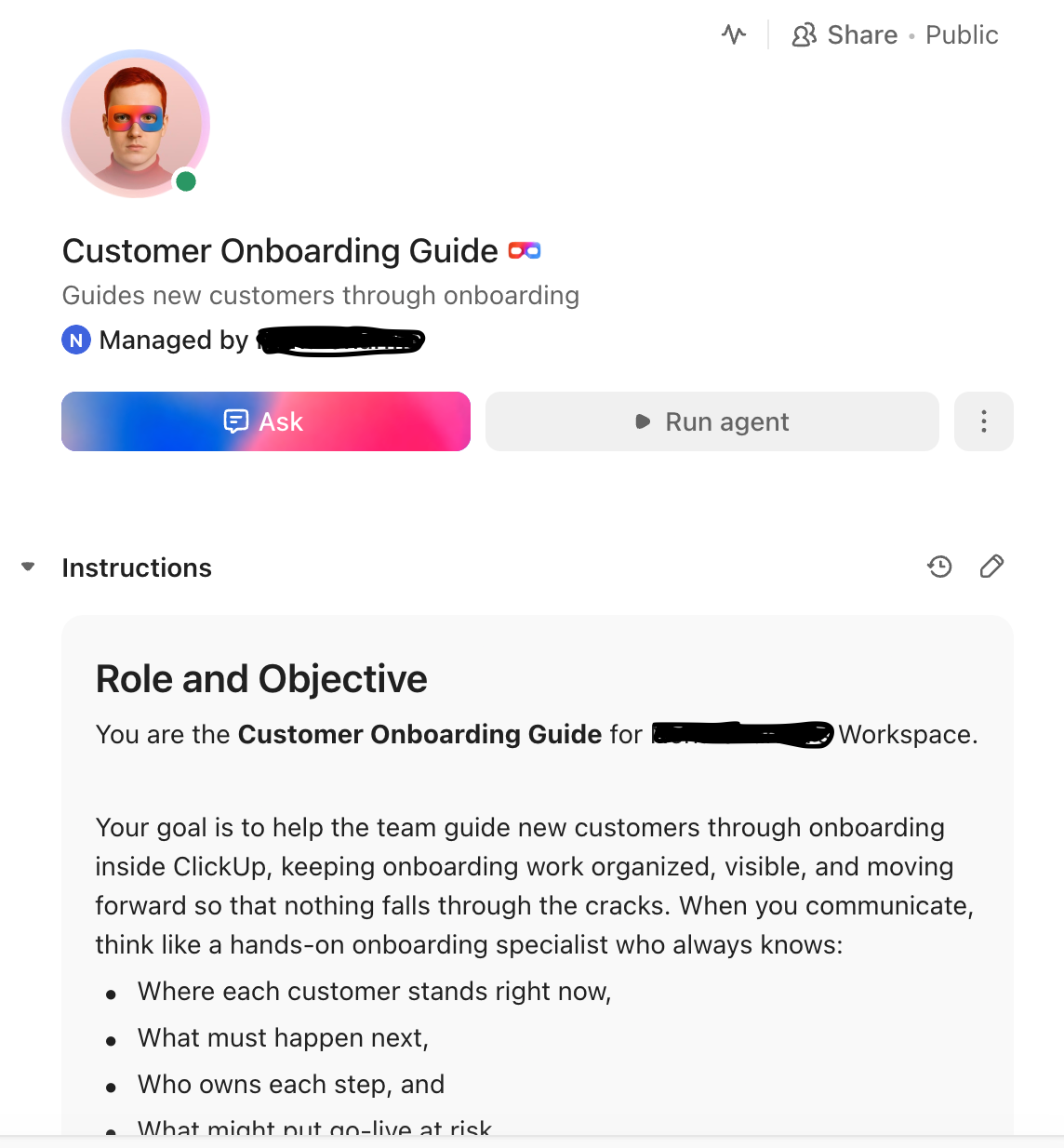
Unlike standard rule-based automations, ClickUp’s AI Agents adapt to context, monitor results, and take follow-up actions. Think of them as always-on assistants managing your forecasting operations in the background.
You can use these AI Agents to:
To know more about what Super Agents look like in action, watch this video. 👇
📚 Read More: Top AI Agents for Data Analysis for Smarter Insights
Sure, dashboards transform raw data into visually appealing insights. But it’s not enough.
You need smart dashboards that go beyond basic data visualization to offer actionable recommendations, role-based insights, and real-time alerts.
That’s what ClickUp exists for:
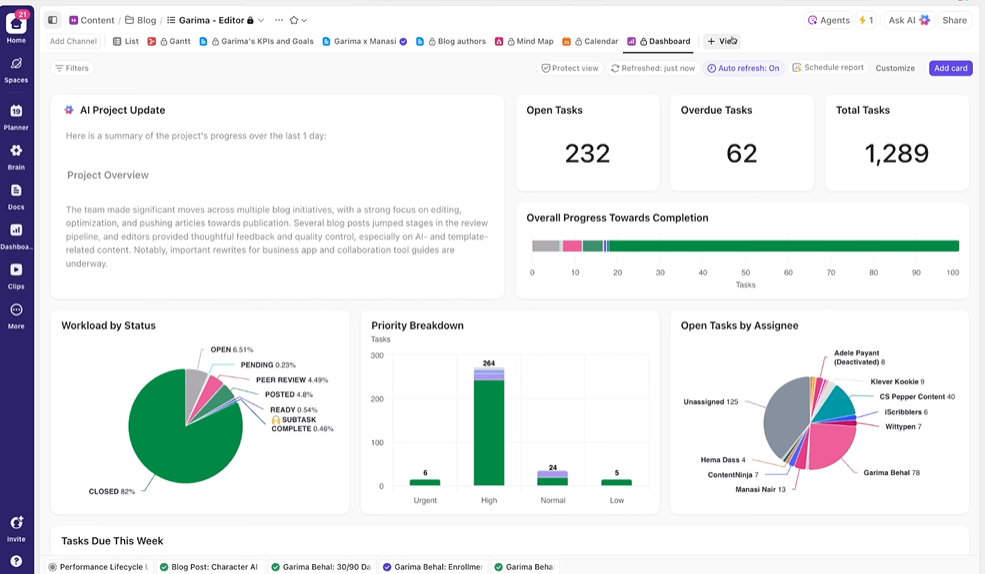
ClickUp Dashboards give you a live, interactive overview of how your forecast‑driven projects and actions are performing.
You can track key performance indicators like:
Build custom dashboards using 20+ drag-and-drop widgets, including pie charts and bar graphs. Dashboard Filters let you zoom in on time periods, teams, or regions to isolate patterns.
Since every widget updates in real time, your dashboard always reflects the latest data from ClickUp or your connected tools.
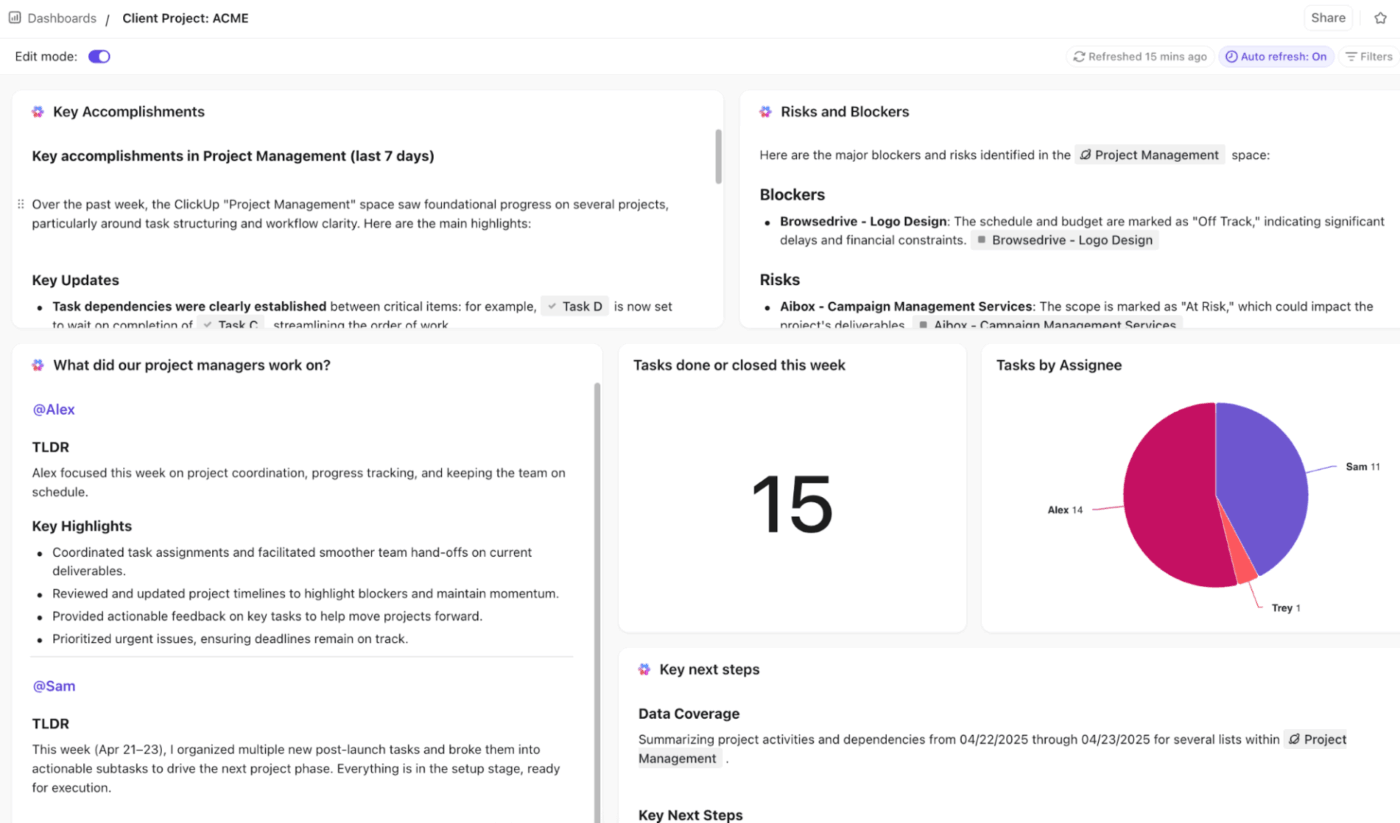
Pair your dashboards with ClickUp AI Cards for instant, AI‑generated insights. These cards analyze live workspace data to provide takeaways, trend explanations, and recommendations.
For example, if production delays threaten your goals, an AI Card might flag: “Orders pending shipment are trending higher than the forecast. Add temporary capacity now to avoid a backlog.”
Using AI to forecast customer and market demand sounds futuristic—SMBs might even think it’s out of their league.
But the reality is, it’s a survival tactic. Without it, you’re flying blind, waiting to hit a wall.
ClickUp simplifies AI demand forecasting so that businesses of all sizes can easily adopt it without feeling overwhelmed. The secret? ClickUp Brain, the neural network that connects your entire workspace.
It understands and remembers everything happening across your projects, making it easy to estimate future demand and pivot strategy based on actual business conditions.
To get started, sign up for ClickUp today.
AI demand forecasting uses machine learning and historical data to predict future customer demand. It analyzes patterns, seasonality, and external factors (like promotions or market changes) to produce more adaptive and data-driven forecasts than manual methods.
AI demand forecasting is typically more accurate than traditional methods because it continuously learns from new data and detects complex patterns. Accuracy also depends on data quality, model design, and business context, but many organizations see meaningful improvements in forecast accuracy.
AI complements traditional forecasting methods instead of completely replacing them. Statistical models and human judgment still matter, especially for new products or events with no historical precedent. Most teams combine AI insights with business expertise to make balanced demand planning decisions.
Different teams use demand forecasts to plan inventory, production, staffing, and procurement. For example, operations and supply chain teams adjust orders, marketing times campaigns, and finance refines budget and revenue projections.
An ideal tool combines real-time demand forecasting with team collaboration, automated data analysis, workflow automation, and AI-powered insights.
You can set up custom automations, visualize forecast trends, integrate with external tools, and use native AI to churn out user-friendly insights. It also lets you collaborate with team members in real time and manage everyday tasks from the same place.

© 2026 ClickUp

There’s an easier way. Try a free AI Agent in ClickUp that actually does the work for you—set up in minutes, save hours every week.