



Sorry, there were no results found for “”
Sorry, there were no results found for “”
Sorry, there were no results found for “”
Managing a supply chain today is no easy job. You’re constantly trying to meet the evolving customer expectations. Adding to it is the immense pressure of cutting down costs, streamlining workflows, and improving efficiency, and dealing with geopolitical disruptions.
To do this, you need complete visibility into your supply chain. This means that all supply chain processes need to be 100% transparent. And that’s where a supply chain dashboard comes in.
A well-built supply chain dashboard turns complex, scattered data into clear, actionable insights. Instead of spending hours digging through spreadsheets to check inventory levels or reconcile supplier performance reports, you can use the dashboard to spot issues in real time and act quickly to avoid disruptions.
In this blog post, we’ll walk you through what a supply chain dashboard should include, the supply chain KPIs that matter, and how to build a dashboard that works for your team.
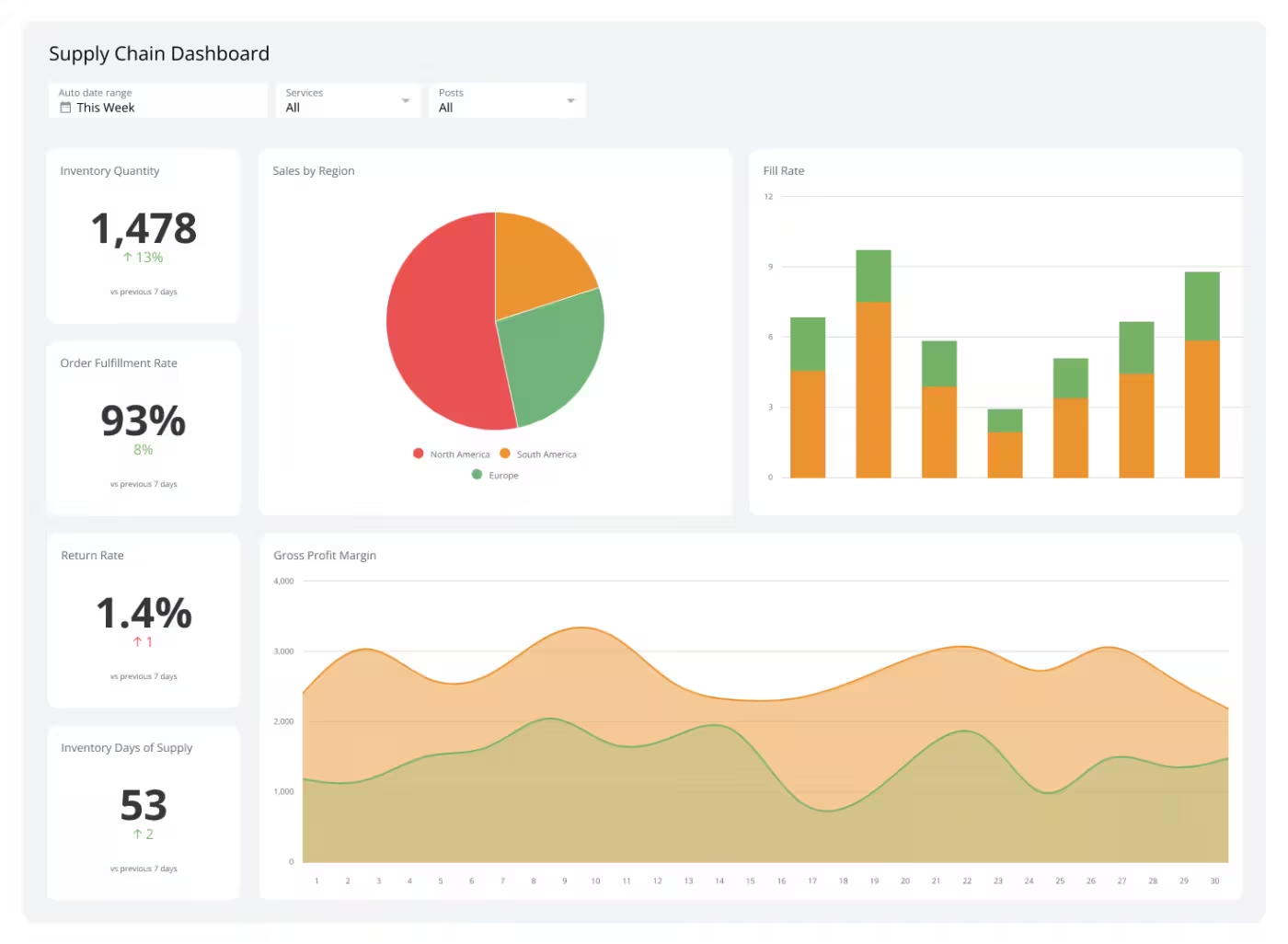
A supply chain dashboard is a centralized, visual tool that displays real-time data and key performance indicators throughout the entire supply chain, from procurement and inventory to production, logistics, and delivery. It brings together scattered data from across existing systems, such as your enterprise resource planning system, warehouse management system, transportation management system, and supplier portals, and turns it into real-time insights.
The dashboard helps you catch issues early, monitor KPIs that matter, and make smarter, faster decisions — whether you’re managing delays, balancing stock, or responding to a last-minute demand spike.
📖 Read More: Best Logistics Software Reviews & Pricing
As an operations manager or a logistics professional, you need proactive data for strategic planning. This means you need live updates across the supply chain, from inventory levels and freight costs to supplier performance and on-time delivery rates.
Here’s why you need to have a supply chain dashboard:
When designing a supply chain dashboard, here are the most important metrics to include:
| Metric | What it means | Why it matters |
| Inventory Turnover Rate | Shows how often inventory is sold and replaced over a given period | Helps optimize stock levels, avoid excess inventory, and reduce holding costs |
| Order Fulfillment Rate | The percentage of orders successfully delivered on time and in full, compared to the total number of orders | Directly impacts customer satisfaction and operational efficiency |
| On-Time Delivery (OTD) | The percentage of orders delivered by the promised date | Ensures customer expectations are met and delays are minimized |
| Lead Time | The total time it takes from placing an order with a supplier to receiving goods or services | Shorter lead times help reduce stockouts and improve inventory planning |
| Supplier Performance | Tracks how well suppliers are meeting quality, cost, and delivery expectations | Identifying strong and weak suppliers enables better sourcing decisions and helps manage risks |
| Transportation Costs | The sum total of shipping and fuel costs, labor, and packaging expenses | Helps optimize logistics, reduce waste, and identify opportunities for cost-saving strategies |
📮ClickUp Insight: 21% of respondents want to leverage AI to excel professionally by applying it to meetings, emails, and projects.
While most email apps and project management platforms have AI integrated as a feature, it may not be seamless enough to unify workflows across tools.
But we cracked the code at ClickUp! With ClickUp’s AI-powered meeting management features, you can easily create agenda items, capture notes from meetings, create and assign tasks from meeting notes, transcribe recordings, and more—with our AI notetaker and ClickUp Brain. Save up to 8 meeting hours per week, just like our clients at Stanley Security!
Let’s take a look at some supply chain dashboard examples.
This supply chain dashboard helps you track daily goods movement and ensures your operations meet service-level agreements, improving supply chain performance.
👤 Used by: Supply chain managers, plant managers, distribution center supervisors
🛠️ Tools commonly used: ClickUp Dashboards, Zoho Analytics
✅ Primary KPIs tracked:
📖 Read More: How to Create a Product Management Dashboard
A comprehensive inventory management dashboard for managing inventory flow across multiple storage locations or channels.
👤 Used by: Inventory planners, warehouse managers
🛠️ Tools commonly used: NetSuite, Cin7
✅ Primary KPIs tracked:
This dashboard focuses on shipment tracking, last-mile delivery, and controlling freight costs. It ensures that goods are moving efficiently from point A to B and allows logistics teams to reroute or proactively escalate delays.
👤 Used by: Logistics coordinators, transportation managers
🛠️ Tools commonly used: ShipBob, FreightPOP
✅ Primary KPIs tracked:
You can use this type of supply chain dashboard to monitor and evaluate supplier reliability and quality over time. Your logistics teams can assess procurement challenges, negotiate better terms, and maintain compliance across sourcing operations using this dashboard.
👤 Used by: Procurement managers, vendor relations teams
🛠️ Tools commonly used: Coupa, Jaggaer
✅ Primary KPIs tracked:
A demand forecasting dashboard predicts customer demand accurately so you can plan inventory, production, and procurement. Instead of relying on last year’s sales numbers, this dashboard pulls in real-time and historical data (sales, seasonality, promotions, market trends, etc.) to surface patterns, spot shifts, and model future demand.
👤 Used by: Demand planners, sales, and operations planning teams
🛠️ Tools commonly used: Excel + BI integration, SAS Forecasting
✅ Primary KPIs tracked:
A risk management dashboard gives you real-time visibility into vulnerabilities across your supply chain—from supplier risks and transportation delays to geopolitical threats, supplier bankruptcies, and compliance gaps.
👤 Used by: Risk analysts, business continuity managers
🛠️ Tools commonly used: Resilinc, Fusion Risk Management
✅ Primary KPIs tracked:
The financial supply chain dashboard bridges the gap between the physical movement of goods and the flow of money tied to it. Ops and finance teams use it to gain shared visibility into how supply chain activities impact working capital, cash flow, and overall financial health in real time.
👤 Used by: CFOs, cost analysts
🛠️ Tools commonly used: ClickUp, Tableau
✅ Primary KPIs tracked:
An order tracking dashboard pulls back the curtain on your entire order lifecycle—from purchase creation to shipment, delivery, and final fulfillment.
In supply chain management, you want a unified view of every step of the order journey. And this supply chain management dashboard helps you do just that.
👤 Used by: Fulfillment managers
🛠️ Tools commonly used: ClickUp, Salesforce Service Cloud
✅ Primary KPIs tracked:
Define upfront whether the dashboard is for strategic oversight, operational control, or exception management, and design it accordingly.
For example, supply chain heads or finance teams need high-level summaries for strategic planning while warehouse managers and logistics coordinators need operational dashboards for day-to-day actions.
🎯 Common goals might include:
Then, tailor the level of detail and visualization to the audience’s needs.
💼 Supply chain stakeholders can include:
Use ClickUp Goals to align your dashboard metrics with strategic objectives and track progress in real-time. With Targets, you can tie specific milestones and KPIs to each goal and see how every data point on your dashboard relates to a larger business outcome.
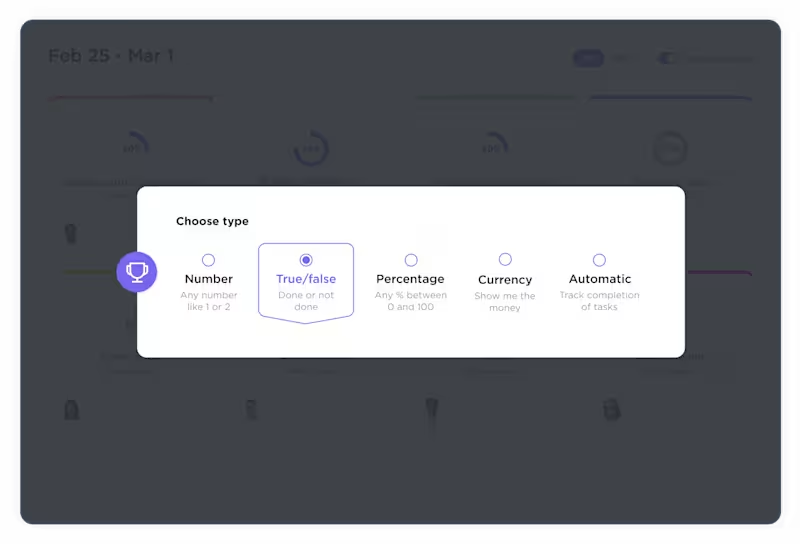
Use number targets when you’re tracking progress toward a numerical objective, such as ‘Reduce average order processing time to under 24 hours’. Currency Targets are perfect for cost-related goals in your supply chain. When you want to track binary milestones, such ‘Real-time shipping updates feature enabled – Yes/No’, switch to True/False Targets.
💡 Pro Tip: Use Goal Folders in ClickUp to organize your goals by different areas of the supply chain dashboard, such as Inventory, Logistics, and Procurement.
A supply chain dashboard is only as strong as the data it pulls from.
Start by identifying all key systems and tools that house supply chain data across your organization.
🖥️ Common data sources to consider:
At this stage, you must document data ownership for each source. Know who maintains it, how often it’s updated, and any known gaps — this will save massive headaches during dashboard integration and validation.
Every KPI you decide to add to the supply chain dashboard should answer a business-critical question. Or it could signal an operational risk that needs attention. Your end goal can range from improving fulfillment speed, reducing carrying costs, shortening delivery timelines, or de-risking your supply chain.
📈 To choose the right KPIs, start by asking:
The ClickUp KPI Template is a flexible and customizable framework designed to track performance across procurement, inventory, logistics, and delivery in one centralized space.
The template features a Progress Board view that displays OKRs based on their progress status. With a high-level overview for quickly identifying which OKRs are at risk, your team can develop and implement effective mitigation strategies.
There’s also the Timeline view, which displays each OKR along a timeline based on its start and due dates and highlights which departments are working on specific OKRs during any given time period.

🤝🏻 Friendly Reminder: Avoid the temptation to track everything. A well-designed dashboard should focus on the few metrics that matter most, tailored to the needs of the dashboard’s audience (executives, managers, or operations teams).
The next step is to bring your supply chain analytics to life on a dashboard. Remember that not every dashboard tool will suit your supply chain’s complexity or data environment.
When you’re choosing a dashboard tool, consider the following aspects:
📊 Here’s how you can use different widgets to make your KPI dashboard both insightful and visually engaging:
Dashboards in ClickUp offer a variety of widgets to track different aspects of your supply chain KPIs and metrics. You can use filters to view data for specific periods and create custom views tailored to various roles within your team, such as warehouse managers or procurement officers.
📖 Read More: Project Management Dashboard Examples & Templates
When a user opens the dashboard, their eyes should land on the most important insights first, without scrolling or searching.
How do you do this? Start by prioritizing the information hierarchy. This means placing the most critical metrics at the top of the dashboard so they’re immediately visible. Supporting or secondary metrics can be grouped lower down or behind drill-down views.
You also know that your supply chain teams aren’t always sitting at a desk. Your warehouse managers, logistics coordinators, and field teams may check dashboards on tablets or phones during operations.
The dashboard layout must be clean, legible, and easy to interact with across different screen sizes. With responsive design, anyone, regardless of their location, can quickly get relevant insights.
📌 Here’s how to make your dashboard easy to interpret at a glance:
ClickUp, the everything app for work, helps supply chain managers plan procurement schedules, track shipments, optimize inventory, collaborate with suppliers, and monitor KPIs in one centralized workspace.
Let’s take a closer look at its robust task management, visualization, automations, and collaboration features for your supply chain dashboard.
Dashboards in ClickUp are fully customizable. Add widgets, arrange them in a grid layout or something more open-ended, drag and drop to move them around, resize them, and group them to put related KPIs together.
In addition to bar/line charts, progress bars, and pie charts, you get a ‘Task List’ widget to track who’s doing what, what’s overdue, and what’s already wrapped up. The ‘Text/Note’ widget lets you drop in weekly updates, quick explanations, or notes on any weird data spikes.

As tasks are updated, statuses shift. Deadlines get closer. Goals move forward.
Your dashboard updates instantly without manual effort. There’s no need to refresh pages or re-run reports. You’re always looking at the most current snapshot of your data.
ClickUp’s List View is like a digital checklist, ideal for tracking what items are low on stock, which orders are delayed, or what’s coming in next. Each task in your list represents a product or batch, and you can use Custom Fields to add information that’s specific to your workflow.
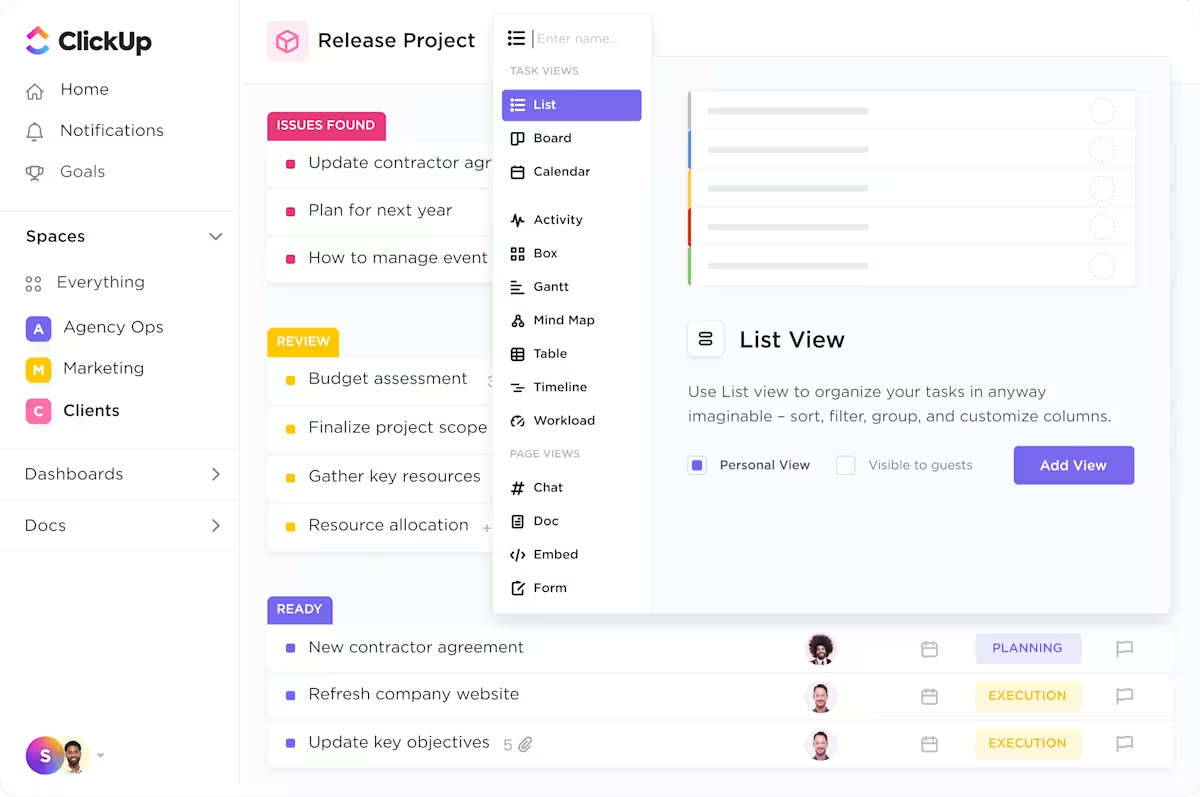
Once your fields are in place, the Table View in ClickUp converts your list into a mini database for your team. Now you can sort by stock level, group by status, or set filters to show only low-stock items or incoming shipments.
You can save the filtered views for different departments, from warehouse operations and finance to the procurement team.

Warehouse management systems can get complicated fast. You’re tracking inventory levels, setting reorder points, processing orders, and managing vendor communications.
With ClickUp Automations, you can set triggers, if/then actions, and conditions to automate repetitive tasks.
For example, when a new order comes in, you can automatically generate a task that captures all the essentials: customer information, item quantities, shipping instructions etc.

Your suppliers, transportation teams, and procurement leads are all working from different locations. This is where all teams can use ClickUp collaboration features to ensure everything moves smoothly.
You can easily discuss details, assign responsibilities, resolve issues, and track updates within the context of your work.
Need to collaborate on shared documents? ClickUp Docs let multiple people edit, comment, and work together in real time. You can even attach files like invoices or order confirmations directly to tasks and projects, keeping everything organized in one place.
Tag a teammate with an @mention to make sure they never miss an important update or request.
And when you need faster conversations, ClickUp Chat lets you create team-specific rooms. They support cross-functional supply chain groups that need to stay connected without switching between different apps.
Trying to manage your supply chain without a clear dashboard means you’re constantly jumping between spreadsheets, waiting on updates, and piecing together information from emails, meetings, and disconnected tools.
With ClickUp’s customizable dashboards, you can pull all your key supply chain metrics into one live view. Automations help by triggering tasks or alerts when inventory dips below a set level or a shipment is late.
Want to build a dashboard that makes updates, reports, and decisions move faster? Sign up on ClickUp for free and get real time visibility across your supply chain.
© 2025 ClickUp




