


While designed for flexibility, agile projects can become challenging due to the complexity of the tasks involved. The lack of initial planning and understanding of the project tasks may lead to ambiguities, inefficient management, and an inability to show the expected outcomes.
Understanding user stories, features, and epics is essential to managing agile projects well. These components of a sprint backlog play specific roles and collectively guide the project toward success. They ensure stakeholder alignment and user satisfaction by meeting their evolving needs.
This article discusses the epic vs. feature vs. user story difference in detail, providing insights into their implementation, benefits, and risks in agile development.
Let’s dig deeper into these concepts and make agile project management simpler!
Epics vs Features vs User Stories: What’s the Difference?

 Summarize this article for me please
User Story in Agile Software Development
A user story is a solution-focused, informal description of a software feature from an end-user perspective. It represents a bite-sized deliverable that provides specific value to the user, helping stakeholders understand the project’s what, who, and why.
Say you are a small business owner discussing your requirement for an invoicing app with a developer. Your user story can be, ‘As a small business owner, I want to be able to create and send multiple invoices to my clients to save time.’ While this user story is straightforward, it doesn’t give a complete insight into what needs to be built in the app, why, and for whom it is being built.
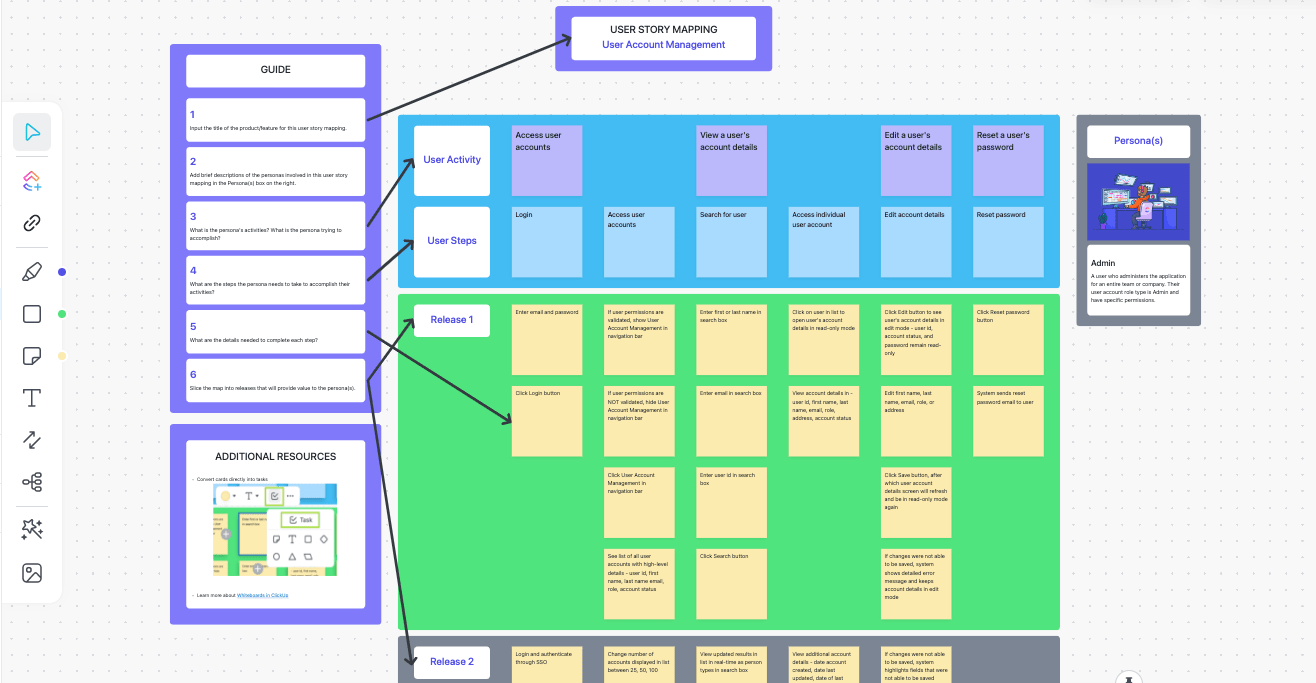
User stories provide context on what the end-user is looking for. It helps you build a user-centric product that gives the desired outcomes. To paint the complete picture, here’s how user stories help you improve user experience design.
Effective communication
User stories bridge the gap between users, developers, agile project management teams, and other stakeholders by clearly outlining the end goal. It reduces ambiguities and chances of miscommunication.
Contextual design
User stories give insights into how a user will interact with the product. This gives developers an idea of the scenarios, environments, devices, etc., they must consider when building the solution. For instance, consider the above user story example. The developers get an idea of the following:
- Who will use the app—A small business owner who needs a time-saving solution for invoicing/ money management
- How the app will be used—To create and send multiple invoices
- On which devices—Mobiles, tablets, etc.
This contextual information guides the design team to incorporate features like sending multiple invoices, income tracking, advanced filtering options, etc., to make the solution affordable and convenient for busy entrepreneurs.
Prevent feature creep
UX designers often face this issue as agile teams add more features to the product, making it too complicated. With user stories, the end-user’s goal becomes evident, helping the team stay within the project’s initial scope.
For instance, the above example clearly defines the need to create and send multiple invoices. The developer teams can focus on the specific feature without getting sidetracked by additional features that aren’t required immediately.
ClickUp for Agile Teams can help track the priority features and speed up their development by helping you generate roadmaps, create test plans with AI, define product workflows, and streamline handoffs between teams.

User stories are essential in methodologies like Agile Scrum. They help teams break down complex features into smaller, more manageable tasks.
Mapping user stories helps teams plan and prioritize tasks, track progress, and estimate the effort needed to create a user-centric product. Teams use agile story points to effectively plan and manage the tasks involved in user stories. Story points help estimate the effort required to execute user stories in your product backlog.

The ClickUp User Story template is the most convenient solution for creating, managing, and mapping user stories. It helps teams capture information consistently and understand project requirements, giving a comprehensive view of user needs. It also helps track the progress of each user story, prioritize them, and delegate tasks to speed up delivery.
Summarize this article for me pleaseFeature in Agile Software Development
Features are the product functionalities that deliver business value to the end user. They are the core units that build a product, making it capable of meeting stakeholder needs. For example, customizable invoice designs, trackable payment receipts, and reminder notifications are the defining features of an invoicing app.
Features offer specific benefits that work well with user stories. While user stories are focused on individual needs, features give a broader view of the product’s capabilities. They include several related user stories, helping the development team build a functionality that serves multiple users.
Features also include product improvements, technical upgrades, or security enhancements that aren’t included in user stories but are critical for product success. While user stories in Scrum highlight specific user needs, features cover the aspects missing in user stories. Using both ensures meeting the user’s needs while considering technical, architectural, and other business aspects.
Here are a few differences between user stories and features.
| User story | Feature |
| Communicates a specific requirement | Represents a product functionality |
| More granular with a narrower scope | Broader scope as it provides value to users and business |
| Used to plan and prioritize tasks within a feature | Used to deliver value to end users and test different product versions based on feedback |
| Written from the perspective of an end user in a specific format | Usually written from a product or system perspective |
| Tested against acceptance criteria | Tested with various approaches, like integration, unit, and end-to-end testing |
Though user stories and features are different, both meet user needs. Here’s how features improve customer satisfaction when implemented in Agile.
Incremental delivery
Features are delivered incrementally. Customers can use the software as additional features are being built, keeping them engaged and satisfied as they experience product improvements and new functionalities.
Consider the ‘shopping cart’ feature of an eCommerce website. The agile approach breaks down the feature into more granular, incremental deliveries, such as:
- Sprint 1 —A basic cart to add multiple products
- Sprint 2 —An enhanced shopping cart that allows users to add/ remove items, change quantities, and modify them
- Sprint 3 — A functionality that allows users to save the cart items and shop later
User collaboration
Agile teams build features aligned with customer needs, directly involving users in activities like user story prioritization, refinement, and review. As customers collaborate to communicate their needs and feedback, engagement is typically higher.

ClickUp’s Agile Story Template improves collaboration between teams and stakeholders. It allows prioritizing tasks, commenting on tasks and sub-tasks, and organizing feature requests by adding custom attributes. Also, it enables stakeholders to understand the story easily by maintaining a consistent format.
Iterative development
When implementing features in Agile, planning and prioritization are based on user feedback. The most relevant features are considered first, and then the evolving user needs are addressed. This flexibility in an agile project plan increases engagement and satisfaction.
 Summarize this article for me please
Epics in Agile Software Development
Epics are a series of stories representing a comprehensive strategic objective in agile development. They are smaller strategic plans that help a product owner develop a project’s action plan. To put it simply, an epic is a large user story.
For instance, an epic can be ‘A mobile app to drive movie ticket sales’ which includes multiple stories, such as:
- Create promo codes for users
- Add in-app messaging capability to send discount coupons
- Develop food pre-order capability for user convenience
- Create promotional texts and emails
Here are a few epic use cases highlighting how agile epics help organize and manage complex project tasks.
Build strategic roadmaps
Epics represent high-level goals that guide the development process. They support strategic planning by helping stakeholders view the bigger picture and breaking complex projects into manageable pieces. This allows the product owner and the development team to work on key deliverables in the product backlog while prioritizing milestones and tasks based on long-term goals.
Plan and allocate resources
Teams can prioritize critical requirements or product functions as epics, which include smaller stories or features. Epics enable teams to estimate and plan resources and effort to complete each task. Stakeholders can also make informed decisions about allocating resources to tasks crucial for project success.
Collaborate across teams
An epic represents the broader goals shared across departments and teams. They ensure a common understanding of project priorities, facilitating coordination among different teams. As a result, epics streamline project workflows by identifying dependencies and minimizing the risk of task duplication.
Manage documentation and project portfolio
Epics lets you organize projects based on their strategic objectives. They help you document software projects and manage portfolios by providing a detailed view of project goals, tasks, resources, and delivered value.
Summarize this article for me pleaseEpic vs. Feature vs. User Story—The Differences
Epics and features, along with user stories, play distinct roles in the development process. Together, they form the product backlog for the product owner. Here are the key differences between epic, feature, and user story.
Scope
- Epics are large project chunks that may take around a quarter to complete. They include smaller user stories or smaller tasks grouped around an overarching theme that are easier to achieve in a single sprint
- Features are a smaller collection of user stories in the sprint backlog. They are independent product capabilities that aren’t as large as epics. They are broad enough to be released as individual product functions in a single iteration
- User stories are the smallest units with the narrowest scope. They focus on delivering individual user needs efficiently
Detail
- Epics give a strategic and high-level overview of the project goals that are described as user stories
- Features are more detailed, considering epics vs. features. They offer context to development teams on product functions that align with the broader goals
- User stories are the most detailed in epic vs. feature vs. user stories. They are typically one-line statements that tell the development team about the user, their need to be met, and the reason behind it
Execution
- Consider epics as the first step. They guide the project’s direction and initial planning based on the project goals
- Features are the next step that facilitates a clear understanding of the product. They give dimension to the product and help in prioritizing tasks that deliver the most value to end users
- User stories are the most actionable in epic vs. feature vs. user stories. They give teams a clear deliverable to focus on
Timeframe and complexity
- Epics are complex, and they require the longest time to complete
- Features are less complex and smaller than epics, but they require time as they need one or more sprints depending on their scope
- User stories are the simplest and can typically be completed in one sprint. They require the least time
Flexibility and adaptability
- Epics bring flexibility to project planning. As you get more project details, they can be modified and broken down into smaller tasks
- Features allow teams to focus on specific product dimensions based on user feedback or evolving needs and priorities
- User stories make implementation flexible by enabling teams to adjust requirements based on user feedback and needs
| Aspect | Epic | Feature | User story |
| Scope | Largest, high-level strategic goal | Smaller than epic; independent product functionality | Narrow, focused on specific individual user needs |
| Detail | Least detailed; gives a strategic overview | More detailed; mentions what needs to be built | Most detailed; clarifies user need to be met and why |
| Execution | Provides direction to the project in the initial stages | Prioritizes tasks based on user needs | Actionable items to be ticked off the list during sprints |
| Timeframe | Takes the longest time (requires multiple sprints) | Takes moderately long (requires one or more sprints) | Takes the least time (requires one sprint or iteration) |
| Complexity | Most complex | Less complex than epics | The least complex, easiest to manage, and complete |
| Flexibility and adaptability | Most flexible; can be altered based on project information | Adaptable based on user needs, feedback, and priorities | Flexible in implementation based on evolving user needs |
Summarize this article for me pleaseThe Benefits and Drawbacks of User Stories, Features, and Epics
Let’s quickly look into the benefits of user stories, features, and epics and their potential downsides.
User stories
Benefits
- User-centric: User stories capture specific needs. They detail the reason behind the need and the end user as well
- Actionable: User stories provide actionable insights into what the user wants. They clarify the user need to be met in a concise format
Drawbacks
- Oversimplification: User stories may oversimplify user requirements, missing out on important details
- Lack of broader context: User stories mention the immediate need of the user but leave out the broader context that ties the story to a long-term objective
Mitigation strategy
User stories must include action items necessary to meet the user goals. They must be tied to epics or features to get more context into what is being built.
Also read: Empathy mapping process explained
Features
Benefits
- Organize and prioritize efforts: Features clarify the product aspect that must be developed to meet the user’s immediate needs. They help prioritize work and resources accordingly
- Provide more context on user stories: Features add more context to user stories. They detail the product feature development, unlike user stories that mention the user’s immediate need only
Drawbacks
- Not as detailed as user stories: Features are more detailed than epics but aren’t as detailed as user stories. They do not mention why the feature must be built or the end user’s perspective
- May be complex to deliver: Features have a broader scope than user stories. Typically, they are more complex and require more time to deliver
Mitigation strategy
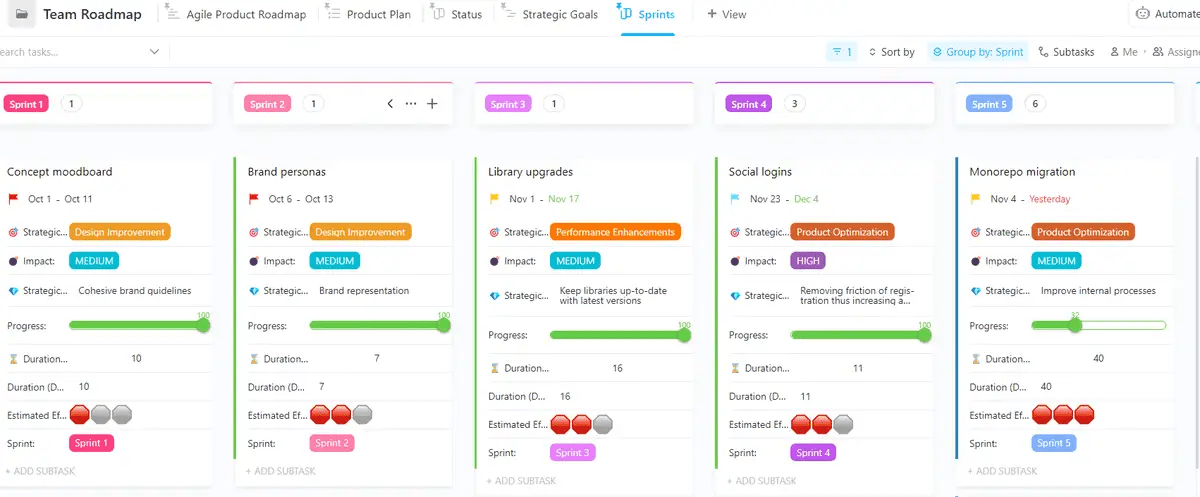
Features must be broken down into sprints for more context and easy management. ClickUp’s Sprint feature makes sprint management easy. It automates setting sprint dates, marking priorities, and assigning points to ensure speedy deliveries. This allows you to spend less time on administrative tasks and more time completing the work that matters. Moreover, you gain valuable insights from each sprint to refine your development process for future iterations.

Epics
Benefits
- Outline strategic objective: Epics outline the high-level strategic objective of the project. They show the bigger picture, giving more clarity into the project’s goals
- Guide the initial project planning: Epics provide project direction at the initial stages. They help create the roadmap to product development
Drawbacks
- Too complex to handle: Epics have the largest scope. They might be too complex to understand and manage if not broken down effectively into smaller components
- Risk of misalignment: Not breaking down epics into more manageable features may cause misalignment between epics and user stories
Mitigation strategy
Epics must be tied to user stories to ensure that the user needs captured in the user stories align with the high-level project goal. Also, they must be broken into multiple sprints for easy management
When to use epics, features, or user stories?
Understanding when to use epics, features, or user stories is critical to maximizing the benefits of these valuable tools. While they are all a part of the sprint backlog, they play distinct roles.
User stories
- Use user stories to capture specific user needs
- They offer actionable tasks that are usually delivered within a sprint
Features
- Use features as a collection of user stories to define a specific product functionality
- They help organize and deliver a set of product functions that offer value to users
Epics
- Use epics in the initial planning of a project
- They define high-level goals that span multiple user stories and many features
Summarize this article for me pleaseImplementing User Stories, Features, and Epics With ClickUp
There’s no denying that agile software development is complex. However, with ClickUp, managing the whole epic vs. features vs. user stories conundrum gets easier.
Use ClickUp Tasks for epics or features and sub-tasks for user stories. You can create epics for every project and customize user stories with custom fields. For instance, engineering teams can create an ‘item type’ custom field to organize an epic parent task and user stories.

Once you create epics, set up targets for each agile epic with ClickUp Goals. This feature helps you establish straightforward targets and assign them to specific individuals. As the project progresses, you can visualize the goal statuses with percentage tracking to know how close you are to achieving them.

Like epics, you can also track your features, user stories, and tasks with ClickUp Gantt Charts. Use different colors to sort tasks based on priority, status, and due dates. Add dependencies, get instant updates on tasks, and view their progress percentage.
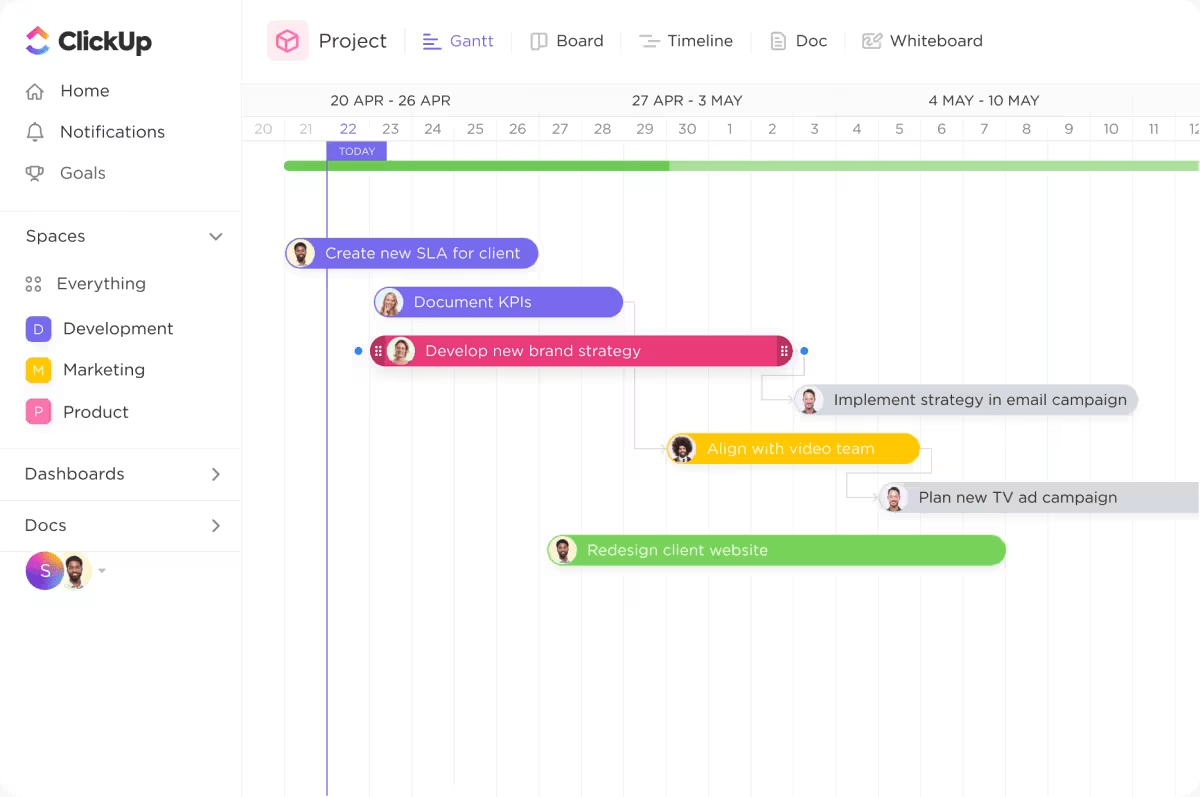
While tracking and managing epics and user stories is easier with ClickUp Tasks, Goals, and Gantt Charts, the tool also goes the extra mile to help you meet deadlines. ClickUp’s Project Time Tracking lets you assign due dates and track your tasks to ensure on-time delivery.
 Summarize this article for me please
Leverage ClickUp for Easy Project Management
User stories, features, and epics are specific components of your product backlog. They help the development team break larger goals into more manageable pieces. However, if not handled properly, they may also complicate projects.
ClickUp’s project management platform helps your development team build a hierarchy within your project with relevant tasks and sub-tasks to compile epics and features along with many user stories. While the tool simplifies and manages your project tasks efficiently, your development teams can focus on driving the successful delivery of the product.
Get started with ClickUp today!

Everything you need to stay organized and get work done.
