
Sorry, there were no results found for “”
Sorry, there were no results found for “”
Sorry, there were no results found for “”
People don’t switch off monday.com because of a feature. In most cases, they switch because the bill grew faster than the team did.
That’s why we stress-tested five top alternatives to monday.com. In this blog post, we’ll walk through each in detail and help you choose the right option based on your requirements.
ClickUp is the closest 1:1 swap and the only free tier here with no seat cap, so a growing team never hits a wall. Trello is the cleanest board on the list and gets a new user up and running in minutes. Asana imposes structure better than anything else through its Workflow Builder. Smartsheet is the easiest landing if your team already lives in rows and formulas. And Airtable models relationships like nothing else here can touch.
We tested at different team sizes, pulled original G2 and Capterra reviews, and called out where each tool falls short, ours included. If you need solutions to a specific problem, check our ToC on the right.
Every tool in the table below is reviewed in full further down. Prices are list prices at the time of writing, billed annually, and they change often, so confirm on each vendor’s pricing page before you commit.
| Tool | Best for | Standout feature | Starting price | Where it taps out |
|---|---|---|---|---|
| ClickUp | One workspace for tasks, docs, dashboards, and automations | Broadest feature set, linked across tasks, docs, goals, and Brain AI | Free; paid from $7/user/mo | More surface area means a heavier week-one setup |
| Trello | Kanban and only Kanban | Cleanest drag-and-drop board, near-zero setup | Free; paid from $5/user/mo | Thin cross-board reporting until Premium |
| Asana | Workflow-first teams that want structure | Workflow Builder: visual, no-code flow mapping | Free (2 users); paid from $10.99/user/mo | Best workflow features gated to Advanced |
| Smartsheet | Spreadsheet-shaped, row-heavy projects | Native Gantt and dependencies on a familiar grid | Paid from $9/member/mo (no free tier) | Spreadsheet-first, not relational; 3-member minimum on Business |
| Airtable | Connected, relational data models | True linked records, lookups, and rollups | Free (5 editors); paid from $20/user/mo | Bill climbs fast as editor count grows |
monday.com uses per-seat pricing: $9/seat on Basic, $12/seat on Standard, $19/seat on Pro, all billed annually, with a 3-seat minimum on every paid plan. The catch most teams don’t price in is where the features they need actually sit.
For instance, automations and integrations start on the Standard plan; time tracking, auto-shifting dependencies, and private boards start on the Pro plan. So the real comparison starts when it’s $12 to $19 a seat, once your workflow needs more than a shared board.
We tested five tools over 14 days of real project work: a content calendar, a product launch, and a client services pipeline, all running in parallel. We tracked setup time, automation reliability, mobile usability, and total cost at scale for teams of 5, 15, and 50.
There’s no universal winner here, just the right pick for your situation, and this guide gets you there in under ten minutes.
Note: We hold no affiliate relationships with any of these vendors. All pricing claims are sourced from the official tool website as of June 2026. Every limitation is one we hit during testing or saw confirmed across multiple recent reviews. If a tool earns praise, it gets it. If it has a real problem, we say so, including ClickUp.
This guide is built for skimming. Each section answers one specific question, and the scenario index below tells you exactly which sections to read:
Read Category 1. ClickUp Free is the only unlimited-user tier in the test, so headcount stops driving the bill. Trello Free is the simpler backup if you stay under 10 collaborators.
Read Category 2. ClickUp scales automation furthest for the dollar; Asana’s rules fire the most predictably if reliability is the real complaint.
Read Category 2. Asana is the fit; its Workflow Builder adds structure without the setup weight that made monday.com feel like too much.
Read Category 3. Trello gets a new user productive in under five minutes. Asana is the next step up when you need a little more structure.
Read Category 4. ClickUp pulls work from across the workspace into one executive dashboard; Smartsheet is the call if your source of truth already lives in sheets.
Read Category 5. Airtable is the only true relational database in the test. ClickUp covers more than half of it if you also need standard task management in the same place.
Our editorial team follows a transparent, research-backed, and vendor-neutral process, so you can trust that our recommendations are based on real product value.
Here’s a detailed rundown of how we review software at ClickUp.
Each category below ranks the top three of our five tools for one specific job, explains the order, and closes with a category winner. A tool missing from the top three lost on that dimension, which says nothing about its quality elsewhere.
Fine for a personal board, monday.com is tight for a team that’s adding people. Below are the top alternatives that hand you a truly usable free tier.
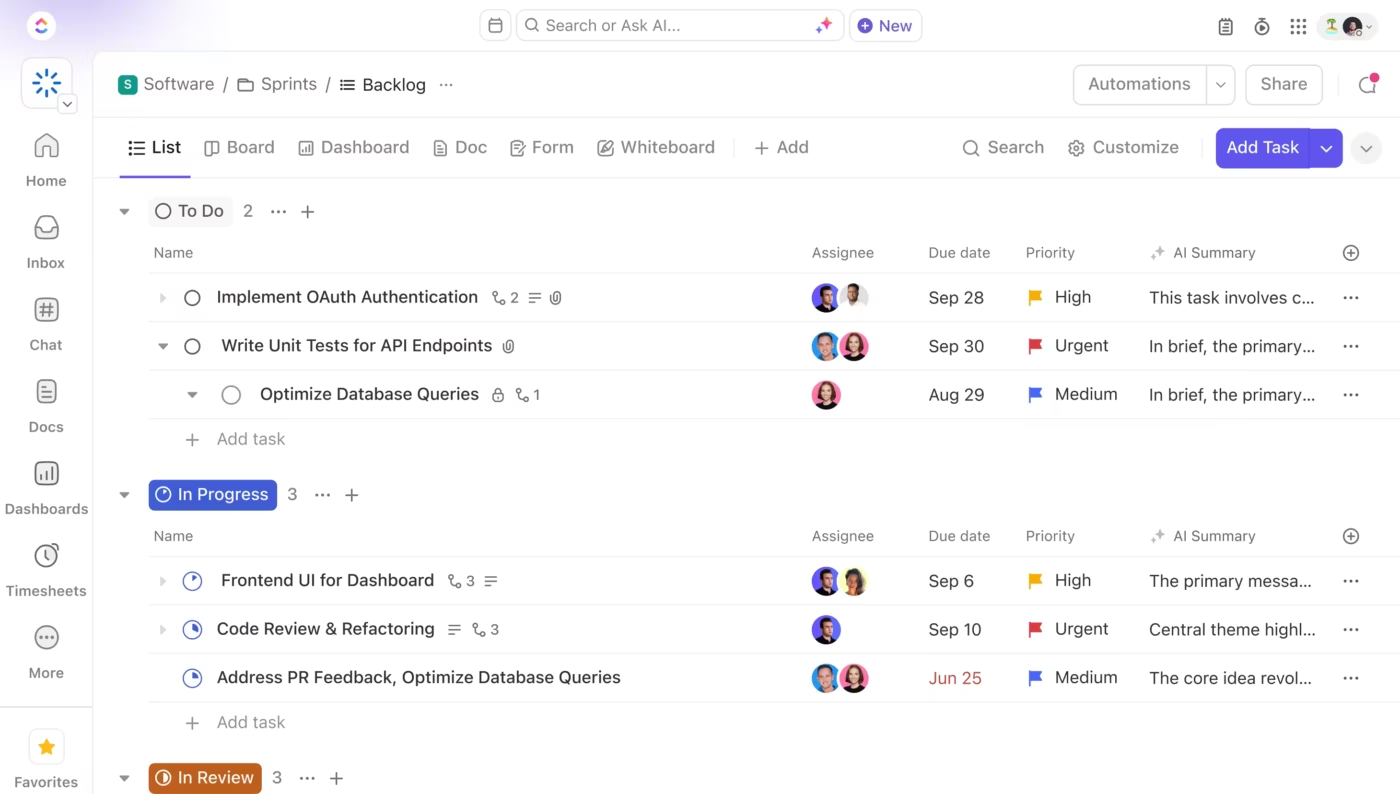
ClickUp’s Free Forever plan is built around one rare promise: no seat cap, so every member you add stays free. You get unlimited tasks and unlimited Free Plan members with 60 MB of shared storage.
The core toolkit is broad for a free tier, covering Docs, Kanban boards, Calendar and Table views, 3 Whiteboards, Sprint management, in-app video recording, two-factor authentication, and 24/7 support. The heavier planning and reporting tools come metered rather than locked. You get a fixed allowance of Gantt, Timeline, and Dashboard uses, plus 100 automation actions per month, before the limits apply.
Why it wins: It’s the only free tier here without a hard seat cap. A 30-person team can run on ClickUp Free indefinitely, as long as the workspace stays inside the storage and metered-use limits. For a growing team, that makes “free” something that scales with headcount instead of pushing you to pay the moment you add people.
Limitation: The 60MB is shared across the whole workspace, so it fills fast once people upload videos, design files, or client docs. The metered tools form a second ceiling, and a busy team can burn through its Gantt, Dashboard, or automation allowance sooner than expected. Both walls lead to the same upgrade: Unlimited clears them at $7/user/month, billed yearly.
Ratings and reviews:
A G2 user walks through what they get with ClickUp’s free tier:
The best thing I’ve found about ClickUp over the past year is how much it helps with project management for our team. I can easily update tasks and assign team members to the things they need to do, which keeps everything organized and clear. And the fact that I can do this without a subscription, using only the free tier, is a big plus. Integration of outside links, good performance, and onboarding the app is easy, as there are instructions for basic things. There is also a built-in AI to help in organizing and monitoring. The interface is smooth and user-friendly.
Trello Free covers the essentials of a working board without fuss. You get unlimited cards across up to 10 boards per Workspace, unlimited Power-Ups per board, and up to 10 collaborators. Storage is unlimited in total, with a 10MB cap per file.
The plan also includes assignees, due dates, an unlimited activity log, two-factor authentication, and 250 Workspace automation runs per month via Butler.
Why it wins: Setup friction is close to zero. A new user reads the board in minutes and drags cards through a “to do → doing → done” flow with no training. For a small team that just needs shared visibility on who’s handling what, that speed is the entire appeal.
Limitation: The caps bind in two spots. The 10-board and 10-collaborator limits stop a growing team early, and the 250 Butler runs vanish fast once a couple of rules go live. Standard lifts the board cap and raises automation to 1,000 runs at $5/user/month, while Premium offers real cross-board views and reporting at $10/user/month, billed yearly.
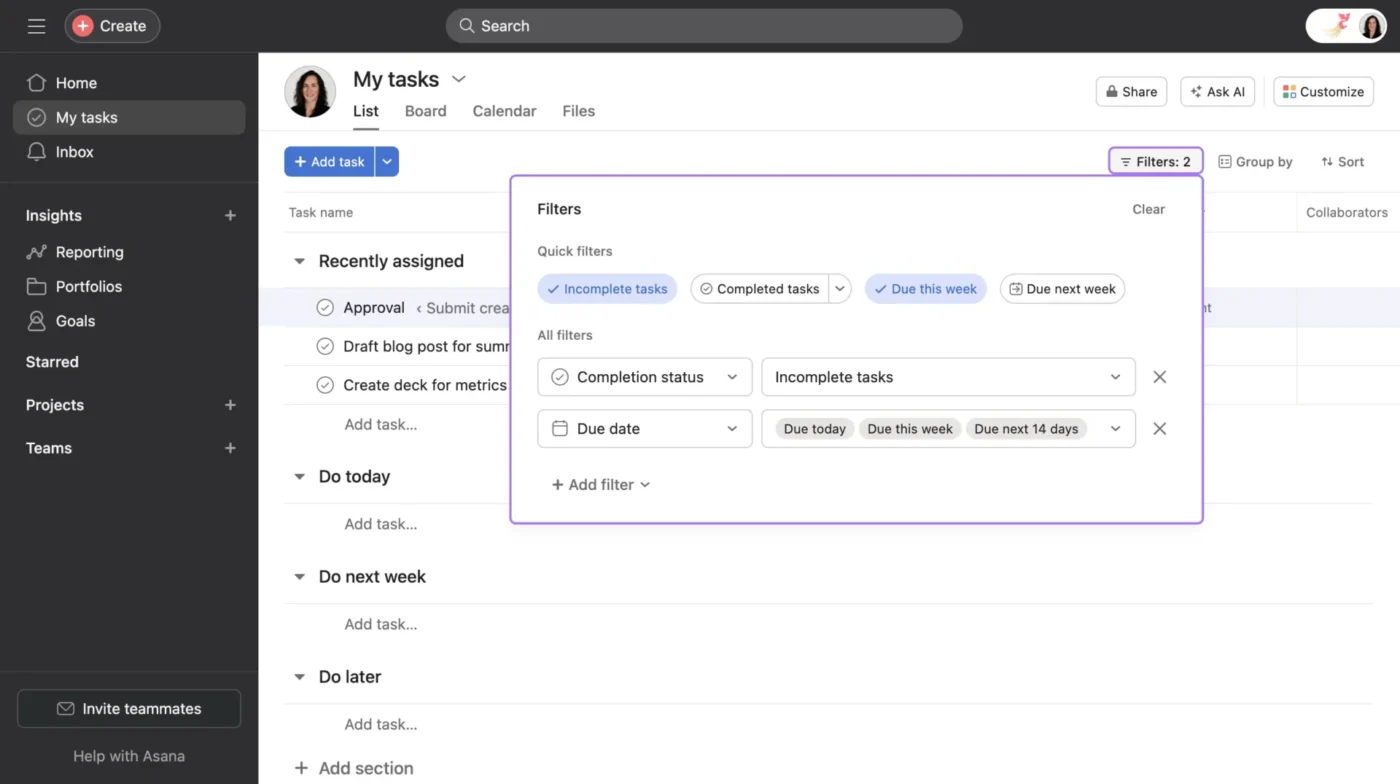
Asana’s Personal plan covers up to 2 users with unlimited tasks and projects. It includes List, Board, and Calendar views, letting a small team track work in multiple ways without paying. Even on the free plan, Asana feels more like a lightweight project management system than a simple board.
Why it wins: It’s the cleanest free tier here for a duo that wants some structure from day one. Tasks, views, and basic organization already feel sorted, which means less time spent setting things up.
Limitation: The 2-user cap is the wall. Add a third person, and you’re on Starter at $10.99/user/month, billed annually. This category is about free tiers that hold up as a team grows. Asana falls behind ClickUp because its free plan limits users to 2, and it also falls behind Trello because Trello’s free tier supports up to 10 collaborators. Asana is the better-structured free tool, but it stops being a team plan much earlier.
ClickUp wins as the best free tier for growing teams because it’s the only plan with no seat cap, so adding members never forces an upgrade. Trello comes second as the easiest free board to adopt, though its 10-board and 10-collaborator limits stop a scaling team early.
Also Read: ClickUp vs. monday.com
monday.com’s automation builder is approachable, but the Standard plan caps you at 250 automation actions a month. That means a couple of active rules burn through fast. The three tools below each beat that ceiling in a different way.
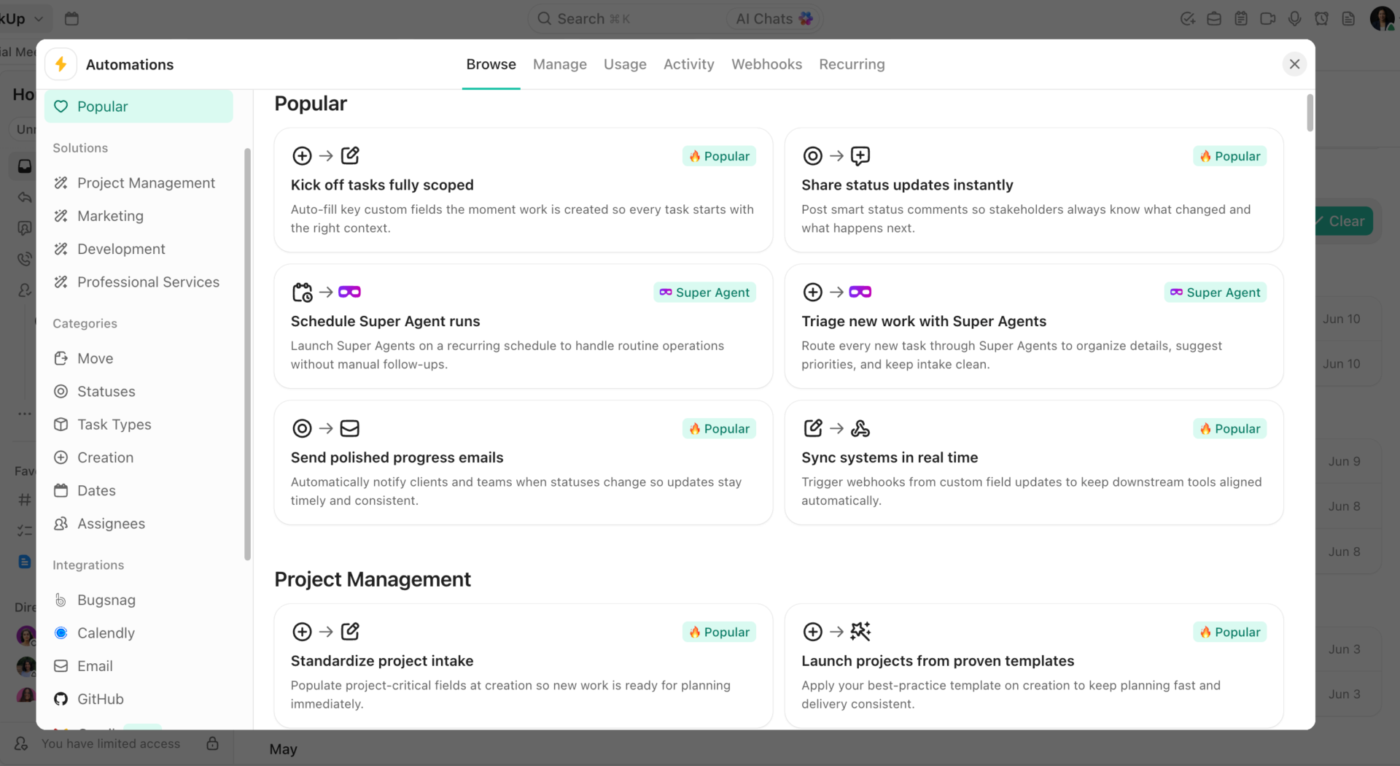
ClickUp’s Automation builder runs on a trigger-condition-action structure, and the range of what it can touch is the draw. A single status change can reassign a task, post a comment, shift a due date, and fire a webhook to an outside app.
With ClickUp Brain added on, the AI automation builder lets anyone create automations by writing simple if-this-then-that commands in plain English. The Business plan includes 25,000 automation executions per month, plus webhooks and native integrations that reduce the need for Zapier-style glue.
Why it wins: The automation scales with you at every tier, which matters for a growing team. The Free plan already includes five active automations and 100 executions per month, with multiple actions per rule. The Unlimited plan jumps to 500 active automations and 1,000 executions, still below Asana’s entry price. Move up a tier, and executions climb into the tens of thousands.
Limitation: That range carries a setup cost. New users build too much too fast, and debugging a misfiring rule takes discipline. Conditions and the highest execution limits land on the Business plan.
Another G2 user added how ClickUp helped them manage 600+ client projects:
With ClickUp, we built separate workflows for our invoicing process and campaign management. For example, we created automations for payment reminders, follow-up workflows, and notifications for expiring client contracts, which save our team a lot of repetitive manual work every week. We also use dashboards and custom statuses to instantly see which clients are online, in preparation, paused, or close to their contract end date.
Another thing I really like is that processes can be adjusted quickly without having to rebuild everything from scratch. As our company grew, our workflows changed a lot, and ClickUp made it easy to continuously improve and expand our setup.
Performance has also been very reliable for us, even with a large number of active projects, automations, and workflows running at the same time. Since we manage more than 600 clients in ClickUp, having a stable, fast system is extremely important to our daily operations.
Asana turns a repeatable process into a rule set a non-admin can build and read. In Workflow Builder, you lay the whole flow on one canvas. A Form intake creates the task. A Rule assigns it by field value. Status changes move it through stages, and each handoff pings the next owner (no scripting required). A marketing team can auto-route a brief from intake to design to copy to approval, the same way every time.
Starter is where this opens up, bundled with Custom Fields, Forms, custom templates, Timeline, and Gantt.
Why it wins: The workflow model is the easiest here for a non-admin to read and maintain. Asana also gives you unlimited automations at the Starter tier, which suits teams that run the same process on repeat. It’s less flexible than Airtable and less sprawling than ClickUp, and it’s more predictable than either.
Limitation: It ranks second because the win comes at a higher entry price. The Starter plan costs more than ClickUp’s Unlimited tier, and the heavier workflow features sit higher still. Formulas, approvals, workload, portfolios, and branching forms all live on the more expensive Advanced plan.
Ratings and reviews:
A G2 user on how Asana’s Workflow Builder holds up:
The workflow builder automates a lot of tedious tasks that would normally be done manually (which actually puts it above any other similar app).
Airtable Automations fire on record changes, form submissions, schedules, and incoming webhooks. The Team plan includes 25,000 automation runs a month, plus scripting actions in JavaScript. When your workflow leans on linked records, lookups, and rollups, this is the strongest automation engine in the category.
Why it wins: It’s the only tool here that lets a team drop a JavaScript action straight into an automation, which matters once the work is genuinely record-heavy.
Limitation: It lands third because that strength is also its weakness. For day-to-day task movement, approvals, and handoffs, Airtable feels like more machine than the job needs.
ClickUp wins as the best tool for custom workflows and automation because its automation scales from 5 rules on the free plan to tens of thousands of executions, giving it the most headroom per dollar. Asana comes second as the most legible workflow for a non-admin to build and maintain, though its entry price starts higher.
monday.com’s board view is usable, but it isn’t the cleanest pick for a team that thinks in cards and columns. When Kanban is the main workflow, these three do it better.
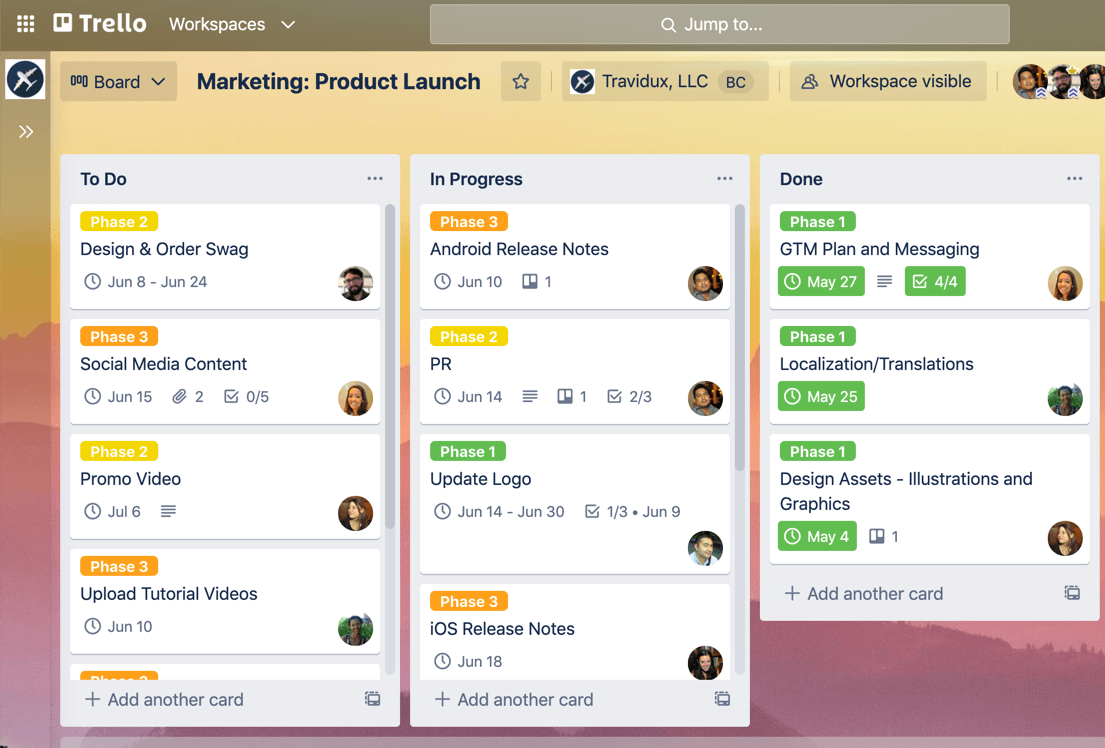
Trello is Kanban-native. Cards hold attachments, checklists, due dates, labels, comments, and, on paid plans, Custom Fields. Power-Ups layer on extra behavior: calendar views, voting, time tracking, reporting, and integrations.
Why it wins: It’s still the cleanest Kanban experience on this list. Drag-and-drop is simple, the board reads at a glance, and there’s almost no setup debt.
Limitation: Trello thins out once you need reporting across boards. Its Premium plan adds Dashboard, Timeline, Table, Calendar, Map, and Workspace views, but that reporting layer stays lighter than what full work management tools offer.
Ratings and reviews:
A G2 user confirms how Trello’s Kanban-first approach helps them:
What I like best about Trello is its simplicity and intuitive interface. The Kanban-style boards make it very easy to visualize tasks and move them through different stages of a project. It’s quick to set up, easy for teams to adopt, and works very well for managing simple workflows and task tracking.
ClickUp’s Board View supports custom statuses, WIP limits, filters, subgroups, and Custom Fields on cards. The same work flips between Board, List, Gantt, Timeline, Calendar, Table, and Dashboard with no rebuild.
Why it wins: It’s the better pick when Kanban is one operating mode rather than the whole system. A team can start on a board, then add reporting, dependencies, docs, goals, and sprints in the same workspace later.
Limitation: The Board View carries more settings than Trello’s. That range pays off over time, but it makes the first setup feel heavier.
Asana’s Board view is clean and usable. It reads as one view inside a broader task management system, and teams can switch between List, Board, Calendar, Timeline, and Gantt depending on how they want to plan.
Why it wins: It suits teams that live in lists most of the time but want a board for workflow stages, editorial pipelines, or campaign tracking.
Limitation: Trello power users may feel boxed in. Asana has integrations and custom fields, but there’s no Trello-style Power-Up ecosystem for extending individual boards.
Trello wins as the best tool for visual, Kanban-first teams because it’s the cleanest board on the list. It reads at a glance and needs almost no setup. ClickUp comes second as the best board for teams that also want reporting, dependencies, and sprints in the same workspace later.
monday.com’s dashboards are reliable, but note the lower-tier plan limit is based on the board rollup, not widget count. Standard dashboards pull from up to 5 boards, and Pro raises that to 20. When leadership needs real cross-project reporting, these three tools do it better.
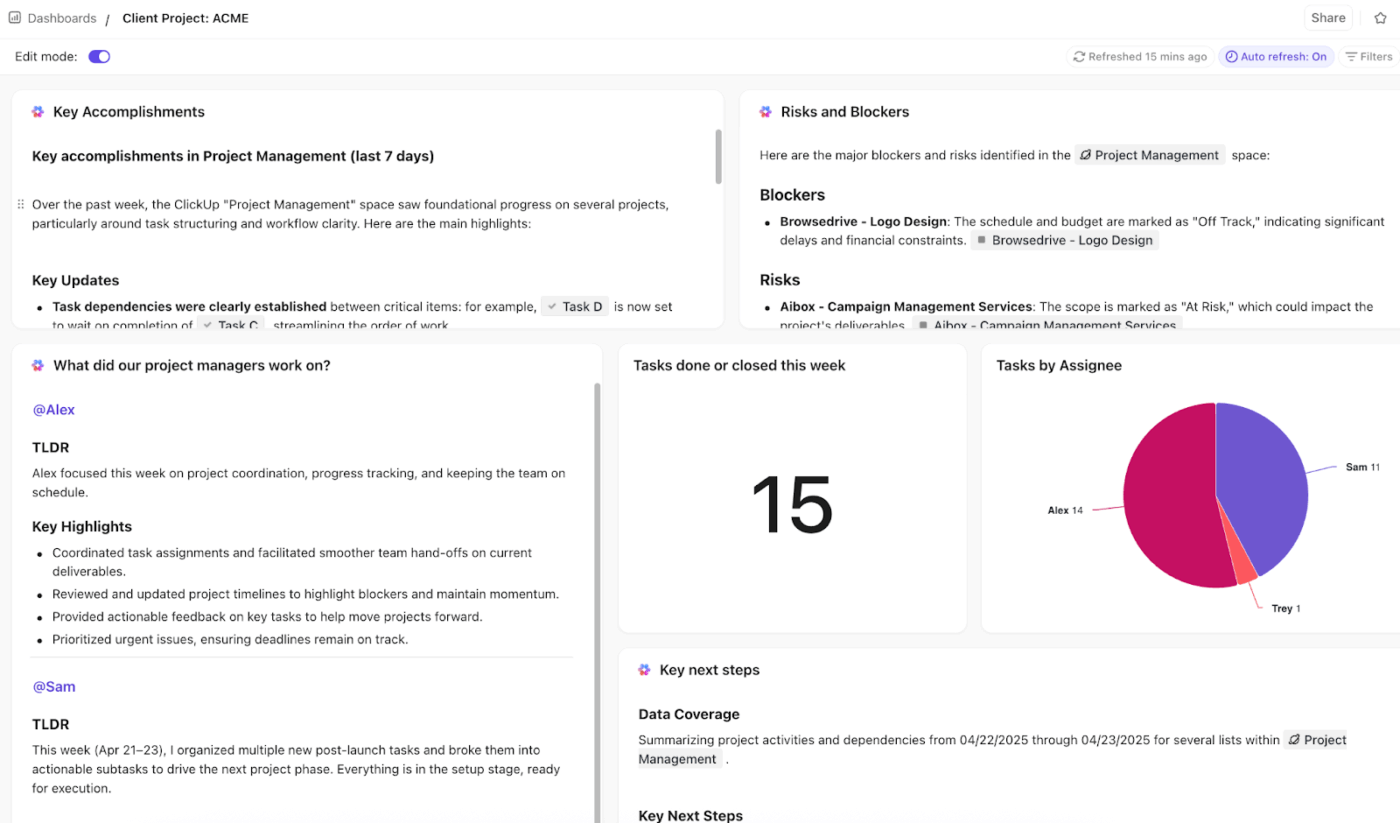
ClickUp Dashboards offer a wide range of card types: workload, time tracking, priority, sprint burndown, sprint velocity, cycle time, lead time, calculation, chart, and custom embed cards. The Business plan unlocks unlimited Dashboard uses and Advanced Cards. Add ClickUp Brain (available as a paid add-on or via AI credits) and AI Cards summarize dashboard data, flag risks across projects, and answer plain-language questions about the work.
Why it wins: It’s the most flexible reporting engine here. You can pull work from Lists, Folders, Spaces, and workspace-level views into one executive dashboard. Then layer in goals, priorities, sprint data, time tracking, and workload.
Limitation: The Dashboard editor takes setup. Non-technical users usually need a template or an admin-built dashboard before it earns its keep.
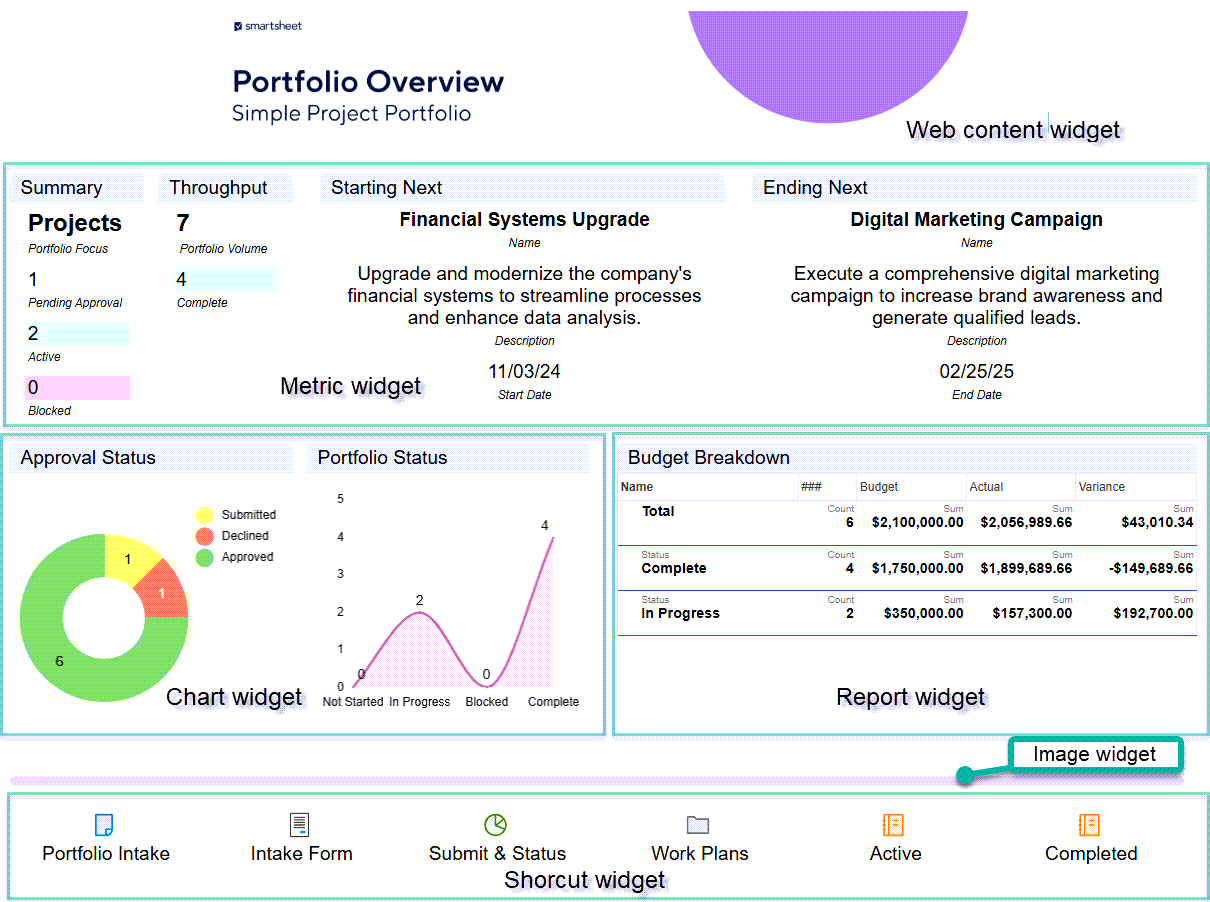
Smartsheet dashboards tie directly to sheets and reports through charts, metrics, rich text, images, and web content widgets. Reports can aggregate rows or sheet summaries across multiple sheets, making Smartsheet strong for portfolio-style status rollups.
Its AI helps where the reporting problem starts in the data itself: generating formulas, summarizing text, and turning sheet data into charts or metrics.
Why it wins: It’s the best fit when the source of truth is already rows and columns. Reporting feels like an extension of the sheet rather than a separate layer.
Limitation: It ranks second because the output reads more like an internal reporting portal than a leadership-ready view. Plus, it rewards teams that already know how to structure sheets, reports, and summary fields. The reporting tier also costs more than ClickUp’s.
Ratings and reviews:
A G2 user particularly says:
Project dashboards and task sheets provide a great workspace with well-structured tables and clear organization. I’m also happy to see that Smartsheet continuously updates both the platform and the dashboards.
Asana’s reporting is the most polished out of the box. Project dashboards, portfolio dashboards, and universal reporting cover project health, goals, blockers, and progress. Its AI leans into exactly that: drafting project, portfolio, and goal status updates so the weekly write-up isn’t manual.
Why it wins: It’s strong when leadership wants clean status visibility, and nobody on the team wants to become a dashboard builder. Charts are customizable, but the default reporting experience is easier to read than ClickUp’s or Smartsheet’s.
Limitation: It’s less flexible than ClickUp for complex, multi-source dashboards, and less natural than Smartsheet for sheet-heavy reporting.
ClickUp wins as the best tool for reporting and executive views because it offers the most flexible reporting engine here, pulling work from across the workspace into a single dashboard, with AI that acts on the data. Smartsheet comes second as the best fit when the source of truth is already a spreadsheet, with reporting that grows straight out of the rows.
monday.com can model structured work, but it isn’t the strongest pick when the workflow is data-shaped. For content calendars with metadata, inventory systems, CRM-style pipelines, or connected campaign data, you want something closer to a real database.
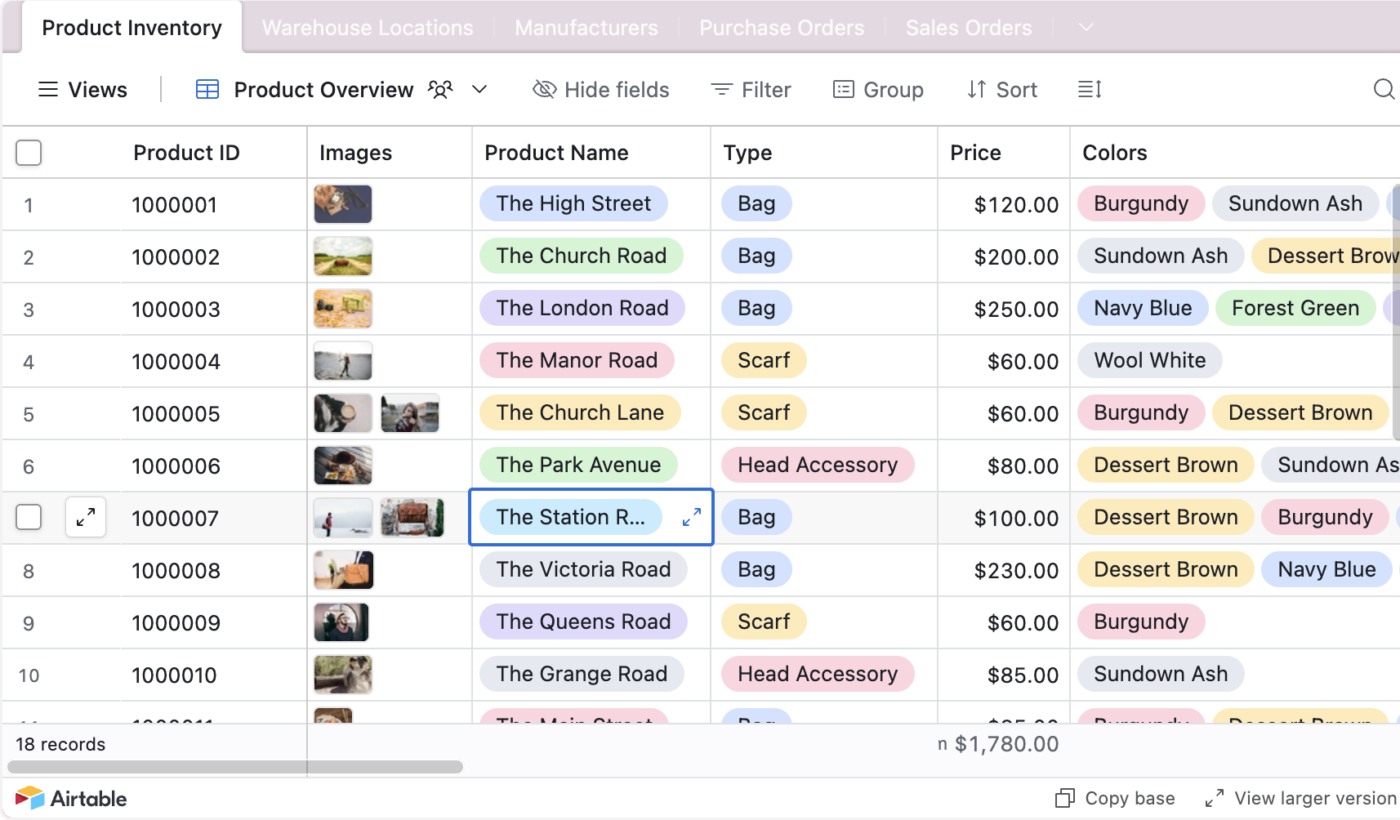
Airtable is the strongest database-style tool here. Linked records, lookups, rollups, count fields, and formulas let teams model one-to-one, one-to-many, and many-to-many relationships. Because the data is structured, its AI can process raw inputs like meeting notes or customer feedback into clean records and generate data at the cell level.
Why it wins: If you need a content piece linked to a writer, campaign, deliverable, asset, channel, and approval record, Airtable handles that cleanly. Nothing else here models relationships this well.
Limitation: The bill climbs with editor count. It’s worth it when the data model is the work, and hard to justify when the team only needs task tracking.
Ratings and reviews:
A G2 user says that Airtable is a database system that isn’t incredibly complex. In their words:
I like Airtable because it’s a lightweight database that’s not as complex as SQL yet highly functional. The presentable UI is a standout, allowing data to be showcased in various ways that make it more engaging and understandable. I appreciate the ability to change views to suit different needs, and the easy collaboration it offers through integration with automation platforms I use. The filters and customization, like adding regex formulas, make data manipulation flexible and valuable. Airtable’s simple UI and good UX are great even for non-technical users, making it easy for my team to navigate and find comfort with the platform.
ClickUp’s Custom Fields, Formula Fields, Relationship Fields, and Rollup Fields cover many lightweight database-style workflows. Teams can connect related tasks, surface linked data in List View, and add calculations without leaving the project workspace.
Why it wins: It’s the cheaper path when you need some database behavior but still want standard project management: tasks, docs, dashboards, automations, goals, and views in one place.
Limitation: It isn’t a true relational database. Relationships and rollups help, but they don’t match Airtable’s full schema flexibility. For complex connected models, you’ll feel the ceiling.
Smartsheet handles large grids, cross-sheet references, formulas, reports, and dashboards well. Cell linking and cross-sheet formulas connect data across sheets, which holds up as long as the model stays spreadsheet-shaped.
Its AI is practical for this crowd, generating formulas and summarizing sheet data to cut the manual work that makes big spreadsheets painful.
Why it wins: If your data already lives in Excel and the team thinks in rows, columns, and formulas, this is the easiest migration path.
Limitation: It’s spreadsheet-first, not relational. It can link sheets and summarize data, but there’s no equivalent to Airtable’s clean linked-record model or app-builder feel.
Airtable wins as the best tool for database-style work because it’s the only true relational database in the test, modeling linked records, lookups, and rollups. ClickUp comes second as the best pick for lighter database features inside a full work-management system.
Building a project database for the first time? Watch this video to get started quickly.
The fastest way to your answer is one question: Is your work shaped like a database, a spreadsheet, or a task list?
If you’re evaluating tools beyond this list, here’s the rubric we used. Score every candidate against these seven criteria.
A tool that wins on five of seven is usually the right pick. Chase fit over a perfect scorecard.
Looking for more options? This video breaks down the top 10 AI project management tools for you.
Most failed migrations fail for one of these four reasons. Read them before you commit.
This is the most common one. Teams pick “ClickUp” or “Asana” off a listicle, then bend their workflow to fit the tool. Flip the order: map your current workflow, list your top five pain points, then choose the tool that solves those specifically. A tool can’t fix a process you haven’t defined, and migrating a broken workflow just rebuilds the same mess somewhere new.
Don’t import every project at once. Pick one team and one workflow for two weeks of testing. Most tools (ClickUp, Asana) offer native monday.com importers, but those importers preserve monday.com’s structure, which is often exactly what you were trying to fix. Start clean on one project, validate, then expand.
Tool changes succeed or fail on people, not software. Budget four to six hours per team member for training, plus a designated champion who fields questions for the first 30 days. Skip that, and your team keeps working in monday.com in their heads while clicking around the new tool.
Free sounds great until your team needs the views, automations, or storage that are available on a paid plan. Calculate the total cost over two years, including the upgrades you’ll realistically hit. The cheapest tool in month one is often not the cheapest by month 24.
Headline per-seat prices hide the real bill. Below is the annual cost at 5, 15, and 50 seats, each tool priced at its cheapest paid tier, with monday.com as the baseline. The “Free covers” column matters most: it’s the size at which a tool costs you nothing.
| Tool | Free covers | 5 seats/year | 15 seat/year | 50 seats/year | Tier priced |
|---|---|---|---|---|---|
| monday.com | 2 seats | $540 | $1,620 | $5,400 | Basic, $9/seat |
| ClickUp | Unlimited | $0, or $420 | $0, or $1,260 | $0, or $4,200 | Unlimited, $7/user |
| Trello | 10 collaborators | $0 | $900 | $3,000 | Standard, $5/user |
| Asana | 2 users | $659 | $1,978 | $6,594 | Starter, $10.99/user |
| Smartsheet | No free tier | $540 | $3,420 | $11,400 | Pro $9 → Business $19 |
| Airtable | 5 editors | $0, or $1,200 | $3,600 | $12,000 | Team, $20/user |
There’s no best monday.com alternative, only the one that fixes the reason you’re leaving. If the per-seat bill broke first, ClickUp Free is the only no-cap tier here. If your team won’t tolerate a learning curve, Trello gets them moving in five minutes. If the work is genuinely spreadsheet-shaped, Smartsheet is the cleanest landing. And if your data has real relationships, Airtable is the only tool here that models them without workarounds.
Two things hold no matter which you pick. Map your workflow before you migrate, because a tool can’t fix a process you haven’t defined. And move one team at a time, because importing everything on day one just rebuilds monday.com’s structure somewhere new, the exact thing you were trying to escape.
But if you’d rather not run a board in one tool and reporting in another, pick ClickUp. It’s the closest swap to monday.com, affordable at every paid tier, and keeps tasks, docs, dashboards, AI, and automations in one workspace, free for unlimited users.
Get started for free with ClickUp, and run the switch where the rest of your work already lives.
ClickUp is the best fit for growing teams watching the per-seat bill. Its Free Forever plan is the only one tested without a user cap, so a 30-person team can run on it indefinitely, subject to the storage and metered-use limits. When you outgrow free, Unlimited is $7/user/month, below Asana’s and Smartsheet’s entry tiers. monday.com, by contrast, charges per seat with a 3-seat minimum on every paid plan.
It depends on your team size and what you track. Trello Free is best for small teams that only need Kanban, free up to 10 collaborators. ClickUp Free is the only tier tested with no per-seat cap, so it suits growing teams. Airtable Free fits data-heavy work up to 5 editors. monday.com’s own free plan stops at 2 seats, the same cap as Asana’s.
Trello is the easiest to learn. A new user reads the board and starts moving cards in under five minutes with no training, which is why it wins for non-technical teams. Asana is the next step up when you need structure without much setup. Tools with broader feature sets, including ClickUp and Smartsheet, trade simplicity for depth and take longer to onboard.
Smartsheet is the best fit when your work already lives in rows, formulas, and dependencies. It runs native Gantt charts and cross-sheet references on a familiar grid, and reporting grows straight out of the sheets. It has no free tier and starts at $9/member/month with a 3-member minimum on Business, so it’s worth it only when the spreadsheet is genuinely the source of truth.
monday’s Gantt and dependencies are usable, but automated dependency shifting sits on higher tiers. If dependency-heavy scheduling is critical, Smartsheet offers native Gantt and dependency support directly in its grid, and ClickUp includes a Gantt view on its paid plans. Both handle dependency logic more effectively.
Plan for 2–4 weeks of partial productivity loss for a 10–25 person team, and longer for larger orgs. ClickUp, Asana, and Smartsheet all offer native monday.com importers that carry over tasks and basic structure, but automations, dashboards, and custom integrations must be rebuilt manually. Migrating one workflow first, then expanding, keeps the disruption contained.

Manasi Nair
Max 26min read
Manasi Nair
Max 20min read

Arya P Dinesh
Max 23min read

© 2026 ClickUp




