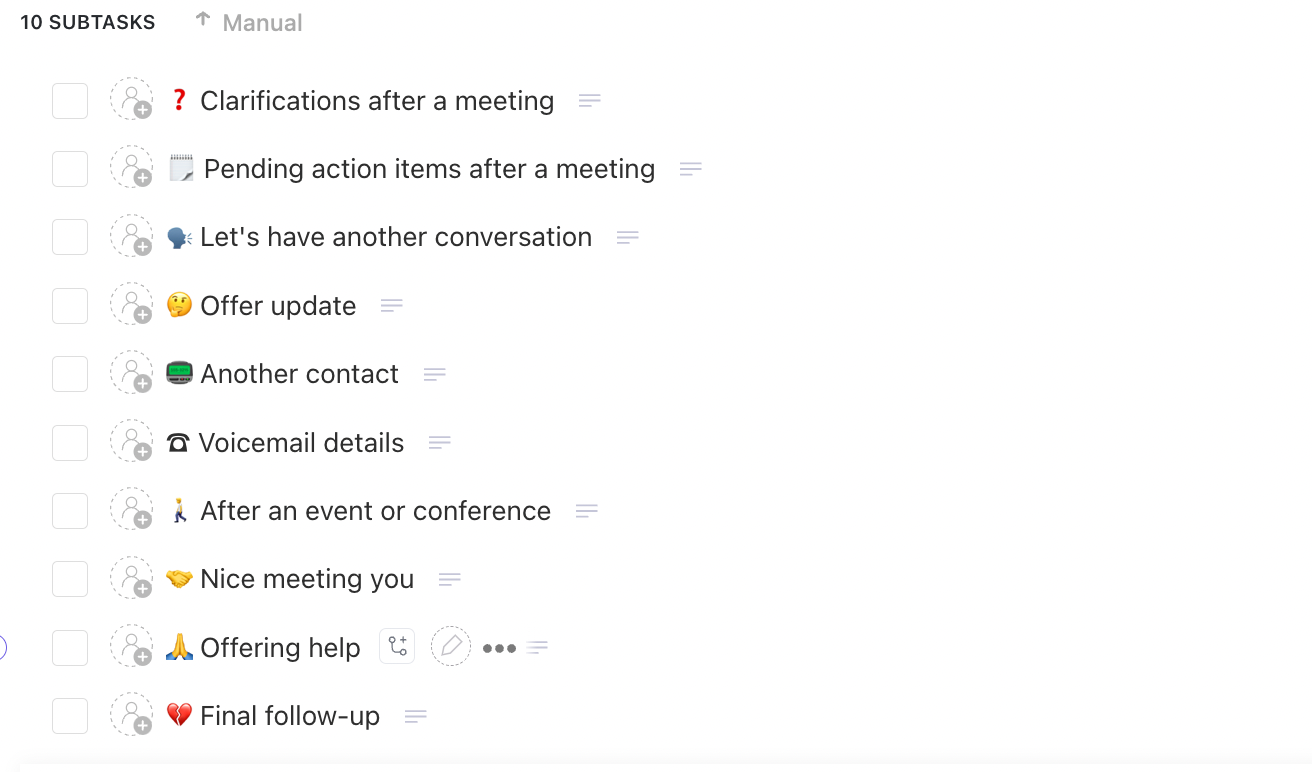

Sorry, there were no results found for “”
Sorry, there were no results found for “”
Sorry, there were no results found for “”
You send an invoice. Silence.
You schedule a meeting. Someone forgets.
You follow up on a deadline. No reply.
Frustrating, right? It’s not that people don’t care—it’s just that they’re juggling countless priorities. That is exactly why you need a reminder email!
A well-timed reminder email can turn radio silence into a confirmed payment, a scheduled call, or a completed task.
The best part? You don’t have to write one from scratch. This blog post has 12 reminder email examples that can be easily edited and customized for your professional use.
We will also introduce you to a tool that creates reminder emails and automates them for you. Let’s get started!
A well-timed reminder email reminds employees of pending tasks, upcoming events, and crucial deadlines, helping to prevent chaos and operational disruptions as much as possible.
Here’s why reminder emails are necessary:
🧠 Did You Know? 80% of sales require at least five follow-up attempts after the initial contact before making a sale.
Read More: How to Use AI to Write Emails (With Prompts)
Writing a reminder email isn’t just about following up—it’s about nailing the timing, tone, and structure to make it impossible to ignore.
Skip the fluff—keep your subject line clear and direct, so the purpose of your email is immediately apparent.
Keep your subject line short (think six to eight words) and include an action verb (think: action required, reminder, or follow-up) to prompt immediate attention.
✅ Good reminder email subject line: Reminder: Payment Due for Invoice #[Number]
❌ Bad reminder email subject line: Invoice Reminder
It doesn’t matter if it’s your first or hundredth reminder email to the same client—always start with a personalized greeting. It makes all the difference!
Addressing the recipient by name makes the email engaging and more relevant. In fact, it creates a more professional and considerate tone, increasing the chances of a response.
✅ Good greeting: Hey/Hi [Name]
❌ Bad greeting: Dear valued customer
Get straight to the point after the greeting.
Your first line should give enough context so the reader doesn’t have to dig through past emails. In three short paragraphs (two lines max each), clearly state the purpose, key details, and next steps.
✅ Good Example: Just a quick reminder that we have a Zoom meeting scheduled on 27th Jan, Friday, at 3:00 EST
❌ Bad Example: Hope you are doing well. Just a quick reminder about the content meeting I mentioned last week. Let me know if you need any changes
If your call to action (CTA) isn’t in the first three paragraphs, now’s the time to add it.
If you need a reply, ask for one. Drop a direct link to the payment portal, document upload, or scheduling tool if action is required.
✅ Good Example: Click here to reschedule your appointment: [Calendar Link]
❌ Bad Example: Please take a look when you get a chance
End on a polite, professional note that invites a response—but skip the unnecessary apologies. Keep it confident and clear.
✅ Good Example: Please let me know if you need any assistance
❌ Bad Example: Waiting for your reply
And there you have it—your key to building perfect reminder emails.
💡 Pro Tip: Don’t spend hours crafting the perfect reminder emails. With ClickUp Brain, simply enter a prompt, and it instantly generates a well-structured, clear, and action-driven email that covers all your requirements.
📮ClickUp Insight: 83% of knowledge workers rely primarily on email and chat for team communication.
However, nearly 60% of their workday is lost switching between these tools and searching for information. With an everything app for work like ClickUp, your project management, messaging, emails, and chats all converge in one place! It’s time to centralize and energize!
Different situations call for different types of reminders. Check out these 12 effective reminder email templates, ready to edit, customize, and tailor to your unique needs!
Got a big client meeting next week? Or a monthly cross-department meeting with 50 attendees? A reminder email, well ahead of time, will give everyone enough time to manage their schedule and show up promptly.
Here’s a gentle reminder template you can use:
Subject: Monthly content team roundup: Friday 3:00 PM
Hey [First Name],
Just a quick reminder that our monthly content meeting is scheduled for [Date] at [Time] ([Timezone]). We’ll be covering [Agenda Highlights], so please take a moment to review any relevant materials beforehand.
To stay organized, be sure to mark your slot on Google Calendar if you haven’t already. Let me know if you need anything to prepare for the meeting. Looking forward to it!
Best regards,
[Your Name]
[Your Position]
[Company Name]
💡 Pro Tip: Consider sending meeting reminders at least 48 hours in advance to give attendees time to prepare.
🎯Also Read: The Follow-Up Email After Meeting: Your Go-To Guide to learn how to write a follow-up email after a meeting.
Even companies that pay regularly can miss an invoice amid overflowing inboxes and daily tasks. A quick, polite nudge will immediately draw their attention to your invoice and encourage timely payment.
Here’s a payment reminder email template you can use:
Subject: Payment reminder for #Invoice number
Hi [Client’s Name],
This email is a quick reminder that the payment for your invoice #[Invoice Number] for [Amount] is due on [Due Date]. You can find the invoice attached for reference.
If payment has already been processed, please disregard this message. Otherwise, you can complete the payment using one of our available options: [Payment Link], bank transfer, or any preferred method.
Reach out to me if you have any concerns or questions regarding this.
Best regards,
[Your Name]
[Your Position]
[Company Name]
💡 Pro Tip: Send the first payment reminder three to five days before the due date to allow your clients enough time to process the payment
Despite repeated reminders, sometimes invoices still go unpaid—even with the best clients. At this stage, the reminder email needs to be firm yet professional. Emphasize that they take prompt action and highlight possible legal consequences if the payment is not settled.
Here’s a final reminder email you can send:
Subject: Urgent: Overdue Invoice #[Invoice Number] – Immediate Action Required
Hi [First Name],
This is a final reminder regarding invoice #[Invoice Number] for [Amount], which was due on [Due Date]. Despite previous reminders, we have not yet received the payment.
As per our contract, if an invoice is a week overdue, legal action may be initiated.
To avoid late fees or further action, please settle the outstanding amount by [Date] using one of the available payment options:
[Payment Link] | Bank Transfer Details | Other Accepted Methods
If payment has already been processed, please disregard this message. Reach out to me, if you have any concerns or queries regarding the same.
Best,
[Your Name]
[Your Position]
[Company Name]
💡 Pro Tip: Send overdue payment reminders between 9-11 am when recipients are more likely to check their emails. Avoid sending such emails on weekends, as your message might get buried in their inbox.
Hosting a conference or trade show? A last-minute reminder will help the attendees plan their day, arrive on time, and prepare for key sessions and networking opportunities.
Here’s a reminder email template you can use for your upcoming event:
Subject: Final Reminder: [The Annual SEO Conference Starts Today]
Hi [First Name],
We’re excited to welcome you to [event name] today at [Time] ([Timezone])!
The event starts at [Start Time], and we’ve attached the event lineup so you don’t miss your favorite session.
To make your arrival smoother, [Check-in Link] is available, and you can find the venue map [Link] for directions. If you’re driving, here are the parking details [Link].
Looking forward to seeing you there. Reach out to me at [contact details] if you face any difficulties getting here.
Best regards,
[Your Name]
[Your Position]
[Company Name]
💡 Pro Tip: Make it easier for your attendees by adding a quick check-in link, venue map, or parking details to help them arrive without any hassle.
Booking an appointment is one thing, but ensuring the client shows up is another. An appointment reminder (or a couple leading up to the date) helps them plan, avoids last-minute cancellations, and gives them time to reschedule if needed.
Here’s a quick reminder email you can use as soon as the client confirms the meeting:
Subject: Confirmed: Your Appointment on [Date & Time]
Hi [First Name],
Just a friendly reminder that your [Service/Meeting Name] appointment is confirmed for [Date] at [Time] ([Timezone]).
📍 Location: [Address/Zoom Link]
⏳ Duration: [Meeting Length]
If you need to reschedule, you can do so 24 hours in advance using this link: [Google Calendar Reschedule Link]. Looking forward to our meeting!
Best regards,
[Your Name]
[Your Position]
[Company Name]
💡 Pro Tip: A rescheduling link makes it easy for clients to adjust their appointments instead of skipping them without notice. Use ClickUp AI-powered Calendar to set up meetings so they don’t miss out, and you don’t lose valuable time.
No-shows are pretty common for service businesses. A polite follow-up keeps the conversation open and allows the client to reschedule. It also serves as a polite reminder that the client needs to honor the booked appointments.
Here’s a polite reminder email you can use for first-time no-shows.
Subject: Missed the meeting? Let’s reschedule
Hey [first name]
I noticed you couldn’t join our [Meeting Name] today. I understand things come up, so I’d be happy to find another time that works for you. You can reschedule here: [Reschedule Link].
As a courtesy, I’ve waived the no-show fee this time. However, per our policy, future missed appointments may be subject to a charge. Let me know how you’d like to proceed.
Best regards,
[Your Name]
[Your Position]
[Company Name]
💡 Pro Tip: Consider implementing auto-reminders a day and an hour before the meeting to reduce the no-shows in your business.
Sent a proposal but haven’t heard back? It’s easy to assume the client isn’t interested, but that might not be the case. A quick follow-up email will remind them of your offer and bring it back to their attention without being intrusive.
Here’s a reminder email template you could use:
Subject: Following Up: Proposal for [Project/Service Name]
Hi [First Name],
Just checking in to see if you had a chance to review the proposal I sent on [Date] regarding [Project/Service Name].
If you’re still considering, I’d be happy to hop on a quick call to discuss any adjustments that work better for you. Feel free to reply here or reach out anytime if you have any questions or need further details.
Looking forward to your thoughts.
Best,
[Your Name]
[Your Position]
[Company Name]
💡 Pro Tip: Frequent reminder messages may come across as pushy. Space out your follow-ups strategically—send the first one 3-5 days after the proposal, then follow up a week later if there’s no response. Keep it polite and professional.
A subscription renewal reminder notifies customers that their access is ending soon and gives them an easy way to renew. Such emails are usually helpful for SaaS companies selling their services on monthly and annual subscriptions.
Here’s a quick reminder email you can follow:
Subject: Renew Now: [Company Name] Subscription ends in [XX] Days
Hi [First Name],
Just a reminder that your subscription to [Company Name]’s [Plan] is set to expire on [Expiration Date]. To avoid any service interruptions, you can renew your subscription now by clicking here [Renewal Link].
Feel free to reach out if you have any questions or need assistance. Looking forward to serving you with our exceptional services.
Best,
[Your Name]
[Your Position]
[Company Name]
💡 Pro Tip: Offer a limited-time discount or an exclusive renewal deal to increase renewals and retain more customers.
Customer feedback is valuable, but getting responses isn’t always easy. A reminder message acts as a polite follow-up, gently nudging customers to share their thoughts without feeling pressured.
Subject: We’d Love Your Feedback—It Only Takes a Minute
Hi [First Name],
We hope you’re enjoying our [name of product]. We’d really appreciate it if you could share your thoughts and experiences with us. Your feedback helps us improve and continue providing products you love.
Take the quick survey here: [Survey Link]
We promise it will only take a minute.
Best,
[Your Name]
[Your Position]
[Company Name]
💡 Pro Tip: Build a mobile-responsive survey and keep it short and straightforward to increase responses. A small discount or incentive would encourage more customers to participate.
Managing a large team can be challenging, especially when tracking deadlines. Delays can occur for various reasons, but a clear, firm reminder can refocus attention and ensure the task is prioritized.
Here’s a sample reminder email you can use in such situations:
Subject: Action Needed: Missed Deadline for [Task/Project]
Hi [First Name],
I’m following up on the deadline for [Task/Project Name] that was due on [Date]. We understand there might be a valid reason for the delay, but we need an update on the status.
This project is critical, and staying on schedule is essential to keep everything moving smoothly. If possible, we’d like to complete it by [New Deadline] to avoid further setbacks.
Please let us know if you’re facing any roadblocks or need support to move things forward. Looking forward to your update.
Best,
[Your Name]
[Your Position]
[Company Name]
💡 Pro Tip: When following up on a missed deadline, give a realistic new deadline instead of leaving it open-ended. This helps prevent further delays and makes prioritizing the task easier for the recipient.
Whether it’s for compliance, onboarding, or processing a request, missing paperwork can slow things down. A clear, polite follow-up can ensure the recipient prioritizes your request and takes action quickly.
Here’s a perfect gentle reminder email you can send in such situations:
Subject: Action Required: Pending Document Submission for [Purpose]
Hi [First Name],
Just a quick reminder that we’re still waiting for [Document Name] from you. The deadline for submission is [Due Date], and we need it to process our contract documents.
Kindly ignore this email, if you’ve already sent them. However, if you’ve yet to submit the documents, kindly upload them using this link here: [Upload Link].
Feel free to contact me if there’s any query or problem I can help with.
Best,
[Your Name]
[Your Position]
[Company Name]
💡 Pro Tip: Set automated emails to follow up if the documents aren’t received in the next 24 hours.
When a project is stalled because you’re waiting on a team member’s input, a polite yet firm reminder will help keep things moving.
Here’s how you do it:
Subject: Waiting on Your Input for [Project Name]
Hi [First Name],
Just a quick reminder—I’m still waiting on your input for [specific task] in [Project Name]. Your expertise is essential to keep things moving and stay on schedule.
Let me know if you need any support or if there are any challenges causing delays. If possible, it would be great to receive your update by [New Deadline] so we can move forward.
Looking forward to your thoughts.
Best,
[Your Name]
[Your Position]
[Company Name]
💡 Pro Tip: Keep your tone polite and appreciative—a gentle reminder shows respect for their time and makes them more likely to respond positively.
Despite these samples, writing reminder emails isn’t the most exciting task. Especially when you need to send hundreds of them every day.
Automating emails through email productivity tools is the only way to save time while maintaining a polite and professional tone.
Your inbox isn’t a to-do list, but it sure feels like one. A follow-up email is still in drafts, a client’s deadline is approaching, and an overdue invoice is causing delays. Maintaining it all is just unrealistic.
You need a tool that automates and organizes your email workflow. Enter ClickUp, the everything app for work, that offers a structured system to transform scattered emails into trackable tasks, eliminating the chaos of manual follow-ups and missed deadlines.
With ClickUp, you can convert your to-do list into a ‘ta-da’ list! Let’s see how.
And at the heart of this platform is the ClickUp Email Project Management Tool. Instead of treating emails as separate from your workflow, it integrates them directly into your tasks and projects.
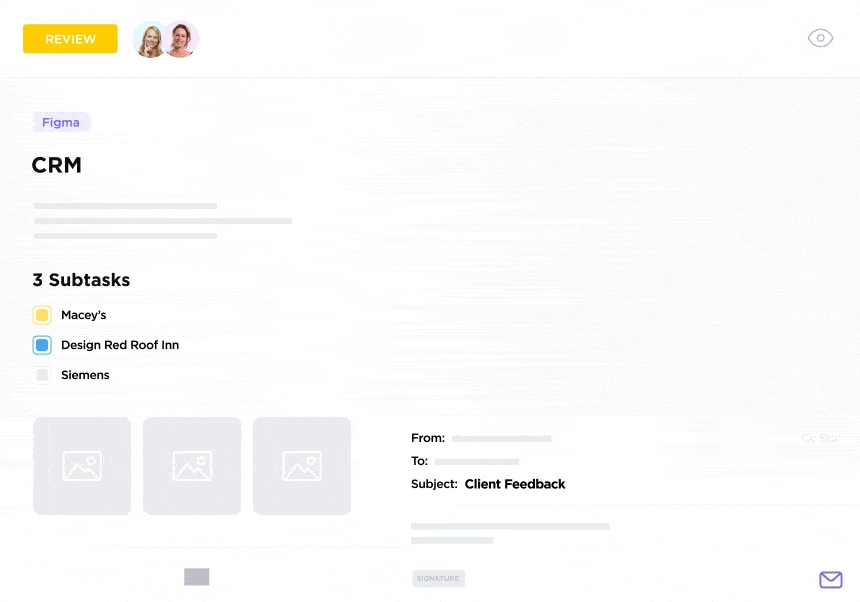
Whether it’s client follow-ups, project updates, or approval requests, everything stays connected in one place, without the inbox overload.
Now, integrate your emails with ClickUp and follow these steps to automate your email workflows:
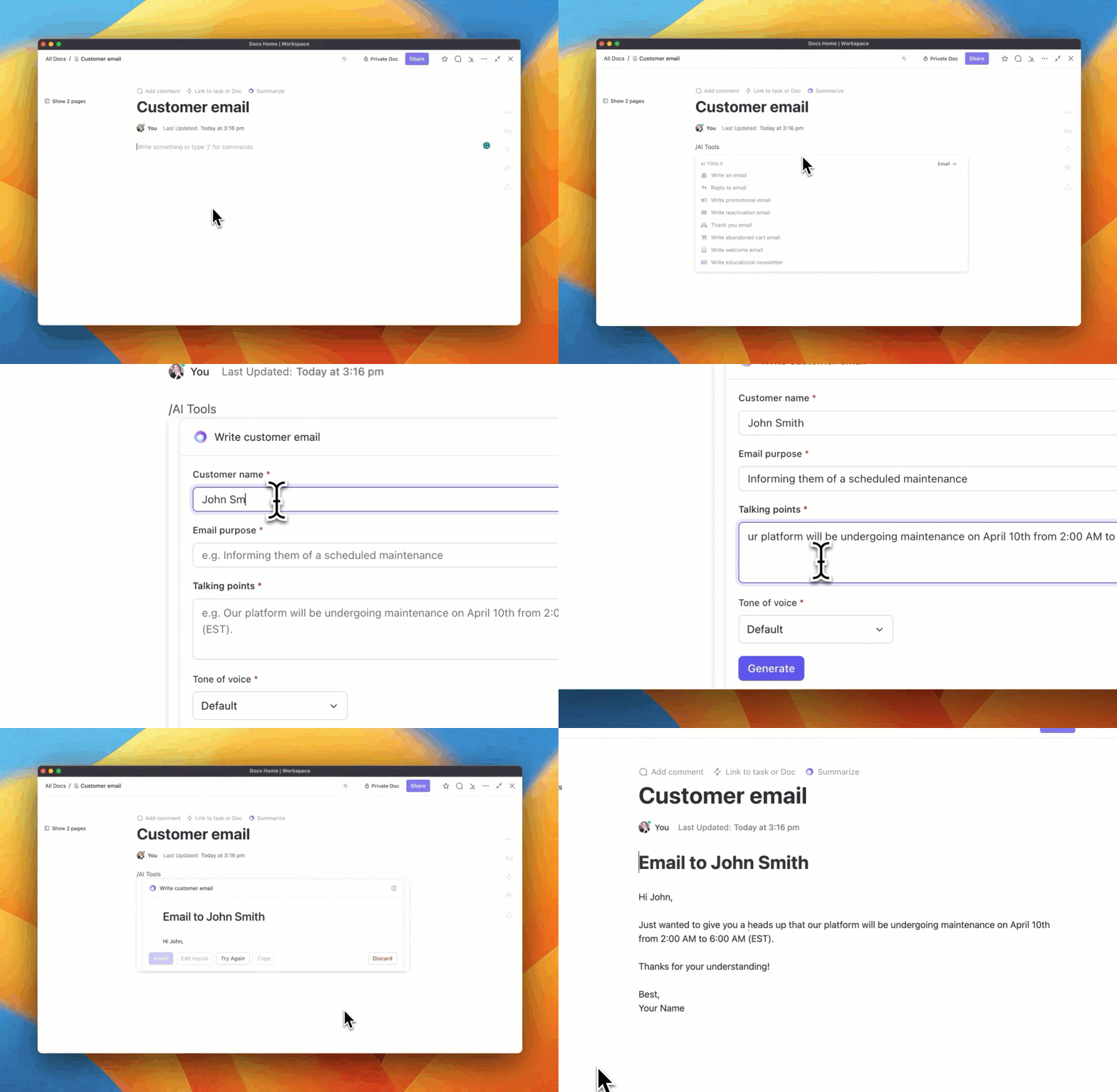
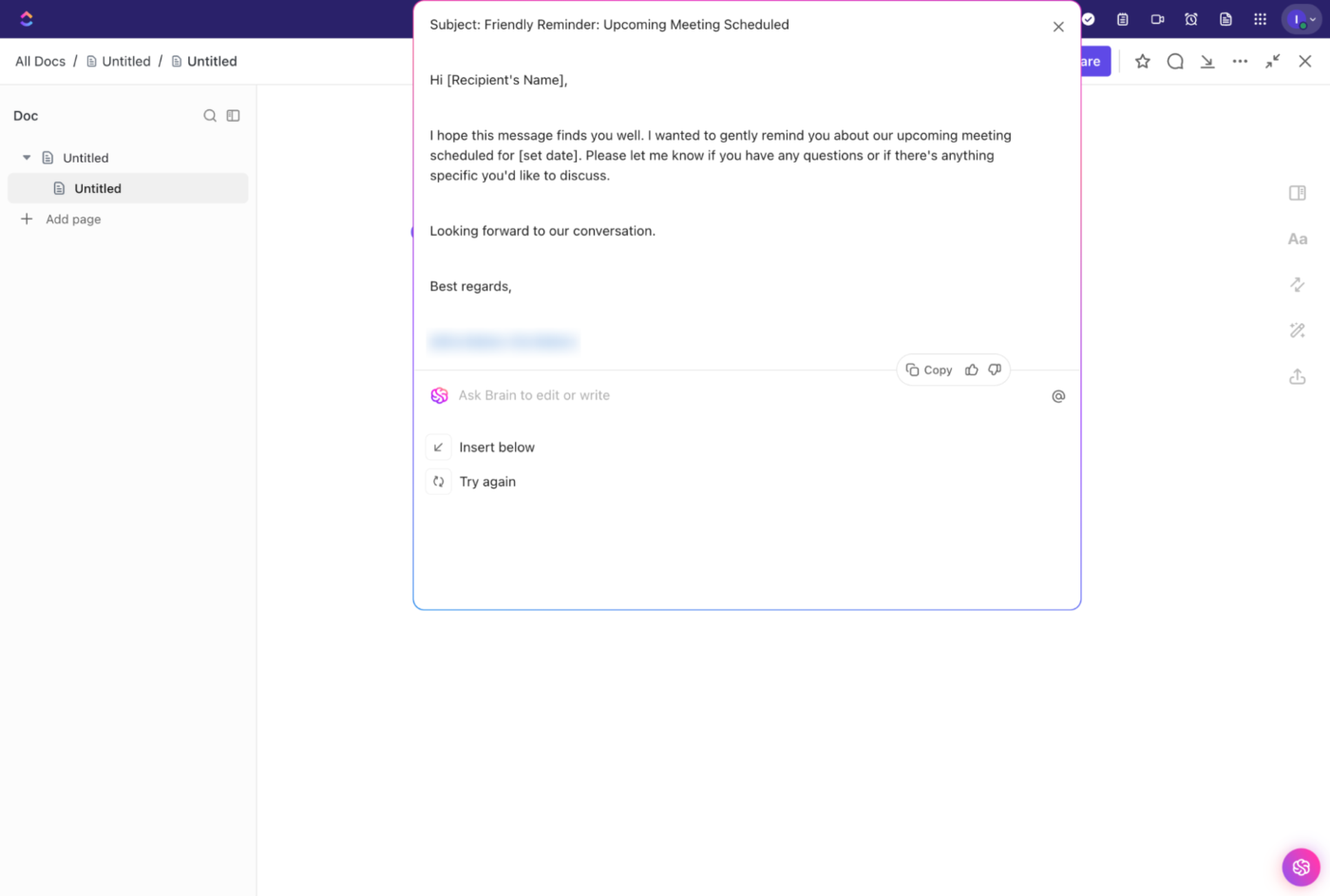
Writing reminder emails from scratch every time is tedious and inefficient. ClickUp Brain takes the guesswork out of email creation by instantly generating professional emails for any situation.
Here’s how it works:
✅ Generate emails instantly: In the Comment section of any task, simply enter the slash command “/Write email” to open Brain. You can compose a new email or reply to an existing one—without ever leaving your workflow
✅ Save and reuse email templates: Store frequently used emails in ClickUp Docs to create a structured repository of email reminder templates
Even better, save time using the ClickUp Follow Up Email template with 10+ common examples working across industries.
In a nutshell,
Instead of rewriting the same emails repeatedly, simply pull up a relevant email template, tweak the details, and send it off.
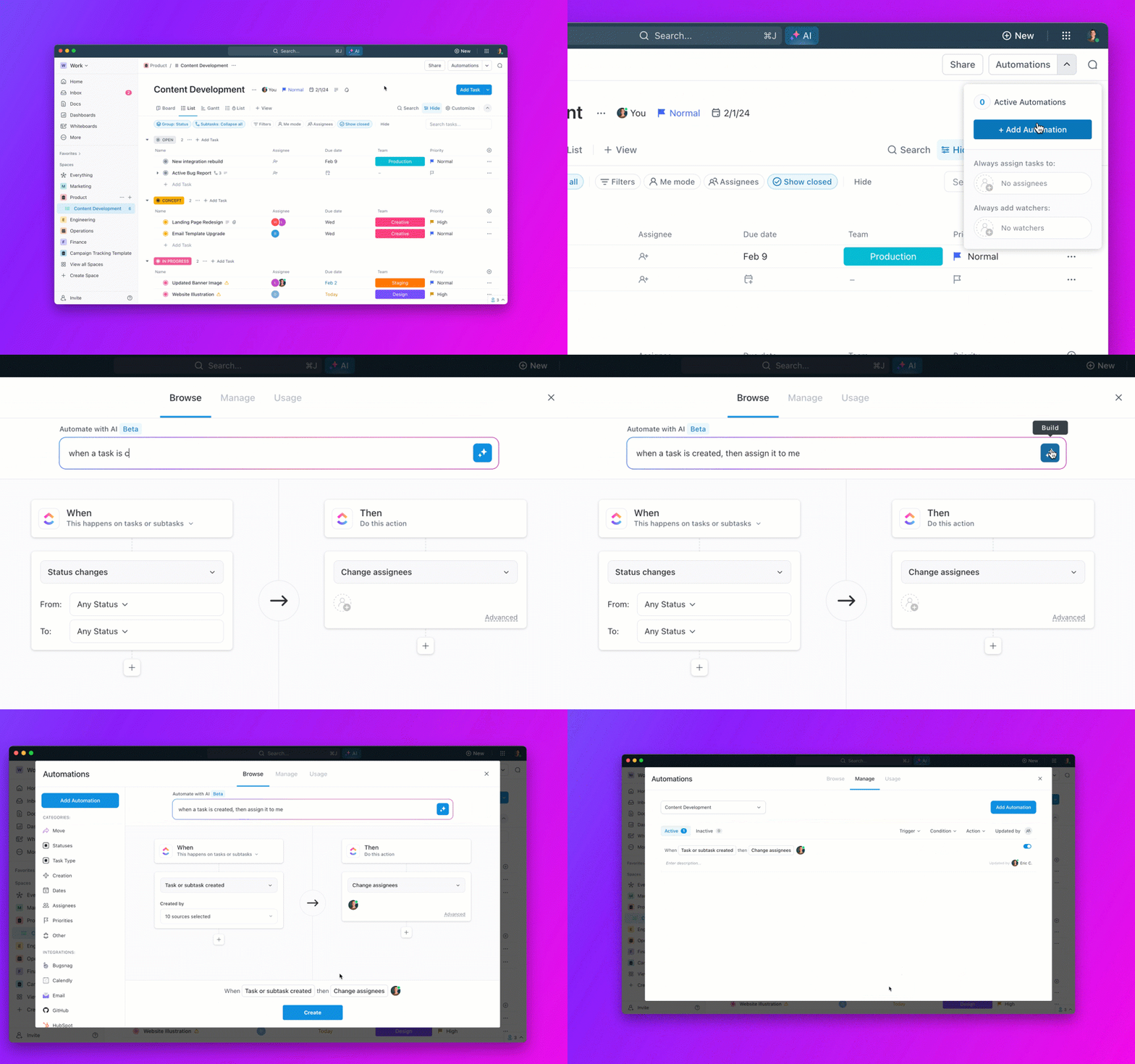
ClickUp Automations allows you to set custom fields, triggers, and actions so you don’t have to track and send follow-ups manually. No matter what’s on your plate, automation keeps your emails going out on time effortlessly.
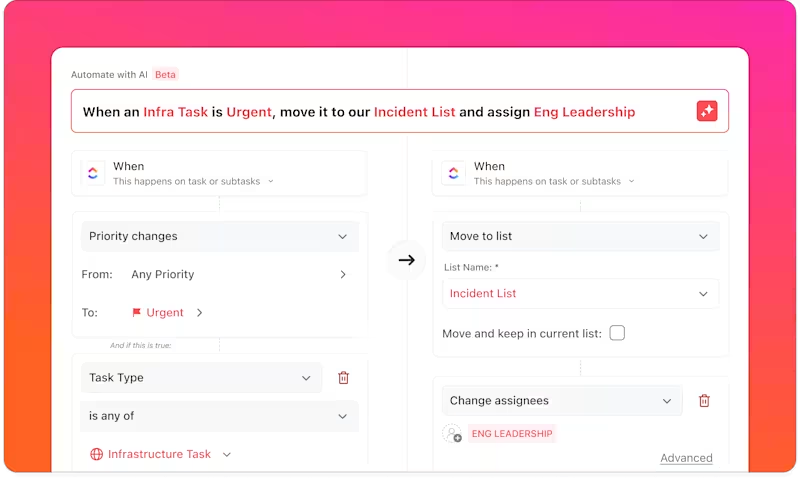
Here’s how to set up an email automation:
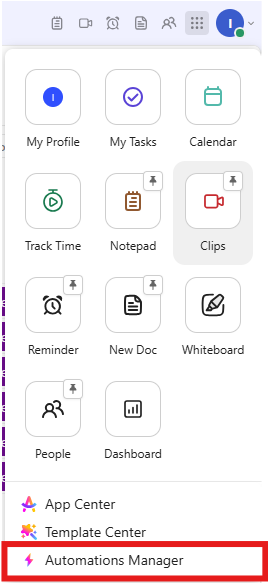
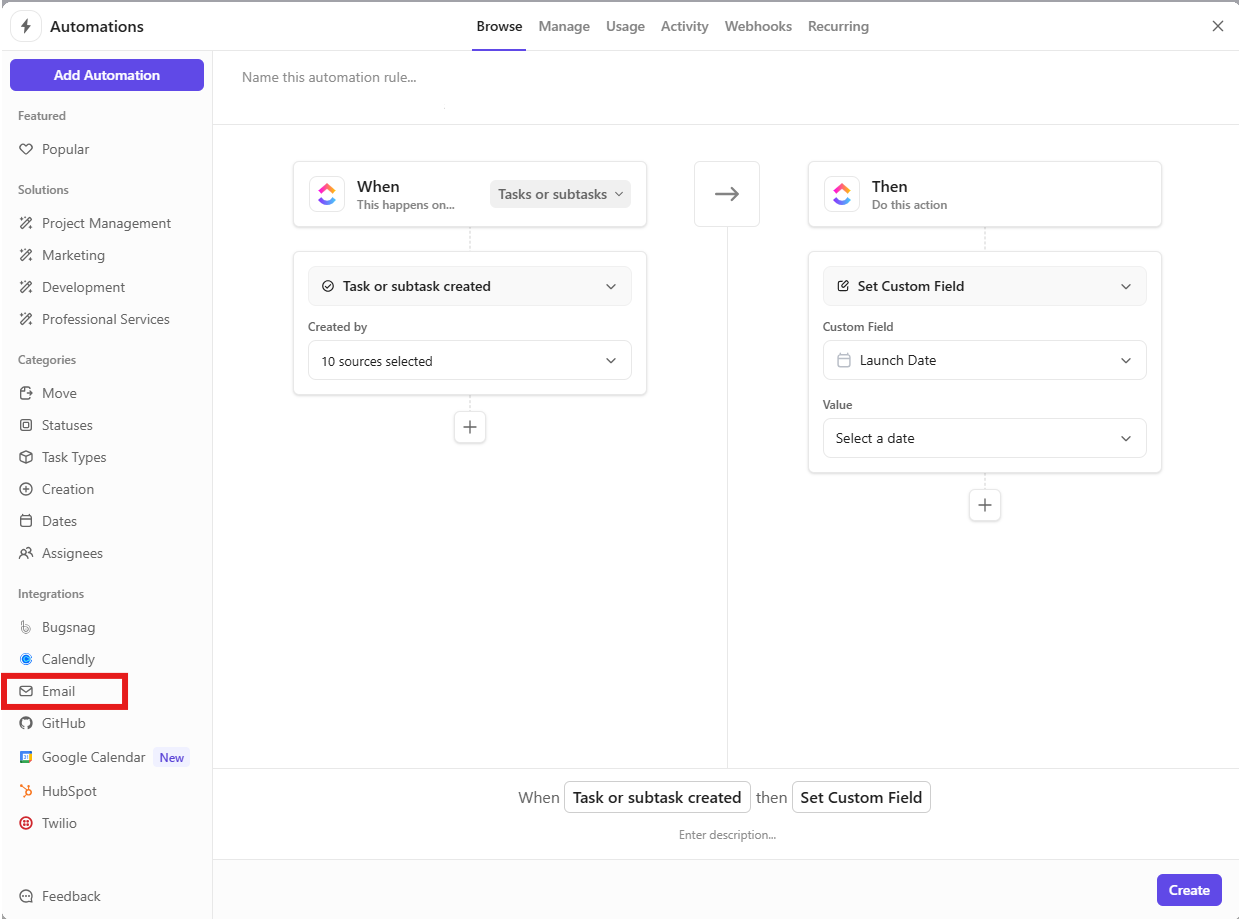
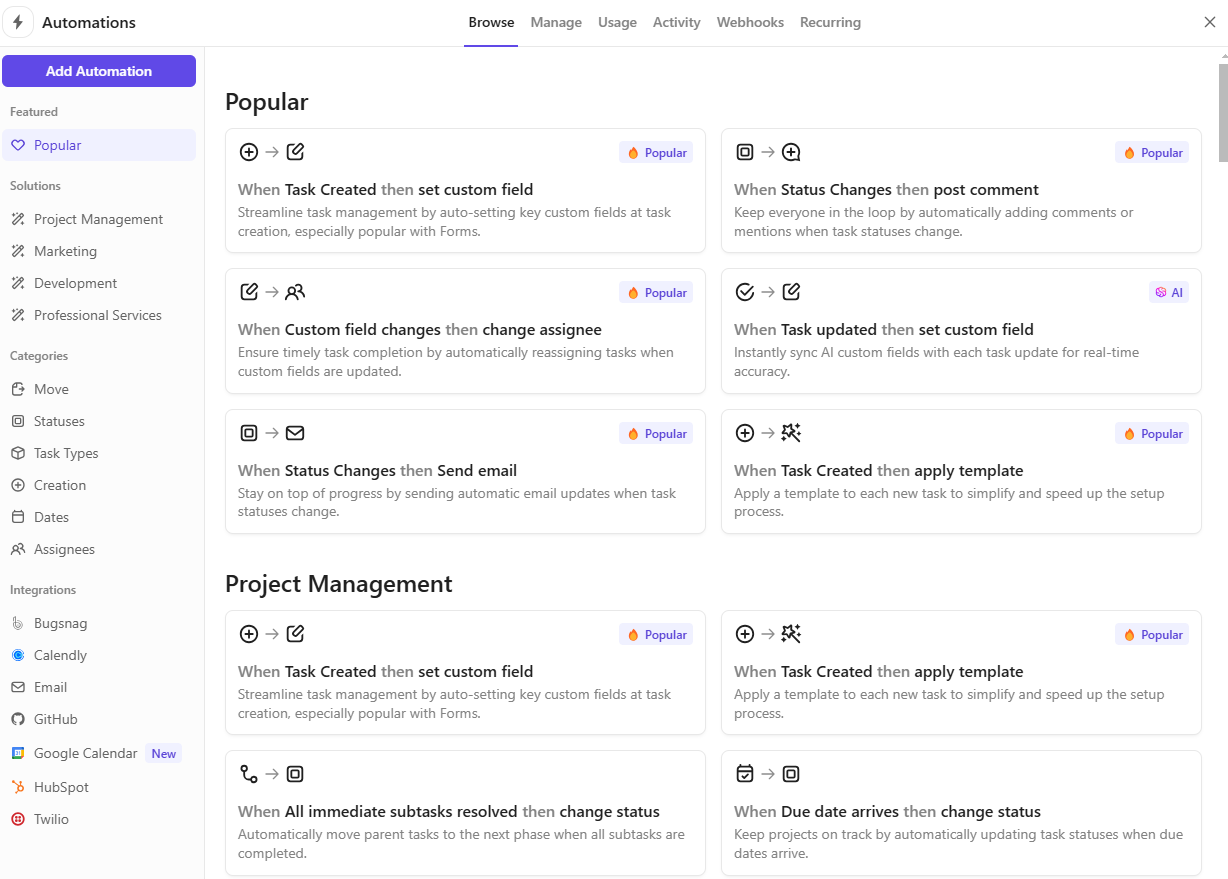
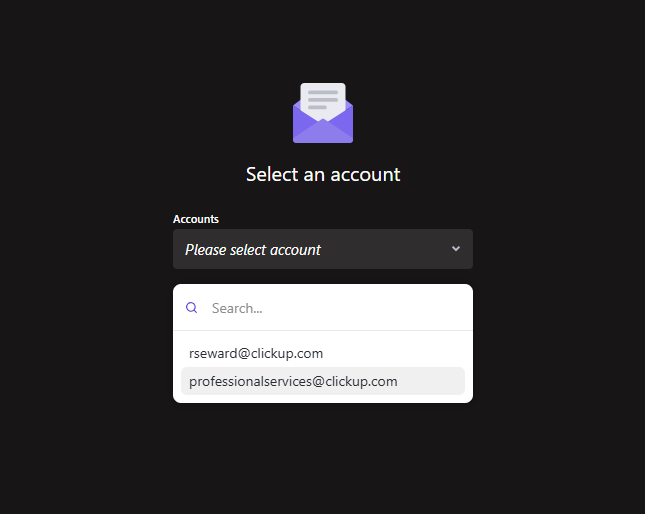
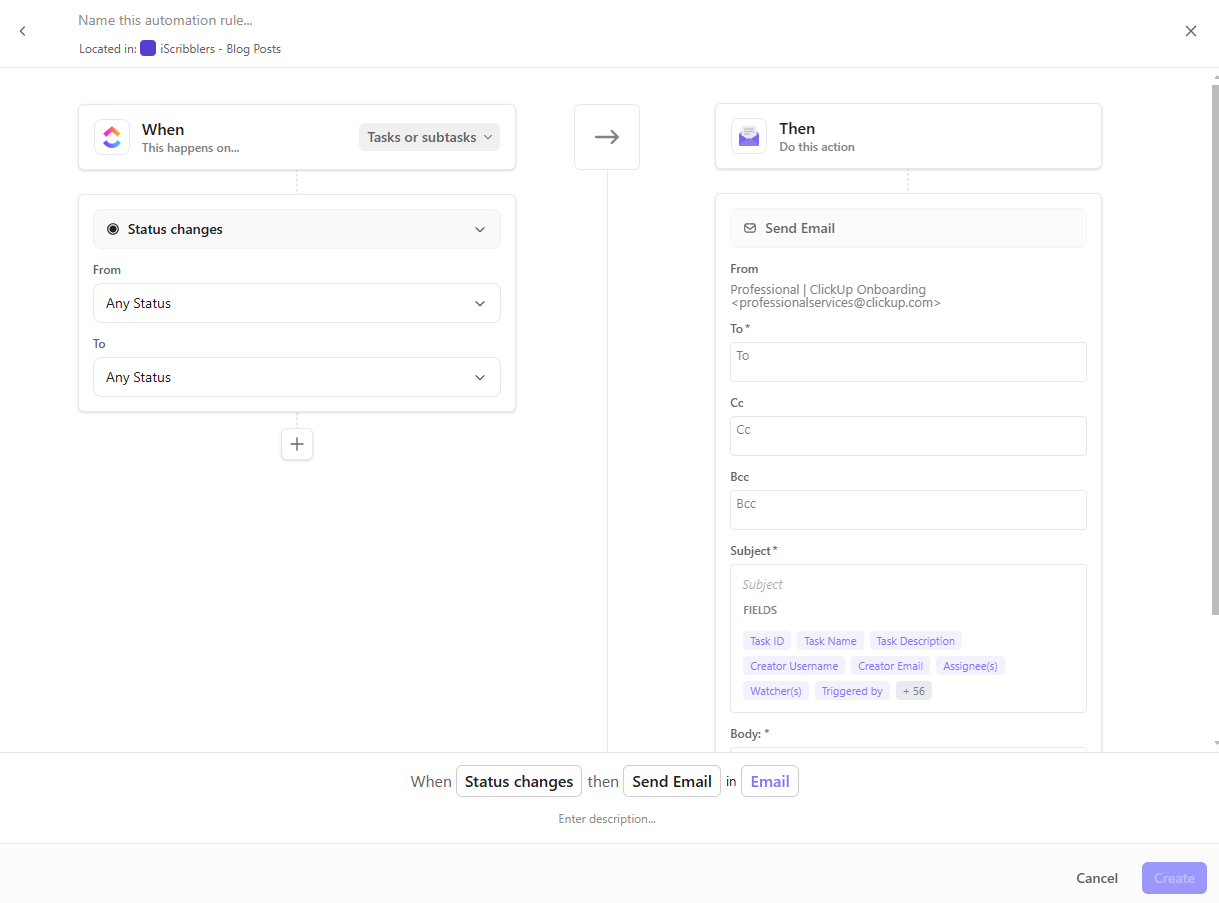
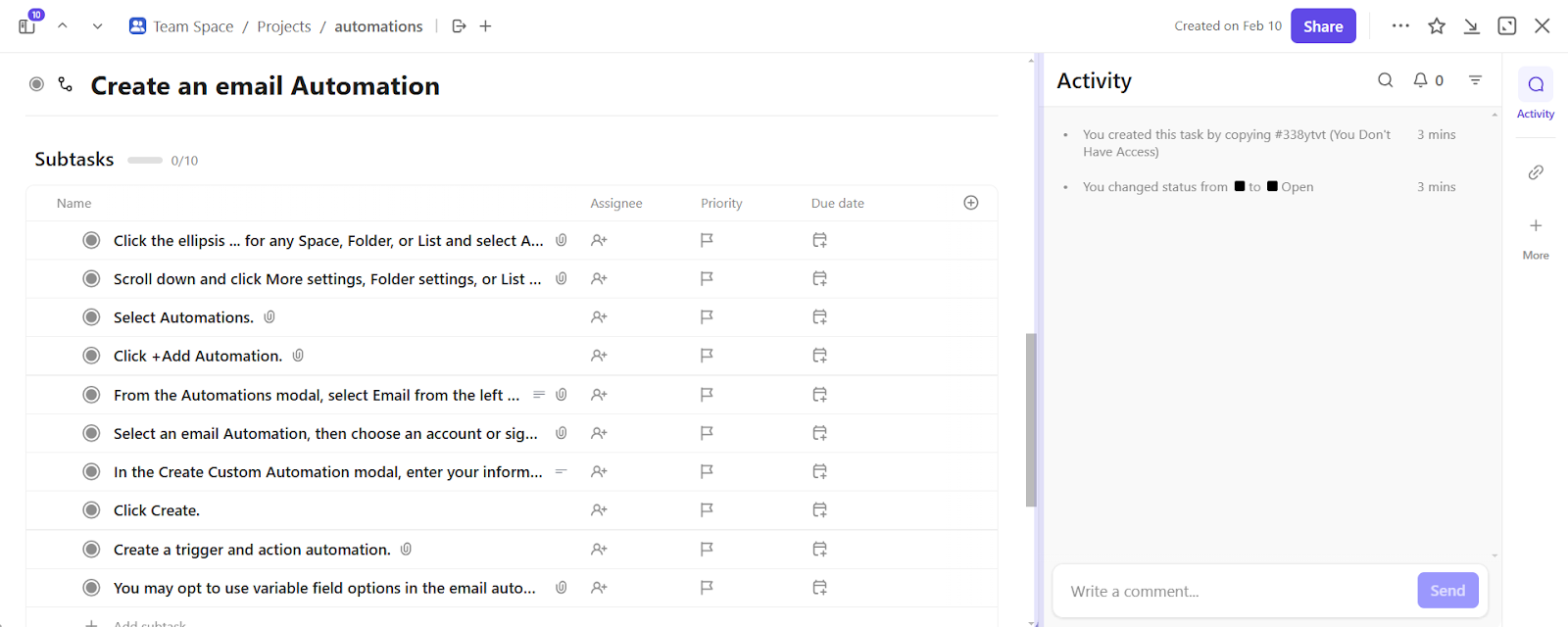
The ClickUp Email Automation Template makes automations even easier as you can integrate them easily into your ClickUp workspace. This template includes pre-built triggers, actions, and checklists for seamless follow-ups and reminders.
Here’s how it helps:
Read More: How to Create Email Templates in Outlook
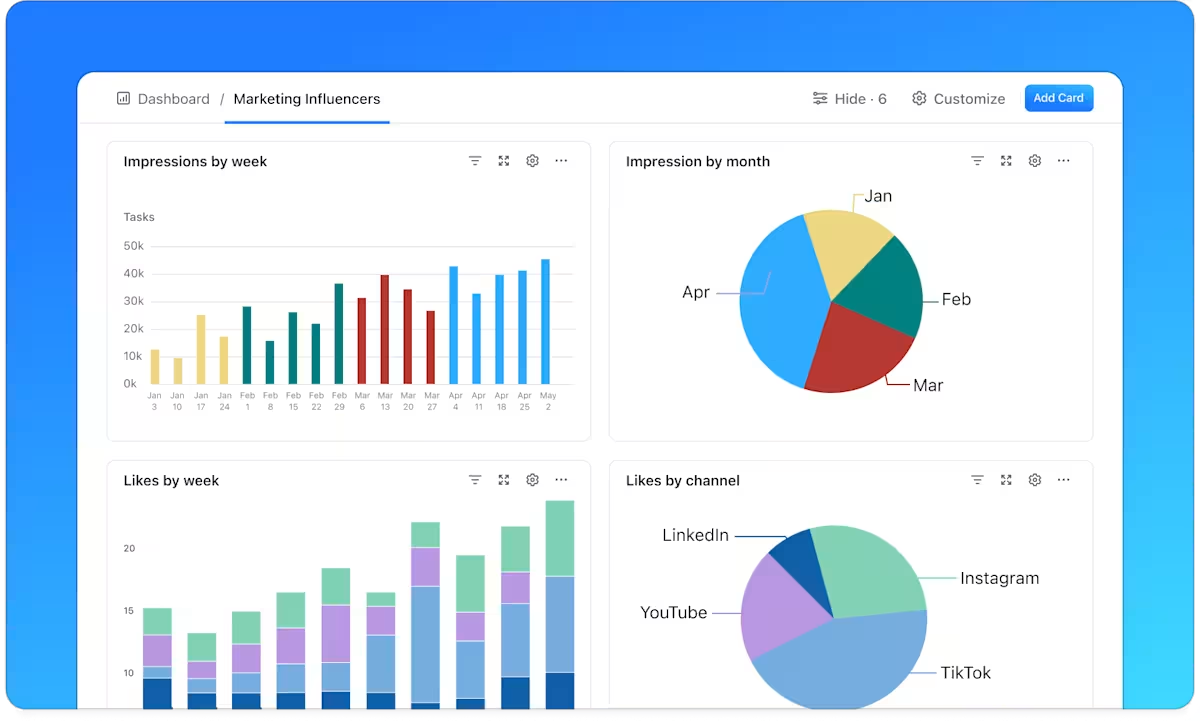
Once you automate your email workflows, track their efficiency to ensure they drive results. Use ClickUp Dashboards to monitor follow-ups, analyze engagement, and refine automation rules. If responses are low, consider adjusting timing, subject lines, or email content for better impact.
Before we wrap this blog, here are some best practices to ensure your email reminders drive maximum engagement:
The right reminder email gets the recipient to act.
And while sending reminders may feel like just another never-ending chore, it doesn’t have to be.
With ClickUp, you can automate the entire process—integrate your email, set triggers for different scenarios, and let AI craft clear and professional reminders in seconds.
No more manual follow-ups. No more missed opportunities. Just effortless automation that keeps everything on track.

Sudarshan Somanathan
Max 23min read

Praburam Srinivasan
Max 22min read
Sudarshan Somanathan
Max 25min read

© 2026 ClickUp