
Sorry, there were no results found for “”
Sorry, there were no results found for “”
Sorry, there were no results found for “”
Rask AI is a popular choice for translating and dubbing videos. But while it has its strengths, it also has limitations.
If you’ve used it, you might have noticed that its English dubs can sound flat, and some voices can lack a natural flow, often needing extra edits. Plus, translating into multiple languages with Rask can get expensive as each language is charged separately.
After thorough research and testing, I’ve uncovered 10 Rask AI alternatives packed with features for multilingual video editing, localization, and content creation.
In this blog post, we’ll break down their features, limitations, pricing, and reviews to help you find the best option for your needs.
But before we get started, let’s tackle an important question.
Here are my favorite Rask AI alternatives that I’ll review in detail below.
Want even more options? Check out my full breakdown of all my picks below.
The market is filled with many AI video communication platforms. However, before making an investment, you’ll want to focus on specific features to ensure you select the right one.
Let’s look at the top 10 tools you can use instead of Rask AI for video-related work.
Video projects can get complicated—especially when dealing with content in multiple languages, campaigns, deadlines, and teams across time zones.
But that’s where ClickUp shines.
This project management software has many capabilities, such as asset organization, task management, and workflow automation, that simplify this job at every stage.
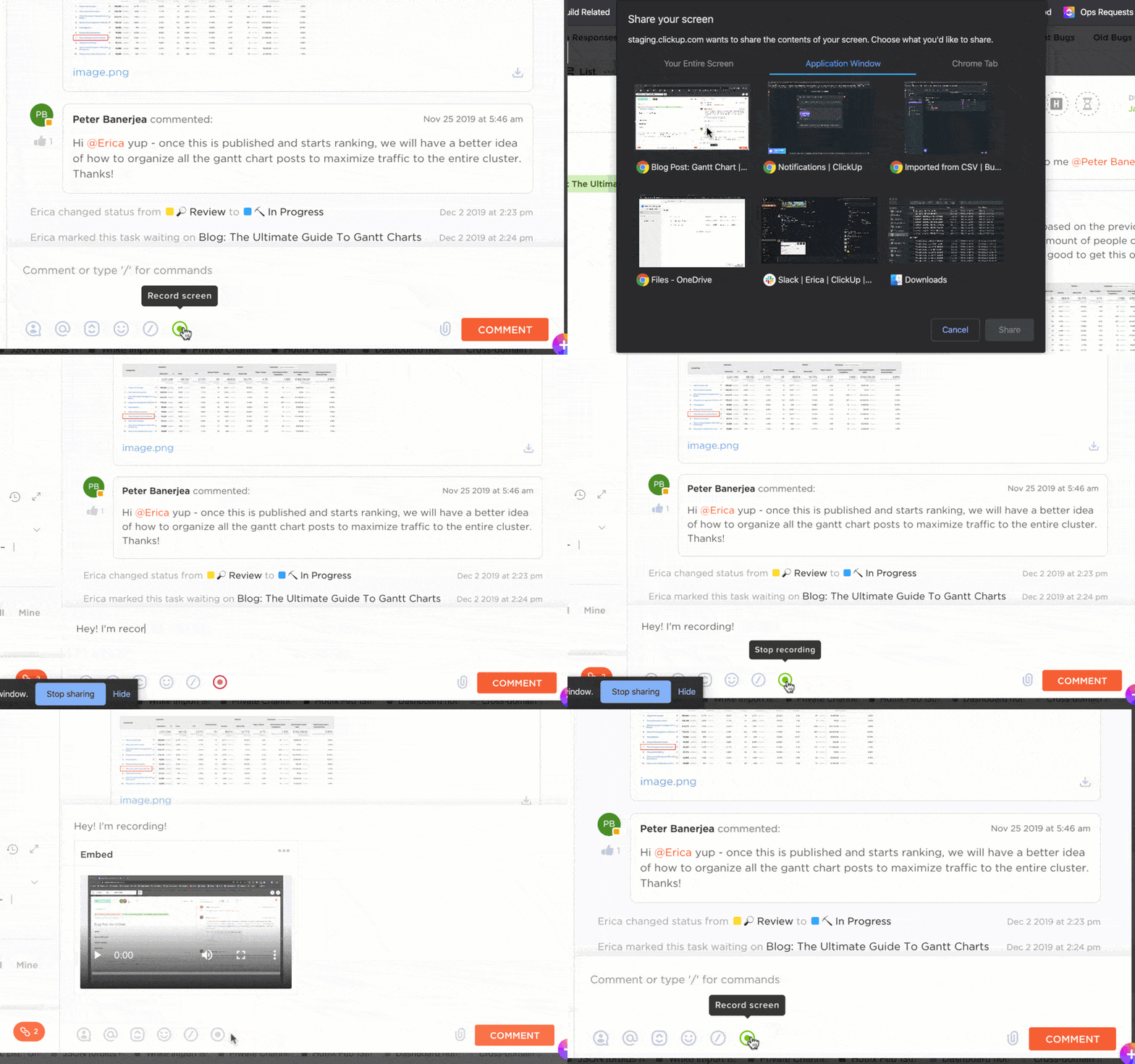
ClickUp Clips, for example, is the ultimate screen recording feature for Agile teams.
I can record a meeting summary, a brainstorming session, or even a quick how-to tutorial from within the platform and convert those directly into ClickUp Tasks with just a click.
It makes async video communication effortless by letting me assign due dates, owners, and extra details for context to these tasks so that the right person can take action at the right time.
Now, what if there was a way for you to avoid re-watching an entire training video to just find a 10-second clip required for a project?
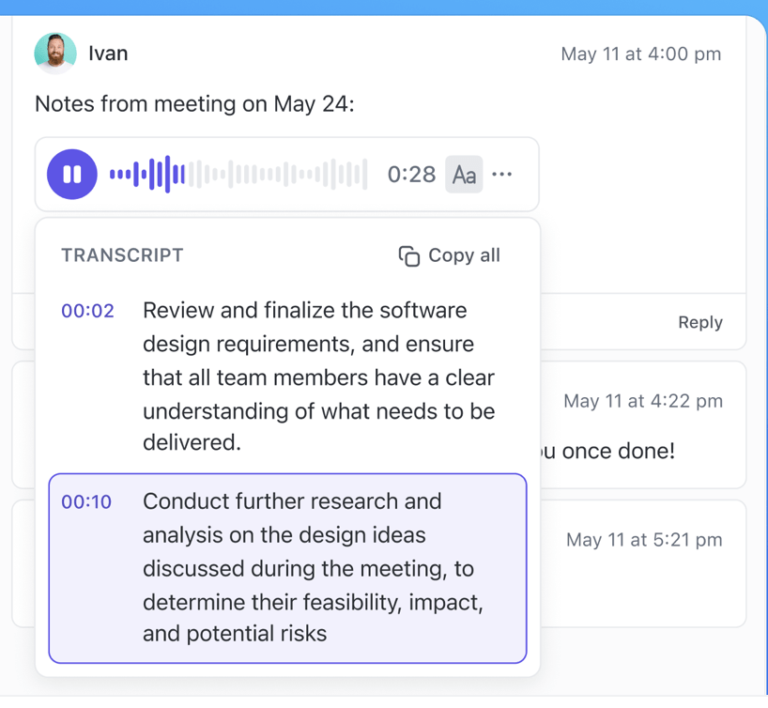
Every clip is automatically transcribed with AI, making it easier to scan clip highlights, click timestamps to jump around the video, and copy snippets to use wherever needed.
You can then share that clip instantly—either embed it directly in ClickUp, send a public link, or download the video file. This flexibility is vital if you work with international teams or clients. The Clips Hub also stores all clips in one place for easy and quick access.
But what really puts ClickUp ahead is its integration with ClickUp Brain. With its AI-driven search, you can search through your clip transcripts in seconds. This is huge when gathering information from older projects or finding specific details buried in past videos. Instead of digging through hours of footage, you just have to search the key phrases, and it’s all right there.
Sounds great, right?

ClickUp Brain helps write video scripts, marketing copy, and translation content, ensuring a smooth creative process from pre-production to publication. It also automatically checks for spelling in your docs and tasks without plugins or extensions.


Do you want to create a polished video in another language—like French, German, or Spanish—without the hassle of hiring actors or setting up a whole production? I’ve found Synthesia to be a game-changer for that.
It makes producing professional, localized video content easy by using AI avatars and voiceovers. Synthesia supports 140+ languages. Plus, if you’re working with a team, you can share your videos directly and invite others to comment and give feedback.
📮ClickUp Insight: Our meeting effectiveness survey data shows that 25% of meetings involve 8 or more participants on average. We also found that an average meeting lasts approximately 51 minutes. These large meetings can result in at least 6 to 8 hours of collective meeting time spent per week at an organizational level.
What if you could cut it down? ClickUp transforms how teams communicate! Instead of lengthy meetings, collaborate directly within tasks using comments, attachments, voice notes, video clips and more—in one place.
💫 Real Results: STANLEY Security’s global teams already saved 8+ hours weekly on meetings and updates with our everything app for work!

If you’ve ever wished editing audio and video could be as simple as editing a Word Doc, Descript makes that possible. Need to tweak dialogue in your video for a French audience? Just edit the transcript, and the audio adjusts in real time.
What I really liked about Descript is how it uses regenerative AI to remove background noise and enhance voices. You don’t need expensive microphones or soundproof rooms to get high-quality sound with this Rask AI alternative.

If you need to release videos in multiple languages quickly, VEED has you covered. You won’t need to download software or deal with complicated setups—just open your browser, upload your video, and add subtitles or voiceovers in any language you want.
Plus, VEED’s online transcription service is more versatile than most. Unlike many tools that restrict you to just one format, it lets you transcribe audio and video files.

If you’re constantly working with subtitles, transcriptions, and translations, this tool won’t disappoint.
Need to export your files in .TXT, Word, PDF, or even AVID? You can do that easily with Happy Scribe. It also makes collaborating with stakeholders easy by allowing you to share transcripts and subtitles in view-only or edit mode.
What stood out for me, though, is the accuracy and speed of this expressive speech-to-text software that ensures top-quality results every time.

Lokalise is a cloud-based localization software that helps you tailor your content strategy for local markets.
You can easily handle simultaneous cross-platform translations and export them into the right files with the correct naming conventions for each platform.
Lokalise also integrates with tools like Figma, GitHub, GitLab, Webflow, and Jira, making workflows smoother and more efficient.

If you’re looking for Synthesia AI alternatives to generate avatars of different ethnicities, ages, and styles for your videos, HeyGen is worth checking out. It lets you create content in 175+ languages using more than 120 AI avatars, perfect for reaching diverse audiences.
Its one-click video translation feature can translate videos into 40+ languages and even recognizes multiple speakers. While it doesn’t clone the original speaker’s voice, you can pick from over 300 human-like voices to add a voiceover.

If you need help with text-to-speech, AI video dubbing, or AI voice generation, use Wavel.ai. It’s an all-in-one software that delivers an immersive experience—not just a generic, flat voiceover.
To reach your multilingual audience, you can easily translate your text into 40+ languages with AI tools for captions and subtitles.
What impressed me about this AI voice generator is the ability to add natural sounding voices with regional accents, including British, Australian, and Indian.

If you want to add authentic-sounding voiceovers in multiple languages to your videos, you’ll enjoy using Dubverse. No more manual recording or tedious editing hassle—it captures the essence and emotion of your original content.
I also liked how Dubverse auto-generates perfectly synced, accurate subtitles, making the videos clear and accessible to every viewer.

Need a presenter who can speak 30+ languages? With Colossyan Creator, it’s possible. It uses AI avatars that look and sound like real humans, making it ideal for creators who need to localize content quickly without sacrificing the personal touch.
You can create videos directly from text using AI avatars, adding interactivity to drive engagement.
The built-in GPT-4 AI script assistant even helps brainstorm ideas, improve your writing, and speed up video production.
💡Pro Tip: Use an AI-powered personal assistant app and delegate tasks like scheduling appointments and handling customer outreach for increased productivity
In addition to Rask AI alternatives, you might also like:
Finding the right AI tool comes down to what works best for you. With so many options, it can get overwhelming. But focusing on your priorities—like accurate translations, seamless AI avatar creation, or achieving natural-sounding speech—will help narrow it down.
When it comes to managing video workflows, nothing beats ClickUp. It’s the go-to software for keeping everything on track.
You can use ClickUp Clips to record product demos or align geographically dispersed teams on project plans and objectives. ClickUp Brain automatically transcribes all clips, making it easier to locate and access specific information.
Sign up for ClickUp for free and change how you engage with your audience using videos.

Manasi Nair
Max 26min read
Manasi Nair
Max 26min read
Manasi Nair
Max 20min read

© 2026 ClickUp