Creating the Perfect How-to Piece: A Comprehensive Guide to Procedural Writing



Sorry, there were no results found for “”
Sorry, there were no results found for “”
Sorry, there were no results found for “”
Ever tried assembling IKEA furniture without the manual? One minute you’re holding a plank of wood and some screws, and the next, you’ve got a table that looks like it’s doing yoga.
That’s what happens when procedural writing is missing.
Procedural writing is the recipe card that saves your dinner. It’s the user manual that keeps your tech tantrum-free. And it’s the setup guide that gets your project off the ground without a dozen “how do I…” moments.
Whether you’re a professional looking to write instructions that people will actually use or a teacher looking to show students great procedural writing, this piece is for you.
Procedural writing is a type of writing that explains how to do something in a clear, logical, step-by-step format. It guides the reader through a process from start to finish without confusion or guesswork.
Essentially, procedural writing is “how-to” writing. It helps people get things done accurately, independently, and without confusion.
Procedural writing plays a key role in creating effective process documentation and helps readers follow repeatable workflows with consistency. You can use a document containing procedural writing to follow a lab experiment, install an app, or even write a blog post on procedural writing (yes, we’re very meta).
At its core, procedural writing answers three things:
Here are some real-world examples of procedural writing you’ll come across 👇
Procedural writing helps train students to think clearly and approach tasks with structure.
Here’s why it matters:
💡Pro Tip: Use AI assistants like ClickUp Brain to create procedural writing documents. Just feed the tool your instructions and voila! ClickUp Brain users even have the option to choose from multiple AI models, like GPT-4o and Claude, right from their ClickUp Workspace.
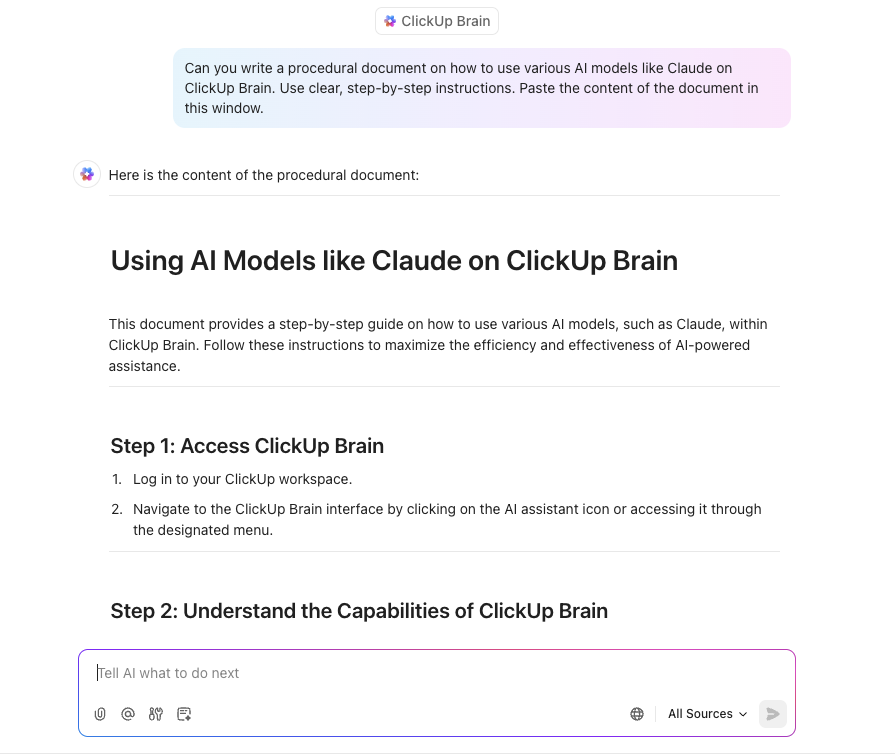
So, what makes procedural writing work? Let’s break down the key features that separate a clear, helpful guide from a confusing mess:
✅ Clear, action-oriented language: Each step starts with a verb (e.g., mix, insert, click). And tell the reader exactly what to do
✅ Logical sequence: Steps are listed in the order they should be performed. But if your reader has to backtrack or guess what comes next, the sequence of your procedural texts needs work
✅ Visual cues (if needed): Bulleted or numbered lists, bolded keywords, graphic organizers, and diagrams/screenshots make the instructions easier to follow, especially for visual learners
✅ List of required materials: A good procedure begins with a ‘What You’ll Need’ section so the reader isn’t caught off guard halfway through. It could be tools, ingredients, or preconditions
✅ Warnings or tips: Great procedural writing anticipates user errors. If there’s a common mistake or tricky part, a quick warning or pro tip goes a long way in helping the reader succeed
✅ Defined outcome: A good procedure explains the expected result: ‘You should now see a confirmation message,’ or ‘The cake is ready when the top is golden brown’. The reader should know if they’ve succeeded
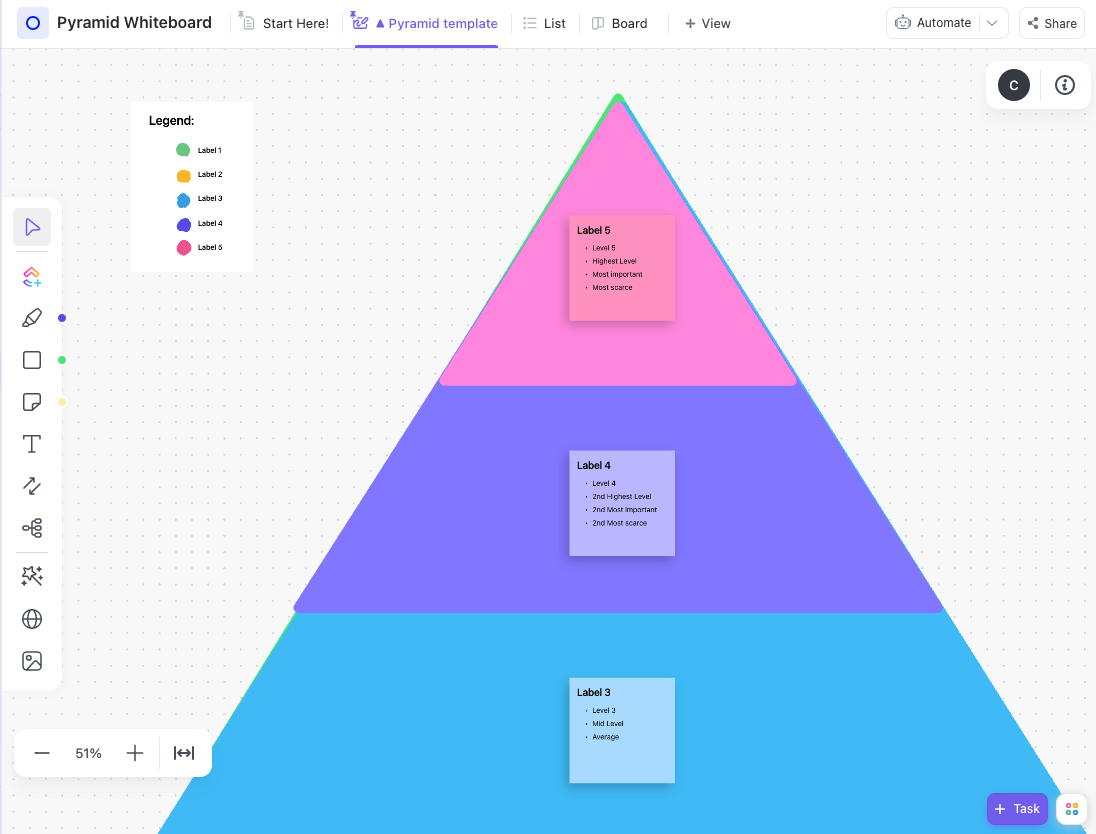
💡 Pro Tip: Use the ‘Inverted Pyramid’ technique for each procedural step. Start with the essential action command, follow with clarifying details, and end with rationale or context. Your reader must be able to scan for key actions with the supporting information.
To save time, use the ClickUp Pyramid Whiteboard Template for organizing ideas into pyramid structures for quick comprehension of topic clusters.
⚡️Template Archive: Free Company Policy & Procedures Templates
Procedural writing lessons help your students communicate effectively. If you’re planning to teach how to write in a practical, real-world way, this section breaks it down into clear steps.
Before students can write strong procedures, they need to understand why procedural writing matters. In the classroom:
❌ The instruction ‘Add vinegar into the beaker’ would be vague.
✅ A clear one looks like ‘Measure 10ml of vinegar using a measuring cylinder. Pour it into the beaker marked A.’
Once students have this baseline, you can turn the lesson into a dynamic, referenceable learning asset using ClickUp Docs—a flexible, collaborative space within ClickUp, the everything app for work.
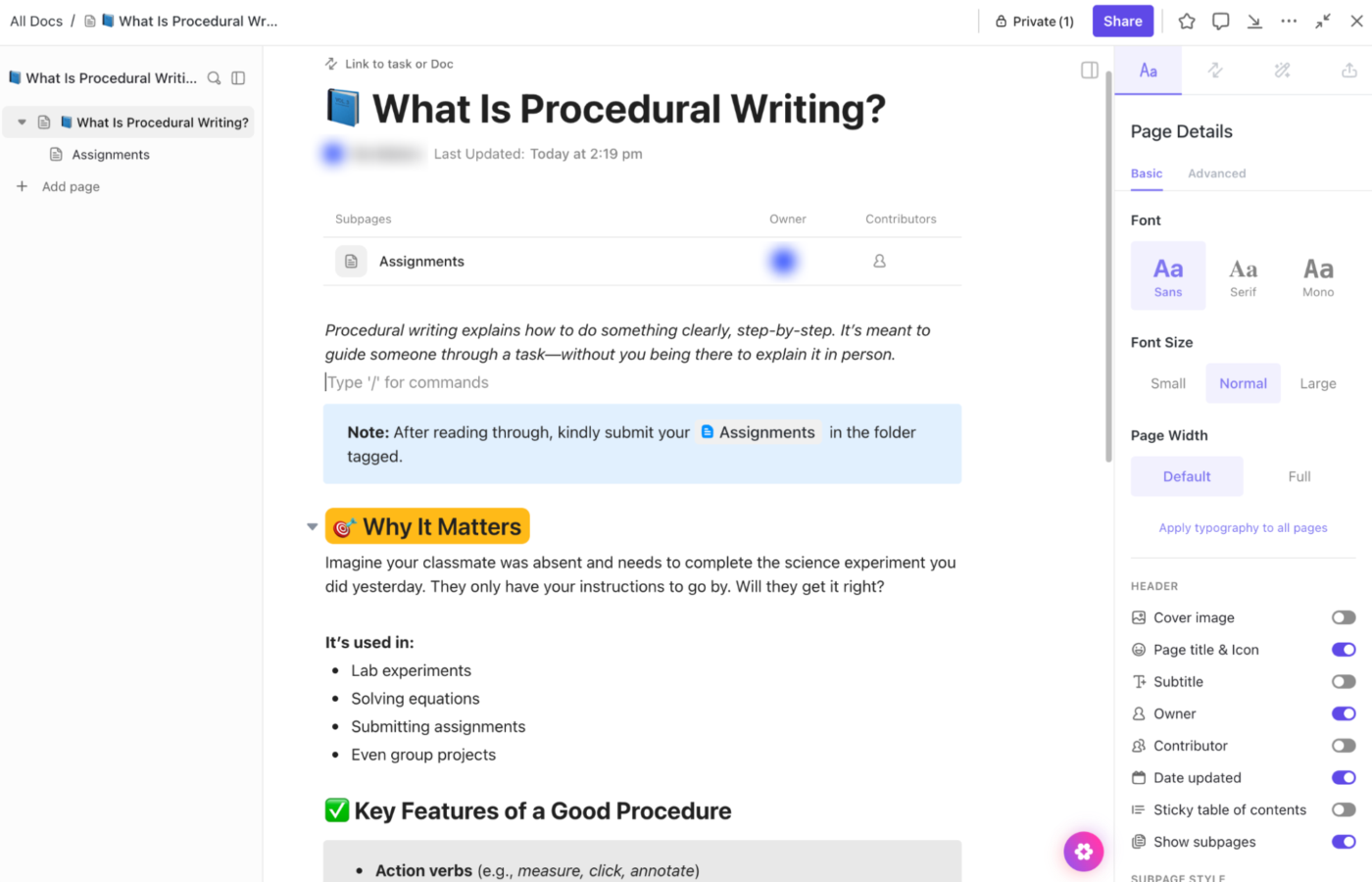
Here’s how to use ClickUp Docs as a collaborative space for your students:
Next, turn the lesson into a dynamic, referenceable learning asset or build a procedural writing unit using ClickUp Docs as your central hub.
📮ClickUp Insight: 92% of knowledge workers risk losing important decisions scattered across chat, email, and spreadsheets.
Without a unified system for capturing and tracking decisions, critical business insights get lost in the digital noise. With ClickUp’s Task Management capabilities, you never have to worry about this. Create tasks from chat, task comments, docs, and emails with a single click!
After students understand the why, it’s time to show them how to structure their procedural writing clearly and logically.
ClickUp makes this structure easy to follow and track through ClickUp Tasks.
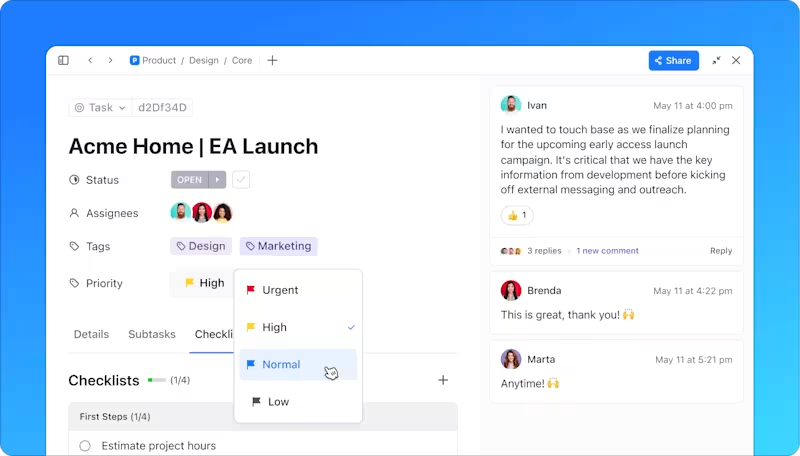
At a glance:
To make it easier to understand, use the ClickUp SOP Template.
Here’s what it gives your students:
Once students understand the structure, it’s time to put it into practice. Writing is a skill they learn by doing so your goal here is to give them relevant instruction manuals that they can then use to craft instructions. This involves:
To save time, use ClickUp’s Knowledge Manager to understand and track work automatically. In a nutshell:
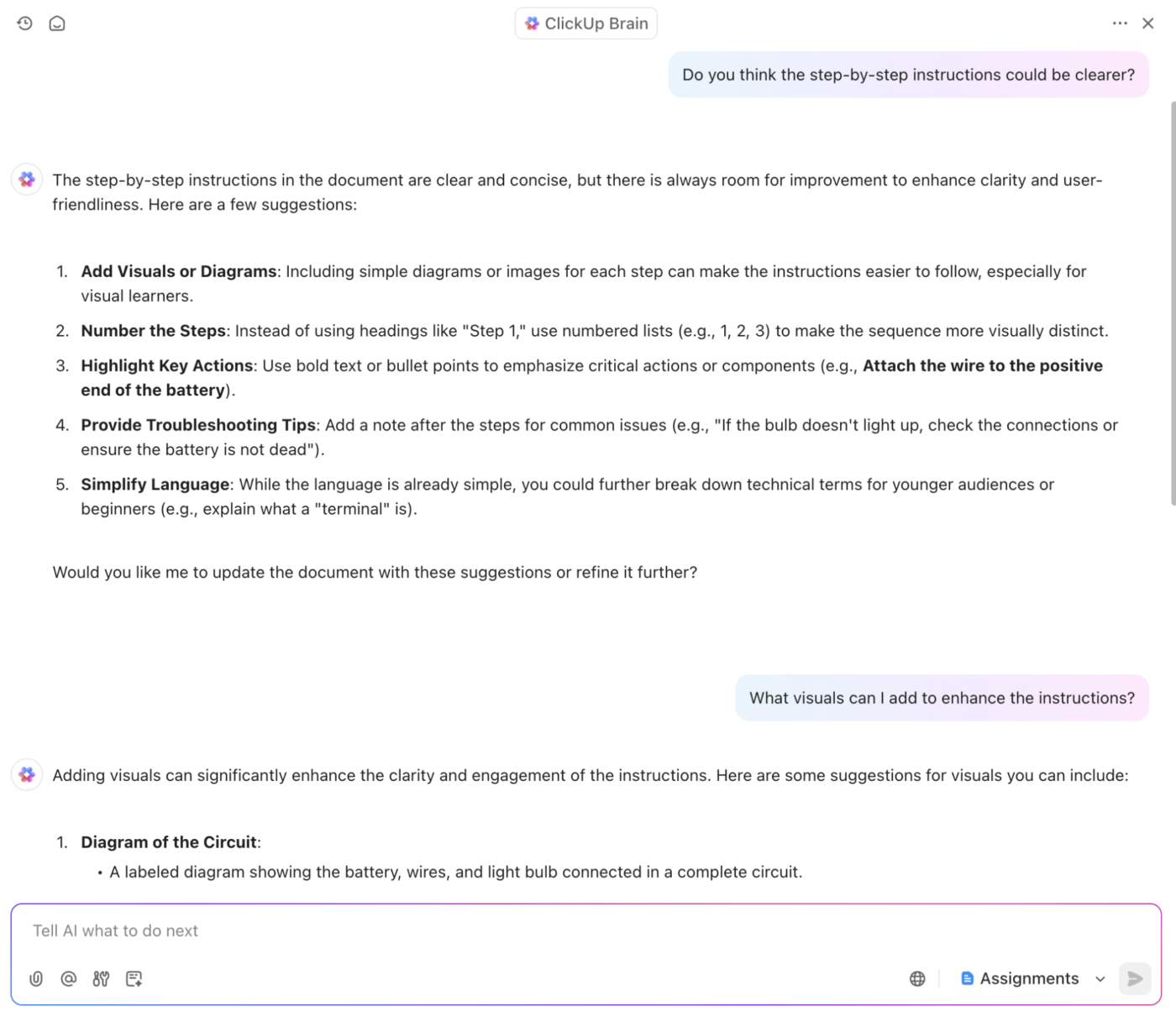
Like everything else, procedural writing isn’t complete until it’s tested. Peer review helps students see how their writing performs in real-world conditions—can someone else follow it without asking for help?
Here’s what you can do to support peer review and collaboration:
💡 Pro Tip: Use ClickUp Whiteboards for collaborative planning during creative writing. Before students begin writing as a group, have them map out each step visually on a Whiteboard using sticky notes. They can color-code, assign parts, and even link to Docs or Tasks, all in one space. It’s a simple way to make teamwork more organized and transparent.
At this point, shift the focus from correction to growth. Instead of just fixing what’s wrong, encourage students to level up their writing.
When you teach procedural writing, this is the stage where students move from following a structure to owning it.
⌛Time-saver: Looking to enhance your procedural writing over time? These process improvement templates can help you document feedback, spot gaps, and improve clarity with every revision.
Here’s how you can make the procedural writing fun and effective rather than being stiff and formulaic.
Start with a finished product—maybe a folded paper airplane, a sandwich, or a basic app setup. Try writing the instructions that someone would need to recreate it from scratch. You’ll have to slow down and think about every small move.
Think of a task you know well, like updating a phone setting or brewing coffee with a French press. Write out the steps, then hand them off to someone unfamiliar with the task. But don’t explain anything—simply observe.
If they fumble, skip something, or keep glancing at you for help, those are the weak spots in your writing. Since you have prior knowledge, you may skip tasks that someone else might need help with.
When writing pieces, time the process. It forces you to focus on what matters and get straight to the point.
Rewrite a confusing tutorial or a poorly written manual. The aim here is to learn how to rescue poorly written procedural texts by spotting gaps, unclear instructions, and awkward structure.
📚Read More: Best Standard Operating Procedure (SOP) Software
Pick a task that involves multiple paths or choices, like setting up an email filter or assembling a piece of furniture. And instead of writing it as a step-by-step how-to guide, you can convert it into a flowchart.
By mapping out each decision and outcome, you’ll start thinking more clearly about structure and sequence. This kind of visual planning sharpens your ability to organize steps in a way that makes your procedural writing easier to follow.
📚Read More: Best Process Mapping Tools & Software
Record yourself doing the task using the manual. You can convert it into a voiceover script that guides a first-grade student through the task. Language features like voiceover help you get a feel for pacing, word choice, and clarity, all while connecting your writing to real actions.
While writing, have a checklist so that your instructions are clear and actionable.
Here’s a checklist that you can follow to keep your writing focused and easy to follow:
You must focus on guiding the reader through tasks. Excessive background information can slow down the process. Keep explanations brief and actionable.
❌ Detailing the history of a software update
✅ This update improves security and fixes bugs. Follow the steps below to install it
Nothing disrupts the flow of a task more than missing an essential step. You might think the reader will know what to do next, but assumptions in any form of expository writing lead to gaps in your instructions.
✅ Solution: Let your peers read through your instructions as if you’re the one following them. If something feels incomplete or unclear, add in the missing details.
Procedural writing thrives on clarity, precision, and repeatability, so vague terms are the enemy.
And for this, use the vague language editing checklist.
| Check for | Mistakes to avoid | How to fix it |
| Subjective adverbs | “Do it carefully” | Be specific: “Tighten the bolt until snug, not forced” |
| Relative time words | “Wait a bit” or “Quickly mix” | Use measurable time: “Wait 30 seconds” or “Stir for 2 minutes” |
| Imprecise correctness terms | “Do it properly” / “Correctly” | Spell it out: “Align the edges before gluing” |
| Incomplete item lists | “etc.” / “and so on” | Fully list or use: “Repeat for each section below” |
When you’re trying to be thorough, you may be tempted to include everything. Background info, unrelated steps, or extra examples that pull attention away from the actual task. It could do more harm by overwhelming the reader and making the process harder to follow.
✅ Solution: Stick to the essentials. If a detail doesn’t directly help someone complete the task, leave it out. Make every step purposeful and easy to act on.
If your formatting changes from one step to the next, it becomes harder for your reader to follow along. Switching between numbered lists, bullets, and different fonts or styles can make your instructions feel disorganized. Even clear content gets lost in a messy layout.
✅ Solution: Standardizing formatting is as important as content clarity. Process standardization helps reduce confusion and keeps workflows efficient.
Procedural writing isn’t a research paper. If you write too formally, your instructions can come off stiff or confusing.
✅ Solution: Use plain, direct language. Say ‘Click the blue button’ instead of ‘Initiate the process by selecting the appropriate interface option.’
Effective procedural writing is all about clarity and structure. By focusing on action-oriented language, logical sequencing, and providing the right context, you ensure that your readers can follow instructions with ease.
ClickUp offers a comprehensive suite of tools to streamline your procedural writing process. With ClickUp Docs, you can easily create clear and organized procedural writing materials that you can refer back to anytime.
ClickUp Whiteboard helps you visualize complex processes or ideas, making them easier to understand and follow. Lastly, ClickUp Knowledge Manager keeps all your documents and tasks easily accessible and up to date, ensuring you always have the latest information at your fingertips.
Try ClickUp for free to start creating your procedural writing manuals.

Sudarshan Somanathan
Max 20min read

Praburam Srinivasan
Max 14min read
Praburam Srinivasan
Max 23min read

© 2026 ClickUp