







Still downloading templates?
There’s an easier way. Try a free AI Agent in ClickUp that actually does the work for you—set up in minutes, save hours every week.
Sorry, there were no results found for “”
Sorry, there were no results found for “”
Sorry, there were no results found for “”
Onboarding a new developer is slower than most teams expect.
👉🏼 44% of organizations say it takes more than two months for new developers to become productive.
Think it’s a talent problem? Not really. It’s a knowledge gap problem.
On day one, new engineers face a massive codebase, fragmented documentation, and years of architectural decisions they weren’t around for.
The result? They spend too much time searching, asking around, or waiting on senior engineers for answers (and not enough time actually shipping code).
This guide shows you how to use Amazon Q Developer, AWS’s AI coding assistant, and reduce that early friction by making your codebase and technical context easier to understand. You’ll also learn how to pair it with ClickUp’s structured workflow management to create a complete onboarding system.
Let’s have your developers contribute code in days, not weeks! 🤩
Amazon Q Developer is an AI assistant from AWS designed to help developers understand, build, and maintain software more efficiently. This directly reduces one of the biggest onboarding challenges: getting the hang of an unfamiliar codebase.
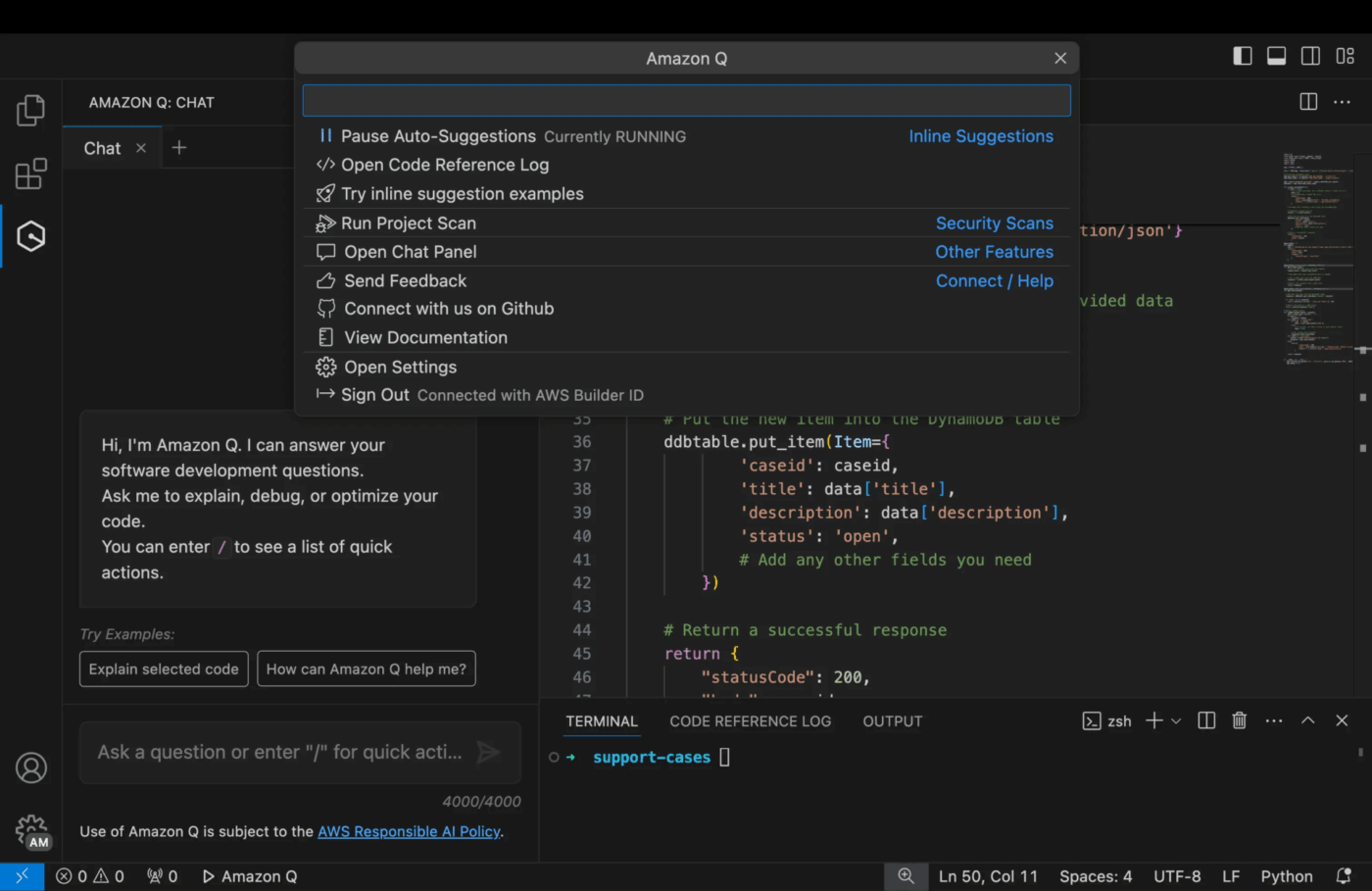
It works as a plugin directly within your developer’s integrated development environment (IDE), like VS Code or a JetBrains tool. This means help is available right where they write code, eliminating the need to switch contexts and search elsewhere.
It operates in two key ways:
What makes it powerful for onboarding is that it’s not a generic chatbot. You connect it to your company’s private knowledge sources.
By indexing your internal information, Amazon Q provides answers that are specific to your systems, not vague suggestions from the public internet.
👀 Did You Know? Amazon Q is not just helpful in accelerating onboarding. It’s actually built to support the entire software development lifecycle. A new hire can use it to:
They can start contributing meaningfully from day one, rather than spending weeks just trying to find their bearings.
The frustration of a slow developer onboarding process isn’t just felt by the new hire; it’s a drain on the entire engineering team.
💰 Picture this: Even the average 2-month developer ramp-up is expensive.
At a fully loaded cost of ~$150K/year, a new hire operating at ~50% productivity for their first two months can cost ~$12,500 in lost output. Multiply that across a dozen hires, and slow onboarding quickly turns into six-figure annual waste for engineering teams.
The slowdown in developer onboarding is caused by common bottlenecks that compound over time:
New developers are often stuck in a “discovery loop”—they don’t know enough to even ask the right questions. AI assistants like Amazon Q break this cycle by making your team’s institutional knowledge instantly searchable. And just like that, they turn weeks of frustrating discovery into minutes of productive work.
How? Through these three core capabilities:
Suppose your new developer needs to understand how your app’s authentication flow works. The old way involves them posting a question in a public Slack channel and hoping the right person sees it…or trying to find a senior dev who isn’t in a meeting. They could wait hours for a simple answer.
With Amazon Q’s chat interface, they can just ask, “How does our authentication flow work?” in plain English. Because it’s connected to your repositories and wikis, it synthesizes a clear explanation based on your actual code and documentation.
So, Amazon Q speeds up the developer onboarding process by empowering developers to self-serve answers and get unblocked instantly.
📮ClickUp Insight: Knowledge workers send an average of 25 messages daily, searching for information and context. This indicates a fair amount of time wasted scrolling, searching, and deciphering fragmented conversations across emails and chats. 😱
If only you had a smart platform that connects tasks, projects, chat, and emails (plus AI!) in one place. But you do: Try ClickUp!
📚 Also Read: AI Code Tools
One of the hardest parts of joining a new team is learning the local coding style and patterns. This leads to extra time spent in code reviews fixing stylistic issues.
Amazon Q provides inline code completion that acts as a real-time mentor.
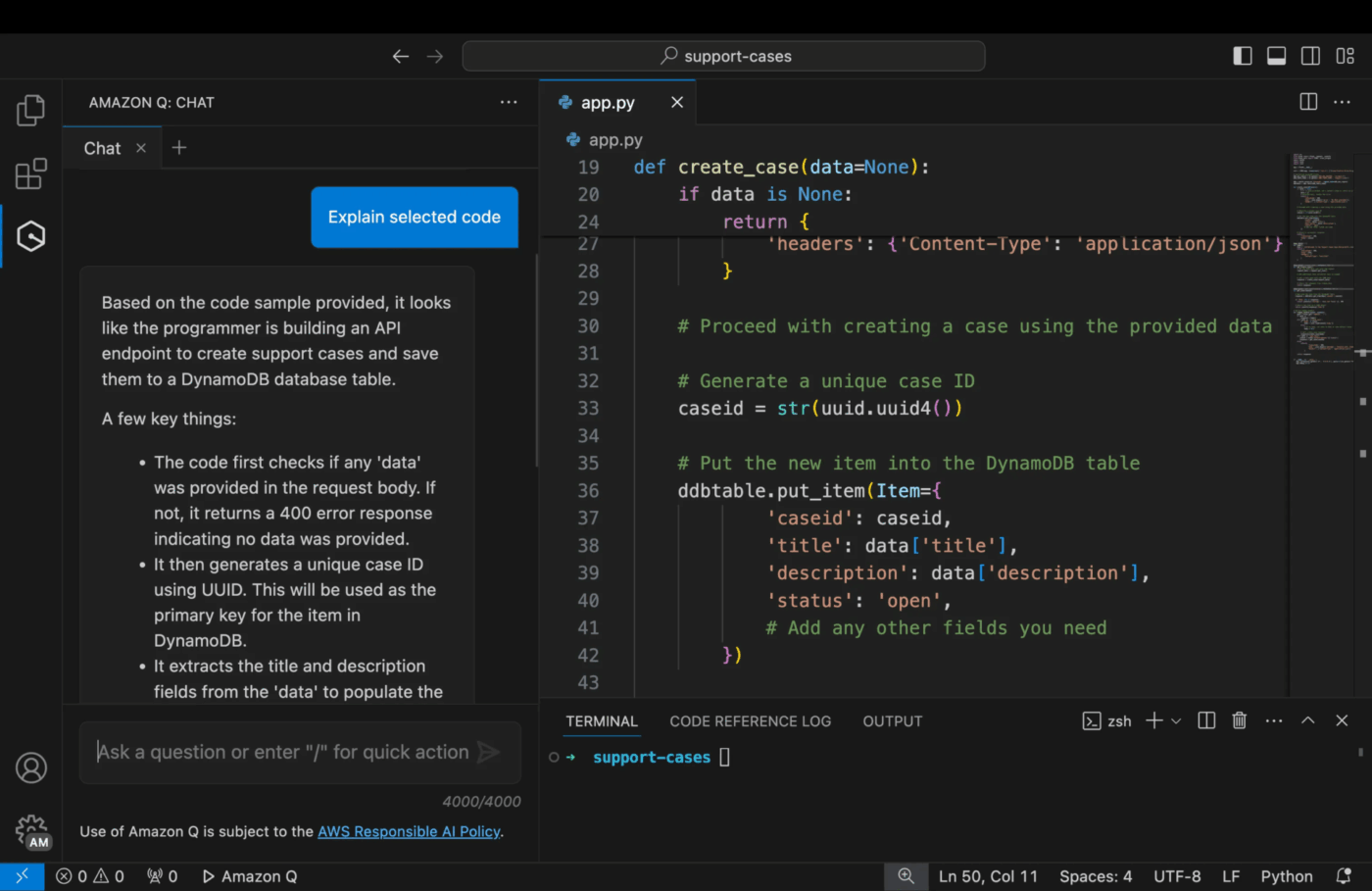
🧠 Fun Fact: Financial-services giant DTCC reported a 30% reduction in code defects after adopting Amazon Q Developer, helping developers write better code from their very first task.
New developers often get dropped into the deep end right away—assigned to older parts of the application that come with years of history baked in. They might have to work with a legacy version of a language or an outdated framework they’ve never used before.
Before they can make even a small change, they first have to understand why the code looks the way it does. That learning curve can be intimidating.
Amazon Q Developer can help. While it doesn’t fully automate large-scale upgrades end-to-end, it can generate updated code, suggesting refactors, and flagging outdated patterns. Instead of wrestling with syntax changes or dependency quirks, new hires can focus on what actually matters: the business logic behind the change.
It’s just as useful for smaller wins, too. A developer can ask Amazon Q to refactor a complex function to make it more readable. Its built-in security scanning can identify vulnerabilities in the code and suggest fixes, preventing new hires from accidentally introducing security risks.
New developers aren’t stuck tiptoeing around legacy code. And that early sense of momentum makes a big difference in how quickly they feel like they truly belong on the team.
📚 Also Read: How to Use Claude AI for Coding
Before you roll Amazon Q out to your team, it helps to get a few fundamentals in place. Nothing fancy, just think of it as the checklist before the checklist:
💡 Pro Tip: For most teams, the Amazon Q Developer Pro tier is the practical choice for onboarding at scale. It gives you the administrative controls, organizational setup, and higher usage limits you need to manage access across the team.
Once the prerequisites are in place, you’re ready to roll out Amazon Q Developer. The setup itself isn’t complicated, but it helps to think about it in stages. At a high level, there are three parts: installing the IDE extension, configuring authentication for your team, and validating that developers can use the tool smoothly in their day-to-day work.
A basic rollout can be done in a few hours. That said, larger organizations—or teams with complex permissions—should plan extra time for testing and fine-tuning access.
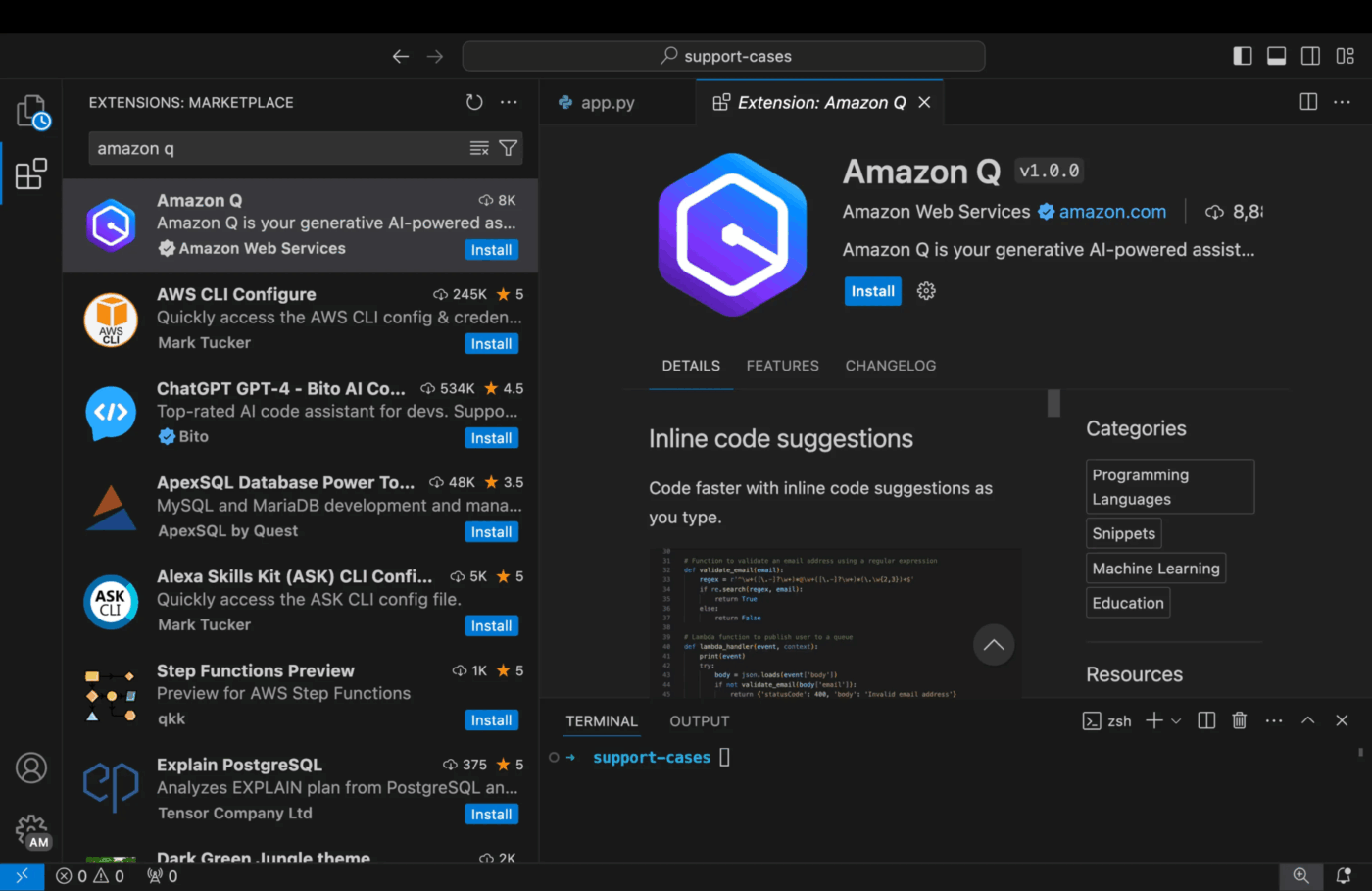
Installation happens locally on each developer’s machine. Amazon Q is delivered as an extension for popular IDEs, so the installation process is straightforward.
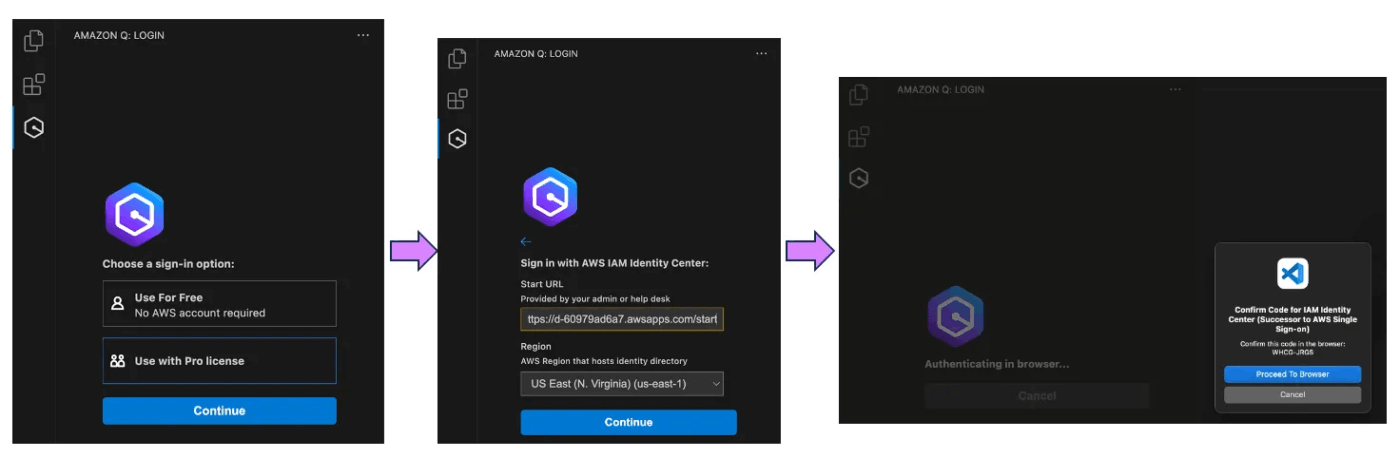
After installation, the developer will be prompted to sign in. They can use an AWS Builder ID for individual use or, for team setups, authenticate through the IAM Identity Center you configured earlier.
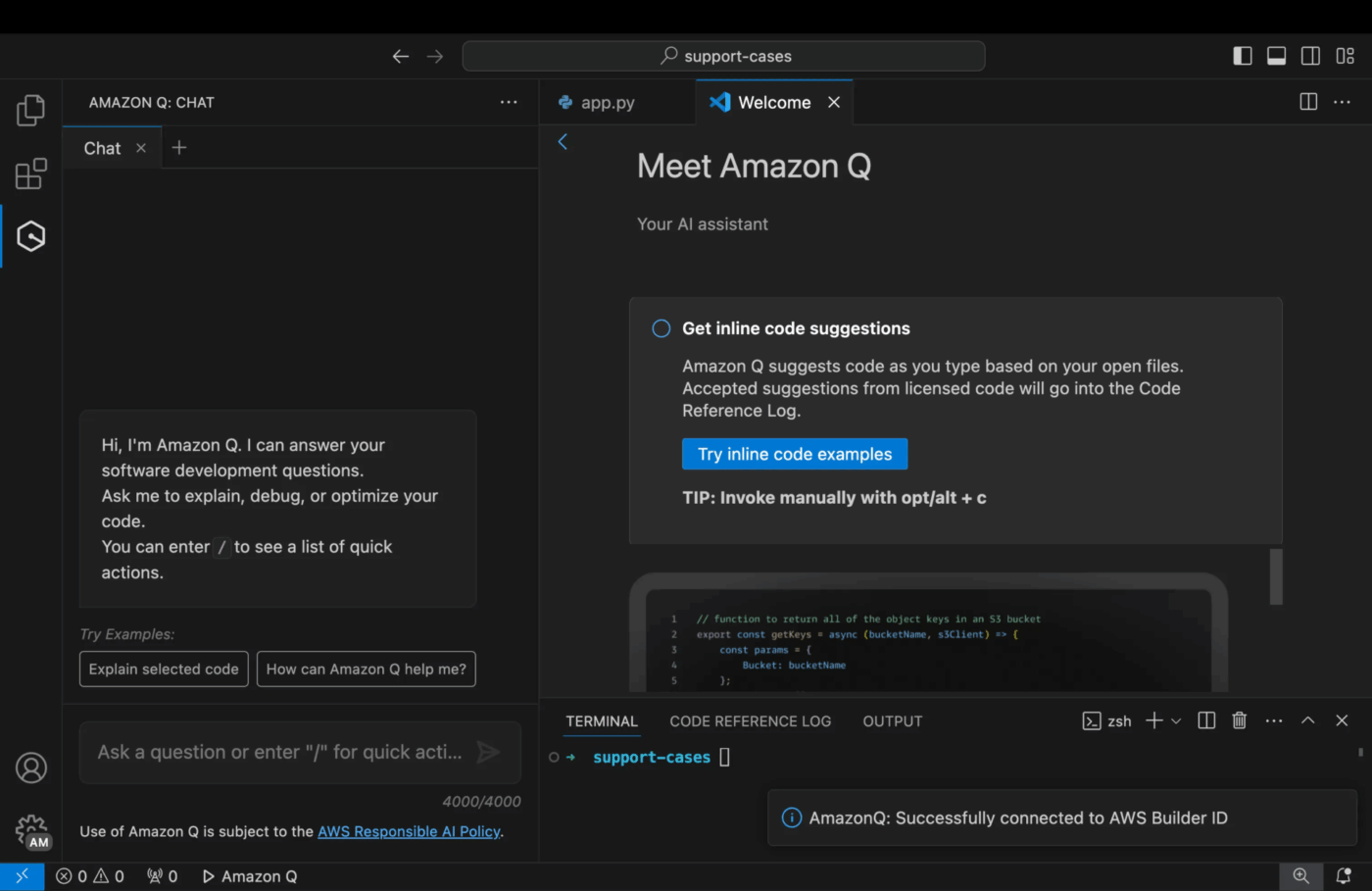
Once authenticated, the extension automatically adds a chat panel to the IDE and enables inline code suggestions. A quick way to verify it’s working is to type a comment describing a function and see if Amazon Q starts offering code suggestions.
This is the step that transforms Amazon Q from a generic AI tool into a personalized expert on your codebase. You need to tell it where to find your team’s knowledge. This is done in the Amazon Q console within AWS.
You’ll see options to connect various data sources. Common choices for developer onboarding include:
For each source, you’ll need to authenticate and configure the sync frequency. It’s important to remember that the initial indexing process can take time, especially for large codebases or extensive documentation sites, so plan for this delay.
💡 Pro Tip: While Amazon Q Developer is designed to provide contextual assistance based on the code a developer is working on, it’s important to set expectations clearly: it doesn’t automatically ingest or understand every internal system by default. The quality of its responses depends on the context available through the developer’s environment and permissions.
📮ClickUp Insight: Only 12% of our survey respondents use AI features embedded within productivity suites. This low adoption suggests current implementations may lack the seamless, contextual integration that would compel users to transition from their preferred standalone conversational platforms.
For example, can the AI execute an automation workflow based on a plain text prompt from the user? ClickUp Brain can! The AI is deeply integrated into every aspect of ClickUp, including but not limited to summarizing chat threads, drafting or polishing text, pulling up information from the workspace, generating images, and more! Join the 40% of ClickUp customers who have replaced 3+ apps with our everything app for work!
With your knowledge sources connected, the final step is to manage how your team accesses them. In the AWS console, you’ll create an “Amazon Q application,” which is the container for your team’s configuration.
Here, you’ll use IAM Identity Center to manage team member authentication and create groups to control access.
📌 For example, you can create a “Frontend-Developers” group that only has access to frontend repositories and a “Backend-Developers” group with access to backend services. This workspace scoping ensures that the suggestions and answers each developer receives are highly relevant to their role.
The administrative controls also allow you to:
Before a full rollout, have a few developers test the configuration to ensure they can access the correct knowledge sources and that everything is working as expected.
Simply installing a new tool doesn’t guarantee it’ll stick. How you roll it out matters just as much as how you configure it. To actually speed up developer onboarding, you need to pay attention to the human side of the change—habits, trust, and day-to-day workflows.
The best practices below are drawn from successful enterprise rollouts and focus on building early momentum, earning buy-in, and showing real value fast.
Instead of rolling out Amazon Q to your entire engineering organization at once, begin with a small, focused pilot team. This could be a single squad or a handful of developers from different teams. A pilot program helps ensure a smooth, large-scale launch.
The benefits?
💡 Pro Tip: For the biggest impact, choose a team that has new hires joining soon. This will allow you to directly measure the tool’s effect on their onboarding experience and gather powerful testimonials.
So, how do you justify the investment in a tool like Amazon Q?
Of course, you need to be able to measure its impact, and before you say it, vague goals like “faster onboarding” aren’t enough. Establish clear success metrics that demonstrate value to both your team and leadership.
Consider tracking the following key performance indicators (KPIs):
| Metric | What it measures |
|---|---|
| Time to first commit | The time it takes for a new developer to submit their first meaningful code contribution |
| Questions to teammates | A reduction in the number of questions asked in public Slack channels or direct messages to senior developers |
| Self-reported confidence | A simple survey asking new hires to rate their confidence and preparedness after their first week or month |
| Amazon Q usage | The volume of queries and which connected knowledge sources are being accessed most frequently |
Establish a baseline for these metrics before you start the pilot program. This will allow you to present clear, compelling before-and-after data that proves the tool’s effectiveness. It also helps you identify any gaps in your knowledge sources.
How do tools actually get adopted? Not because someone said they should—but because someone saw them work.
Encourage your pilot team to share these “aha” moments. Talk about them. Give them the limelight.
A simple ClickUp Chat channel is often enough—a place for quick tips, “this saved me time” stories, or questions that spark better usage. Just proof, in the open, that the tool is pulling its weight.
Because if a skeptical senior engineer sees a new teammate solve a problem they’ve wrestled with before, curiosity kicks in. And once curiosity shows up, adoption usually isn’t far behind.
While Amazon Q is great at helping devs navigate the technical complexities of a codebase, it doesn’t solve the entire onboarding puzzle. A new developer also needs a clear, structured plan for what they need to do, by when, and who they need to meet.
Amazon Q answers the question, “How does this code work?” but it doesn’t answer, “What should I be working on right now?” That’s where ClickUp becomes an ideal partner. 🛠️
Together, they cover both sides of onboarding: context and coordination.
Most developer onboarding processes aren’t intentionally messy. They just grow that way over time. A checklist lives in one doc. Access requests happen in Slack. Architecture notes are somewhere else entirely. New hires do their best to piece it all together, while managers try to track progress from the sidelines.
ClickUp brings structure to that Work Sprawl.
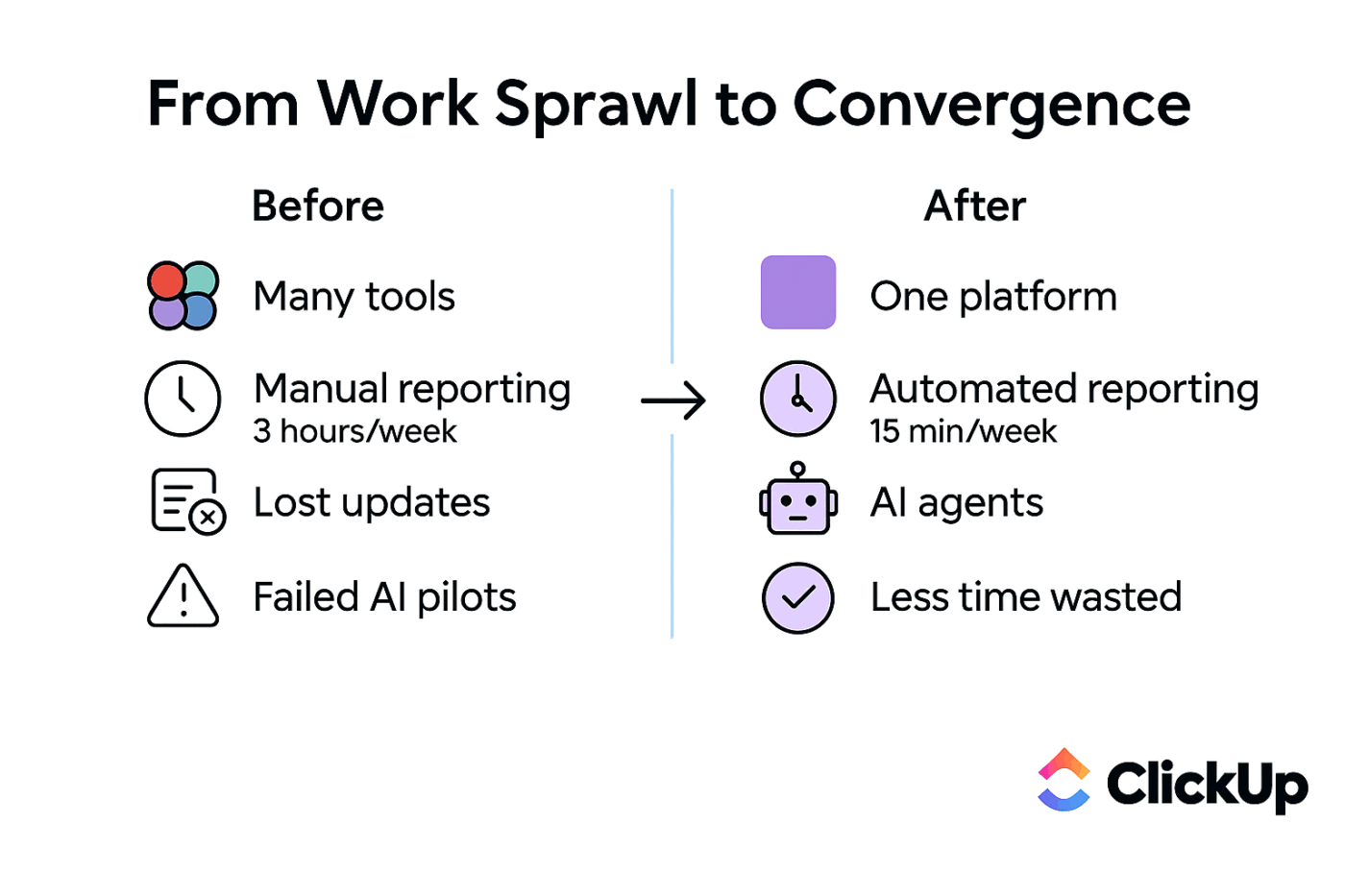
With ClickUp Tasks, you can turn onboarding into a clear, repeatable plan, everything from environment setup to the first code review laid out in one place. No guessing. No “Did I already do this?” moments.
Custom Fields add the missing context that usually lives in people’s heads: mentor assigned, repo access granted, and intros completed. Small details, but the kind that derail onboarding when they’re missed.
Documentation alone doesn’t unblock developers—accessible documentation does.
ClickUp Docs gives you a centralized home for onboarding guides, architectural overviews, and team norms. But the real difference is how Docs connect to work. A new developer can read about a process and jump straight to the ClickUp Task where they apply it, in the same workspace.
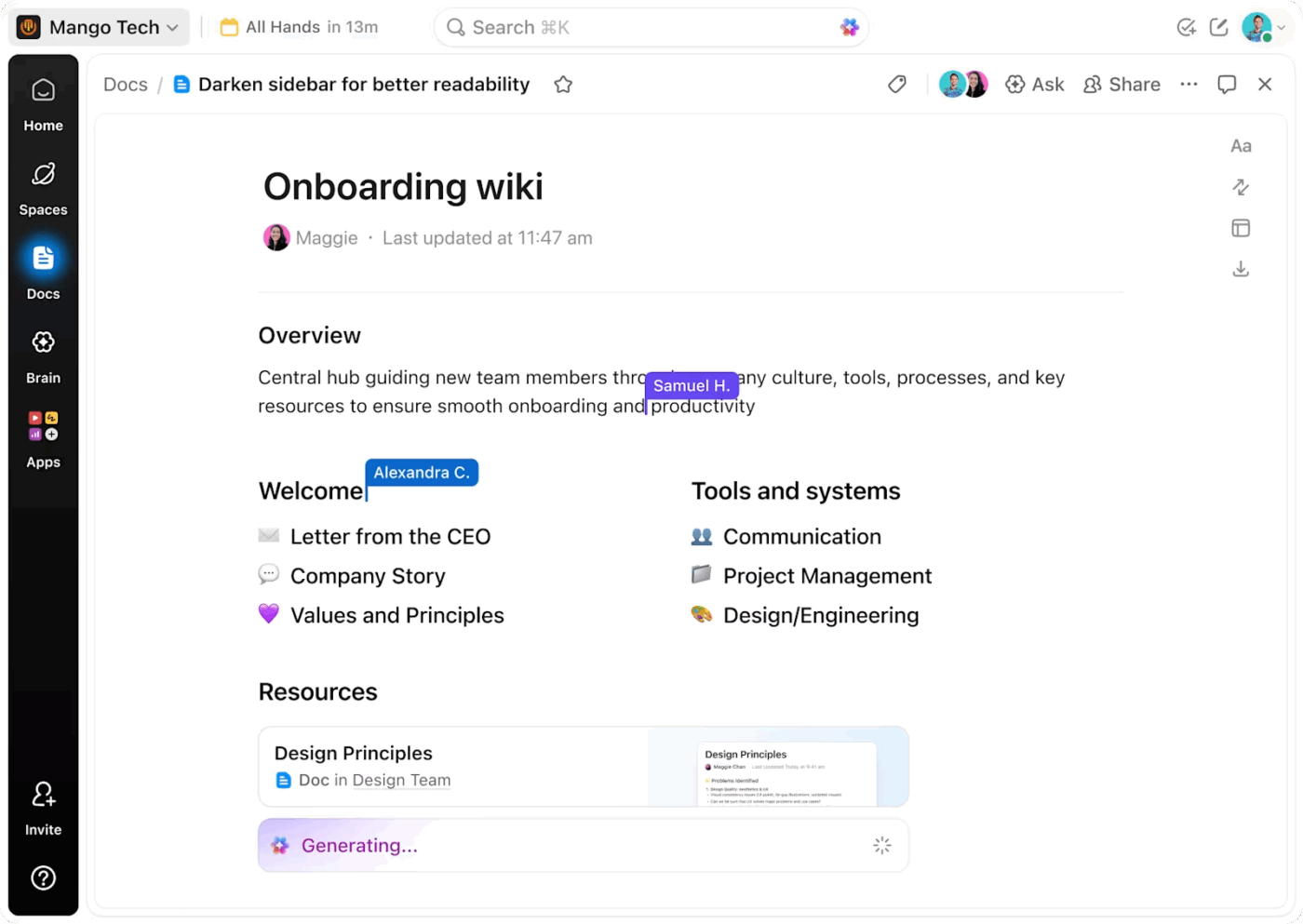
And when things change (because they always do), updates stay connected to the workflow instead of drifting out of date.
Need some tips for creating technical documentation to keep devs up-to-date? This video will be your guide:
Just like Amazon Q, ClickUp Brain, ClickUp’s native and context-aware assistant, does a lot of heavy lifting to make onboarding simpler and smoother for everyone.

Instead of managers acting as the human glue—answering the same questions, checking the same statuses—ClickUp Brain helps onboarders and new hires self-serve information in context.
Layer in ClickUp Super Agents as your AI teammates, and onboarding starts to run itself. Add a start date, and tasks get assigned. Mentors get notified. Welcome messages go out. No one has to remember the steps—they just happen.
Find out how Super Agents manage work for you with their AI superpowers. Watch this video!
For managers, onboarding usually feels like a black box.
Is everything on track? Is someone stuck? Are we about to miss something important?
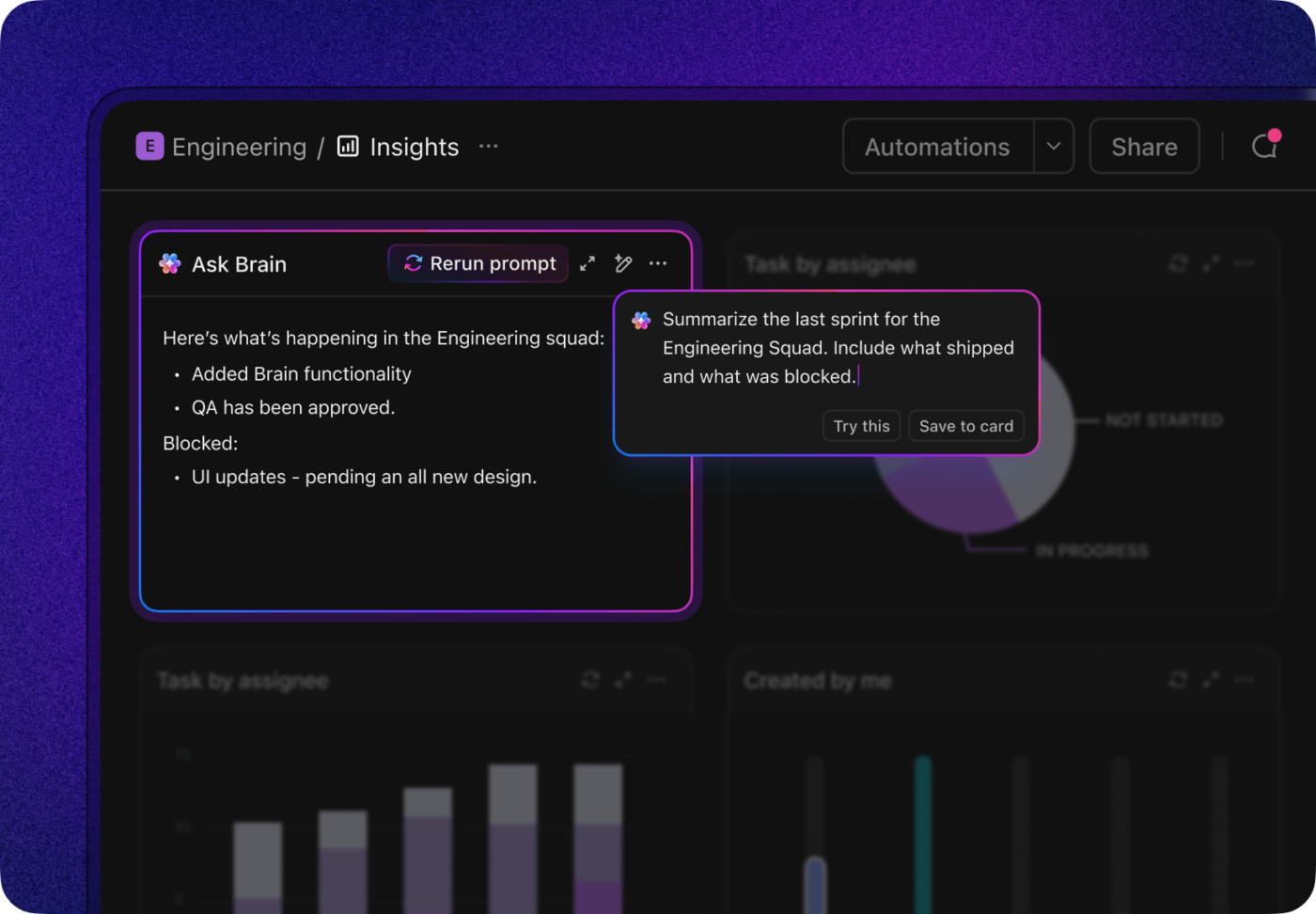
ClickUp Dashboards change that. You get a real-time view of onboarding progress across the team. It’s easier to figure out who’s ramping smoothly and who might need help. You can even set up AI Cards to summarize how long it’s taking new hires to reach milestones like their first commit.
ClickUp comes with a ready library of onboarding templates that let you skip the blank-page struggle and build consistency from day one. Choose from any of these to get started:
Access a readymade, step-by-step task list for bringing new hires up to speed. Account setup, tool access, documentation review, first-week goals… every task gets clear owners and due dates so you can move fast with accountability built in.
Because it’s checklist-driven, it’s easy to duplicate for every new developer while still leaving room to customize tasks by role or team.
If your onboarding spans weeks (or months), this template gives you more structure to manage it end-to-end. It includes multiple views—such as timeline, progress, and onboarding phases—plus Custom Fields for tracking mentors, departments, start dates, and completion status.
It’s especially useful for teams that want visibility into onboarding progress across multiple hires at once.
Designed for distributed teams, this template focuses on replacing hallway conversations with clarity. It combines clearly sequenced tasks, async check-ins, and centralized documentation so remote hires always know what’s expected next.
The result: fewer Slack pings, less uncertainty, and a more consistent experience—no matter where someone’s joining from.
🤝 Friendly Reminder: Each template gives you a working foundation where you can layer in automations, ClickUp Brain, and team-specific workflows as onboarding matures.
Amazon Q helps developers move faster inside the codebase. ClickUp makes sure everything around that code—tasks, knowledge, people, and progress—moves just as smoothly.
Together, they turn onboarding from a fragmented experience into a system. One where new developers spend less time figuring things out and more time doing meaningful work.
Want to see it for yourself? Get your free ClickUp account today!
Summarize this article with AI ClickUp Brain not only saves you precious time by instantly summarizing articles, it also leverages AI to connect your tasks, docs, people, and more, streamlining your workflow like never before.Frequently Asked Questions (FAQs)
The initial setup of Amazon Q can be done in a few hours, but the time it takes for the tool to fully index your knowledge sources will vary depending on the size of your repositories. Developers can start using the chat and code suggestion features immediately after the IDE extension is installed.
Amazon Q supports a wide range of popular programming languages, including Python, Java, JavaScript, TypeScript, and C#. The depth of support and the quality of suggestions are strongest for languages commonly used in AWS environments.
You can connect your ClickUp Docs as a knowledge source for Amazon Q, which allows it to include your team’s process documentation and project context in its answers. This creates a workflow where task management and code assistance work together to support onboarding.
The Free Tier is designed for individual developers and offers basic features. For team onboarding, the Pro tier is typically necessary as it includes essential administrative features like organizational controls, higher usage limits, and the ability to customize knowledge sources for different teams.

© 2026 ClickUp

There’s an easier way. Try a free AI Agent in ClickUp that actually does the work for you—set up in minutes, save hours every week.