






Still downloading templates?
There’s an easier way. Try a free AI Agent in ClickUp that actually does the work for you—set up in minutes, save hours every week.
Sorry, there were no results found for “”
Sorry, there were no results found for “”
Sorry, there were no results found for “”
You’ve already seen what large language models (LLMs) like Claude, ChatGPT, Gemini, or LlaMA can do: write impressive copy, solve complex problems, and analyze data like a pro. But once the novelty wears off, the real question kicks in: why can’t your AI work with the specific tools your team uses daily?
Model Context Protocol (MCP) tools do exactly that. Developed by Anthropic as an open-source protocol, MCP connects AI models directly with external tools and systems without forcing you to build custom bridges. With MCP tools, you can automate manual business processes and use LLM agents with live app data to improve operations, sales, and strategy.
This article explains how MCP works, why it matters, and how to utilize it to make your AI genuinely helpful.
👀 Did You Know? 25% of organizations using GenAI are already exploring agent-based pilots or proofs of concept, with adoption expected to double as teams seek more intelligent, end-to-end automation. This shift reflects a broader move from passive AI assistants to proactive agents capable of integrating with tools like ClickUp, orchestrating workflows, and driving real business outcomes.
MCP tools are the building blocks of a more connected, modular, and scalable AI ecosystem.
In simple terms, MCP servers expose tools as callable functions—ones that AI agents can use to interact with the real world. These tools let you do things like querying databases, calling an API, writing a file, or triggering an internal workflow—without glue code, manual integrations, or switching platforms.
Think of them as API endpoints, but for AI agents. Once a tool is registered with the MCP server (with its name, input/output schema, and description), any MCP-compatible client, like an LLM, can discover and call it using the protocol’s standard methods:
It’s consistent, predictable, and easy to extend—perfect for developers building agentic systems that need to interact with dynamic environments.
📮 ClickUp Insight: 21% of people say more than 80% of their workday is spent on repetitive tasks. And another 20% say repetitive tasks consume at least 40% of their day.
That’s nearly half of the workweek (41%) devoted to tasks that don’t require much strategic thinking or creativity (like follow-up emails 👀).
ClickUp AI Agents help eliminate this grind. Think task creation, reminders, updates, meeting notes, drafting emails, and even creating end-to-end workflows! All of that (and more) can be automated in a jiffy with ClickUp, your everything app for work.
💫 Real Results: Lulu Press saves 1 hour per day, per employee using ClickUp Automations—leading to a 12% increase in work efficiency.
Right now, connecting LLMs to your internal systems—say, your CRM or ticketing platform—means writing one-off wrappers, brittle integrations, and debugging opaque issues with the tool’s behavior.
Want your agent to use AI to automate tasks and pull user data from Salesforce to generate a support response? That’s two custom tools. Want to switch to HubSpot? Rewrite time.
This is where the Model Context Protocol changes the game. MCP gives you a shared standard—a way for different AI agents and tools to speak the same language. Define the tool once, and any MCP-compatible model (Claude, GPT-4, open-source agents, and others) can use it. No rework; no extra logic-mapping required.
There are three big advantages of using MCP-compatible tools. Let’s look at these closely:
Most organizations manage tools by teams and workflows. This makes building general-purpose AI agents difficult because integrating tools becomes a one-off.
MCP solves this with a universal interface. If you’ve got a tool that fetches user activity from HubSpot, it works the same way across all MCP-ready LLMs, no matter which one you plug in.
This unlocks agent interoperability across systems, teams, and toolsets. You stop reinventing the wheel, and your AI becomes truly cross-platform.
Traditional integrations are fragile. Change one piece—say, your email platform—and you’re back in the weeds, updating everything.
With MCP, tools are registered independently with defined input/output schemas. That means agents can treat them as plug-ins, not hard-coded logic.
Switching out one API or replacing a webhook becomes as simple as registering a new tool. Your core logic stays untouched. This modular approach makes your automation stack easier to manage and evolve over time.
In most setups, a tool built for one project lives and dies there, wasting engineering effort.
With MCP, tools are reusable components. Build a tool that generates invoices? Now it’s available to your billing agent, finance assistant, and CRM bot—without duplicating logic or rewriting payloads. This boosts the productivity of your AI agents.
It also drastically reduces technical debt and accelerates the development of new agent workflows—all without ballooning your codebase.
📮 ClickUp Insight: 32% of workers believe automation would save only a few minutes at a time, but 19% say it could unlock 3–5 hours per week. The reality is that even the smallest time savings add up in the long run.
For example, saving just 5 minutes a day on repetitive tasks could result in over 20 hours regained each quarter, time that can be redirected toward more valuable, strategic work.
With ClickUp, automating small tasks—like assigning due dates or tagging teammates—takes less than a minute. You have built-in AI Agents for automatic summaries and reports, while custom Agents handle specific workflows. Take your time back!
💫 Real Results: STANLEY Security reduced time spent building reports by 50% or more with ClickUp’s customizable reporting tools—freeing their teams to focus less on formatting and more on forecasting.
📖 Also Read: Best AI Chrome Extensions to Boost Productivity
A major strength of the Model Context Protocol is how it organizes tools by function. It makes it easier to build robust, modular AI systems. Each category plays a key role in creating intelligent, context-aware agents that can act across your stack without friction. Let’s break them down.
Clients are the bridge between your AI assistant and the tools it needs to use.
When a model wants to access a capability, say, generating a diagram in Figma or triggering a workflow in Zapier, it doesn’t talk to those tools directly. Instead, it sends requests to an MCP client, which connects to the appropriate MCP server.
You can think of the client as a translator and dispatcher rolled into one. It opens a socket, sends structured messages, listens for replies, and then routes everything back to the model in a format it understands.
Some platforms, like Cursor, even act as MCP client managers—spinning up new clients on demand to talk to tools like Ableton, VS Code, or any custom MCP-compatible backend.
🔑 Key Insight: Since both the client and server speak the same protocol, you skip all the boilerplate. No custom wrappers, no API juggling, just clean, real-time communication between the AI and the tools it needs.
Memory systems are how your AI remembers things. These tools let an agent store, retrieve, and use contextual information over time—so conversations don’t reset whenever you ask a new question.
A well-integrated memory system boosts continuity and personalization by remembering a user’s name, referencing a past action, or tracking task progress across sessions.
In the MCP world, memory tools are just like any other callable tool—meaning you can plug in open-source memory backends or build your own, and the protocol handles the rest.
This category is all about the brains behind the operation: the models themselves.
Model providers are the engines that generate output based on input. They might be rule-based models, task-specific classifiers, or full-blown LLMs like GPT-4, Claude, or Mixtral.
What’s powerful about MCP is that it lets you mix and match models. Want to use GPT-4 for writing tasks but Claude for summarization? No problem. The protocol abstracts away the complexity so your controller just picks the right model and routes the data accordingly.
It’s flexible, adaptable, and future-proof.
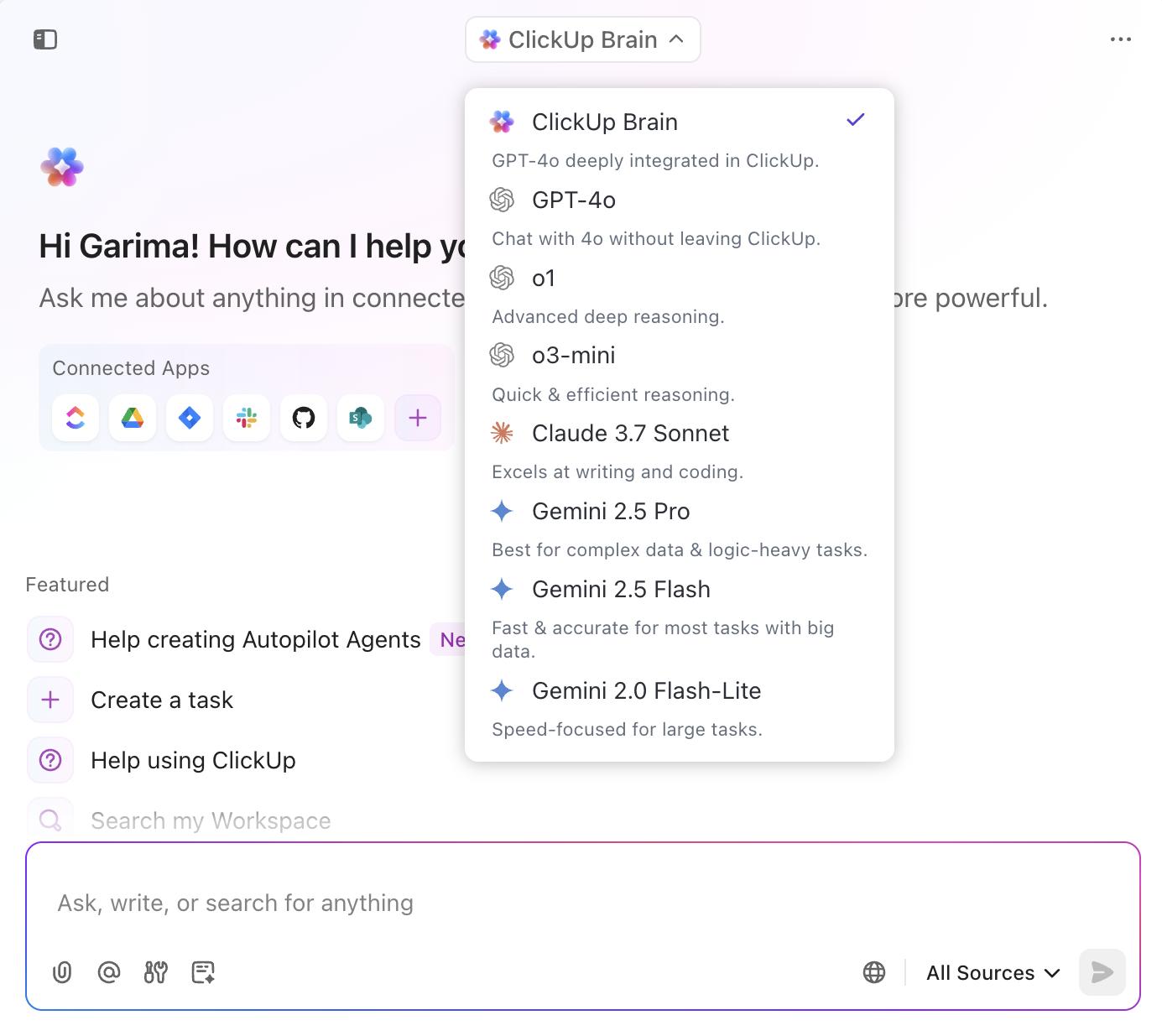
💡 Pro Tip: ClickUp lets you choose from multiple LLMs—including the latest ones from OpenAI, Claude, and Gemini—for different use cases like writing, summarizing, or coding.
ClickUp Brain, however, is the only one with access to your ClickUp workspace data for context-aware insights. For advanced automation, you can connect external LLMs (like Claude or GPT via Zapier or an MCP server) to auto-tag tasks, generate content, or triage support. Each model has trade-offs in speed, context, and creativity—so you can switch based on what you need.
These are the orchestrators in your MCP stack. Controllers and coordinators manage the logic that ties tools, models, and clients together into a working system.
Say your AI assistant receives a task: Summarize a report, send it via email, and log the result. The controller decides which model should generate the summary, which email tool to use, and the order of operations.
It’s like a conductor directing an orchestra—making sure each instrument (tool) plays at the right time.
This coordination layer is key for building multi-step workflows and complex behaviors across your agent architecture.
To keep everything discoverable and organized, MCP uses registries and agent stores.
Registries hold metadata about available tools, including what they do, what inputs they take, and where they’re hosted. This makes it easy for clients to discover and interact with tools dynamically.
Agent stores manage collections of AI agents that can be deployed, reused, or shared. Think of it as a package manager for agent behaviors.
Many open-source MCP servers also expose public registries, giving users access to pre-built connectors, shared workflows, and a growing catalog of tools maintained by the community.
🧠 Fun Fact: The MCP protocol was born out of frustration. In July 2024, Anthropic engineer David Soria Parra got tired of switching between Claude Desktop and his IDE. Inspired by the Language Server Protocol (LSP), he co-created MCP with Justin Spahr-Summers to make it easier for any application, such as an IDE, to integrate deeply with AI tools.
If you want to get your AI model to behave like a domain expert, you need to choose the right MCP tools. Let’s walk through how to pick the right ones based on your needs, data, and team setup.
Before diving into tools, get specific about what you’re building:
Each use case demands a different set of capabilities. Here’s how that typically breaks down:
| Use case | Ideal MCP features |
| Customer support chatbot | Instruction fine-tuning, retrieval augmented generation (RAG) |
| Legal document summarizer | Domain-specific fine-tuning, long context handling |
| eCommerce image tagging | Vision language models, low-latency deployment |
Clear goals help you identify what each tool in your stack actually needs to do—and prevent overengineering.
Once you’ve nailed down your use case, assess your data:
Also, consider where your data can live. If it must stay local for compliance reasons, prioritize open-source tools and self-hosted setups. If cloud is on the table, managed services can speed things up.
Planning for secure, collaborative workflows here sets the stage for smoother implementation, especially when integrating AI with broader team operations.
Your team’s expertise matters just as much as your data:
You don’t need to build everything from scratch—but you do need the right level of control, observability, and flexibility, especially if multiple teams will be contributing to tool development or usage later on.
There’s no one-size-fits-all stack, but here’s a snapshot of what’s out there:
Choose tools that give you visibility across dev and deployment environments and enable tight iteration loops between prompt design, testing, and feedback.
Good tooling isn’t just about features—it’s about fit.
The best tools not only integrate with your LLMs but also align with how your teams plan, build, and collaborate—something that’ll become increasingly important as you scale workflows across functions.
Last step: Think beyond the dev environment.
Also consider tools that help you manage deployment workflows, monitor tool usage, and support feedback loops—especially when AI is tied into broader ops like product management or customer support.
By aligning your MCP stack with your use case, data, and team workflows, you unlock scalable, cross-functional automation that doesn’t require constant maintenance.
And if you’re looking to streamline how these tools connect with your day-to-day projects, there’s a way to make that easier, too.
📖 Also Read: MCP vs. RAG vs. AI Agents: Who Leads AI?
👀 Did You Know? By autonomously handling repetitive tasks, coordinating tools, and making context-aware decisions, agentic AI can reduce response times by up to 50%. For large organizations, that translates to serious savings—up to 15,000 work hours reclaimed every month.
These time gains are especially valuable in complex environments where AI agents operate across systems like ClickUp, Slack, GitHub, and more, allowing teams to focus on strategy instead of routine operations.
Now let’s explore how MCP-compatible solutions are transforming workflows.
ClickUp, the everything app for work, is a productivity platform that can now be directly connected to the Model Context Protocol (MCP) ecosystem.
While ClickUp doesn’t natively host MCP servers, you can add one yourself to expose workspace data to external LLM agents via the MCP standard.
ClickUp’s community maintains rich open-source MCP servers that act as a bridge between agentic LLMs like Claude or ChatGPT and the ClickUp API. This makes your workspace AI-native and MCP-compatible out of the box.
Here are some of the community MCP servers’ supported capabilities:
With MCP-compatible ClickUp Integrations, you can connect to tools across your tech stack and execute workflows that span multiple platforms.
| ClickUp integrates natively with 👇🏽 | Using the best ClickUp integrations, an MCP-enabled AI agent can 👇🏽 |
| Slack/Microsoft Teams for real-time notifications | Notify team channels when blockers occur |
| Google Calendar for meeting scheduling | Schedule meetings based on task assignments |
| GitHub/Jira for syncing development status | Auto-update task statuses based on commit messages or issue resolutions |
| Google Drive/Dropbox for document management | Attach relevant documents based on the task context |
| Salesforce for CRM alignment | Update Salesforce records from task completions |
This level of orchestration enables end-to-end automation from context to action.
📌 Here’s an example:
ClickUp, however, does have Autopilot Agents or built-in AI agents that work within the platform—no MCP or extra setup is needed.
ClickUp’s Autopilot Agents interact with your workspace, manage tasks, retrieve docs, and orchestrate workflows, without manual input or platform switching.
These agents can perform complex workflows—from creating and organizing tasks to updating documents and managing project timelines—with no glue code or custom integrations.
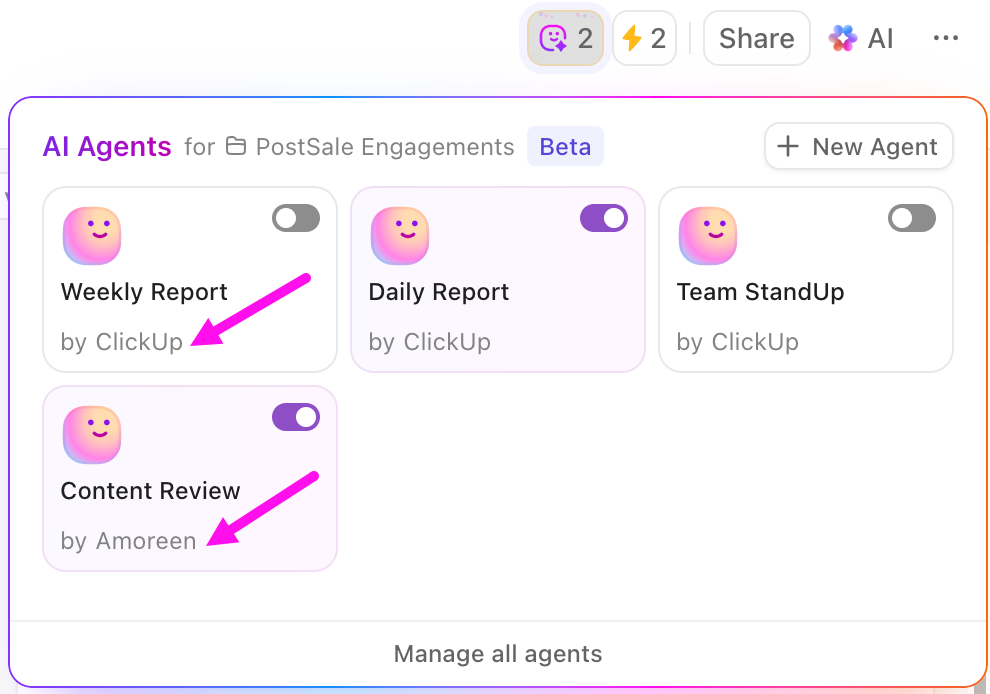
You can pick Prebuilt Autopilot Agents for sharing daily/weekly task reports, stand-ups, and auto-answering questions in ClickUp Chat. They require minimal setup—just customize their tools, triggers, and timeframe and they’ll start operating right away!
You can also build Custom Autopilot Agents using ClickUp’s no-code builder. You define triggers, conditions, instructions, knowledge sources, and tools, tailoring your agents for specialized workflows.
This is how Agents work:
📌 Here’s an example of how you’d build a custom Content Review Agent in a ClickUp Chat channel:
👉🏼 The result: Every message in the channel is intelligently reviewed for tone, clarity, and style
The bottom line? ClickUp’s Autopilot Agents combine event‑based logic with AI-driven reasoning, enabling you to build smart, context-aware automations—without code—that can proactively summarize, triage, respond, or generate content across your Workspace.
Wondering what powers these AI Agents?
ClickUp Brain is the intelligence layer behind ClickUp AI Agents. It turns your workspace into a memory-rich, context-aware environment for agents. It enables AI agents to reason, plan, and act with precision.
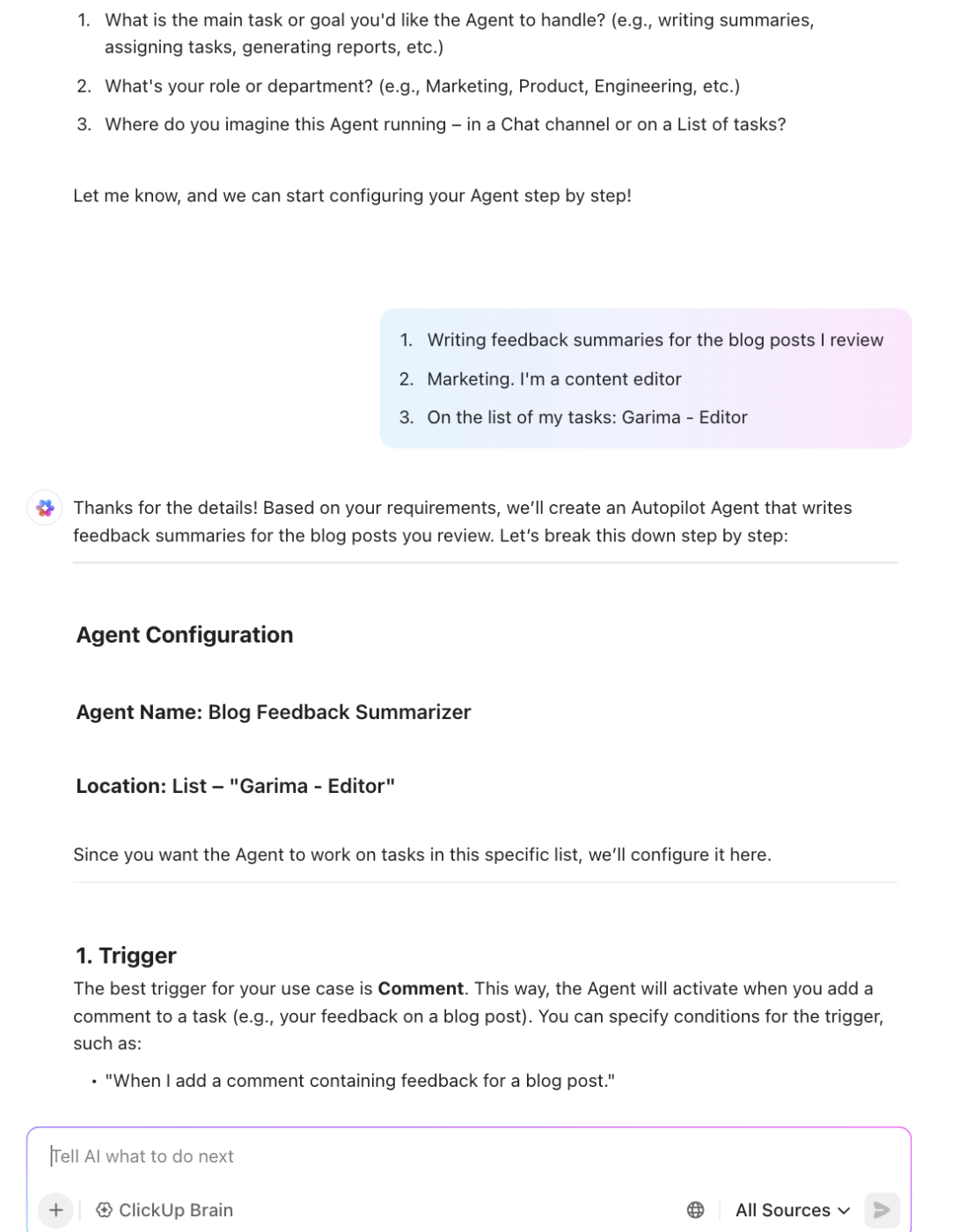
Here’s how ClickUp Brain is agent-ready by design:
| Aspect | How ClickUp Brain delivers |
| Memory | ClickUp Brain remembers data from your ClickUp Tasks, Docs, comments, and workflows in context |
| Reasoning | AI interprets intent, uses historical data, and recommends next steps |
| Planning | Agents generate tasks, goals, and schedules from natural language |
| Execution | Automations let AI update statuses, assign owners, and act across tools |
| Integrations | Native integrations with Slack, GitHub, GCal, and more for cross-platform action |
With ClickUp Brain, AI agents don’t just respond—they understand and take initiative. For example, the agent can summarize a meeting, create structured tasks with owners and deadlines, and trigger follow-up actions based on prior knowledge.
It can also pull information from third-party applications you’ve integrated into your ClickUp workspaces.
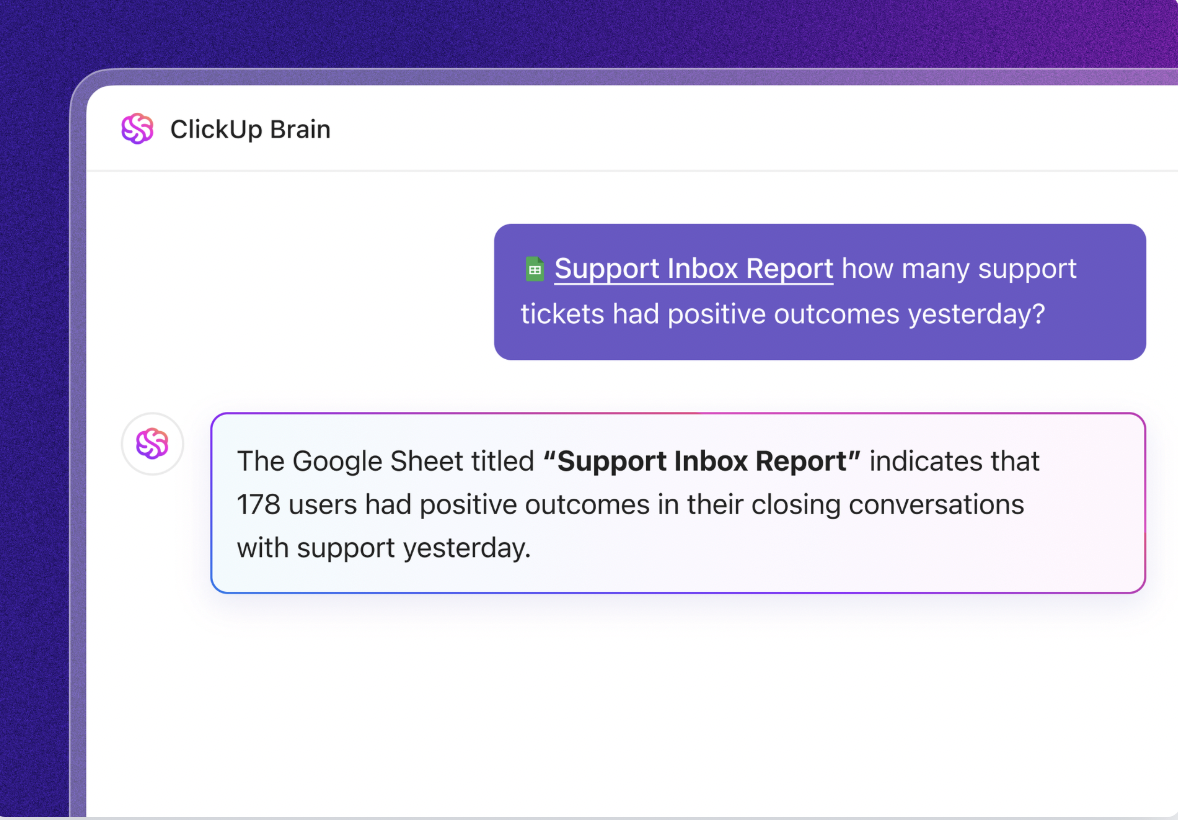
A Redditor, thevamp-queen says:
ClickUp Brain saves me a ton of back and forth honestly. I know there are AI tools with a pretty efficient free tier, but the constant switching between tabs takes a toll. And honestly, when I’m in my deep work zone, this is the last thing I want to do. I primarily use the AI for writing stuff since I’m in the content industry. It also edits what I’ve written (ah-mazing!). Another thing that really helps me is Docs. I love the formatting options, especially those banners. So cute!
Next, let’s talk about automation.
ClickUp’s native Automations already handle thousands of logic-based workflows—like assigning tasks, updating statuses, or sending Slack messages—without requiring a single line of code.
But when combined with AI features and MCP-connected LLM tools, these Automations transform from reactive workflows into intelligent, decision-making systems.
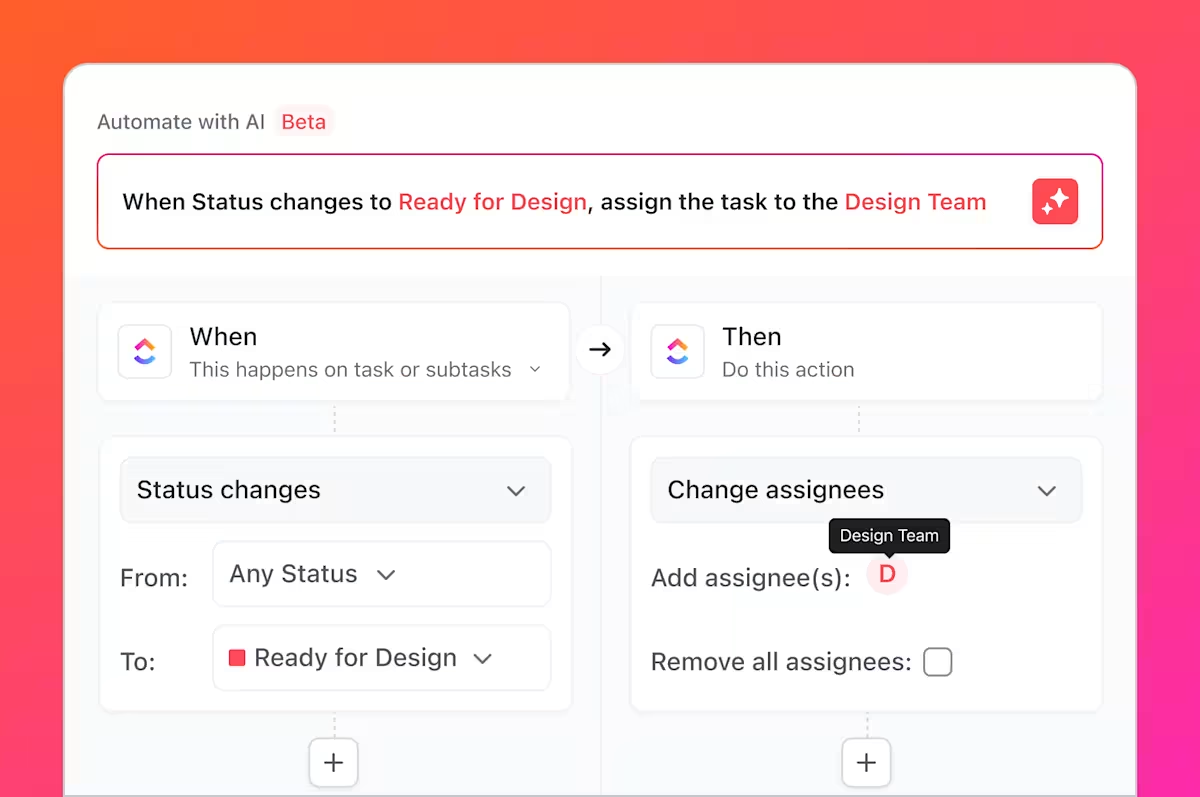
Using ClickUp Brain, you can build automations in natural language, without clicking through and selecting from dozens of triggers, conditions, and actions. 🦄
With AI, automations move beyond executing static triggers to implementing contextual intelligence.
📌 Example:
🦾 Basic automation: “When task status changes to ‘In Review’, assign to Manager.”
🤖 With AI + Automations: MCP servers act as open-source bridges between ClickUp and external LLMs like Claude or GPT. When paired with Automations, you can create workflows like: “When a comment includes feedback like ‘unclear’ or ‘incomplete’, summarize key issues and reassign the task with suggestions. ”
This enables a closed-loop workflow in which ClickUp executes logic, LLMs interpret context, and Automations take action—all without manual involvement.
Why this combo works:
| Feature | Traditional automation | With AI & MCP |
| Reactive logic | ✅ | ✅ |
| Natural language understanding | ❌ | ✅ |
| External API decisions | 🔧 (via webhook) | ✅ |
| Workspace context | ❌ | ✅ (via AI + permissions) |
| Smart summaries, tone checks, etc. | ❌ | ✅ |
Some other examples of AI + Automation in action to inspire you:
By embedding AI logic into workflow execution, ClickUp Automations turn your team’s actions into intelligent, scalable systems.
| Aspect | Description |
| Integration type | MCP server (open-source, deployable) |
| AI Agent compatibility | Claude, ChatGPT, and other agentic LLMs |
| Supported actions | Task management, updates, document retrieval, checklists, navigation |
| Use cases | Project automation, collaborative AI, knowledge retrieval |
| Developer benefits | Interoperability, modular design, fast prototyping |
📌 A standout MCP demo in the space of music is the AbletonMCP server by Siddharth Ahuja.
AbletonMCP connects AI agents (like Claude) directly to Ableton Live via a Python remote script. This MCP server allows agents to:
With this, music producers can simply say, “Create an 80s synthwave track with reverb-heavy drums,” and watch Ableton Live build the scene programmatically.
Natural language becomes the UI for music production—ideal for rapid prototyping, live experimentation, and accessibility.
📌 Another example is Blender MCP. It integrates an AI agent with Blender’s Python API, turning 3D scene creation into a conversational experience.
The agent can:
The MCP server runs locally inside Blender as a socket listener, enabling secure, low-latency, bidirectional control without cloud dependencies. This setup is ideal for iterative scene building and real-time feedback in 3D workflows.
📖 Also Read: Best ClickUp Integrations
MCP tools deliver value through the data they access and the actions they enable. But this power also introduces challenges.
⚠️ A key issue is ensuring accurate and high-quality data integration across systems. Without it, AI agents risk making decisions based on incomplete or outdated information.
🤝 Additionally, coordinating and automating complex workflows across diverse tools and teams can be challenging. Misaligned automation rules or timing issues may cause errors, such as a deployment trigger firing before the code has passed QA, leading to a broken release.
🕵️♀️ Maintaining security and privacy across interconnected systems requires rigorous controls and continuous oversight.
🛜 Reliable deployment also depends on well-documented server configurations that define access controls, rate limits, and environment variables tailored to each tool’s needs.
To address these challenges and ensure reliable performance, follow best practices that prioritize clarity, precision, and resilience:
MCP tools are already changing the game for AI agents, but the real breakthrough will come when we solve the core challenges around context, control, and coordination.
Get those right, and MCP has the potential to become the go-to interface for AI-to-tool interactions, powering a new era of intelligent, integrated, and autonomous systems across every industry.
ClickUp shows what’s possible. It’s not just integrated with MCP; it’s built to thrive in it. With modular, interoperable tools like ClickUp AI Agents, Brain, Automations, and Integrations, you can build autonomous workflows that are smarter, faster, and easier to maintain.
Try it yourself! Sign up for ClickUp and start building smooth, intelligent workflows for free.

© 2026 ClickUp

There’s an easier way. Try a free AI Agent in ClickUp that actually does the work for you—set up in minutes, save hours every week.