

What happens when the person who “knows everything” leaves?
Suddenly, workflows stall. Projects get delayed. And the team is left piecing together information from scattered docs, outdated files, and Slack messages that say, “I think [name] handled that…”
When knowledge lives in people’s heads instead of knowledge management systems, it walks out the door with them.
That’s where a clear and effective knowledge transfer process comes in—one that captures critical knowledge, speeds up onboarding, and keeps teams aligned no matter who comes or goes.
In this guide, we’ll break down the different types of knowledge, transfer methods, and challenges—and show you how to build a strategy that sticks.
✨ Plus, see how ClickUp Docs, AI, and plug-and-play templates make it easy to create a management system your whole team can rely on.
How to Build a Scalable Knowledge Transfer Process
- What is Knowledge Transfer?
- Understanding the Types of Knowledge
- Why Is Knowledge Transfer Important?
- Knowledge Transfer Methods
- What Does Knowledge Transfer Achieve?
- How to Create a Knowledge Transfer Process
- Step 1: Gather information for the KT process
- Step 2: Structure Knowledge for Long-Term Use
- Step 3: Choose your dissemination method
- Step 4: Supercharge Knowledge Transfer with ClickUp AI & AI Agents
- Step 5: Gauge your success
- Step 6: Automate Knowledge Transfer Workflows
- Step 7: Track Engagement and Acknowledgment
- Step 8: Centralize Feedback and Continuous Improvement
- Step 9: Integrate with Other Tools
- Step 10: Visualize the Knowledge Transfer Process
- Step 11: Secure and Control Access
- How to Create a Knowledge Transfer Plan (+ Template)
- Simplify Your Knowledge Transfer Process With ClickUp
- FAQs

 Summarize this article for me please
What is Knowledge Transfer?
Knowledge transfer (KT) is the process of sharing information, skills, and expertise across teams or individuals. It ensures that critical knowledge isn’t lost—and that people have access to the tools and context they need to succeed.
It can occur between individuals (like a mentor training a new employee), between departments (like engineering sharing best practices with product), or even between organizations (like a university and a startup collaborating).
It involves conveying valuable insights, best practices, lessons learned, or technical know-how to help others learn and use that knowledge in work-related situations.
📌 Use ClickUp Docs to turn organizational knowledge into searchable, accessible content for your entire team.
Summarize this article for me pleaseUnderstanding the Types of Knowledge
Not all knowledge is shared—or even shareable—the same way. Here’s how to tell the difference.
Explicit Knowledge
Information that can be documented and shared easily, like SOPs or written documentation.
📌 Example: A refund process outlined in ClickUp Docs.
Tacit Knowledge
Experiential knowledge that’s hard to write down. Think intuition or deep know-how.
📌 Example: A senior engineer demonstrating a debugging process in a 1:1 meeting.
Implicit Knowledge
Knowledge that hasn’t yet been documented—but could be.
📌 Example: A marketing lead’s go-to copy review process that lives in their head.
💡 Pro Tip: Use ClickUp AI to turn meetings, chats, or recordings into structured documentation for knowledge capture and reuse.
📮 ClickUp Insight: 46% of knowledge workers rely on a mix of chat, notes, project management tools, and team documentation just to keep track of their work. For them, work is scattered across disconnected platforms, making it harder to stay organized. As the everything app for work, ClickUp unifies it all. With features like ClickUp Email Project Management, ClickUp Notes, ClickUp Chat, and ClickUp Brain, all your work is centralized in one place, searchable, and seamlessly connected. Say goodbye to tool overload—welcome effortless productivity.
Summarize this article for me pleaseWhy Is Knowledge Transfer Important?
Without intentional knowledge transfer activities, businesses risk losing valuable know-how, duplicating effort, and slowing down innovation. Here’s why it matters:
✅ Preserves institutional knowledge and ensures knowledge retention when employees leave or change roles
✅ Speeds up onboarding and encourages employees to develop new skills through structured mentorship programs and peer learning
✅ Improves collaboration across teams through knowledge sharing culture and modern collaboration tools`
✅ Supports organization development and professional development by sharing practical skills and expertise
✅ Drives efficiency by reducing knowledge barriers and enabling teams to apply knowledge consistently
Summarize this article for me pleaseKnowledge Transfer Methods
There are many ways to facilitate knowledge transfer, and the best method often depends on the type of knowledge and who it’s being shared with. The goal is to create a successful knowledge transfer strategy that is repeatable and adaptable.
- Documentation: Write it down in ClickUp Docs and distribute knowledge across your workspace with ease. This method supports the distribution of knowledge and helps ensure the knowledge cycle continues.
- Mentorship: Pair up experienced team members with newer employees to share collective knowledge through conversation and feedback
- Training sessions: Conduct formal training and live walkthroughs to teach practical skills in a group setting
- Job shadowing: Let employees gain hands-on experience by observing others. This is key in transferring key knowledge through immersive learning
- Automated processes: Use digital tools to build systems that proactively store knowledge, collect knowledge, and guide learners through critical workflows
Summarize this article for me pleaseWhat Does Knowledge Transfer Achieve?
Consider the wealth of knowledge within your organization and, more crucially, contemplate how much this knowledge is disseminated.
Critical knowledge is often not passed down or retained within your organization due to a lack of proper knowledge transfer management.
The primary goal of knowledge transfer is to prevent this tragedy from happening. Envision how you could boost progress and efficiency by using internal knowledge management.
By fostering an environment of shared expertise and experiences, your team members will know what works, avoid mistakes, and make better decisions to improve performance, productivity, and your bottom line.
Common Knowledge Transfer Challenges—and How to Fix Them
Even with the best intentions, a critical process like knowledge transfer can fall flat without the right structure. Here are the most common hurdles organizations face—and how ClickUp helps you overcome them.
🧱 1. Information Hoarding
People are often reluctant to share knowledge if they fear losing control or job security.
✅ ClickUp Fix: Assign ownership for documentation and create transparent workflows. Use shared Docs to transform individual insights into a key resource for the entire team.
🕳️ 2. Tribal Knowledge That’s Never Captured
Valuable know-how often exists only in someone’s head—and vanishes when they leave.
✅ ClickUp Fix: Use AI to extract and document insights from meetings, interviews, or coaching sessions, ensuring knowledge capture is proactive—not reactive.
🌀 3. No Central Knowledge Hub
If information is scattered across platforms, it becomes harder to maintain a knowledgeable workforce.
✅ ClickUp Fix: Consolidate internal knowledge into one workspace with Docs, Tasks, Folders, and the Docs Hub—so everything is searchable and connected to work.
⏳ 4. Last-Minute Transfers During Offboarding
When someone’s leaving, knowledge transfer often becomes a rushed afterthought.
✅ ClickUp Fix: Start the process early with a predefined template, assign deadlines, and automate task handoffs to support ensuring business continuity.
🔁 5. No Feedback Loop or Ownership
You share knowledge once—but no one updates it, owns it, or checks if it was understood.
✅ ClickUp Fix: Assign reviewers, collect feedback using survey tools, and create recurring reminders to update resources so your sharing mechanism evolves with your team.
💡 Pro Tip: Add a short quiz or checklist at the end of every knowledge Doc to ensure the recipient has understood the information. You can even automate feedback collection with ClickUp Forms.
Summarize this article for me pleaseHow to Create a Knowledge Transfer Process
An effective knowledge transfer (KT) process doesn’t happen by accident—it’s the result of intentional str`ucture, smart tooling, and team-wide commitment. Whether you’re preparing for team growth, reducing dependency on individual contributors, or just tired of repeating the same explanations over and over, building a robust KT system is the solution.
ClickUp empowers teams to create and scale knowledge transfer with ease—combining documentation, automation, and intelligent AI support in a single management system.
Step 1: Gather information for the KT process
Start by identifying the types of knowledge that are critical to your team’s success. This includes everything from technical SOPs and client insights to undocumented workflows and tribal knowledge stored in people’s heads.

ClickUp Docs is the foundational tool to capture and centralize knowledge. You can create structured documents for SOPs, onboarding guides, playbooks, and more. Use nested pages and relationships to connect Docs to relevant tasks, goals, and departments.
- Use headings, tables, and bookmarks for clear formatting
- Link to related Docs, tasks, or dashboards directly inside your document
- Set permissions for editing, commenting, or viewing to ensure clarity and security
💡 Pro Tip: Use ClickUp Clips to record knowledge walk-throughs. For example, a product manager could record a tour of a feature spec while explaining key decisions, then link that Clip to the development task.
📌 Example: A sales team can centralize email scripts, qualification frameworks, and objection-handling guides within a Sales Wiki in ClickUp Docs—ensuring every part of the sales process is documented and easy to access
Step 2: Structure Knowledge for Long-Term Use
Capturing knowledge isn’t enough—it needs to be logically structured so teams can find and use it instantly.

ClickUp’s Project Hierarchy + Smart Folders + AI tagging
ClickUp’s customizable hierarchy (Spaces → Folders → Lists → Tasks → Subtasks) lets you mirror how your team actually works. Structure your knowledge base using:
- Spaces for departments (e.g., Engineering, Marketing)
- Folders for function (e.g., Campaigns, Onboarding)
- Lists for individual processes or programs
- Tasks to manage documentation updates
Use Smart Folders to auto-group documents and resources by tags, custom fields, or usage. Let ClickUp AI recommend tags and detect themes in documentation to make searching easier.
📌 Example: The HR team uses a Smart Folder to automatically group all policy Docs tagged “Compliance” and “Remote Work.” When new employees onboard, they receive a filtered view with only relevant resources.
Step 3: Choose your dissemination method
Even the best documentation won’t matter if it’s not shared in the right way. Choose your KT method based on the type of knowledge (tacit vs. explicit) and how your audience learns best.
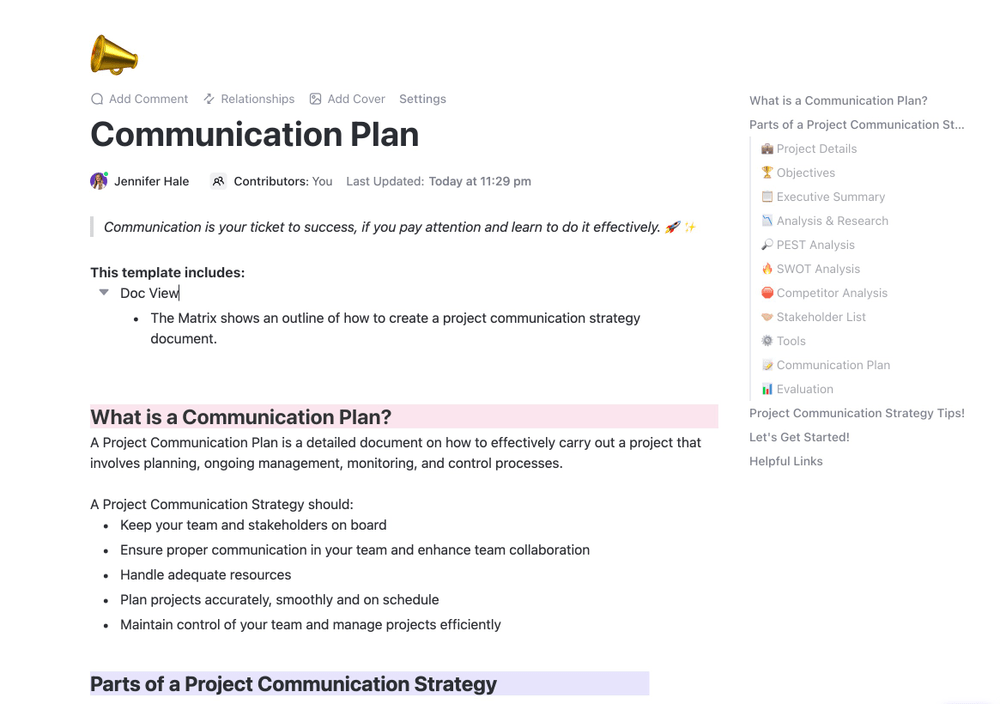
ClickUp Communication Plan Template
This template helps lay out timelines, methods, responsibilities, and follow-ups. Here are four dissemination methods with ClickUp-enhanced execution:
👥 Mentorship
- Assign mentors using Custom Fields in ClickUp
- Use recurring tasks to track bi-weekly 1:1 sessions
- Store notes and goals in shared Docs with AI-powered summarization
📌 Example: A new engineering hire is paired with a mentor whose Docs are pre-tagged in the onboarding task list. AI Agents track their milestones and send nudges when tasks are incomplete.
🎥 Modeling
- Use Clips to visually walk through a workflow
- Embed those Clips in Docs or task descriptions
- Automate reminder tasks to revisit and practice the skills
📌 Example: A senior designer records a Clip explaining a complex Figma handoff process and embeds it into the “Design QA” Doc. Every new hire in Design receives this as a required step.
🕵️♀️ Work Shadowing
- Assign observer access to relevant projects
- Use task followers and Watchers for real-time updates
- Summarize key learnings in a shared Doc after each session
📌 Example: A product marketer shadows the Growth PM for two sprints. Tasks are followed, Docs are shared, and a wrap-up summary is written by the shadowing employee and reviewed by their manager.
🤝 Collaborative Techniques
- Use ClickUp Whiteboards to brainstorm in real time
- Use AI Meeting Summaries to document decisions
- Convert whiteboard sticky notes into actionable tasks
📌 Example: During a strategy workshop, the leadership team uses ClickUp Whiteboards to map objectives. AI captures and organizes the ideas into strategic Docs, assigned to owners via tasks.
Step 4: Supercharge Knowledge Transfer with ClickUp AI & AI Agents
ClickUp AI and AI Agents transform static documentation into a living, evolving knowledge ecosystem.
✨ AI-Powered Summarization & Content Generation
- Use AI to convert meetings into Docs, Docs into guides, and guides into tasks
- Draft personalized onboarding Docs for each role using existing task history and process templates
🤖 AI Agents for Automated Knowledge Transfer

- Create an AI Agent that answers common onboarding questions in Docs
- Let AI Agents route new questions to subject matter experts if they can’t answer
- Assign tasks based on roles and doc interactions automatically
🧠 Smart Knowledge Gap Detection
- Detect when Docs are outdated, underused, or over-edited
- Use activity heatmaps to flag which processes are being neglected or over-relied on
🔍 AI-Driven Search & Recommendations
- Enable employees to search Docs in natural language
- Display “Related Docs” sidebars based on semantic relevance, not just tags
📝 Meeting Notetaker & Transcription
- Automatically record and summarize meetings
- Push summaries into Docs or tasks and distribute via automations
📚 Continuous Learning & Onboarding
- Auto-create onboarding flows using past employee journeys
- Quiz employees with AI-generated questions pulled from key Docs
- Track learning completion via checklist automation and custom fields
Step 5: Gauge your success
Success in knowledge transfer means effectively adopting and applying the transferred knowledge, leading to improved performance, innovation, and problem-solving.
Use ClickUp AI to automatically generate comprehensive reports and analyze the data to surface actionable insights for future knowledge transfer undertakings.
Feed your market report into the software, and the raw data will automatically be converted into a comprehensive report. The AI uses this to give you data-driven insights, identify pain points, and help reorganize your business operations.
Step 6: Automate Knowledge Transfer Workflows
Manual processes lead to bottlenecks and inconsistencies. Automating your KT workflows in ClickUp ensures nothing slips through the cracks.
- Create Automations to trigger actions when a Doc is created or updated. For example, when a team member updates a training manual, ClickUp can automatically notify relevant departments to review the changes.
- Use conditional logic: Automatically assign onboarding tasks when a new hire is added to a team List.
- Set recurring tasks for quarterly documentation audits, policy updates, or knowledge base reviews so that content stays fresh and relevant.
📌 Example: When a marketing process Doc is updated, an automation sends alerts to the Sales, Product, and Customer Success teams with a link to review and acknowledge the changes.
Step 7: Track Engagement and Acknowledgment
Knowing if people are engaging with the knowledge is just as important as sharing it.
- Add Custom Fields to tasks for recipients to check off once they’ve reviewed or applied the knowledge.
- Use checklists within Docs to prompt readers to acknowledge understanding or complete follow-up tasks.
- Enable ClickUp’s Activity view to see who has viewed, edited, or commented on a Doc.
📌 Example: In an onboarding project, include a “Doc Acknowledgment” custom field. Use Dashboards to visualize how many new hires have completed each required training step.
Step 8: Centralize Feedback and Continuous Improvement
A feedback loop is critical to improving knowledge quality, increasing usability, and helping teams improve the quality of documentation and processes over time.
- Encourage real-time feedback: Team members can comment directly within ClickUp Docs to flag missing information or request clarification.
- Use ClickUp Forms to collect structured feedback at the end of onboarding programs or training series.
- Tag collaborators in Docs or tasks to review content and suggest revisions. You can track comment resolution for accountability.
📌 Example: After completing a new feature training, users submit a ClickUp Form evaluating the clarity and completeness of the Docs. Responses automatically generate tasks for content updates.
Step 9: Integrate with Other Tools
Centralizing knowledge doesn’t mean isolating it. Integrate ClickUp with the rest of your tech stack for seamless visibility and access.
- Embed Google Drive files, Loom videos, or Miro boards directly into ClickUp Docs.
- Send automated Slack messages or Microsoft Teams notifications when KT tasks are updated.
- Use Zapier or Make to connect ClickUp with HRIS or LMS platforms for syncing training status and onboarding progress.
📌 Example: When a ClickUp onboarding task is completed, it triggers an update in the LMS system to mark the user as certified.
Step 10: Visualize the Knowledge Transfer Process
Seeing the full picture helps stakeholders understand and trust the KT process.
- Use ClickUp Whiteboards to visually map out who owns what knowledge, where it’s stored, and how it moves between people or departments.
- Design KT workflows with start-to-finish visibility, including triggers, tasks, and validation steps.
- Build a Dashboard to monitor progress, showing how many Docs have been reviewed, how many knowledge assets are pending updates, and which stakeholders are involved.
📌 Example: A product team Whiteboard shows the lifecycle of feature documentation—from draft to review to knowledge base entry—linked to tasks and Docs in real time.
Step 11: Secure and Control Access
Not all knowledge is meant for everyone. Maintain confidentiality and compliance with ClickUp’s granular permission settings.
- Control who can view, edit, or comment on Docs, Lists, or entire Spaces.
- Share Docs externally with expiring links for contractors or clients while keeping internal Docs protected.
- Use role-based access for sensitive content, such as HR policies or product roadmaps.
📌 Example: A financial policy Doc is shared internally with the Finance and Legal teams but is restricted from being edited or accessed by other departments.
Summarize this article for me pleaseHow to Create a Knowledge Transfer Plan (+ Template)
A solid knowledge transfer plan ensures that vital information doesn’t get lost in Slack threads, notebooks, or a departing employee’s brain. Whether you’re onboarding a new hire, preparing for a team handoff, or scaling internal documentation, a plan gives structure to your process.
✍️ What to Include in a Knowledge Transfer Plan
Here’s what a typical plan should cover:
- What knowledge needs to be transferred: Is it process-related? Technical? Tribal?
- Who’s involved: The knowledge owner, recipient, and any collaborators.
- Best method for transfer: Docs, video walkthroughs, 1:1 sessions, or all of the above.
- Timeline: When the handoff should start and finish.
📋 Here’s a brief overview of essential components to include in every knowledge transfer plan:
| Section | What to Include |
|---|---|
| Knowledge Summary | What’s being transferred and why it matters |
| Owner | Person currently responsible |
| Recipient | Person or team receiving the knowledge |
| Transfer Method | Docs, Tasks, Mentoring, Meetings |
| Completion Criteria | What shows that the transfer is successful |
🎯 Streamline this process in ClickUp
Don’t start from scratch. We’ve built a Knowledge Base Template you can customize in seconds.
Summarize this article for me pleaseSimplify Your Knowledge Transfer Process With ClickUp

Edit in real-time alongside your team. Tag others with comments, assign them action items, and convert text into trackable tasks to stay on top of ideas.
Knowledge transfer is crucial to keep your team motivated, skilled, and adaptable. ClickUp facilitates your KT process with its documentation and management features.
Use ClickUp Docs with AI-based writing tools to generate inspiring and data-filled speeches. Plan your communication cycle with pre-built communication templates, and allow your teams and departments to collaborate on a shared and unified platform.

Access everything in one place by linking Docs and tasks together. Add widgets to update workflows, change project statuses, assign tasks, and more—all within your editor.
ClickUp Docs lets you easily connect all your essential data to workflows and execute ideas with your team. It offers powerful styling and formatting options to ensure your knowledge transfer material always conveys the right point.
Further, it lets you collaborate in real-time with your team by helping you make edits together. Mention team members within comments, delegate tasks by assigning action items, and transform the text into traceable tasks to manage and keep track of your ideas effectively.

Easily protect your Docs with privacy and edit controls. Create shareable links and manage permissions for team, guest, or public access.
ClickUp AI does everything you’d want your ideal virtual assistant to do—from brainstorming ideas to creating quick emails and offering suggestions to let you finish the most critical and challenging tasks in a jiffy.
ClickUp offers one of the most efficient and effective knowledge transfer options. Try ClickUp for free to gain knowledge and enjoy success!
Summarize this article for me pleaseFAQs
What are the 4 stages of knowledge transfer?
The four key stages are:
- Capture: Gather essential knowledge from individuals or sources.
- Organize: Structure and store information so it’s easy to access.
- Distribute: Share knowledge with the right people at the right time.
- Apply: Put shared knowledge into action to improve performance.
💡 Streamline every stage with ClickUp Docs and ClickUp AI for seamless capture, organization, and sharing.
What are the three types of knowledge transfer?
- Explicit knowledge: Easily documented and shared, like manuals or guides.
- Tacit knowledge: Personal insights and experiences that are harder to express but critical for expertise.
- Implicit knowledge: Know-how gained through practice, often unspoken until applied.
💡 ClickUp makes all three types easier to transfer with task tracking, collaborative docs, and AI-powered summaries.
What is a KT plan?
A Knowledge Transfer (KT) plan is a structured process that outlines how critical information will be shared during employee transitions, team changes, or project handoffs. It ensures continuity and minimizes disruptions.
What is another word for knowledge transfer?
Other terms include:
- Knowledge exchange
- Knowledge sharing
- Knowledge handoff
- Information dissemination


Everything you need to stay organized and get work done.

Recent Articles
20 SMART HR Goals & Examples for Real Results in 2026 
20 SMART HR Goals & Examples for Real Results in 2026
Project Management Calendar: How To Build One That Works 
Project Management Calendar: How To Build One That Works
50 Writing Prompts to Transform Your Creative Process at Work
50 Writing Prompts to Transform Your Creative Process at Work
