


To create a standout product in today’s competitive market, you must understand your customer’s needs and preferences. A customer-centric approach is key to building loyalty, attracting new clients, retaining existing ones, and increasing profits.
However, as customer preferences change, deciding which product features to prioritize can be challenging. The Kano Model offers a structured method for analyzing a feature’s impact on customer satisfaction.
In this post, we present a Kano Model analysis guide with examples of how to implement the model and how it can boost your business strategy.
How to Implement Kano Model Analysis (+ Examples)

 Summarize this article for me please
Understanding the Kano Model
The Kano Model, developed by Dr. Noriaki Kano in 1984, is a framework for categorizing and prioritizing product features based on their impact on customer satisfaction and lifecycle management.
Rooted in the idea that emotional responses drive customer satisfaction, the model helps assess which features meet basic expectations, which enhance satisfaction, and which delight customers. Like agile prioritization techniques, this model aids in aligning features with customer needs to maximize satisfaction and loyalty.
This product management framework categorizes product features into the following five distinct types based on their impact on customer satisfaction:
- Must-have features: Also known as must-be features, these attributes are crucial for market acceptance, and their absence results in dissatisfaction. For example, functional seatbelts in cars are a fundamental safety requirement that customers expect, and a call function in smartphones is one of the basic features of a communication device
- Performance features: These features have a direct positive impact on satisfaction; the better the performance, the higher the customer satisfaction. For example, a larger gas tank in a vehicle extends the driving range between refueling, which enhances convenience. Similarly, extended battery life in electronics reduces the need for frequent charging, increasing usability and contributing to an overall improved user experience
- Indifferent features: Such features neither improve nor detract from customer satisfaction, regardless of their presence. Customers typically view them as irrelevant to their overall experience. For instance, the style of a product’s logo generally does not affect its functionality or user experience. Similarly, the number of ringtones available on the phone usually has little impact on its core appeal or performance for most users
- Attractive features: An attractive feature adds significant value and can drive impulse buys and repeat purchases. An example is an extra cover included with a new smartphone, which adds protection and style. Special promotional offers, such as discounts or complimentary accessories, can also enhance perceived value and encourage customer loyalty
- Reverse features: These are features that cause dissatisfaction and are often considered undesirable. For example, complex visual formatting in an instruction manual may frustrate customers who prefer a straightforward, step-by-step text format
Customer responses gathered through surveys help classify the feature into one of the Kano Model’s categories, guiding product decisions intended to satisfy customers.
Summarize this article for me pleaseSurvey Methodology for the Kano Model
Creating a Kano Model survey helps capture and understand customer expectations, perceptions, and needs, enhancing the customer-centricity of your products.
How to design a Kano Model survey
To design the survey questionnaire, brainstorm and select the features you want to assess.
For every feature, ask the target audience two sets of questions:
- Functional question: How would you feel if this feature were present in product X?
- Dysfunctional question: How would you feel if this feature were absent from product X?
Provide a set range of responses for both questions:
- I like it
- I expect it
- I am neutral
- I can tolerate it
- I dislike it
After creating the survey, send it to your team for pilot testing to identify any unclear or ambiguous language. Address these issues, then distribute the final questionnaire to your target audience via email, social media, and other channels.
Follow effective customer management strategies to increase survey participation and engagement. This will help ensure your survey accurately captures customer preferences that maximize customer delight.
Evaluating responses from the Kano Model questionnaire
After collecting customer responses, the next crucial step is to analyze and evaluate them.
Here’s how you can do it:
Step 1: Categorize individual responses: Analyze the combination of answers from each participant for both functional and dysfunctional questions. Use the table below to classify the responses for each feature
| Functional | Dysfunctional | Category | ||
| I expect it | + | I dislike it | → | Must-have |
| I like it | + | I dislike it | → | Performance |
| I like it | + | I am neutral | → | Attractive |
| I am neutral | + | I am neutral | → | Indifferent |
| I dislike it | + | I expect it | → | Reverse |
Let’s look at an example to understand the table above: say you’re designing a new car. If most drivers expect airbags (functional) and dislike not having them (dysfunctional), airbags are a must-have feature—they are essential. This table shows the categories that are the result of the combination of the functional and dysfunctional responses.
Note: If a participant provides an illogical or inconsistent answer, such as ‘I like it’ for both functional and dysfunctional questions, classify the response under the special category ‘questionable.’
Step 2: Conduct aggregate analysis: After categorizing individual responses, create a summary table to consolidate the data. For each feature, calculate the percentage of responses in each category relative to the total responses. This analysis will help you understand the relative position of feature categories
Step 3: Identify the final category for each feature: After calculating the percentages for each category, determine the category with the highest percentage for each feature. Create a column labeled ‘Result/Final Feature Category’ and list the category with the highest percentage for each feature
To make evaluating responses easier, consider using productivity tools that simplify data analysis and streamline the process.
ClickUp stands out as a comprehensive solution for managing and organizing your evaluation tasks efficiently.
How ClickUp can assist in survey creation and data collection
ClickUp, as an all-in-one productivity platform, offers a range of powerful features that simplify Kano Model survey creation, data collection, and analysis.
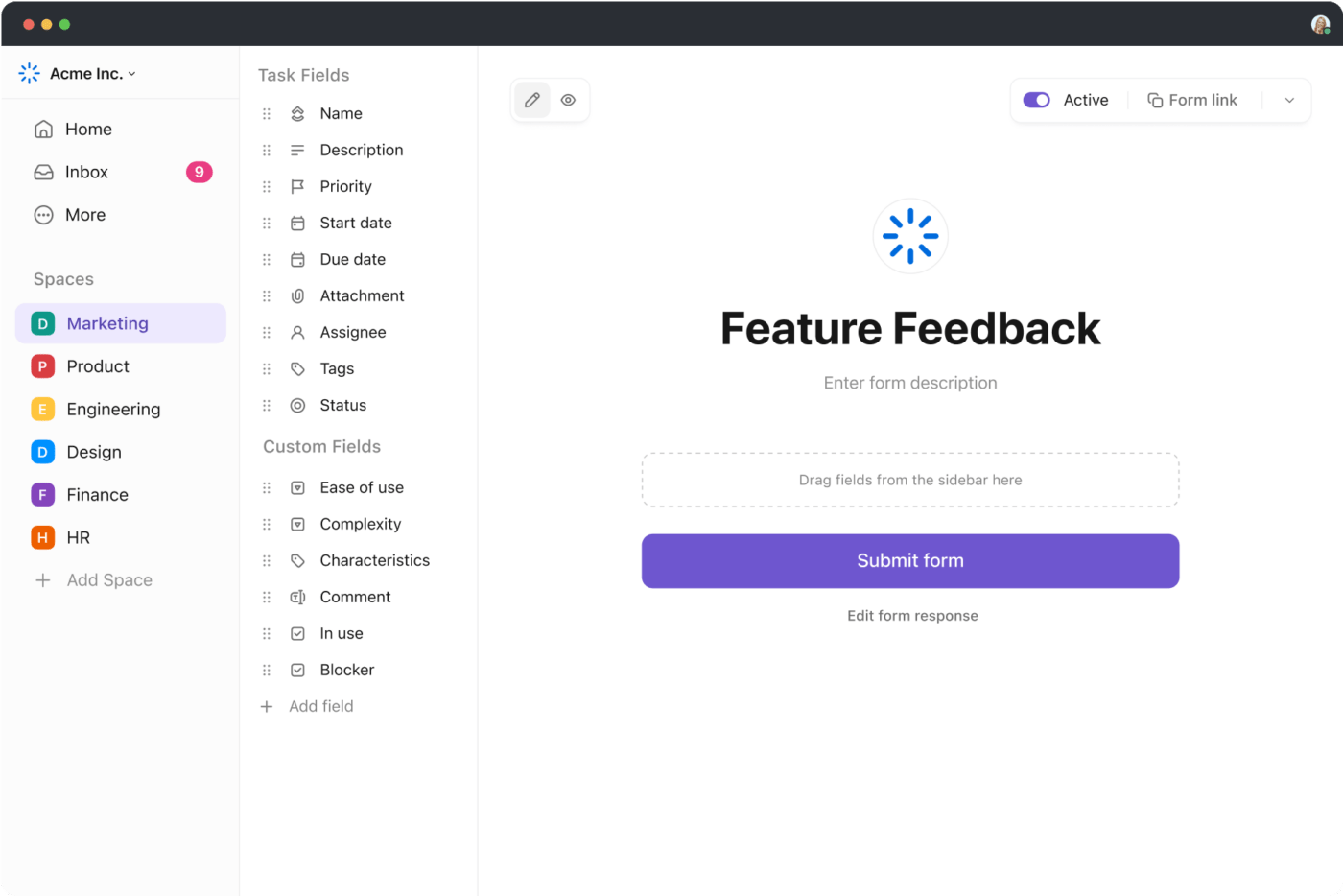
ClickUp Forms allows you to create well-formatted surveys for a variety of purposes and easily gather relevant data and feedback from customers. Moreover, you can take action promptly by converting responses into trackable tasks. This streamlines the process of data collection, ensures timely follow-ups, and enhances the overall efficiency of managing survey results.
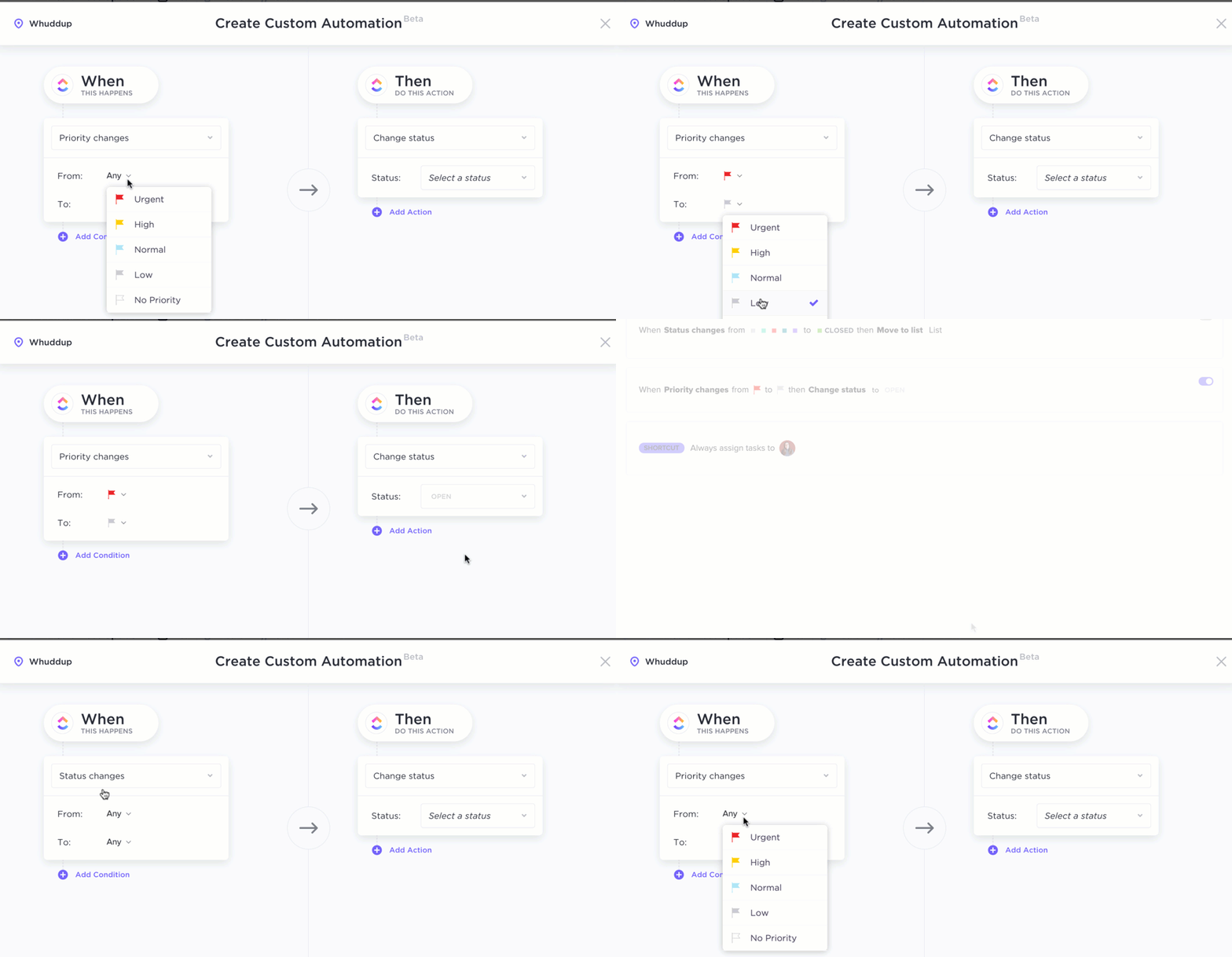
Once you collect the data, ClickUp Automations can streamline the process of categorizing individual responses by automating repetitive tasks. You simply need to set up rules and define criteria for tagging responses.
For instance, you can create a rule that assigns the ‘Performance’ tag to responses containing keywords such as ‘like it’ or ‘dislike it’ related to a specific performance feature.
After configuring the triggers and conditions, ClickUp Automations automatically categorizes responses based on the defined keywords, saving you time and effort.
How to use ClickUp for data analysis and visualization

With ClickUp Dashboards, you can visualize your data using charts and graphs, making it easy to identify key trends and patterns. This lets you quickly grasp the proportionate value of each response category for every feature, helping you easily pinpoint the final feature category at a glance.
It helps you monitor survey progress, analyze response categories, and generate detailed reports, making data interpretation more efficient and actionable.

ClickUp’s Kano Model Whiteboard Template simplifies the analysis and interpretation of Kano Model questionnaire results. It helps you categorize and prioritize features, identify high-value areas, and track your product development efforts over time.
This way, it helps you:
- Prioritize features based on customer feedback and satisfaction
- Identify critical areas for improvement to enhance product quality
- Monitor progress in product development and customer satisfaction
- Align product features with customer expectations and needs
- Streamline decision-making with clear, visual insights into feature impact
Bonus Tip: Use customer success software to streamline customer management. This way, you can centralize data, automate tasks, and track key metrics that affect customer satisfaction.
Summarize this article for me pleaseUse Cases and Examples of the Kano Model
The Kano Model survey is particularly useful for projects with tight deadlines or limited budgets. It helps you pinpoint which features to prioritize to create a product or service that impresses and satisfies customers.
Here are several contexts and scenarios where the Kano model is beneficial:
Product feature development
The Kano Model assists product discovery and development teams create feature-rich products that customers expect. For instance, if a company is developing a new smartwatch, the Kano Model survey helps distinguish between essential features (such as heart rate monitoring) and those that can offer a competitive advantage (like sleep tracking and stress management features).
Marketing campaigns
Marketing teams can use the Kano Model to design targeted campaigns that align with customer preferences.
For example, when launching a new home appliance, the model helps identify standout features (such as a unique voice command system or an in-built recipe assistant) that can be emphasized in advertisements and promotions to generate buzz, create excitement, and boost the product’s market appeal.
Product evaluation and improvement
After a product launch, the Kano Model helps product managers assess how well the product meets customer expectations.
For instance, an online food delivery app can use the model to gather feedback on basic features like user interface design and checkout options. This helps identify crucial performance features, such as accurate real-time order tracking and responsive customer support, that are vital for customer satisfaction and may need improvement.
Healthcare solutions
The Kano Model helps healthcare companies design patient-focused apps by balancing essential features and performance attributes.
For instance, it can guide the inclusion of must-have features like secure user authentication, performance features like tracking key health metrics, and attractive features such as personalized health tips. This ensures the app is both functional and exceeds patient expectations, ultimately enhancing the overall patient experience and increasing customer satisfaction.
Automotive industry
Car manufacturers can use the Kano Model to enhance customer satisfaction by identifying and prioritizing features.
The model helps distinguish between essential features like safety airbags, performance attributes like a larger fuel tank, and appealing extras like an advanced entertainment system. By incorporating a mix of these features, manufacturers can create car models that are both satisfying and attractive to customers.
Streaming platforms
Streaming platforms use the Kano Model to refine their services and attract new users. It helps them identify key features that enhance the user experience, such as AI-driven recommendations and desirable extras like exclusive content offers. This approach ensures the platform meets user expectations and stands out in a competitive market.
Many companies have used the Kano Model to enhance various aspects of their operations, from product development to marketing strategies.
Here’s how some well-known companies have used the Kano Model to their benefit:
- Apple: Apple used the Kano Model to enhance customer satisfaction by focusing on features that exceeded expectations. For example, Apple’s sleek, user-friendly design and innovations like the magnetic laptop power cord demonstrate how the model helps identify and integrate features that delight customers. This approach has strengthened Apple’s customer satisfaction and brand loyalty
- Tesla: Tesla used the Kano Model to stand out in the luxury car market. They blend high-performance features like rapid acceleration and long battery life with the unique appeal of electric cars and advanced technology to exceed customer expectations
Summarize this article for me pleaseAddressing the Limitations of the Kano Model
The Kano Model is a powerful tool for understanding customer needs and preferences, but it does have some limitations that can impact its effectiveness.
Here’s a closer look at these challenges:
- Time-consuming research: Using the Kano Model effectively requires identifying and defining a range of potential features. This necessitates thorough market, competitor, and customer research. Conducting this research can be time-consuming and resource-intensive, as it demands a deep understanding of what features are relevant and valuable to your audience
- Respondent fatigue: The Kano Model survey can become lengthy and burdensome for respondents, especially when evaluating numerous features. This fatigue can lead to disengagement and diminished quality of responses, which affects the reliability of the data collected
- Complex analysis: Interpreting the results of a Kano survey involves sorting through detailed responses and categorizing features into basic, performance, and excitement attributes. This analysis can be complex, particularly with large datasets, and requires a nuanced understanding of the model to derive meaningful insights
Here’s how you can address these limitations:
- Combine research methods: Use the Kano Model alongside qualitative methods like interviews and focus groups. This approach provides deeper insights into customer needs and helps identify key features without extensive pre-survey research
- Apply adaptive survey techniques: Limit the number of features in the survey or use adaptive techniques to focus on the most important ones. This reduces respondent fatigue and contributes to more effective quality management
- Utilize data analysis tools: Use productivity tools like ClickUp to streamline and speed up the analysis of survey responses. This way, you can efficiently manage and interpret data, ensuring timely and accurate insights for your decision-making
Summarize this article for me pleaseSimplify Kano Model Analysis with ClickUp
The Kano Model identifies features that enhance customer satisfaction and drive product success. Integrating Kano analysis into your product development process helps create offerings that delight your customers and boost sales.
However, implementing the Kano Model can be challenging–this is where ClickUp can be a game changer. With its robust product management features and customizable templates, it simplifies the Kano analysis process, making it easier to implement and assess. Beyond the analysis phase, ClickUp helps you manage customer relationships and ensure ongoing product success.
So why wait? Sign up on ClickUp and streamline your Kano Model analysis process today!


Everything you need to stay organized and get work done.

Recent Articles
How to Automate the Product Lifecycle from Brief to Launch 
How to Automate the Product Lifecycle from Brief to Launch
