






Still downloading templates?
There’s an easier way. Try a free AI Agent in ClickUp that actually does the work for you—set up in minutes, save hours every week.
Sorry, there were no results found for “”
Sorry, there were no results found for “”
Sorry, there were no results found for “”
Your team picked Claude as the AI standard. That makes ClickUp more valuable, not less. Claude is a reasoning engine for power users. ClickUp AI is the intelligence layer for the entire org. Claude needs structured data to reason about, and ClickUp is the system that provides it.
Meanwhile, ClickUp AI enriches your workspace continuously, powers agents that run without anyone prompting, and gives every person on every team AI in the workflow they already use.
Claude handles deep, cross-system reasoning for your technical users. ClickUp AI handles the other 95% of your workforce. Together, they offer you a smart way to scale AI at work.
Read on to find out how you can get more from Claude with ClickUp AI.
💡 Want help figuring out how ClickUp AI and Claude could fit into your workflows?
ClickUp AI is a full suite of AI capabilities built into the platform where your teams already manage work.
Instead of treating AI as a separate add-on that has no context of your work, ClickUp offers you the world’s first Converged AI Workspace—where AI deeply understands your tasks, docs, and conversations to provide you with relevant, contextual, time-saving support across every part of your workflow.
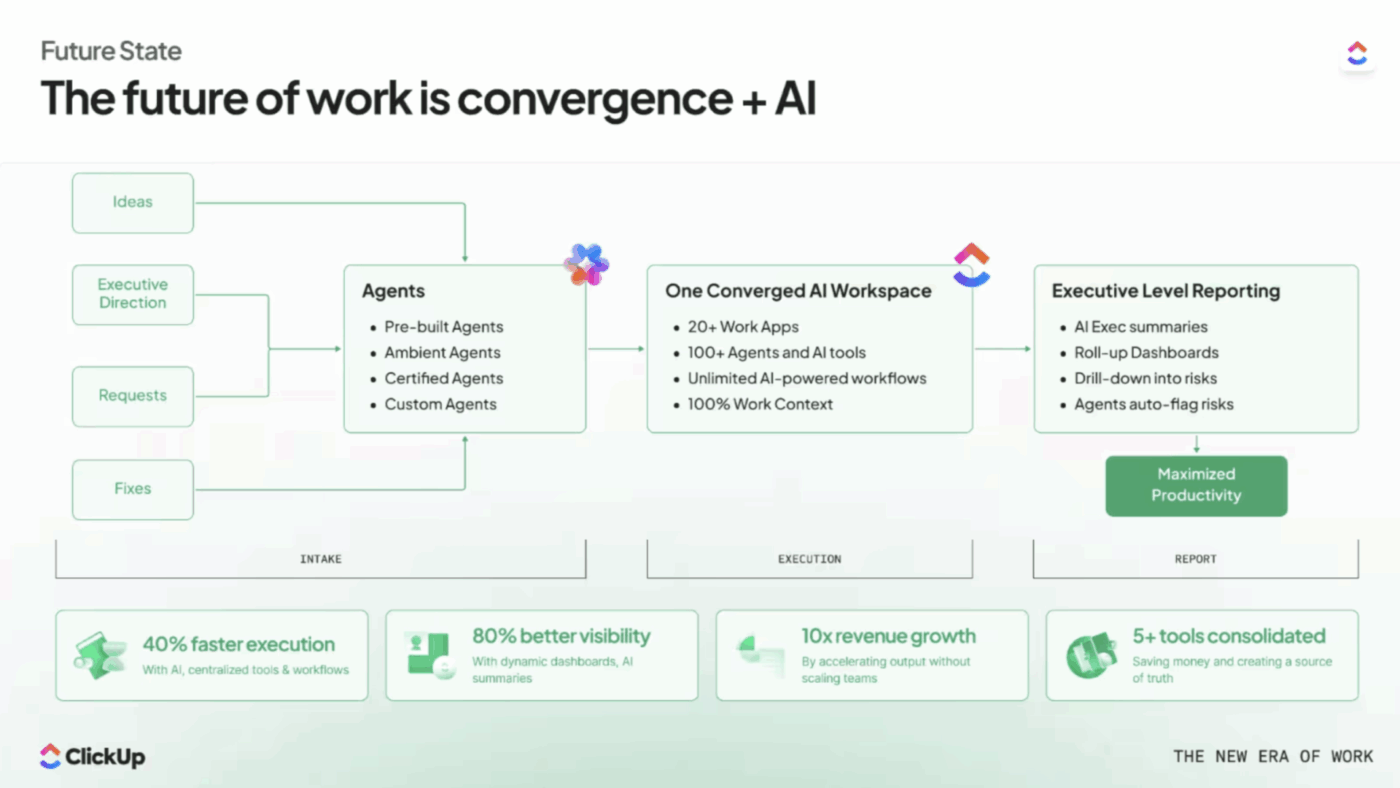
Here’s what makes that possible:
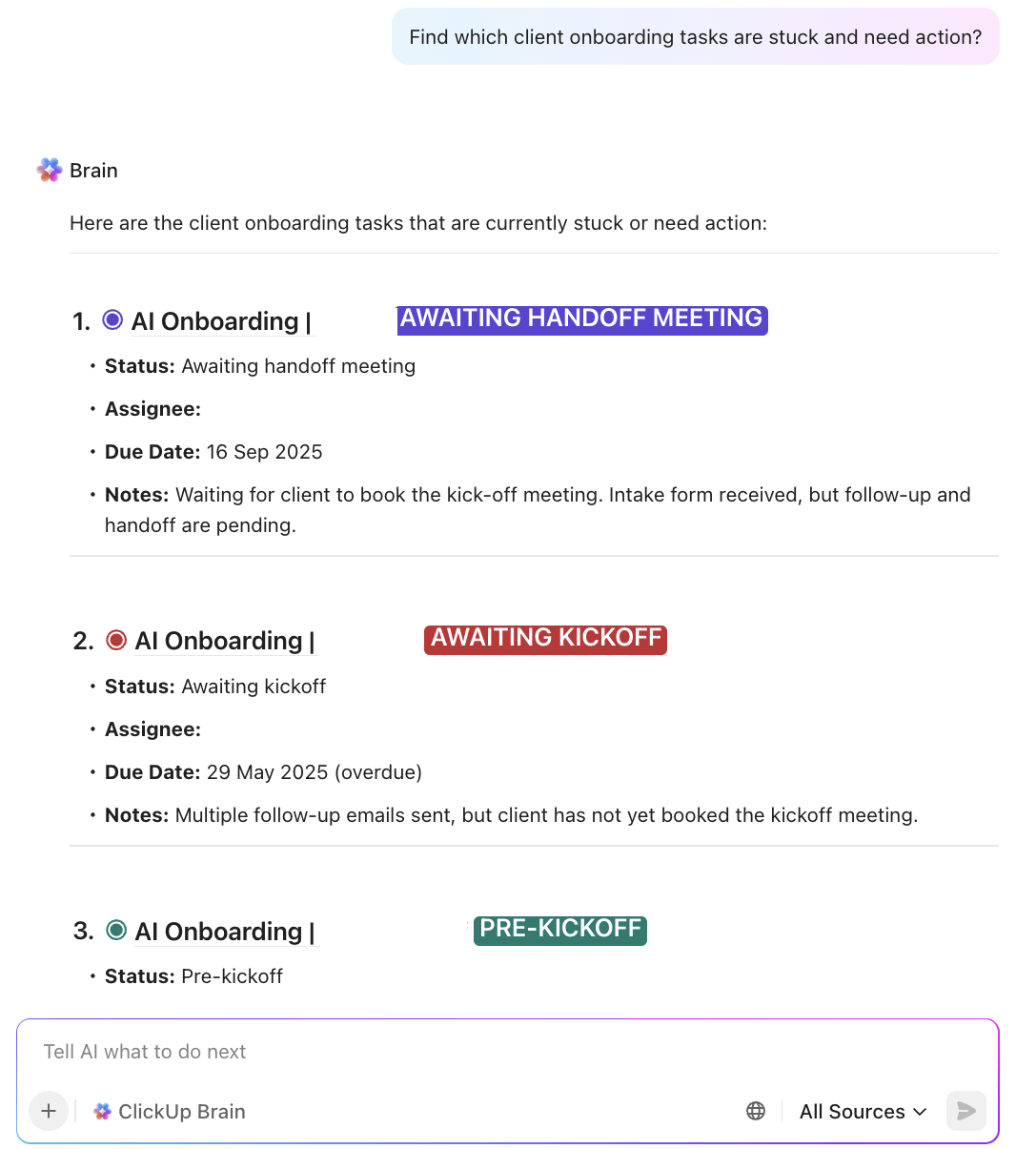
ClickUp Brain is the built-in intelligence layer inside ClickUp. It makes your entire workspace smarter, whether a human is reading the data or Claude is pulling it via MCP.
📮ClickUp Insight: 62% of our respondents rely on conversational AI tools like ChatGPT and Claude. Their familiar chatbot interface and versatile abilities—to generate content, analyze data, and more—could be why they’re so popular across diverse roles and industries.
However, if a user has to switch to another tab to ask the AI a question every time, the associated toggle tax and context-switching costs add up over time.
Not with ClickUp Brain, though. It lives right in your Workspace, knows what you’re working on, can understand plain text prompts, and gives you answers that are highly relevant to your tasks! Experience 2x improvement in productivity with ClickUp!
Super Agents are AI teammates that you configure with instructions, triggers, tools, knowledge, and memory through the Super Agent Builder.
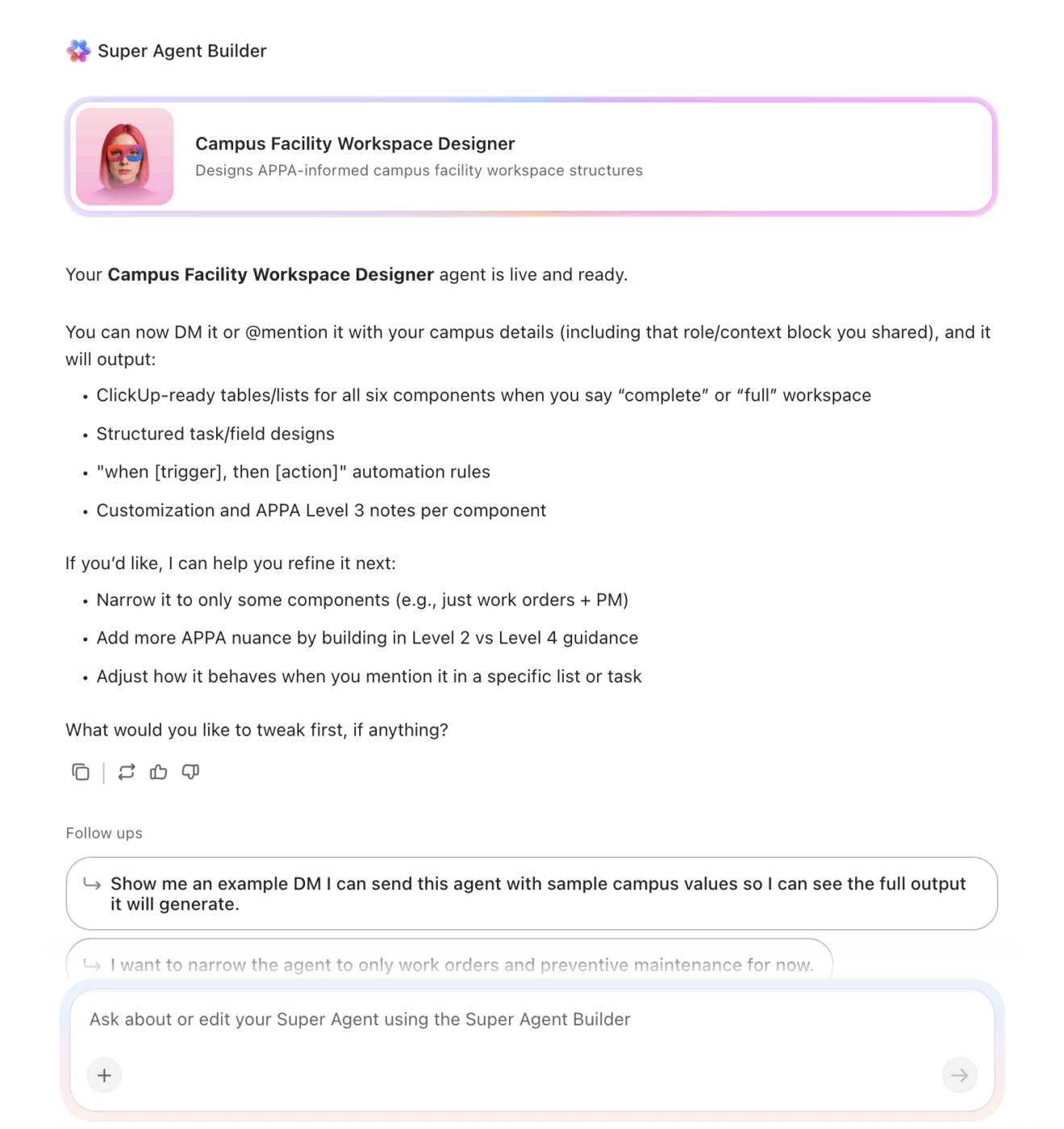
You can tag them, assign them tasks, DM them in chat, and even @mention them right where you’re working. They act like a human teammate, taking the necessary steps independently to complete the assigned work.
You don’t have to prompt them at every step. They execute work autonomously.
🎥 Watch this video to learn more about building and working with Super Agents:
Every department has pre-built agent packs ready to go:
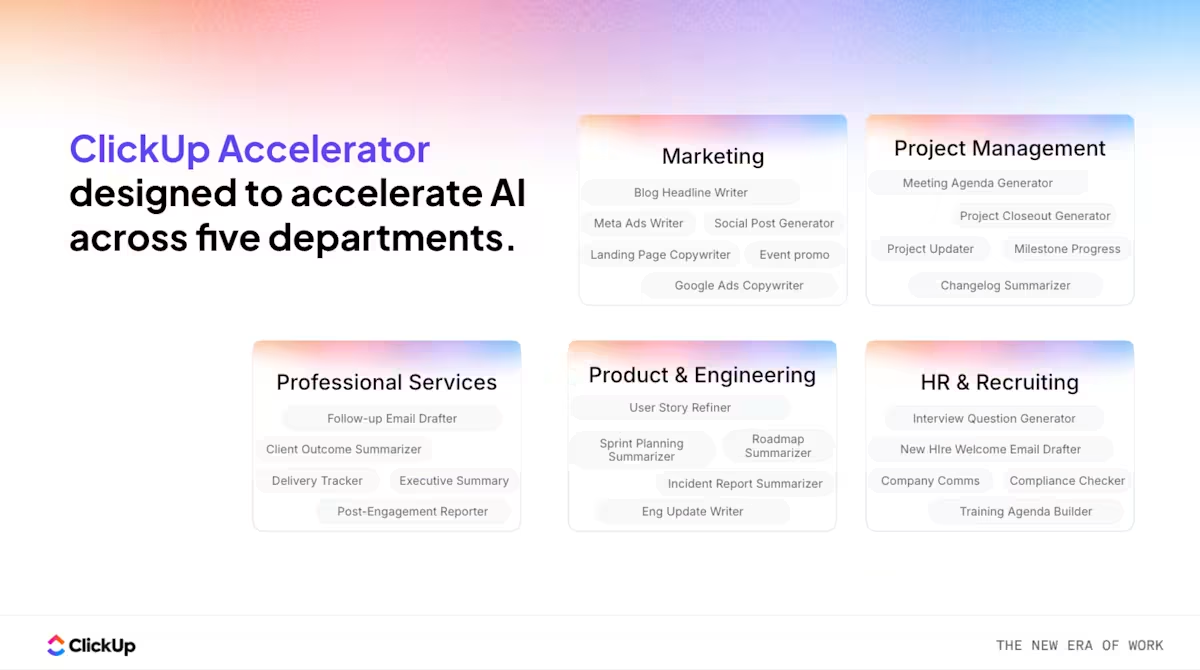
| Department | Agents |
| Project management | Intake Agent, Assign Agent, PM Agent, Live Answers Agent |
| Marketing | Brief Agent, Content Agent, Brand Agent, Live Intel Agent |
| Product & Engineering | PRD Agent, Triage Agent, Codegen Agent, Live Answers Agent |
| HR | Onboarding Agent, Pulse Check Agent, Trainer Agent, Live Answers Agent |
| Leadership | Goal Reminder Agent, Alignment Agent, Key Results Agent, Status Update Agent |
| Sales | Custom agents for sales workflows |
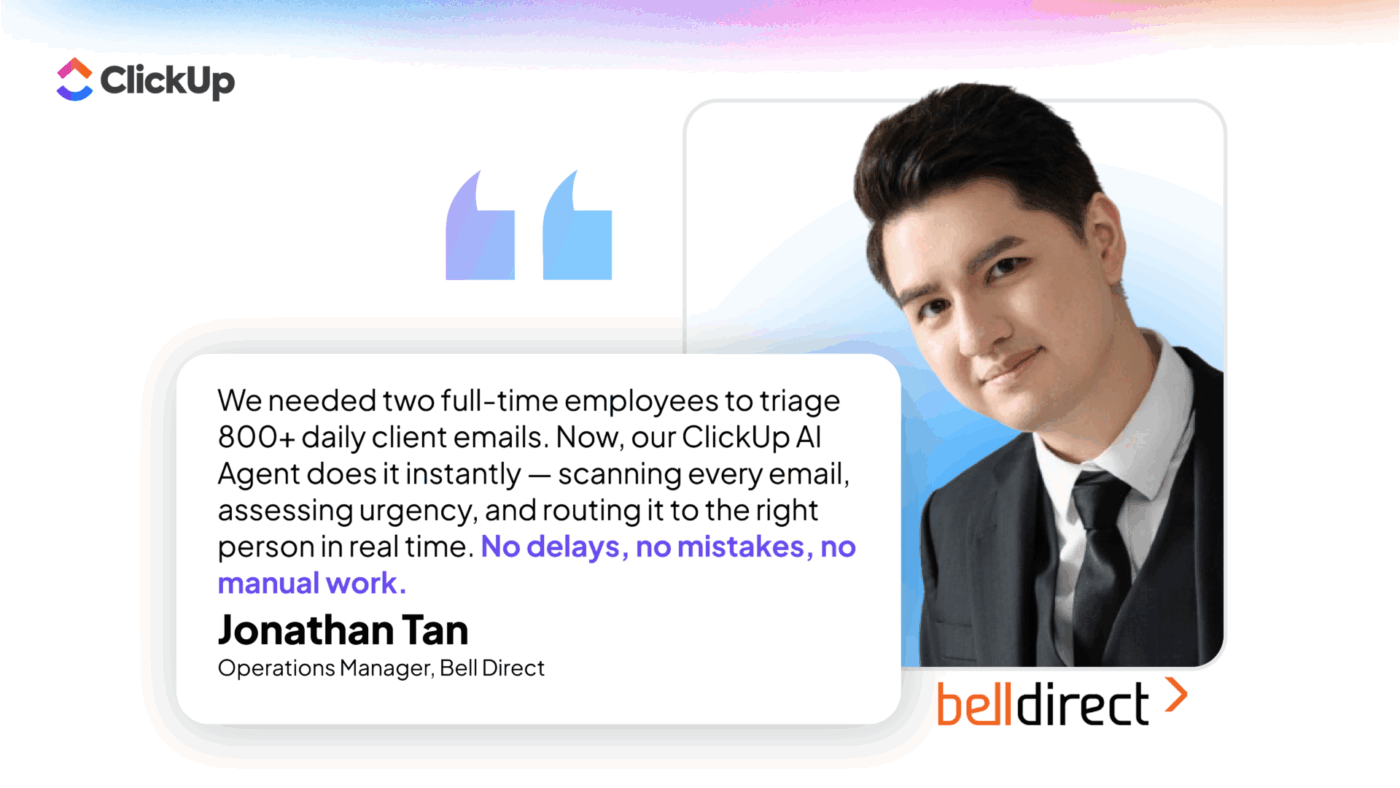
Bell Direct proves that with ClickUp, you don’t need a technical team to adopt AI meaningfully.
Using ClickUp Super Agents, the team automated an end-to-end intake and triage workflow without writing code or adding new tools.
💡 Looking for similar efficiency gains for your team?
These are always-on agents that run in the background without being prompted. Think:
For workflows where the stakes are high enough to warrant a custom build, ClickUp’s Forward Deployed Engineers will design and deploy an agent tailored to your org’s specific processes. With Certified Agents, you get a white-glove setup as well as uncapped usage.
👀 Did You Know? ClickUp’s Certified Agent scored 96 out of 100 in a direct benchmark of execution‑ready project plans. The closest competitor reached 61, with most others stuck in the 40s and 50s.
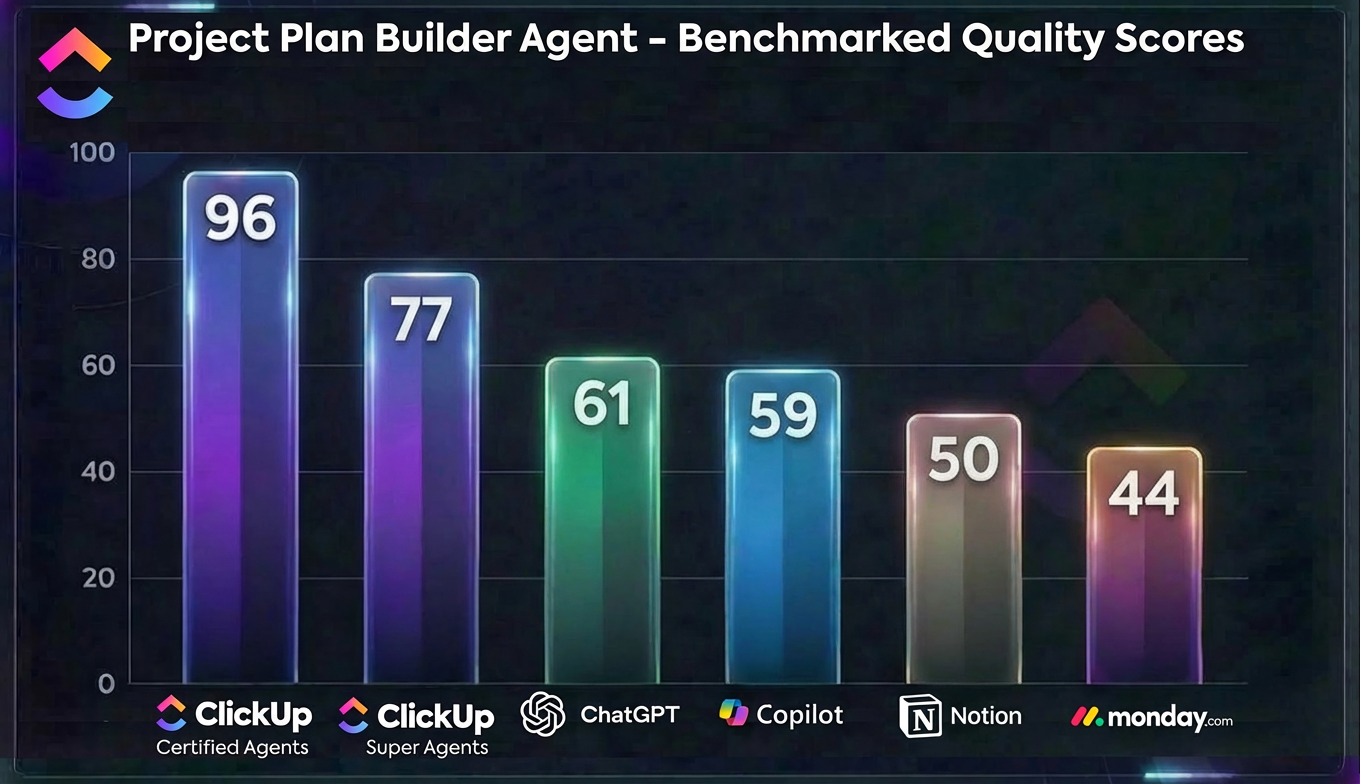
In practical terms, teams could move from idea → plan → execution in a single pass, with minimal human cleanup. That’s what makes the Certified Agent stand out in this benchmark.
With ClickUp Calendar and AI Notetaker, teams can schedule meetings in context and capture notes automatically.
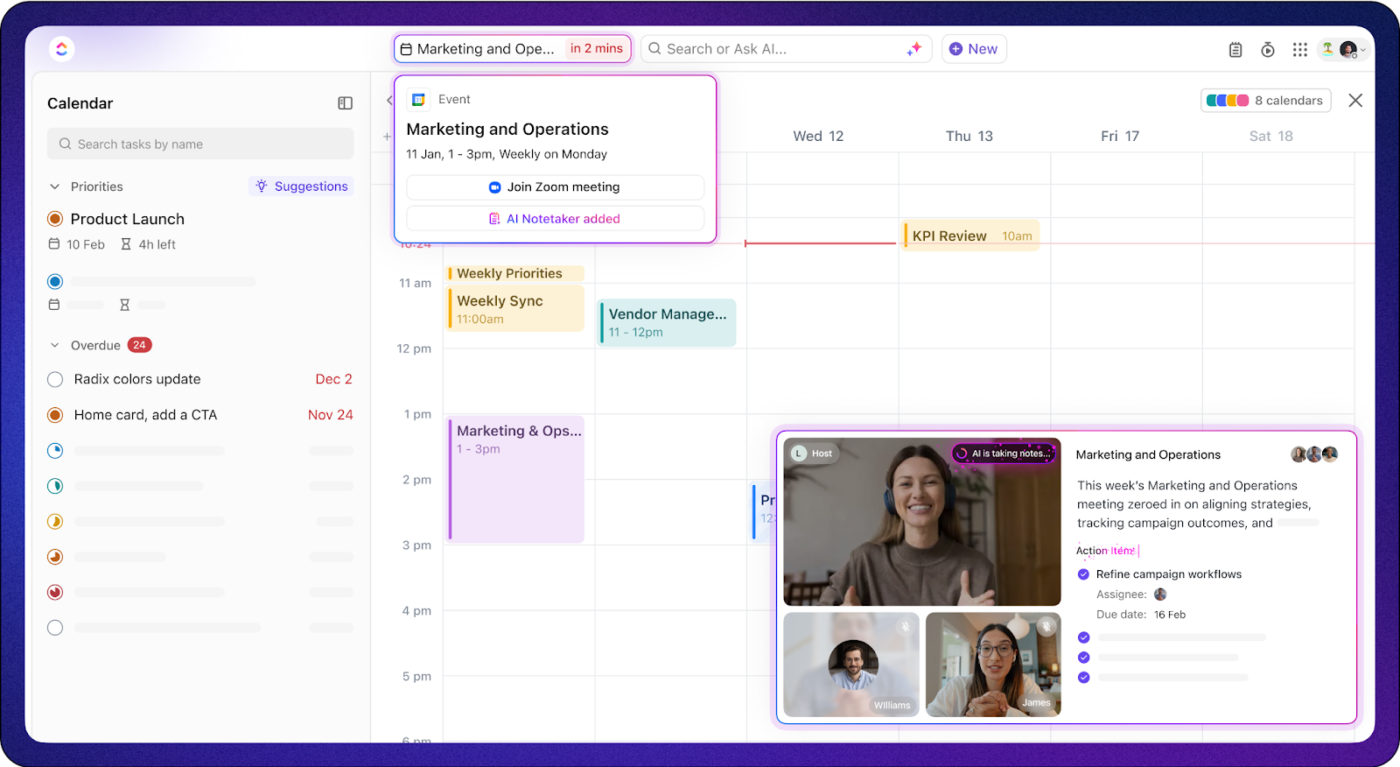
Every meeting participant has visibility into what was discussed, what needs to happen next, and who owns it.
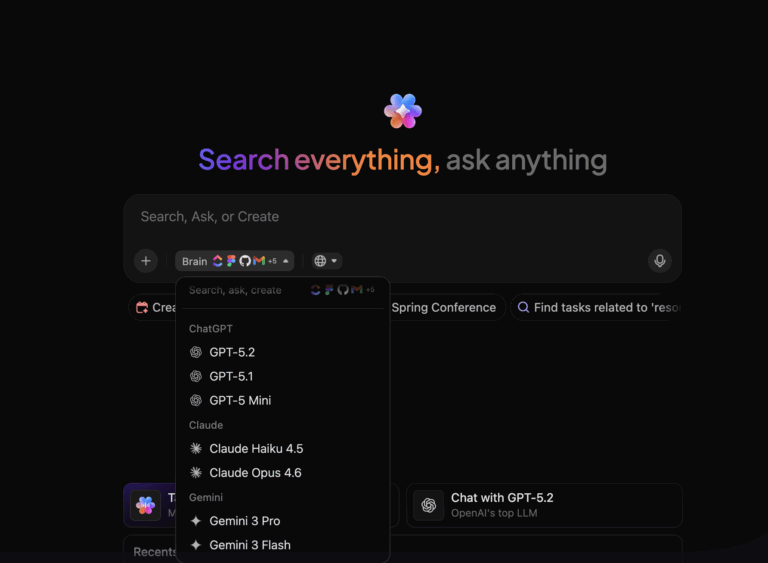
ClickUp is model-agnostic. Users can toggle between ChatGPT, Claude (including Opus 4.6), Gemini, and 12+ other top AI models directly from the ClickUp toolbar without leaving the platform.
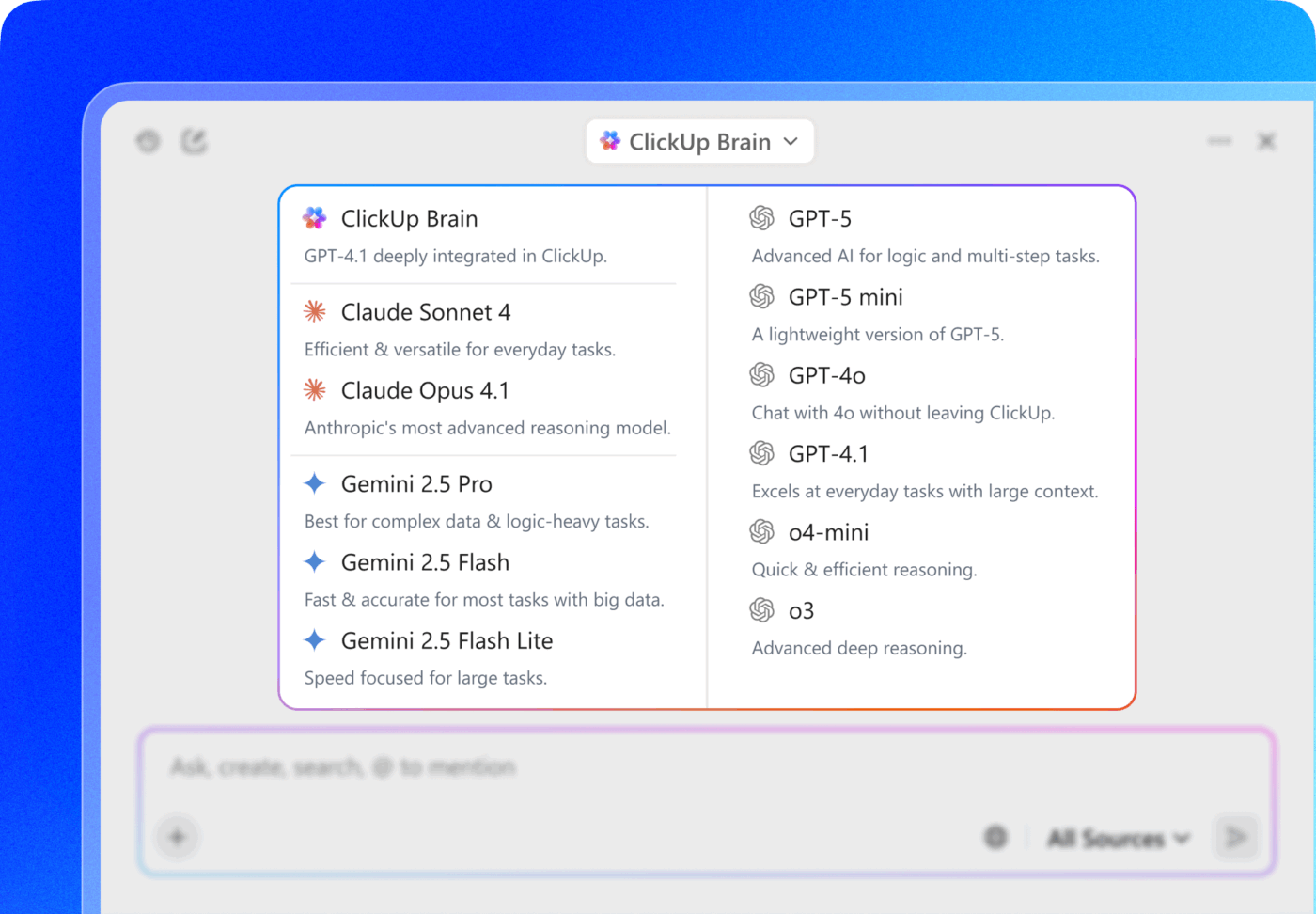
Brain uses these models under the hood for workspace intelligence, and Super Agents can be configured to leverage any available model. Admins can restrict which models are available per workspace.
This means your team already gets Claude’s reasoning inside ClickUp, applied to the full work context.
📚 Also Read: Use external AI models from ClickUp
Claude is a powerful reasoning engine, and when used alongside ClickUp, it adds genuine cross-system intelligence:
Claude connects to ClickUp via MCP (Model Context Protocol), an open standard that lets any AI tool read and write to external systems. ClickUp’s MCP server gives Claude full access to tasks, docs, comments, Custom Fields, and search.
🌟 This is a good thing. The more AI tools that connect to ClickUp via MCP, the more essential ClickUp becomes as the system of context.
Instead of competing, ClickUp and Claude complement each other across analysis, execution, and team-wide adoption. They combine deep reasoning with operational context, so you can turn intelligent thinking into organized, efficient work.
Here’s how:
👉🏼 Claude is excellent at analysis—researching, synthesizing, exploring what a workflow could look like, pulling data across systems, and generating recommendations. That’s what a reasoning engine does well.
🏆 ClickUp is where those insights become hardened workflows.
The one-off output becomes a repeatable, governed process that the whole org executes on.
Claude helps you figure out what to do. ClickUp AI helps you actually do it, at scale, for every team, without anyone needing to prompt anything again.
👉🏼 What you build in Claude stays with you: your skills, your MCP configurations, your project context. If you build something great, the rest of the team has no way to see it, use it, or benefit from it.
🏆 ClickUp AI is shared by design:
👉🏼 Claude works when someone prompts it. If nobody asks, nothing happens.
🏆 ClickUp AI works continuously whether anyone is paying attention or not:
The workspace gets smarter every hour without anyone actively driving it. You don’t use ClickUp AI the way you use Claude. ClickUp AI just runs.
ClickUp AI continuously enriches the data sitting in your workspace. So when Claude connects to ClickUp via MCP, it’s not reading raw task dumps. It’s reading pre-processed intelligence: Brain-generated summaries, AI-classified Custom Fields, and structured project insights that were created without anyone prompting for them.
The compounding loop:
ClickUp AI enriches workspace data
  (summaries, AI Custom Fields, knowledge updates, status insights)
       │
       ▼
Claude reads enriched data via MCP
  (better inputs = better outputs, fewer tokens consumed)
       │
       ▼
Claude creates work back in ClickUp
  (tasks, docs, comments, structured analysis)
       │
       ▼
ClickUp AI processes new work
  (auto-summarize, classify, trigger agents, update dashboards)
       │
       ▼
Cycle continues—each makes the other more valuable
🤝 The result: Claude gets better outputs because ClickUp AI already did the hard work of organizing, summarizing, and classifying the data before Claude ever touched it. And when Claude writes work back, ClickUp AI picks it up and keeps the cycle going.
📮 ClickUp Insight: Our AI maturity survey shows that access to AI at work is still limited—36% of people have no access at all, and only 14% say most employees can actually experiment with it.
When AI sits behind permissions, extra tools, or complicated setups, teams don’t get the chance to even try it in real, everyday work.
ClickUp Brain takes all that friction away by putting AI directly inside the workspace you’re already using. You can tap into multiple AI models, generate images, write or debug code, search the web, summarize docs, and more—without switching tools or losing focus.
It’s your ambient AI partner, easy to use and accessible to everyone on the team.
The point isn’t to replace Claude with ClickUp AI. It’s to use the right AI for the right job.
| Use case | Best tool | Why |
| Deep research and analysis | Claude | Cross-system reasoning, long-context synthesis |
| Agentic coding and debugging | Claude Code | Terminal-native, autonomous multi-file changes |
| Cross-system data orchestration | Claude + MCP | Combines data from ClickUp, Salesforce, databases |
| Project status updates | ClickUp AI | Always-on, auto-generated from real activity |
| Content drafts inside docs | ClickUp AI | In-context, linked to the brief and the task |
| Questions about work | Brain | Instant answers from tasks, docs, chat, comments |
| Task routing and triage | Super Agents | Event-driven, workspace-aware, permission-scoped |
| Meeting notes and follow-ups | AI Meetings | Automatic capture, action item creation |
| Background monitoring | Autopilot Agents | 24/7, no prompting, always running |
| Custom high-stakes workflows | Certified Agents | Purpose-built, FDE-supported, uncapped |
| Personal deep work | Claude Desktop | Individual reasoning, drafting, exploration |
| Shared team workflows | Super Agents | Visible to the org, maintained at the workspace level |
🔑 Key insight: Claude handles personal, deep, cross-system work. ClickUp AI handles the team-wide, always-on, shared workflows. Between the two, you’ve covered the entire org.
AI that works the moment they open ClickUp, with no MCP setup, no terminal commands, and no prompt skill required. Brain answers their questions, agents handle repetitive work, Custom Fields classify tasks automatically, and meeting notes write themselves.
Claude Code, Claude Cowork, and Claude Desktop for deep reasoning, coding, and cross-system orchestration. ClickUp’s MCP server gives them full access to the workspace. What they build in Claude feeds back into ClickUp, where agents process it further.
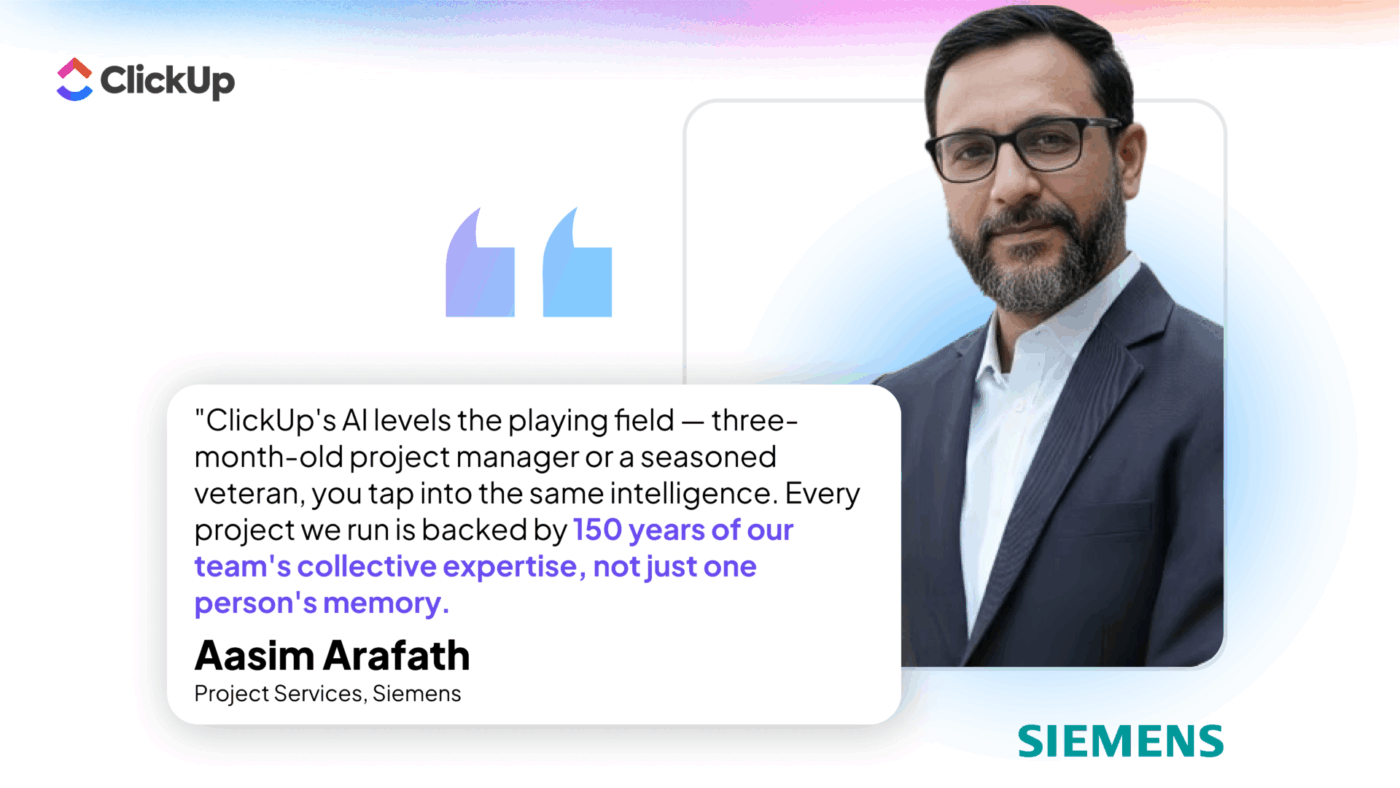
Siemens India saw this in action.
Their Project Services team embedded 150 years of combined PM expertise into ClickUp’s AI-powered workflows. Portfolio risk reviews went from 12-15 hours to 15 minutes, and a three-month-old PM now taps the same intelligence as a seasoned veteran.
One governed AI platform with the same SSO, permissions, and compliance posture as the rest of ClickUp. ISO 42001 certified for AI management, zero data retention from AI partners, and centralized admin controls over which models, agents, and capabilities are enabled. Compare that to 200 individual Claude instances running across the org with no centralized visibility into what AI is doing with company data.
ClickUp is model-agnostic, so today your team might prefer Claude Opus 4.6, but tomorrow the best model could come from somewhere else entirely. ClickUp incorporates the latest models without requiring anyone to rebuild workflows, retrain agents, or reconfigure MCP connections. Your AI strategy stays flexible even as the model landscape continues to shift.
┌───────────────────────────────────────────────────────────┐
│                                                           │
│   EXTERNAL AI (your team's choice)                        │
│                                                           │
│   Claude Desktop · Claude Code · Cursor · Copilot         │
│                                                           │
│   Used by: power users, technical teams                   │
│   For: deep reasoning, coding, cross-system orchestration │
│                                                           │
└─────────────────────────┬─────────────────────────────────┘
                          │
                     MCP (bridge)
                          │
                          │  read tasks, docs, comments, fields
                          │  create tasks, update statuses
                          │  search across spaces
                          │  push docs, post comments
                          │
┌─────────────────────────▼─────────────────────────────────┐
│                                                           │
│                CLICKUP (system of context)                │
│                                                           │
│  Tasks · Docs · Chat · Dashboards · Goals · Sprints       │
│  Whiteboards · Time Tracking · Calendar · Forms · Clips   │
│                                                           │
│  ┌─────────────────────────────────────────────────────┐  │
│  │                                                     │  │
│  │   CLICKUP AI (intelligence inside the platform)     │  │
│  │                                                     │  │
│  │   Brain           Enterprise Search   AI Meetings   │  │
│  │   Super Agents    Autopilot Agents    AI Custom     │  │
│  │   Certified       AI Project Mgr     Fields         │  │
│  │   Agents          AI in Docs/Chat    Dashboard AI   │  │
│  │                                                     │  │
│  │   Used by: everyone on the team                     │  │
│  │   For: always-on AI in the daily workflow           │  │
│  │                                                     │  │
│  └─────────────────────────────────────────────────────┘  │
│                                                           │
└───────────────────────────────────────────────────────────┘
Claude may be your AI standard at the model layer. ClickUp AI is how that intelligence becomes operational across your entire org.
As the world’s most complete and context-aware work AI, Brain makes the workspace smarter from the inside. Super Agents give every team AI teammates that run 24/7, while Certified Agents help manage complex, high-stakes, customized workflows.
Claude leverages that enriched intelligence from the outside via MCP.
Together, they compound.
👉🏼 If you’re evaluating how to use ClickUp AI and Claude together, share your goals with our team, and we’ll help you map out the right approach.

© 2026 ClickUp

There’s an easier way. Try a free AI Agent in ClickUp that actually does the work for you—set up in minutes, save hours every week.