Ever stared at a new word—entropy, irony, opportunity cost—and realized you ‘kind of’ know it, but can’t explain it clearly?
The Frayer Model was built to solve this.
Instead of memorizing definitions you can forget, it forces real understanding by breaking a concept into four parts (more on that later 😉). It’s fundamentally built for transfer: Once learners can describe the traits, they can recognize the concept in new passages, questions, and even presentations.
In this blog post, we’ll walk you through some of the best free Frayer Model templates you can copy, customize, and reuse—plus quick tips for using them in classrooms, study sessions, and team training.
Summarize this article with AI
ClickUp Brain not only saves you precious time by instantly summarizing articles, it also leverages AI to connect your tasks, docs, people, and more, streamlining your workflow like never before.
Teachers and instructional coaches running collaborative vocabulary and concept-building activities
Custom Fields to map Frayer-style sections in one layout; group entries by status/category/learning stage; task assignment to students or groups for collaboration and peer review
Trainers and instructional teams building structured evaluation and comparison exercises in collaborative Docs
Criteria definition section for what to evaluate; weighted scoring table for repeatable comparisons; documentation of reasoning; collaboration and notes in one place
Facilitators, customer success teams, and cross-functional groups running concept-alignment workshops or planning sessions
Subpages (Stakeholders, Resources, Meeting Notes, Success Criteria) to capture concept definition plus examples/edge cases; Assigned Comments to finalize definitions as a single source of truth; Action Items Tracker to turn aligned understanding into follow-up tasks
Instructional designers, trainers, and team leads creating one-page, visual learning assets from Frayer-style notes
Visual canvas with blocks for headline and supporting sections; Icons/images/color-coded quadrants; drag-and-drop images or embed videos for examples; export as an image or share via public link
Educators and trainers teaching structured thinking, process improvement, or concept clarity in group settings
Step-by-step DMAIC whiteboard (Define, Measure, Analyze, Improve, Control) to deepen concept understanding; capture core meaning and traits early; track misconceptions/signals and lock in an approved “final version” for consistency
Senior associates running group-based business lessons needing a repeatable, visual concept-mapping structure
DMAIC-style columns on a single canvas; color-coded columns and legend for easy scanning; dedicated sections to capture examples/non-examples/supporting notes; reusable structure to keep multiple terms consistent
Educators and trainers who need classic four-quadrant layouts for print-based activities
Classic four-box Frayer worksheet layout; centered vocabulary term for fast scanning and review; printable and reusable for individual practice, small groups, and classroom checkpoints
Teachers building classroom slides, anchor charts, or presentation-friendly vocab organizers
Strong visual hierarchy (center term + four labeled panels); presentation-friendly formats (Word/PowerPoint); clear labels for quick checks for understanding during review and test prep
Individuals and teams who prefer Microsoft Word or Google Docs for editable, duplicable worksheets
Simple four-quadrant doc you can duplicate for multiple words; easy to complete box-by-box for independent or small-group work; printable and highly editable for weekly word lists, unit vocab, or quiz prep
Summarize this article with AI
ClickUp Brain not only saves you precious time by instantly summarizing articles, it also leverages AI to connect your tasks, docs, people, and more, streamlining your workflow like never before.
Summarize this article for me please
What Is a Frayer Model?
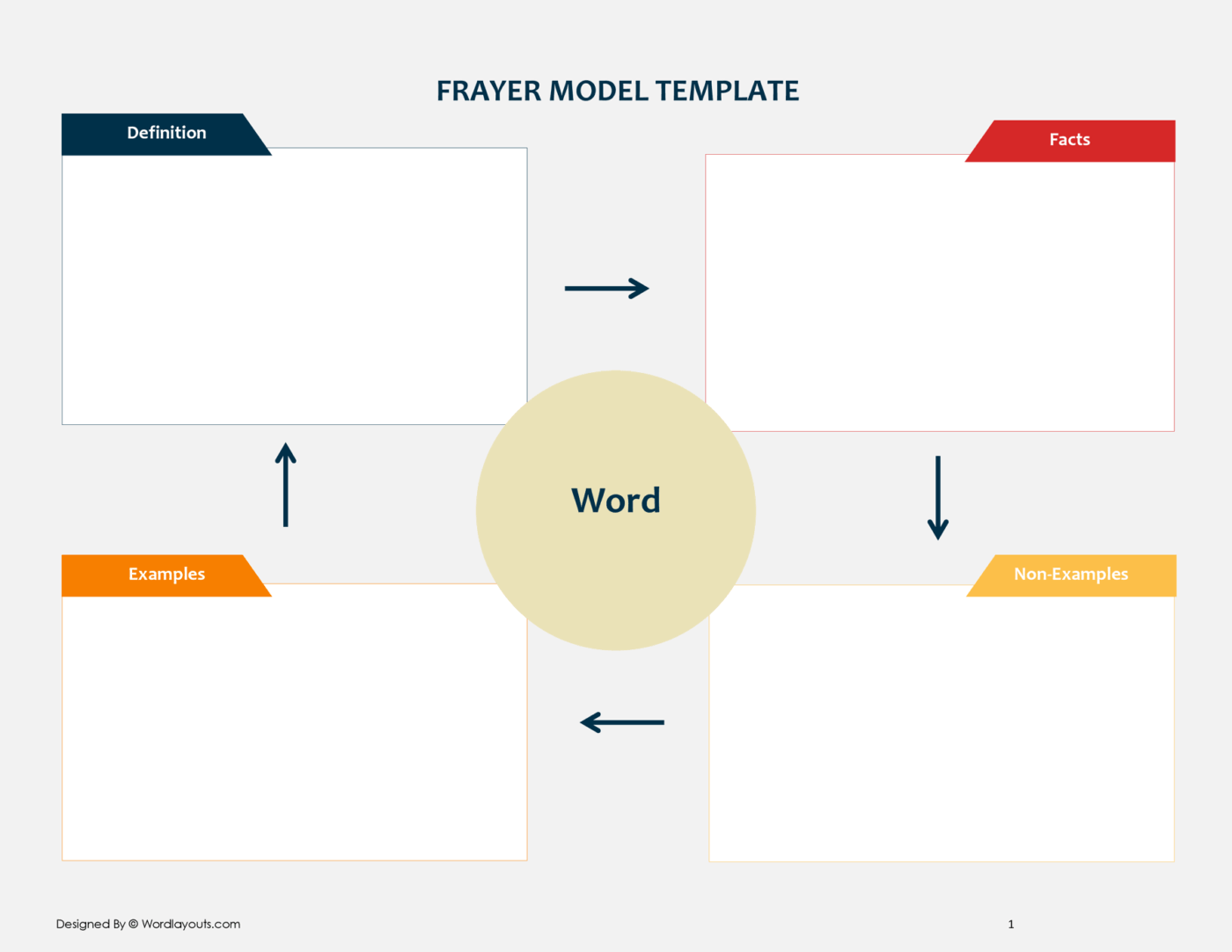
A Frayer Model is a four-part graphic organizer used to help learners build a deeper understanding of a word or concept, especially in vocabulary and concept instruction. It typically places the target term in the center and asks students to complete four surrounding sections.
Developed by Dorothy Frayer in 1969, it moves teams and learners beyond simple memorization toward genuine comprehension. Instead of just defining a word, you explore it from all angles.
The model’s structure is:
Definition: What does the term mean, in your own words?
Characteristics: What are the essential attributes or facts that are always true about this concept?
Examples: What are concrete, specific instances of this concept in action?
Non-Examples: What are things that seem similar but are definitely not the concept?
🔖 Example: Say your term is ‘Ecosystem.’ The Frayer Model would have the following:
Definition: A community of living things interacting with each other and their environment
Characteristics: Includes living + non-living parts; organisms depend on each other
Examples: Forest, pond, coral reef
Non-examples: A single rock, one animal alone, a plastic bottle
That last quadrant—Non-Examples—is the most powerful part. It forces you to draw clear boundaries around a concept, sharpening your understanding by defining what it isn’t. While originally for classroom vocabulary, this framework is incredibly effective for clarifying business jargon, technical specifications, and project scope.
👀 Did You Know? A TESL-EJ study on secondary English learners reports the Frayer Model as an effective tool for building ‘word ownership’ (moving beyond recognition into usable understanding).
Summarize this article with AI
ClickUp Brain not only saves you precious time by instantly summarizing articles, it also leverages AI to connect your tasks, docs, people, and more, streamlining your workflow like never before.
Summarize this article for me please
10 Free Frayer Model Templates for Vocabulary and Concept Analysis
Finding the right format for your Frayer Model can be a challenge. Static PDFs are great for printing but impossible for team collaboration, while a blank document leaves you to handle all the formatting. The right template should match your workflow, whether you’re working with trainees or brainstorming with a distributed team.
These templates range from traditional four-quadrant layouts to creative digital adaptations that bring Frayer Model thinking into your daily work.
Most are editable and ready to use immediately, helping you move from surface-level memorization to deep, actionable understanding.
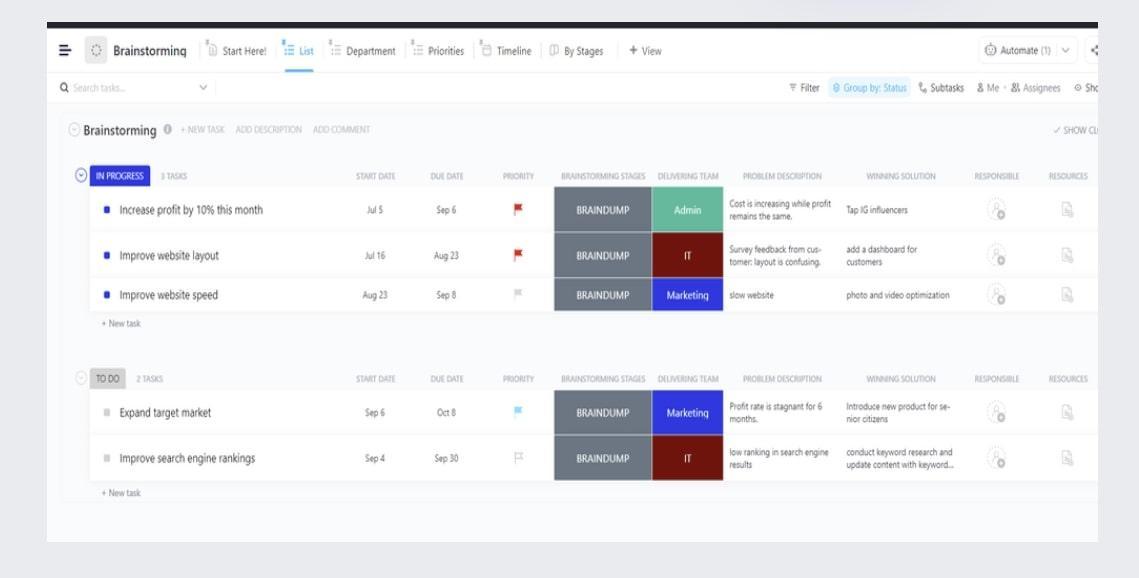
Capture definitions, examples, and misconceptions with the ClickUp Brainstorming Template
If you’re teaching vocabulary or building concept understanding, you need a template that makes thinking visible.
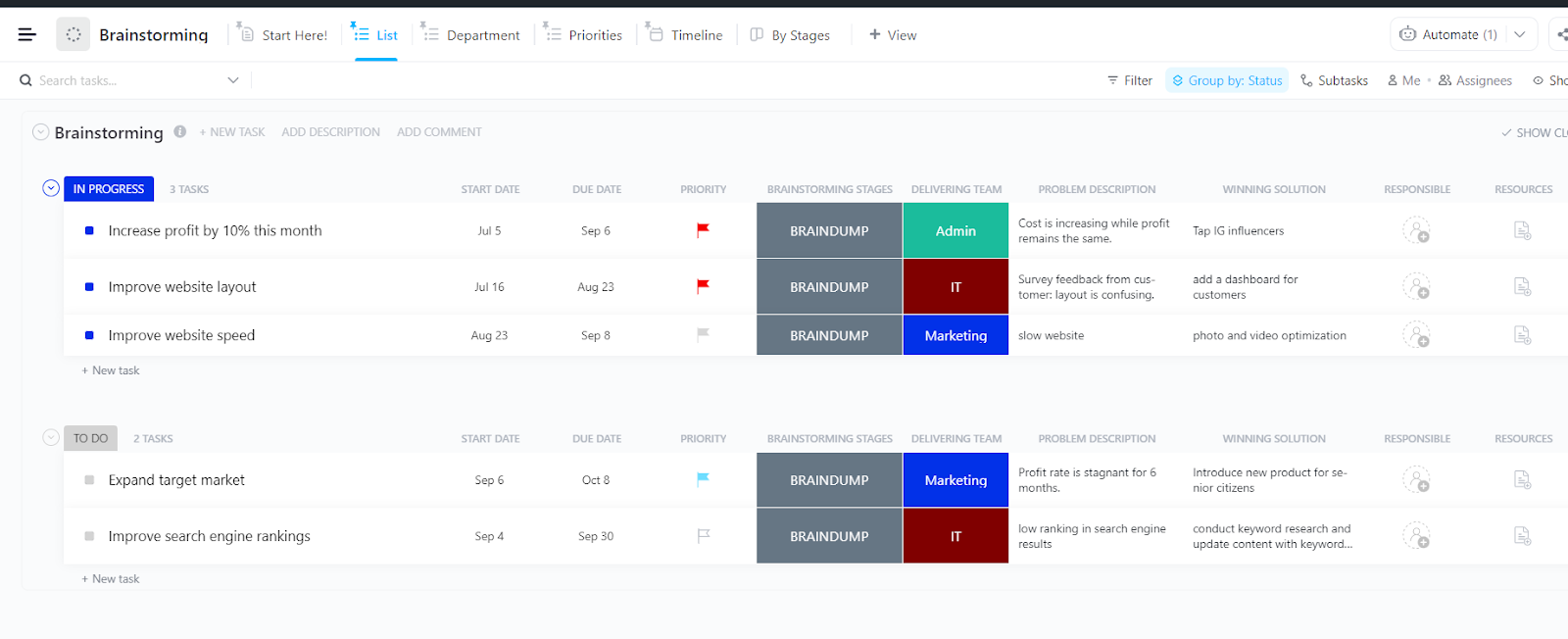
The ClickUp Brainstorming Template gives you a space to break a concept into parts, assign focus areas, and organize responses across stages, teams, or categories. It is all about brainstorming and ideating across specific terminologies.
What’s more, it lets you customize the fields and views to capture the core term, definition, characteristics, examples, and misconceptions in an easily reviewable format.
Why you’ll like this template:
Use customizable ClickUp Custom Fields and columns (like problem description, solution, priority, or custom labels) to map Frayer Model sections into one layout
Group entries by status, category, or learning stage to track progress across multiple terms or concepts
Assign tasks to students or groups when using Frayer Models for collaborative activities, peer review, or station-based learning
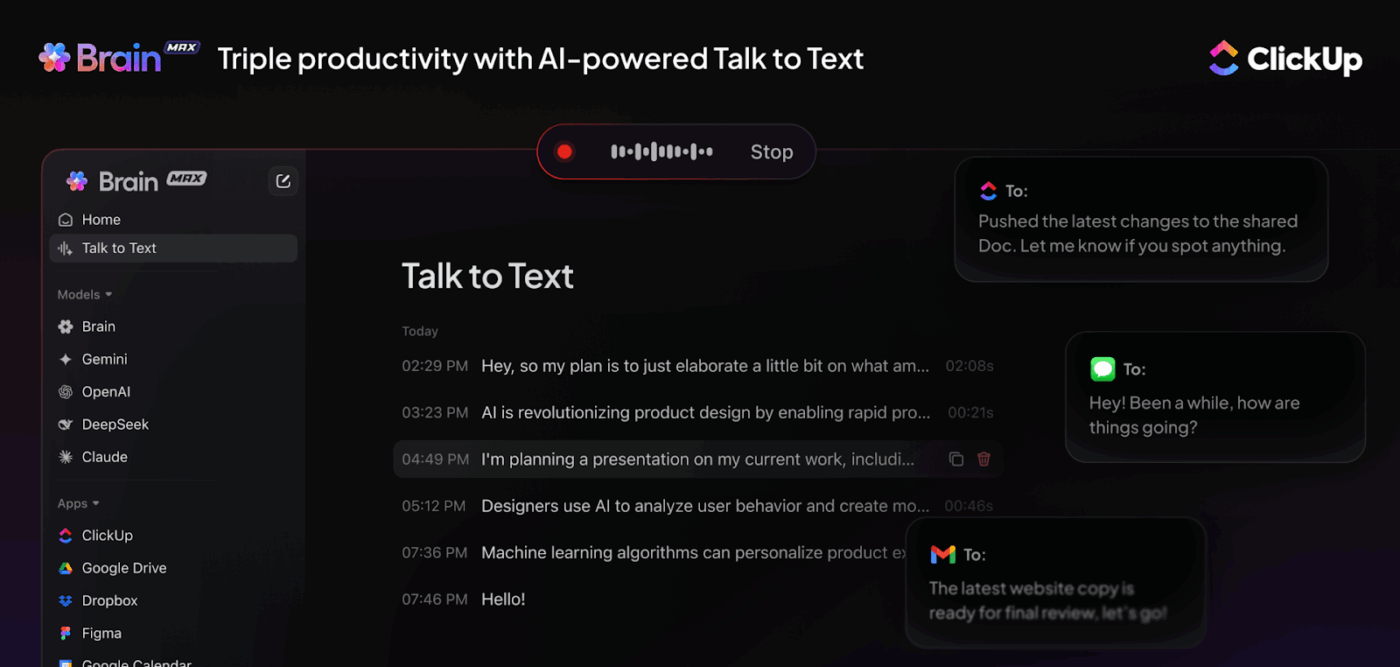
📮ClickUp Insight: 57.75% of people say voice-to-text software could “change everything” at work, but most are still glued to their keyboards.
Why? Because typing is an ingrained habit, even though it’s 4x slower than voice transcription. Brain MAX’s Talk-to-Text lets you skip the bottleneck and capture ideas as fast as you can speak.
No more losing momentum or struggling to keep up with your thoughts. With Brain MAX, your voice becomes your workflow accelerator.
Turn each term into a trackable Frayer Model entry with the ClickUp List Template
If you want a Frayer Model setup that feels simple enough for quick classroom use but flexible enough to expand into richer activities, the ClickUp List Template is a strong starting point.
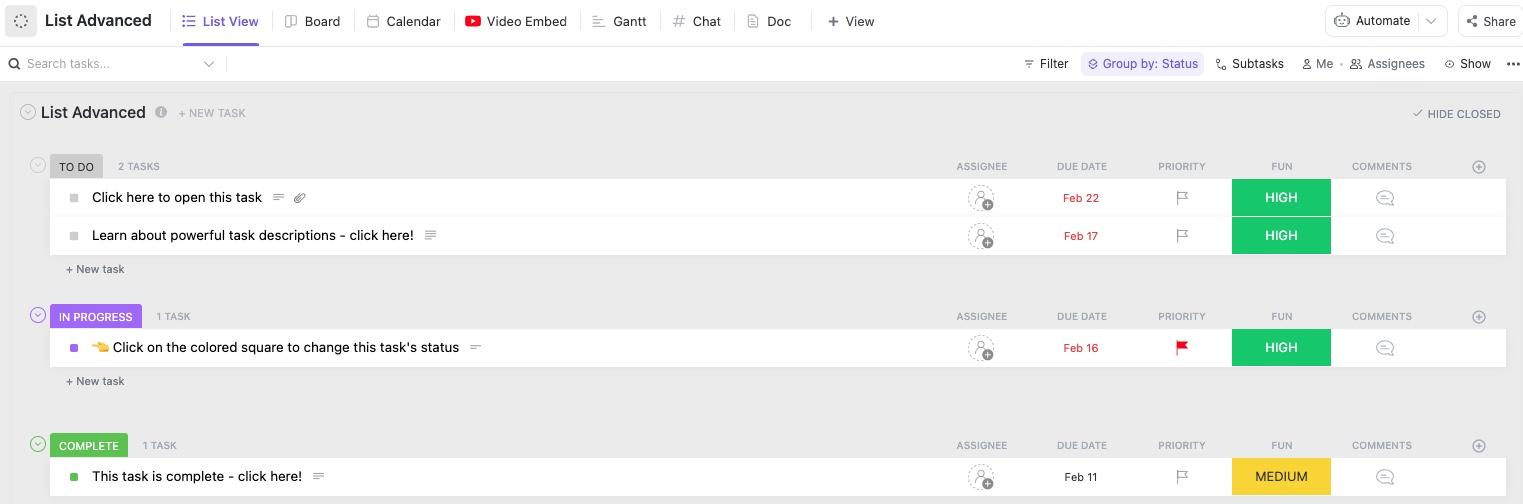
It comes with a clean, status-based list layout for organizing terms, examples, and practice items, while still letting you layer in extra context through multiple views.
For a Frayer Model workflow, this template lets you customize each task as a term and use fields, comments, and linked resources to build out the definition, examples, non-examples, and concept.
Why you’ll like this template:
Add context by using ClickUp Tasks under each main vocabulary task to list out multiple, detailed examples or non-examples
Switch between different ClickUp Views if you’re planning lessons, assignments, or vocabulary review timelines across a unit
Use Video Embed to attach explainer videos, mini lessons, or concept walkthroughs directly inside the workspace for students to reference
✅ Ideal for: Instructional designers or trainers creating Frayer-style learning activities with embedded lesson content.
Compare concepts with weighted criteria in a structured Doc using the ClickUp Design Matrix Template
If you’re using a Frayer-style exercise to help students compare closely related concepts (or evaluate examples vs. non-examples with clear criteria), the ClickUp Design Matrix Template gives you an analytical format to work with.
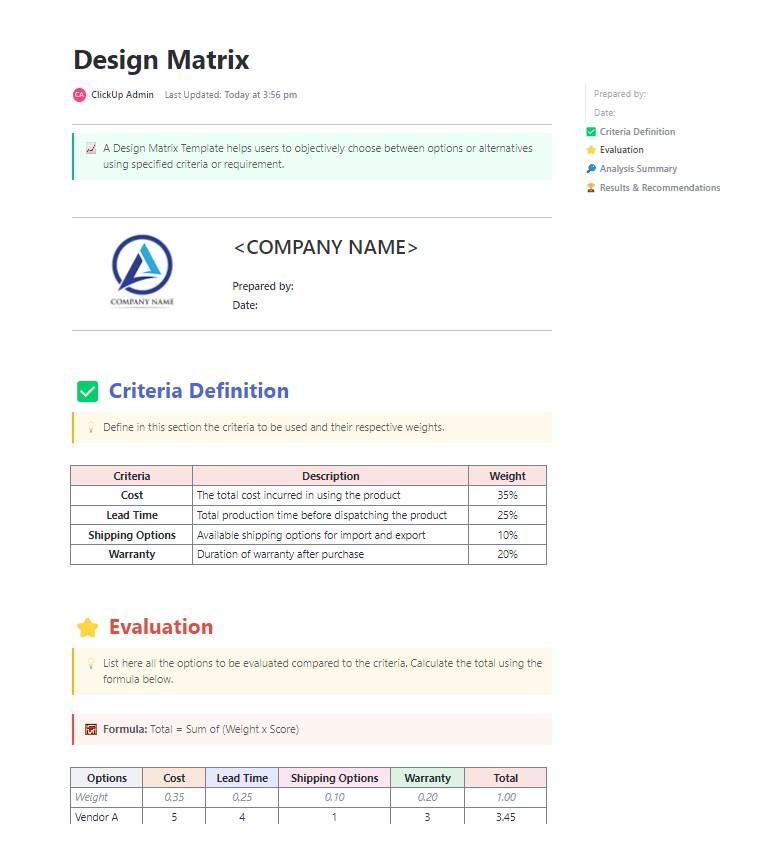
Built as a structured ClickUp Doc, this template walks you through criteria definition, weighted evaluation, and a final recommendation section. That makes it especially useful when your Frayer Model activity goes beyond simple vocabulary recall and into concept distinction, classification, or evidence-based comparison.
Why you’ll like this template:
Use the Criteria Definition section to set the attributes students should evaluate (for example: definition accuracy, real-world relevance, examples, and non-examples)
Turn abstract comparisons into a repeatable framework using the weighted scoring table, which is helpful for advanced Frayer-style analysis activities
Document the full thinking process in one place, add notes under each section, and collaborate on evaluations without switching tools
✅ Ideal for: Trainers and instructional teams building structured evaluation exercises inside collaborative Docs.
🏆 Quick Hack: Build your own, personalized Frayer Models with Talk-to-Text.
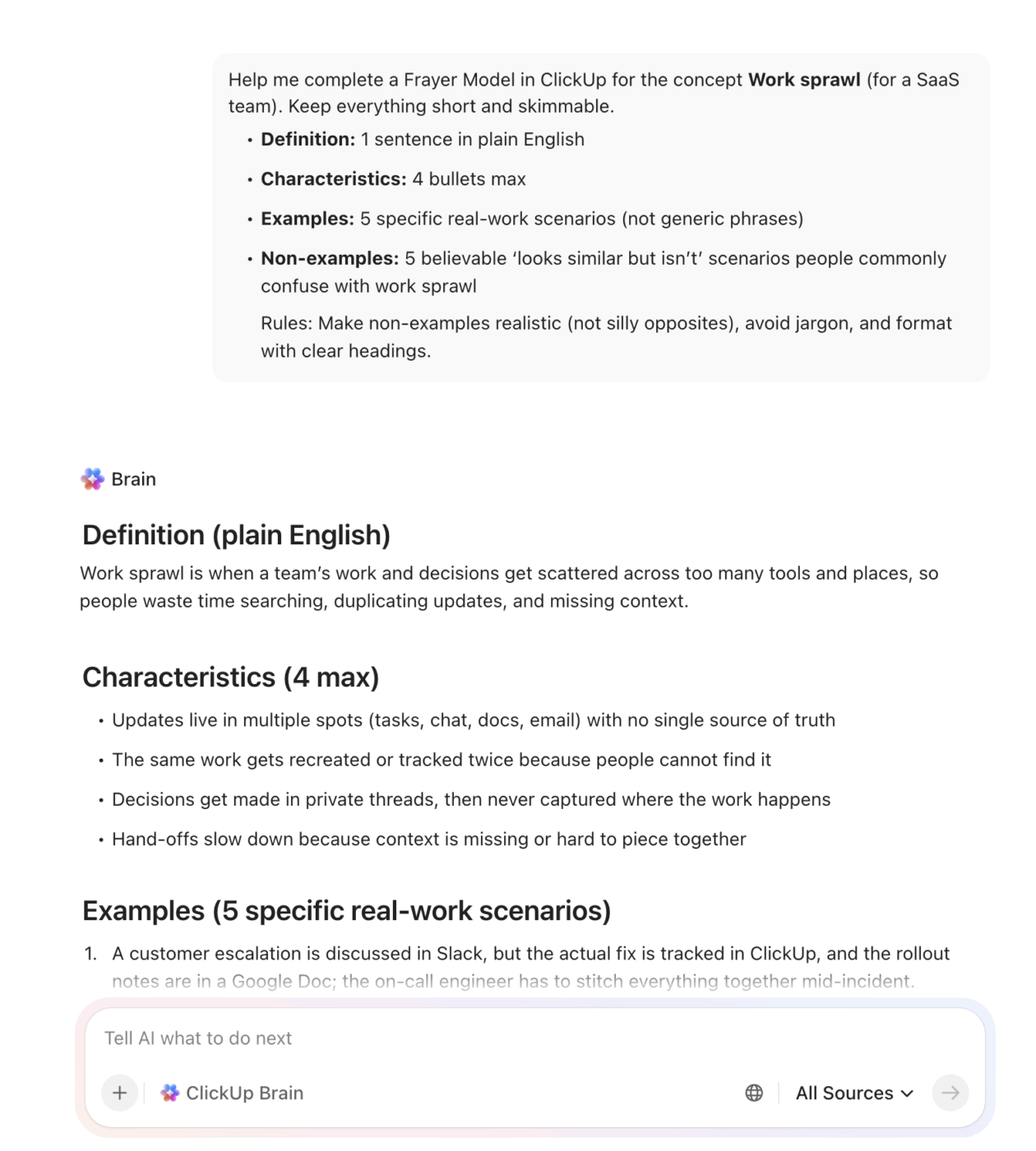
Create Frayer Models from voice notes with Talk-to-Text in ClickUp Brain MAX
Simply speak your rough thoughts out loud—a quick definition, a few traits, and 2–3 examples.
In seconds, ClickUp’s Talk-to-Text turns that voice draft into a clean Frayer Model. It can tighten the wording, add better examples, and generate clear non-examples that stop common misunderstandings.
Map concepts with subpages for traits, examples, and next steps using the ClickUp Mutual Action Plan Template
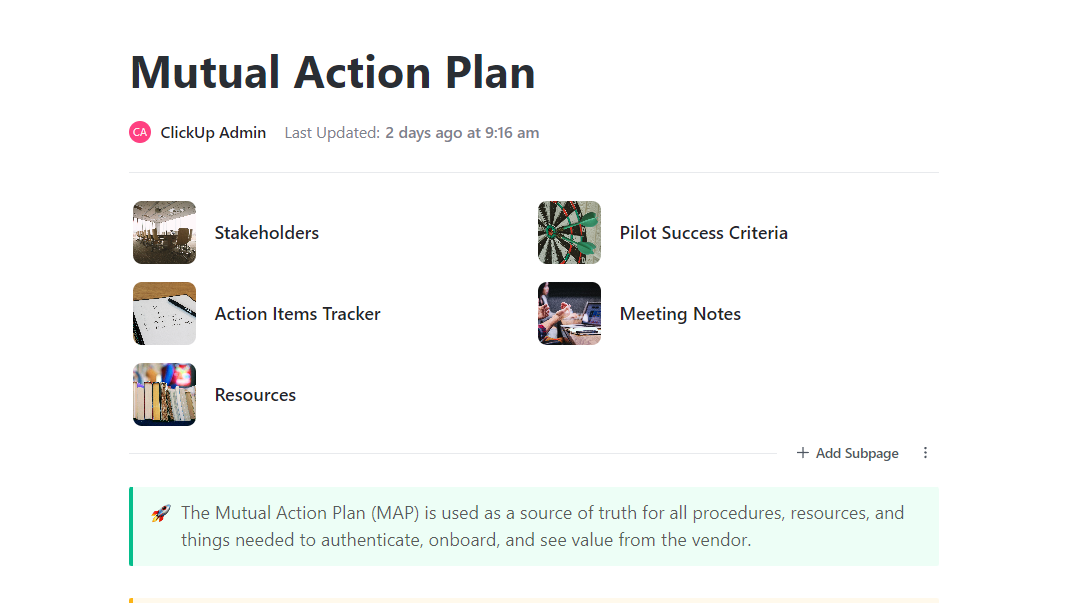
The ClickUp Mutual Action Plan Template can be adapted into a clean concept-mapping workspace for teams defining an idea before taking action. Its built-in subpages—Stakeholders, Action Items Tracker, Resources, Pilot Success Criteria, and Meeting Notes—help make discussion easier to review and use.
That layout works well when your team is breaking down a term, process, or initiative from multiple angles during a workshop. You can capture the core meaning, note defining traits, collect real examples from past work, and document boundaries or exceptions. Then, carry the discussion forward into the assigned next steps.
Why you’ll like this template:
Use ClickUp Assigned Comments directly within the template to discuss and finalize definitions, creating a single source of truth
Capture examples, edge cases, and supporting references in Resources and Meeting Notes during live discussions
Move directly from aligned understanding to execution by tracking follow-up tasks in the Action Items Tracker
✅ Ideal for: Facilitators, customer success teams, and cross-functional groups running concept-alignment workshops or planning sessions.
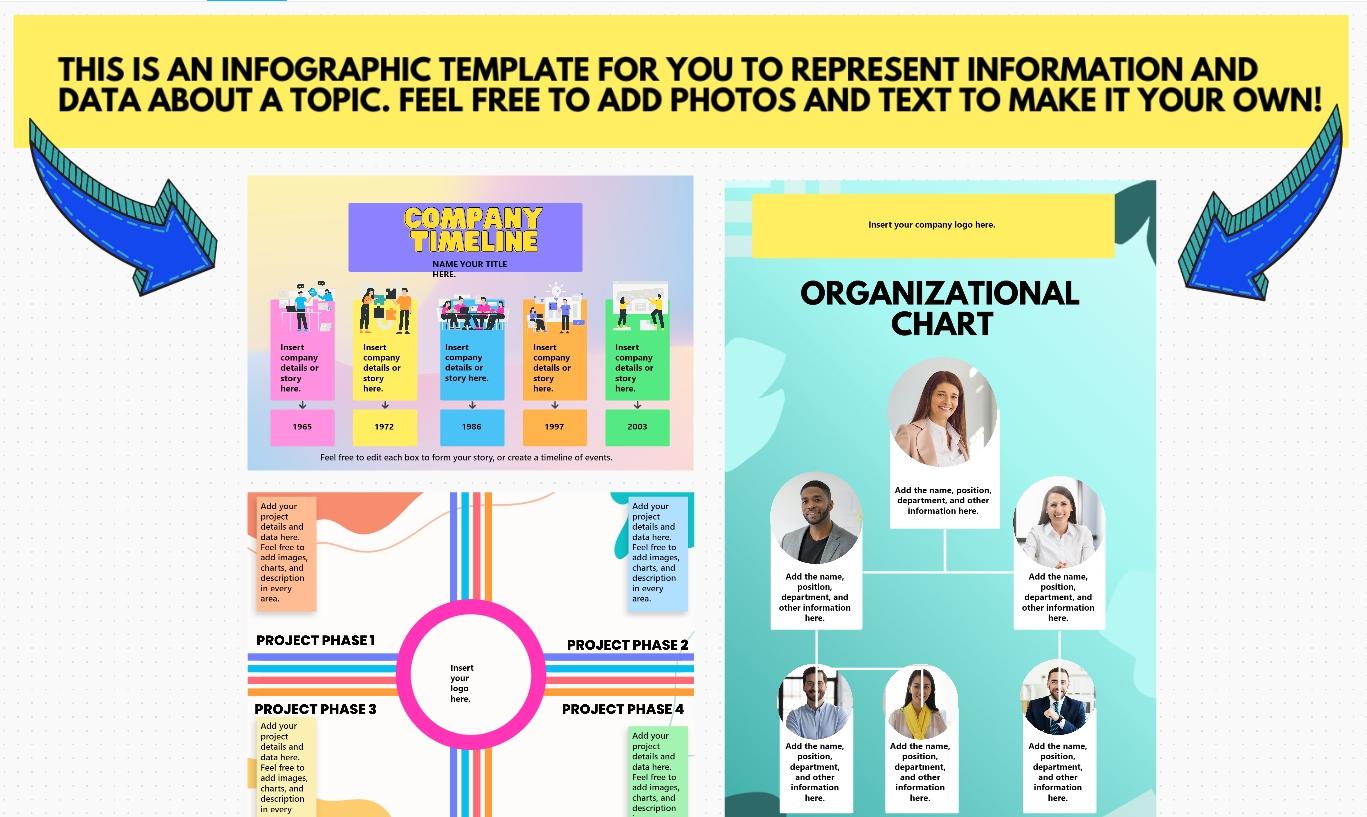
Turn any concept into a Frayer-style visual one-pager with the ClickUp Infographic Whiteboard Template
Plain, text-based Frayer Models can be uninspiring and ineffective for visual learners on your team. The ClickUp Infographic Whiteboard Template comes with a ready-made canvas to turn any topic into a visual one-pager—using blocks for headline messaging, supporting sections, and visuals (icons, photos, mini-diagrams).
It’s built on ClickUp Whiteboards, so you have numerous options to build the model as you want.
You can customize it as a Frayer Model, using the four main content zones as Definition, Characteristics, Examples, and Non-examples. Drop sticky notes into each quadrant, add icons for visual cues, then use the header strip to title the concept, and define the audience (grade level, team, or training cohort).
Why you’ll like this template:
Go beyond plain text by adding icons, embedding images, and using color-coded quadrants to make your Frayer Models visually distinct and easier to remember
Illustrate your ‘Examples’ quadrant by dragging and dropping images or embedding videos directly onto the Whiteboard canvas
Once your visual Frayer Model is complete, export it as an image or share a public link with anyone
✅ Ideal for: Instructional designers, trainers, and team leads creating ‘one-page learning’ assets from Frayer Model notes.
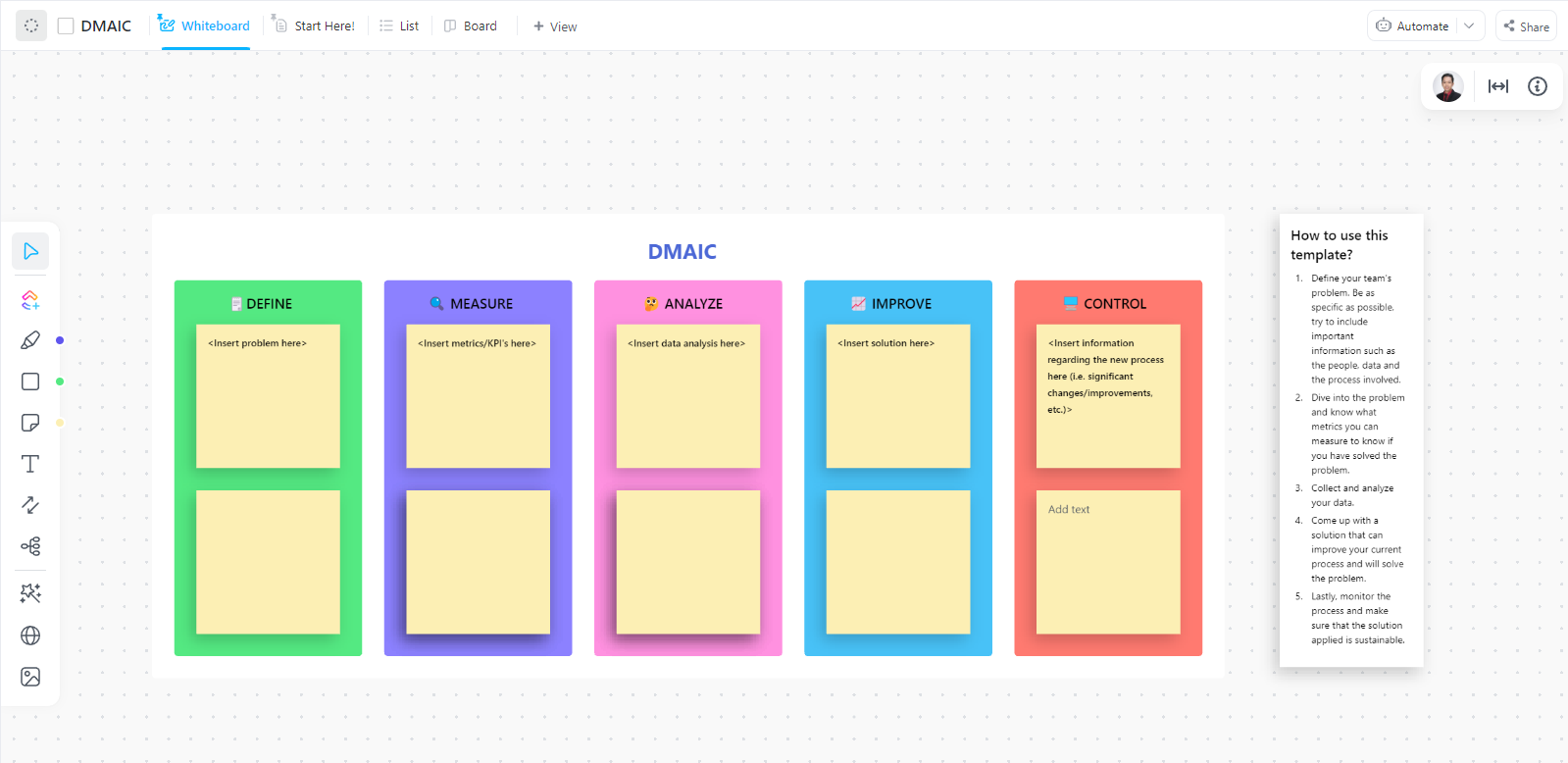
Break down concepts step by step on a DMAIC Whiteboard with the ClickUp DMAIC Template
The ClickUp DMAIC Template highlights a step-by-step whiteboard to work through a problem using the classic Define, Measure, Analyze, Improve, and Control structure. Each stage has its own space for sticky notes, and the guide keeps the workflow focused as you move from problem framing to a fix.
This layout works as a concept breakdown format when you want learners to understand a term deeply and apply it correctly.
You can treat each DMAIC column as a prompt for building a complete understanding. For instance, you can define the concept in plain language, measure it with real indicators, analyze what it includes/excludes, improve the definition with stronger examples, and then lock in the final version with a consistency check.
Why you’ll like this template:
Use the Define section to capture the core meaning of a term, then add key characteristics in the second sticky area
Build stronger examples in Measure and Analyze by listing signals, metrics, and common misunderstandings that learners mix up
Keep the final version consistent in Control by saving the approved definition, examples, and non-examples that your team or class agrees on
✅ Ideal for: Educators and trainers teaching structured thinking, process improvement, or concept clarity in group settings.
👀 Did You Know? Graphic organizers trace back to cognitive psychology. They were developed to put David Ausubel’s (1963) theory of meaningful reception learning into practice, based on his core idea that what a learner already knows is the biggest driver of what they’ll learn next (Ausubel, 1968).
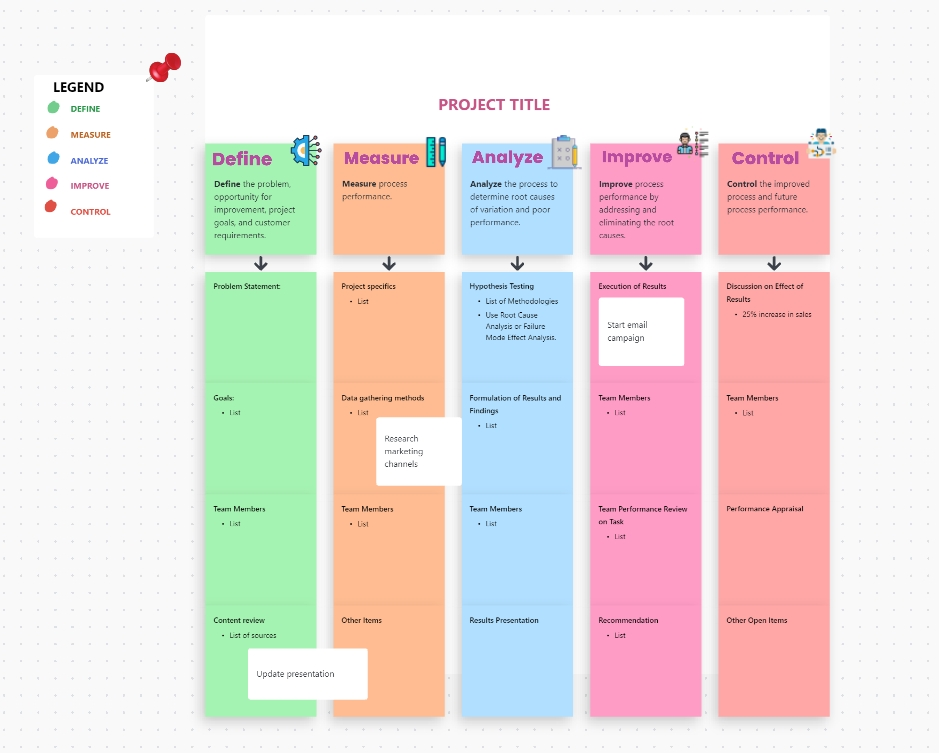
Build a DMAIC-style concept map with the ClickUp Work Plan Whiteboard Template
The ClickUp Work Plan Whiteboard Template lays out a complete plan on one visual canvas, with precise columns for DMAIC. Each column includes space for the project statement, goals, team members, research notes, results, and open items, which keeps planning and follow-through in one view.
And this works super well for concept learning when you want trainees to move beyond definitions and build real understanding.
You can use the first column to capture the definition and key traits, the middle columns to add examples and supporting notes, and then use the final column to lock in non-examples or common misconceptions.
Why you’ll like this template:
Keep concept breakdowns easy to scan with color-coded columns and a built-in legend that separates each stage clearly
Capture examples, non-examples, and supporting notes in dedicated sections
Maintain consistency across multiple terms by reusing the same structure each time
✅ Ideal for: Senior associates running group-based business lessons where trainees need a visual structure and repeatable format.
💡 Pro Tip: Want to use AI for brainstorming without getting stuck in endless ideation loops? Watch this video to see how teams turn scattered inputs into clear ideas using ClickUp AI, Docs, Whiteboards, and templates:
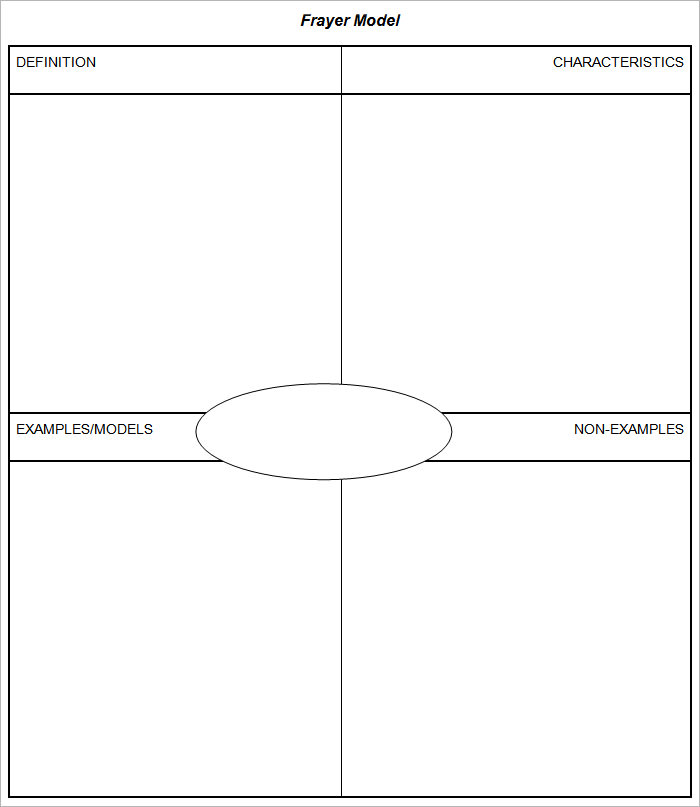
8. Frayer Model Template Collection by Template.net
The Frayer Model Template Collection by Template.net comes with Frayer worksheets in a four-quadrant layout, built for vocabulary instruction. Each template centers the vocabulary word and surrounds it with dedicated sections for Definition, Characteristics, Examples/Models, and Non-examples.
Because the format is printable and reusable, it works well for individual practice, small-group work, or quick classroom checkpoints.
Why you’ll like this template:
The classic four-box layout keeps vocabulary practice focused on the core features of a Frayer Model
The centered vocabulary term makes it easy to scan completed sheets during review or assessment
Works well as a repeatable routine for new vocabulary words across reading, science, and social studies units
✅ Ideal for: Educators and trainers who need classic four-quadrant layouts for print-based activities.
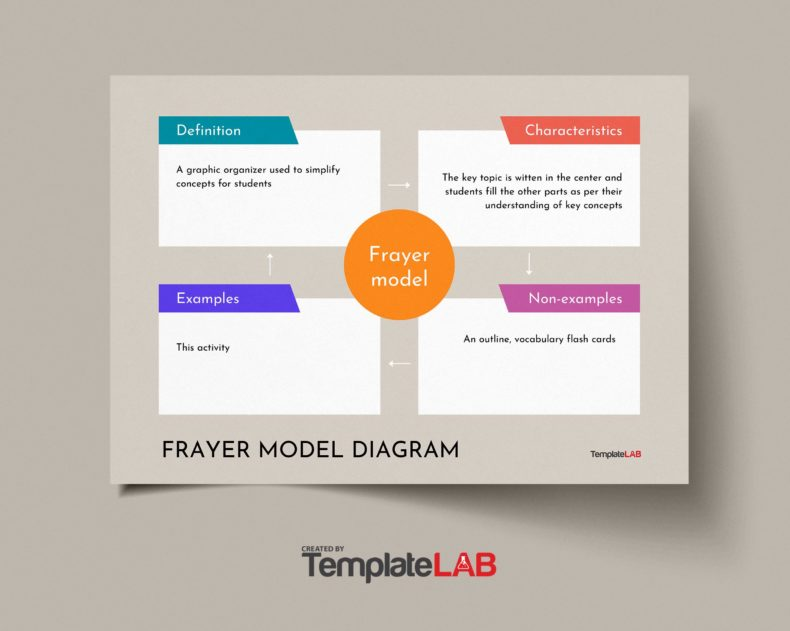
The Frayer Model Diagram V1 Template by TemplateLab comes with the vocabulary word in the center and four labeled boxes around it. The labels are already built in, so you can project them during a lesson, fill them out together as a class, or print them for quick practice.
It’s also available in formats like Word and PowerPoint, which makes it easy to edit, duplicate for multiple words, and reuse across units without rebuilding the organizer each time.
Why you’ll like this template:
Strong visual hierarchy (center term + four panels) makes it easier to teach the Frayer structure during whole-class instruction
Diagram-style layout is presentation-friendly for Word, PowerPoint, or posters
Clear labels support faster checks for understanding during review and test prep
✅ Ideal for: Teachers building classroom slides or anchor charts for academic vocabulary.
WordLayouts’ Frayer Model Template is a straightforward, four-quadrant template designed to be edited directly in Microsoft Word or Google Docs.
Because it’s a simple document format, it’s easy to duplicate for multiple vocabulary words, assign as homework, or print for in-class practice. You can type directly into each box, save versions for different units, and reuse the same layout for quick review before quizzes.
Why you’ll like this template:
Works well for both independent work and small-group activities because students can complete one box at a time, then compare answers quickly
Easy to print out and can be heavily personalized on Microsoft Word or Google Docs
Easy to duplicate for weekly word lists, unit vocab, or quiz prep
✅ Ideal for: Individuals and teams who prefer to work within the Microsoft/Google ecosystem.
📮ClickUp Insight:11% of our respondents leverage AI primarily for brainstorming and ideation. But what happens to these brilliant ideas afterward? This is where you need an AI-powered whiteboard, like ClickUp Whiteboards, which helps you instantly turn ideas from the brainstorming session into tasks. And if you can’t quite explain a concept, simply ask the AI image generator to create a visual based on your prompt. It’s the everything app for work that enables you to ideate, visualize, and execute faster!
Summarize this article with AI
ClickUp Brain not only saves you precious time by instantly summarizing articles, it also leverages AI to connect your tasks, docs, people, and more, streamlining your workflow like never before.
Summarize this article for me please
How to Use a Frayer Model Template for Vocabulary Development
Having a template is a great start, but knowing how to fill it out effectively is what improves vocabulary retention and team alignment.
Follow this practical, step-by-step approach to get the most out of your Frayer Model template. 🛠️
Select your target term or concept: Choose a word or concept that is genuinely challenging or frequently misunderstood. For teams, focus on terminology where misalignment causes confusion, like ‘agile’ or ‘customer-centric’
Start with the definition quadrant: Don’t just copy a dictionary definition. Write it in your own words. If you can’t explain it simply, you don’t fully understand it yet
Identify key characteristics or facts: List the attributes that are always true about this concept. Ask yourself, ‘What are the non-negotiable features that make this term what it is?’
Generate examples: Provide concrete, specific instances of the concept. The more varied and real-world your examples are, the deeper your understanding will become
Define non-examples (the critical step): This step is essential. Identify things that are similar but are not the concept. This forces you to clarify the boundaries of the term
Review and refine: Read all four quadrants together. Do they paint a complete and accurate picture? If you’re working with a team, discuss any disagreements—they often reveal critical gaps in shared understanding
✨ ClickUp Advantage: When using a digital Frayer Model template in ClickUp, use ClickUp Brain to suggest examples or non-examples when you get stuck. It can spark ideas you hadn’t considered and accelerate the deep processing that makes new concepts stick.
Summarize this article with AI
ClickUp Brain not only saves you precious time by instantly summarizing articles, it also leverages AI to connect your tasks, docs, people, and more, streamlining your workflow like never before.
Summarize this article for me please
Bring Vocabulary to Life With ClickUp
Free Frayer Model templates are a great first step when you need a simple way to help learners define concepts, spot patterns, and separate examples from non-examples without turning it into a long lesson plan.
But Frayer Models get even more useful when they become part of the workflow. With ClickUp, you can reuse your Frayer templates in Docs, teach in real time using Whiteboards, and turn each target word into a Task with an owner, due date, and checklists.
Plug in AI to generate a quick first draft of examples and non-examples that you can refine with your class or team.
Summarize this article with AI
ClickUp Brain not only saves you precious time by instantly summarizing articles, it also leverages AI to connect your tasks, docs, people, and more, streamlining your workflow like never before.
Summarize this article for me please
Frequently Asked Questions
What are the four quadrants of a Frayer Model graphic organizer?
The four quadrants are Definition (what the term means in your own words), Characteristics (key attributes or facts), Examples (specific instances), and Non-Examples (things that are similar but don’t fit the definition).
How can teams use Frayer Model templates for onboarding and training?
Teams can use Frayer Models to build a shared vocabulary for key business terms, processes, or tools. This ensures new hires understand not just definitions but also what concepts do and don’t include, reducing miscommunication from day one.
What is the difference between a blank Frayer Model and an editable Frayer Model template?
A blank Frayer Model is typically a static, print-ready document with empty quadrants. An editable Frayer Model template allows for digital customization, real-time collaboration, and integration with other work management tools.
Can Frayer Models be used for math, science, or technical concepts beyond vocabulary?
Yes, the Frayer Model is highly effective for math terms (like ‘prime number’), science concepts (like ‘photosynthesis’), and technical terminology in any field. It excels wherever distinguishing examples from non-examples is key to clarifying understanding.
Everything you need to stay organized and get work done.