






Still downloading templates?
There’s an easier way. Try a free AI Agent in ClickUp that actually does the work for you—set up in minutes, save hours every week.
Sorry, there were no results found for “”
Sorry, there were no results found for “”
Sorry, there were no results found for “”
Debt has a way of sneaking up on you…
A card swipe here, a “try free for 7 days” subscription there, and suddenly you’re staring at three different due dates and have no idea which balance to tackle first.
Zoom out, and it makes sense why it feels heavy: credit card balances in the U.S. reached about $1.21 trillion in Q2 2025. That’s a lot of interest quietly compounding in the background while you’re just trying to keep up with everyday life.
A debt payoff tracker template is how you switch from “I hope this works” to “I know what happens when I make this payment.” It puts every balance, interest rate, minimum payment, and due date on one page.
In this guide, you’ll find 16 free debt payoff tracker templates across ClickUp, Google Sheets, Excel, and printables so you can manage your debt payoffs at your own pace.
Debt payoff tracker templates are tools that organize debt repayment in one place. They list each account with the current balance, interest rate, minimum payment, payment dates, and the payment amount you plan to make.
Most layouts also total your balances, estimate payoff timing, and show the total interest paid based on the method you choose.
You can sort debts by the snowball method, which targets the smallest balance first, or the avalanche method, which targets the highest interest rate first.
As you record monthly payments and any extra payments, the template updates remaining balances and highlights the next debt to focus on. formats range from printable checklists to debt payoff spreadsheets in Google Sheets or Microsoft Excel, as well as workspace templates that track progress over time.
📖 Also Read: How to Organize Finances: A Step-by-Step Guide
A good debt payoff tracker template helps you see every account clearly, review payoff strategies that fit your cash flow, and track steady progress without extra work.
The ideal template should include:
👀 Fun Fact: Credit card statements in the U.S. must show how long it will take to pay off your balance if you only make the minimum and the fixed monthly amount needed to wipe it out in 36 months. Incorporate these two figures into your tracker to ensure the accuracy of your plan.
Here’s a quick summary of the best free debt payoff tracker templates:
| Template Name | Download Template | Ideal for | Best Features | Visual Format |
| ClickUp Personal Budget Template | Get free template | Individuals & small biz owners who want budget + debt in one place | Map income, bills, and debts; switch Snowball/Avalanche; running totals & reminders | List, Table, Dashboard |
| ClickUp Simple Budget Template | Get free template | Anyone who wants a lightweight budget that frees cash for payoff | Clean categories; views for Budget Plan/Income/Net Cash/Expenses; quick exports | List, Table |
| ClickUp Payment History Template | Get free template | Households & teams that need a clean audit trail | Receipt form; statuses (Open/Complete); fields for method/receipt #; client table | Form, List, Table |
| ClickUp Monthly Expense Report Template | Get free template | Households & small teams tracking monthly spend | One running log; category views; MoM comparisons; simple exports | Doc, Table |
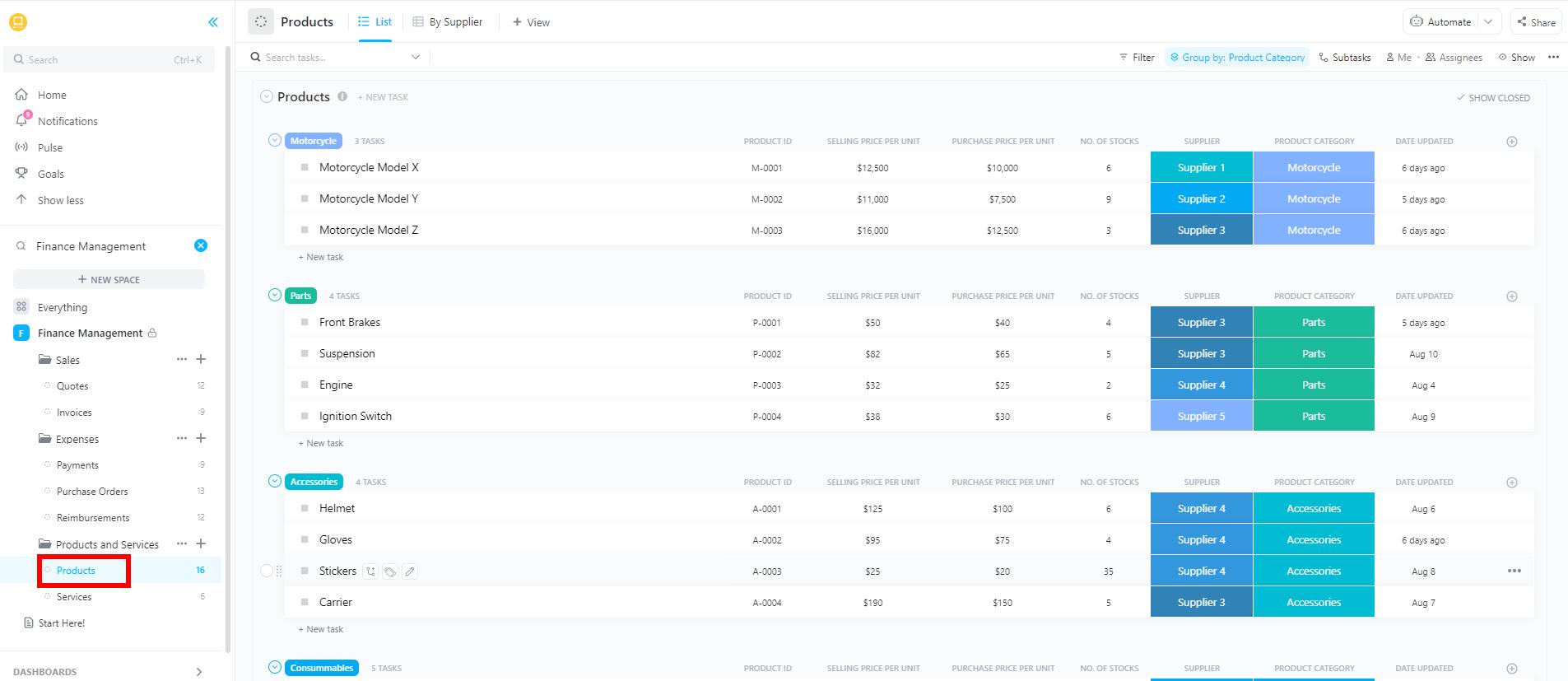
| ClickUp Finance Management Template | Get free template | Freelancers, SMBs, households centralizing finances | Budgets + expenses + debts in one hub; 28 statuses; due-date flags | List, Calendar |
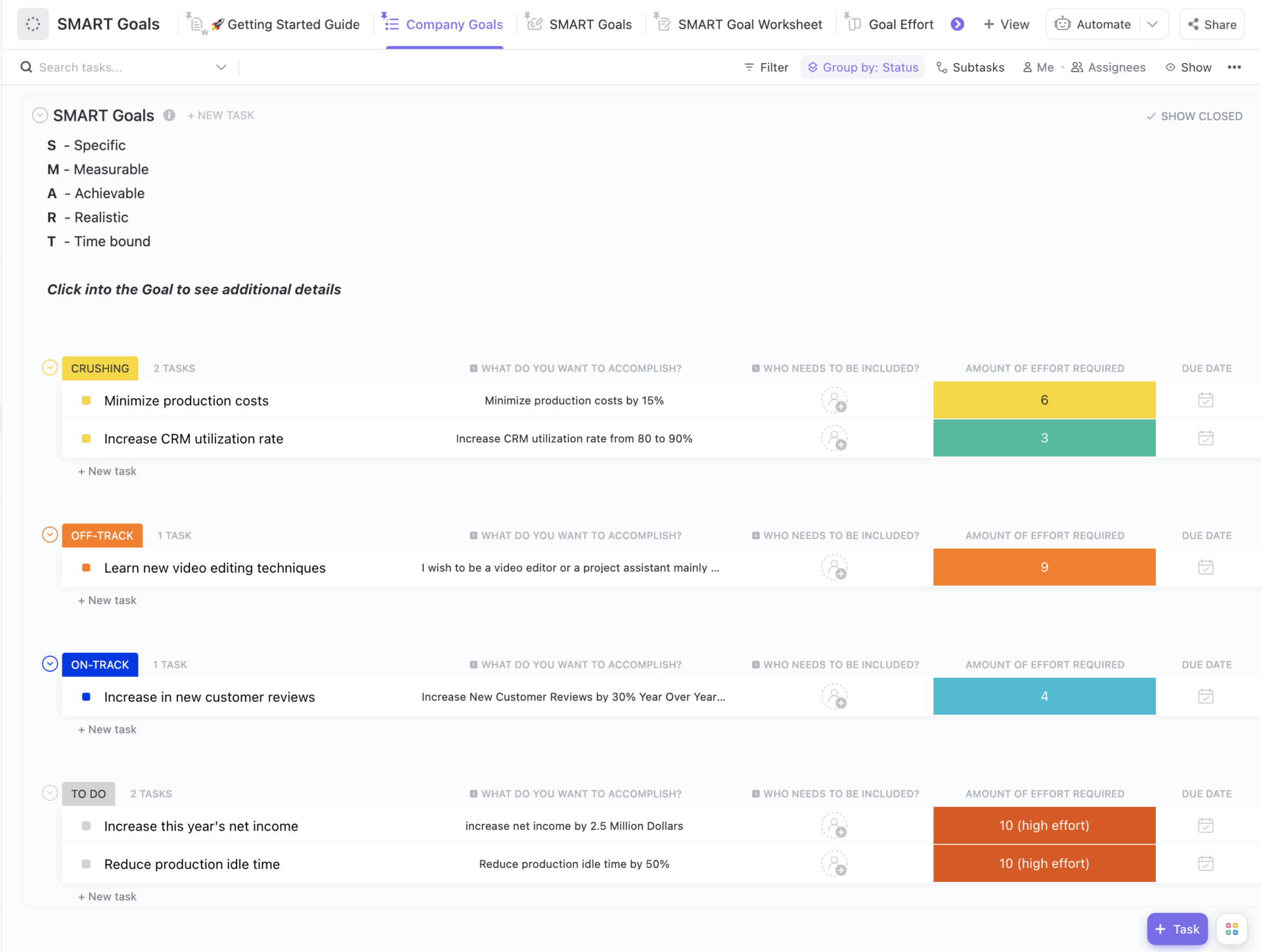
| ClickUp Finance Goal Setting Template | Get free template | Individuals/teams turning “get out of debt” into milestones | SMART views; milestones; progress tracking; status rollups | Goals, List, Doc |
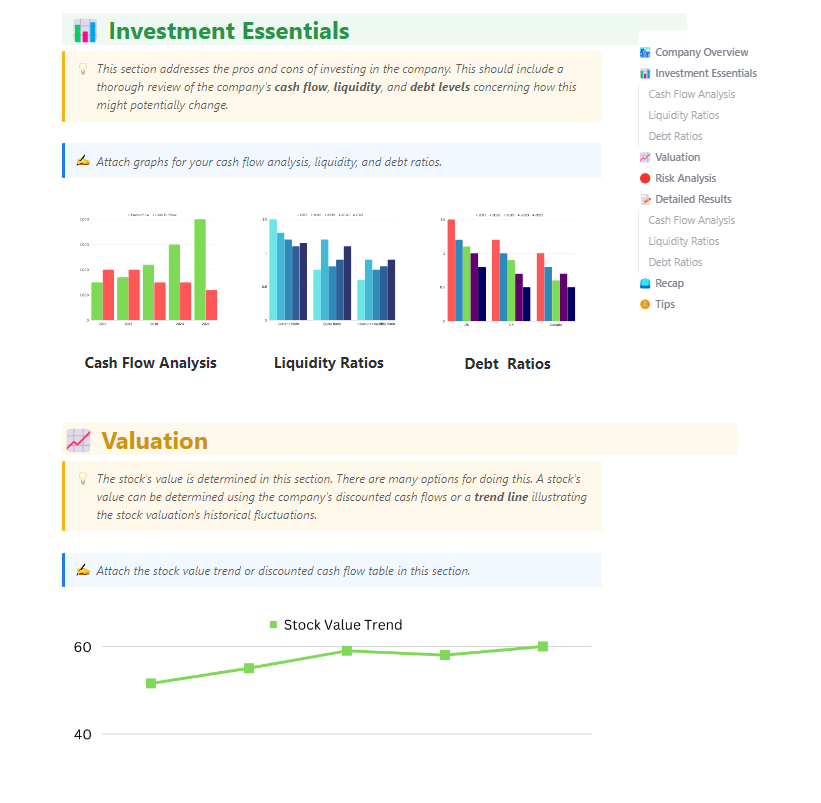
| ClickUp Financial Analysis Report Template | Get free template | Small teams needing a clear readout before decisions | Income/expense tables; quick charts; QoQ/MoM comparisons; easy sharing | Doc, Table, Charts |
| Excel/Google Sheets Personal Debt Template (Template.net) | Download the template | Spreadsheet users listing all debts | Columns for balance/rate/min/due; totals; works with Snowball/Avalanche | Excel, Google Sheets |
| Excel/Google Sheets Monthly Debt Template (Template.net) | Download the template | Month-at-a-glance payoff tracking | Monthly due-date view; extra-payment column; payoff totals | Excel, Google Sheets |
| Excel/Google Sheets Debt Organizer (Template.net) | Download the template | Anyone building a master debt list | Lender, balance, rate, min, due; promo/autopay notes; quick sort | Excel, Google Sheets |
| Spreadsheet Debt Repayment Template (Credit Canada) | Download the template | People who want a ready plan from a nonprofit | Built-in Snowball/Avalanche; month-by-month schedule; interest totals | Excel, Google Sheets |
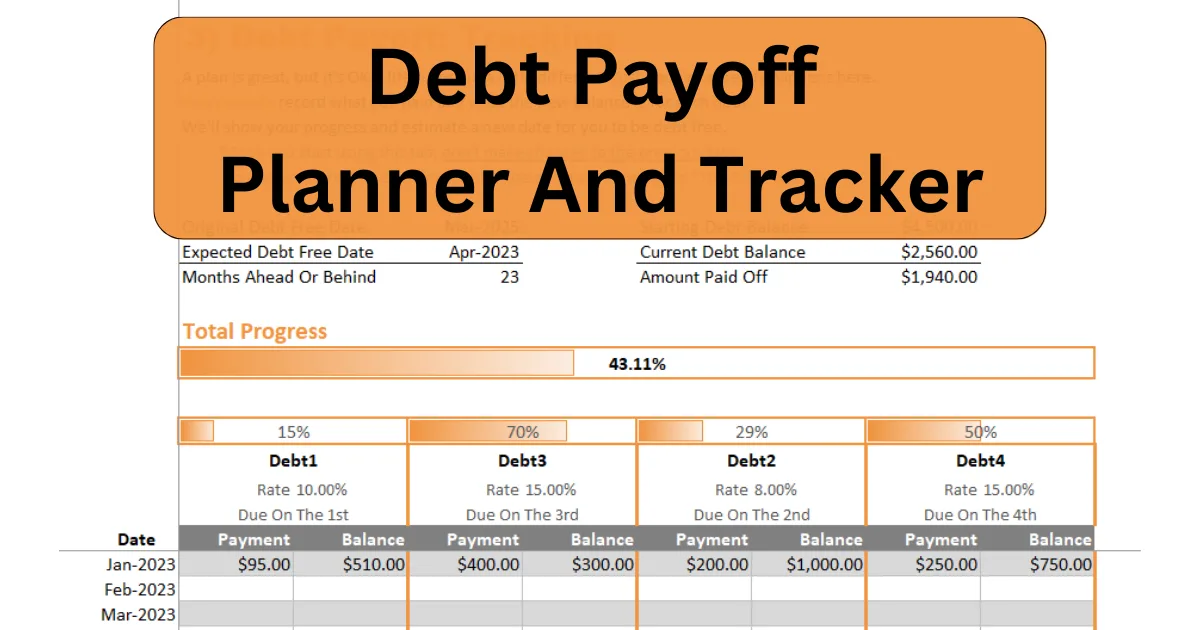
| Excel Debt Payoff Planner & Tracker (The Happy Giraffe) | Download the template | Users who want plan + tracker in one file | Next-debt guidance; rolls payments forward; projected debt-free date | Excel, Google Sheets |
| Debt Payoff Tracker (5-in-1) (Vertex42) | Download the template | Visual progress fans tracking multiple debts | Auto goal amounts; check/colour boxes; date stamps | Excel, Printable PDF |
| Debt Snowball Tracker (Vertex42) | Download the template | Snowball method users who want quick visual wins | Snowball graphic fills via conditional formatting; min/extra refs | Excel, Printable PDF |
| Debt Free Journey Charts (Vertex42) | Download the template | Monthly “progress poster” users | Reveal-as-you-go graphic; simple monthly balance log | Excel |
| Debt Payoff Tracker Grid (Vertex42) | Download the template | Paper-friendly, box-ticking trackers | 200-cell grid; space for creditor/min/start debt; fridge-friendly | Excel, Printable PDF |
Debt tracking usually breaks before the plan does. Balances are listed in a spreadsheet, due dates are hidden in emails, and a separate AI chat with your bank’s AI bot where you’ve typed, “Which debt should I pay first?”
That’s Work Sprawl in real time—and it makes even simple decisions feel harder than they need to be.
ClickUp pulls all of that into one Converged AI Workspace. Your balances, due dates, payoff strategy, and tasks to “make the payment” live side by side with docs, reminders, and AI.
You can log debts once, set recurring payments, add extra amounts when you have them, and watch progress updates in real time instead of across five different tabs.
If you want a space that is already set up for making money decisions, ClickUp Finance provides ready-made views and dashboards for budgets, bills, and cash flow.
As one G2 reviewer put it,
I also love that it combines so many tools into one platform docs, goals, chat, and whiteboards, so I don’t have to keep switching between apps.
Here are some practical debt payoff tracker templates you can start with today.
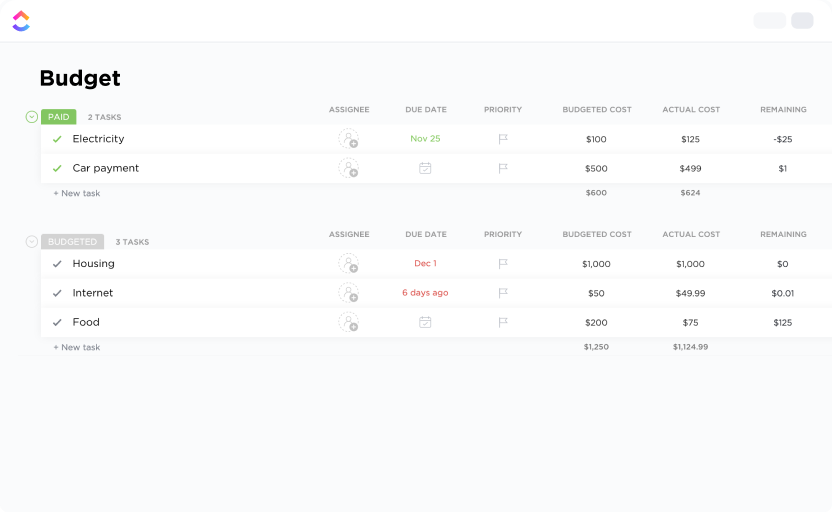
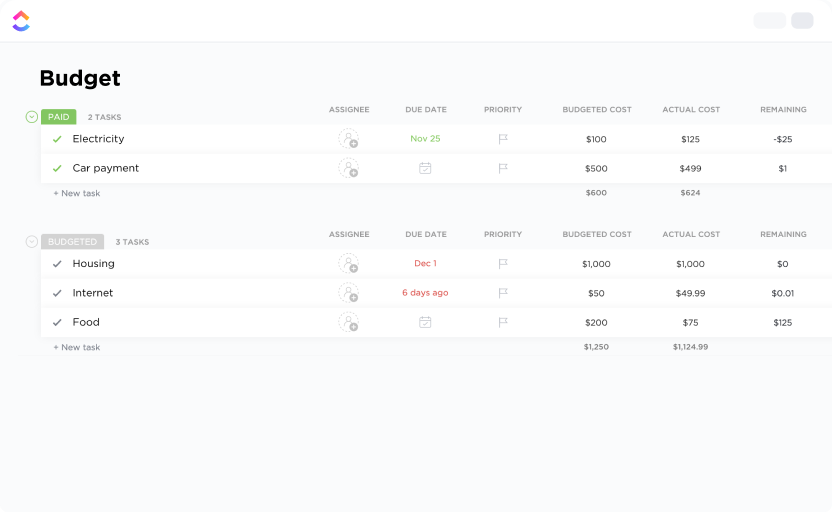
The ClickUp Personal Budget Template pulls income, bills, and debt repayment into one simple view so your debt payoff plan matches real cash flow. You see every account, every due date, and the payment amount you can commit to without guessing.
The setup takes a few minutes. You can add each account’s current balance, interest rate, and minimum payments, then list your monthly payments for housing, utilities, and other essentials.
As you log payments and add the occasional extra payment, remaining balances and payoff timing update automatically. You always know the next debt to focus on and whether today’s payment keeps you on pace.
✨ Ideal for: Individuals and small business owners who want a simple budget that drives consistent debt repayment.
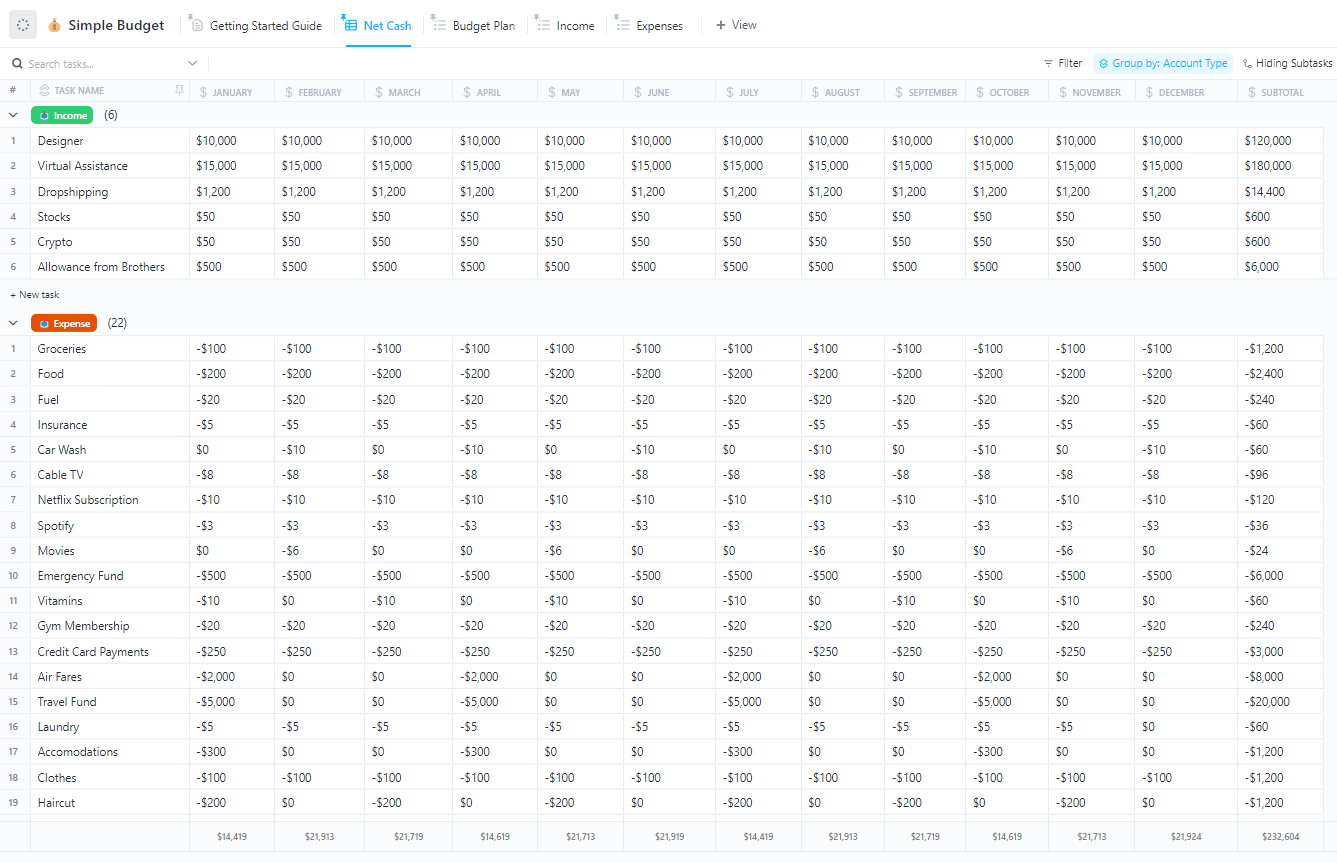
Budgets work best when they are simple to read and quick to update. The ClickUp Simple Budget Template gives you a clean list for income and expenses, a quick view of net cash, and a place to note monthly payments for credit cards or student loans.
You can add categories once, then log spending as it happens. You get a visual snapshot of where money goes, where to cut, and how much is free for extra payments.
If you prefer the snowball method, you can allocate those extra dollars to pay off the smallest balance first. You can use those extra dollars to settle the balance with the highest interest rate if you’d rather use the avalanche method.
Sharing or reviewing is straightforward. You can open the budget plan, check this month’s totals, and adjust next week’s payment amount without rebuilding a spreadsheet.
✨ Ideal for: Anyone who wants a simple budget that frees up cash for debt repayment without a complicated setup.
💡Pro Tip: Set up ClickUp Reminders for each debt payment due date so you’re never hit with late fees or damage to your credit score. You can create recurring reminders that notify you days before payments are due, giving you time to transfer funds or adjust your budget.
Reminders can be customized by priority—mark your highest-interest debts as urgent so those payments stay top of mind.
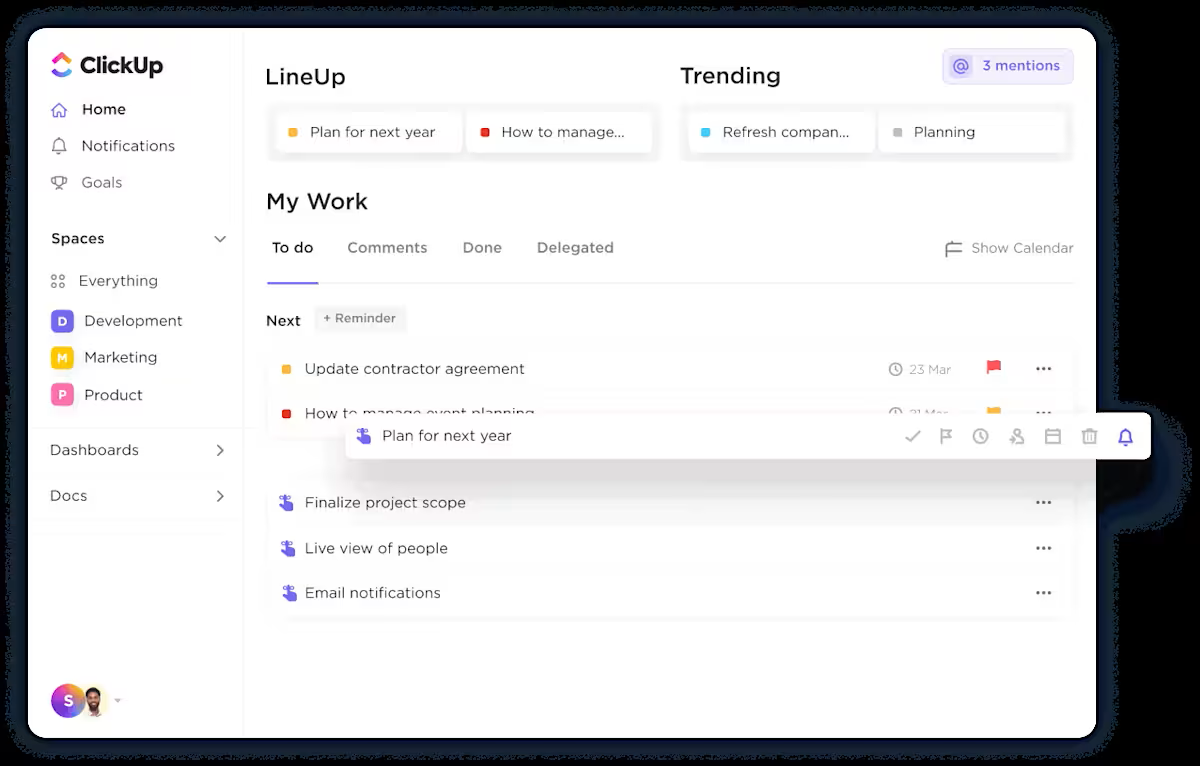
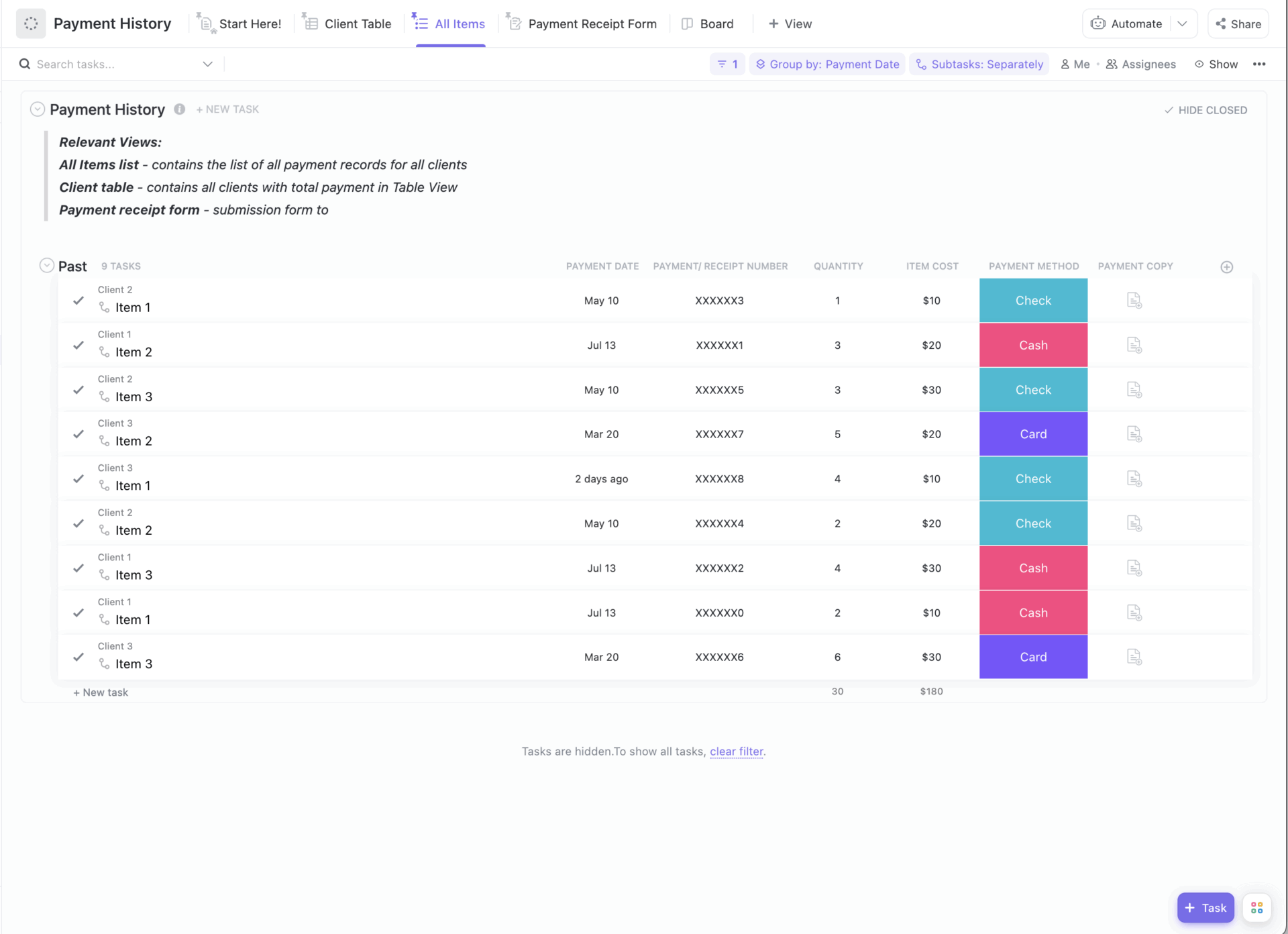
The ClickUp Payment History Template keeps a running log of what you pay and what you receive. You can note the payment amount, date, method, and reference number, then tag it to credit card bills, personal loans, or other financial obligations.
This becomes the quick way to confirm minimum payments, keep due dates visible, and see how cash flow moves through the month.
Looking up answers is simple. Filter to find open items, scan a client table for past activity, or export a clean snapshot for your records. Need to show that last month’s payment was posted on time? It is right there.
✨️ Ideal for: Individuals, households, and small teams who want a clean audit trail that keeps debt repayment and everyday bills on schedule.
💡Pro Tip: ClickUp Brain can read your lists and documents, summarize last month’s spending by category, flag overshoots, and draft snowball or avalanche payoff schedules based on your balances and rates. It can turn those plans into dated tasks with reminders, so your template becomes a living routine.
Try prompts like:
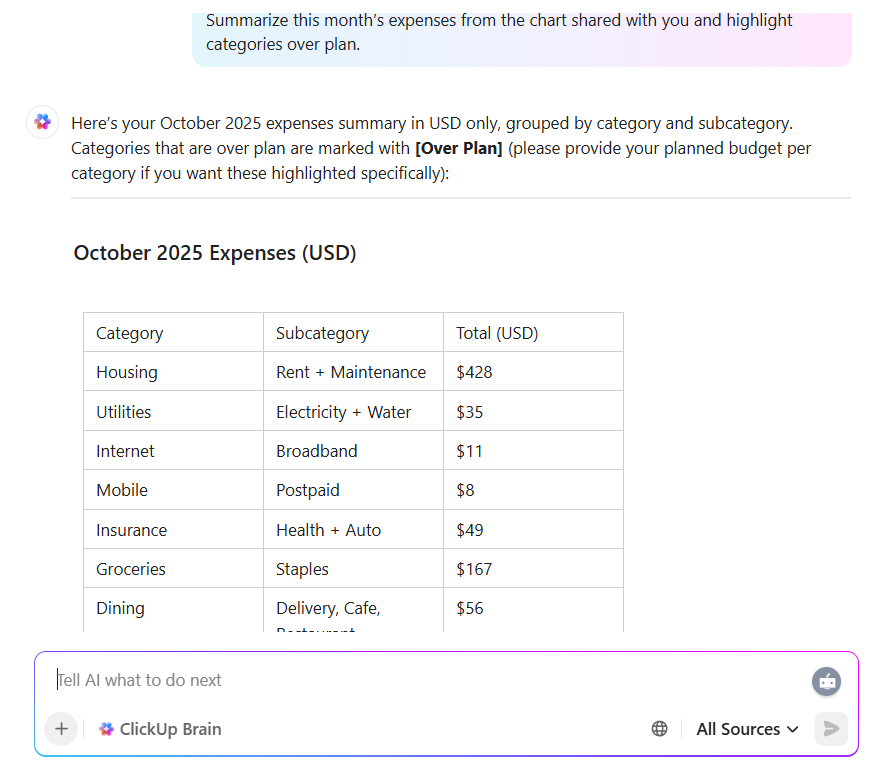
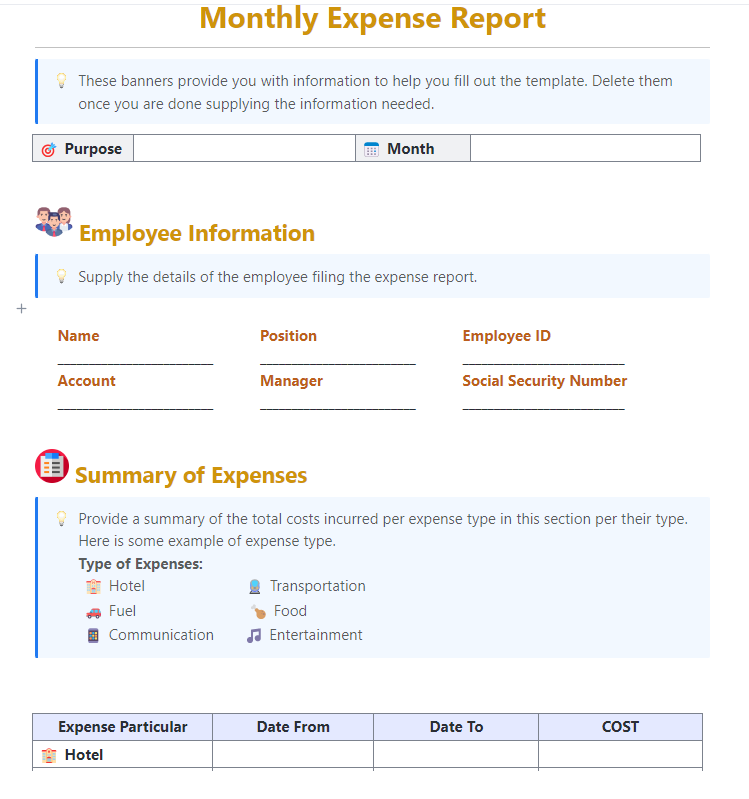
The ClickUp Monthly Expense Report Template provides a single, running record for the month, allowing you to clearly see your spending before it surprises you.
Add the usual fixed bills and everyday expenses, then categorize them accordingly. Patterns show up fast. That makes debt payoff simpler, too, because you can free up cash flow and decide whether extra payments go to the smallest balance or the highest interest debt.
When you want answers, you do not hunt. Compare this month to last, grab a quick snapshot to share, and set the next payment amount with more confidence.
✨️ Ideal for: Households and small teams that want an accurate monthly readout to support steady debt repayment.
💡 Pro Tip: Before you lock any plan, run a quick check with this simple ClickUp Risk Assessment Calculator to spot variable-rate or late-fee risks early.
The ClickUp Finance Management Template consolidates budgets, expenses, and debt repayment into one place, so you can match your plan to real cash flow and set a payment amount that sticks.
You can add your recurring bills, variable spending, and financial obligations, then label debts you want to prioritize. If you prefer quick wins, focus on the smallest balance. To minimize interest, send extra payments to the account with the highest interest rate.
Either way, you get a clearer view of the next step and the impact on payoff timing. Over time, you can compare months, spot categories to trim, and decide when to increase monthly payments. The snapshot is easy to share with a partner or bookkeeper, which keeps decisions moving.
✨️ Ideal for: Small business owners, freelancers, and households that want one hub to manage budgets, monitor cash flow, and route extra payments to the right debt
Goals only work when they line up with the numbers. The ClickUp Finance Goal Setting Template helps you turn ideas like “get out of debt” or “save three months of expenses” into clear steps you can actually track.
To get there, you can define debt payoff goals, add checkpoints for the smallest balance or highest interest debt, and set a steady monthly payment that does not wreck cash flow.
When income or expenses change, you adjust the next step instead of rewriting the whole plan. You also get a view of your progress. Before deciding what to do next, you can see what is on track, what needs a nudge, and where an extra payment would help most.
✨️ Ideal for: Individuals and small teams who want clear, measurable goals that guide steady debt repayment.
When you do not trust the numbers, decisions stall. The ClickUp Financial Analysis Report Template pulls income, expenses, profits, and losses into a clear report you can read in minutes. You get simple tables that transform into visuals, making it easier to explain the source and destination of money.
This template pairs well with a debt payoff plan. You can see which costs are increasing, how much free cash is left after monthly payments, and whether an extra payment should be applied to the smallest balance or the highest-interest debt.
The picture updates as soon as you adjust an input, so you do not need a second sheet to test ideas. Save a snapshot for the month or quarter, answer quick questions with a single view, and set next month’s payment amount with more confidence.
✨️ Ideal for: Small teams and individuals who want a clear financial readout that supports smarter debt repayment decisions.
Quick Hack: Use ClickUp Custom Fields for things like budgeted vs. actual spend, vendor, and payment date. That means your debt payoff tracker sits within a fuller picture of where your money is going, not in its own isolated file.
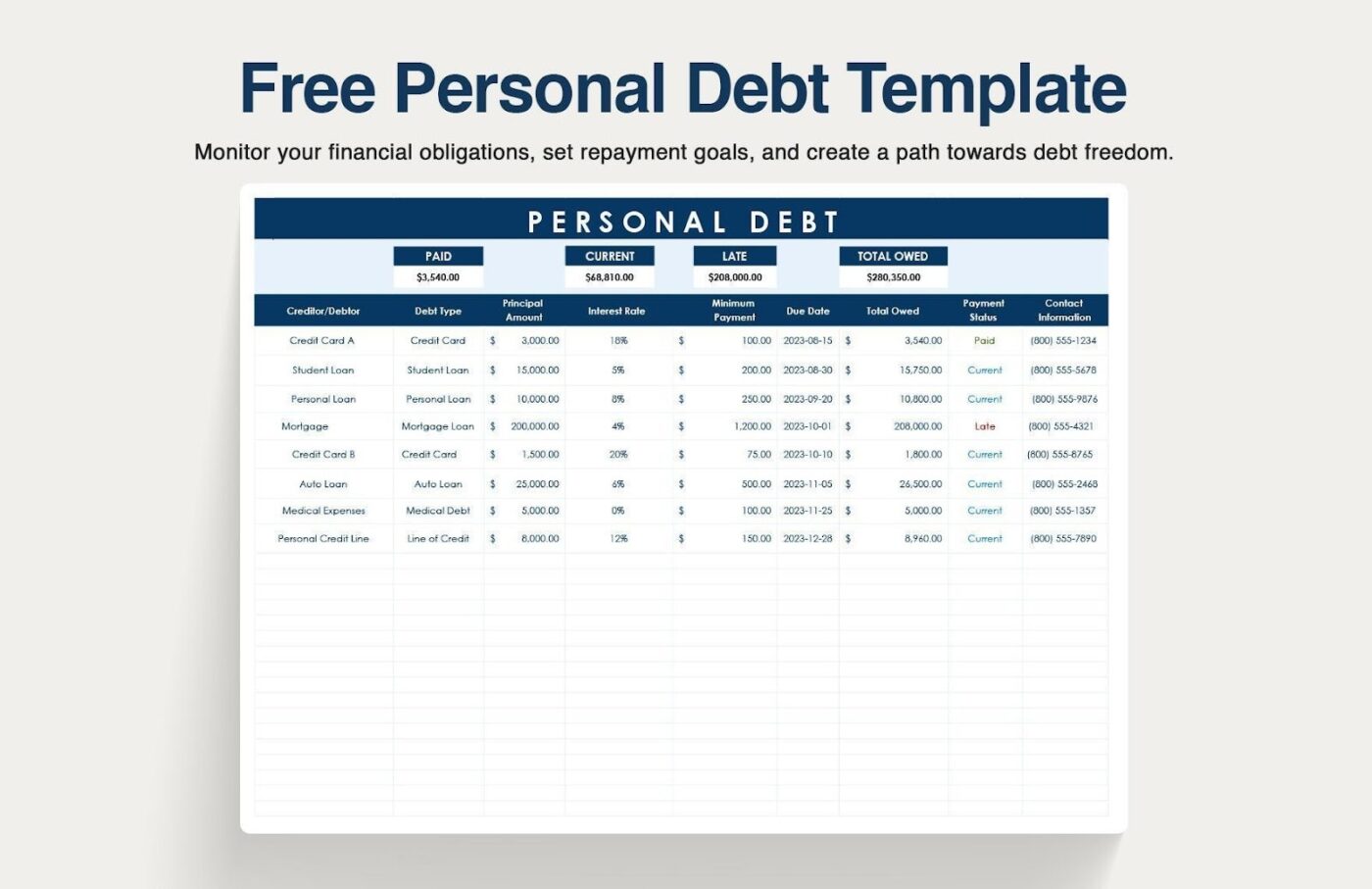
If you prefer the comfort of a spreadsheet, Excel, or Google Sheets, the Personal Debt Template by Template.net is a straightforward tool for listing every balance, rate, and due date. Enter the current balance, interest rate, and minimum payments for each loan or credit card, then log monthly payments as you go.
You can use it as a debt payoff spreadsheet for either approach. Sort by the smallest balance for the snowball method or by the highest interest rate for the avalanche method. Add a column for extra payments, and you will see remaining balances and payoff timing move in the right direction.
Save a copy for records, hand a tab to a partner, or export a snapshot before you set next month’s payment amount.
✨️ Ideal for: Spreadsheet users who want a clean, editable debt payoff tracker without extra tools.
👀 Fun Fact: Small wins matter. Studies find that concentrating payments to close out one debt at a time boosts motivation and follow-through, one reason many people stick with a snowball start, even if the avalanche saves more interest on paper.
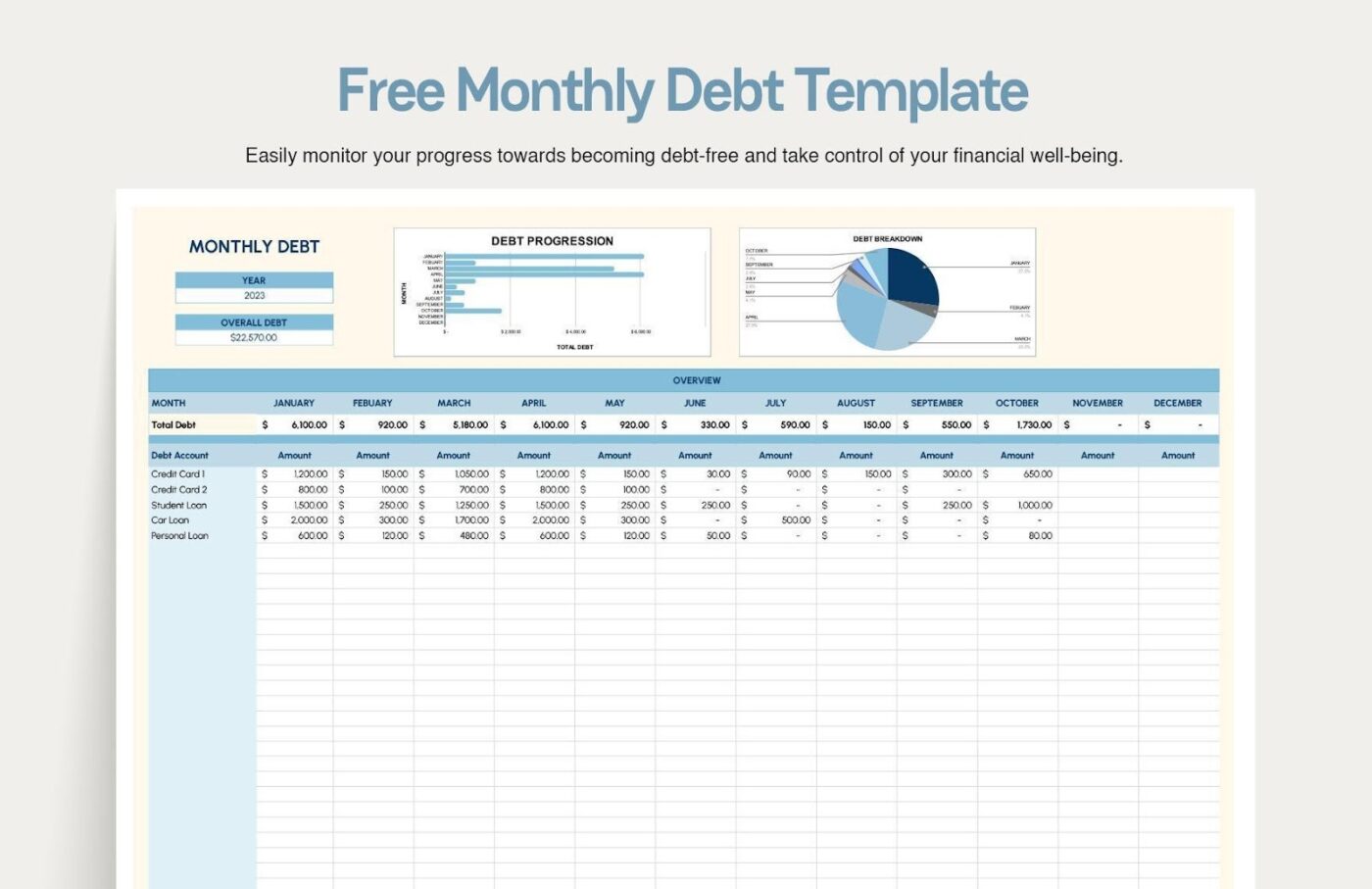
If you like a month-at-a-glance view, the Excel and Google Sheets Monthly Debt Template by Template.net keeps every due date and payment in one sheet. List each account with its current balance, interest rate, and minimum payment, then track monthly payments as you go.
You get a rhythm for the month, plus a clear spot to record any extra payments.
Sharing with others is simple, too. You can send the sheet to an advisor, save a monthly snapshot for records, and adjust next month’s payment amount without rebuilding anything.
✨️ Ideal for: Spreadsheet users who want a clean monthly tracker for due dates, minimum payments, and extra payments.
💡 Pro Tip: Tracking multiple debts—credit cards, student loans, car payments, personal loans—means monitoring balances, interest rates, payment schedules, and progress toward payoff goals across different accounts and lenders.
ClickUp BrainGPT helps you make sense of your debt payoff data without manually calculating which debts to prioritize or how extra payments affect your timeline.

Here’s how:

If your account details are stored in different places, the Excel and Google Sheets Debt Organizer Template by Template.net is an organizer that consolidates them into a single, clean master list.
You capture the basics for each debt in a single sheet, so you can see total debt, who you owe, and what comes next without hopping between portals.
It is a helpful first step before you pick a payoff strategy. With every current balance, interest rate, minimum payment, and due date in one view, you can spot the highest interest debt or the smallest balance quickly. Add an extra payment column, and you will see how the plan starts to move.
✨️ Ideal for: Anyone starting a debt-free journey who wants a comprehensive, editable snapshot of all accounts before choosing the snowball or avalanche method.
📖 Also Read: How to Use AI in Accounting (Use Cases & Tools)
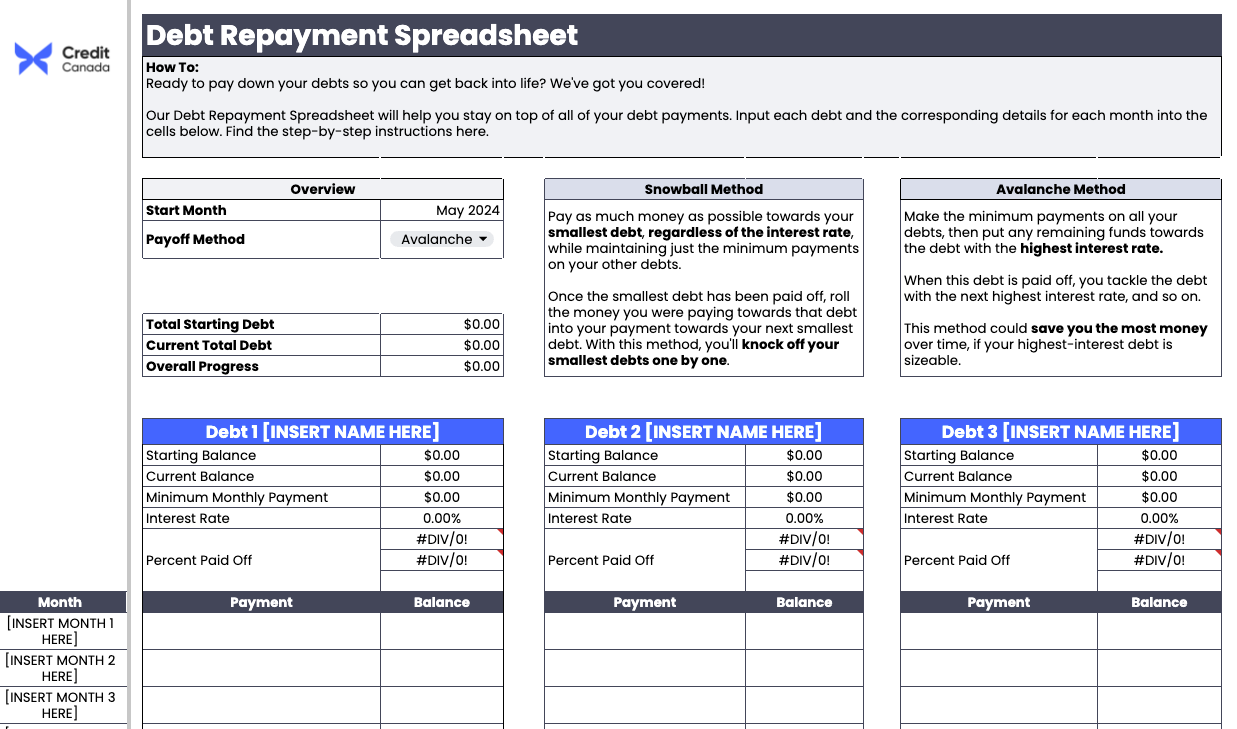
If you want a clear plan without a lot of formula setup, the Spreadsheet Debt Repayment Template by Credit Canada does the job. List each debt with current balance, interest rate, minimum payment, and due date, then follow a month-by-month schedule that tells you what to pay next.
Add an extra payment, and the sheet updates payoff timing and total interest so you see the impact right away. You can save a copy for yourself or share it with a partner or counselor, and both of you will see the same plan.
✨️ Ideal for: Anyone who wants a straightforward worksheet that keeps the plan and progress in plain view.
👀 Fun Fact: A mid-cycle credit card payment can cut interest because many issuers calculate it daily using your average daily balance, so lowering the balance earlier reduces what interest is charged.
Want a spreadsheet that gives you both a plan and a running log? The Excel Debt Payoff Planner and Tracker Template by The Happy Giraffe does both. Enter each debt’s name, current balance, interest rate, due date, and what you can put above the minimum.
This template then lays out the steps to follow and keeps a simple tracking sheet that you update as you pay. This template also updates your expected debt-free date as you go. You can also use the handy ClickUp Days Calculator to estimate your payoff date from today and keep the timeline real.
You can copy it to Google Sheets or keep it in Excel and save a monthly snapshot.
✨️ Ideal for: Anyone who wants a free, nonprofit spreadsheet that shows the next step and tracks progress in the same place.
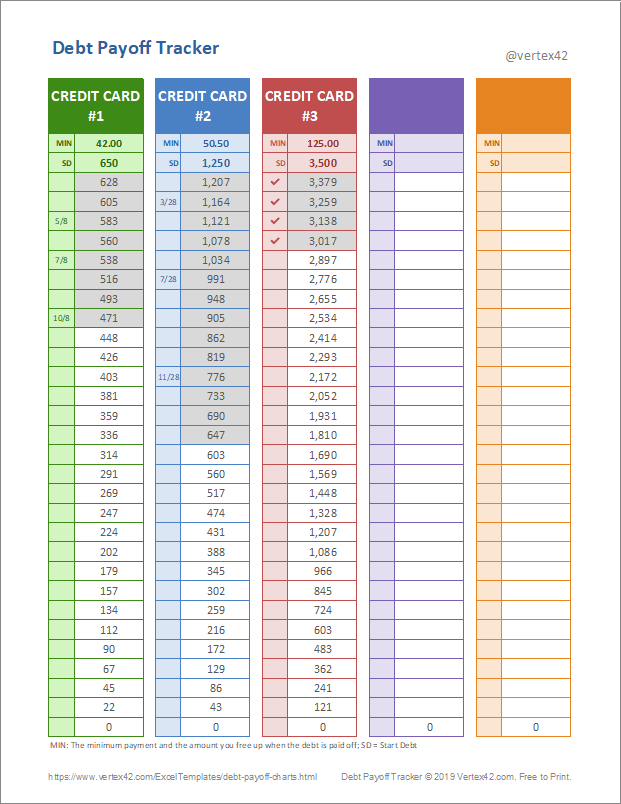
If you want one sheet to track multiple debts, the Debt Payoff Tracker (5-in-1) by Vertex42 is the simple route. Enter each starting debt and minimum payment, and the chart fills in goal amounts for you. You color in boxes or check them off as you hit milestones, and you can record the date for each step so progress stays visible.
The setup is light too. Edit the labels you need, list your accounts, and you are ready to mark payments against a single view. It works as a printable PDF or an Excel file, so you can keep a copy on your desk or drive.
✨️ Ideal for: Anyone who wants a single, printable tracker that updates itself.

The Debt Snowball Tracker by Vertex42 is playful and clear. You enter the total debt, and the sheet builds a target with snowballs you color in as you pay. In Excel, the snowballs even fill automatically using conditional formatting, so your progress shows up without extra work.
The minimum and extra snowball boxes are provided for reference, keeping the focus on momentum. You get a visual nudge to keep going, plus a simple way to see how far you have come. Use it to stay motivated between full budget check-ins. Color a few snowballs after each payment and watch the target clear.
✨️ Ideal for: Snowball method users who want a quick visual win after each payment.

If you prefer a monthly snapshot, the Debt Free Journey Charts by Vertex42 provide a visual representation as balances decrease. You record the new balance each month, and the background picture appears piece by piece, which makes progress easy to see at a glance.
The sheet is Excel-friendly. Use a simple formula like =EDATE(prevdate,1) to roll months forward and keep the timeline tidy. Pair it with your main payoff tracker. Keep this tab as the monthly “progress poster” and let your budget handle the day-to-day numbers.
✨️ Ideal for: Anyone who wants a simple monthly progress chart that makes payoff momentum visible.
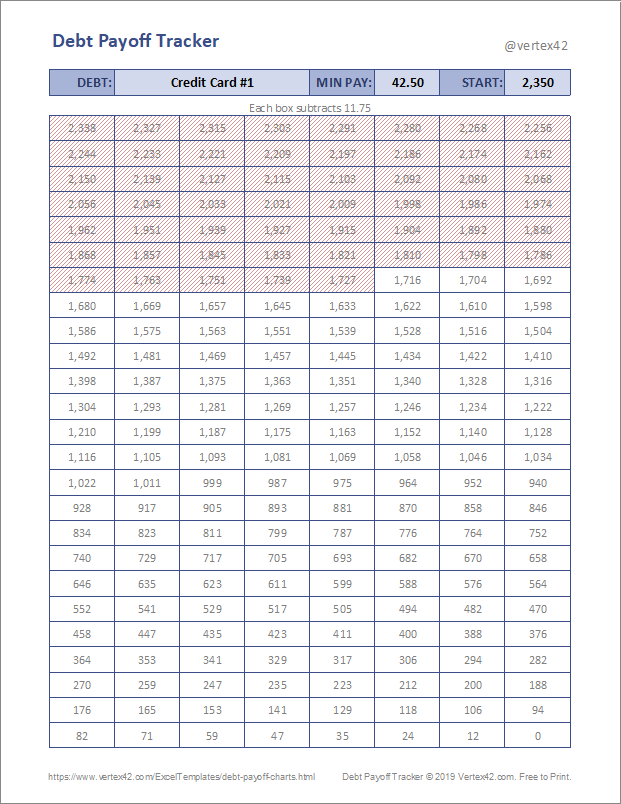
Do you prefer to cross off boxes as you go? Debt Payoff Tracker Grid by Vertex42 provides 200 cells for you to color or strike through upon reaching each goal amount. Add the creditor and minimum payment at the top, enter the starting debt, print, and start marking progress.
It is simple enough to stick on the fridge or keep beside your laptop. Seeing the grid fill up helps you stay on track even when the month gets busy. Use it for a single balance or make one per account. The cash flow you free up when the grid hits zero becomes fuel for the next debt.
✨️ Ideal for: Visual trackers who like a paper-friendly grid that shows steady progress.
📮 ClickUp Insight: 78% of survey respondents struggle with staying motivated on long-term goals. It’s not a lack of drive—it’s how our brains are wired! We need to see the wins to stay motivated. 💪
That’s precisely where ClickUp delivers. Track achievements with ClickUp Milestones, get instant progress overviews with rollups, and stay focused with smart reminders. Visualizing these small wins builds momentum for the long haul.
💫 Real Results: ClickUp users report they can handle ~10% more work without the overwhelm.
Debt freedom is built, not guessed. It comes from a plan you can see, small adjustments you can make without friction, and proof that each payment is moving the right balance. You now have a set of templates to track totals, map due dates, and choose the path that fits how you like to pay.
If you want one place where numbers, notes, and next steps live together, ClickUp gives your payoff plan a home.
You can keep accounts side by side with your budget, review month-to-month progress without hunting through tabs, and adjust timing when life shifts. The debt snowball method and the avalanche both work here because the plan and the actions stay in the same view.
Pick a template, set a pace that matches your cash flow, and let steady payments do the heavy lifting. The win is clarity today and momentum tomorrow.
Sign up for ClickUp today to organize your budget and debt payoff in one workspace.

© 2026 ClickUp

There’s an easier way. Try a free AI Agent in ClickUp that actually does the work for you—set up in minutes, save hours every week.