Sorry, there were no results found for “”
Sorry, there were no results found for “”
Sorry, there were no results found for “”
The playbook for communication plans is simple, right? Decide the objective, refine the messaging, then identify your audience, channel, and frequency, and bam! You’re done.
Then why does every communication plan look useless by week two? The project shifts, the doc stops matching reality, and you’re getting non-stop pings on Slack, forwarded emails, and last-minute “FYI” updates.
Knowledge workers spend 88% of their week communicating. But high message volume does not fix problems like unclear ownership, missed handoffs, duplicate updates, and no shared rule for who gets told what, when, and where.
A communication plan template clearly maps the audience, message, channel, cadence, and owner for each update. The 10 templates below cover stakeholder updates, internal rollouts, employee communications, organizational change, PR workflows, and product launches.
Choose based on what breaks first. Use ClickUp for communication plans tied to tasks, owners, and approvals. Use HubSpot for execution planning, Template.net for HR or change communication, and Smartsheet for launch communication.
| Template | Download Link | Ideal For | Best Features | Visual Format |
|---|---|---|---|---|
| ClickUp Communication Plan Template | Get free template | Teams needing a flexible, all-purpose communication plan | Audience + channel Custom Fields, approval workflow, communication matrix view, multi-view planning | List, Board, Calendar |
| ClickUp Communication Matrix Report Template | Get free template | PMOs and teams managing multiple stakeholder groups | Stakeholder-to-channel mapping, filterable matrix, exportable views, structured communication grid | Matrix view |
| ClickUp Team Communication and Meeting Matrix Template | Get free template | Managers auditing meetings and communication gaps | Meeting inventory, gap analysis, recurring task automation, cadence visualization | Calendar + task system |
| ClickUp Internal Communication Strategy and Action Plan Template | Get free template | Internal comms teams handling company-wide rollouts | Strategy + execution layers, audience segmentation, channel mapping, task tracking | Docs + tasks |
| ClickUp Employee Communication Template | Get free template | HR teams managing recurring internal updates | Recurring communication cycles, status tracking, archive view for compliance | Recurring task workflow |
| HubSpot Action Plan Template | Get free template | Teams turning communication plans into execution tasks | Task breakdown, ownership tracking, timelines, progress monitoring, flexible formats | Spreadsheet / document |
| ProjectManager Stakeholder Engagement Plan Template | Get free template | Projects with complex stakeholder alignment needs | Stakeholder register, power-interest mapping, engagement goals, communication requirements | Word document |
| Template.net Organizational Change Management Communication Plan | Get free template | Teams managing org change, restructuring, or transformation | Stakeholder segmentation, messaging framework, channel planning, feedback loops | Editable document |
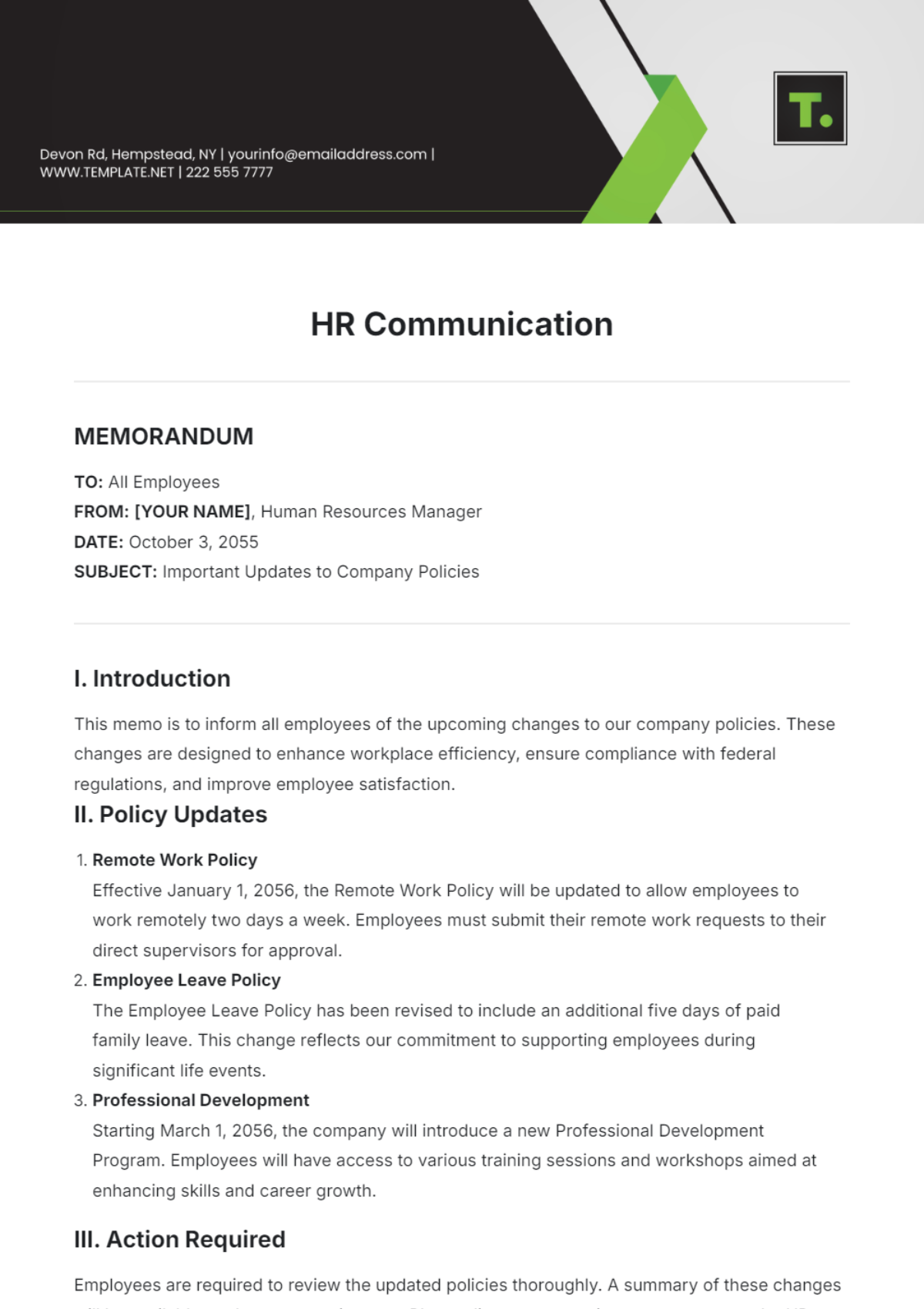
| Template.net HR Communication Template | Get free template | HR teams sending employee updates and policy communications | Clear structure for announcements, audience clarity, action-driven messaging, flexible format | Editable document |
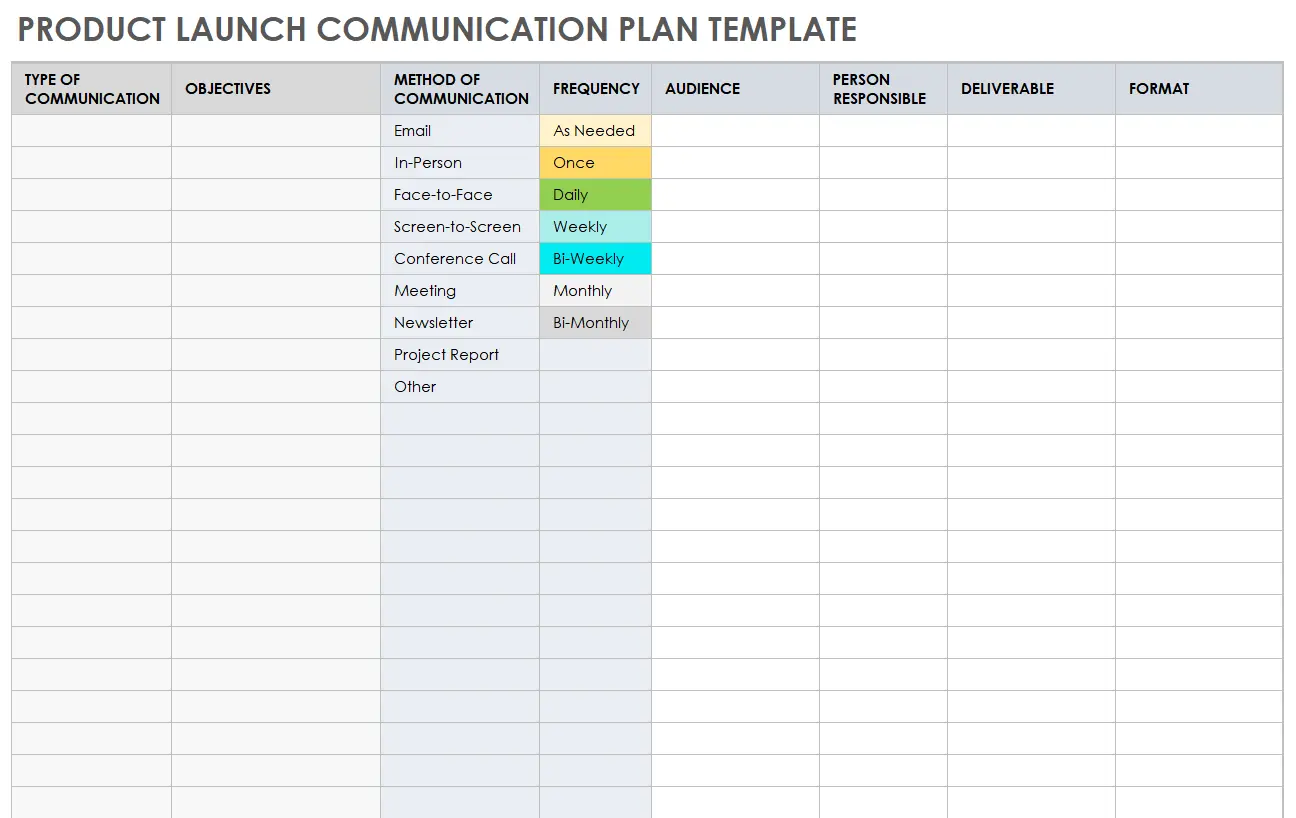
| Smartsheet Product Launch Communication Plan Template | Get free template | Product and marketing teams coordinating launch communication | Purpose + audience tracking, cadence planning, stakeholder mapping, flexible worksheet format | Excel / Word |
Each template below solves a different failure point: stakeholder mapping, meeting cadence, employee updates, change confusion, or launch coordination.
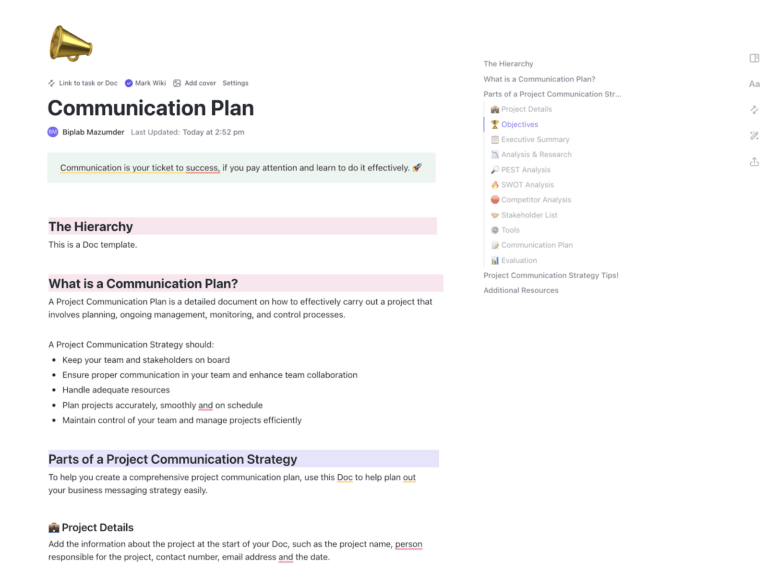
Use the ClickUp Communication Plan Template when you need one plan for audiences, channels, owners, approvals, and tasks. The matrix view shows who gets each update, which channel to use, and how often to send it.
ClickUp Brain can draft message variants from existing project context, which you can edit for audience, tone, and approval needs.
Use case: You’re rolling out new pricing. Enterprise reps need account-specific talking points. Marketing needs email and in-app messaging. Customer success needs help center updates. Use the matrix view to map each audience, then move every message through Draft, In Review, Approved, and Sent.
Best for: Teams that need a flexible, all-purpose plan they can adapt to any initiative
Skip it if: You need a plan for a specific event, such as a reorg, PR launch, or product rollout
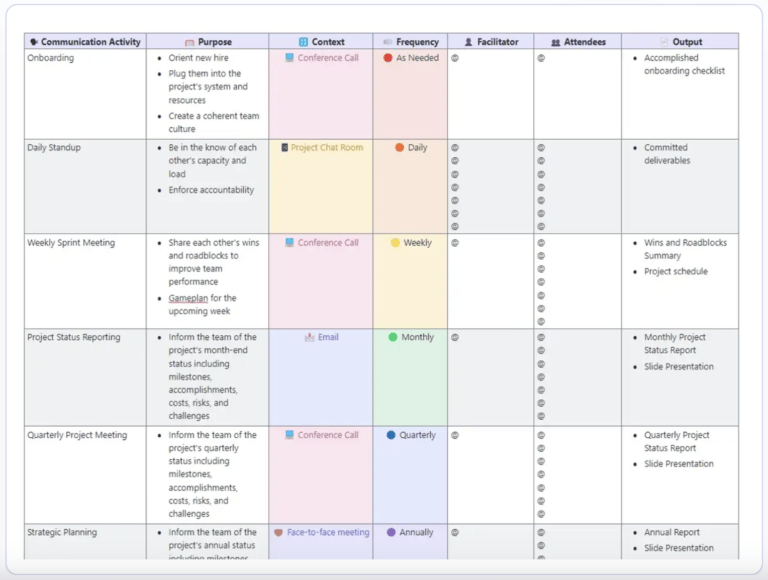
Use the ClickUp Communication Matrix Report Template when stakeholder updates need a clear grid. It keeps the structure of Excel but connects the plan to tasks and owners.
It maps stakeholders against communication types, channels, frequency, and owners. Filter by stakeholder group, then export the matrix for people outside ClickUp.
Use case: You’re a PMO at a 200-person company running a Salesforce migration. Twelve stakeholder groups need different updates. Sales ops needs weekly progress. AE managers need biweekly readiness. Reps need a monthly digest and a go-live brief. IT needs daily standups during cutover. The matrix filters by group, so the IT lead only sees IT-relevant rows.
Best for: PMOs and operations teams managing stakeholder relationships across multiple workstreams
Skip it if: You don’t have multiple stakeholder groups. A single-audience project doesn’t need a matrix
Use the ClickUp Team Communication and Meeting Matrix Template to audit recurring meetings. It shows which meetings exist, why they exist, who attends, and what each one should produce.
The gap analysis shows who is missing from recurring meetings. That is often where cross-functional updates get lost.
Use case: You’re a new manager who inherited a team with 11 standing meetings per week and unclear ownership across half of them. List every meeting, its purpose, attendees, and expected outcome. The gap analysis shows that nobody actually owns the cross-functional QBR. Three of the standups can be merged into one. Two recurring 1:1s no longer need to exist.
Best for: Team leads and managers who want to rationalize meeting load and make sure every recurring meeting has a clear purpose
Skip it if: You’re running a one-off project. This is built for ongoing team communication, not project-specific plans
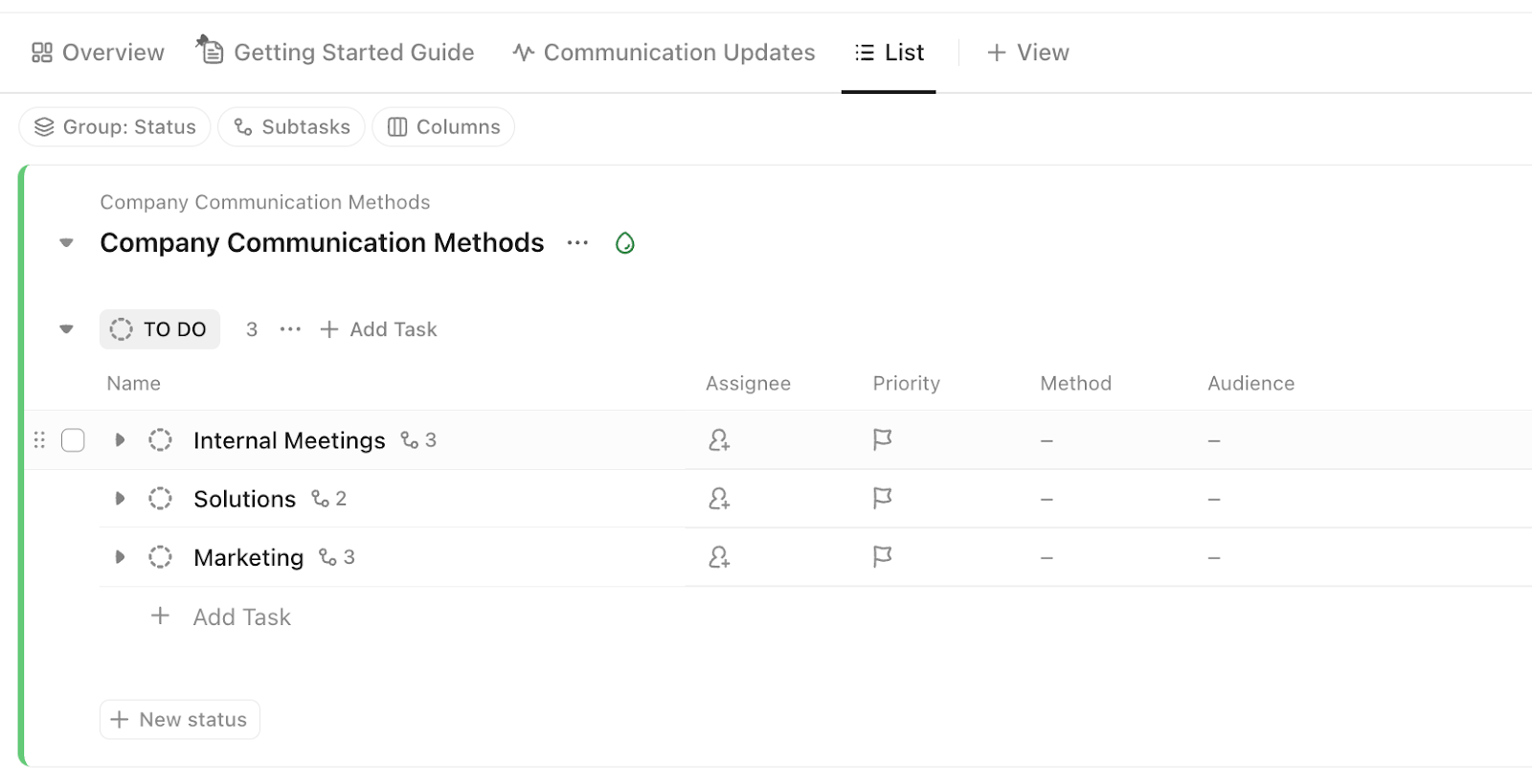
Use the ClickUp Internal Communication Strategy and Action Plan Template for company-wide updates, policy changes, culture initiatives, and org-change rollouts.
It separates the reason for the change from the work needed to communicate it. That helps employees understand what is changing, why it matters, and what happens next.
Use case: You’re piloting a 4-day workweek. The strategy layer captures why: productivity goals, talent retention, and employee feedback. The action plan shows who owns the leadership email, FAQ, all-hands, and feedback channel for employee questions.
Best for: Internal comms teams managing company-wide policy, culture, or org-change updates
Skip it if: You’re running a project-level comms plan, not a company-wide one. Templates 1 and 2 will fit better
Use the ClickUp Employee Communication Template for recurring HR updates. Set the cadence once, then reuse the same workflow each cycle.
Each cycle tracks the message type, employee group, delivery channel, and status. The archive view keeps past updates easy to find for compliance or reference.
Use case: You run HR for a 500-person company. Every newsletter, benefits update, and policy change still has to pass through you. Set up recurring tasks so each cycle auto-creates with the right stages already in place. The archive view becomes the audit trail when legal asks what was sent and when.
Best for: HR and internal comms teams managing ongoing employee updates on a regular schedule
Skip it if: Your team’s employee comms are ad hoc. The recurring structure adds overhead if you’re sending one-offs
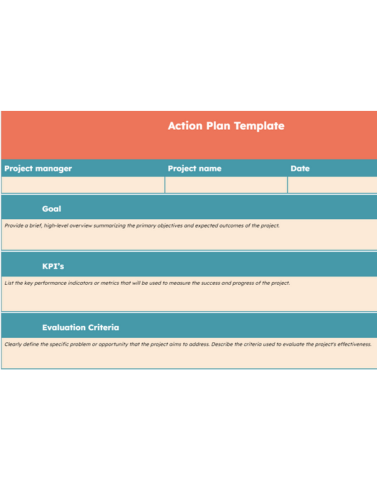
Use the HubSpot Action Plan Template when your communication plan needs to turn into a clear set of tasks, owners, deadlines, and next steps.
This template is not a pure communication plan, and that is exactly why it earns a spot. Many communication plans fail because they define the audience and message but never assign the work. HubSpot’s action plan format helps teams translate communication goals into execution.
Use case: You are rolling out a new customer onboarding process. The communication goal is clear: inform sales, customer success, support, and leadership before launch. Use the action plan template to break that goal into tasks: draft the internal announcement, prepare enablement notes, update the FAQ, schedule the team briefing, assign owners, and set due dates.
This template helps you with:
Best for: Teams that already know what they need to communicate but need a simple execution plan to get it done
Skip it if: You need stakeholder mapping, channel planning, or message segmentation. Pair it with a communication plan template if the strategy is still unclear
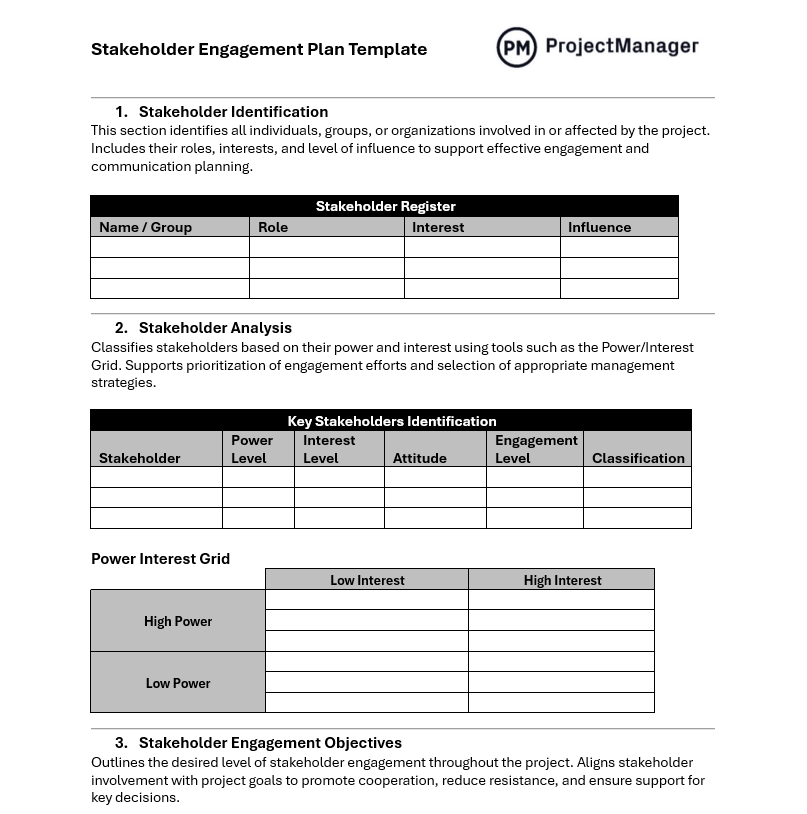
Use the ProjectManager Stakeholder Engagement Plan Template when stakeholder alignment is the hard part. It groups stakeholders by influence and interest, so you know who needs close management and who only needs periodic updates.
Use case: You’re managing a $2M ERP implementation. The CFO is a sponsor, with high influence and high interest, so they need weekly executive briefings. Three department heads are power users, so they need biweekly working sessions. IT is the build team, so they need daily standups during cutover. Four hundred employees are end users. They need monthly progress updates before go-live and focused training reminders in the final month. The template forces that thinking before you start scheduling anything.
Best for: Project managers and PMOs managing high-visibility work with many stakeholder groups
Skip it if: Your project has one or two stakeholder groups with similar information needs. The setup is not worth it
Use the Template.net Organizational Change Management Communication Plan when the change itself is the hard part. It helps teams explain what is changing, why it is happening, who is affected, and what happens next.
Use case: You’re announcing a reorg that moves 60 engineers under a new VP and dissolves two team structures. The plan helps you sequence messages in the right order: leadership briefing first, affected employee 1:1s next, then the all-hands, FAQ, and feedback loop. Most teams skip the feedback section. That is the part that shows whether the message landed.
Best for: HR, change management, internal comms, and leadership teams managing restructuring or transformation
Skip it if: You’re running standard project comms. The change-specific framing adds overhead you don’t need
Use the Template.net HR Communication Template when HR needs a simple, editable document for employee-facing updates, policy announcements, internal notices, and people-team communication.
This template is broader than the SHRM acquisition template, which makes it a better fit for a general communication plan templates article. It gives HR teams a flexible starting point for communicating with employees without overbuilding a full internal comms system.
Use case: Your HR team needs to announce a benefits enrollment window, a policy update, or a new employee program. Use the template to structure the message, clarify the audience, define the purpose, and make sure employees know what action to take next.
This template helps you with:
Best for: HR and people teams managing employee updates, policy notices, benefits communication, and internal announcements
Skip it if: You need a full communication plan with stakeholder mapping, cadence, approvals, and task ownership. This is better as a flexible HR communication document than a complete planning system
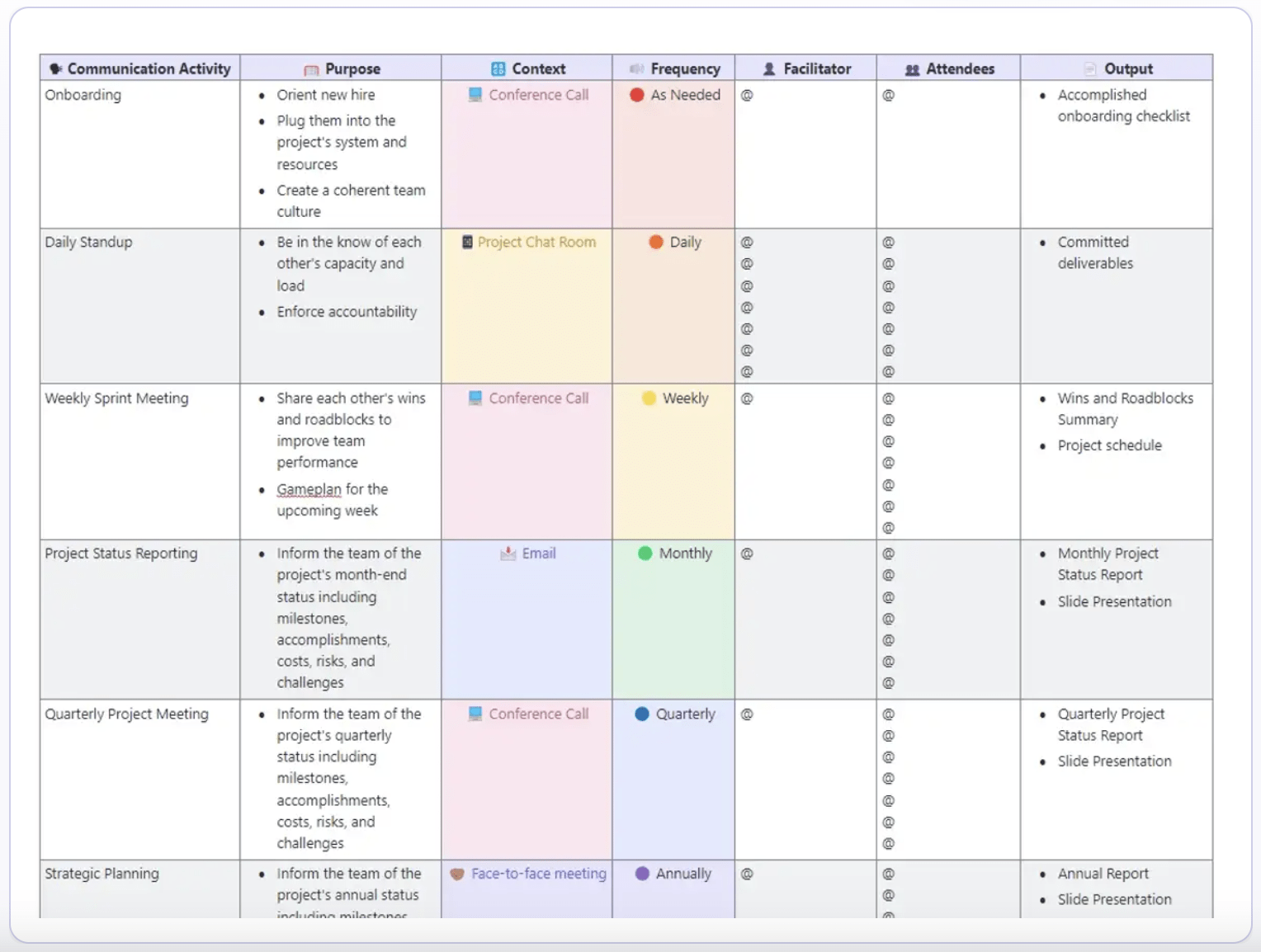
Use the Smartsheet Product Launch Communication Plan Template to plan internal launch communications across project teams, sales partners, executives, and other launch stakeholders. It gives you one worksheet for the update purpose, audience, method, frequency, and deliverables.
Use case: You’re 60 days from launch, and the team is already buried in Slack threads. Use the worksheet to list each internal update: weekly project standups, biweekly sales enablement updates, milestone-based executive briefings, and the all-hands before launch. For each update, track the purpose, audience, method, frequency, and deliverable.
The tradeoff: it is a worksheet, not a workflow. You can plan the launch communication there, but you need another system to assign tasks, track follow-ups, and send reminders.
Best for: Product marketing teams coordinating internal launch updates and go-to-market communication
Skip it if: Your launch is small or internal. This template assumes a full marketing motion
| If you need to… | Start with this template |
|---|---|
| Build a general project communication plan | ClickUp Communication Plan Template |
| Map stakeholders, channels, and cadence in one grid | ClickUp Communication Matrix Report Template |
| Audit meeting load and team communication | ClickUp Team Communication and Meeting Matrix Template |
| Roll out a company-wide initiative | ClickUp Internal Communication Strategy and Action Plan Template |
| Manage recurring employee updates | ClickUp Employee Communication Template |
| Turn communication goals into execution tasks | HubSpot Action Plan Template |
| Classify stakeholders by influence and engagement | ProjectManager Stakeholder Engagement Plan Template |
| Communicate organizational change or a reorg | Template.net Organizational Change Management Communication Plan |
| Create HR updates or employee notices | Template.net HR Communication Template |
| Plan internal communication for a product launch | Smartsheet Product Launch Communication Plan Template |
This walkthrough shows how teams can use ClickUp to draft internal updates, assign follow-ups, and keep communication work tied to tasks.
External templates make sense when you need a simple document, already use the tool, or have a narrow use case. HubSpot works well for turning communication goals into tasks. ProjectManager helps with stakeholder engagement. Template.net fits HR and change communication. Smartsheet works well for launch communication.
ClickUp templates are better when the plan has to do more than sit in a doc. They connect each message to the task, owner, approval step, and recurring update behind it. That is what keeps the plan useful after kickoff.
Real users describe the same shift. In a G2 review of ClickUp, Suman R., a Co-Founder running a small business, wrote:
I really appreciate how ClickUp has streamlined my project management by allowing me to assign tasks effortlessly and plan my schedule seamlessly. The ability to re-plan my days easily and keep my calendar organized helps me distinguish tasks and assign them to my teammates effectively. I find ClickUp invaluable in bringing all aspects of project management into one place, from tasks, documents, to project dates, which saves me a significant amount of time and keeps my workflow organized without needing to switch between multiple apps. ClickUp significantly enhances my team communication by centralizing discussions, tagging people on tasks, attaching files, and ensuring everyone is aligned, which helps reduce confusion and prevents losing updates like in WhatsApp messages or emails.
Neither category wins for everyone. Choose based on whether the plan needs to stay active after kickoff or simply get shared at kickoff.
Digitalli, a Paris-based agency for international luxury brands, managed about 700 content orders per month across Trello, email, and phone calls. Project managers tracked work differently, and updates lived in different places.
The fix was not a better document. Digitalli moved intake into one ClickUp Form, gave project managers the same matrix view, and used Automations to catch bottlenecks early. Order capacity grew from 700 to 1,000 orders per month with the same headcount.
Having a single source of truth has been a game-changer. Everything is in ClickUp, which means faster decision-making and improved accountability.
The takeaway isn’t that ClickUp is magic. It is that the plan only works when it lives where the work happens.
A template is not the whole answer. Harvard Business School professor Tsedal Neeley has argued that communication norms need to account for differences across locations, cultures, and functions. Most plans fail after kickoff because the project changes, but the communication rules do not.
Three failure modes show up often:
A useful template fixes at least one of these problems. A stronger workflow connects the plan to tasks, owners, approvals, and feedback.
A stale communication plan creates false confidence. The team thinks communication is handled, but the plan no longer matches the project.
Run this five-point check after kickoff:
| Check | What to ask | What to fix |
|---|---|---|
| Feedback | Do people understand the updates? | Add a pulse check, retro question, or ClickUp Form for missing context |
| Message consistency | Are different teams saying the same thing? | Keep one shared source of truth, such as a ClickUp Doc |
| Ownership | Does every update have one clear owner? | Assign one person to draft, one to approve, and one to send |
| Measurement | Do you know whether the plan is working? | Track status-check messages, response times, attendance, satisfaction, and overdue updates |
| Automation | Are repeat updates still manual? | Use ClickUp Automations for recurring tasks, milestone reminders, and phase-change alerts |
Axios HQ’s 2025 State of Internal Communications report found that 80% of leaders say internal communications are helpful and relevant, but only 53% of employees agree. That gap is the reason this check matters. A plan only works if people understand the message, trust the source, and know what to do next.
Use these five steps if you want to build a communication plan from scratch or customize one of the templates above.
Ask yourself “what should this update make clear or move forward?”
Some messages inform. Others ask people to approve, decide, review, or act.
“Keep everyone informed” is not measurable. “Reduce client status-check messages by routing updates to a shared dashboard” is.
Strong goals look like this:
Do not treat “the team” as one audience. Executives, managers, ICs, clients, and vendors need different updates.
List every group that needs communication. Note their role, information needs, preferred channel, and decision power.
Use a RACI chart, ClickUp Whiteboard, or ClickUp Doc to map the audience before turning the plan into tasks.
Each audience needs a different framing, not a different story.
For a product migration:
For executive updates, use BLUF:
Use ClickUp Brain to draft message variants from project context, then finalize them in a shared ClickUp Doc before sending.
Pick the channel based on urgency and audience need, not sender convenience.
| Message type | Best channel type | Examples |
|---|---|---|
| Urgent and time-sensitive | Synchronous | Meetings, chat, phone |
| Informational or reference-based | Asynchronous | Email, docs, dashboards |
| High-stakes or sensitive | Face-to-face | Video call, in-person meeting |
Do not send everything through email or Slack. Important updates get buried fast.
Use ClickUp Chat for team discussions, Assigned Comments for task-specific follow-ups, and Dashboards for stakeholder updates.
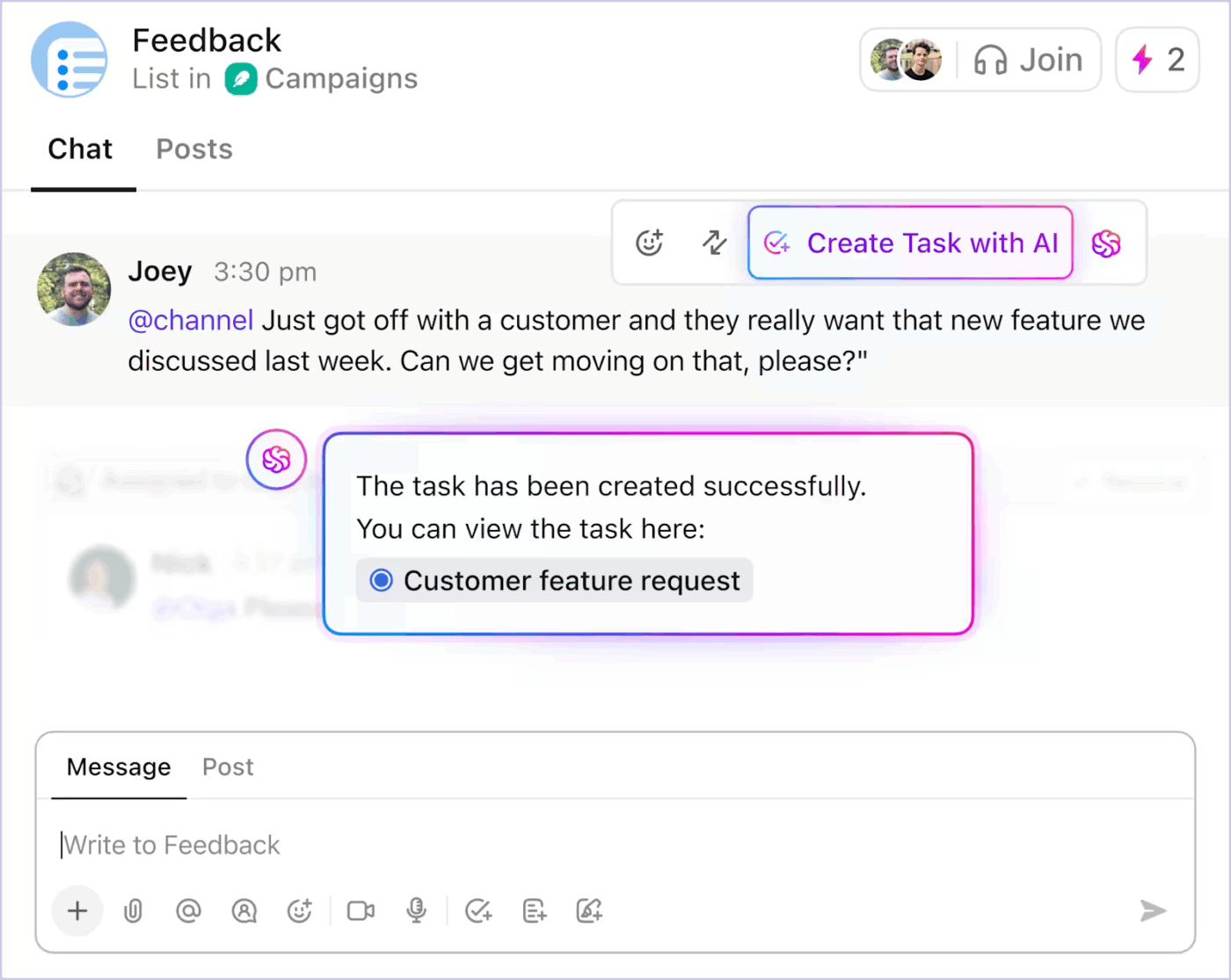
According to a ClickUp survey, 83% of knowledge workers rely primarily on email and chat for team communication, yet nearly 60% of the workday is lost switching between these tools and searching for information. Keeping project work, messages, docs, and owners in one workspace reduces the need to hunt across tools.
Map each update to the project timeline.
Work backward from major milestones. If launch is March 15, ask:
Use ClickUp Gantt View or Calendar View to spot timing gaps before they turn into missed updates.
Use ClickUp Automations to create communication tasks when milestones are reached. For example, when a project phase moves to Complete, create a task to send the stakeholder update.
Share the plan with stakeholders before the first message goes out.
A good communication plan answers one question clearly: who gets which message, through which channel, and who owns sending it?
A good template makes that decision reusable. A good workspace keeps it alive after kickoff.
ClickUp fits when the plan needs tasks, owners, approvals, updates, and dashboards. External templates work when you only need a document to share.
Pick the template that matches your biggest communication risk: unclear stakeholders, slow approvals, missed employee updates, change confusion, scattered PR work, or launch misalignment.
Build your communication plan in ClickUp. Get started for free!
Use a communication plan template when different groups need different updates. One person sending one message does not need a template. A launch, reorg, incident, or stakeholder-heavy project usually does.
A communication plan template is useful for:
A communication plan should answer eight questions: what is the goal, who needs the update, what do they need to know, where will the update go, how often will updates happen, who owns each message, when does each message go out, and how will success be measured?
Those eight questions map directly to the eight parts of any plan: communication objectives, target audiences, key messages, communication channels, frequency and cadence, owners and approvers, timeline and milestones, and success metrics. Skip one, and you create the gap that breaks the plan during execution.
A communication strategy explains why you are communicating. A communication plan explains who gets each update, which channel to use, who owns it, and when it goes out.
Most teams need both. The strategy sets the direction. The plan turns that direction into messages, owners, channels, and dates.
Review the plan at every project milestone. For active projects, review it at least every two weeks.
Stakeholders, scope, and channels change quickly. Build the review into the project with a recurring task, weekly agenda item, or automation that reminds the plan owner.
A communication plan focuses on messages, channels, cadence, and owners. A stakeholder management plan focuses on influence, interest, and engagement.
For simple projects, a communication plan is enough. For high-visibility work with sponsors, executives, regulators, or external partners, use both.

Praburam Srinivasan
Max 10min read
Praburam Srinivasan
Max 19min read
Praburam Srinivasan
Max 20min read

© 2026 ClickUp