

Sorry, there were no results found for “”
Sorry, there were no results found for “”
Sorry, there were no results found for “”
Workplace communication: that thing that always feels like too much or just not enough.
The average worker now fields 117 emails and 153 chat messages every workday, and nearly half say work already feels chaotic. Unfortunately, high message volume does not mean a more communicative or in-sync team.
Most communication strategies tell you to “use the right channel” or “communicate more.” And the usual fix, adding another stand-up or Slack group, only gives the chaos more places to thrive.
The missing piece is almost never a better tool. It’s a shared set of rules about where each type of message belongs, who owns the next step, and how fast they need to move. This guide lays out eight communication strategies that replace the trite “over communicate” advice with a system that turns conversation into trackable work.
TL;DR: Adding channels doesn’t fix your workplace’s communication strategy; it gives the mess more places to live and likely distracts. AI only adds to that. ActivTrak found that after teams adopted AI tools, email activity rose 104% and chat rose 145%.
These eight strategies replace “over-communicate” advice with a system:
A communication strategy is the standing set of rules a team uses to decide how information moves: what belongs where, who’s responsible for acting on it, and how quickly. It answers those routing questions before anyone sends the message.
Two other terms often get lumped in with it: project communication and communication styles. But they do different jobs.
| Term | What it covers | Who owns it | How often it changes |
|---|---|---|---|
| Communication strategy | Standing rules for channels, ownership, and response times | Team lead or ops | Reviewed periodically |
| Project communication plan | Who gets which update, through which channel, and on what cadence for one project | Project manager | Per project |
| Communication style | An individual’s usual tone, directness, and communication preferences | The individual | Rarely |
The communication strategy sits above the other two. A project plan can tell stakeholders to expect a weekly status update over email. The strategy should already have settled whether email is where status updates go, whether anyone’s expected to respond, and where feedback gets recorded.
If you need the project-level version, start with one of these communication plan templates.
The weak point is usually the handoff.
A message can land in the right inbox, say exactly the right thing, and still go nowhere if nobody agrees on where decisions, questions, updates, and urgent requests belong. Grammarly’s workforce productivity research found that almost 60% of leaders and 54% of workers struggle to keep up with notifications across multiple platforms. Grammarly calls the wider problem the communication swirl: critical information gets scattered across email, chat, project tools, and documents with no clear guidance on where it belongs.
Once that happens, teams start paying a few hidden costs:
Look at what those four have in common. Each one is work that happens after the communication ends: reconstructing, resending, chasing an owner, forcing attention. The message did its job. The system around it didn’t, so people paid for it later.
A better communication system turns conversation into usable work while the context is still fresh.
Reddit user u/YakitoriSenpai named what happens when it doesn’t. In an r/projectmanagement thread, they said the drain wasn’t the meeting. In their words:
I’m fine with meetings; I struggle turning notes into clear actions, owners, approvals, and JIRA tickets without losing hours. How do you do it efficiently?
I leave with pages of notes, then spend way too long translating them into action items, figuring out who’s actually responsible, who I need permission from to proceed, how to phrase the asks, and finally getting everything into JIRA so it doesn’t vanish. By the time I’m done, the momentum from the meeting is gone.
That’s the standard to design for: decisions become records, requests leave with owners, and discussions end with a clear next step. The less cleanup people have to do afterward, the more useful the communication was in the first place.
Pro Tip: Audit the handoffs between your tools before replacing any of them. If a decision leaves chat but must be copied manually into a task, document, or tracker, that handoff is probably where context is lost. This walkthrough shows how modern communication tools handle those handoffs in practice.
Read More: Marketing Communication Strategies
The eight below cover the full arc: choosing the right channel, assigning owners, logging decisions, setting response-time expectations, writing decision-ready updates, filtering meetings, closing handoffs, and auditing the system every quarter.
A channel charter is a one-page rulebook for where different kinds of communication belong. Its job is to make routing decisions predictable, so nobody has to ask “where should I put this?” before sending.
That means “Slack for quick things, email for formal things” isn’t specific enough. A useful charter answers the questions people run into during the week:
Gartner’s guidance on information overload names channel proliferation as the first of three problems communications leaders face. More than a quarter of employees and 38% of managers already say they feel overwhelmed by the volume of internal communication. In fact, Gartner says teams must “clearly define each channel’s role” so people can find critical information without digging through every platform.
Gartner also lists the four traits of information that burden people: it’s duplicated across places, hard to find later, inconsistent, or unrelated to daily work. Every one of those gets worse when a decision can live in chat, email, and a doc at the same time.
A simple charter can look like this:
| Channel | Put this here | Don’t put this here |
|---|---|---|
| Team chat | Quick questions, lightweight coordination | Final decisions or assigned work |
| Task/project tool | Requests, owners, deadlines, decisions tied to work | Casual discussion |
| External communication or messages that need a formal thread | Day-to-day project coordination | |
| Meetings | Discussion that needs real-time back-and-forth | Information people could read asynchronously |
| Async video | Visual walkthroughs, nuance that’s hard to convey in text | Something a quick message would answer just as well |
Then add one line naming the system of record for decisions.
To test the charter, hand two teammates the same message and ask where it goes. If they’d choose different places, the charter still has a gap.
Don’t write it alone, either. Draft the rules, walk the team through them once, and let people challenge the edge cases. Those edge cases are usually where the real charter gets written.
A request dropped into a channel with no name on it belongs to everyone. That simply means it belongs to nobody. That’s the ownership gap from earlier, and closing it takes a habit anyone can start tomorrow. Assign one owner, set one due date, and include enough context for the owner to act without coming back for more.
A strong request typically carries:
Cross-functional teams need this most. Words like review, approve, check, and take a look mean different things to different teams. “Review this” might mean catching factual errors for legal, assessing positioning for marketing, and approving publication for a manager.
Quick Hacks
Most teams already have a record of every decision they’ve made. It’s just spread across meeting recordings, chat scrollback, and email threads, and nobody can find it. A full transcript preserves history. A decision log preserves the part someone needs six months from now: what was chosen, why, and what would make the team choose differently.
Keep each entry short:
| Field | What to capture |
|---|---|
| Decision | What was agreed |
| Rationale | Why the team chose it |
| Trade-off | What the team gave up or ruled out |
| Owner | Who made or owns the call |
| Status | Proposed, accepted, or superseded |
| Revisit trigger | What would justify reopening it |
Place extra attention on the last one. A call that made sense in March can be wrong by September because the budget shifted or the scope grew. Without a revisit trigger, the team either relitigates the decision every time someone doubts it or keeps following it long after the reasons have expired. Write down the condition that reopens it, and both problems go away.
Software teams have been doing this for years under the name Architecture Decision Records. In fact, Martin Fowler, Chief Scientist at Thoughtworks, adds that you should add one page per decision, put the important part first, and leave old records untouched when a new one replaces them.
He also makes a point that applies well beyond engineering: writing the record forces the disagreements into the open before the decision is final, which is often worth more than the record itself.
Every channel needs two clocks: when someone should acknowledge a message, and when they’re expected to resolve it. Teams blur those constantly, and the blur is expensive. A teammate might need three days to answer properly and only 30 seconds to say, “I’ve got this, back to you Thursday.” Without a stated norm, they often say nothing until the answer is ready, and the requester spends those three days wondering if the message landed.
A starting point:
| Channel | Acknowledge by | Resolve by |
|---|---|---|
| Team chat | Same working day | Depends on the ask |
| Task comment | Within one working day | By the task due date |
| Within two working days | State the timeline if more work is needed | |
| Urgent route | As soon as possible | Until the blocker is cleared |
Say when no reply is needed, too. Labels such as FYI, no action needed, or reply by Friday in the first line of a message spare people from reading the whole thing just to work out whether it’s theirs.
There’s a temptation to solve this with a single company-wide rule, and the research argues against it. A 2026 systematic review in the Scandinavian Journal of Work, Environment & Health looked at 12 studies of after-hours availability policies, from national right-to-disconnect laws to team-level guidelines. Most organizational and national policies showed limited or no effects. The programs that helped were flexible and combined several elements, and the authors conclude:
Policies alone are unlikely to reduce harmful connectivity without active organizational implementation and cultural change.
The takeaway: publish expectations per channel, let each team tune the numbers, and give one person the job of holding the line. That gives you a shared vocabulary of four labels everyone already understands: FYI, acknowledge, resolve, escalate.
Write every status update so the reader can tell, in one pass, whether they need to act.
Use four fields:
For example:
At risk: Legal review moved from Tuesday to Thursday. Launch is still safe, but another delay will push back the campaign. John needs approval by Thursday EOD.
Three lines, and the reader knows the state, what changed, what it affects, and who’s on the hook. The format also makes vague updates hard to write. “70% complete” or “making progress” describe activity without telling anyone what moved, and the Change field has no room for either.
Also, routine work that’s still on track doesn’t need a written update. That’s because the tracker already shows the status. Write one only when something has changed, is at risk, is blocked, or needs a decision.
Organizational psychologist Steven Rogelberg surveyed 632 workers. They spent about 18 hours a week in meetings and said nearly six of those hours could have been skipped, as long as they were kept in the loop. Asked what that meant in practice, they ranked decisions, dates, and action items as must-haves. They rated full transcripts and recordings as not really needed. The four fields above map onto that list.
Before you book time to align, send the question that the meeting should answer.
Written down, it tells people what the meeting is for. If the replies surface a real disagreement, book the meeting. If they uncover missing context, keep it in the thread and move on.
Even when the meeting goes ahead, the thread pays for itself. The replies become the pre-read, the invite list shrinks to the people who disagreed, and the first ten minutes of “so where are we on this” disappear.
Treat a handoff as complete only when the receiver confirms what they own.
That confirmation can be one line, and it does three things at once: confirms receipt, restates the scope, and surfaces any misunderstanding before work starts. The restating is the part that’s useful. If the receiver’s version of the task doesn’t match yours, you’ve found the gap while it’s still cheap to fix.
You’ll get the most out of this when work crosses teams, because context gets thinner (and more muddled!) at every handoff. A marketer says “final copy,” legal hears “claims review,” and design assumes the text is locked. All three are working from the same message, and each reading is reasonable.
Not every request needs this. Be strict about this strategy on tasks with dependencies, a deadline, or a real cost if someone interprets it differently.
The charter you wrote in Strategy 1 will drift if you neglect it. Channels multiply, meetings outlive their purpose, and the place where decisions live quietly changes without anyone announcing it. A quarterly review catches the drift before it turns back into chaos.
Five questions cover most of it:
That last one is the most telling. Manual copying means the system has a gap the person is bridging with their own time. Either automate the move or pick one source of truth and stop maintaining the others.
Then act on what you find. Archive dead channels, merge duplicates, retire meetings without a clear purpose, and document the questions people keep asking. Update the charter to match what the team does now, since the version on paper and the version in practice will have separated.
Finally, assign the audit a single owner.
Also Read: Communication Goals
Everything above deals with how a team moves information: which channel a message belongs in, who owns it, and where the decision ends up. There’s a second, older meaning of “communication strategy” that works at a much smaller scale. It describes the moves a person makes inside a single conversation to keep it on track, from opening a topic to closing it out.
Oral communication courses teach seven of these: nomination, restriction, turn-taking, topic control, topic shifting, repair, and termination. The Philippine Department of Education’s senior high Oral Communication in Context module is one widely used version. Since plenty of people search for this framework under the same phrase, here’s what each one means in practice:
The eight strategies above fix the system; these seven fix your work environment. A clean charter won’t help if nobody gets a turn to speak, and a well-run conversation still leaks if nobody writes the decision down.
For the theory behind how conversations work, see our guide to communication models.
The same strategy looks different depending on what the team is coordinating. Below are four communication strategy examples by team:
An eight-person platform squad hands an API change to a four-person mobile squad. Every decision about the interface goes in the ticket, and only in the ticket. Chat covers availability details and nothing else.
The handoff itself is a five-minute recorded walkthrough plus a written checklist of what changed, both attached to the ticket. Ticket comments get a reply within one working day, and the mobile lead owns any questions still open after that.
This prevents the version-mismatch argument that arises three weeks later, when both squads remember the call differently.
LTM Principal Architect Aryashree Pritikrishna described a team that had been firefighting production incidents every other week.
Post-mortems kept circling back to the same root cause: the engineer who made the original decision had left, no one had documented the trade-offs, and the team that inherited the system was guessing.
After a year of recording every significant decision (with context, rejected alternatives, and accepted risks) directly in the repo, production incidents fell by 60%, new-engineer onboarding took half as long, and architectural debates that once dragged for days closed in hours.
Their read was that most of those incidents stemmed from forgotten context, not really bad code.
A six-person marketing team runs a launch with an outside agency. Email is the channel of record with the agency, because it has to be forwardable and formal. Internal chatter stays internal, in one campaign channel.
All creative feedback goes as comments on the asset, never in an email. The agency gets one consolidated set of notes instead of a thread full of debated opinions. Each lead writes weekly status into a shared tracker on Thursday, and the Friday call covers only items marked as at risk.
This keeps them from sending contradictory feedback and a client-facing message that accidentally includes internal nitpicking.
Digitalli, a French agency producing content and experiences for international luxury brands like Dior and Moët Hennessy, was coordinating campaigns across Trello, email, calls, and several internal platforms. Each project manager used a different method to track work, and Louis-Jean de Sedouy described the result as a lack of visibility that led to “inefficiencies and miscommunications.”
Digitalli pulled everything into ClickUp using intake forms and in-task comments, so feedback lived on the work itself. Monthly order capacity rose 30% with the same headcount, and the late-night scrambles that had become routine dropped.
Product, engineering, marketing, sales, and support ship the same thing on the same date. Status by exception works best here because a full round-robin across five leads takes an hour.
One launch document holds the date, the owner per workstream, and the open risks. Each lead updates their own row by Tuesday, and the Wednesday call reads only the risks. A named scribe records any decisions in the launch doc before the call ends.
When Mixpanel relaunched its annual Benchmarks report, Product Manager Isha Mehra built what she called “mission control”. It was her single tracker for the final launch week.
Every deliverable owner maintained their own row, and the tracker mapped each dependency. The public landing page had to go live before demand gen could send emails. The content team had to publish the report before onboarding engineering could post the in-product announcement.
The tracker existed, in her words, so that the team could see what depended on what and keep the timing straight across roughly 25 people from engineering, marketing, and product.
Our guide on how to improve team communication goes deeper into the cross-team case.
A communication system works better when the conversation, decision, request, and follow-up stay close to the work they affect.
ClickUp, a work management platform, puts Chat, Tasks, Docs, comments, meetings, and AI in one Workspace. A discussion can turn into assigned work without losing its context. A decision can stay attached to the project it changed. And someone joining later can trace the outcome back to where it started.
ClickUp Chat, for starters, gives teams Channels, direct messages, threads, and calls, along with Tasks and Docs.
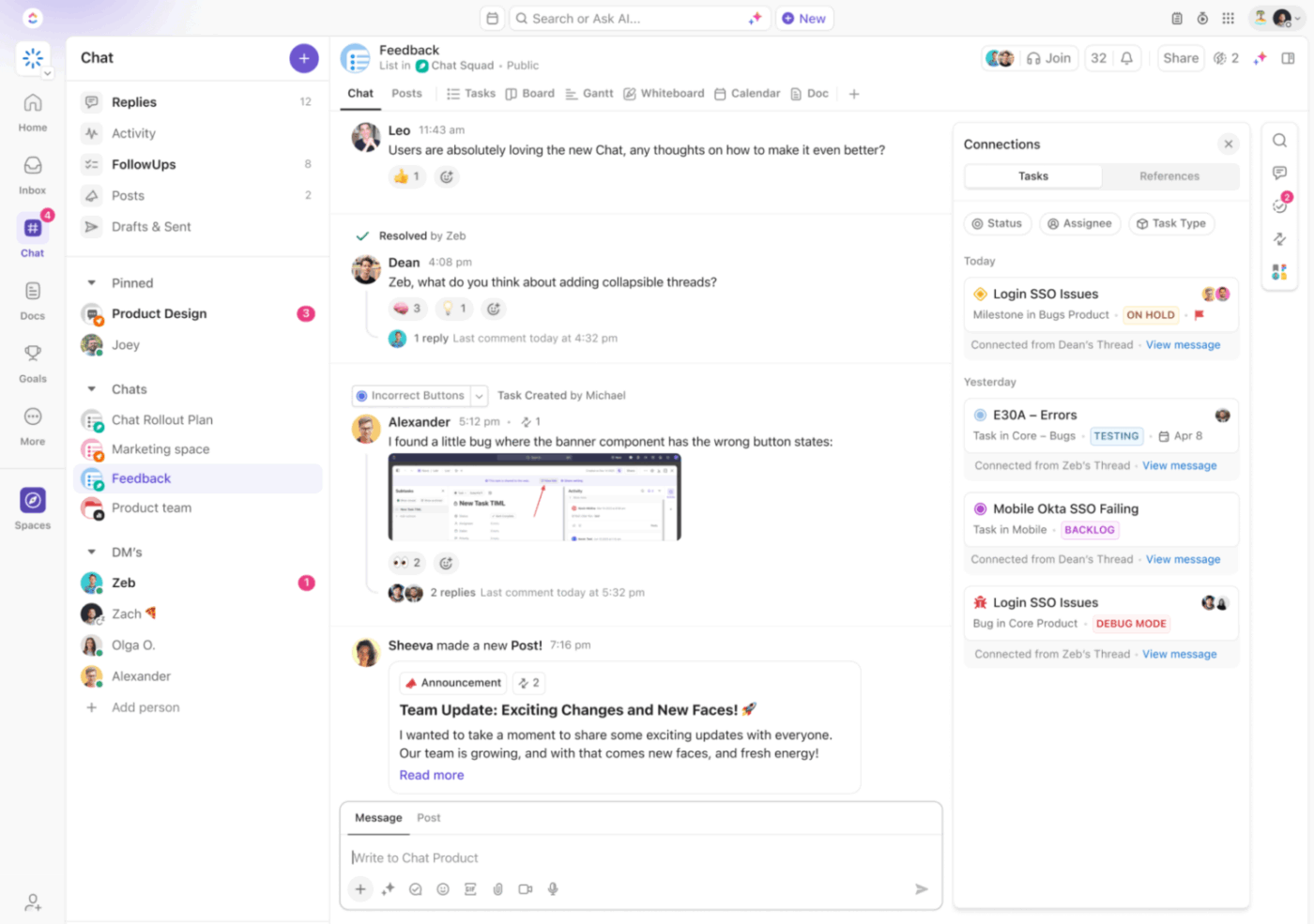
A conversation that starts casually and turns into real work can become a task in its own right. That means the discussion and the task can share one history.
And if you’re moving from Slack, you can import public channels, message history, threads, replies, users, and attachments. Reactions and custom emojis come over too (thankfully!) if you import via the API. Direct messages don’t import. Private channels generally don’t either, except on Slack Enterprise Grid.
Not every request needs its own task. With ClickUp Assigned Comments, you can assign a comment to a teammate and ask them to resolve it when they’re done. Assigned comments work best for contained tasks, like fixing a specific section, updating a detail, or making a targeted change. Basically, a change so small that it doesn’t significantly affect the umbrella task, but still needs to be made.
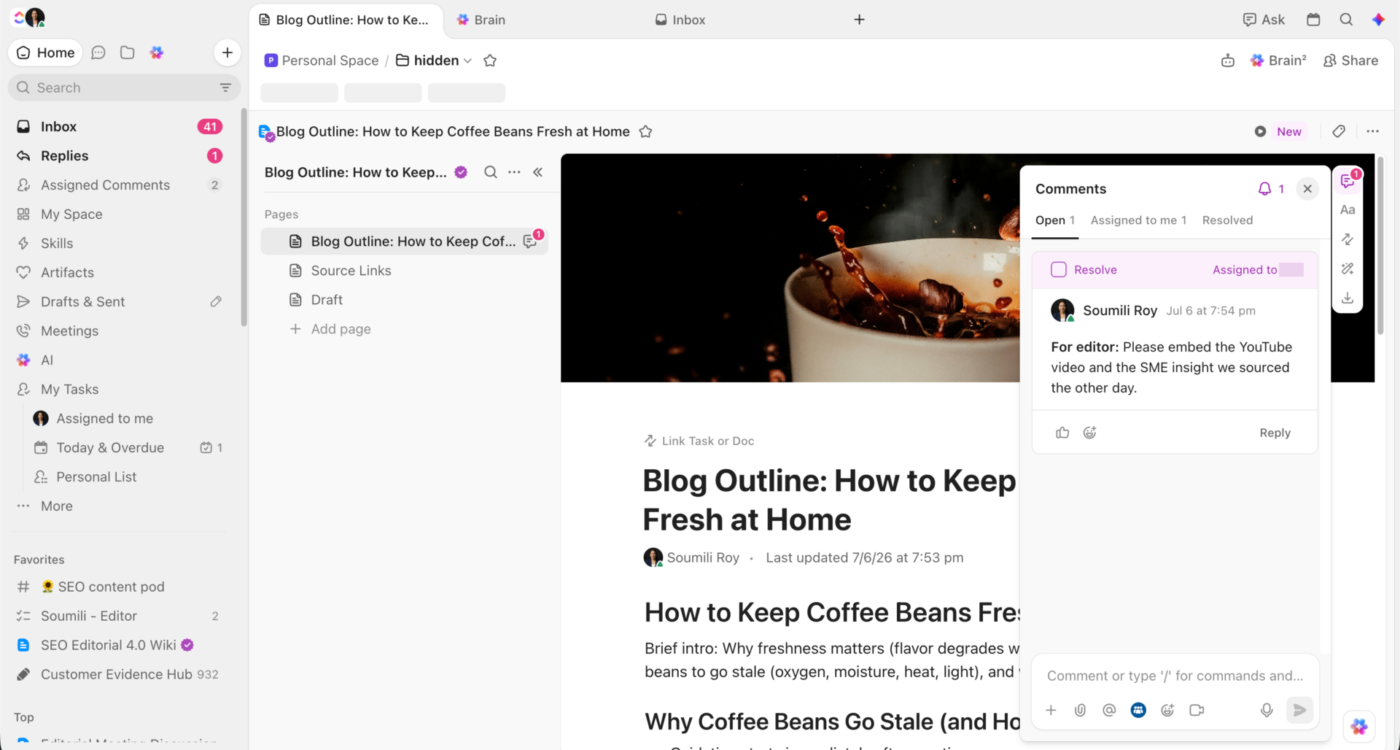
Assigned Comments can be as simple as: “@Jane, verify the pricing claim and resolve this once the source is updated.” Requests like this can sit alongside the bigger task itself, where larger, more important tasks take priority.
Use ClickUp Docs for decision logs, briefs, processes, and anything people will need after the original conversation has scrolled out of view.
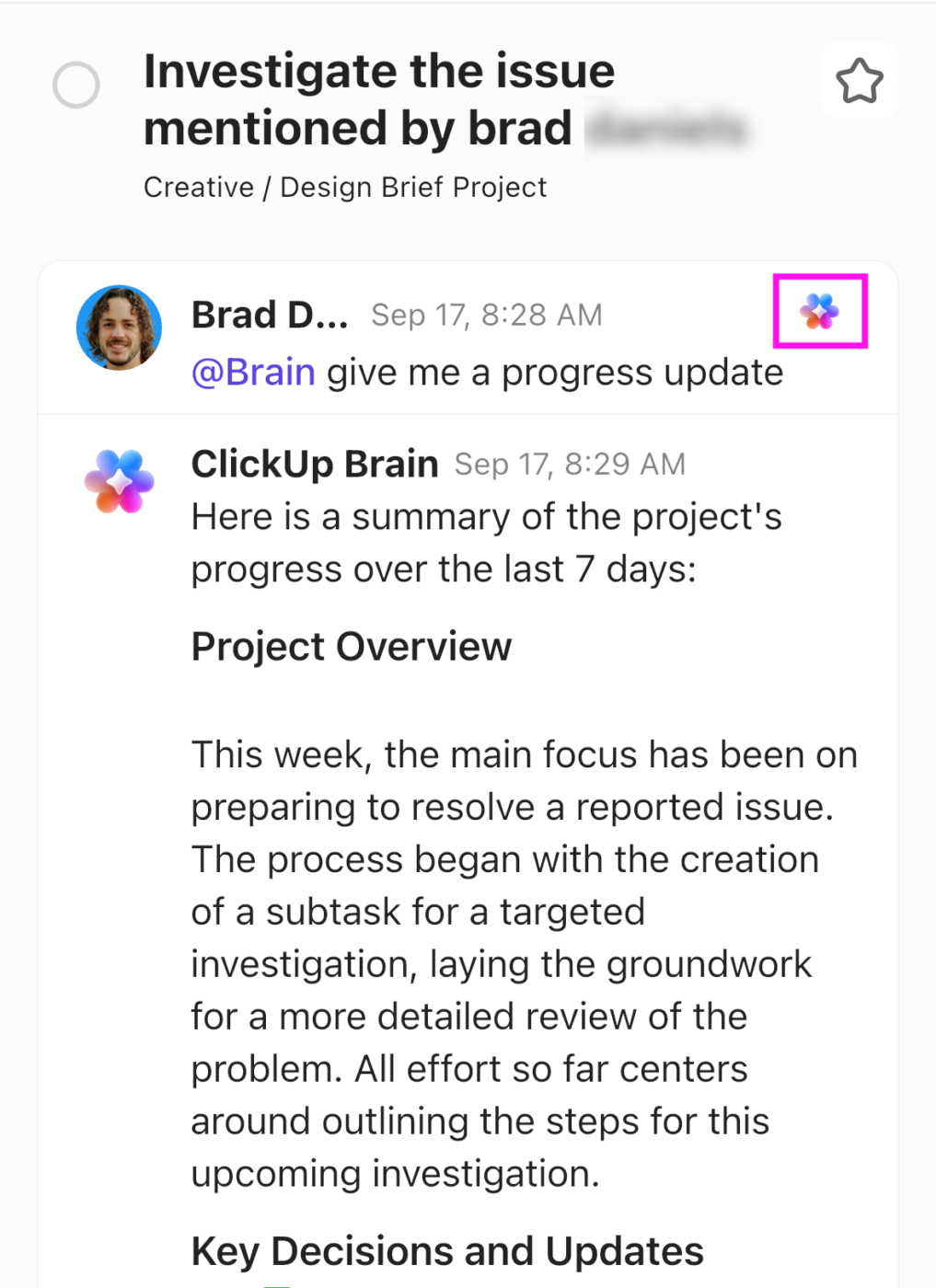
Brain² then works across the surrounding Workspace. Ask what changed on a project, summarize a long thread, or pull together the history behind a decision without pasting the whole trail into a prompt.
ClickUp AI Notetaker joins Zoom, Google Meet, Microsoft Teams, and SyncUp calls, then produces a Doc with an overview, key takeaways, next steps, and the full transcript. Decisions can then move into the project record, action items can be assigned, and open questions stay visible.
For async communication, ClickUp Clips give teams another option when showing something is faster than writing it out.
The limitation: ClickUp works best when the communication and the work already live in the same system. If your team only needs lightweight chat and a shared doc, a smaller stack may be faster to adopt and easier to maintain.
Who it fits: Cross-functional teams where conversations regularly turn into tasks, approvals, decisions, reviews, and handoffs. The more often people have to move context between tools, the more value there is in keeping those steps connected.
A few specialist tools tighten one part of team communication each, and they sit alongside whatever work platform you already run:
Add one only when you can name the communication gap it closes.
The hard part usually comes after you write the rules. Teams have to make those rules easy to remember, flexible enough for edge cases, and consistent enough that people don’t need a refresher every week. These are the five places where most strategies fall apart.
| Mistake | What it looks like | Better move |
|---|---|---|
| Writing rules nobody can remember | The strategy lives in a long document with exceptions, edge cases, and channel rules people have to look up every time | Reduce it to a few defaults people can recall without opening the doc. Keep the edge cases underneath |
| Designing for perfect behavior | The system only works if everyone updates every field and remembers every convention | Build for the rushed Tuesday-afternoon version of your team. Make the important behavior the easiest one |
| Leaving exceptions undefined | Everyone knows the normal route, but nobody knows what to do when something is urgent, sensitive, or external | Write the exceptions down. A strategy usually gets tested at the edges first |
| Letting senior people bypass the system | Leadership asks for updates in DMs, changes decisions verbally, or starts parallel threads. Everyone else follows the behavior they see | Make the same rules apply upward. One executive bypass can undo a lot of careful process design |
| Measuring the wrong things | Teams track message volume, meeting counts, or response speed, and assume more activity means better communication | Track the cleanup work: repeated questions, reopened decisions, missed handoffs, and time spent reconstructing context |
If you do one thing from this article, write the channel charter. It takes about an hour and settles the argument your team keeps having without realizing what it is.
One caveat: no strategy survives a team that doesn’t believe it applies to leadership. If managers keep posting decisions in direct messages, the charter is a suggestion. Fix that first, and the rest is straightforward.
Ready to put the rules somewhere your team will see them? Get started with ClickUp for free.
Look for less cleanup after communication: fewer repeated questions, reopened decisions, clarification loops, and handoffs that need someone to reconstruct context. Message volume and meeting counts won’t tell you much on their own. The better signal is how often communication turns into action without extra chasing.
Give one person clear ownership of the system, usually someone in operations, project management, internal communications, or team leadership. The team should still shape the rules, especially around channel use, response expectations, and edge cases. The owner’s job is to keep the system current and catch drift, while the team decides what the rules should say.
The rules stay the same. The cost of skipping them goes up. A missing decision record that costs a co-located team a quick desk visit costs a remote team a full day while they wait for the right time zone to wake up. So remote teams need stronger async defaults: write down every decision, state response expectations per channel, and make each handoff complete enough that the next person can start without a live conversation. Time-zone gaps also need a clear escalation route for the rare thing that can’t wait.
Start with one or two rules that remove the most friction. Agreeing on where the final decisions live and how requests get assigned usually covers the most ground. Let those habits settle before adding response-time rules, meeting conventions, or a fuller channel charter.
Share a few company-wide defaults, then let teams tune the details. The source of truth, escalation rules, and core terminology can stay consistent across the company. Response windows, meeting cadence, and channel use may need to differ between functions with very different workflows.
Check the rule before blaming the behavior. If the process is slow, hard to remember, or poorly matched to the work, people will route around it. Fix that first. If one person keeps bypassing an otherwise workable system, it becomes a management issue and should be handled as one.
A crisis communication strategy is a pre-agreed plan for an incident or reputational event that describes who speaks, through which channel, and how often, during and after the event. It differs from everyday strategy in three ways: it names a single spokesperson, has a much shorter update cadence, and has holding statements drafted before anything happens.
CrowdStrike’s 2024 global outage is a clear example. CEO George Kurtz posted on X within 90 minutes, disambiguating a software defect from a cyberattack in one sentence, arguably the most important call of the entire response. Within 24 hours, the company had published a remediation hub, issued a formal video statement, and coordinated messaging with Microsoft. The first 72 hours were near-textbook, but analysts noted the response weakened as updates slowed after week two, reinforcing a pattern crisis researchers see repeatedly: strong opening, mixed follow-through. Write your crisis communication strategy early, because nobody makes good routing decisions at 2 a.m.
A communication strategy sets the standing rules: which channels a team uses, how fast people respond, and where decisions live. A communication plan applies those rules to a specific project, defining who gets which update, through which channel, on what cadence. The strategy rarely changes, whereas the plan is written and retired for each project. In general, the communication strategy sits above the communication plan as a team-level operating agreement.

Praburam Srinivasan
Max 16min read
Praburam Srinivasan
Max 19min read

Arya P Dinesh
Max 16min read

© 2026 ClickUp




