






Still downloading templates?
There’s an easier way. Try a free AI Agent in ClickUp that actually does the work for you—set up in minutes, save hours every week.
Sorry, there were no results found for “”
Sorry, there were no results found for “”
Sorry, there were no results found for “”

Ever feel like your brain has a thousand tabs open at once? Same here.
And it’s not just us—science backs this up: A study from Queen’s University found that the average person cycles through 6,000+ thoughts per day.
That’s a lot of mental clutter, and let’s be honest—at least half of those are just a chaotic mix of to-do lists, deadlines, and random notes we’re struggling to keep track of.
Like any other professional, my brain can’t afford to double as a task manager and problem solver at the same time. It needs a system.
This is why brain dump apps are my go-to tools throughout my day. Whether it’s note-taking, making to-do lists, or organizing work stuff, these tools keep everything in check and prevent me from feeling overwhelmed.
Based on my experience and after using some of the most popular tools online, I’ve put together a list of the 10 best brain-dumping tools to help you manage projects more efficiently.
If you’re drowning in ideas and tasks, these brain dump apps can help capture, organize, and structure your thoughts effortlessly:
The whole point of brain dump apps is to create a digital thought space where you can declutter your mind and focus because research proves that stress negatively impacts the brain’s networks responsible for creative thinking.
Personally, I use them to organize information that aligns with my work schedules—so my brain only has to remember what’s relevant at the moment.
The best brain dump app for you is one that seamlessly fits into your workflow, allowing for flexibility and spontaneous ideas.
📌 Here’s what to look for:
Here’s a curated list of the best brain dump apps to help you stay organized and productive:
Our list starts with ClickUp. I’ve used ClickUp for years, and it’s easily my first choice for brain dumps, note-taking, and project management.
And rightfully so, because ClickUp is the everything app for work that combines project and task management, knowledge sharing, and collaboration with AI-powered automation.
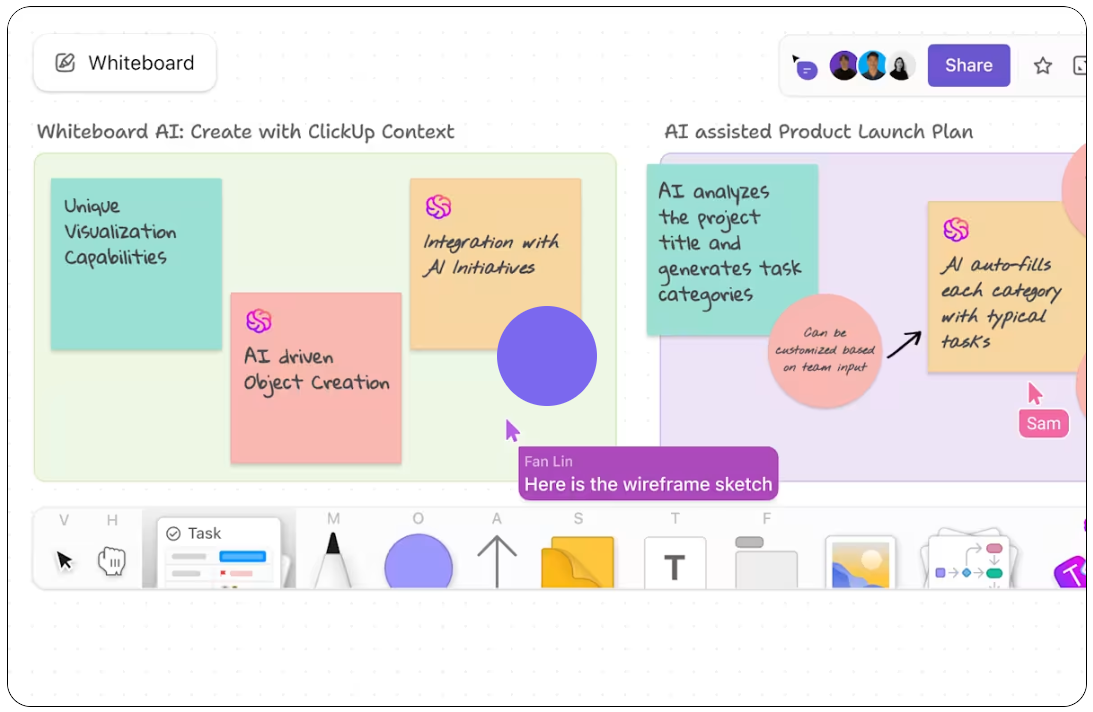
I like to use ClickUp Whiteboards to quickly brain dump all my ideas in one visual space so I can organize my thoughts without losing momentum.
I also use ClickUp Docs to jot down thoughts as they come without worrying about formatting or structuring. Thanks to its document management hierarchy, finding specific information later is effortless.

ClickUp Docs also supports bidirectional linking to ClickUp Tasks, so I can seamlessly connect related tasks and maintain a clear, structured view of my workflow.
As a visual learner, I particularly like ClickUp Docs’ rich formatting options, such as bullets, headings, checklists, banners, highlights, and color coding. They help me quickly scan my notes and recall key points instantly (these are especially helpful when preparing for meetings). 📈
Plus, I can embed images, markdown files, and attachments to keep everything in one place.
But that’s not all. ClickUp Brain, ClickUp’s AI assistant, can summarize notes, auto-generate task lists, and even brainstorm new ideas!

Here’s everything else ClickUp Brain helps me with:
🗒 ClickUp’s Notepad is another favorite of mine—I use it as my go-to writing pad for quick note-taking throughout the day. Whether it’s capturing random ideas or work reminders, I can instantly convert notes into tasks!

For example, if I note down, “Send a follow-up email to the client,” I can turn it into a task with a due date and assignee in seconds. ⏱
ClickUp’s Meeting Notes Template plays the role of a meeting minutes software and helps you capture the meeting agenda, discussion points, decisions, and action items—all in one place, boosting productivity and saving time!
Other users rave about ClickUp’s collaboration tools.
Our most recent appreciation of ClickUp was while working on a content plan for a product launch. The Docs tool allowed us to build and maintain a structured content repository with hierarchical organization, real-time collaboration, and seamless embedding features.
Here’s what a TrustRadius user shared:
This is the special advantage of ClickUp: offering most of the tools needed for organizing the projects in one place. It doesn’t only allow the managing and assignment but also offers other tools in the same environment such as Documents, where one can take notes and make reports, and integration with calendar and e-mails, all in one place. No need to use external programs or different apps for every function.
🍪 Bonus: Whether you’re structuring ideas, planning projects, or connecting related thoughts, use ClickUp’s Mind Maps to visually organize your brain dumps to create a clear, intuitive roadmap for your workflow.

Evernote is a brain dump app that lets you capture ideas, notes, web clippings, and even PDFs in one place. With notebooks, tags, and a powerful search feature, I could jot down thoughts without worrying about structure and organize them later.
One of my favorite features is Evernote’s Web Clipper—a useful tool for saving articles, research, and snippets from websites directly into my notes.
My team and I rely on it heavily when gathering ideas, insights, and references for projects. Cross-device syncing ensures our notes are always accessible, while notebook stacks keep related projects structured.
I can save almost anything to my Evernote account—typed notes, website clippings, PDFs, pictures. The Web Clipper and the ’email to Inbox’ features are especially useful for me.
📖 Also Read: How to Share Notes

When I need unlimited space to jot down ideas without worrying about formatting, the first thing that strikes me is Microsoft OneNote. OneNote, being a document management software, gives me a free-form canvas where I can click anywhere and start writing, sketching, or even recording audio and videos.
Everything stays organized in notebooks, sections, and pages, making it easy to categorize ideas and revisit them later.
With cross-device syncing, I can access my notes anytime on desktop, mobile, or web. The inking feature is a personal favorite, letting me handwrite, sketch, or annotate notes just like a real notebook.
I use this tool daily to write quick notes during meetings and draft materials before they go out. It’s like my virtual binder, with added benefits like searchability and dictation!
📖 Also Read: Best AI Note-Taking Apps for Meetings

Notion is a flexible, all-in-one workspace where I can capture ideas, create to-do lists, and organize thoughts without any rigid structure. It functions as a notes app, task manager, and database, making it an incredibly powerful tool for brain-dumping and organizing information.
Notion’s block-based system makes every element movable. Customizable blocks easily transform brain dumps into structured documents. Rich formatting options like headings, bullet points, and code blocks help keep notes visually organized.
I especially like Notion’s database functionality. It allows me to turn raw ideas into structured lists, Kanban boards, or tables, making tracking projects and action items easy.
Notion is a great tool for organizing work and personal tasks
💡 Pro Tip: Struggling to capture key points while watching videos? Master the art of how to take notes from a video with these expert strategies, and never miss an important detail again!

I prefer free-flowing brain dumping during my ideation processes but also crave structured content later. This is where Obsidian can be helpful. This app allows you to capture raw thoughts and ideas in an unstructured way, while its powerful linking system helps you connect related concepts effortlessly.
Obsidian’s graph view is quite popular among its users. This feature provides a visual representation of how different notes and ideas are connected—a feature that makes it feel like a mind map for brain dumps.
Obsidian is also Markdown-based, meaning I can format text quickly without distractions. The vault system keeps all my notes neatly categorized, and with its daily notes feature, I can brain dump whatever’s on my mind and organize it later.
Easy to use for taking and editing notes. It was helpful in importing and reading markdown notes that I had exported from Mac Notes.
🧠 Did You Know? The way you take notes can impact how well you retain and recall information! Whether you’re a mind mapper, a Cornell note-taker, or a digital scribbler, these five effective note-taking methods can supercharge your productivity and help you capture ideas more effectively.
📮ClickUp Insight: Mental clutter is a big-time creativity killer that calls for centralization of scattered information.
According to ClickUp’s research, 92% of knowledge workers risk losing crucial decisions buried in chats, emails, and spreadsheets. Without a centralized system to capture and track them, valuable business insights can easily slip through the cracks. With ClickUp’s Task Management features, you can keep everything organized effortlessly—create tasks directly from chats, comments, docs, and emails with just one click!

Google Keep is a lightweight notes app that lets users quickly jot down ideas, make checklists, set reminders, and even record voice notes—all of which sync seamlessly across devices.
My team and I love Google Keep’s color-coding and labeling system, which makes it easy to organize notes at a glance.
Whether I’m pinning important notes, archiving older ones, or extracting text from images, everything stays neatly structured. Additionally, with Google Keep’s integration with Google Docs, I can convert important notes into full documents instantly, making it perfect for turning quick ideas into structured content.
Overall, I love Google Keep’s ease of use for fast and efficient note-taking. The voice-to-text feature is awesome and makes creating personal reminders a breeze. Google Keep works across all of my devices and syncs perfectly, making it ideal for staying organized and being productive.

Roam Research is designed for networked thought—it connects ideas in a way that mimics how our brain naturally works.
Instead of storing notes in rigid folders, Roam effortlessly links concepts, turning random brain dumps into a dynamic web of knowledge.
One thing I enjoyed in particular is Roam’s bi-directional linking, which makes it easy to see how different thoughts relate to each other, even if they were written weeks apart.
The graph view is another standout feature, visually mapping out these connections like a mind map for my brain dumps.
Roam introduced me to networked linking and this amazing way of taking notes. Everything is to the point and you don’t lose time in random features. Simple and clean notetaking.
📖 Also Read: Best AI note-taking apps and tools

If you’re anything like me and appreciate a clean, elegant note-taking experience, Bear is the brain dump app that delivers simplicity with power.
What I appreciate most is Bear’s beautiful, distraction-free interface, making it perfect for free-flowing brain dumps, structured notes, and creative writing. Bear also supports text, images, sketches, and to-do lists, all while maintaining a sleek, uncluttered workspace.
💡 Pro Tip: Want to organize thoughts without leaving your workflow? Use AI tools for meeting notes to capture ideas instantly from any screen—whether browsing a website, reading an article, or reviewing documents, jot down your thoughts efficiently.

For Apple users, Apple Notes is a free brain dump app that’s always there when you need it—no downloads, no sign-ups, just quick, intuitive note-taking that syncs effortlessly across Mac, iPhone, and iPad.
I also enjoyed using Apple Notes’ smart folder system that automatically organized my notes based on hashtags and filters. Plus, to keep sensitive information secure, Apple Notes also enabled end-to-end encryption for locked notes.
🔮 Key Insight: Our brain is like a whiteboard scattered with information and ideas. Declutter it with these note-taking templates that will help you capture, organize, and build upon your ideas—so you can focus on brilliance, not chaos!

Trello is a brain dump app that captures, categorizes, and organizes ideas effortlessly.
It comes with Kanban-style boards, lists, and cards, which allow a structured way to brain-dump tasks, notes, and ideas without overwhelming users with unnecessary complexity.
I especially liked Trello’s visual workflow, which let me drag and drop notes, create dynamic to-do lists, and add deadlines and attachments without losing track of important thoughts.
It’s simple. I have tried many tools over the years for managing my tasks, and keeping track of notes/key information, but I always come back to the simplicity of Trello.
Here are some honorable mentions for brain dump apps and tools that didn’t get listed in our top 10 but have helped me quite a lot:
I’ll be honest—out of all the brain dump apps I’ve tried, ClickUp is my top pick. And for good reason:
With ClickUp Docs, you can jot down ideas on the fly, structure your thoughts effortlessly, and link notes directly to tasks. Plus, ClickUp Brain automates summaries, organizes brain dumps, and transforms scattered thoughts into actionable plans—saving you hours of manual work.
Try it for yourself. Sign up for ClickUp today.

© 2026 ClickUp

There’s an easier way. Try a free AI Agent in ClickUp that actually does the work for you—set up in minutes, save hours every week.