






Still downloading templates?
There’s an easier way. Try a free AI Agent in ClickUp that actually does the work for you—set up in minutes, save hours every week.
Sorry, there were no results found for “”
Sorry, there were no results found for “”
Sorry, there were no results found for “”

Most audits fail or don’t deliver promising results because the planning stage is rushed. Teams jump directly into checklists and deadlines without first addressing the basic questions concerning audit goals, risks, and responsibilities.
That’s exactly why experienced auditors and even small businesses now consider audit planning as the real starting point of a successful audit.
A well-designed audit planning template helps organize objectives, timelines, documentations, and review steps altogether to help teams uncover crucial insights and maintain accountability.
In this article, we will explore free audit planning templates to help you conduct your audit with greater clarity and confidence.
An audit plan template is a structured blueprint that helps you outline how an audit will be conducted before the actual review begins.
In simple terms, it helps you:
📌 Did You Know? Only 1 in 5 internal audit functions has a comprehensive, well-documented 3–5 year strategic plan.
Here are the key elements an ideal audit planning template should include:
| Template Name | Download Template | Ideal For | Best Features |
| ClickUp Audit Plan Template | Get free template | Internal auditors, compliance teams, operations managers, business owners planning audits | Audit objectives documentation, SWOT risk analysis, team role assignment, audit timeline planning |
| ClickUp Audit Program Template | Get free template | Internal audit teams, ISO auditors, compliance managers | Custom audit fields, audit findings tracking, board views for procedures, issue prioritization |
| ClickUp Internal Audit Checklist Template | Get free template | Internal auditors, safety officers, compliance teams | Checklist-based audit questions, audit scoring system, non-conformance tracking, corrective action notes |
| ClickUp Internal Audit Form Template | Get free template | Internal auditors, leadership teams evaluating departments | Audit feedback collection forms, automated audit reports, department score calculation, quarterly review tracking |
| ClickUp Corporate Audits Template | Get free template | Internal audit teams, consulting firms, enterprise audit departments | Kanban audit tracking, audit budget monitoring, client scheduling calendar, audit interview documentation |
| ClickUp Business Audit Doc Template | Get free template | Business consultants, management teams, operational auditors | Business audit checklist table, audit findings documentation, improvement action items, audit sign-off section |
| ClickUp Process Audit and Improvement Template | Get free template | Process improvement teams, internal auditors | Process analysis tasks, CATWOE stakeholder analysis, workflow redesign planning, change management tracking |
| ClickUp Internal Control Checklist Template | Get free template | Finance teams, compliance specialists, internal control reviewers | Financial control checklist, cash receipts monitoring, reimbursement verification, audit progress tracking |
| ClickUp Supplier Audit Template | Get free template | Procurement teams, QA managers, compliance specialists | Supplier audit checkpoints, compliance board view, documentation evidence uploads, supplier process rating |
| ClickUp Statutory Audit Scope of Work Template | Get free template | External auditors, statutory audit teams, accounting firms | Audit scope, pre-built audit procedures and testing framework, responsibility and task assignment |
Here are the top audit planning templates that can help you execute your audits with better control from start to finish.
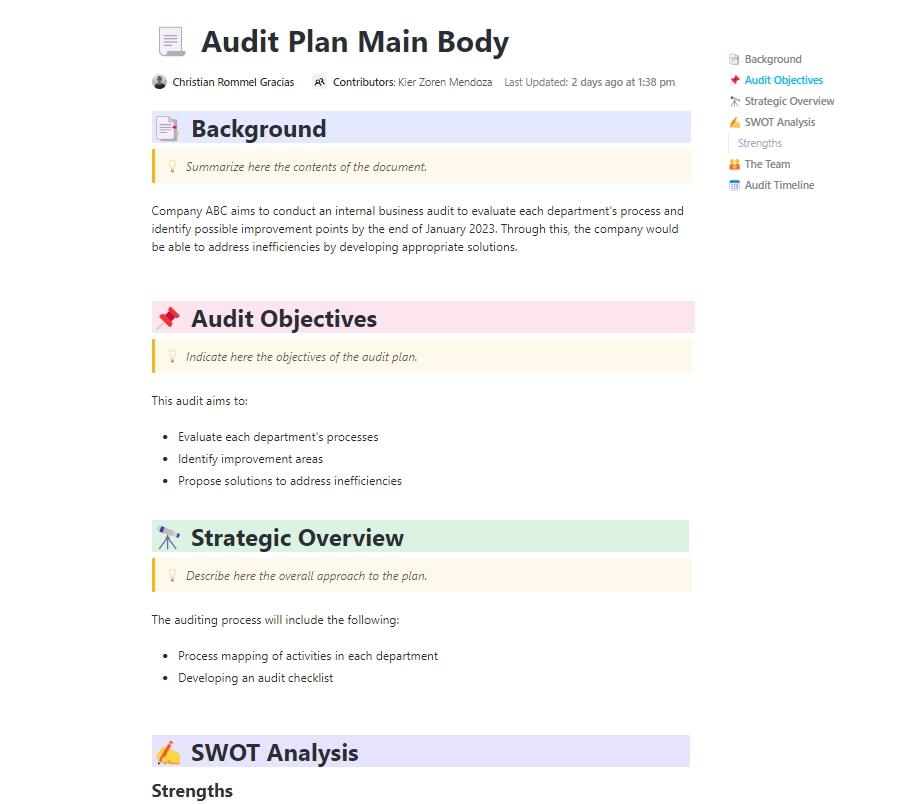
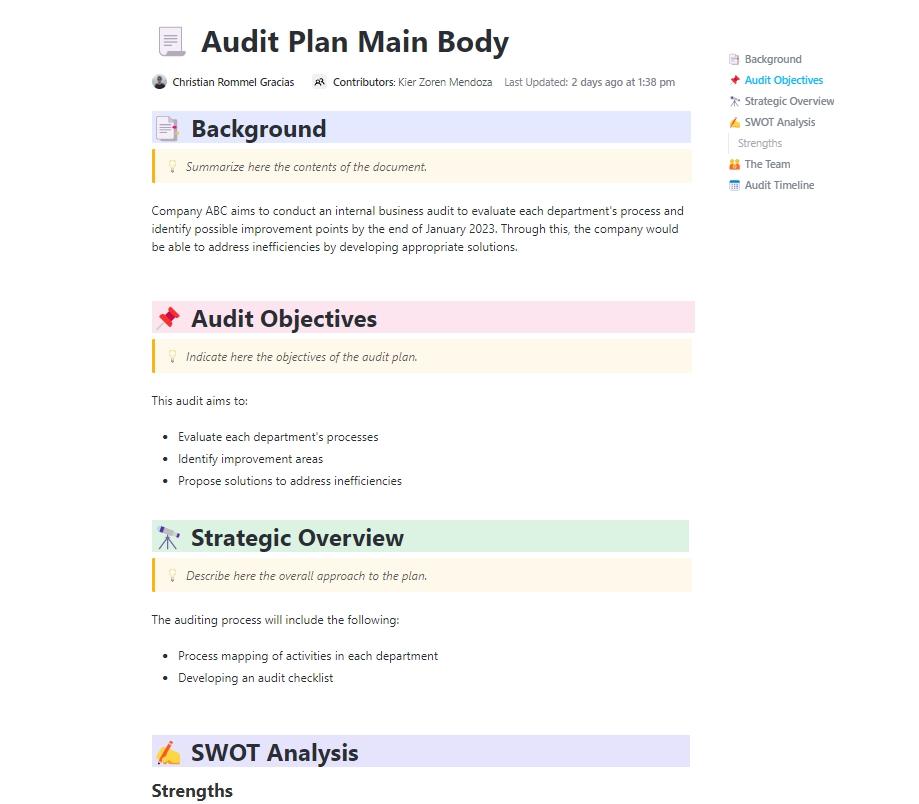
The ClickUp Audit Plan Template is a simple doc-style template that helps you put the entire audit plan on paper before starting the real work. It helps document the audit background, define objectives, outline the strategy, and organize the people responsible for the review. It even includes a detailed timeline so every activity has clear dates and owners.
✅ Ideal for: Internal auditors, compliance teams, operations managers, and business owners looking for a simple way to plan audits and keep the entire process organized
📚 Read More: How to Prepare for and Pass Your IT Compliance Audit
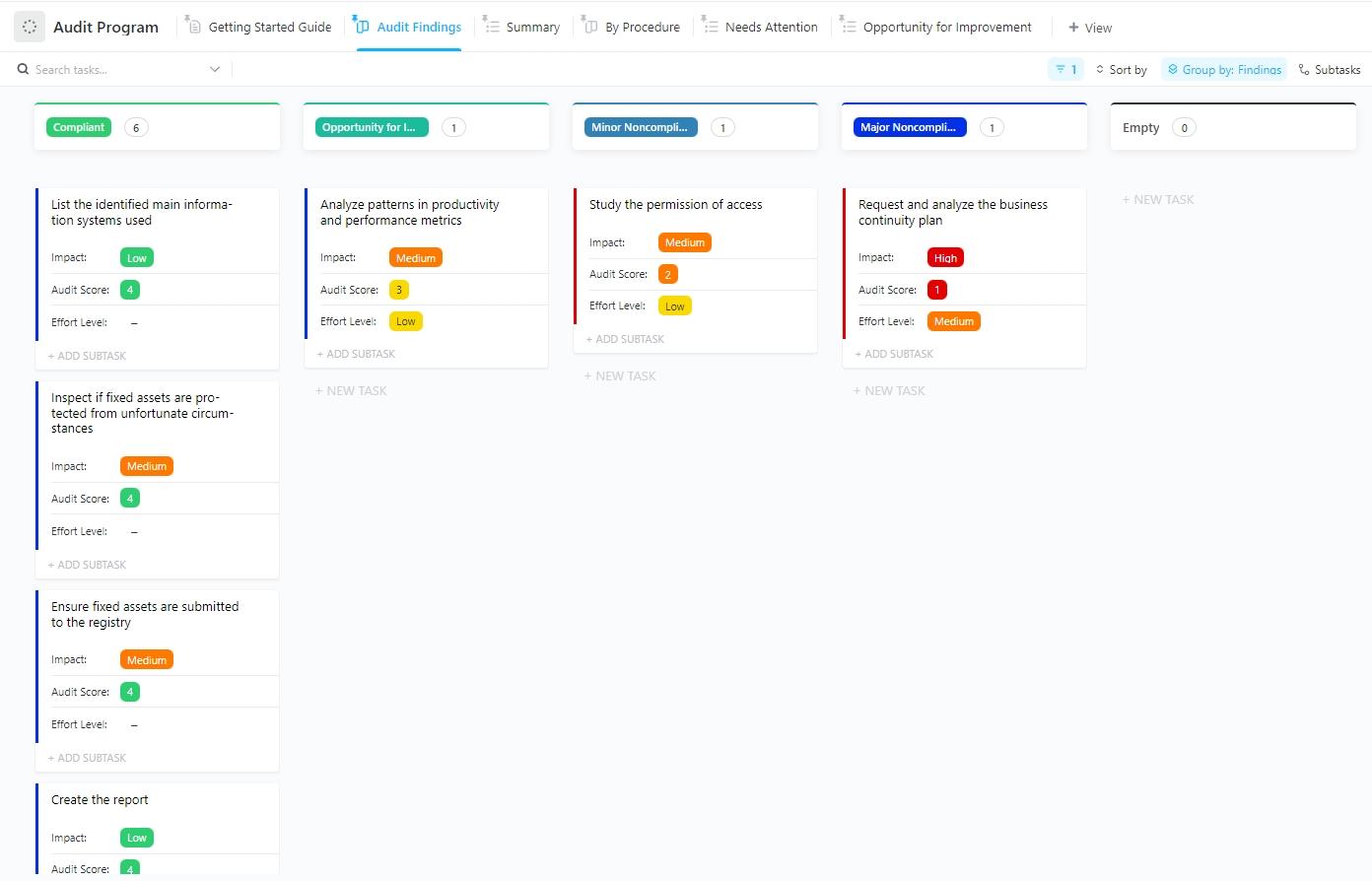
Once the audit plan is ready, the ClickUp Audit Program Template helps break down each audit activity into individual tasks where auditors can log findings, attach evidence, record root causes, and track corrective actions as the audit progresses.
The template also provides multiple views to monitor audit work. For example, the Summary List View provides a quick overview of the entire audit program by grouping tasks by status (complete, in progress, or pending). Then there is the By Procedure Board View, a drag-and-drop board that lets teams move audit items across different stages of the audit process.
You also get the Audit Findings Board View, which sorts audit items by their audit score or findings.
✅ Ideal for: Internal audit teams, ISO and compliance auditors, and operations or quality managers who need a streamlined way to run audit activities across different departments
📮 ClickUp Insight: Context-switching is silently eating away at your team’s productivity.
Our research shows that 42% of disruptions at work come from juggling platforms, managing emails, and jumping between meetings. What if you could eliminate these costly interruptions?
ClickUp unites your workflows (and chat) under a single, streamlined platform. Launch and manage your tasks from across chat, docs, whiteboards, and more—while AI-powered features keep the context connected, searchable, and manageable!
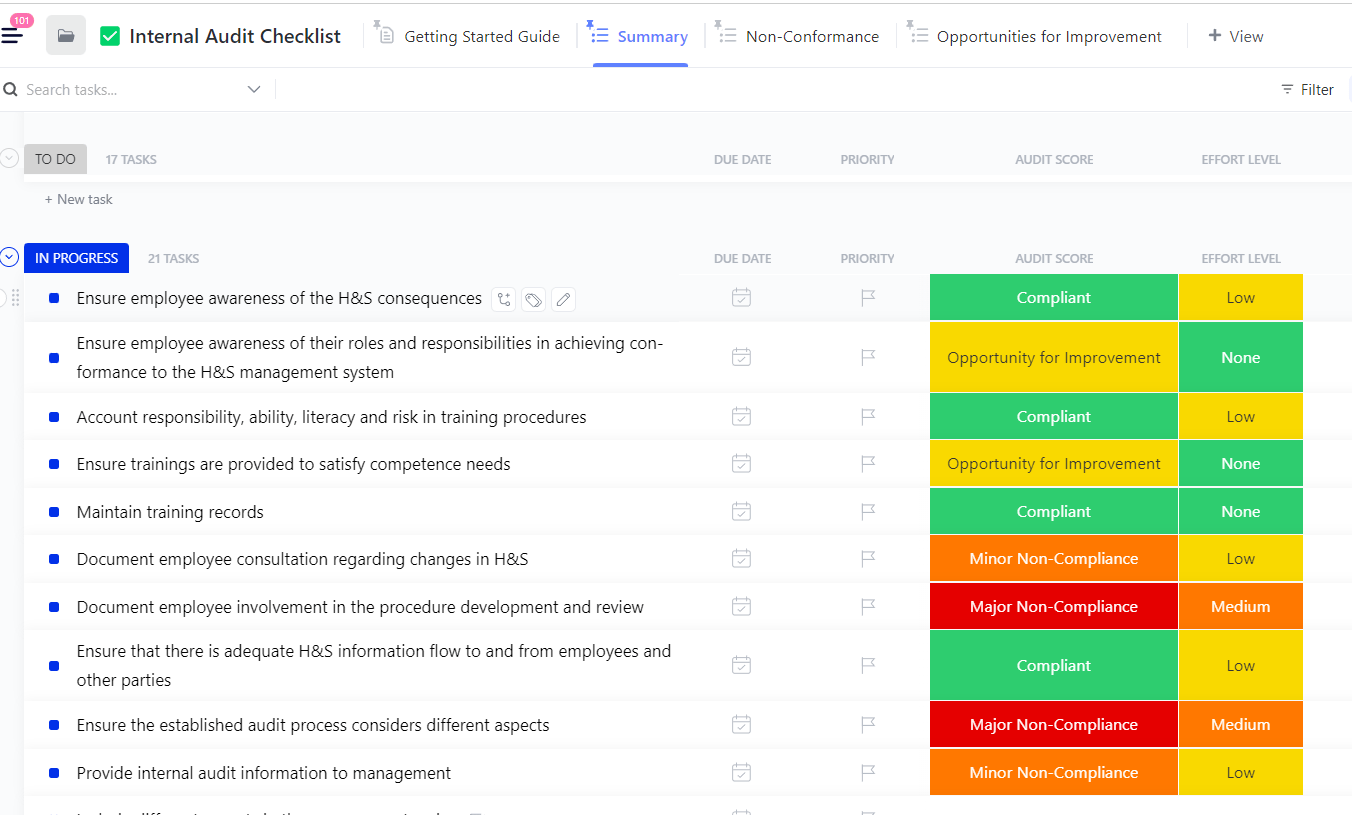
The ClickUp Internal Audit Checklist Template helps teams run internal audits using checklist-style items. Auditors can turn each audit question into a task and evaluate it directly in the workspace.
The template is organized into audit sections, including General Requirements, Health & Safety Policy, Planning, Implementation & Operation, Checking, and Management Review. Each section contains audit questions that help auditors verify if the organization’s systems are properly documented, implemented, monitored, and reviewed.
As auditors assess each item, they can assign scores, upload supporting evidence, record the root cause of issues, and note the corrective actions required to resolve them.
✅ Ideal for: Internal auditors, safety officers, and compliance teams reviewing operational standards or workplace safety systems
📌 Did You Know? In AuditBoard’s Focus on the Future survey, 75% of internal audit teams reported they had not yet implemented generative AI in their audit workflows.
This means most audit teams are still relying on manual reviews and time-consuming analysis, even though modern AI tools can significantly accelerate audit work.
That’s where ClickUp Brain MAX comes in.
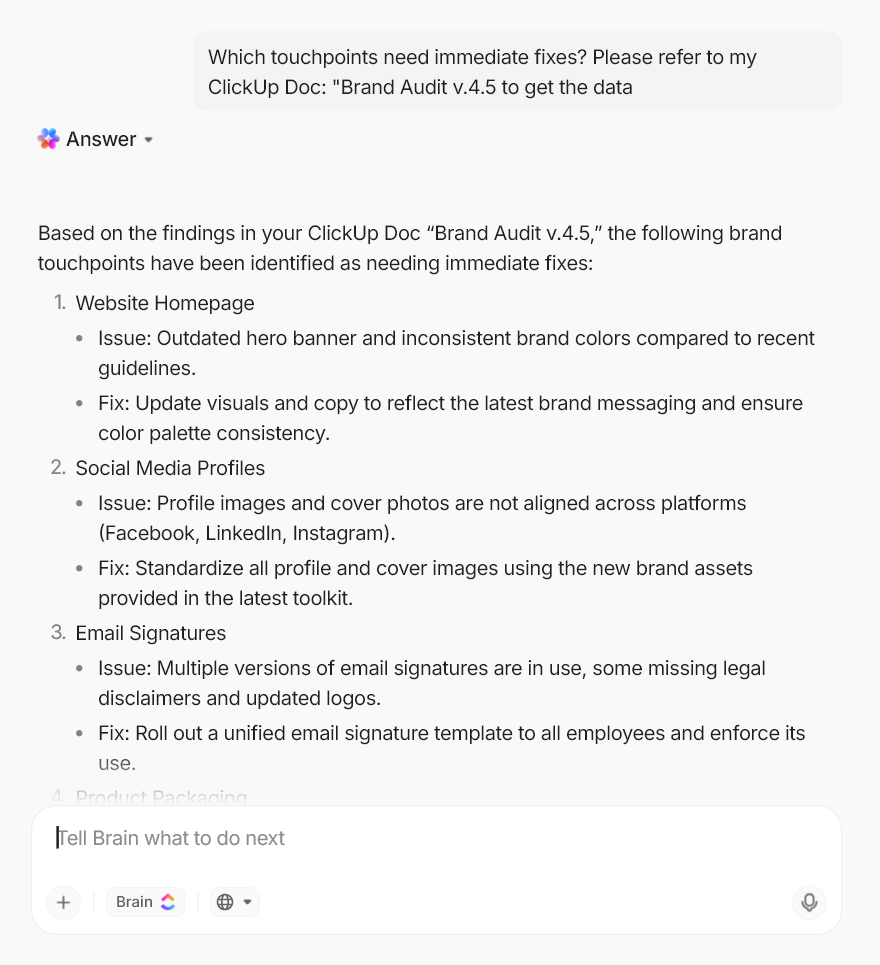
The AI acts as a context-aware layer in your workspace, understanding your audit tasks, documents, timelines, dependencies, and team workload. With ClickUp Brain, auditors can:
⭐ Bonus: With Talk-to-Text, auditors can even dictate observations during an audit review or meeting, and Brain instantly converts them into structured notes or action items.
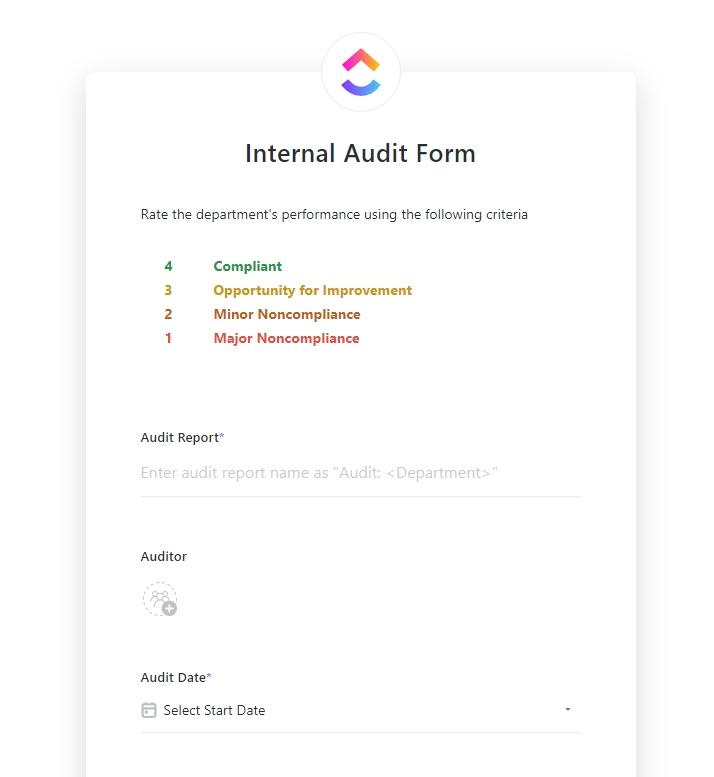
The ClickUp Internal Audit Form Template helps collect internal audit feedback through a form and automatically converts responses into audit reports. The employees simply fill out a form to evaluate departments against key operational criteria, such as Work Capacity, Work Environment, Resources, Health and Safety, and Budget.
Each area is rated on a scale from 1 to 4, where the score corresponds to findings such as Compliant, Opportunity for Improvement, Minor Non-Compliance, or Major Non-Compliance. The template then calculates an overall audit score by averaging these ratings. With this, the managers get a quick review of how well a department performed during the audit.
✅ Ideal for: Internal auditors and leadership teams reviewing departmental performance across quarterly audits
💡 Pro Tip: Many teams combine audit forms with audit report templates to turn collected data into actionable reports. These templates are especially helpful when auditors need to:
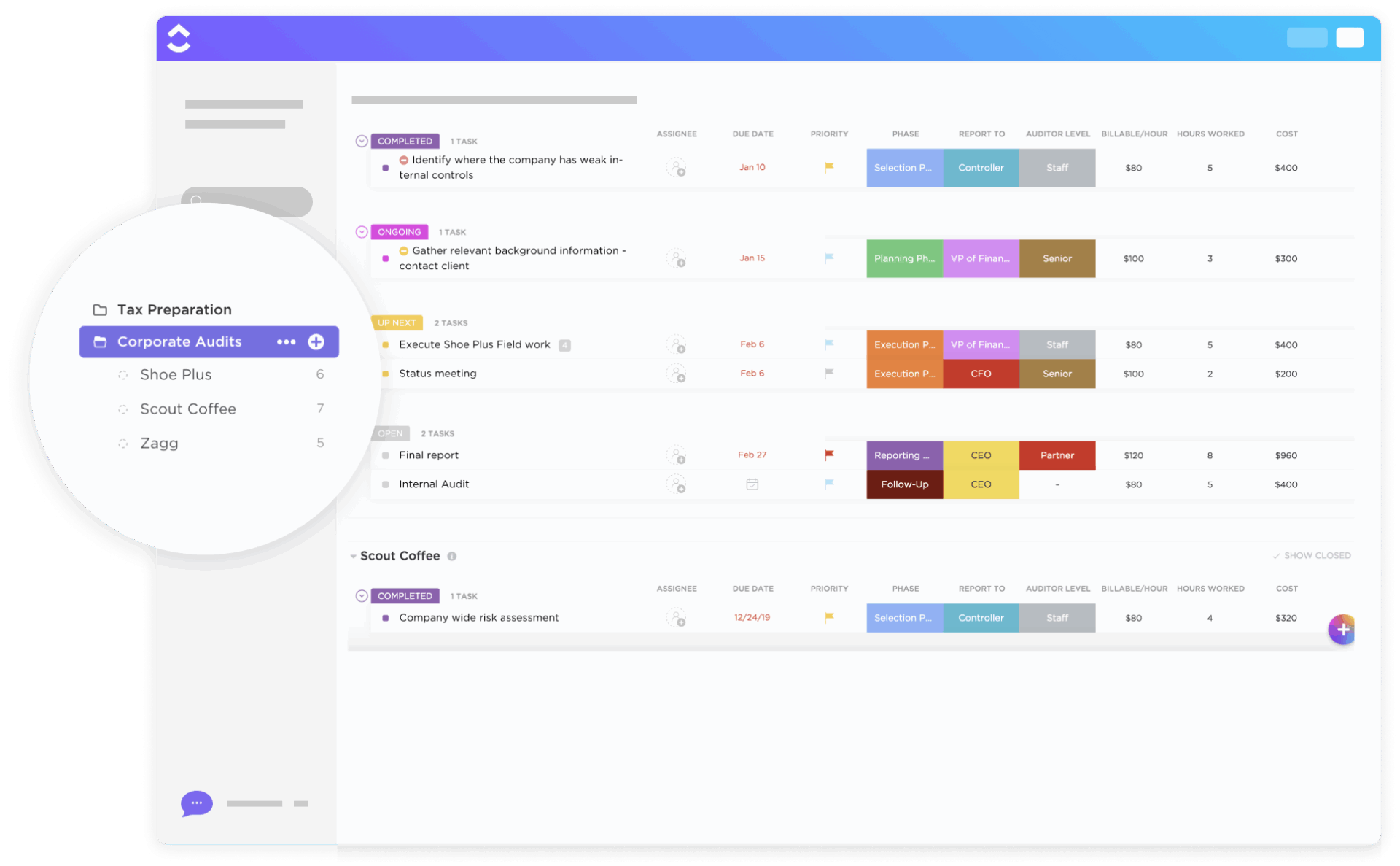
The ClickUp Corporate Audits Template helps audit teams manage the whole corporate audit process in one systematic workspace. Audit tasks move through stages such as Open, Up Next, Ongoing, and Completed in a Kanban board, making it easy to track each audit activity’s progress.
The same tasks can also be viewed in a List view, where they appear in an ordered table format for easier monitoring and reporting.
In addition to task tracking, the template includes additional views to manage different parts of the audit. For example, the Audit Budget view helps track client audit costs, while the Client Schedule view allows the team to plan meetings and field work using a ClickUp Calendar.
✅ Ideal for: Internal audit teams and consulting firms managing multi-stage corporate audits across multiple clients or departments
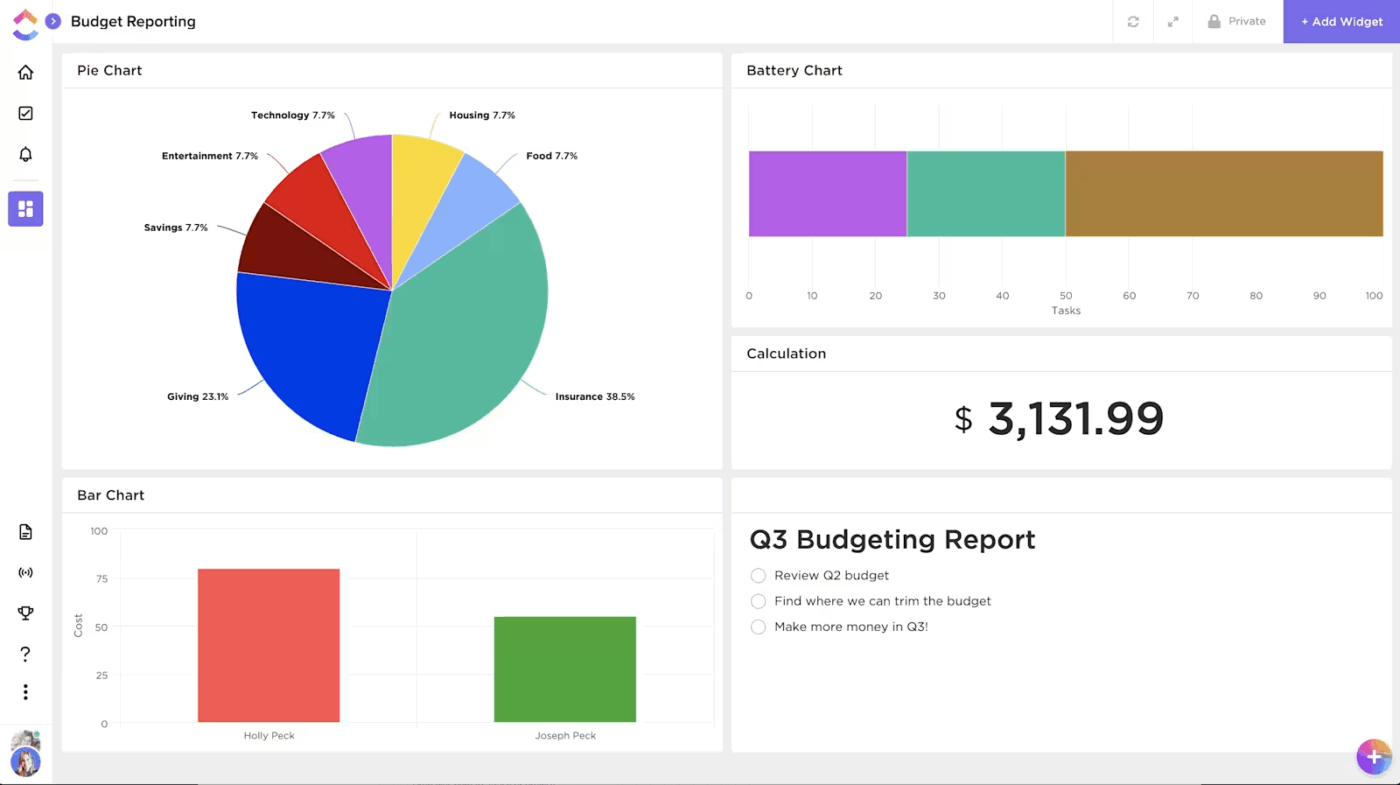
💡 Pro Tip: Turn audit data into real-time insights with ClickUp Dashboards! Using AI Cards, teams can:
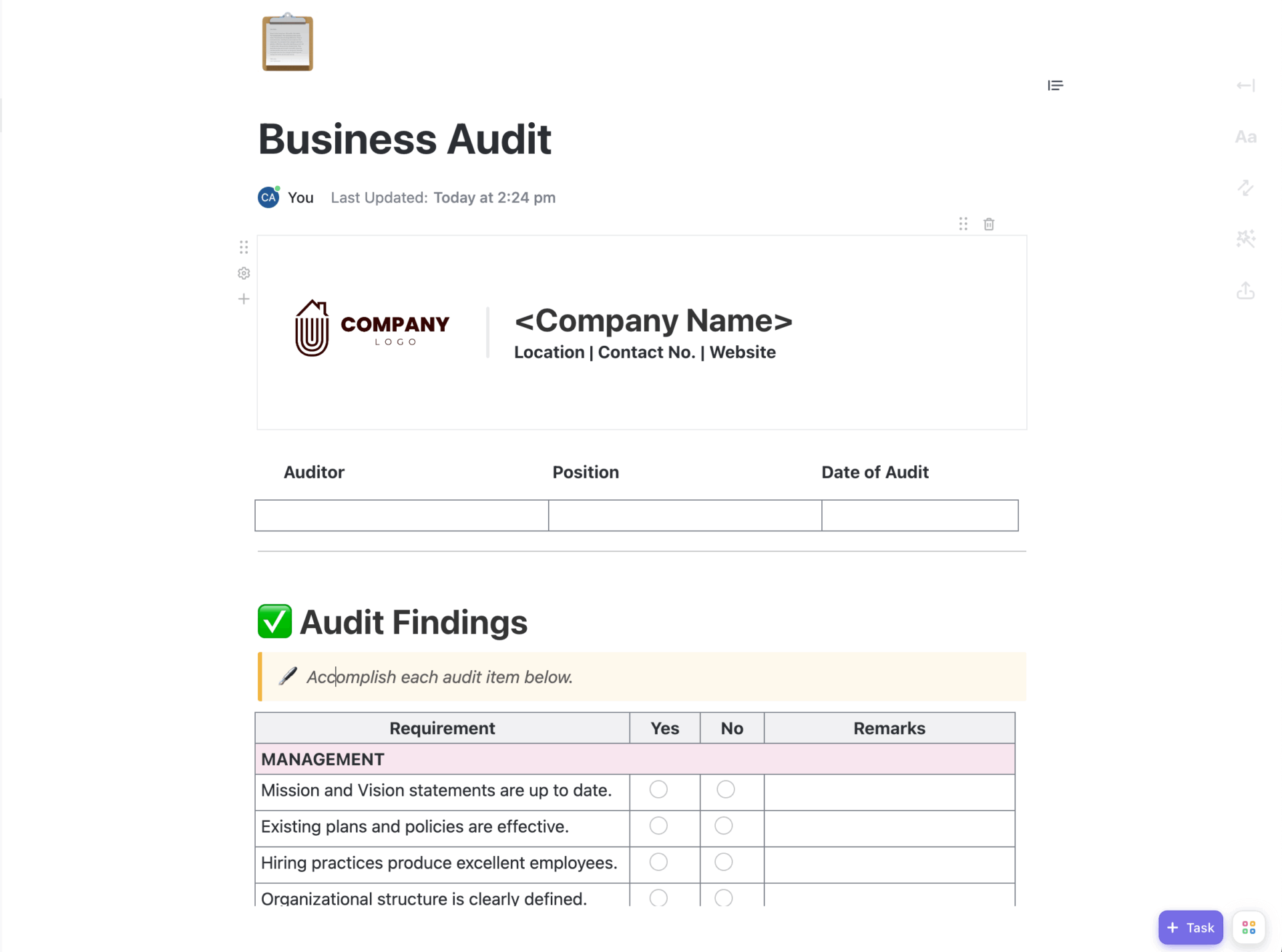
The ClickUp Business Audit Doc Template is another doc-style template that is super customizable and useful for conducting business audit processes and understanding how a business is operating. You can add your company name and logo at the top of this template, along with the auditor’s name, position, and date of audit.
The main section of the document focuses on audit findings, where auditors evaluate different parts of the business, such as Management, Operations, and Finance, using a checklist-style pre-made table. Each requirement can be marked Yes or No, and the auditor can add remarks to explain issues or observations discovered during the audit.
✅ Ideal for: Business consultants, internal auditors, and management teams conducting business performance or operational audits
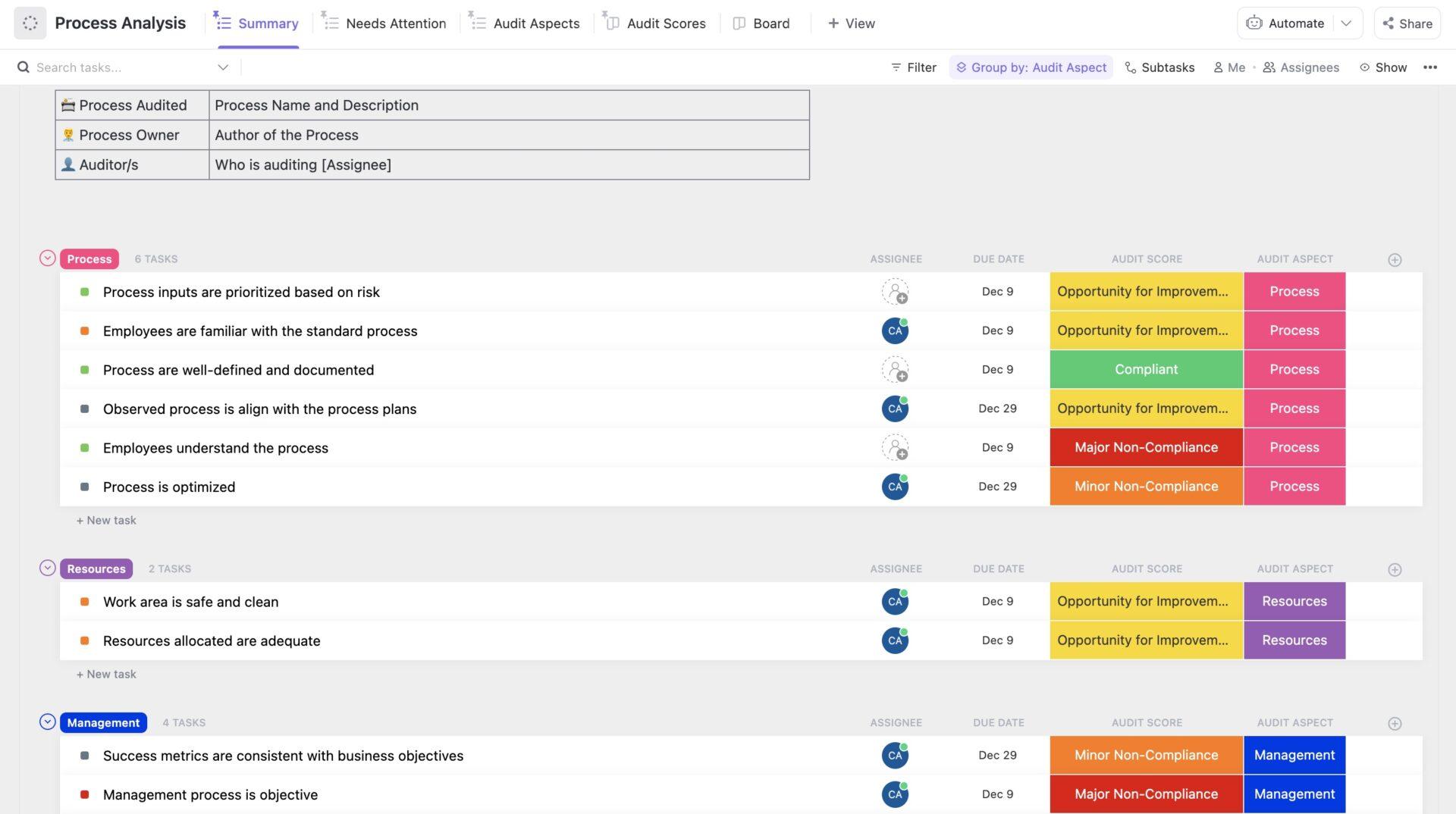
Instead of simply checking whether an audit process is compliant or not, the ClickUp Process Audit and Improvement Template goes a step further to analyze the current business processes and design improved workflows for better implementation.
Everything is organized in a single folder that provides a high-level overview of all audit activities, grouped by status (pending, reviewed, completed).
The template includes multiple lists and views, each representing a different stage of the process improvement. The Process Analysis section allows auditors to evaluate existing processes by creating tasks for each audit checkpoint. Every task represents one audit requirement that can be reviewed and documented.
There’s also a CATWOE (Customers, Actors, Transformation, Worldview, Owner, Environmental Constraints) analysis section to help teams assess processes from different stakeholder perspectives and a Model Conception area where teams design improved workflows based on audit findings.
✅ Ideal for: Process improvement teams and internal auditors working to evaluate and optimize business processes
🚨 Stat Alert: In a global risk study, cybersecurity ranked as the No. 1 risk for organizations worldwide, and the No. 1 priority for internal audit teams.
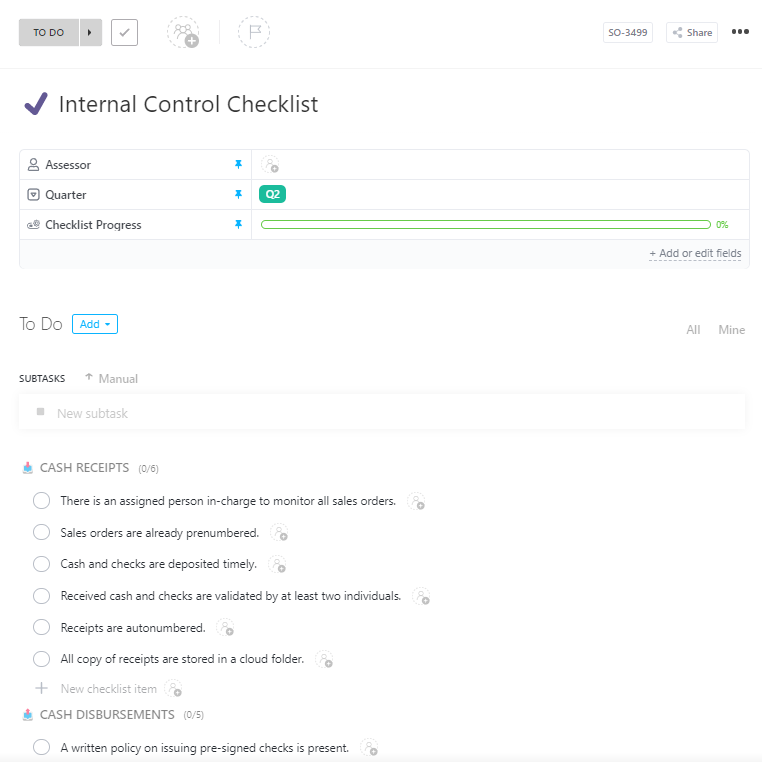
The ClickUp Internal Control Checklist Template is especially useful for controlling and monitoring a company’s financial processes. It focuses on three main financial control areas: cash receipts, cash reimbursements, and financial reporting.
The cash receipts area verifies if the company has proper controls over money received from customers or sales. The cash reimbursements check whether the company has controls over outgoing payments and expenses. And financial reporting verifies the reliability of financial reporting processes, ensuring they are accurate and reviewed appropriately.
Each area contains a set of audit checklist questions that auditors can work through during the assessment. Reviewers simply open the checklist task, go through each checklist item, tick items that meet the control requirement, and flag missing or weak controls that may require attention.
✅ Ideal for: Finance teams and compliance specialists reviewing financial controls and operational procedures
🚀 ClickUp Advantage: Audit teams spend a lot of time on repetitive coordination tasks, like assigning audit items, following up on findings, preparing reports, and tracking remediation progress. These tasks are often necessary, but they slow down the actual analytical work that auditors need to focus on.
With ClickUp Super Agents, teams can delegate these operational tasks to autonomous AI teammates that monitor the workspace and take action automatically.
Super agents help auditors:
Learn more about them here. ⬇️
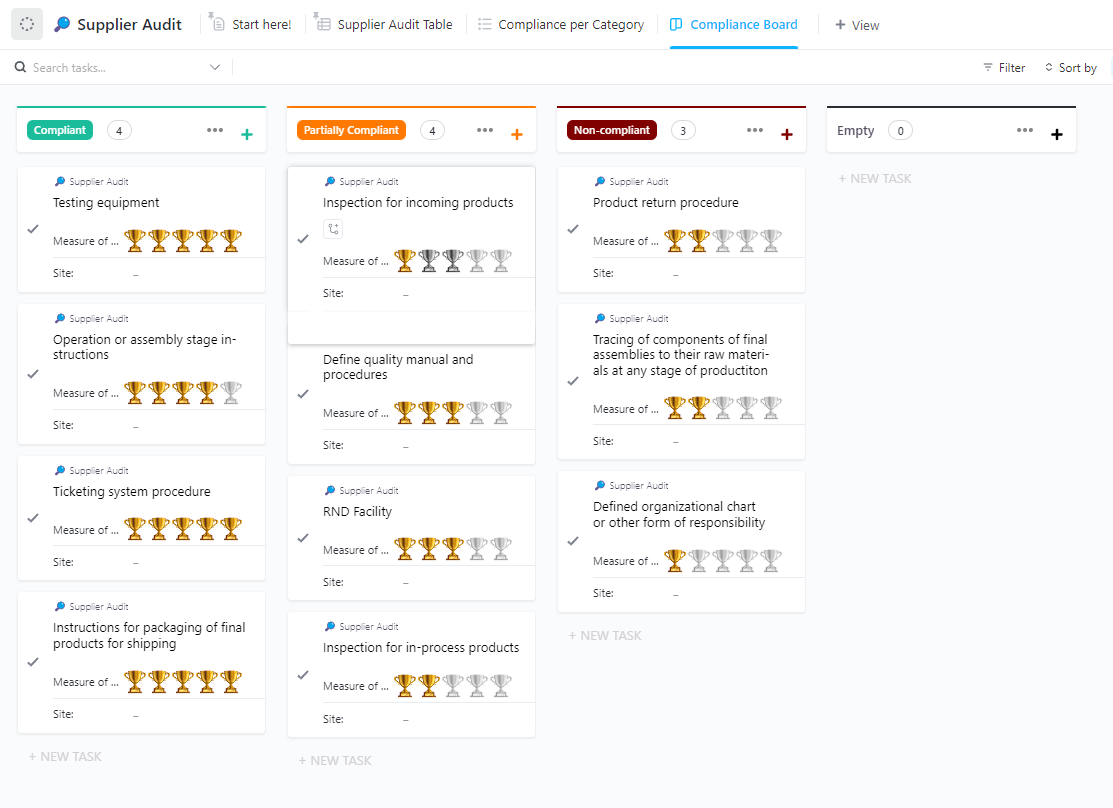
The ClickUp Supplier Audit Template helps evaluate if a supplier meets the operational and quality standards required to work with a company. It allows auditors to review key areas, such as quality procedures, production practices, documentation, supply chain management, and customer service processes.
Each audit checkpoint is created as a task that can be reviewed across Custom Views, including Supplier Audit Table, Compliance Board, and Compliance per Category views. This allows auditors to examine the same audit data in different formats, like using ClickUp Table View for detailed entries and Kanban-style Board View for checking progress at a glance.
Auditors can also rate each checkpoint using the Measure of Success field to evaluate the strength of the supplier’s processes.
✅ Ideal for: Procurement teams, quality assurance managers, and compliance specialists evaluating potential suppliers or conducting periodic supplier audits
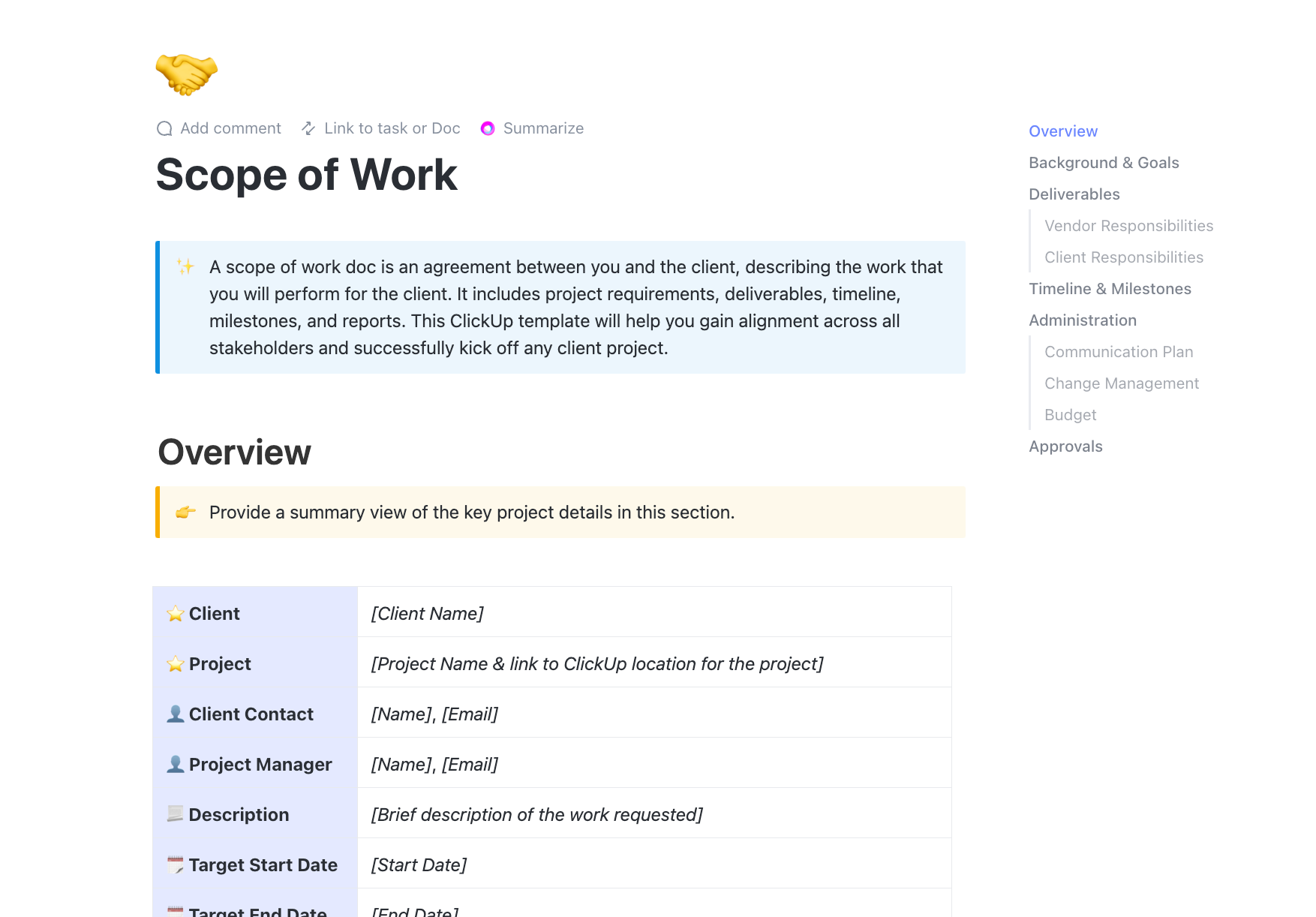
The ClickUp Statutory Audit Scope of Work Template is a formal agreement and execution plan for audit teams to define the work involved in a statutory audit engagement. It captures all the important information about the engagement, including the client name, project name, client contact, start date, end date, and links to key documents.
The template also includes the background and objectives of the audit, so both the auditor and the client know the purpose and expected outcomes of the engagement.
It also outlines what the auditor will deliver, such as audit findings or compliance reports, and what the client must provide, including financial records or system access. Additionally, it includes sections for milestones, communication plans, and final approval tracking to ensure the audit runs smoothly from planning through closure.
✅ Ideal for: External auditors, statutory audit teams, accounting firms, compliance teams, and organizations preparing for financial statement audits
Audit planning doesn’t have to feel complicated. With the right template at your side, you can easily organize your audit tasks and track findings.
The templates covered in this guide help bring structure to different types of audits, from internal reviews to supplier evaluations. Moreover, using a converged AI workspace like ClickUp makes this even easier. You can manage checklists, document evidence, track compliance, and monitor progress all in one place.
So, if you want a simple way to keep audits actionable, explore these templates and start building your audit workflow in ClickUp. Sign up for ClickUp today.

© 2026 ClickUp

There’s an easier way. Try a free AI Agent in ClickUp that actually does the work for you—set up in minutes, save hours every week.