Sorry, there were no results found for “”
Sorry, there were no results found for “”
Sorry, there were no results found for “”
You’ve scoured through countless applications, customized your resume and cover letters, and applied for roles for which you’re qualified.
After being shortlisted, you have one more hurdle: the interview.
The word interview alone can give anyone the jitters, even for the most qualified candidate.
The interview is a tiny time capsule, allowing you to put your best foot forward and tip the scale depending on your performance. For recruiters, it is their chance to size up the candidate and provide them with a snapshot of the company.
There’s no worse feeling than walking out of an interview knowing you’ve fumbled because you were unprepared. The competition in today’s job market is intense, and to stand out, you need to go the extra mile when preparing for your interview.
Fortunately, AI tools are available to help you prepare for your interviews, reducing the stress and anxiety you may experience before your interview.
So you don’t have to be scared because the jitters eventually get to everyone, even the most qualified applicants.
This article offers a step-by-step guide to help you excel in your next dream job interview using AI tools for preparation.
Let’s get right into it. 👇
The current job market is highly competitive across various industries. Glassdoor’s study reveals that an average of 250 resumes are submitted for a single open position.
Traditionally, talent acquisition has involved manual tasks like resume screening and interview scheduling. But recruiters now streamline these processes by:

Human bias can creep into the recruitment process, leading to the exclusion of qualified candidates. AI algorithms rely on pre-defined criteria and data from past successful hires, minimizing the influence of unconscious bias based on resumes, names, or backgrounds.
AI personalizes the recruitment journey for candidates, fostering engagement. Here’s how:
The adoption of AI in recruitment empowers organizations to:
AI helps you to gain an edge against the competition, stand out, and land your dream job.
Use AI to prepare for interviews, craft your resume that gets noticed by applicant tracking systems (ATS), and even network with industry professionals more efficiently. Here’s how to use AI to prepare for your interviews:
Filling out lengthy forms and uploading resumes takes much time and becomes repetitive, but job seekers can streamline the job search process through AI.
Job seekers looking to change careers use these tools to showcase their strengths and stand out effectively. Tools like ChatGPT can analyze job descriptions and generate realistic interview questions specific to the role.
More details on how job seekers use AI and how you can below:


With AI, you can rehearse your responses, refine your communication style, and build confidence before the interview. The next section provides more details on that.
The interview can be a nerve-wracking experience, but you can ace your next job interview and get your dream job with AI tools. Use these ten strategies to prepare:
Tools like Pramp work like a virtual interviewer. Feed it a job description, and watch Pramp generate realistic interview questions specific to the role.

You can then rehearse your responses, refine your communication style, and build confidence before your big day.
Browsing through companies takes a lot of time, but tools like ChatGPT can analyze company websites, news articles, and social media profiles to deliver insightful summaries.
Simply prompt the AI for information about the company culture, recent projects, and industry trends. You can even request sample interview questions specific to the role you’re applying for.

Explore our list of prompt templates, and customize your choice the way you like.
Crafting compelling application materials is crucial. Resoume.com’s AI Assistant analyzes your resume and cover letter to identify areas for improvement.
It can suggest stronger keywords based on the job description, spot formatting inconsistencies, and ensure your materials are tailored to the specific role.
Do you ever struggle to come up with interview talking points? Google’s Gemini, an AI assistant, can analyze the job description and suggest key skills and experiences relevant to the position.

Work with the AI to brainstorm compelling stories and examples you can use to showcase these skills during your interview.
Asking insightful questions shows preparation and genuine interest in the position. Use ChatGPT to analyze the company website and job description. It’ll suggest questions you can ask the interviewer about the company culture, team dynamics, and specific challenges in the role.
For instance, here are the interview questions for a project manager role generated from ChatGPT.

For technical roles, mastering coding challenges is crucial. Platforms like CodeSignal provide practice problems that are often used in technical interviews.
After attempting the problems, you can receive AI feedback on your code efficiency, logic, and adherence to best practices.
Advanced AI tools like HireVue analyze your body language, tone, and facial expressions during mock interviews.
HireVue then provides feedback on your non-verbal communication, helping you identify areas like maintaining eye contact, using confident gestures, and speaking enthusiastically.
Finding time slots for interview practice can be a hassle. Tools like Calendly integrate with AI to streamline scheduling with friends or peers.
Simply share your availability with the AI, and it can schedule mock interview sessions with friends, colleagues, or even professional interview coaches. Go through our research on interview templates to see which one suits your choice.
Tools like Otter transcribe audio into texts. Leverage this while simulating upcoming interviews. Review the questions and responses and refine their answers for future interviews.
Jot out the crucial aspects of your talks while simulating your upcoming interview. Wave works similarly to Otter but differs in transcribing only the critical points of your talk sessions.
Filter the output to determine what matters most and refine your next trial. Rinse and repeat the processes until it gets better.
Landing your dream project management role requires organization so that you can prepare for interviews effectively. You’ll need to keep track of applications, interview schedules, company information, and rejections.
A project management tool can help you manage every detail without losing anything. This is where ClickUp Brain comes in to simplify your interview preparations.
Paste a company’s job description URL into ClickUp Brain and watch it summarize key information, saving you valuable research time.
Type in a broad prompt like leadership challenges, and Brain will suggest various interview questions related to that topic. ClickUp Brain can’t write your answers for each question, but it can help! Brain highlights relevant keywords and skills based on the job description.
Take a look at how to use ClickUp Brain effectively:
Set up recurring ClickUp tasks for mock interview sessions with friends, colleagues, or professional services.

Schedule a pre-interview task reminding you to practice your relaxation techniques. ClickUp Brain can’t manage your stress directly, but you can use the notes section of a task to jot down calming exercises like deep breathing or meditation routines.
Create a ClickUp List titled Project Management Skills for Interview. Add checkboxes for key skills like Risk Management, Resource Allocation, and Stakeholder Communication.

Ticking these boxes as you prepare interview responses helps you visualize your progress and ensures you’re highlighting your entire range of expertise.
ClickUp offers highly customizable pre-built templates to supercharge your job search:
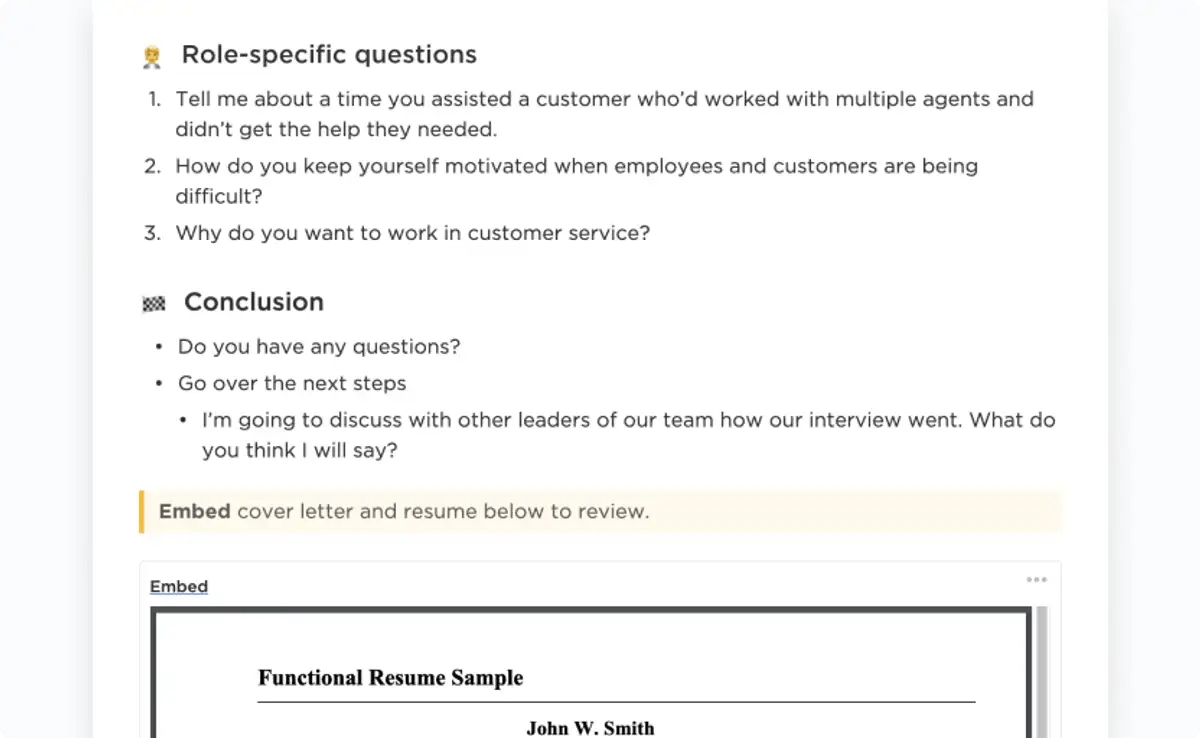
Streamline and organize your interview process with ClickUp’s Interview Process Template to help ensure you get the most out of every practice. The solid template is designed to help you:
Capture job postings from various sources in one place. Using ClickUp’s Job Search Template in ClickUp can help you stay organized and ensure you have a comprehensive plan for your search. Organize your application process and follow-up tasks with this template.
Let’s say you’re applying for a project management role at a growing tech startup.
A laid-off project manager shared on Reddit how he struggled to land a new job despite applying to many positions. A friend’s advice on a 3-stage application process with AI tools transformed his search, leading to success within two months.
The initial focus was improving the resume’s conversion rate, measured by the percentage of applications resulting in responses. He meticulously tailored his resumes to each position, and tools like Kickresume were helpful in this stage.
Another key strategy he used involved incorporating keywords from the job descriptions and catering to applicant tracking systems often used by companies. He created a cover letter template with customizable sections for each application. Finally, he prepared a detailed resume with project links where a website URL was requested.
Once invitations for initial interviews with HR managers approached, the focus shifted to interview skills.
In this stage, he aimed to increase the number of secured second interviews or technical exercises. Thorough preparation became paramount, and he leveraged tools like Otter to transcribe interviews, creating a reference document with common interview questions and prepared responses.
The Reddit user received not one but two job offers, with one exceeding their previous salary. He ultimately chose the offer that better aligned with his priorities.
Take a look at another Reddit user who narrated how his job search experience turned fruitful through ChatGPT:

Job seekers struggle to land job interviews due to the obvious competition. Use AI to prepare yourself and dominate the saturated job market.
Analyze job descriptions, suggest strong answers to common interview questions, and simulate interview scenarios to build confidence in your ability to succeed.
ClickUp Brain provides everything you need to stay ahead of others. Create checklists, set reminders for mock interviews, and keep all your research materials neatly organized in one place. It’s time to turn your job search into a success story. Want to explore how ClickUp Brain can help? Check it out!

Praburam Srinivasan
Max 10min read

Manasi Nair
Max 22min read
Manasi Nair
Max 24min read

© 2026 ClickUp