

10 Best Restaurant Scheduling Software for Smarter Staff Management

Sorry, there were no results found for “”
At the restaurant where I work, we have the weirdest shifts, and scheduling is almost never right. We have a few short shifts (like 5-hour openers and 3:30 PM dinner shifts), some standard 7-hour shifts, and then those terrible 10-hour closes from 5:00 PM to 2:00 AM.
This comment from a Reddit user perfectly highlights a common struggle in the restaurant industry—poorly planned shift scheduling.
The hospitality sector is very people-dependent. When employees miss their shifts, managers scramble to fill last-minute open staff roles, and ultimately business suffers.
What you need is reliable restaurant scheduling software. The right employee rostering software can handle time tracking and even automate swap shifts so that last-minute changes don’t throw your entire operation off balance.
To make things easier, we’ve rounded up the 10 best restaurant scheduling software platforms to help you manage your restaurant staff efficiently.
Want to keep restaurant employees engaged while controlling labor costs? Make sure your restaurant scheduling software offers these must-have features:
Here’s a quick summary of the top restaurant scheduling software:
| Restaurant Scheduling Software | Best for | Key features | Pricing |
| ClickUp | Team scheduling and workflow automation for restaurants of all sizes | AI-powered schedules, workload view, calendar integration, time tracking, shift templates | Free plan available; Customizable plans for enterprises |
| 7shifts | Restaurant-specific scheduling and labor management | Auto-scheduler, POS/payroll sync, manager logbook, engagement dashboard, mobile app | Free plan; Paid plans start at $29.99/location |
| Homebase | Small restaurant teams needing all-in-one scheduling and payroll | Drag-and-drop scheduling, time tracking, automated payroll, tip management, messaging | Free plan; Paid plans start at $24.95 |
| Deputy | Workforce management and labor compliance | Auto-scheduling, compliance tools, time tracking, mobile app, labor cost tracking | Plans start at $4.50/user |
| Sling | Budget scheduling and team communication | Real-time updates, labor cost tracking, geofencing, team messaging, calendar sync | Free plan; Paid plans start at $1.70/user |
| ZoomShift | Small businesses and shift-based teams | Drag-and-drop scheduler, GPS clock-in, shift reminders, PTO tracking, team chats | Free plan; Paid plans start at $2/user |
| Planday | Businesses with multiple locations and complex scheduling | Smart scheduling, geofencing, payroll-ready reports, multi-location tools, compliance | Starts at $3.25/user |
| When I Work | Businesses that need scheduling services in one platform | One-click scheduling, shift swapping, payroll sync, labor budget control, mobile app | Starts at $2.50/user |
| Buddy Punch | Remote teams and payroll integration | GPS tracking, facial recognition, timesheet automation, payroll integrations, PTO tracking | Starts at $4.49/user |
| Connecteam | Deskless teams and workforce management | Time clock with GPS, auto-scheduling, built-in messaging, HR tools, payroll integrations | Free plan; Paid plans start at $29/month |
📮 ClickUp Insight: AI is taking over the world, yet a chunk of your employees are hesitant to use it.
22% of our survey respondents remain skeptical about using AI in the workplace. Half are concerned about data privacy, while the other half question AI’s reliability.
ClickUp directly addresses these concerns with top-tier security protocols and transparent AI-generated responses that include source links and task references. This ensures even the most cautious teams can confidently embrace AI-powered productivity—without worrying about data security or the accuracy of their insights.
There’s no denying—managing a restaurant is tough as it is. Take scheduling headaches out of the equation with these restaurant scheduling software platforms.
The hospitality industry is always on its feet. Hence, time is scarce. This is why you need an all-in-one software that offers AI-powered employee scheduling and task automation in one platform.
ClickUp is a work app that combines knowledge management, AI-powered employee scheduling, and task automation into one platform. Here’s how ClickUp can help restaurants manage their schedules better.
Imagine having an intelligent system that learns your workflow and constantly updates you with important info, progress summaries, and action items.
That’s ClickUp Brain for you. The AI consolidates your restaurant’s key tasks, schedules, and data into actionable insights—all in one place.
ClickUp Brain is particularly helpful in automatically generating employee schedules by analyzing past work patterns, availability, and workload demands.
ClickUp’s Workload View balances staff shifts efficiently, reducing labor costs and preventing over- or under-scheduling.
Another way to plan shifts around your employees’ feasibility is using ClickUp’s Team Schedule Template. It provides a clear view of who is working, when, and what tasks they’re responsible for.
💡 Pro Tip: Every second counts when you’re running a restaurant. To understand where your time is going, the ClickUp Time Tracking feature offers automatic time entries and manual time tracking. It even integrates with popular tools like Toggl, Harvest, and Everhour, ensuring everything you track is in one place.
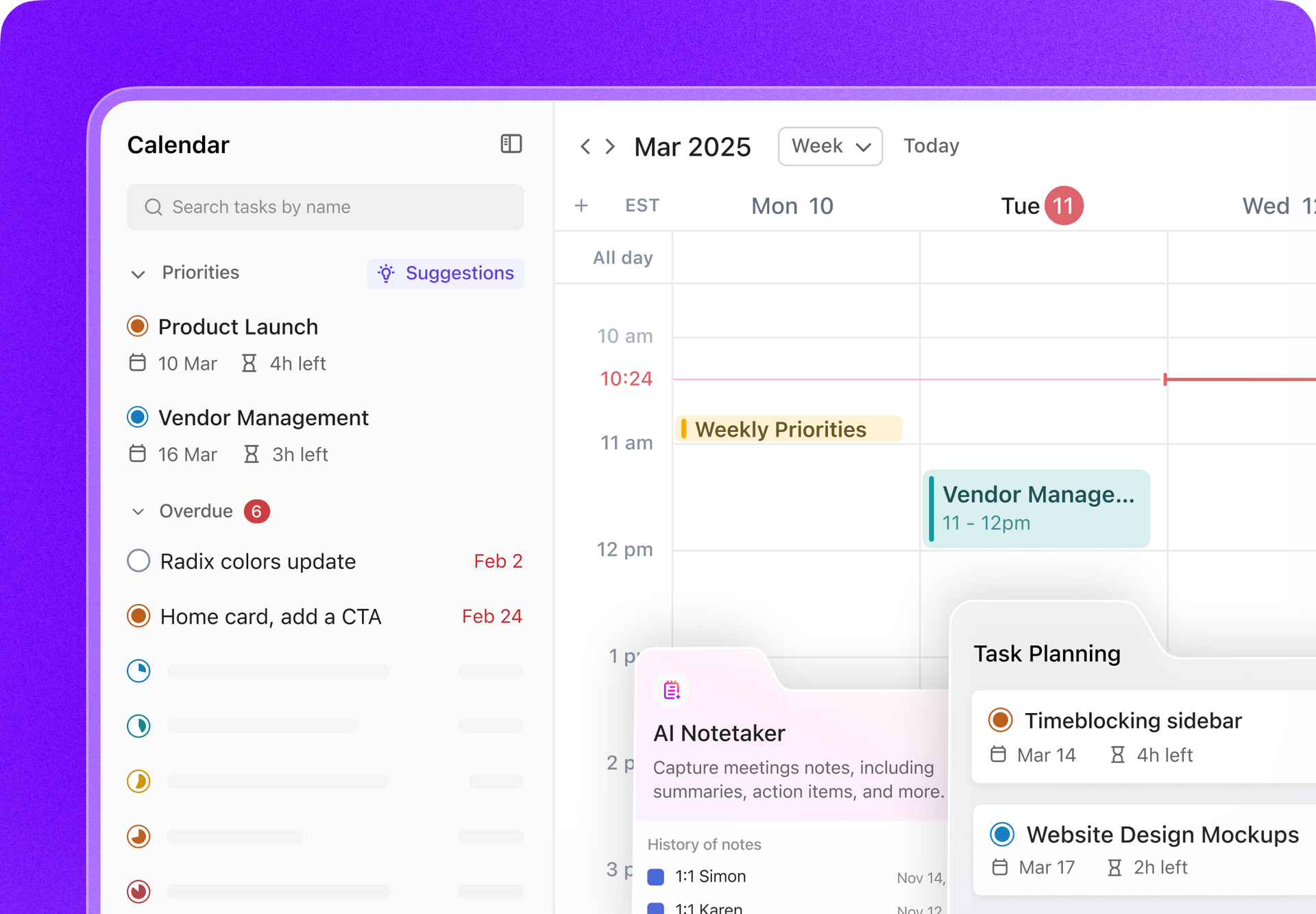
ClickUp AI-powered Calendar
ClickUp Calendar reduces visual clutter. It is an AI-powered calendar designed to intelligently manage your team’s workload and streamline your productivity.
Imagine having a virtual assistant that not only analyzes your backlog but also prioritizes the shifts and automatically time-blocks them for optimal efficiency.
By integrating ClickUp and Google Calendar, restaurants can effortlessly sync scheduling information between platforms.
Any action taken in one—such as scheduling a new event or creating a task—automatically updates the other, ensuring seamless planning.
Tyler Guthrie, Director of Revenue Operations at Home Care Pulse, said ClickUp’s Workload and Calendar Views make capacity planning a breeze.
Workload and calendar views make capacity planning much easier. Visibility into what teams are working on is way better than it was before
By integrating ClickUp and Google Calendar, restaurants can effortlessly sync scheduling information between platforms. Here’s how:
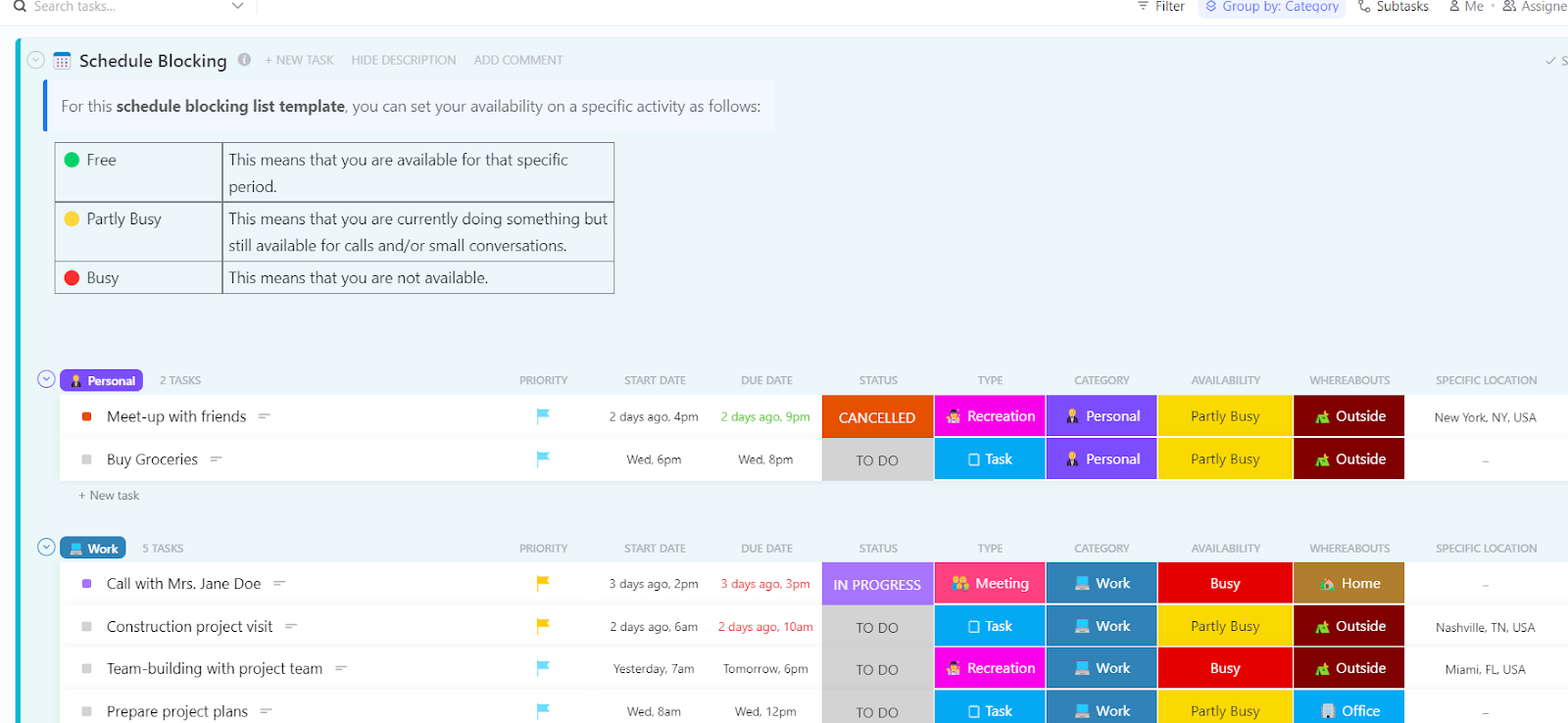
You can also try out ClickUp’s Schedule Blocking Template. This template helps restaurant managers structure workdays efficiently by prioritizing tasks like prep work, inventory checks, and customer service without relying on scattered spreadsheets.
What you get is a clear timeline for peak hours so that restaurant employees are aligned on their duties.
Similarly, ClickUp’s Shift Schedule Template simplifies the shift scheduling process with drag-and-drop editing, real-time updates, and visual organization of shifts.
ClickUp Tasks

While Calendar takes care of the shifts, ClickUp Tasks helps you manage every aspect of your restaurant’s daily operations.
For instance, you can schedule shifts, manage inventory, and oversee customer service tasks by setting up reminders, assigning roles, and tracking every project in real time. You can even create Custom Fields, so you’re always on top of what matters most for each task: prep work, customer orders, or maintenance.
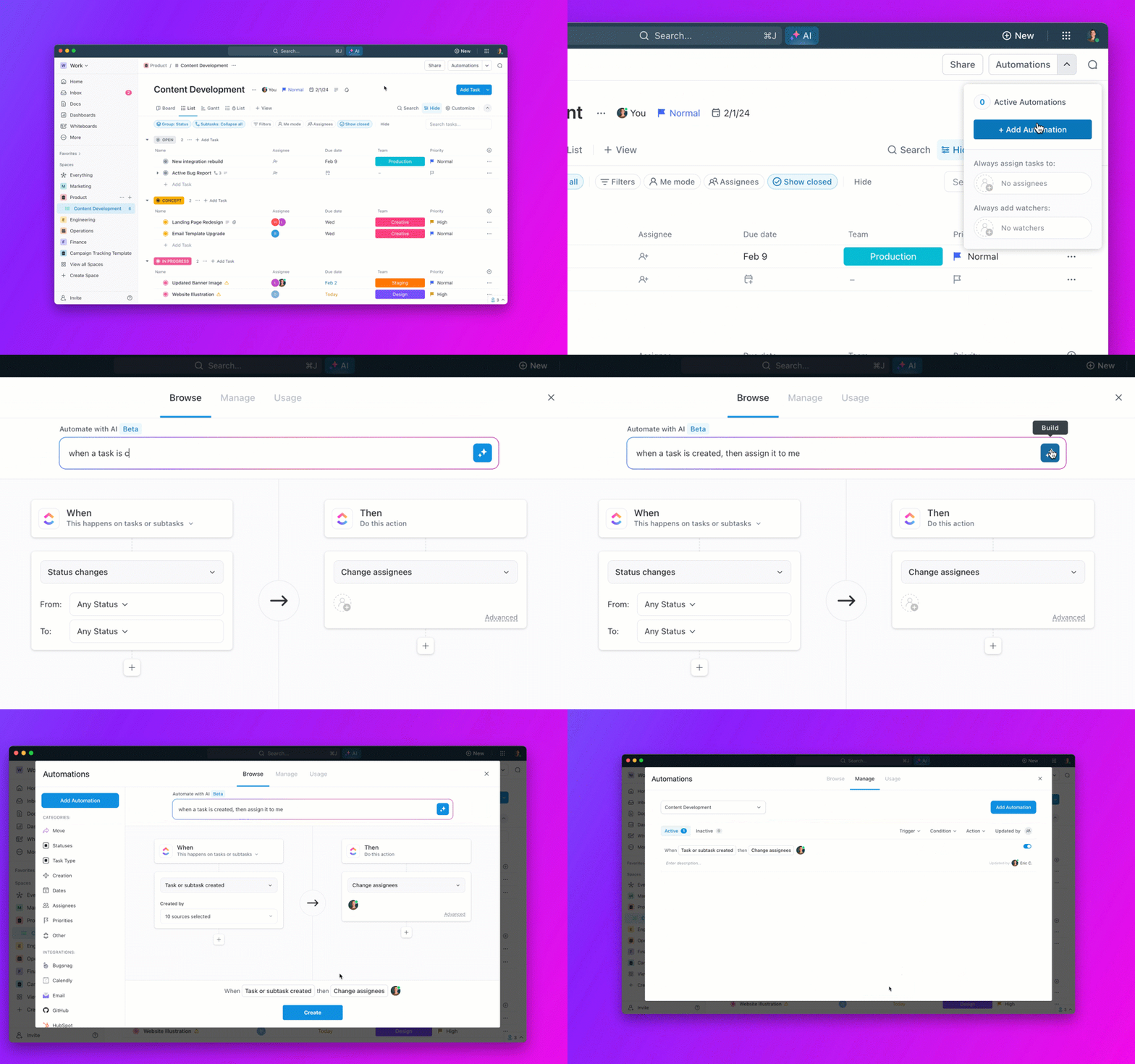
Plus, with the automatic scheduling feature, you never have to worry about overlapping duties again.

What real users are saying about ClickUp?
A G2 review says,
One of the biggest game-changers has been ClickUp’s integrations and API capabilities. We’ve automated nearly half of our manual tasks, significantly improving efficiency and freeing up time for higher-value work. The ability to customize dashboards, set up automations, and integrate with our existing tools make ClickUp an indispensable part of our tech stack.
💡 Pro Tip: Restaurant owners often struggle to decide what to tackle first. Without a clear task hierarchy, you risk bottlenecks and missed deadlines. Learn how to prioritize tasks effectively in How to Prioritize Tasks at Work and start working smarter, not harder.

Managing restaurant scheduling requires a tool built specifically for the industry’s unique challenges. Unlike general employee scheduling software, 7shifts is designed exclusively for restaurant managers and employees. It features features like tip pooling, POS integrations, and labor forecasting.
One of the biggest headaches in the restaurant industry is keeping schedules fair while balancing labor costs. 7shifts solves this with its auto-scheduler, which creates optimized shift schedules based on employee availability, historical sales data, and peak business hours.
What real users are saying about 7shifts?
It makes communication with the team easy, everyone knows what assignments they have as well as many tools to trade, ask for time off, review shifts, etc. 7shifts has massively saved time with scheduling and also is a great form of communication with staff.

Running a restaurant means a number of administrative tasks packed into the heat and chaos of a busy kitchen, especially when you are a small business. You need an app called Homebase that combines employee scheduling, time tracking, and HR management.
Unlike most restaurant scheduling software, Homebase also automates payroll processing, transforms timesheets into paychecks, files payroll taxes, and even offers early wage access for employees.
What real users are saying about Homebase?
I’m management and use Homebase and it does what it needs to do. Staff can clock in on a terminal or right on their phone if you allow it. On each employee’s “homescreen” it gives a summary of their upcoming shifts etc but also gives them how much money they “made” so far and gives them the option to cash out.

Every restaurant has its rhythm—busy lunch rushes, quiet mid-afternoons, and unpredictable peak hours. Managing shift scheduling while ensuring labor costs stay under budget is challenging, but Deputy makes it easier with AI-powered auto-scheduling and real-time labor tracking.
Instead of spending hours manually creating restaurant schedules, Deputy helps you automate shift planning, taking into account employee availability, sales trends, and demand forecasts. Where Deputy truly shines is labor compliance. The work schedule app tool provides a built-in Fair Workweek compliance and overtime tracking.
What real users are saying about Deputy?
Deputy has been an amazing addition to our newly opened business, helping simplify the hospitality pay process and save so much time! The support is fantastic, with very quick responses and great follow up. Highly recommend!
✨ Fun Fact: The very first hotels in history, called Ryokans, were established in Japan at the start of the seventh century. These Ryokans acted as rest stops along the Silk Road, offering travelers a place to relax on their journey.

For restaurants with multiple locations, Sling provides long-term scheduling options, making it easier to manage shifts across different venues.
With Sling, restaurant managers can create, edit, and share schedules effortlessly, reducing last-minute shift changes and miscommunications. The platform also supports time tracking and labor cost management, making it easier to control labor costs and stay within budget.

Businesses that prioritize hourly workers appreciate ZoomShift since it offers easy-to-use features like PTO tracking, shift swapping, and labor cost controls that help managers stay on budget while keeping employees happy.
Plus, with drag-and-drop scheduling, automatic reminders, and built-in team communication, employees always know when and where to be, reducing no-shows and scheduling confusion.
What real users are saying about ZoomShift?
We are a non-profit music venue at a college that has a team of 40+ students who help us put on our events. ZoomShift is great at helping us organize the event details, date, time, and position (i.e., usher/stage crew, etc.). The ability to ask for shift coverage is helpful since college students have hectic schedules at times. Because students come and go/graduate, it is easy to add and remove members.
💡 Pro Tip: Want to offer your team more flexibility without losing productivity? A 9/80 work schedule could be the perfect solution! Learn how it works and how to implement it seamlessly with scheduling apps. What is a 9/80 Work Schedule, and How Does It Work?

Ever feel like scheduling is a full-time job on top of your actual full-time job? Planday helps you schedule smarter, communicate better, and keep payroll on track without the headache.
Built for restaurants, hotels, retail shops, healthcare teams, and businesses of all sizes, Planday automates the tedious stuff so you can focus on running the show. Whether you’re managing one location or multiple, Planday helps keep your team in sync, cut down labor costs, and make payroll a breeze.

When I Work’s reputation speaks for itself—an easy-to-use scheduling and workforce management platform trusted by 150,000+ businesses worldwide.
The tool’s best feature is that it automates scheduling, tracks time seamlessly, and keeps teams connected—all in one place. Whether you run a small café, a multi-location retail store, or a growing healthcare facility, When I Work helps you build schedules in minutes.
What real users are saying about When I Work?
I like that everything I need is in one place. I also like that I can see the team schedule as well as my own personal schedule. It was easy to implement for the team and with how much we use it, I’m glad it’s such an easy system to use.
✨ Fun Fact: McDonald’s is well-known as one of the world’s most popular restaurant chains, but it also holds the title of the world’s biggest toy distributor, all thanks to its Happy Meals!

If you’re managing hourly employees, remote workers, or multiple job sites, Buddy Punch makes time tracking and payroll simple and seamless. With GPS tracking, geofencing, and facial recognition, you can ensure employees clock in from the right place and on time—without manual oversight.
Designed for businesses of all sizes, Buddy Punch automates payroll, tracks overtime, and integrates with QuickBooks, Paychex, and Workday, making it one of the best time-tracking and payroll solutions available today.

Keeping everyone connected, organized, and accountable is a challenge if you run a deskless workforce, whether in retail, hospitality, construction, or field services.
Connecteam solves this issue by offering an all-in-one mobile app for employee scheduling, time tracking, communication, leave management, and HR management. Managers can schedule shifts, track hours with GPS-enabled clocks, send announcements, assign tasks, and store employee documents—all from a single dashboard.
It’s equally intuitive for employees: They can clock in/out, swap shifts, submit time-off requests, and chat with managers from their mobile devices.
✨ Fun Fact: Nearly 40% of Americans have worked in a restaurant at some point—whether a full-time gig or a short-lived part-time hustle.
Here are some tools that didn’t make our top 10 but can be useful for you to check out:
Restaurant scheduling is no easy matter—83% of the US workforce prioritizes flexible working hours. However, in a busy sector like hospitality, there needs to be a balance and transparent communication.
The right restaurant scheduling software takes the stress out of staffing. So why wrestle with last-minute call-outs and confusing schedules?
ClickUp handles it with automated reminders, shift swapping, time tracking, and even payroll integration. Ready to make your scheduling work for you? Sign up for ClickUp now!
© 2025 ClickUp
