

Sorry, there were no results found for “”
Sorry, there were no results found for “”
Sorry, there were no results found for “”
You shipped the last project on time. You also burned out two developers, blew past budget by 40%, and discovered a critical dependency three weeks too late. By every deliverable metric, the project succeeded. By every process metric, it failed.
This is the gap most teams never close. They measure whether they shipped the thing, but not how well they ran the work.
Gallup’s State of the Global Workplace report shows the downstream effect. Only 47% of employees strongly agree they know what’s expected of them at work.
Project management goals are specific, measurable targets that govern how a project is planned, executed, and controlled. Not “launch the app.” That’s a project goal. “Reduce average delivery time by 15% this quarter” is a project management goal. One defines the destination. The other defines how you travel.
Most teams set project goals (ship the thing) and call it done. Project management goals are the targets that govern how the work actually runs, and include budget variance, decision turnaround, risk cadence, handoff lead time, and more. These are the metrics that make every future shipping goal cheaper.
This guide is about the second list. What to measure, how to set goals that survive past week two, and the five mistakes that quietly kill them in most teams.
Project management goals are specific, measurable targets that shape how you plan, execute, and manage a project. They focus on how the work runs day to day. That includes how fast decisions get made, how resources get assigned, how often risks are reviewed, and how closely the budget stays on track.
These goals are different from project goals or OKRs. A project goal defines the final outcome, like “launch the mobile app.” An OKR measures a broader business result, like “increase active users by 30%.” A project management goal focuses on the system behind the work, like “complete a risk assessment at the start of every Q3 project.”
This distinction matters. Teams that mix these goals often measure only the final result. They rarely measure how well the project was actually managed. This also explains why, according to the PMI’s Pulse of the Profession, 11.4% of project investment is wasted.
Effective PM goals follow the SMART structure (Specific, Measurable, Achievable, Relevant, Time-bound), which we’ll cover in depth below. For now, here’s the clearest way to see the difference:
One governs the management process. The other defines the deliverable.
| Dimension | Project Management Goal | Project Objective |
|---|---|---|
| Scope | Broad, directional | Narrow, specific |
| Measurability | Often qualitative or high-level metric | Always quantitative with a clear target |
| Timeframe | Spans the project or quarter | Tied to a specific milestone or deadline |
| Example | “Reduce project risk exposure” | “Complete risk assessments at kickoff for all Q3 projects” |
These terms get used interchangeably in most organizations, but they describe different levels of specificity.
Goals are broad outcomes; they show the direction you want to move in. Project objectives are the specific, measurable steps that get you there. A goal without objectives is a wish; objectives without a goal are busywork.
Here’s what goals vs. objectives looks like in practice:
Objectives become stepping stones. Each one is trackable, each one has a deadline, and together they add up to the broader goal.
ClickUp’s Work Allocation Survey from May 2025 showed that 55% of managers explain the ‘why’ behind projects by tying tasks to larger challenges or goals. Which means that 45% default to process over purpose. This can lead to a lack of motivation and drive among team members. Even high performers need to see how their work matters and find meaning in what they do.
Project management goals matter because they give a team a shared definition of ‘good’ before the work starts, and a way to measure how that work was actually run after it ships. Without them, teams default to deliverable success and never learn whether the process holding it up is healthy or quietly breaking.
Here’s how David Allen (author of Getting Things Done) explains the importance of setting goals.
The value of goals is not in the future they describe, but the change in perception of reality they foster, in the present. What we focus on changes what we notice. Our brain filters information, seeing one thing in a situation instead of something else, based on what we identify with, what we have our attention on.
Here are five reasons why your team should take project management goals seriously.
Software teams have a term for the hidden cost of moving fast without fixing underlying issues: technical debt. You take a shortcut to hit a deadline, and pay interest on that shortcut every sprint after, until you eventually refactor.
Ward Cunningham, who coined the term in 1992, was clear that the debt itself wasn’t the problem. The problem was pretending it didn’t exist.
Project management has the same dynamic, and almost no one names it. Call it process debt: the cumulative cost of running projects on broken processes. Because shipping the current thing always feels more urgent than fixing how you ship.
Process debt looks like this.
The deliverables succeeded. The process compounded debt.
This is what project management goals actually solve. They’re the refactoring step that lets a team ship the next thing without inheriting the last project’s broken process.
A goal like “reduce average decision turnaround from 4 days to 1” is a refactor. A goal like “every project starts with a documented risk register” is a refactor. They don’t produce a deliverable. They reduce the friction of producing every future deliverable.
Teams that do this well treat PM goals the same way strong engineering teams treat refactoring. It is ongoing work, not a one-time effort. They set goals at the start of each quarter, review them at key milestones, and adjust them when the data shows something isn’t working.
The teams that ignore them keep shipping successfully right up until the day they can’t. And then they spend six months trying to figure out where it went wrong.
A PM goal that survives past kickoff has nine specific elements. Miss any one of them, and the goal turns into a wish someone wrote down once.
Together, those nine elements turn a goal from an aspiration into an operating commitment. The test: Can you put your goal in a table with all nine elements filled in? If yes, it’s a goal. If no, it’s still a draft.
Here’s what that test looks like, filled in for a real goal. The goal: reduce average decision turnaround on project-blocking questions to under 24 hours by the end of Q3. Use this as a template for each goal in your tracker.
| Element | Example |
| Process metric | Average decision turnaround time on project-blocking questions |
| Numeric target | Under 24 hours |
| Baseline | 4.2 days (measured across the last 6 sprints in Slack + ClickUp comments) |
| Single owner | Priya R., Tech Lead |
| Review cadence | Standing 2-min item in the Tuesday weekly sync |
| Outcome link | Slow decisions were the #1 cause of missed sprint commitments last quarter |
| Time boundary | End of Q3 |
| Failure threshold | If turnaround exceeds 3 days for 2 consecutive weeks, escalate to the project sponsor and replan the decision-routing process |
| Data source | Saved ClickUp Dashboard view: Decision Turnaround (rolling 14d), refreshed daily |
If you’re new to goal-setting for projects, here are some strategies that can help:
The hard part isn’t writing the goal. It’s choosing the right one. These seven steps work in order: each feeds the next, and skipping any of them leaves a gap that later shows up as drift or abandonment.
What: Before setting any new goal, look backward. List every project your team has run in the past 6-12 months and write down what went wrong in how the work was managed, not in what got shipped.
Why: Most teams set PM goals from a feature wishlist (“We should track risk better”) instead of from observed pain. The result is goals that look reasonable on paper but lack urgency. A goal anchored to a real, recent failure has built-in motivation, because the team remembers what it cost the last time.
How: Open last quarter’s project retros, sprint reviews, or post-mortems. For each project, write down two columns: what shipped successfully, and what process broke (handoffs missed, dependencies discovered late, capacity miscounted, scope crept silently, reviews skipped). The second column is your list of goal candidates.
Pitfall: If your team doesn’t run retros, you don’t have an audit trail. Skip this step at your own risk: you’ll set goals that sound smart but don’t match what your team actually needs.
Here’s something from our own PMO experience
In one of ClickUp’s recent retros, we created what we called a “silent failure list.” We ignored missed launch dates and focused only on problems that grew worse during execution.
That included approvals sitting untouched for days, dependencies discovered after sprint planning, duplicate work caused by unclear ownership, and tasks reopened after QA because requirements changed mid-sprint.
We expected to find four or five repeating issues. We found twelve. Even more surprising, most major delivery problems traced back to the same process failures across different projects.
That list became the foundation for our project management goals for the next quarter.
What: Review the issues you found in Step 1. Then choose three to five process metrics that could have exposed those problems earlier.
Why: Three to five goals are usually enough to stay focused. Fewer than three often means teams ignore process improvement. More than five becomes hard to manage, and people stop tracking them consistently. Choose metrics tied to your biggest problems, not just the easiest numbers to measure.
How: For each issue in your review, ask this question:“What metric could have warned us about this two weeks earlier?” Common candidates include scope variance, decision turnaround time, risk review cadence, capacity allocation, handoff lead time, and budget variance. Keep the goals that map to multiple failures.
Pitfall: Don’t choose metrics just because they are easy to track. Logging work hours is simple, but it will not solve a broken handoff process or unclear ownership.
What: Translate each metric into a Specific, Measurable, Achievable, Relevant, Time-bound goal. This is the step where vague intentions become operating commitments.
Why: SMART is a widely used goal-setting framework in project management. It forces vague intentions into measurable commitments.
How: Here’s each letter applied to PM-specific situations:
The final goal: “Reduce average response time on project-related messages to under two hours within six months, measured via message analytics.”
Pitfall: The “Achievable” check is where most teams fail. For example, setting a goal to reduce response time from eight hours to 30 minutes by next month isn’t just ambitious. It’s setting up the team to fail and then ignore the goal entirely.
What: For each goal, capture where you are right now. Pull two to four weeks of historical data on the metric and write down the starting number.
Why: Without a baseline, you cannot tell whether things are improving or getting worse. You are only guessing. A goal like “keep budget variance under 8%” means very little if your normal variance is already 22%. Without context, the team may think they are failing when they are actually making progress.
How: Pull past data from the systems where the metric already exists. That could include your project management tool, time tracker, finance platform, or communication tools. Two to four weeks of data is usually enough. Use a longer timeframe if the work changes a lot across cycles. Record the baseline next to the goal so the team sees it during every review.
Pitfall: Many teams skip this step because collecting baseline data feels like extra work. But without it, the goal has no real meaning later.
What: Every goal gets a single named owner. Not a team. Not “the PM” generically. One person.
Why: Shared ownership across a team produces zero ownership. When everyone is responsible for tracking budget variance, no one is. The owner doesn’t have to do all the work the goal implies. They own the visibility of the number and the escalation when it drifts. Without a named owner, the goal lives in the doc and dies there.
How: Add the owner’s name next to each goal in the same document. Then confirm ownership directly with that person. For example: “You own this goal for the quarter. That means you will share the metric during our weekly check-ins and flag it if it crosses the threshold.” That conversation matters. Goals added quietly to a document rarely get real ownership.
Pitfall: Don’t assign every goal to the project manager. The PM owns the overall project, but each process goal should have its own owner. Assign goals to the people closest to the metric. For example, the tech lead for deployment frequency, the design lead for review turnaround time, and the finance partner for budget variance. That makes the data more accurate and accountability much clearer.
What: Decide when and how each goal gets reviewed. Then put that review inside a meeting your team already has, not a new one.
Why: Goals that require new meetings get abandoned. Adding a “PM goals sync” to the calendar feels productive in week one, but it gets canceled by week three. Goals embedded in existing standups, weekly syncs, sprint reviews, and milestone retros survive because the team is already in the room.
How: For each goal, pick the ceremony that already covers the right time horizon. Weekly metrics (decision turnaround, capacity allocation) go in the weekly sync. Sprint-level metrics (velocity, scope variance) go in the sprint review. Quarter-level metrics (training investment, retro action follow-through) go in the quarterly retrospective. Add the goal as a standing two-minute agenda item, not a separate discussion.
Pitfall: Don’t try to review every goal in every meeting. Match the review cadence to the metric’s natural rhythm. A goal reviewed too often becomes noise; one reviewed too rarely becomes invisible.
What: Every goal needs a single, defined place where the current number lives, and the team needs to be able to find that number in under a minute.
Why: If checking the goal requires asking someone, running a report, or remembering a password, the goal will not get checked. The friction compounds: by week four, the goal owner is spending 20 minutes pulling the number before each sync. By week six, they stop pulling it. By week eight, the goal is dead.
How: Build a shared dashboard, a pinned spreadsheet, or a saved view in your PM tool. Each goal links directly to the source data, so anyone on the team can pull up the current number without help. The time you spend building this view is the highest-leverage investment in the entire goal-setting process.
Pitfall: Avoid tracking goals in a slide deck. Slides are stale the moment they’re sent. The data source has to be live: the number you see today should be the number that’s actually current today.
Most project management advice assumes goals are always helpful. But research from Harvard Business School shows that poorly designed goals can create new problems.
The risk comes when teams focus too heavily on one metric. A team that’s measured only on sprint velocity may skip documentation or avoid difficult work to keep numbers high. A team pushed to hit deadlines may stop raising risks early because escalation could slow delivery.
In these cases, the metric improves while the system underneath gets weaker.
The research found that narrow goals can encourage short-term thinking, risky decisions, and poor collaboration. That is why strong project management goals should balance speed with quality, sustainability, and team health.
Good project management is not about maximizing every number. It is about building a system that keeps working over time.
The following goals show up most consistently across high-performing project teams. They’re organized from execution fundamentals (time, budget, risk) to team dynamics like team collaboration and productivity, to professional growth. Each includes the “why” and concrete strategies to make it successful.
Here’s the full set at a glance. Use this as a shortlist: pick the three to five that map to your team’s most expensive recent failures, not the ones that look the cleanest on paper.
| Goal | Metric to track | Review cadence |
| Deliver projects on time | Milestone adherence and schedule variance (planned vs. actual) | Weekly sync |
| Control the project budget | Budget variance (planned vs. actual spend, %) | Bi-weekly check |
| Strengthen team collaboration and communication | Average response time on project messages | Weekly sync |
| Increase team productivity | Ratio of focused project work to status/admin time | Sprint review |
| Mitigate project risks proactively | Open risks reviewed per milestone; % with named owners | Every milestone |
| Align stakeholder expectations with project reality | Approval turnaround time; stakeholder satisfaction score | Milestone review |
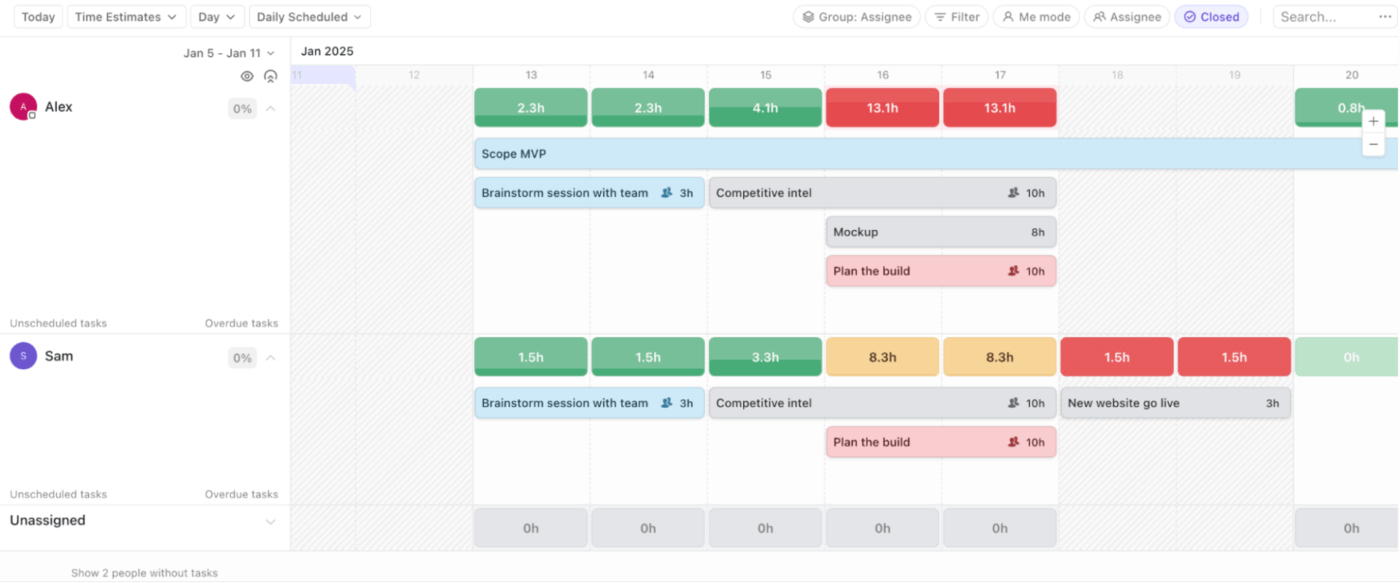
| Allocate resources more effectively | % of team at >90% capacity; reassignment frequency | Weekly sync |
| Build a data-driven decision-making culture | % of project decisions logged with supporting data | Sprint review |
| Improve the quality of project deliverables | Defect rate or rework hours post-handoff | Phase-end retro |
| Invest in PM skills and continuous learning | Training hours per PM per quarter; certifications earned | Quarterly retro |
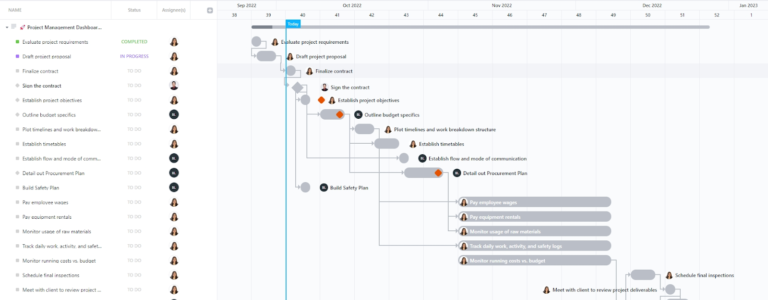
According to Wellingtone’s State of Project Management report, only about 29% of projects finish on time. Late delivery delays dependent projects, burns stakeholder trust, and inflates costs.
How to make the goal actionable:
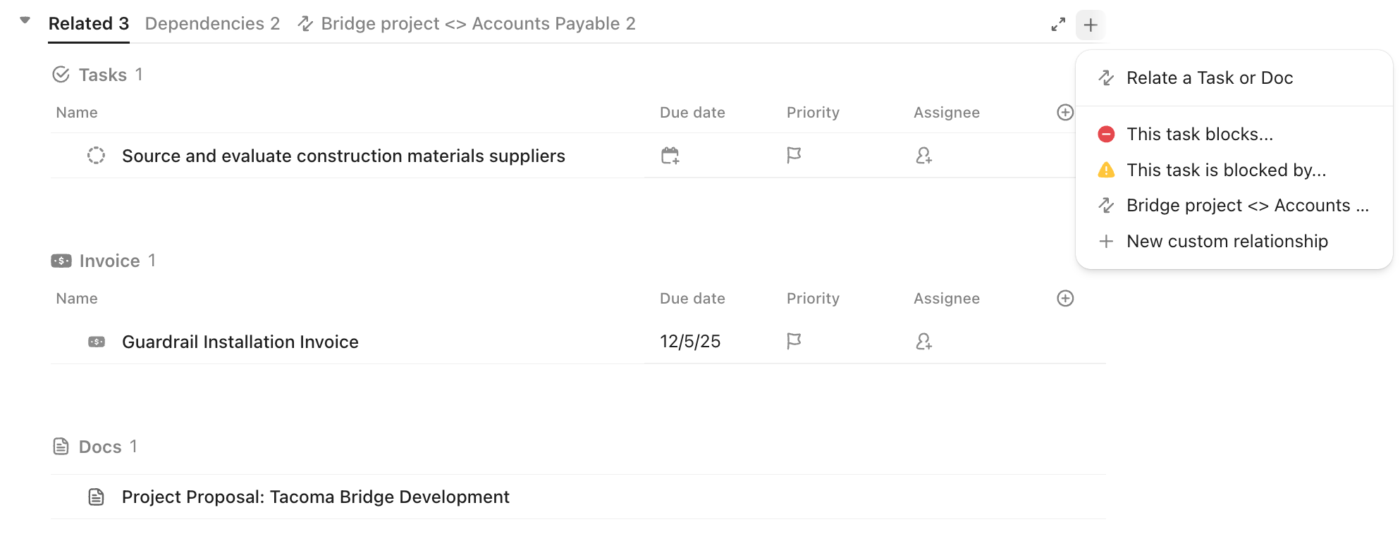
The budget goal isn’t “spend less.” It’s to implement cost control to reduce variance between planned and actual spend. A project that comes in under budget because the team cut corners isn’t a success; it’s a quality problem waiting to surface.
PMs typically control three cost categories:
And here’s how to keep those categories in check:
According to SHRM research, 85% of employees feel more engaged when leaders communicate transparently. Regular feedback mechanisms, like weekly meetings, can reduce turnover by 15%. Here’s what you can do:
Improving workforce productivity doesn’t mean “more hours.” It means a higher percentage of time spent on work that moves the project forward. And less time spent on status meetings, context switching, and manual admin.
Here are ways you can execute this successfully:
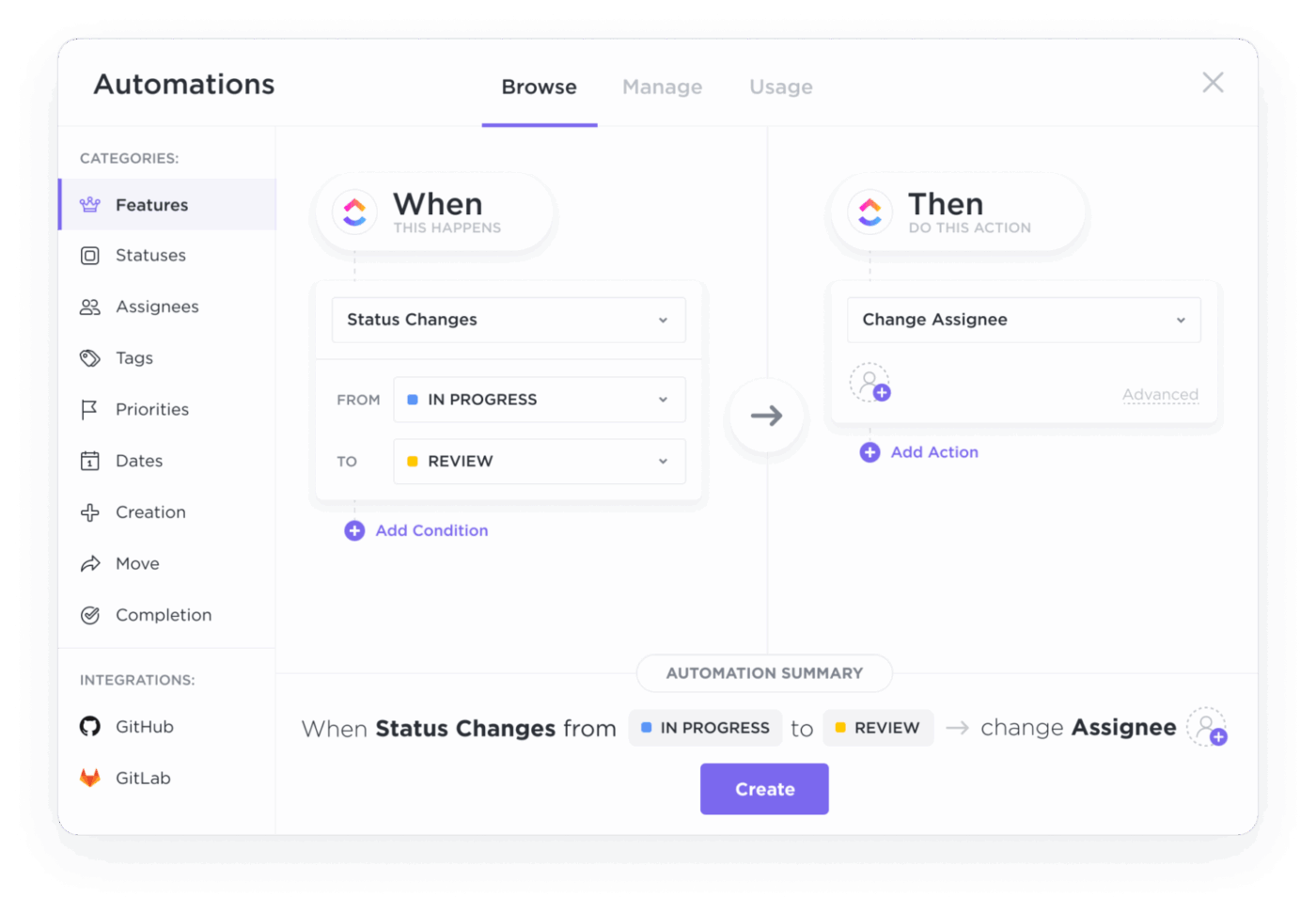
The goal isn’t to eliminate risk but to catch risks before they become fires, and have risk mitigation strategies ready.
Projects with actively engaged sponsors are more likely to succeed. The gap is significant enough to make stakeholder alignment a standalone goal, not a “nice to have.”
This goal is about doing more with what you have, not doing more with less. The distinction matters because “do more with less” is a euphemism for overwork. Smart resource allocation matches the right people to the right tasks at the right time.
Most project decisions are still made on gut instinct. Data-driven decision-making means using project management analytics before committing to a direction and making those numbers accessible to the whole team.
The value isn’t in the data itself. It’s in creating the habit of checking data before making decisions.
Quality is the first thing to be sacrificed when timelines slip. Teams cut QA, skip reviews, and ship “good enough.” They then spend twice as long fixing it post launch.
According to PMI’s Pulse of the Profession, organizations that prioritize project management training waste 28 times less money than those that don’t. But this development goal for project managers goes beyond credentials. It’s about building the judgment and adaptability that certifications alone can’t teach.
Most PM goals don’t fail because they were the wrong goals. They fail because no one tended to them after kickoff. Setting goals takes a week, but keeping them alive takes a habit.
These six practices will ensure your goals still mean something a few weeks down the line.
Surface the number, not the goal, in every review. In your weekly sync, the conversation should start with the current number, not the goal statement. “Decision turnaround is at 2.4 days this week, up from 1.8 last week” is a useful opening. “Let’s check in on our decision turnaround goal” is not. Lead with the number every time, and the discussion that follows actually moves the goal forward.
Treat a missed week as a signal, not a failure. One week off-target is information, not a verdict. Two consecutive weeks off-target is a pattern. Three is a structural problem. Build a simple rule: one week off = note it, two weeks off = discuss it, three weeks off = act on it. The rule keeps the team calibrated without overreacting to noise.
Revise the goal when the data warrants it, not when it’s inconvenient. If your baseline was wrong, your target was unrealistic, or the project’s scope changed materially, change the goal. But document the change and the reason. Goals that quietly migrate downward because the team is behind are worse than no goals at all. They teach the team that targets are negotiable. Explicitly revised goals, with reasoning documented, teach the team that the system is honest.
Separate goal failure from project failure. A project can ship successfully and miss every PM goal. A project can hit every PM goal and fail to ship. When you miss a goal, the question is what the process needs, not whether the team did good work. Keep the conversation about the process, not the people. Treat PM goal reviews and project retros as two separate sessions, not one combined meeting.
Kill goals that have stopped earning their place. Not every goal you set in week one is still the right goal in week six. A metric that was urgent at kickoff may have been resolved. Goals that have gone stale should be retired, not ignored. Retiring a goal is a clean act with a documented reason. Ignoring a goal infects the credibility of every other goal on the list. The team should be willing to kill at least one goal per quarter.
Carry the lessons into the next project, not just the next quarter. The point of tracking PM goals isn’t the current project. It’s the next one, and the one after that. At the end of each project, write down which goals worked, which didn’t, and what you’d change. Carry that document into the next project’s kickoff. Most teams run retros, file the notes, and start the next project from scratch. The teams that improve consistently bring the last project’s goal lessons into this project’s planning.
The team’s relationship with the goal is what keeps it alive. A perfectly written SMART goal in a doc no one opens is dead. A loosely written goal that gets discussed every Monday and revised honestly when the data shifts is alive.
Setting goals is only half the job. The harder part is tracking them without creating extra manual work for the team.
Most teams struggle to connect daily task activity to larger project goals. Updates end up scattered across spreadsheets, meetings, and status reports.
This is where a converged AI workspace helps. When tasks, docs, dashboards, and time tracking all live in one platform, progress updates happen automatically instead of turning into another admin task.
Here’s how that works in practice in ClickUp.
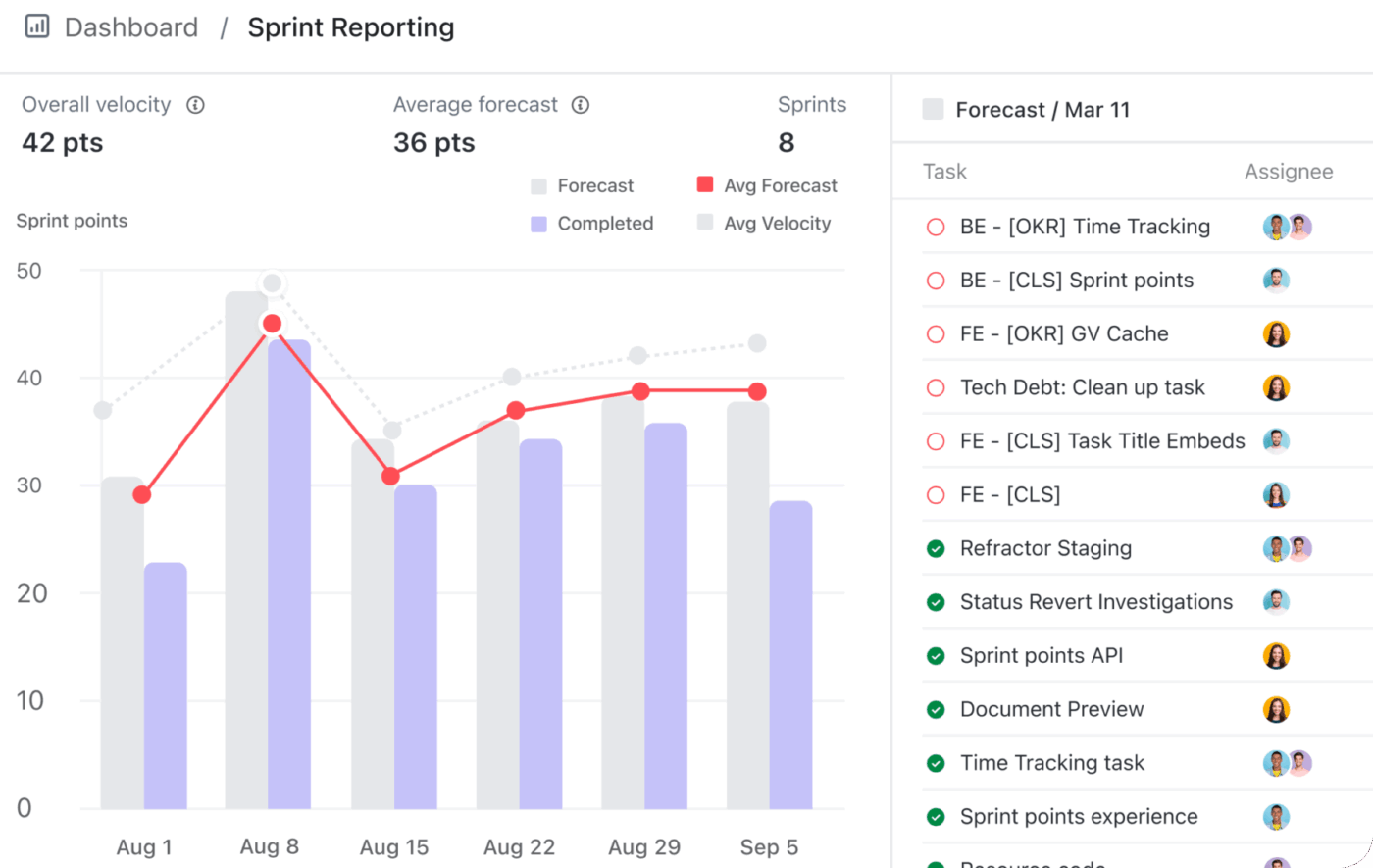
ClickUp Dashboards pull live data from tasks, sprints, time tracking, and Custom Fields into visual reports of process metrics that your PM goals actually measure. There are over 50 widget types available, and each one maps directly to a category of goal:
Here’s how our PMO team tracks quarterly PM goals: Each dashboard rolls up task-level completion into goal-level progress, so the numbers update themselves. Stakeholders get a shared dashboard link instead of a status email. The weekly sync opens with the current numbers on screen instead of with someone preparing endless slides.
If you’re new to this, here’s a quick video tutorial on creating your first project management dashboard in ClickUp!
For teams tracking goals across multiple projects, ClickUp Brain is the ambient AI assistant with full context of your work. It can
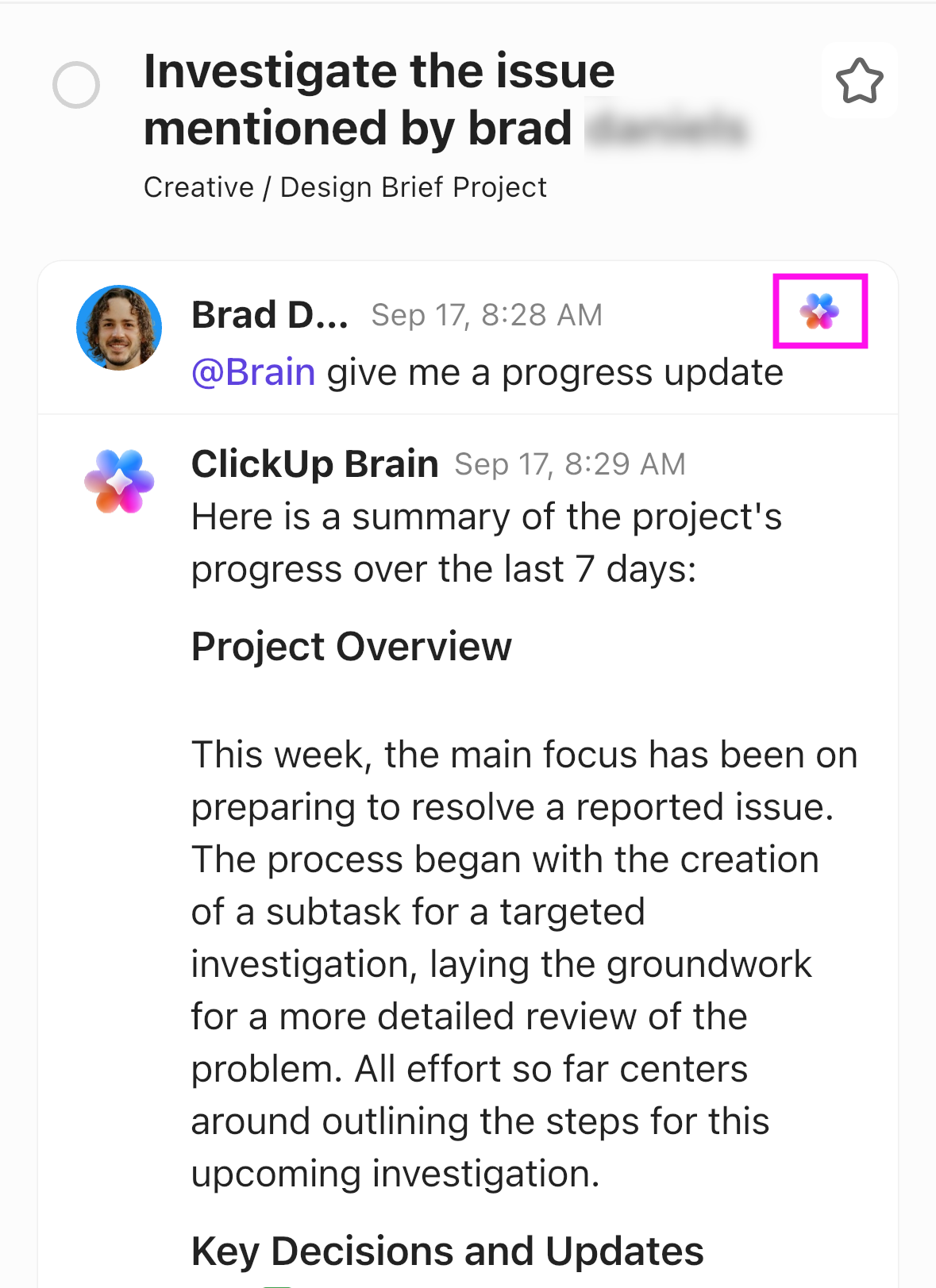
Pair Dashboards with ClickUp Automations to trigger alerts when a goal metric crosses a defined threshold. For example, budget utilization exceeding a set percentage, a milestone date passing without task completion, or a team member’s capacity hitting 100% allocation.
You could also set up a Super Agent in ClickUp to autonomously summarize project status, flag variances, and more.
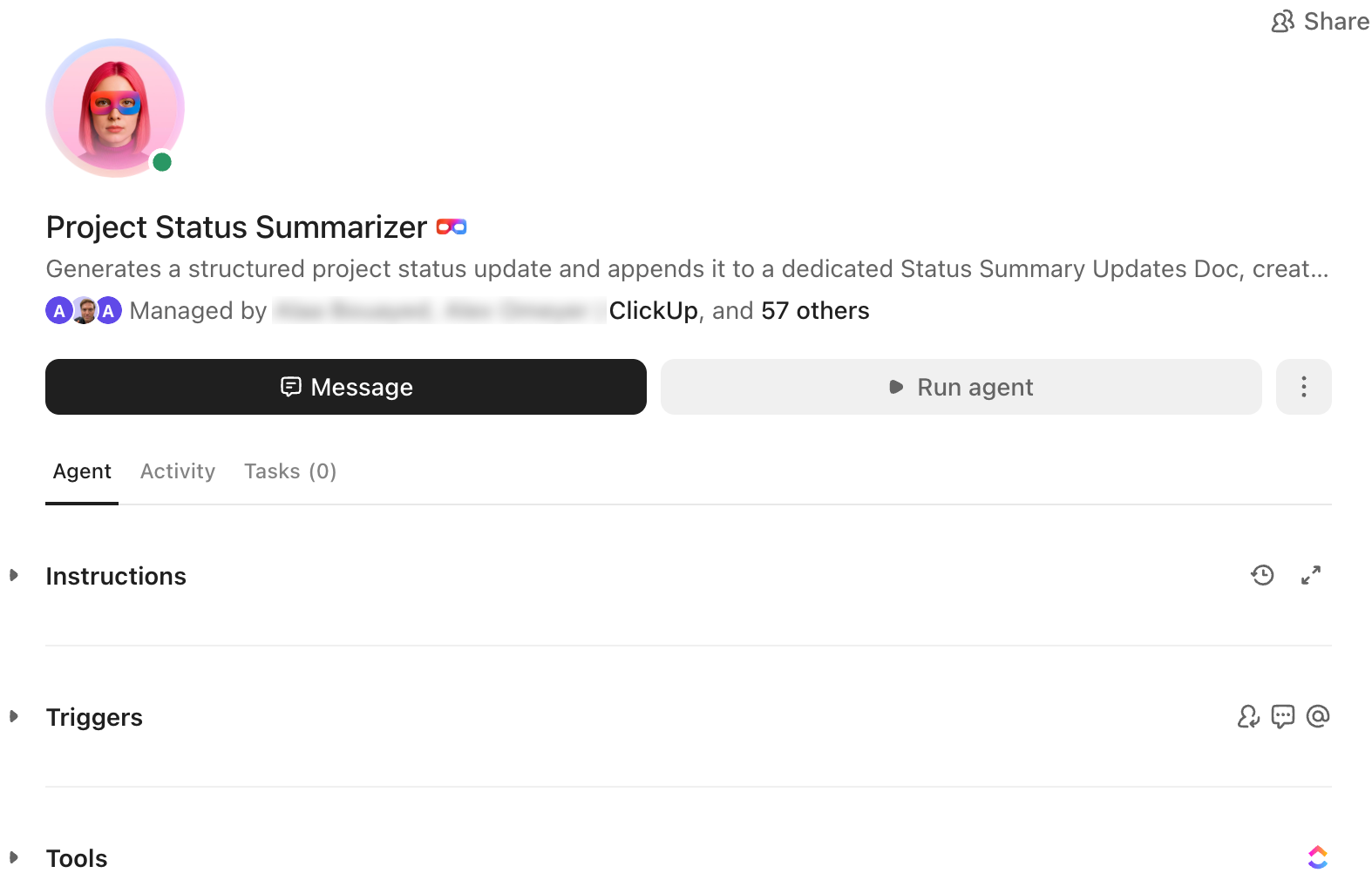
The monitoring becomes the system’s job, not a person’s. You can focus on the response instead.
For teams that only need lightweight goal tracking without full project management, a standalone OKR tool like Weekdone or Perdoo will be simpler to set up and maintain. Plus, the spreadsheet approach remains the right answer for a team running its first quarterly experiment with PM goals.
Skip it if: Your team is under 5 people, you have no cross-team dependencies, and you’ll never track more than 3 goals at a time. A spreadsheet will be faster to set up and just as effective
Best for: Managing cross-functional projects that need more than basic goal tracking
Most teams that set PM goals abandon them within a quarter, and the failure modes are remarkably consistent. The mistakes below show up across teams, industries, and project types.
Setting deliverable goals disguised as process goals. “Ship the redesign by the end of Q3” feels like a process commitment because there’s a date and a target, but it’s a project goal in costume. The metric is the deliverable, not the process that produced it. The team hits the date by cutting QA and skipping handoffs, and the PM goal “succeeds” while the process gets worse.
The fix: Every PM goal should measure how the work runs (cadence, variance, turnaround, capacity), not what the work produces. If the goal would still make sense without a specific project attached to it, it’s a process goal. If it disappears the day the project ships, it’s a deliverable in disguise.
Tracking 12 goals instead of 5. A wall of metrics in a goal-tracking doc is a guarantee they won’t last. Each one was logged in good faith at kickoff, and the team feels guilty looking at the doc by week six.
The fix: Cut to three to five goals, ruthlessly. When deciding what to retain, pick the goals tied to the most expensive failures from your last audit. The other goals aren’t gone forever; they’re just not this quarter’s focus. A small number of goals reviewed every week beats a comprehensive list reviewed twice.
Setting goals without a baseline. “Reduce decision turnaround time” is an incomplete goal, with no record of what the current decision turnaround time actually is. Six weeks in, someone asks if the team is improving, and no one can answer. The goal becomes a feeling instead of a measurement. The team eventually stops bringing it up because the conversation goes nowhere.
The fix: Spend an hour to capture two to four weeks of historical data before the project starts. Write the baseline next to the goal in the same doc, so every review starts from a known starting point. A goal with a baseline is a measurement. A goal without one is a wish.
Requiring manual data collection to track the goal. A goal owner spends 20 minutes every Friday compiling numbers from three different systems into a spreadsheet and updating the status. By week four, the update happens every other Friday. By week eight, it stops happening. The goal hasn’t been killed; it’s been quietly orphaned by friction.
The fix: Before finalizing any goal, ask where the number lives and how it’ll be updated. If the answer involves manual collection, build a live dashboard view that pulls the number automatically. Alternatively, pick a different metric that lives in the system. The goal that requires no manual update wins the long game against the goal that requires 20 minutes of prep every week.
Reviewing PM goals on a different cadence than the project runs. Your project runs in two-week sprints, but PM goals are reviewed quarterly. The team discovers in week ten that they’ve been off-target on three goals since week three. There was no opportunity to course-correct.
The fix: Match the review cadence to the project’s natural rhythm. Sprint-level metrics get reviewed in sprint reviews. Weekly metrics get reviewed in weekly syncs. Goals reviewed on the project’s actual cadence stay current.
Project management goals only work when they measure the process, not just the deliverable. And just as important, they have to be tracked weekly, not just written down at kickoff and forgotten by week three.
Goals fail when they’re disconnected from the team’s actual workflow. A goal that measures the wrong thing, gets buried in volume, has no baseline, requires manual upkeep, or runs on the wrong cadence isn’t a goal at all. It’s an artifact. The fix in every case is the same: pull the goal closer to the work.
Clear project management goals close that gap. They turn “the project shipped” into “we know exactly how well we ran it, and what to fix next time.”
Over the years, we’ve seen that teams who deliver consistently treat their PM goals as living commitments. They set baselines, review the numbers in meetings they’re already having, and revise the goals openly when the data shifts. That’s what keeps the process healthy across project after project.
If your team already runs projects in ClickUp or wants to consolidate goal tracking and project execution into one workspace, get started for free with ClickUp and build your first goal-tracking dashboard in under 10 minutes.
SMART goals in project management are targets that are Specific, Measurable, Achievable, Relevant, and Time-bound. The framework, originally proposed by George T. Doran in 1981, forces vague intentions like “improve communication” into commitments like “reduce average response time on project messages to under 2 hours by end of Q3, measured via message analytics.” Every well-formed PM goal passes all five tests, with a named owner and a data source.
Project management success is measured against two distinct sets of metrics: deliverable metrics (did the project ship on time, in scope, on budget, at quality) and process metrics (how efficiently did the team run the work). A project that ships on time but breaks the team in the process isn’t a success by the second measure. The most useful PM scorecards track both sets side by side, so the team can tell whether a successful delivery came from a healthy process or in spite of a broken one.
A project management goal is the target you’re trying to hit; a KPI is the indicator you measure to know whether you’re hitting it. The goal “reduce decision turnaround to under 24 hours within Q3” is the commitment. The KPI is “average decision turnaround time, measured weekly.” Every well-formed PM goal has at least one KPI behind it. Not every KPI is tied to a goal: teams often track operational KPIs continuously without setting an improvement target against them.
A project management goal targets how the work runs (“keep budget variance under 8%”). An OKR targets a business outcome (“grow active users 30%”). OKRs span quarters and ladder up to company strategy; PM goals are scoped to a project or sprint and govern the operating system underneath delivery. Most teams need both, but they fail in different ways: OKRs fail from misalignment, PM goals fail from abandonment.
Yes, project management goals can and should change mid-project when the underlying data warrants it. If the baseline turns out to be wrong, the target turns out to be unrealistic, or the project’s scope changes materially, the goal should be revised explicitly and documented. The distinction that matters is intentional revision versus silent drift: a goal that’s changed with a written reason teaches the team the system is honest, while a goal that quietly migrates downward teaches the team that targets are negotiable.

Praburam Srinivasan
Max 16min read
Praburam Srinivasan
Max 19min read
Praburam Srinivasan
Max 19min read

© 2026 ClickUp




