







Still downloading templates?
There’s an easier way. Try a free AI Agent in ClickUp that actually does the work for you—set up in minutes, save hours every week.
Sorry, there were no results found for “”
Sorry, there were no results found for “”
Sorry, there were no results found for “”
Imagine you’re a project manager at a SaaS startup.
The strategic product campaign launch is two weeks away. Your designer is asking for final copy, the copywriter is waiting on brand guidelines, and the product manager just emailed a “tiny change” that rewrites half the plan.
Welcome to the execution phase, where even the best-laid plans can fail. Without a proper project execution plan, you risk delays, scope creep, and resource overload.
In this post, we’ll discuss the best project execution templates that help teams like yours to stay on track, meet deadlines, and actually deliver what they promised without the late-night scramble.
🔎 Did You Know? The global market for project management software is estimated to reach $4.7 billion, representing a significant increase from the total of $3.5 billion in 2020. 💡
A project execution template helps you manage the core components of orchestrating a project end-to-end—from outlining the project scope and objectives to tracking project tasks, assigning roles, and monitoring project status.
It aligns your project team, maps out key activities, and connects all moving parts into a cohesive execution plan.
So, when you leverage a project execution template, you can:
Using a project execution plan template is especially useful for project managers handling multiple projects or large teams.
➡️ Also Read: Best Project Planning Tools
| Template | Download template | Ideal for | Best features | Visual format |
| ClickUp Project Execution Plan Template | Get free template | Project managers, team leads, consultants, startup founders | Goal setting, task breakdown, milestone tracking, status transparency | ClickUp List |
| ClickUp Project Execution SOP Template | Get free template | Operations leads, agencies, enterprise teams | Repeatable SOPs, accountability, deadlines, Table & Calendar views | ClickUp List |
| ClickUp Project Implementation Plan Template | Get free template | Project managers, product teams, IT leads, consultants | Phase breakdown, Gantt timeline, resource/cost tracking, dependencies | ClickUp List |
| ClickUp Advanced Implementation Plan Template | Get free template | Product managers, IT leads, ops teams | Actionable tasks, dependency mapping, risk tracking, progress monitoring | ClickUp List |
| ClickUp Software Project Management Simplified Template | Get free template | Agile dev teams, product managers, tech startups | Time tracking, dependency warnings, automation-ready, clear statuses | ClickUp List |
| ClickUp New Product Development Template | Get free template | Product managers, R&D, engineers, startups | Stage planning, timeline mapping, subtask breakdown, responsibility assignment | ClickUp List |
| ClickUp Project Management Template | Get free template | Team leads, ops managers, solopreneurs | ICOR methodology, unified workspace, weekly check-ins, cross-team priorities | ClickUp List |
| ClickUp High-Level Project Management Plan Template | Get free template | PMs, team leads, agencies, ops teams | Role assignment, milestone tracking, cross-functional collaboration | ClickUp List |
| ClickUp Project Management Timeline Template | Get free template | PMs, product teams, agencies | Drag-and-drop timeline, milestone marking, real-time collaboration | ClickUp Whiteboard |
| ClickUp Project Planner Template | Get free template | Project coordinators, team leads, ops managers | Task prioritization, budget monitoring, roadblock identification | ClickUp List |
| ClickUp Project Tracker Template | Get free template | PMs, team leads, agencies | Multi-project tracking, timeline visualization, assignment monitoring | ClickUp List |
| ClickUp Project Deliverables Template | Get free template | PMs, client success, marketing/software teams | Deliverable breakdown, owner assignment, timeline visualization | ClickUp List |
A well-designed project execution template streamlines your project execution plan, gives structure to your project tasks, and keeps key project stakeholders aligned from start to finish.
Here’s what to look for in the best project execution templates:
➡️ Also Read: How to Create a High-Level Project Plan for Your Team
Having the right template can make all the difference when it comes to executing a project efficiently. The best templates offer structure, but they also drive clarity, communication, and consistency across your team.
ClickUp, as the everything app for work, offers a powerful suite of project execution templates designed to help you plan, track, and deliver results—all in one place.
Whether you’re managing a product launch or a client project, here are some of the best ClickUp templates to explore:
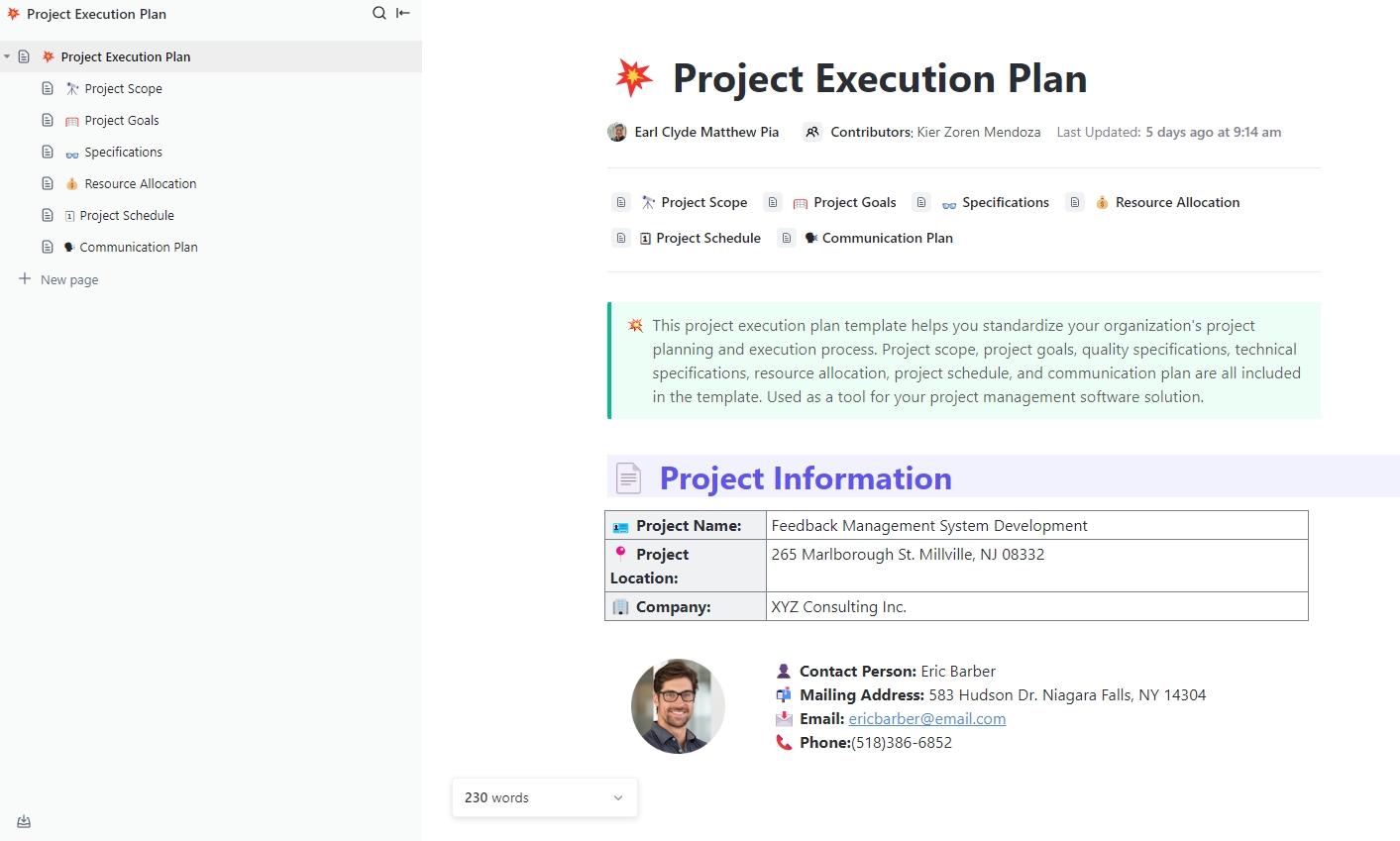
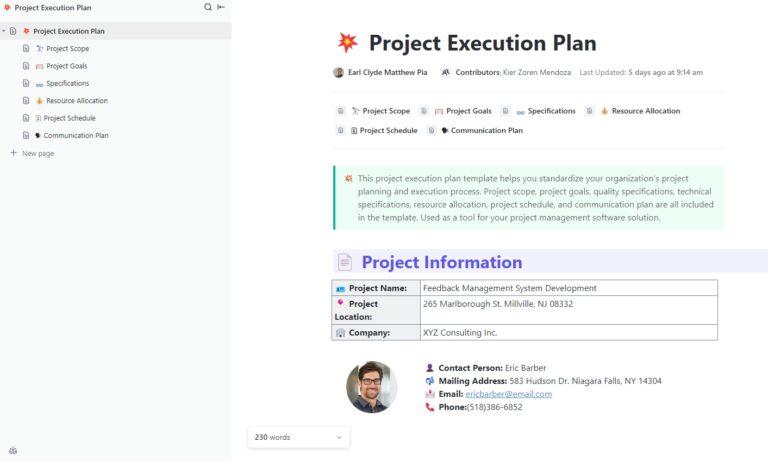
Projects can go off the rails, but you reduce the room for error when you’ve got a solid plan in place. The ClickUp Project Execution Plan Template helps you organize every step, task, and timeline so your team always knows what to do next.
This powerful project execution template keeps your team aligned, your goals clear, and your project status transparent. Whether you’re managing a software rollout or planning a business launch, it makes it easy to stay organized and accountable from day one to delivery.
🔑 Ideal for: Project managers, team leads, consultants, or startup founders planning complex deliverables in software, construction, marketing, operations, or product development.
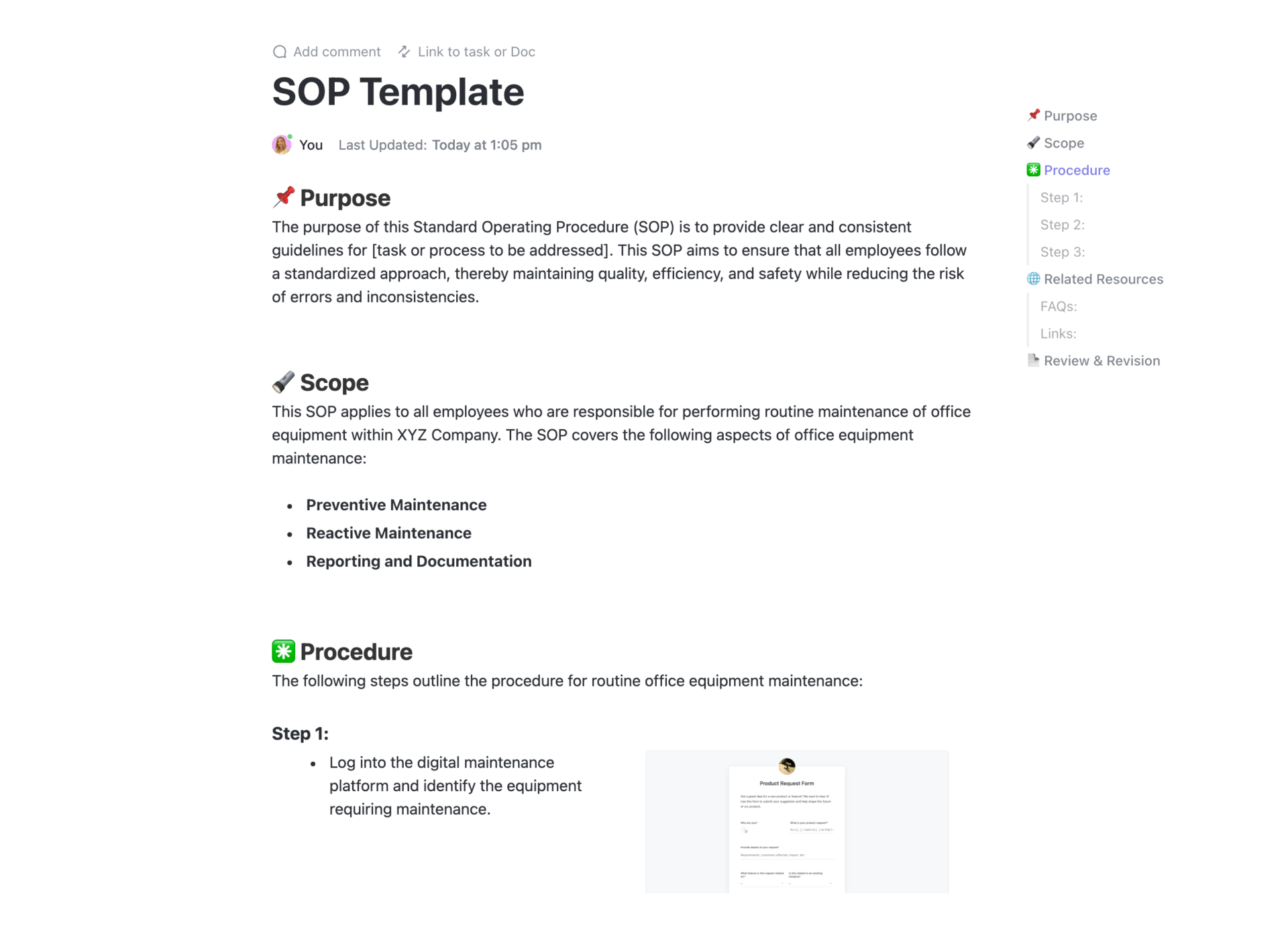
Ever wish your projects could run like clockwork every time? The ClickUp Project Execution SOP Template makes that possible. It helps build repeatable systems and is designed to give you a foolproof step-by-step guide for rolling out projects.
This template offers easy-to-use views like Table and Calendar, plus robust features like Dependencies, Milestones, and Tags to track task flow and deadlines in real time.
🔑 Ideal for: Operations leads, project managers, agencies, and enterprise teams managing recurring or complex projects that require structured execution and accountability.
➡️ Also Read: Free Project Plan Templates in Excel & ClickUp
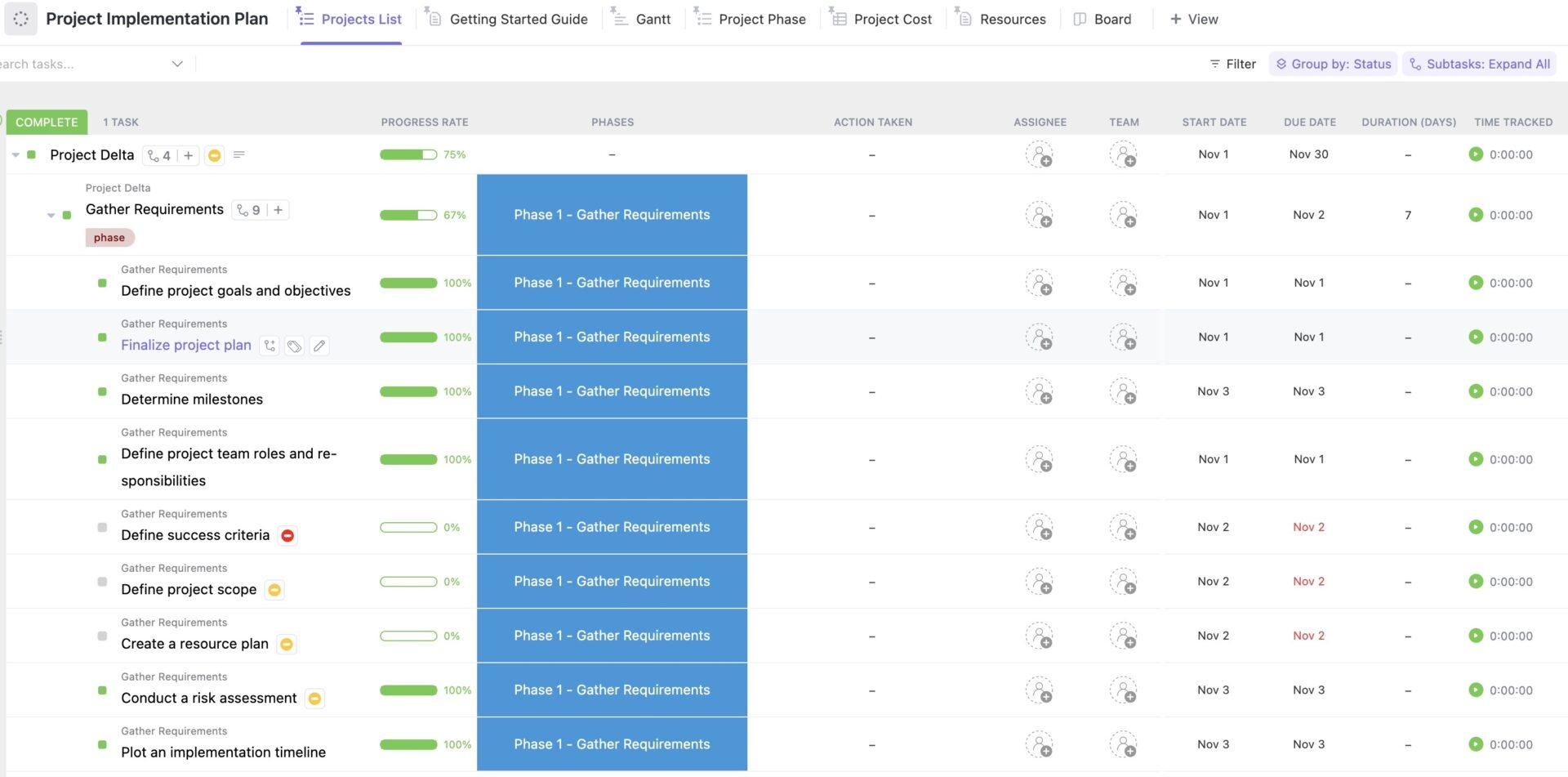
Project execution can become overwhelming quickly, especially when deadlines, dependencies, and decisions accumulate. But the ClickUp Project Implementation Plan Template provides a full-spectrum blueprint for managing your project from start to finish—mapping out scope, deliverables, timelines, milestones, and dependencies in one centralized workspace
With six built-in views covering Project Phase, Gantt Timeline, Resource Allocation, Cost Tracking, and more, you and your team get visibility into workload, deadlines, and budgets. It’s ideal for turning launch plans or operational rollouts into predictable, trackable projects.
🔑 Ideal for: Project managers, product teams, IT leads, and consultants who handle strategic initiatives, software deployments, or multi-phase implementations in industries like tech, healthcare, education, and manufacturing.
📮 ClickUp Insight: 64% of employees occasionally or frequently work outside their scheduled hours, with 24% logging extra hours most days! That’s not flexibility—that’s never-ending work. 😵💫
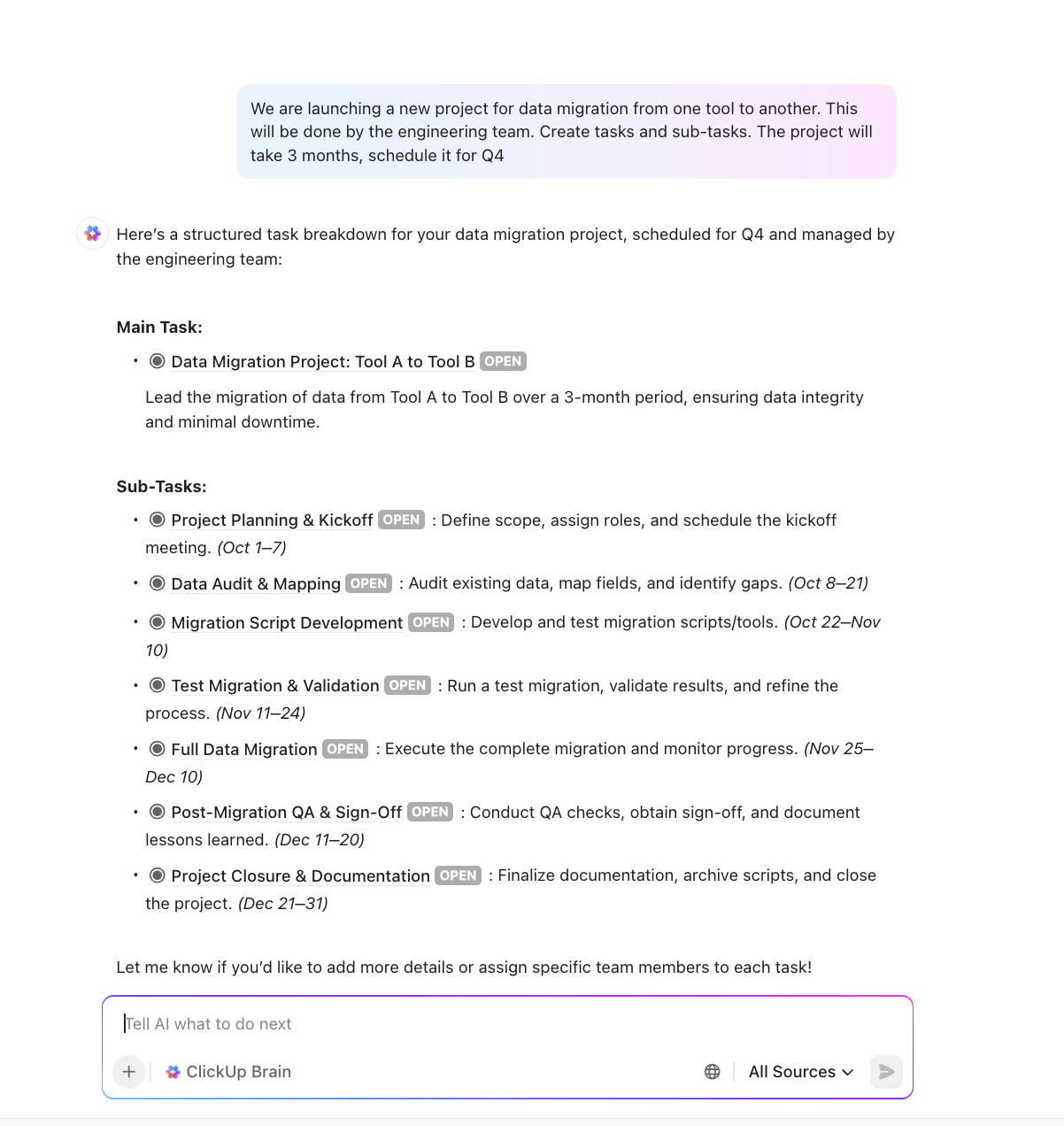
ClickUp Tasks help you break down big goals into smaller, manageable steps, so you always know what to tackle next, without feeling overwhelmed. Just ask ClickUp’s AI to generate subtasks, add checklists, and map dependencies to stay organized and in control. Meanwhile, ClickUp Automations streamline routine work by handling updates, assignments, and reminders—so you can spend less time on busy work and more time on what matters. 🚀
💫 Real Results: Pigment improved team communication efficiency by 20% with ClickUp—keeping teams better connected and aligned.
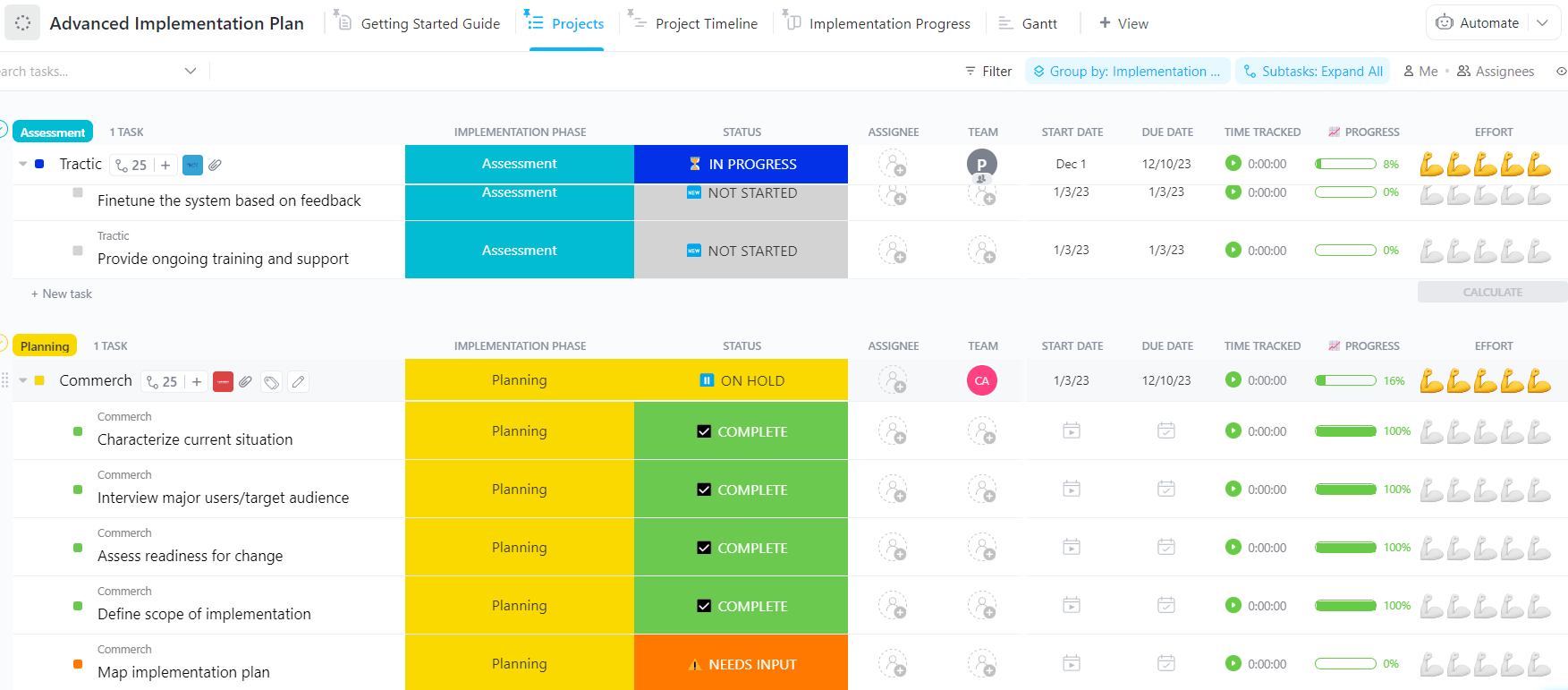
The ClickUp Advanced Implementation Plan Template helps you manage complex project rollouts with a structured, visual, and collaborative planning system.
Whether you’re launching a product, onboarding a client, or deploying new software, this template breaks everything down into manageable chunks. You get visibility into tasks, progress, risk factors, and dependencies, so your entire team stays aligned from planning to delivery.
🔑 Ideal for: Product managers, IT leads, consultants, and operations teams managing high-stakes implementations in tech, healthcare, construction, or enterprise services.
📣 Customer voice: Here’s what Siobhan Wheelan, Principal & Vetted ClickUp Consultant at SDW Consulting, has to say about ClickUp:
ClickUp has transformed the way our team works, providing one source of truth aligns our team and ensures we stay focused on our goals. Using templates, automations, and getting our workflows properly setup has been a game-changer in terms of efficiency and communication.
Managing software projects doesn’t have to be messy or stressful; you can do it without drowning in spreadsheets or constant check-ins.
The ClickUp Software Project Management Simplified Template is designed to streamline software delivery. It features built-in time tracking, dependency warnings, and automation-ready workflows that keep everyone aligned from kickoff through release.
The template offers a beginner-friendly task structure with five clear statuses—Backlog, To Do, In Progress, Needs Input, and Complete—so your dev team instantly knows what’s pending, in motion, or stuck.
🔑 Ideal for: Agile development teams, product managers, and tech startups building or maintaining software solutions that require organized, collaborative project tracking and flexible scheduling.
💡 Bonus: Try ClickUp Brain MAX—the AI Super App that truly understands you, because it knows your work. Ditch the AI tool sprawl, use your voice to get work done, create documents, assign tasks to team members, and more. Here’s how:
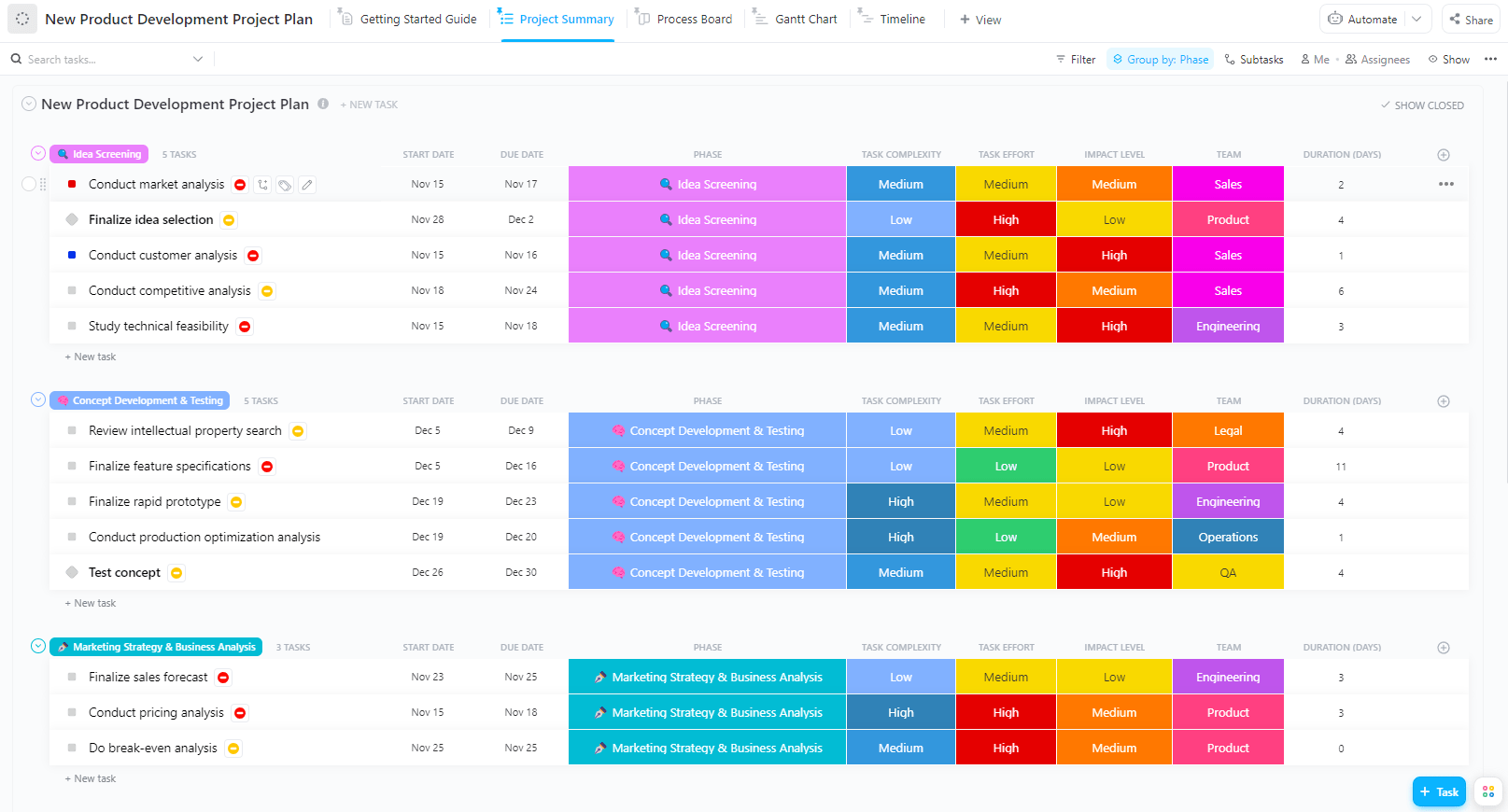
Got a brilliant product idea? That’s only the beginning. The real challenge is getting it built, tested, and launched on time. That’s where the ClickUp New Product Development Template comes in.
The template streamlines the entire product development process from ideation to launch. It helps you align on product goals, map out the software development timeline, and stay on top of every subtask.
🔑 Ideal for: Product managers, R&D teams, engineers, and startups in tech, consumer goods, or manufacturing looking to streamline the path from idea to launch.
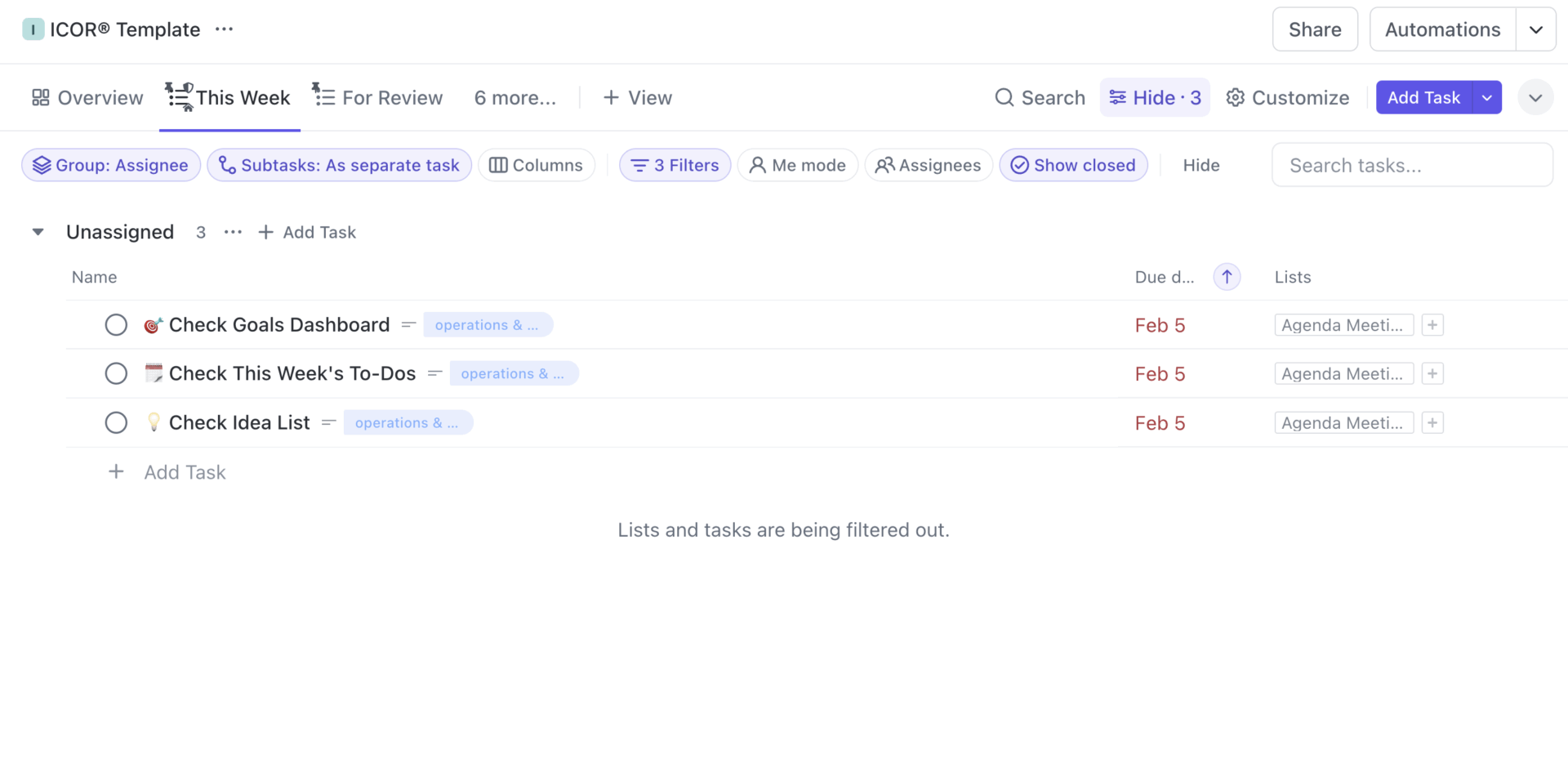
The ClickUp Project Management Template helps you build a focused, high-efficiency work environment that thrives in fast-paced, high-stakes situations. It is based on the ICOR Methodology (Input, Control, Output, Refine), which is particularly effective in dealing with overwhelming situations.
This template is structured to reduce digital clutter, increase visibility across teams, and systematize everything from operations to marketing.
🔑 Ideal for: Team leads, project managers, operations managers, and solopreneurs who want a customizable system that scales with their business across teams and departments.
Curious about Project Management in ClickUp with ICOR? Here’s a handy explainer:
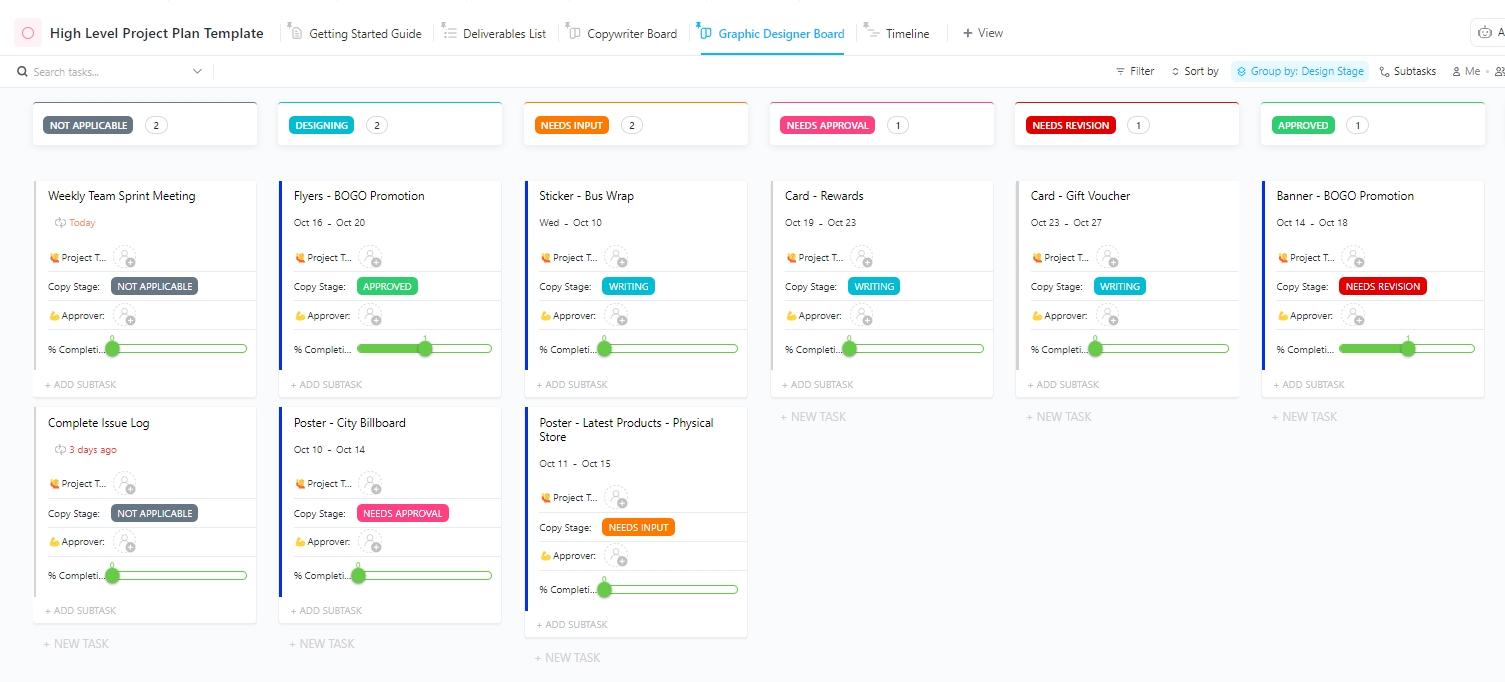
Tired of misaligned teams or missed deadlines? The ClickUp High-Level Project Plan Template helps you zoom out and see the macro picture, without losing control of the details.
This template allows you to create a big-picture roadmap that breaks down each phase into manageable chunks. From task assignments to stakeholder alignment, you’ll have all project milestones organized in one place, allowing your team to execute efficiently and confidently.
🔑 Ideal for: Project managers, team leads, marketing and creative agencies, and business operations teams who need a top-down view of project timelines, goals, and deliverables.
💡 Pro Tip: Need AI to lend a helping hand during project planning? Use ClickUp Brain, the world’s most complete work AI, to refine the initial project scope, assign tasks, and generate phased plans. It can quickly structure complex projects right within your ClickUp workspace, ensuring all key deliverables and communications are addressed from the start.
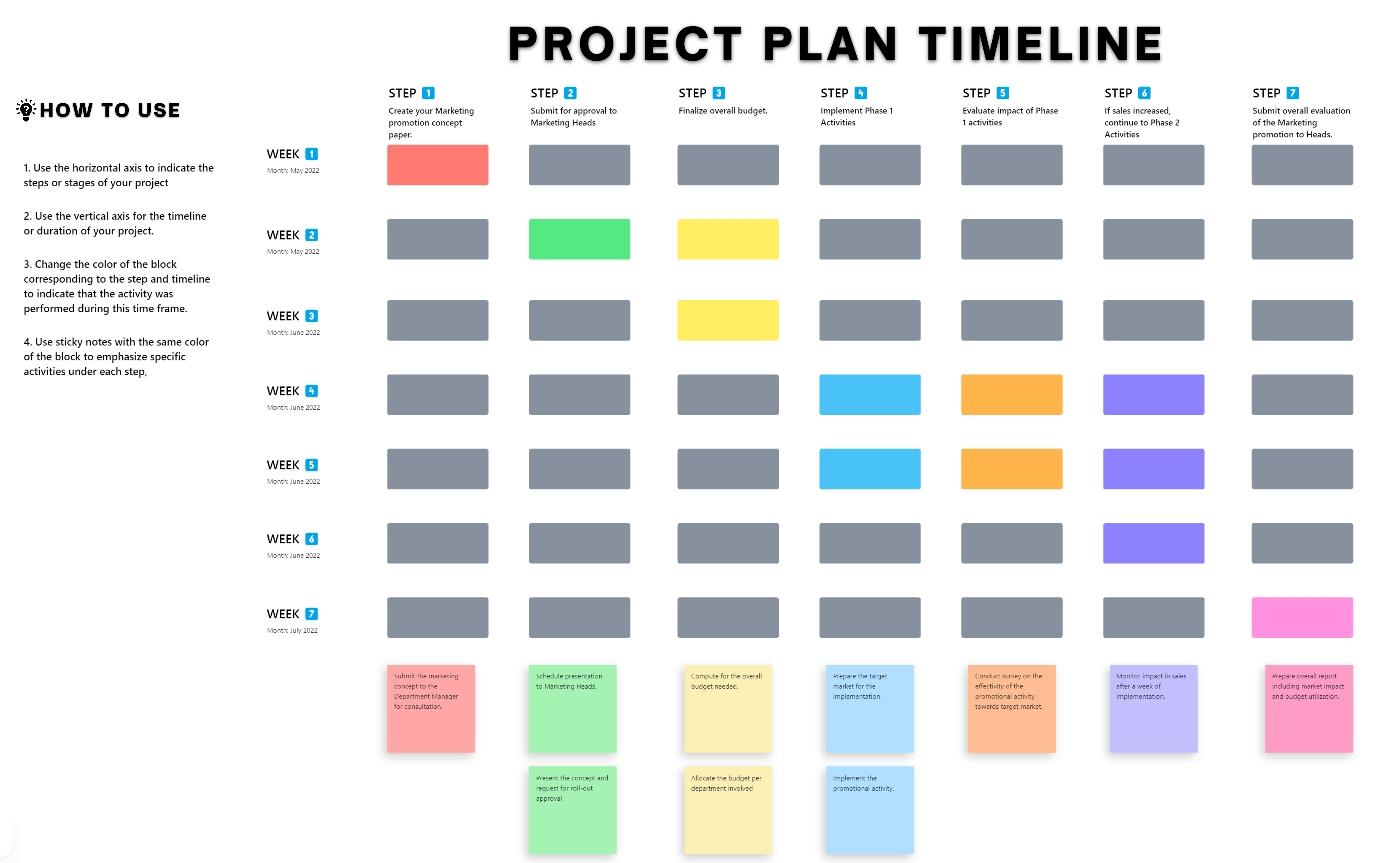
The ClickUp Project Timeline Whiteboard Template helps you build a clear, visual roadmap for your entire project in one place. It simplifies planning and collaboration by letting you map out tasks, key milestones, dependencies, and due dates directly on an interactive whiteboard.
The project template is ideal for visualizing the big picture. Plus, you can instantly spot bottlenecks, drag and adjust timelines on the fly, and keep progress updated in real time.
🔑 Ideal for: Project managers, product teams, creative agencies, or operations leads who need to create project plans and adjust them collaboratively in real time, visualize timelines, and sync priorities.
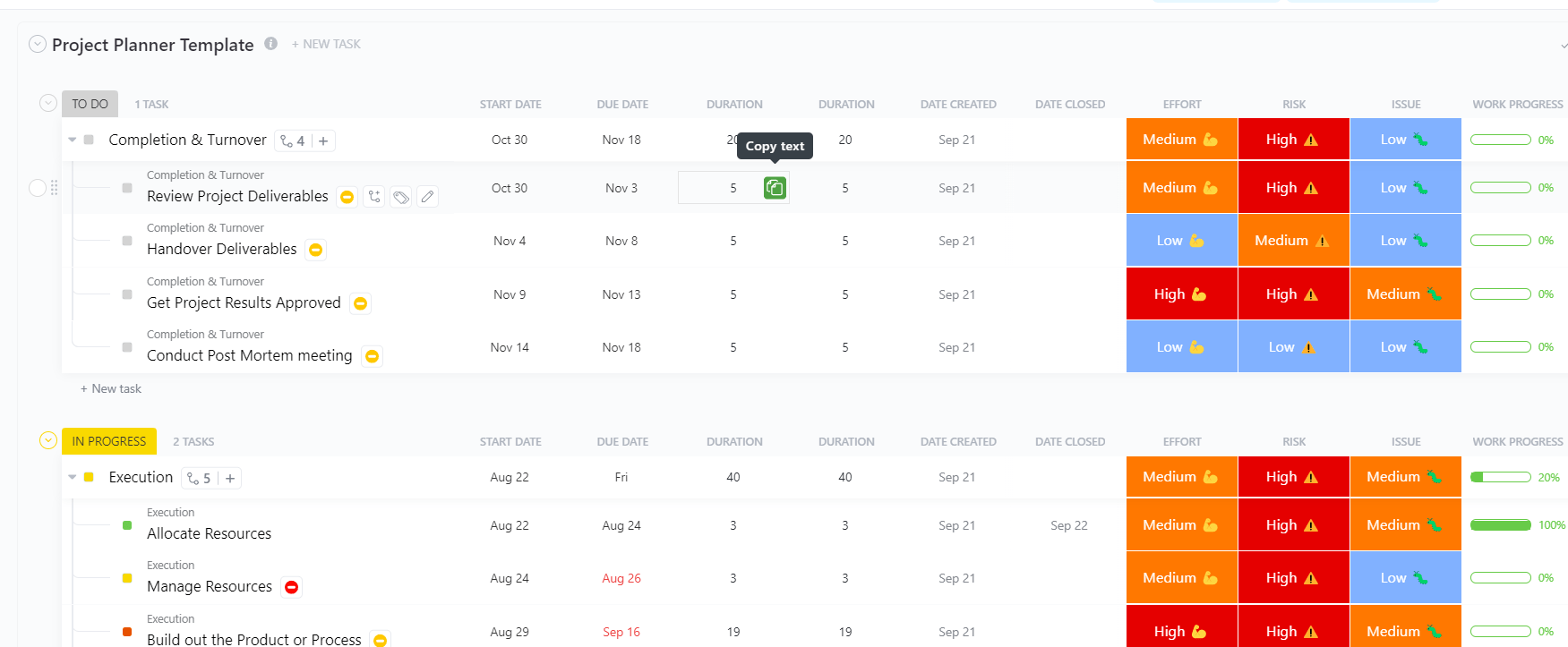
Planning a project can feel like juggling a hundred balls, such as deadlines, budgets, tasks, team input, and more. That’s where the ClickUp Project Planner Template comes in to simplify your planning process.
Whether you’re managing a major feature launch or organizing internal workflows, this template offers you a centralized hub. From visualizing project timelines to monitoring costs and assigning roles, it’s your all-in-one planning assistant to drive results.
🔑 Ideal for: Project coordinators, team leads, and operations managers in product, marketing, IT, or consulting who need a reliable way to structure, execute, and monitor projects from start to finish.
🧠 Fun Fact: Ever heard of the Ninety-Ninety Rule? Coined by Tom Cargill of Bell Labs (and popularized by Jon Bentley in Programming Pearls in 1985), it says that the first 90% of the project takes 90% of the time… and the last 10% takes the other 90%. That final stretch is where all the hidden issues, refinements, and edge cases come out of the woodwork.
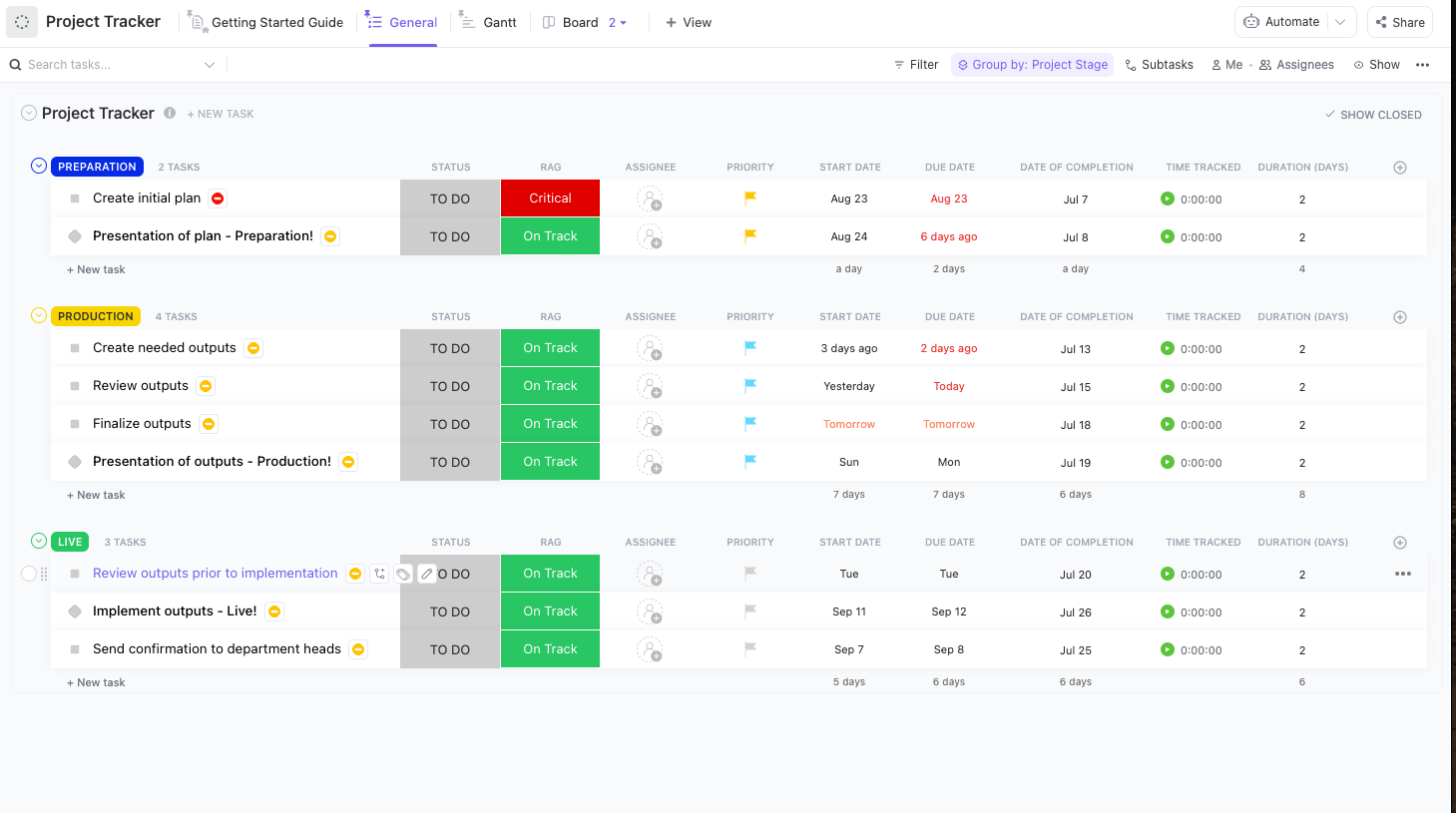
Whether you’re juggling deadlines, managing team workloads, or tracking deliverables, the ClickUp Project Tracker Template gives you the tools to stay organized and calm under pressure.
This ready-to-use template simplifies project management by providing a single hub for tracking project progress, managing dependencies, and preventing bottlenecks across teams, projects, and timelines.
You’ll get real-time insights, powerful automation, and streamlined collaboration to help your projects succeed every time.
🔑 Ideal for: Project managers, team leads, marketing departments, and agencies handling complex or multi-phase projects who need to monitor progress, assignments, and deadlines.
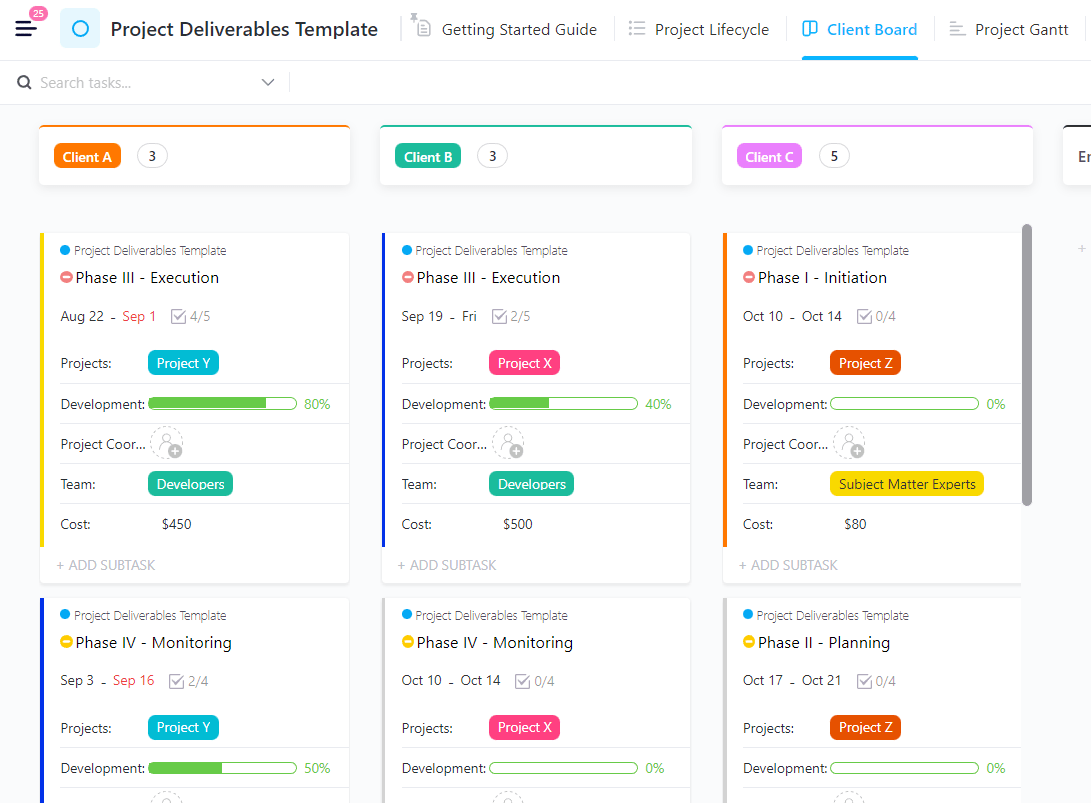
Timely and high-quality deliverables can make or break your projects. You can have a brilliant plan, the right team, and plenty of resources, but if the final outputs fall short, the whole effort is in vain. That’s where the ClickUp Project Deliverables Template steps in to save the day.
This template helps you track every deliverable with clear timelines, assigned responsibilities, budgets, and client details, all in one organized place. Whether you’re juggling documents, prototypes, or service rollouts, it ensures you never drop the ball on what truly matters: delivering results that count.
🔑 Ideal for: Project managers, client success teams, marketing and software teams, and operations leads managing complex deliverables across multiple stakeholders, deadlines, and departments.
💡 Pro Tip: Don’t just list tasks for your projects; rank them! Use methods like the Eisenhower Matrix (Urgent/Important) or the “Eat the Frog” approach (complete your biggest, hardest task first thing). This ensures you’re always tackling what truly moves the needle, not just what’s easy or loud. 🐸
From strategy to launch, every project needs solid planning, clear tracking, and smooth execution to succeed. But juggling all the moving parts? That’s where things get tricky.
That’s why having the right project execution templates can make all the difference by keeping you organized, on track, and always one step ahead.
ClickUp, the everything app for work, provides project managers, team leads, operations directors, and consultants with powerful tools to streamline workflows, enhance accountability, and maximize results.
And the best part? ClickUp offers 1,000+ customizable templates to fit your exact workflow.
Sign up for ClickUp today to plan smarter, track better, and execute like a pro!

© 2026 ClickUp

There’s an easier way. Try a free AI Agent in ClickUp that actually does the work for you—set up in minutes, save hours every week.