

Feeling like there’s never enough time in the day? You’re not alone.
Small, intentional changes to how you plan, prioritize, and follow through on work can unlock hours each week without adding more to your plate.
Productivity hacks are simple, repeatable habits or techniques that help you focus on the right work, reduce friction, and finish more in less time.
This guide walks through 20 proven productivity hacks – plus how to put them into practice with tools like ClickUp – so you can save time and protect your energy.

 Summarize this article for me please
The Best Productivity Hacks [At a Glance]
| Productivity Hack | What It Does | Best For |
|---|---|---|
| Time Blocking | Dedicate specific time slots to individual tasks | Deep focus work and reducing multitasking |
| Pomodoro Technique | Work in 25 minute bursts with short breaks | Maintaining focus and preventing burnout |
| Two Minute Rule | Complete any task taking under two minutes immediately | Clearing small tasks before they pile up |
| Eisenhower Matrix | Categorize tasks by urgency and importance | Prioritizing what to tackle first |
| 80/20 Rule (Pareto Principle) | Focus on the 20% of tasks driving 80% of results | Identifying high impact work |
| Eat That Frog | Tackle your hardest task first thing | Building momentum and reducing procrastination |
| Task Batching | Group similar tasks and complete them together | Minimizing context switching |
| 1-3-5 Rule | Plan one big, three medium, and five small daily tasks | Balanced daily planning without overwhelm |
| Productivity Templates | Standardize recurring tasks with reusable formats | Saving time on repetitive work |
| Delegation | Assign tasks to others based on skills and availability | Reclaiming time for high priority work |
| Automation | Set up systems to handle repetitive processes | Eliminating manual busywork |
| Time Audits | Track how you spend every minute | Identifying time wasters and inefficiencies |
| Environment Optimization | Redesign your workspace for focus | Breaking mental ruts and boosting mood |
| Ivy Lee Method | List six priorities the night before and tackle them in order | Simple daily structure and single tasking |
| Brain Dumps | Get all your thoughts out of your head onto paper | Clearing mental clutter and capturing ideas |
| Saying No | Decline tasks that don’t align with your goals | Protecting focus time for what matters |
| Scheduled Breaks | Build rest periods into your calendar | Preventing burnout and restoring energy |
| SMART Goals | Set specific, measurable, achievable, relevant, time bound objectives | Long term direction and accountability |
| Weekly Reflection | Review progress and adjust your approach | Continuous improvement and course correction |
| Reminders | Set alerts for deadlines and important tasks | Avoiding missed deadlines and overlooked details |
Summarize this article for me pleaseCommon Productivity Hacks
Effective productivity hacks help you overcome procrastination, improve focus, and solve time and project management issues from the ground up.
Incorporating a few of them into your daily routine will help you strategize and achieve your goals more effectively.
(And if you’re looking to implement these productivity hacks easily, try using a work management tool such as ClickUp that brings your tasks, conversations, and knowledge together and enhances them with AI.)
Here’s a breakdown of the best productivity hacks to boost efficiency:
Hack 1: Practice time blocking
Time blocking is a time management method where you dedicate specific blocks of your calendar to specific tasks or types of work.
Instead of multitasking, you plan when you’ll do deep work, meetings, and admin. Each block has a clear purpose, helping you stay focused and reduce context switching.
Multitasking can cost you a significant portion of your productive time. Time blocking counteracts this by giving each important task undisrupted focus.
For example, you might schedule deep work in the morning when you have the most energy, and meetings or calls in the afternoon once your most critical tasks are done.
How to implement time blocking with ClickUp:
- Use ClickUp’s Calendar View to drag and drop tasks into specific time blocks for deep work, meetings, and admin.
- Use ClickUp’s Project Time Tracking to track how long each task actually takes. Over time, this data helps you estimate more accurately and adjust your blocks.
- Keep similar work types (e.g., strategy, reviews, 1:1s) grouped in adjacent blocks to reduce context switching.
When managing a complex project with multiple tasks and deadlines, Calendar View gives you a clear overview of your workload and helps you prioritize effectively.
Hack 2: Try the Pomodoro Technique
The Pomodoro Technique is a time management method where you work in focused intervals (traditionally 25 minutes) followed by five-minute breaks, with a longer break after every four intervals.
This simple routine helps you maintain focus, manage mental fatigue, and make steady progress without burning out.
How to implement it with ClickUp:
- Set a timer: Use ClickUp’s time tracking or a timer integration to set 25-minute work intervals and 5-minute breaks.
- Focus on a single task: During each Pomodoro, concentrate on one task—drafting an email, analyzing data, or writing a document. For more demanding work, combine two Pomodoros.
- Minimize distractions: Close unnecessary tabs, silence notifications, and find a quiet workspace or use focus music.
- Use breaks intentionally: During short breaks, stretch, hydrate, or step away from your screen. Every four Pomodoros, take a 15–30 minute break.
This structure helps you stay on track and make steady progress without feeling overwhelmed.
Hack 3: Get minor tasks out of the way using the two-minute rule
The two-minute rule says that if a task takes two minutes or less, you should do it immediately instead of postponing it. Quickly handling tiny actions (short replies, approvals, or quick updates) keeps your inbox and to-do list under control and frees up mental space for deeper work.
For instance, if you receive an email requesting one simple piece of information, respond right away so it doesn’t linger or turn into a larger, time-consuming chore.
To make the two-minute rule stick in ClickUp, use it as a filter every time you touch your inbox or task list.
When a new item appears, ask “Can I finish this in under two minutes?” If yes, complete it immediately and either mark the task done or clear the Reminder.
If not, convert the message or idea into a ClickUp task, give it a realistic due date, and move on. The win isn’t only in clearing the tiny items—it’s in avoiding half-tracking them in your head.
Hack 4: Prioritize tasks using the Eisenhower Matrix
The Eisenhower Matrix helps you prioritize tasks based on urgency and importance. You divide tasks into four categories:
- “urgent and important”
- “important but not urgent”
- “urgent but not important”
- “not urgent and not important”
This makes it easier to decide which tasks to tackle now, schedule, delegate, or delete. You can mirror the Eisenhower Matrix in ClickUp with a simple structure.
Create a List for your personal or team backlog, then add a custom field called “Priority quadrant” with four options:
- Urgent & Important
- Important / Not Urgent
- Urgent / Not Important
- Neither
Once that’s in place, build a Board View grouped by that field so each column is one quadrant. As you triage work, assign each new task to a quadrant and let the Board View surface what to do now versus what to schedule, delegate, or drop.
- Review the Urgent & Important column first thing each day.
- Schedule time blocks specifically for Important / Not Urgent work so it doesn’t turn into a fire drill later.
Hack 5: Identify critical tasks using the 80/20 rule (Pareto Principle)
The 80/20 rule (Pareto Principle) states that roughly 80% of your results come from 20% of your efforts. Your goal is to identify the high-impact tasks that yield the most value and focus your energy on them.
For example, if 80% of your revenue comes from 20% of your clients, prioritize nurturing those key relationships.
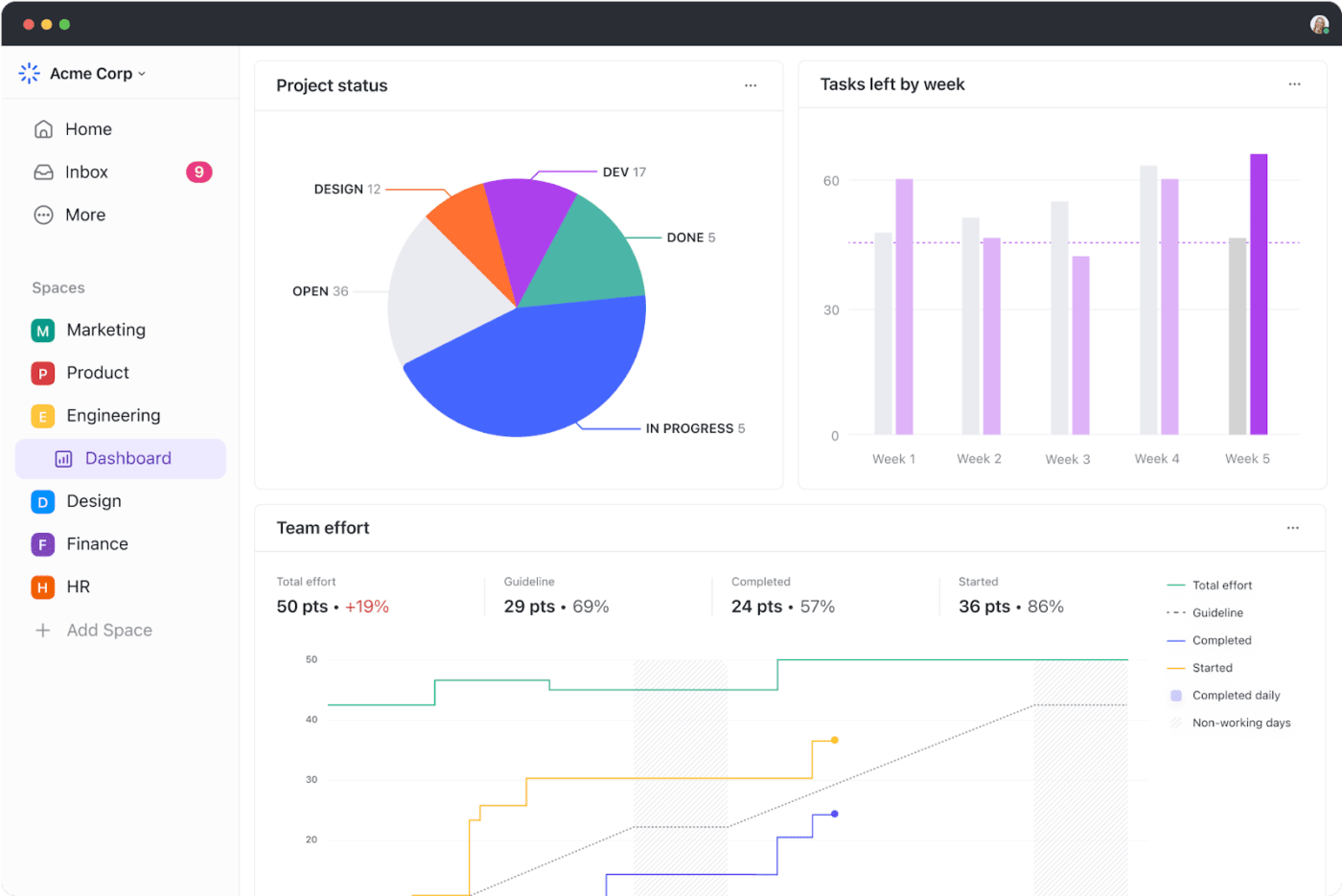
To apply this principle effectively, ClickUp Dashboards provide a visual overview of tasks, projects, and their respective outputs.
By analyzing the data presented, you can quickly pinpoint which tasks are driving results and which ones are consuming time without delivering significant value.
This insight allows for a more efficient allocation of time and resources, ensuring prioritization of the right tasks that align with goals.
Hack 6: Eat that frog!
In productivity terms, your “frog” is your hardest or most dreaded task. Tackling it first removes the biggest obstacle early, preventing all-day procrastination and making everything else feel easier.
“Eat a live frog first thing in the morning, and nothing worse will happen to you the rest of the day.” – Mark Twain
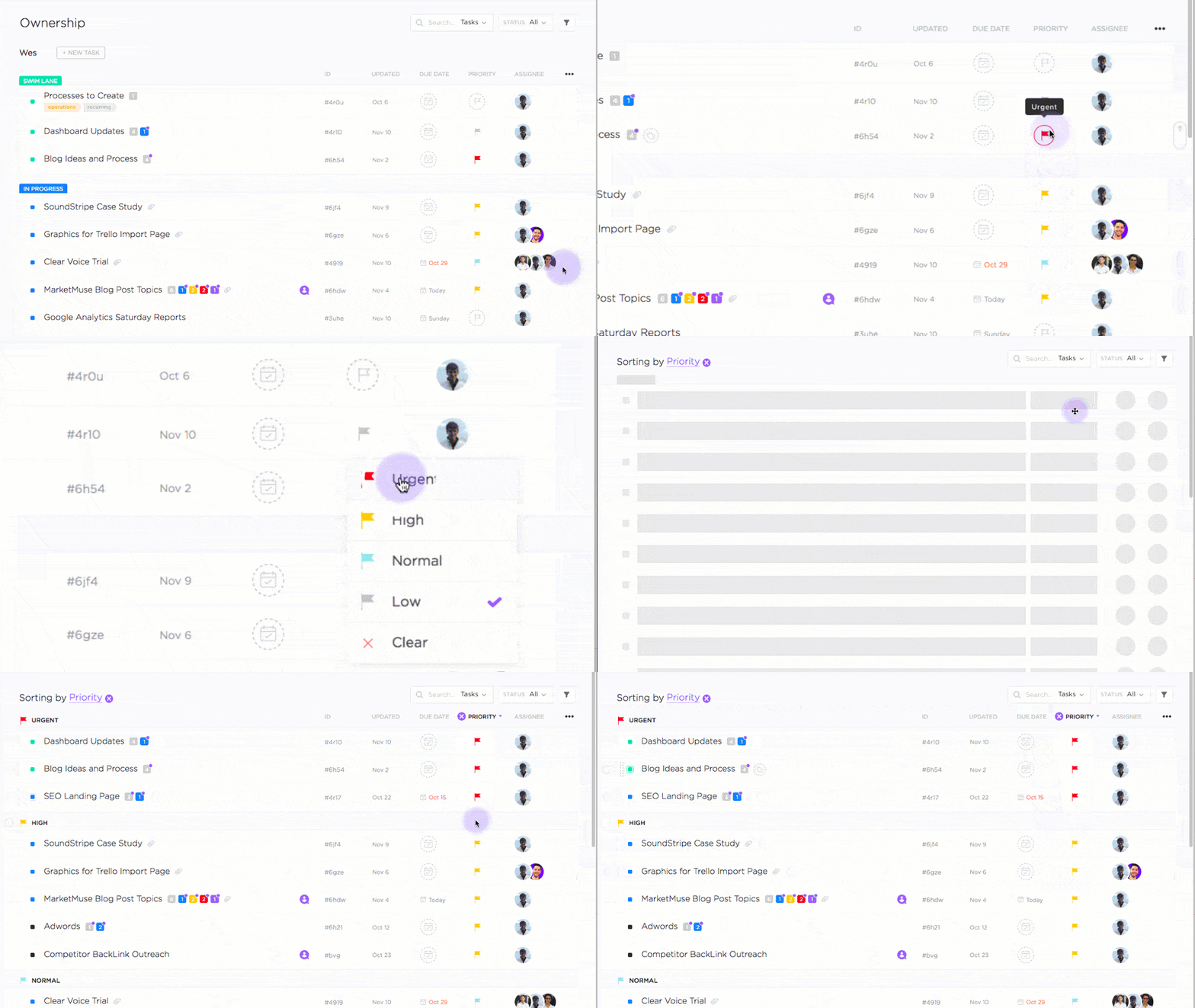
A simple daily ritual in ClickUp can turn “eat that frog” into a habit.
At the end of each day, scan tomorrow’s tasks and mark one as the top priority using ClickUp Task Priorities (e.g., Urgent). Rename it with a clear action verb—“Draft Q4 roadmap,” not “Roadmap”—and drag it to the top of your Today view.
Then block the first 60–90 minutes of your morning calendar for that task alone. When you open ClickUp the next day, you’ll see a single, clearly marked frog waiting for you instead of a wall of competing priorities.
Hack 7: Batch similar tasks—and get them all done together
Task batching means grouping similar tasks like reporting, calls, or approvals and handling them in a single session. This minimizes context switching, which drains mental energy and reduces focus.
ClickUp’s Subtasks allow me to break down large projects (e.g., “answer all emails”) into smaller, related tasks that I can tackle in one go. Each subtask can have its assignees, deadlines, priorities, and dependencies.
Hack 8: Take a shot at the 1-3-5 rule
The 1-3-5 rule is a simple planning method: each day, you aim to accomplish one big task, three medium tasks, and five small tasks. It keeps your to-do list ambitious but realistic.
For a marketing manager, a 1-3-5 day might look like:
- One big task: Develop the strategy for next quarter’s product launch.
- Three medium tasks: Review ad copy, analyze campaign performance, approve social media posts.
- Five small tasks: Reply to emails, schedule a team meeting, check a project update, proofread a blog post, finalize a brief.
ClickUp makes the 1‑3‑5 rule visible at a glance.
Add a custom field called “Size” with values Big, Medium, and Small, then assign one of each to your daily tasks.
In your Today view, you’ll immediately see whether you’ve overloaded the day with “Big” work or forgotten to include any quick wins.
- Use a filtered List or Board View to show only today’s tasks grouped by Size.
- Drag tasks between sizes as you learn how much effort they really require.
- At the end of the day, clone your 1‑3‑5 pattern forward for tomorrow and adjust as needed.
Hack 9: Use templates for repetitive tasks
Recreating the same task structures, checklists, or documents from scratch wastes time. Templates standardize recurring work so you can launch faster and ensure consistency.
In ClickUp, you can use or create templates for tasks, projects, docs, and more.
For example, The ClickUp Personal Productivity Report Template helps you measure and track your progress on any task or project. Use it to track time spent, identify bottlenecks, and generate personalized productivity reports.
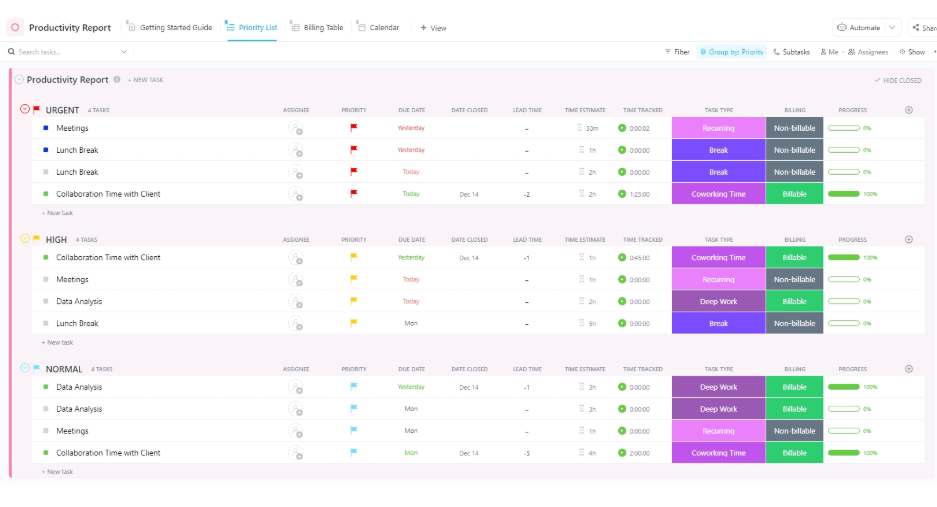
This template is ideal for beginners because it gives you a quick, structured starting point. Once you’ve identified repetitive tasks, you can decide whether to automate, delegate, or streamline them using templates.
Tip: Start by templating the processes you repeat weekly (status reports, sprint planning, content briefs) to reclaim time immediately.
Hack 10: Delegate wisely
Effective delegation is a major productivity lever. You can reclaim a significant portion of your workday by identifying tasks that don’t require your specific expertise and assigning them to the right people.
Delegation in ClickUp works best when the conversation and the assignment happen in one place.
- When an action item comes up in ClickUp Chat, convert the message into a task immediately instead of leaving it as “something we discussed.”
- Assign the task to the right owner (or owners, using multiple assignees) and add a due date while the context is still fresh.
- Use @mentions in task comments for clarifications, so every decision lives alongside the work instead of in scattered DMs.
Hack 11: Automate everything you can!
Repetitive tasks such as status updates, handoffs, reminders add up quickly. Automation frees you from this manual busywork so you can focus on higher-value work.
We suggest starting small with automations in ClickUp by targeting the handoffs that annoy you most.
For example, if tasks routinely stall in “In Review,” create an automation that pings the assignee or moves the task to the right reviewer as soon as its status changes.
If you always forget to follow up after a meeting, set up an automation that creates a follow-up task from your meeting template when the meeting ends.
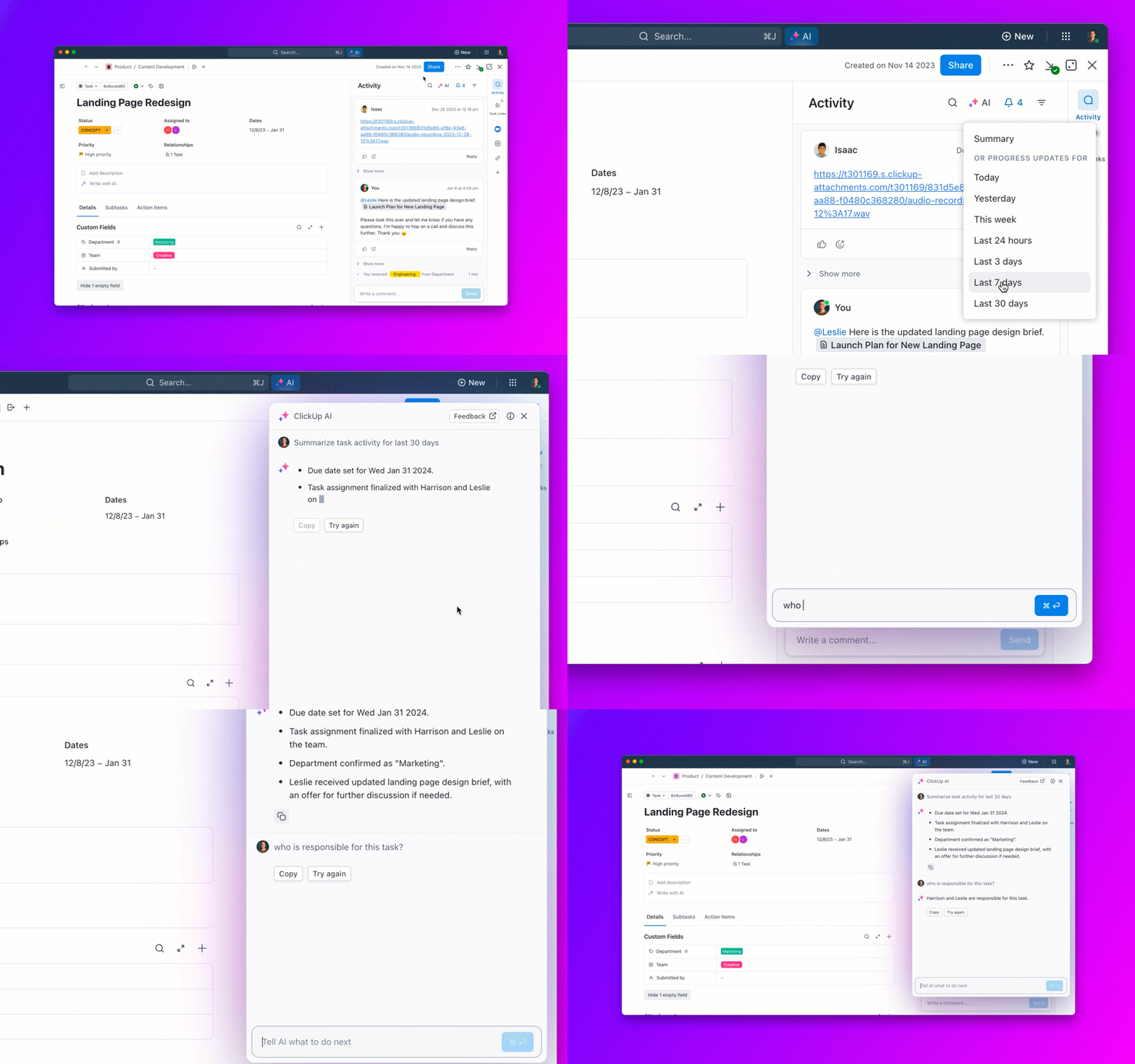
As ClickUp Brain learns your patterns, you can let it propose the next status or even auto-create tasks based on phrases in your docs (“publish by Tuesday,” “send contract,” “schedule demo”), so you spend less time translating notes into work.
Hack 12: Conduct time audits
A time audit means tracking how you spend your time over a set period (e.g., a week) and reviewing the data honestly. It’s one of the fastest ways to expose time wasters and misaligned priorities.
A time audit helps you:
- Identify time wasters like excessive meetings, social media distractions, or inefficient task-switching.
- Improve time management by revealing how long activities really take.
- Increase focus by shifting time to tasks that contribute to your goals.
- Boost accountability, since you’re more likely to stay on track when you know you’re measuring your time.
A simple two-week experiment in ClickUp is enough to run a useful time audit.
- Track everything that matters: For a fixed period, log time on each task you touch using Project Time Tracking—no rounding, no guessing.
- Sort by category: Use custom fields (like “Work type” or “Team”) and Dashboard widgets to see how much time goes to meetings, admin, deep work, and so on.
- Decide what to change: Based on the data, reduce or batch low-value categories, and add time blocks for the work that drives results.
Hack 13: Transform your environment
Your physical and digital environment has a direct impact on focus. Sometimes, a small change of scene or a cleaner workspace is enough to break a mental rut and help ideas flow.
Psychologically, changing environments leverages the “incubation effect” – stepping away from a problem can allow your brain to form new connections and surface better solutions.
Practical tips:
- Set up a well-designed, clean, and clutter-free workspace.
- Work near natural light when possible; sunlight supports mood and energy.
- Keep your digital workspace organized: fewer open tabs, clear file structures, and focused views for current work.
Hack 14: Adopt the Ivy Lee method
The Ivy Lee method is a simple productivity approach that helps you prioritize, sequence, and focus on one task at a time.
Before wrapping up your day, pick out tomorrow’s six most important tasks and list them by priority, putting the most important task first.
Then, when tomorrow comes, tackle each task one by one, completing each fully before moving on to the next.
In ClickUp, you can set this up quickly by adding those six tasks into your “Tomorrow” list or Upcoming view. Tag them as “Ivy Lee” to find them easily the next morning.
As you finish each task, check it off and move directly to the next one. This keeps your workflow clear and productive without distractions.
Hack 15: Use a digital notepad for brain dumps
When your mind is crowded with ideas, to-dos, and worries, it’s harder to focus on any one task. A brain dump means getting everything out of your head and into a trusted system and is one of the simplest mental resets.
We always suggest trying ClickUp Notepad as your inbox for everything that doesn’t have a home yet. Any time an idea, worry, or to-do pops into your head, drop it into a single running note instead of leaving it in your memory or starting a new doc.
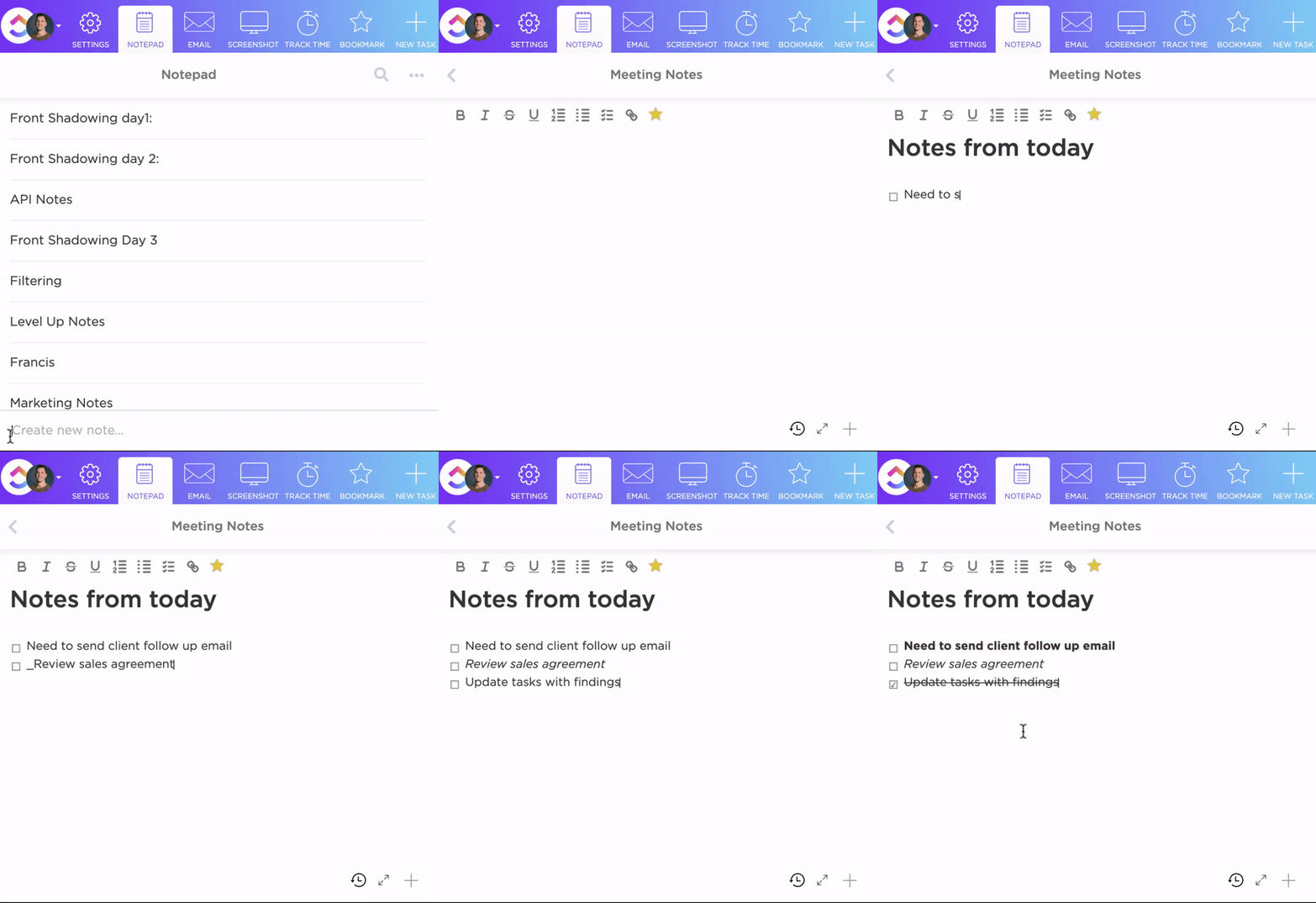
Once or twice a day, scan that note and promote anything actionable into tasks with one click. Add them to the appropriate List, assign an owner and due date, and archive the original note line.
Over time, you’ll trust that anything important ends up in ClickUp, not scattered across sticky notes and tabs.
Hack 16: Say ‘No’ more often
Being productive doesn’t mean doing everything. It means doing the right things. Saying no to tasks that don’t align with your goals protects your time, energy, and attention.
Not sure how to politely decline requests? Here are a few quick tips on how to say no gracefully:
- Be polite but firm: “Thanks for thinking of me, but I can’t take this on right now.”
- Offer an alternative: “I’m unable to help, but you might try [another resource/person].”
- Set clear boundaries: “I’m focused on other priorities right now, so I’ll have to decline.”
At work, you can use project management tools to protect your bandwidth by clearly tracking your commitments and sharing your workload with stakeholders, so it’s easier to show what’s already on your plate.
Hack 17: Schedule breaks
Scheduling regular breaks prevents burnout, sustains focus, and improves decision-making. Short pauses give your brain time to rest and process information, which often leads to better ideas.
Physically, breaks reduce strain from prolonged sitting or screen time and help you stay energized over longer stretches. This is where ClickUp’s Time Blocking feature comes in handy.
How to schedule breaks in ClickUp:
- Create tasks like “Morning break,” “Lunch break,” or “Afternoon stretch.”
- Assign realistic time estimates (e.g., 10–15 minutes for quick breaks, 30–60 minutes for lunch).
- Drag and drop these tasks into specific time slots using ClickUp’s Calendar View.
- Set them as recurring tasks (e.g., a 10-minute break every two hours).
- Turn on reminders so you actually step away when it’s time.
Hack 18: Set SMART goals
SMART goals (Specific, Measurable, Achievable, Relevant, Time-bound) give you clear direction and reduce ambiguity. They make it easier to prioritize and to know whether you’re on track.
Breaking large goals into smaller, actionable steps also prevents overwhelm and increases accountability. With ClickUp Goals, you can turn vague intentions into SMART objectives.
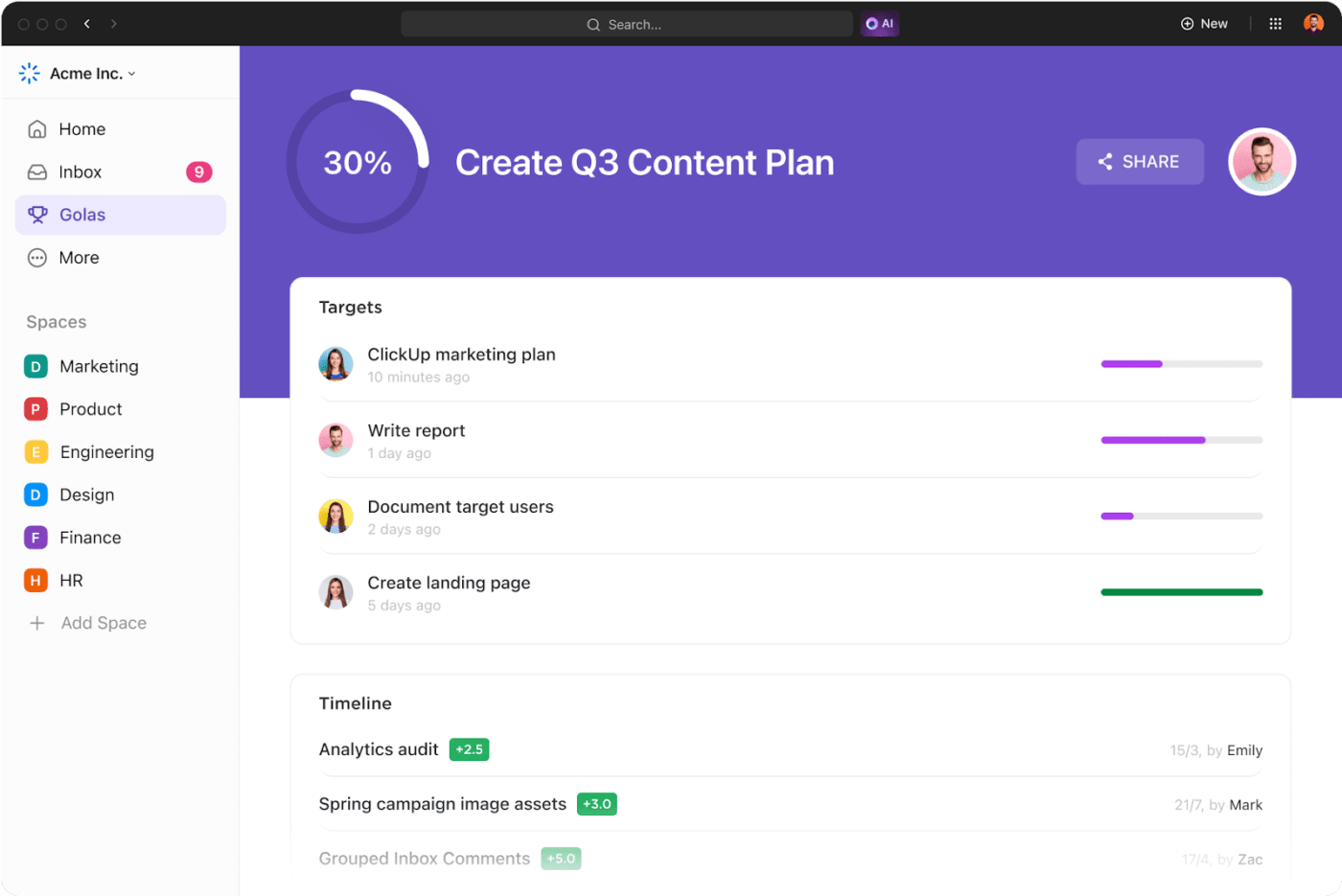
For each major outcome, create a Goal with a clear title and description that spells out what success looks like.
Add one or more Targets connected to real work—such as a task count, a numeric KPI, or specific Milestones—and set a due date that reflects when you expect to achieve it.
As you complete linked tasks, progress updates automatically, so weekly check-ins become a quick glance at your Goals dashboard instead of a manual status hunt.
Hack 19: Reflect and adjust
Productivity isn’t just about doing more, it’s about learning what works and adjusting. A short weekly reflection helps you double down on effective habits and drop what isn’t serving you.
At the end of each week, review:
- What you accomplished vs. what you planned.
- What felt easy and energizing vs. draining.
- Where tasks took longer than expected or got blocked.
I like to make this easy by adding a recurring “Weekly review” task in ClickUp, which keeps reflection lightweight but consistent. Give it a short checklist you run through every Friday:
Review this week’s completed tasks on your Dashboard, note three wins in the task comments, capture one or two blockers you hit, and then adjust next week’s priorities or time blocks based on what you learned. When you check off the review, you’re not just closing a task—you’re closing the loop on your system.
A recurring “Weekly review” task in ClickUp keeps reflection lightweight but consistent. Give it a short checklist you run through every Friday.
ClickUp Dashboards and progress-tracking features offer real-time insights into your performance, making it easier to course-correct when needed.
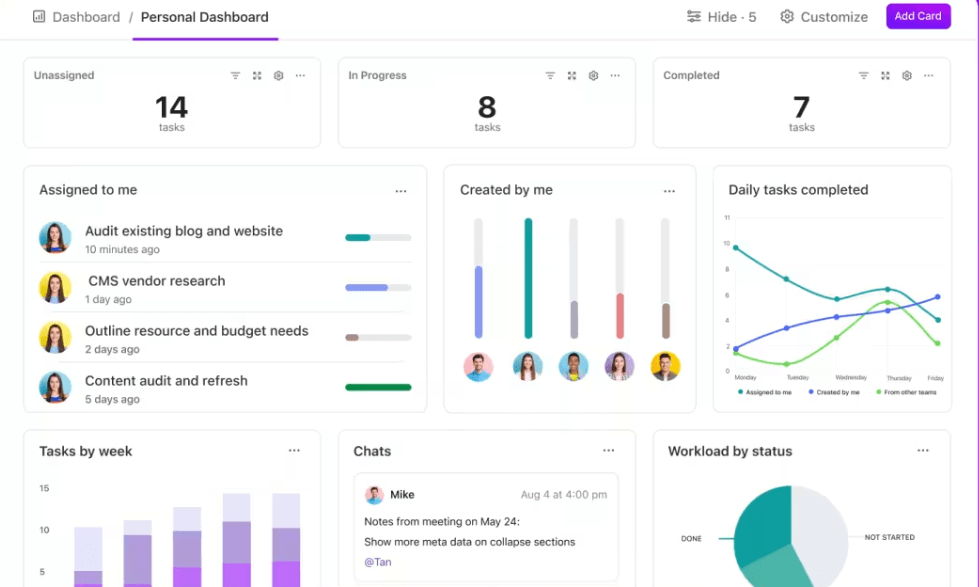
Dashboards give you a bird’s-eye view of your week, allowing you to fine-tune your approach and course-correct when necessary.
Hack 20: Use reminders
Reminders can be powerful tools. They help avoid the stress of last-minute rushes or overlooked details.
ClickUp Reminders can help you stay organized by gently nudging you when something requires attention. These reminders ensure nothing is inadvertently overlooked, whether a small daily task or a critical deadline.
Summarize this article for me pleaseDigital Tools and Apps for Productivity
Productivity tools can automate routine tasks, centralize information, and surface insights faster. From simple email filters to virtual assistants, the right stack makes it easier to keep work under control.
When choosing productivity tools, look for:
- Centralization: Can you manage tasks, docs, and communication in one place?
- Automation: Can the tool handle repetitive workflows and reminders for you?
- AI support: Does it help you summarize, prioritize, or generate content faster?
- Integrations: Does it connect with the apps you already use (email, calendar, CRM, chat)?
Why ClickUp Works as Your Productivity Hub
Consider ClickUp. It’s the everything app for work, with all of the above capabilities built-in and enhanced by AI to allow individuals and teams to achieve more in less time.
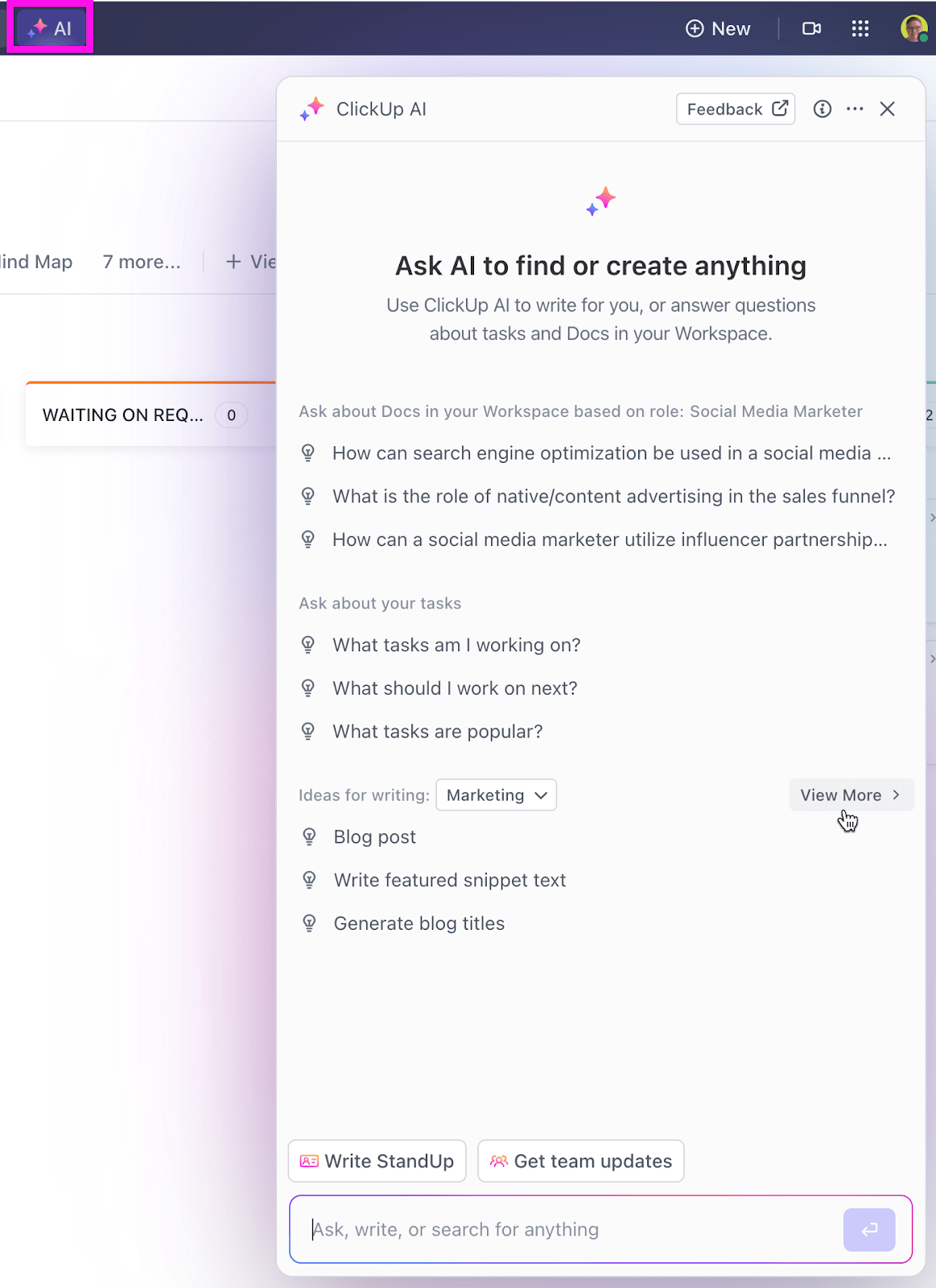
With a wide range of features, such as ClickUp Brain, ClickUp provides a centralized hub for all your work.
In addition to managing tasks, ClickUp Brain helps you:
- Get real-time project summaries and updates without opening individual tasks, enhancing overall efficiency via AI StandUps

- Gather contextual answers and insights, connecting various elements of your workspace seamlessly
- Create tailored, on-brand content in ClickUp Docs—from social media captions and quick email replies to full-fledged blog posts and project reports

ClickUp also has many prebuilt productivity templates (such as the ClickUp Personal Productivity Template) that help you stay organized.
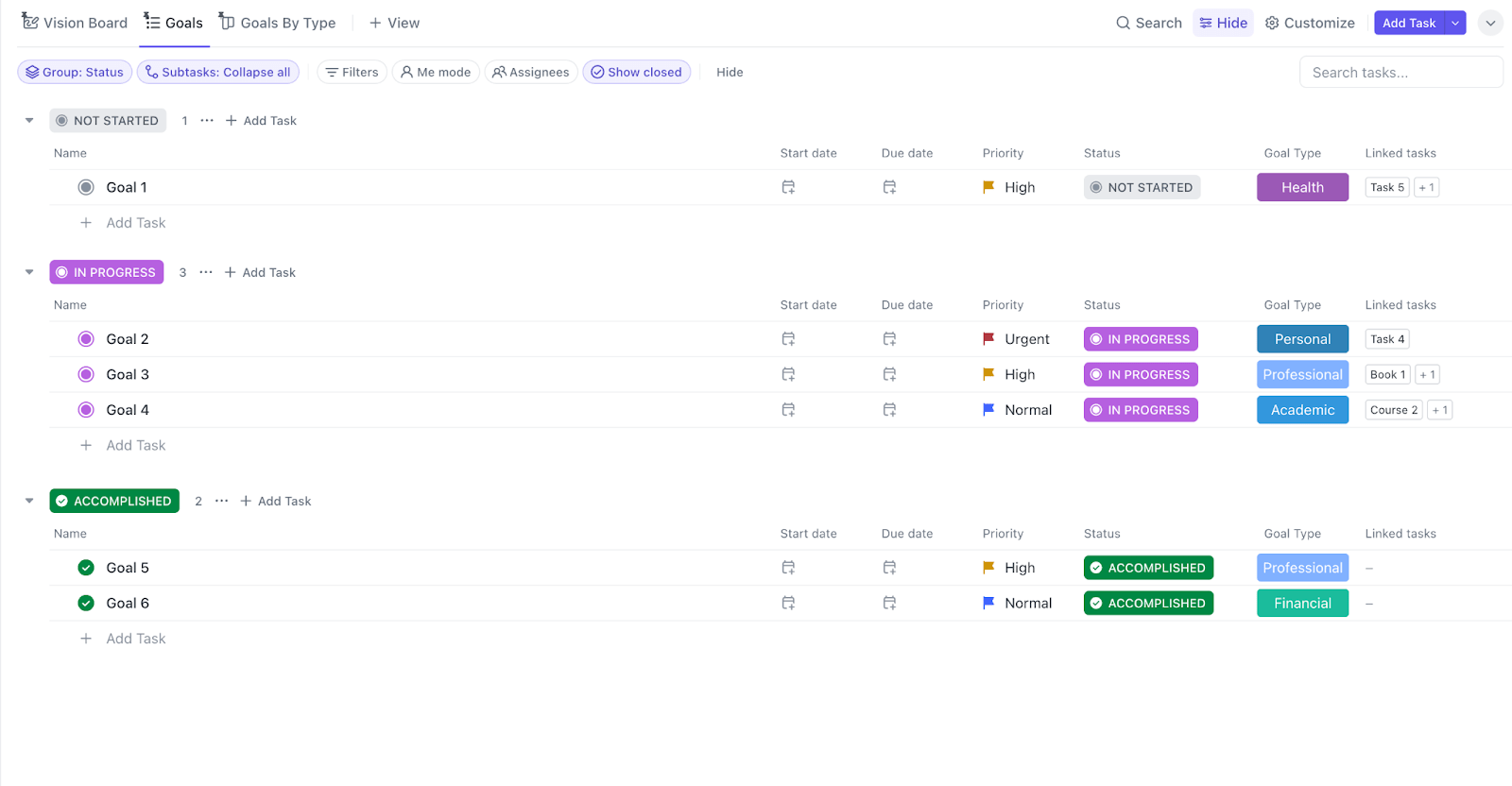
The ClickUp Personal Productivity Template helps me categorize tasks by priority, allowing me to focus on what’s most important while visualizing the progress of all tasks. I can also customize the template to set SMART goals, create a schedule, remind myself to take breaks, and even accelerate my progress with collaboration features.
Here’s what the template helps me do:
- Categorize tasks by urgency and importance
- Track tasks and get a clear overview of where I stand daily
- Align tasks with specific, measurable, achievable goals
- Set break reminders to prevent burnout and maintain a healthy work pace
- Share tasks and progress with my team to speed up workflow and maintain accountability
The best part? ClickUp integrates with 1000+ apps, including those you use daily, such as Google Workspace, Slack, HubSpot, Outlook, and more!
Summarize this article for me pleaseTips for Sustained Productivity
Once you find a hack that works, consistency is what turns it into a lasting advantage. Start small, experiment, and refine over time.
1. Building productive habits
Don’t try to adopt all 20 hacks at once. Pick one or two that match your current pain points—like time blocking for overloaded calendars or the two-minute rule for inbox overwhelm—and practice them daily.
For instance, if time blocking has proven effective, schedule time blocks for your most important daily tasks. ClickUp’s Recurring Tasks feature is a powerful tool for automating reminders for these key activities.
2. Managing distractions
Distractions are unavoidable in a fast-paced organization. However, you can take proactive steps to mitigate their impact.
For example, when working with ClickUp Docs, ClickUp’s Focus Mode allows you to immerse yourself in your writing without the noise of notifications or interruptions. Combine this with ClickUp Reminders for critical deadlines and tasks, and you’ll find it easier to maintain focus.
3. Setting realistic goals
Setting ambitious goals is essential, but they must be grounded in reality to be effective. Use ClickUp Goals to define clear, actionable objectives that align with your broader business strategy.
4. Tracking progress and adjusting strategies
Regularly monitoring your performance and measuring your productivity can help you stay on track. With ClickUp’s Dashboards, you can visualize your output and identify trends over time. This data-driven approach empowers you to adjust your strategies proactively.
For example, if you notice a dip in productivity during certain hours, you can schedule your easiest, most mundane tasks for those times. Similarly, try shifting your most demanding tasks to times when you’re naturally more alert.
Summarize this article for me pleaseStaying Productive Consistently with ClickUp
Heightened productivity requires minimal distractions, seamless collaboration, and clear alignment between daily tasks and larger goals. Productivity hacks aren’t just about doing more—they’re about creating a rhythm that works for you and your team.
Use this list to discover a few high-impact hacks, implement them with ClickUp, and keep iterating as your work evolves.
Ready to put these ideas into practice and simplify your tool stack at the same time? Sign up for ClickUp and turn your daily grind into a more focused, sustainable, and productive workflow.
Summarize this article for me pleaseFrequently Asked Questions
How many productivity hacks should I use at once?
Start with one to three hacks that directly address your biggest bottlenecks—for example, time blocking plus the two-minute rule. Once those feel natural, layer in others as needed.
Which productivity hacks are best if I manage a team?
Team leads often see quick wins from time blocking for shared focus time, SMART goals for clarity, delegation, and weekly reflection using shared Dashboards to align on priorities.
What if a productivity hack stops working?
Treat hacks as experiments. If something stops working, review what changed—your workload, tools, or schedule—and adjust. Use your weekly review to decide whether to tweak the system or try a different approach.
Are productivity hacks just for work?
No. Many of these apply to personal projects and life admin—like using the Ivy Lee method to plan weekends, or time blocking for exercise and learning.
Do I need a specific app to use these hacks?
You can start with a notebook or basic calendar, but a unified tool like ClickUp makes it easier to centralize tasks, docs, communication, and automations so the hacks stick.


Everything you need to stay organized and get work done.

Recent Articles
8 Communication Strategies That Actually Fix Team Chaos 
8 Communication Strategies That Actually Fix Team Chaos
ADHD Task Management: How to Build a System You’ll Still Use in a Month 
ADHD Task Management: How to Build a System You’ll Still Use in a Month
What Is Tacit Knowledge? Definition, Benefits and Examples
What Is Tacit Knowledge? Definition, Benefits and Examples
