






Still downloading templates?
There’s an easier way. Try a free AI Agent in ClickUp that actually does the work for you—set up in minutes, save hours every week.
Sorry, there were no results found for “”
Sorry, there were no results found for “”
Sorry, there were no results found for “”
At 11:47 p.m., someone in the campaign chat drops a message: ‘Did anyone update the voter outreach list?’ Three minutes later, another reply comes in: ‘Which doc are we using now?’
By midnight, half the team is working off different versions, and Election Day is getting closer.
That’s what political campaigns actually look like behind the scenes: fast decisions, late nights, and a constant scramble to keep people, data, and messaging aligned.
Political campaign tools have stepped in to fill that gap. From managing volunteers and field ops to tracking voter outreach, fundraising, communications, and internal coordination, software has become the backbone of modern campaigns.
In this guide, we break down 10 of the best political campaign tools – the ones campaign teams can rely on when things get intense and the stakes are high. 📈
Political campaign tools help candidates, campaign managers, and advocacy organizations coordinate voter outreach, manage volunteers, track donations, and communicate with supporters.
Running a campaign often means you’re juggling dozens of moving pieces, like canvassing schedules, donor databases, volunteer coordination, event logistics, and compliance reporting. This creates work sprawl: the fragmentation of work activities across multiple, disconnected tools where critical information gets lost.
These tools are used by candidates at every level, from local school boards to federal races, as well as political action committees, issue advocacy groups, and grassroots organizers.
Modern political campaign management software has evolved to incorporate voter file integration, predictive analytics, peer-to-peer texting, and AI-driven voter targeting to maximize limited budgets and volunteer hours.
📮 ClickUp Insight: 92% of knowledge workers risk losing important decisions scattered across chat, email, and spreadsheets. Without a unified system for capturing and tracking decisions, critical business insights get lost in the digital noise. With ClickUp’s Task Management capabilities, you never have to worry about this. Create tasks from chat, task comments, docs, and emails with a single click!
Choosing the wrong tool for your campaign can lead to wasted time and money, forcing your team into rigid workflows that don’t fit your needs. This frustration builds as deadlines loom, volunteers get mixed signals, and you can’t scale your operations when it matters most.
Here are the key criteria to evaluate:
🧠 Fun Fact: Front-porch campaigning was once a major strategy: candidates like Warren G. Harding during the 1920 U.S. election stayed at home and let supporters come to them instead of traveling around the country. This low-mobility style emphasised local voter interaction and personal touch long before digital campaigning existed.
Here’s how the top 10 political campaign tools stack up against each other:
| Tool | Best for | Best features | Pricing* |
| ClickUp | All-in-one campaign planning, execution, and AI-powered automation | Whiteboards for campaign planning, Super Agents for autonomous workflows, Dashboards for real-time visibility, ClickUp Brain for contextual AI, Docs, Automations, Forms | Free Forever; Custom enterprise pricing |
| NationBuilder | Community organizing with integrated CRM, website, and fundraising | Unified supporter profiles, political website templates, email & text broadcasting, segmentation based on engagement | Starter from $41/month; Pro from $179/month; Enterprise custom |
| NGP VAN | Democratic & progressive campaigns needing voter file access | VoteBuilder voter file, MiniVAN canvassing app, FEC-compliant fundraising, turf cutting & contact tracking | Custom pricing |
| Aristotle Campaign Manager | Non-partisan campaigns needing voter data + compliance | National & state voter files, donor CRM, automated FEC/state compliance reporting | Custom pricing |
| i360 | Republican & conservative campaigns | National voter file, predictive modeling, offline canvassing app, digital ad targeting | Custom pricing |
| Catalist | Progressive organizations focused on data & analytics infrastructure | National voter file, predictive turnout & persuasion models, list matching & enrichment | Membership-based |
| New/Mode | Advocacy and constituent engagement campaigns | Email/call/tweet-your-rep actions, automated representative matching, web embeds | Free plan; Paid from $44/month |
| RunningMate (Civitech) | Down-ballot & first-time candidates | Easy voter targeting, volunteer management, and interactive maps | Custom pricing |
| Impactive | Relational organizing through supporter networks | Contact importing, voter matching, gamified outreach, leaderboards | From $50/month; Enterprise custom |
| Daisychain | AI-powered digital organizing & personalized outreach | Automated SMS/email journeys, unified supporter timelines, centralized inbox | Custom pricing |
Our editorial team follows a transparent, research-backed, and vendor-neutral process, so you can trust that our recommendations are based on real product value.
Here’s a detailed rundown of how we review software at ClickUp.
You need a tool that adapts to the unique chaos of a campaign, not one that adds to it.
The best political campaign tools connect your voter outreach, fundraising, volunteer coordination, and compliance reporting into a unified system.
Here are the top tools that improve operational efficiency. ✨
First off on our list, we’ve got ClickUp, the world’s first Converged AI Workspace. Planning execution, visibility, and intelligence live together here, reducing tool sprawl and avoiding confusion.
For fast-moving teams like political campaigns, that convergence matters. Whether you’re coordinating a hundred volunteers or managing a multi-state field program, ClickUp adapts to your workflow rather than forcing you into a rigid structure.
Let’s look at how you can plan a campaign with ClickUp:
Campaign strategy has multiple moving parts at the start: maps of voting districts, issue priorities, voter segment sketches, outreach sequences, messaging hierarchies… It all starts as a brainstorm.

ClickUp Whiteboards gives your team shared visual space to sketch ideas, cluster themes, and map your entire campaign picture before turning it into execution.
For instance, your communications and field teams in a live planning session. On a Whiteboard, they build a voter-segmentation map, link key outreach ClickUp Tasks to each segment, and attach draft messaging Docs. Then they immediately convert top priority segments into structured Lists that become executable tasks.
Create your campaign with ClickUp:
Busy campaigns have routine heavy work, including follow-ups, daily summaries, progress reports, volunteer check-ins, and weekly outreach recaps.
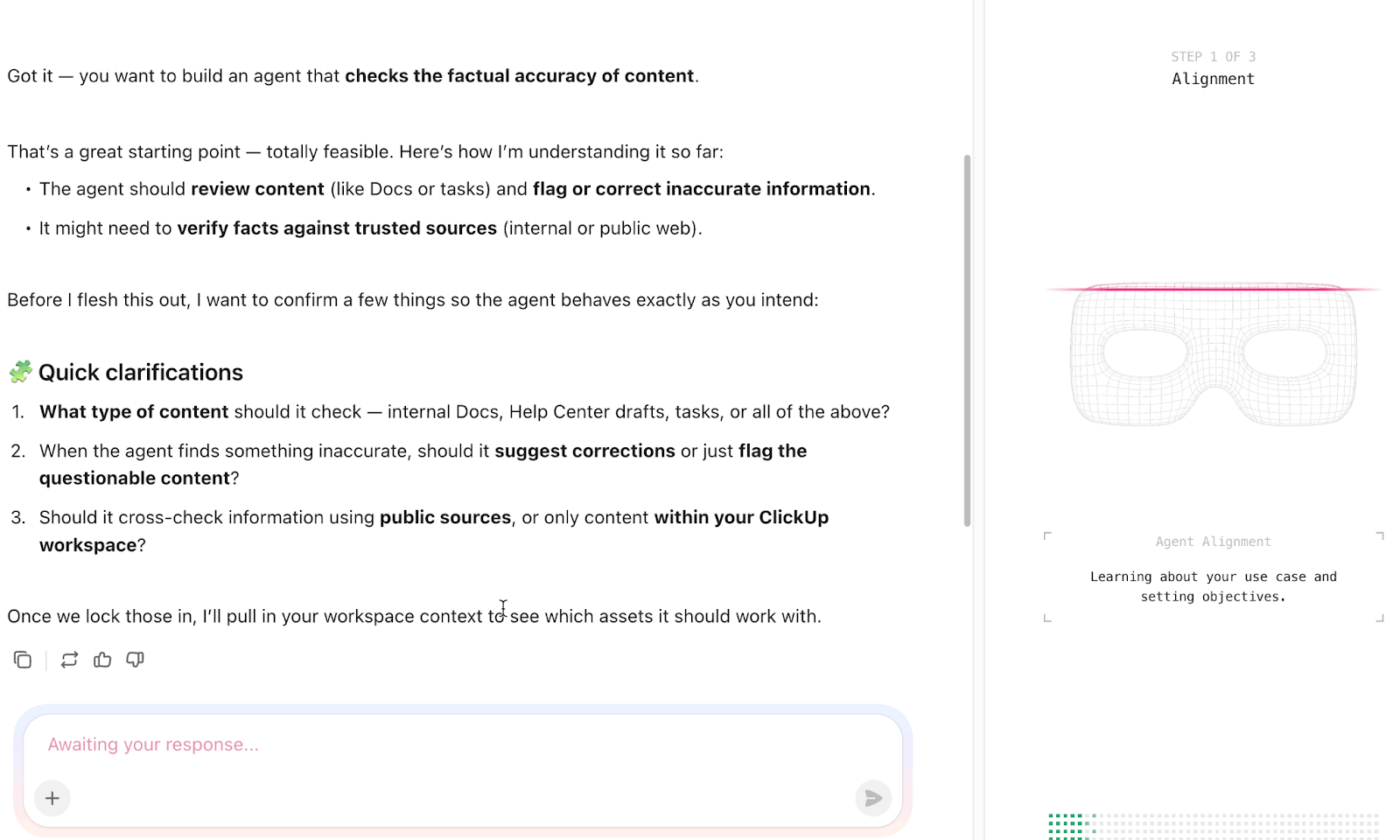
ClickUp Super Agents are AI teammates built into your workspace with context about your campaign, so they can perform multi-step workflows autonomously and learn as they go. They can be triggered manually or set to operate around the clock.
Once your campaign rhythm is defined, you can configure a Super Agent to draft weekly outreach reports from your activity streams. It compiles which tasks were completed, what volunteers reported, what’s overdue, and highlights shifts from last week. The result is a ready-to-present summary.
Build your first Super Agent:
ClickUp Dashboards give you real-time visibility into everything that matters: volunteer engagement, event turnout, task progress, deadlines, and communications outputs. They can include charts, stats for operational metrics, workload balances, overdue task trackers, and more – configured however your team needs.

For example, you can create a ‘Field Ops’ dashboard that shows how many voter calls were completed, how many doors were knocked, which regions are behind targets, and which volunteers haven’t yet been assigned follow-ups. When something trends off track last week, everyone sees it instantly.
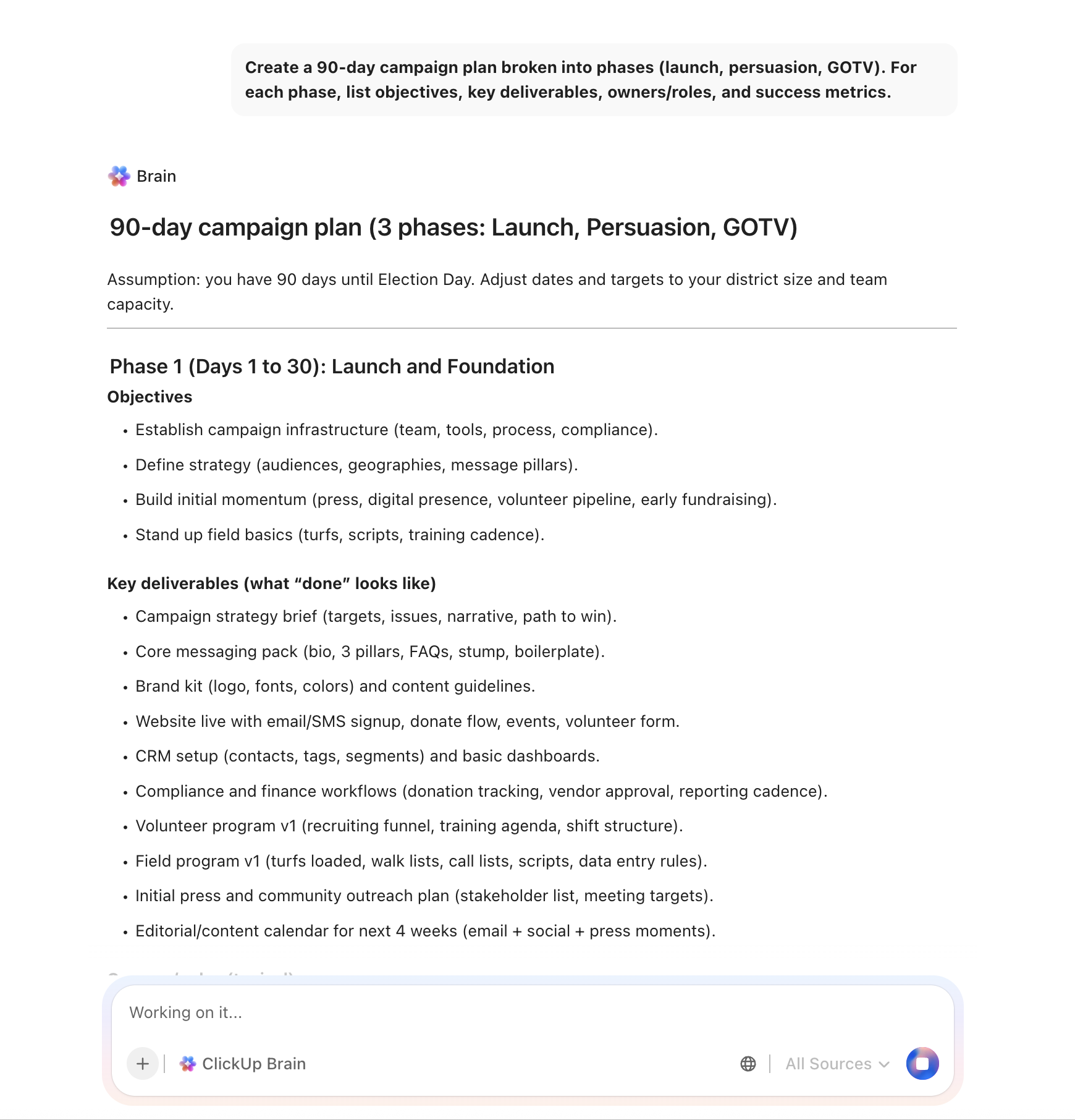
ClickUp Brain is your built-in contextual AI assistant that understands everything about your workspace: tasks, comments, Docs, Whiteboards, and more. It’s designed to answer contextual questions, produce summaries, and take actions that reflect the real state of work instead of generic AI outputs.
Here are some example prompts you can ask:
A G2 reviewer praises ClickUp:
What’s most helpful about ClickUp is that it truly runs our entire agency. We use ClickUp all day long, for task management, Super Agents, internal team communication, content calendars, documentation, campaign tracking, and so much more. It’s not just a project management tool for us, it’s our operating system.
The Super Agents are a huge upside. Because our entire workflow lives inside ClickUp, the agents can support almost anything we need. They help us move faster, think clearer, and execute more efficiently without bouncing between tools.
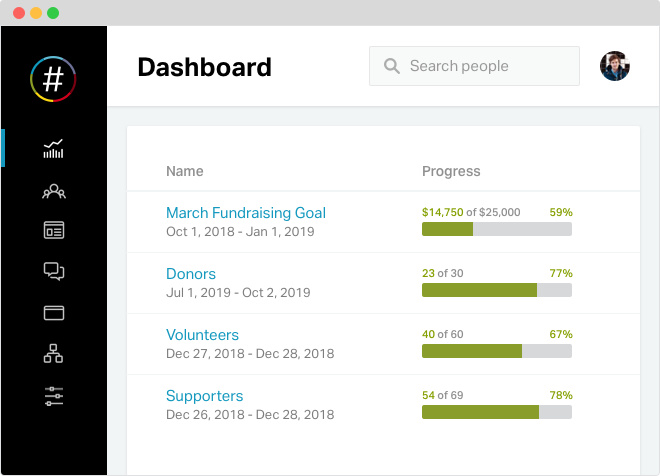
NationBuilder positions itself as a community organizing system that combines CRM, website builder, email marketing, and donation processing. It offers an integrated approach where supporter data flows seamlessly between your website, email lists, and outreach efforts.
The platform’s ‘Nation’ database serves as a hub for all supporter information, tracking every interaction from website visits to donations to event attendance. This profile approach helps campaigns understand supporter engagement over time and segment outreach accordingly.
NationBuilder also includes built-in website templates, tools foremail campaign management, and text broadcasting, reducing the need for custom development.
Here’s what a G2 reviewer had to say:
NationBuilder is a one-stop shop for CRM, website, and credit card transactions. Usually these are complicated and piecemeal, NationBuilder gets you up in running often in hours instead of days or weeks…Sometimes searches and batch updates are clunky. Social media sharing has lagged behind current trends. Podcasting and RSS would be helpful
🧠 Fun Fact: The 1952 U.S. presidential election marked a turning point in media, where television news networks, specifically CBS, famously utilized the UNIVAC I (Universal Automatic Computer) to predict the outcome of the race between Dwight D. Eisenhower and Adlai Stevenson.
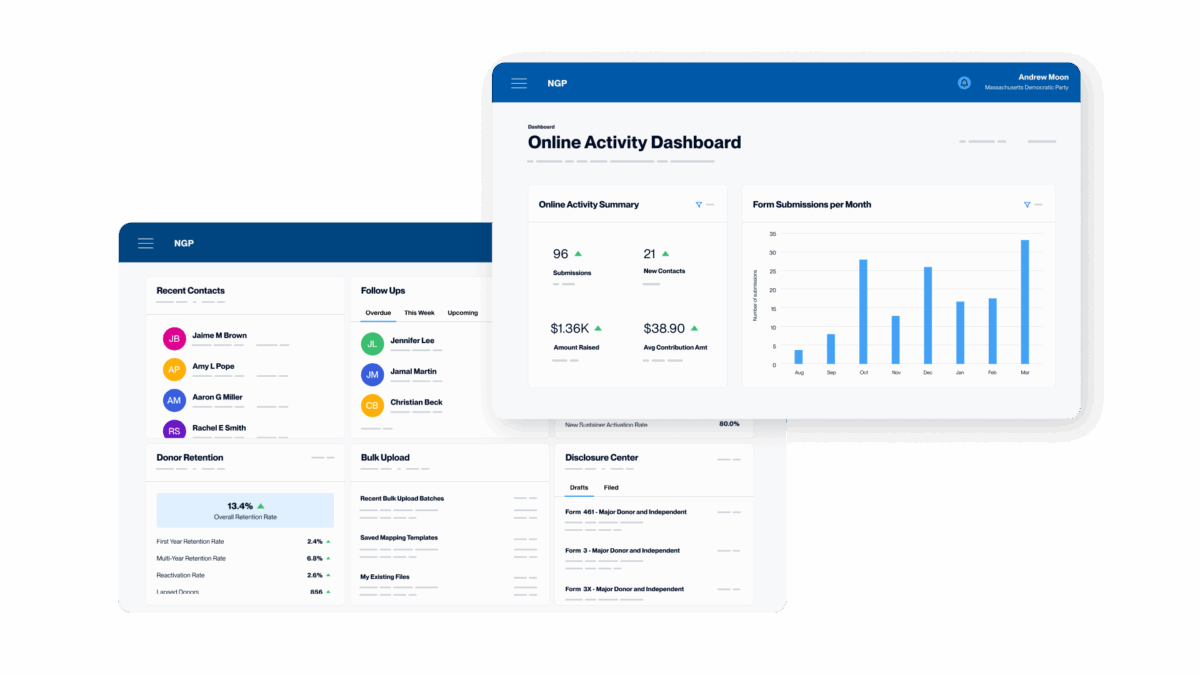
NGP VAN is the dominant technology provider for Democratic campaigns and progressive organizations in the United States. The platform combines voter file access through VoteBuilder, fundraising tools through NGP, and digital organizing capabilities, making it the default choice for campaigns operating within the Democratic ecosystem.
Its file interface provides access to state voter files enhanced with consumer data, modeling scores, and contact history from previous campaigns. Field organizers use it to cut turf, generate walk lists, and record voter contacts. The platform’s strength comes from network effects and integrated tools to manage a compliance checklist that helps avoid FEC penalties.
From a G2 review:
All voters are available and their information is usually up to date. Basic functions like quick look up and simple lists and turfs usually work well…During advanced use there are many roadblocks to accomplish goals. Right now I am struggling to make sure that when lists are printed out for contacting voters, that canvassers can adequately note if the voter has never been contacted or is hostile or especially if they are threatening
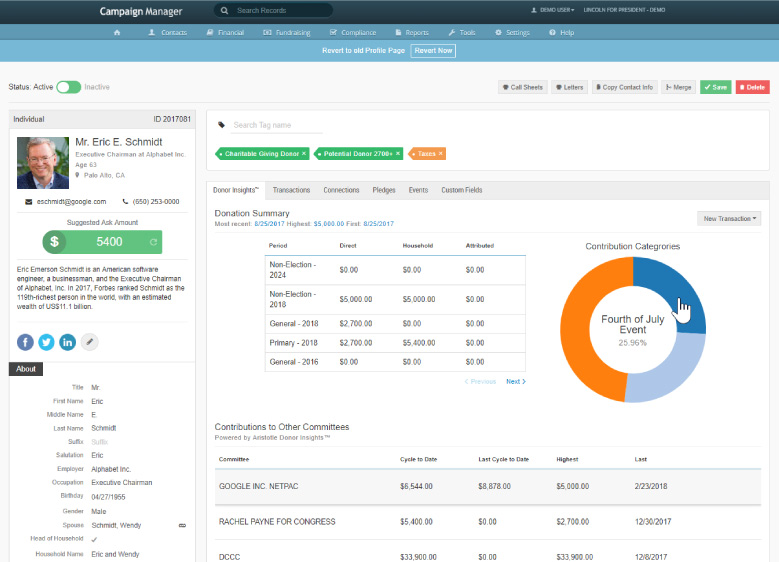
Aristotle has provided political data and campaign technology for decades, serving campaigns across the political spectrum. It combines voter file access, donor management, and compliance reporting for campaigns that need robust data without ecosystem restrictions.
The platform’s voter data capabilities include access to national and state voter files with demographic overlays, consumer data, and predictive modeling. Campaigns can build targeted universes for outreach and track contact history across multiple communication channels.
Aristotle serves campaigns regardless of party affiliation, making it an option for Republican, Democratic, and independent candidates.
Here’s a firsthand perspective:
Simple interface yet supports a lot of functions, such as various aspects of finance…Requirements of some of the features are too extensive
🔍 Did You Know? By the 2008 U.S. presidential campaign, Barack Obama’s team built a dedicated social platform called My.BarackObama.com, enabling supporters to organize, call voters, and coordinate in ways that had never been possible before.
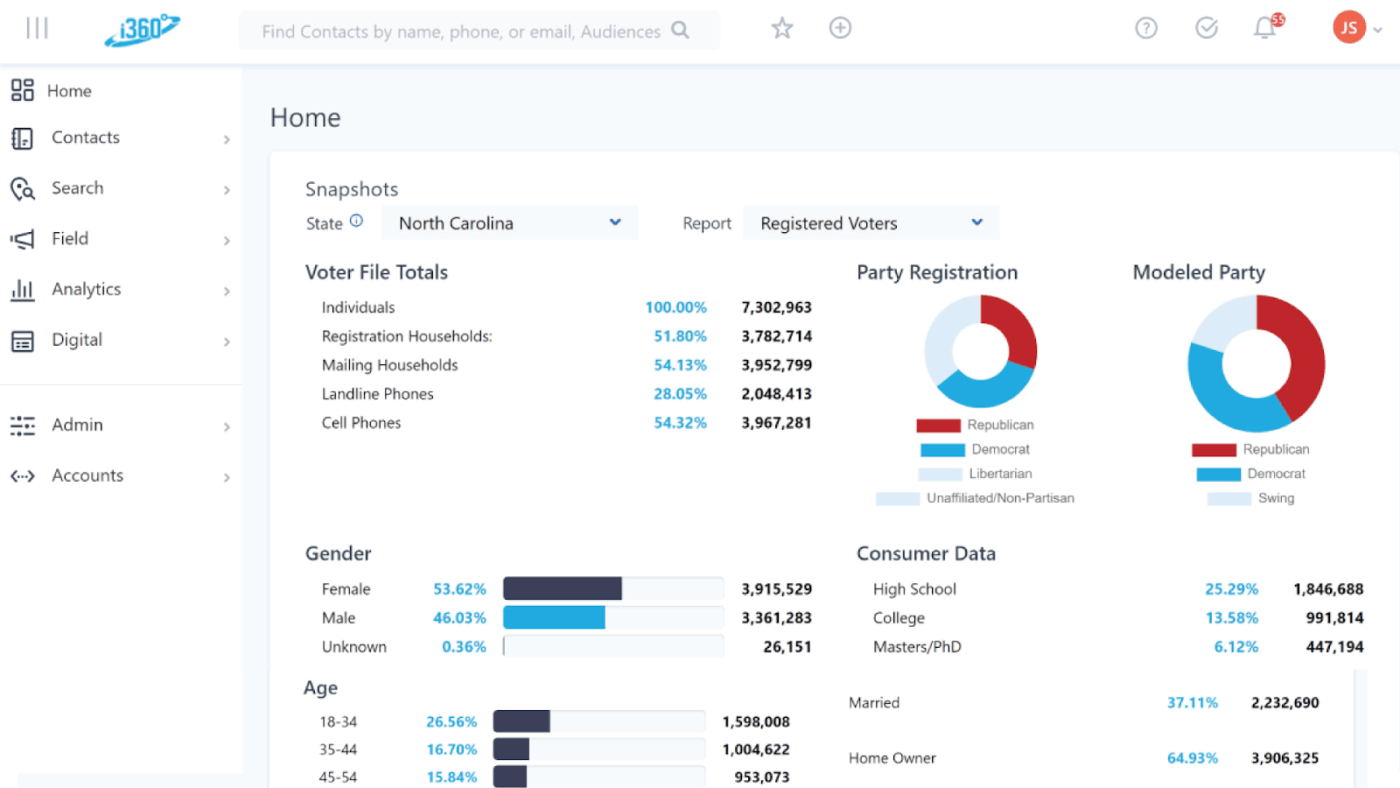
i360 serves as the primary data and technology platform for Republican and conservative campaigns, offering voter data, canvassing tools, and digital advertising capabilities. The platform provides access to a national voter file enhanced with consumer data and predictive modeling designed for conservative targeting.
The platform’s data science capabilities include predictive models for voter persuasion, likelihood of turnout, and issue positions, helping campaigns allocate resources to the voters most likely to respond.
Directly from a user:
It is so easy to call back-to-back people with the way i360 automates phone calls. It is also easy to set a disposition when going to visit people’s homes for political campaigns…Sometimes, the app can be a bit buggy and freezes when you add a script for leaving a voicemail.

Catalist operates as a data infrastructure provider for progressive organizations, maintaining a national voter file that serves as the foundation for targeting and analytics. Rather than a campaign management platform, it provides the data layer that other tools build upon.
Its database combines voter registration records with consumer data, demographic information, and contact history. The platform’s membership model means data collected by one organization enriches the file for all members, improving targeting accuracy over time.
One review puts it this way:
The best thing about Catalist.io is that it gives you multiple insights across all platforms at once… At times when I am looking at my dashboard, I find it overwhelming to be bombarded with so much data and insights.
🧠 Fun Fact: While the famous Kennedy-Nixon debate in 1960 is often cited as the first major televised debate, an earlier 1956 televised debate actually featured two prominent women. Eleanor Roosevelt and Margaret Chase Smith debated on behalf of their parties, marking an early use of TV as a campaign medium.

New/Mode focuses on advocacy campaigns and constituent engagement rather than electoral politics. The platform enables organizations to create multi-channel advocacy actions, like emails to legislators or phone calls to officials, that supporters can take with minimal friction.
The platform’s strength lies in making advocacy accessible. Supporters enter their address, and New/Mode automatically identifies their elected representatives and routes messages appropriately. For issue advocacy organizations and nonprofits, it provides purpose-built tools that general campaign platforms lack.
According to one reviewer:
The user interface for their V2 impact platform is very user friendly with thoughtful designs. The auto-selection of recipients based on postal/zip codes is a rare feature in this space.

RunningMate targets down-ballot and first-time candidates who need effective campaign tools without the complexity or cost of enterprise platforms. The platform simplifies voter outreach, canvassing, and volunteer coordination for campaigns that may lack experienced political operatives.
Civitech designed RunningMate to lower barriers for candidates running for local office like school boards or city councils, where resources are limited.
🔍 Did You Know? Before modern media, campaigning relied on rail travel. Candidates like William Jennings Bryan used whistle-stop tours, where trains would stop in many towns daily so the candidate could speak directly to crowds, building grassroots connections that technology now tries to digitally replicate.

Impactive focuses on relational organizing: the strategy of mobilizing voters through their personal networks rather than cold outreach. The platform helps campaigns leverage the connections supporters already have, turning every volunteer into a potential organizer.
The core concept is that people are more likely to vote or volunteer when asked by someone they know. Impactive enables supporters to import their contacts, identify voters in their networks, and send personalized outreach, gamifying participation to encourage friendly competition.

Daisychain streamlines digital organizing for progressive campaigns through AI-powered automation and unified supporter data. The platform connects tools like ActBlue and Mobilize, enabling personalized SMS/ email journeys, assignments, and tracking.
It emphasizes scalable 1:1 outreach via automations, charms (personalized images), and pathways that guide supporters through engagement steps, rather than peer-to-peer network mapping.
🧠 Fun Fact: The word ‘candidate‘ actually comes from the Latin candidus, meaning ‘shining white,’ referring directly to the specially whitened togas (the toga candida) worn to signify honesty and lack of corruption
Political campaigns lose when strategy lives in one tool, field data in another, messaging in someone’s inbox, and deadlines in someone’s head.
That’s where ClickUp becomes the backbone. You can map the campaign visually with Whiteboards and automate repetitive work with Super Agents. Monitor progress in real time through Dashboards as you sharpen messaging and internal alignment using ClickUp Brain.
If you’re building a modern campaign and want software that adapts as fast as politics does, sign up to ClickUp for free today! ✅
Can a general project management tool like ClickUp work for political campaigns?
Yes. Campaigns are fundamentally project management challenges with unique constraints. ClickUp handles volunteer coordination, event planning, and task management, while its AI capabilities help manage the information overload common in fast-moving campaigns.
What’s the difference between a campaign CRM and campaign management software?
A campaign CRM focuses on supporter and donor relationships by tracking interactions and donations. On the other hand, a campaign management software encompasses broader operational needs like task assignment, volunteer scheduling, and field coordination.
How is AI changing political campaign management?
AI now powers voter targeting models, automates routine communications, and helps campaigns identify patterns in supporter behavior. Tools like ClickUp Brain bring AI assistance to daily campaign operations by drafting outreach, prioritizing tasks, and surfacing relevant information without manual searches.

© 2026 ClickUp

There’s an easier way. Try a free AI Agent in ClickUp that actually does the work for you—set up in minutes, save hours every week.