
Sorry, there were no results found for “”
Sorry, there were no results found for “”
Sorry, there were no results found for “”
Ever feel like you’re drowning in a sea of notes? Meeting notes scattered across one app, team task lists scribbled in a diary, and big ideas slipping through your fingers before they can take shape.
It can feel overwhelming.
That’s where the right note-taking app can change everything. Tools like NotebookLM and Obsidian streamline your workflows, connect your thoughts, and bring order to the chaos.
In this blog post, we’ll compare these two tools and explore their unique features, strengths, and differences to help you decide which fits your style. And if neither quite feels like ‘the one,’ stick around—we’ve got a wildcard option that might steal the show.
Let’s enter the Notebook LM vs. Obsidian debate and find the perfect match for your note-taking needs.
| Feature | NotebookLM | Obsidian | ClickUp |
| Core Purpose | AI-powered research and summarization tool | Local-first note-taking & knowledge graph | All-in-one workspace for notes, tasks & docs via ClickUp Docs |
| AI Capabilities | Strong AI summaries, insights, audio overviews | No native AI; plugins required | Built-in AI assistant ClickUp Brain for writing, summarizing & task creation |
| Organization Style | Multi-document analysis with source citations | Backlinks, graph view, customizable vaults | Connected docs, tasks, spaces, & Universal Search |
| Collaboration | Seamless sharing in Google Workspace | Limited native collaboration; plugins needed | Real-time co-editing, comments, chat, & workflows |
| Integrations | Google ecosystem | Plugins & community extensions | 1,000+ integrations via ClickUp Integrations |
| Customization | Limited formatting & structure suggestions | Highly customizable with themes & plugins | Flexible docs, templates, views, and automations |
| Best For | Students & researchers needing fast AI insights | Knowledge workers who prefer customizable local systems | Teams needing notes + tasks + projects in one place |
| Pricing | Free (beta) | Free personal use; paid add-ons | Free Forever; Paid plans from $7/user/month |

Developed by Google Labs, NotebookLM is an innovative AI tool for note-taking that represents a shift from static note repositories to dynamic, interactive knowledge systems.
It transforms into an expert by uploading PDFs, videos, documents, and websites. It summarizes uploaded files and generates creative outputs grounded in your materials, complete with relevant sources.
Plus, since it’s your Notebook, your data is never used to train the NotebookLM algorithm.
NotebookLM offers several features that help students, researchers, freelancers, and businesses boost productivity.
Let’s see how you can use NotebookLM to enhance your workflow:
Imagine turning your documents into podcast-style conversations between two AI voices. You can listen to these ‘Deep Dive’ discussions with a single click, absorbing uploaded information on the go.

NotebookLM scans transcribed conversations to pinpoint specific information, saving you the hassle of combing through lengthy audio files for key details. It also allows you to generate a public audio link and share it with your team.
NotebookLM fetches answers to your questions with citations that link directly to the original sources. This means you’ll always know where the information came from without wasting time manually fact-checking on search engines.

Its key feature is that the chat responses are based only on the sources you provide unless you ask it to do something creative, like rewriting a story.
📌 Note: NotebookLM currently supports various source types, including Google Docs, Google Slides, PDF files, Markdown files, web URLs, YouTube URLs of public videos, and audio files.
Notebook LM can analyze several articles and documents simultaneously, helping you find common themes, different opinions, and new trends among various sources.

It’s like having a super-powered research assistant who can quickly understand a lot of information, saving you time and effort.
NotebookLM turns messy notes into organized documents. Choose a set of notes and ask the tool to create something new. Based on your ask, it suggests formats like a thematic outline or study guide.

You can type in custom instructions to shape your notes into an email newsletter, script outline, marketing plan, and more. Once you’ve completed the draft, you can export it to Google Docs for final edits.

Obsidian is a flexible, privacy-centered note-taking app with multiple plugins and themes that adapt to your thinking and working. It stores notes locally on your device, allowing you to access them quickly, even offline.
Several features in Obsidian make taking notes seamless. Let’s explore them together:
Obsidian allows you to design a standardized format for your to-do list and divide tasks into sections, such as client meetings, workout plans, or creative projects.

It also lets you track and manage tasks across your entire Obsidian vault. You can query tasks, mark them as done from anywhere, and use features like due dates, recurring tasks, completion dates, checklist subsets, and advanced filtering.
The Graph View in Obsidian gives you a bird’s-eye view of your entire vault, showing how all your notes are interconnected.

Each note appears as a node, and lines represent links between them. You can zoom in on specific clusters, filter by tags or links, and customize the appearance to make it easier to explore complex ideas visually.
Obsidian has a built-in tool called ‘Canvas’ that lets you map ideas as cards on a board. You can move, group, and connect these cards however you like, creating a non-linear representation of your thoughts.

You can embed online sticky notes, images, PDFs, videos, audio, and articles right into it. Moreover, the Canvas files are stored locally in an open JSON format, making them easy to integrate with other tools, apps, scripts, and Obsidian templates.
You can now turn your plain text notes and images into a shareable website. Obsidian Publish lets you create a public wiki, knowledge base, or digital garden, making your thoughts and information accessible online.

You can fully customize the look of your Obsidian Publish site with CSS and Javascript. Other features include hover previews for quick popovers of linked pages and fast text editing, all powered by the simplicity of Markdown.
You can also use stacked pages to browse links in horizontal panes, like flipping through papers, and backlinks that automatically list pages referencing the one you’re viewing.
Bonus: ClickUp vs. Obsidian
At first glance, it can be challenging to distinguish between NotebookLM and Obsidian based on their key features alone. The table below provides an overview of their key differences.
Feature | NotebookLM | Obsidian |
| AI assistant | ✅ | ❌ |
| Real-time collaboration | ✅ | ✅ |
| Knowledge graph | ❌ | ✅ |
| Backlinking | ❌ | ✅ |
| Mobile app | ✅ | ✅ |
| Syncing across devices | ✅ | ❌ |
| Offline functionality | ❌ | ✅ |
| Markdown support | ❌ | ✅ |
| Spell check | ✅ | ✅ |
| API support | ❌ | ✅ |
| Embed from third-party sites | ✅ | ✅ |
Now, let’s dig into the finer details.
NotebookLM simplifies your workflow by helping you combine documents and extract key insights, making it perfect for tasks like studying or applying brainstorming techniques. For example, it can summarize chapters, answer questions, and create study aids to help you focus on learning.
Obsidian, in contrast, offers a customizable vault system with features like split-pane views. This allows you to work on multiple notes side by side, which is excellent for multitasking and exploring connections between ideas.
Winner 🏆
Both AI tools are great, so choose the one that best fits your workflow!
NotebookLM’s knowledge management system centers on source linking. When summarizing or answering questions, it connects the answers to their original sources after surfing through the internet. This transparency makes it super handy for researchers or anyone who needs to keep track of where their information comes from.
In contrast, Obsidian takes a graphical approach. It lets you create a ‘web’ of interconnected thoughts and ideas, perfect for building personal wikis or long-term knowledge systems. With its Canvas feature, you can see how everything ties together from a top-level view.
Winner 🏆
Again, it’s a tie!
If your team uses Google Workspace, NotebookLM will integrate seamlessly into your workflows. This AI tool allows you to upload a marketing presentation, generate summaries or insights, and share them directly with colleagues, unlocking its ability to boost alignment and productivity.
Obsidian, on the other hand, is more tailored for individual use. While shared vaults are possible with plugins or third-party tools, they’re not as seamless as NotebookLM’s collaboration features.
However, Obsidian offers an entire version history for every note, making it easy to track changes, which is especially helpful when multiple users are involved.
Winner 🏆
NotebookLM takes the lead! For teams, NotebookLM’s seamless integration with Google Workspace and its AI tool’s collaboration features unlock the full power of shared productivity. Obsidian shines for individual workflows but falls short regarding native team collaboration.
NotebookLM operates almost entirely in the cloud, relying on Google’s servers to analyze and organize your documents. This means you’ll need an internet connection to take advantage of its features.
Although beneficial for accessibility and collaboration, NotebookLM might not satisfy users who need strong offline capabilities or are worried about data privacy.
In contrast, Obsidian is proudly offline-first. It uses open, non-proprietary files that prevent lock-in and preserve uploaded data. This approach gives you peace of mind about privacy and ensures you can continue working without an internet connection.
Winner 🏆
Obsidian wins in this area. Its offline-first design and use of non-proprietary file formats ensure that users retain full ownership of their data while working without connectivity.
When we researched NotebookLM vs. Obsidian, we used Reddit to determine what users think.
As one user puts it:
Everything I put into Obsidian is mine, forever, and if I choose, completely private and local. Everything you put into NotebookLM is not mine for as long as Google decides and is far from private, regardless of what I want. The “cool” factor is irrelevant to me if I can’t be sure my data is safe, secure, and forever mine.
On the flip side, another Redditor praises NotebookLM’s utility for time-strapped learners:
I’m digesting security white papers like crazy right now. I often have multiple sources, and they’re usually confusing. I feed it all the info I have, listen to the overview, and then question it like crazy. I ask for examples in related fields that I understand better, ask for FAQs, and then ask for backtesting.
Since I’m a full-time student with two jobs, I end up doing a lot of this on buses, between classes, shifts, etc. It’s like having a full-time research admin for a very specific topic.
Although NotebookLM and Obsidian have a lot of other user reviews on Reddit, both tools have their share of critics. So, where do you land in this battle of AI tools for note-taking?
Hold that thought because we want you to get acquainted with an all-in-one productivity platform.
Both NotebookLM and Obsidian are excellent in their own ways. But what if you need more than just note-taking? What if you want to combine your notes with task management, team collaboration, and project tracking all in one place?
Enter ClickUp, a robust NotebookLM vs. Obsidian alternative. It’s a complete productivity powerhouse that elevates your life and work.
Let’s explore its features together. 👇
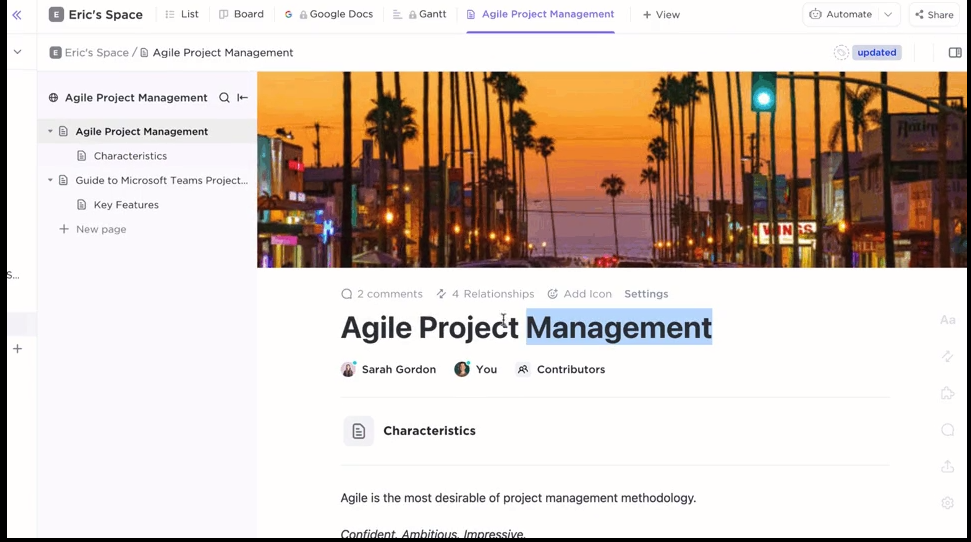
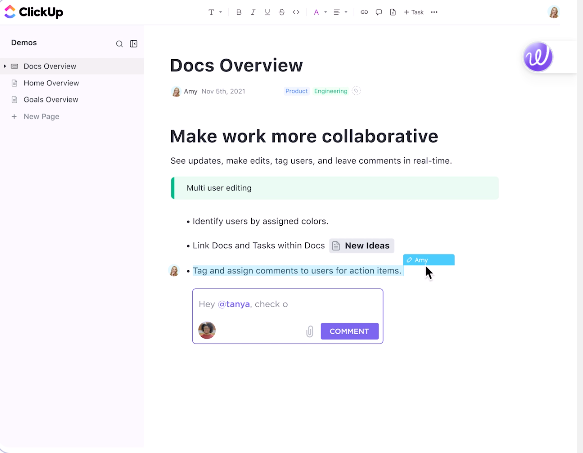
ClickUp Docs lets you create wikis, knowledge bases, checklists, or detailed notes tailored to your preferences. You can also use intuitive styling options like banners, tables, and rich text editing.
Plus, its nested pages and backlinks help you create an interconnected document management system with the bonus of tying them into your tasks and projects to keep your workflow moving.
And here’s the game-changer: you can turn any note into a task, assign it to yourself or a team member, and track progress without leaving the document. It’s perfect for those who want their ideas and to-dos to live in the same space.
👀 Did you know? Sharing your Docs within the platform is equally easy. Generate a shareable URL and control permissions to decide who can edit—your team, external stakeholders, or the public.
Imagine effortlessly capturing fleeting thoughts, links, and to-dos without disrupting your workflow. ClickUp Notepad makes this a reality through its integrated solution for quick note-taking within your existing workflow.
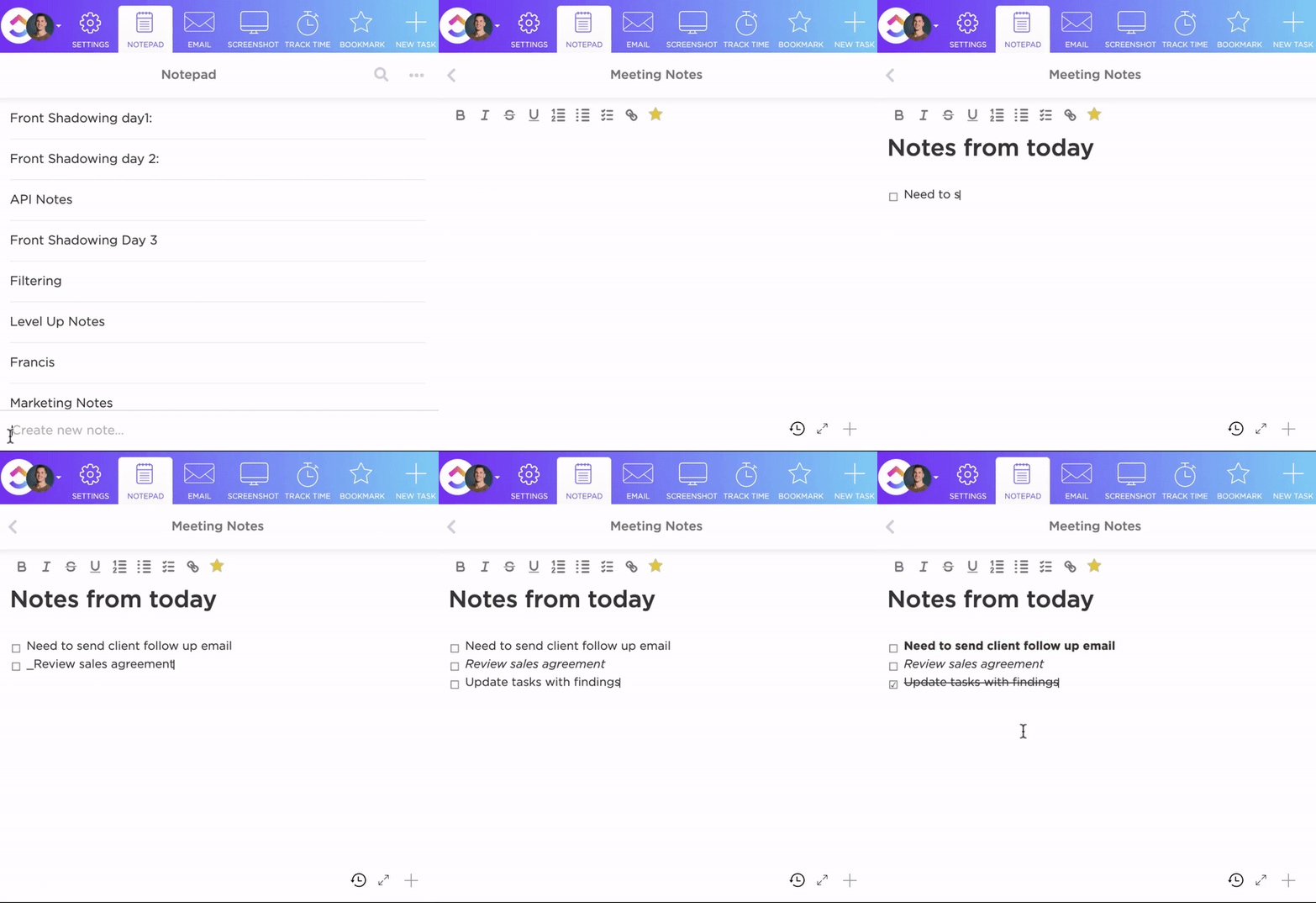
Your notes live within the same platform as your Tasks, Calendars, and Goals, making it easier to align team efforts without juggling multiple apps.
Plus, your notes are private by default, ensuring no one else in your workspace can see them. This lets you jot down personal thoughts without worrying about sharing sensitive information.
💡Pro Tip: Use ClickUp’s Chrome Extension to capture notes from anywhere on the web. You can save only the information you need, such as important links or snippets, with just a click, without disrupting your workflow.
Combine note-taking with artificial intelligence, and you’ll create a system where everything is contextually relevant. That’s what ClickUp Brain brings to the table.
This AI assistant helps you work smarter and faster, from brainstorming new ideas to polishing existing work.

One of the standout features of ClickUp Brain is its ability to link notes to Tasks and Projects. This means your notes are no longer isolated ideas sitting in a vacuum. Instead, you can jot down an idea during a meeting and turn it into a Task for a dedicated team member.

What makes this particularly powerful for note-taking is how effortless it becomes to refine your thoughts.
Instead of sifting through messy notes or unstructured ideas, let ClickUp Brain do the heavy lifting. Imagine scribbling key points during a meeting and, in seconds, having a professional email or a ready-to-share content draft. That’s the power of ClickUp Brain. 💪
💡Pro Tip: Use detailed prompts to get better results from ClickUp Brain. For example: ‘Turn notes on [topic] into a blog outline’ or ‘Draft an email about [update].’ Be specific with tasks, and watch them transform your ideas into organized content effortlessly!
ClickUp’s Connected Search unifies your files, documents, and tools in one place, making it effortless to find what you need, no matter where they’re stored.
Plus, integrating your favorite apps, such as Google Drive, Slack, and Figma, brings your entire tech stack to your fingertips, all from a single search bar in ClickUp.
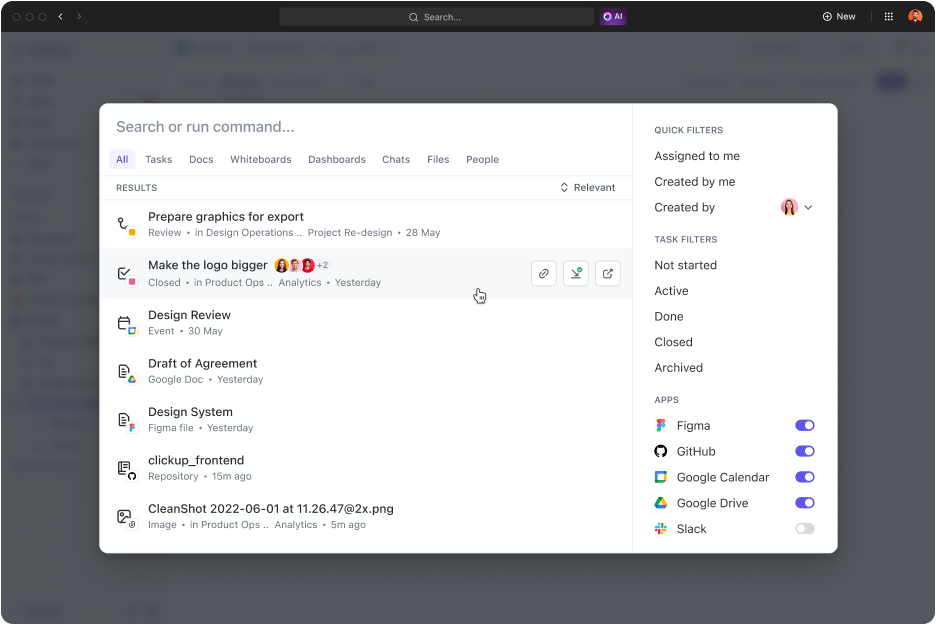
And it becomes more potent with time. As you use it, it adapts to your needs and provides personalized, more relevant results.
For instance, you can add custom search commands, like shortcuts to links, and store text for later for an intuitive search experience.
My company uses ClickUp as its main task management program. All team members, including management, use ClickUp daily for multiple departments: operations, HR, Sales, and marketing. ClickUp docs hold all of our company policies and procedures. The Dashboard oversees our clients’ and internal company tasks and projects. Their automation assists in avoiding doubling up on efforts. Their universal search function, which allows integrated programs to be searchable, is a time-saver. My team has benefited from their new AI functions when creating procedure manuals and summarizing their workload, daily tasks, and other details.
📮ClickUp Insight: We recently discovered that about 33% of knowledge workers message 1 to 3 people daily to get the context they need. But what if you had all the information documented and readily available? With ClickUp Brain’s AI Knowledge Manager by your side, context switching becomes a thing of the past. Simply ask the question right from your workspace, and ClickUp Brain will pull up the information from your workspace and/or connected third-party apps!
Why reinvent the wheel when ClickUp offers 1000+ ready-to-use templates for making your note-taking strategies structured and professional?
Take the ClickUp Meeting Notes Template, for instance.
It’s packed with features to help you deliver your best work in less time:
ClickUp Knowledge Base Template is another fantastic resource for transitioning from meeting notes to team-wide knowledge sharing. With sections for knowledge articles, FAQs, and resources, it’s perfect for organizing and sharing knowledge across your team.
To give you more, it integrates with Connected AI, making it easier than ever to link your knowledge with your workflows.
Both NotebookLM and Obsidian are solid tools. You can collate all your notes and thoughts and visualize them in ways you deem fit.
But what happens when your needs evolve, teams grow, and switching between multiple tools becomes a hassle?
That’s when you need a solution that scales with you. ClickUp is the perfect productivity tool for note-taking, task management, and project execution.
That’s why we’re the everything app, for work!
Sign up for ClickUp for free today and see for yourself.

Manasi Nair
Max 26min read
Manasi Nair
Max 20min read

Arya P Dinesh
Max 23min read

© 2026 ClickUp