






Still downloading templates?
There’s an easier way. Try a free AI Agent in ClickUp that actually does the work for you—set up in minutes, save hours every week.
Sorry, there were no results found for “”
Sorry, there were no results found for “”
Sorry, there were no results found for “”
You’ve likely experienced the friction of the data request queue.
When you have to wait days for an analyst to translate a business question into SQL, the opportunity to act on that data often passes. Snowflake Cortex helps reduce the back-and-forth between business teams and data teams by adding AI-powered querying and retrieval inside Snowflake. Teams can ask questions in natural language across governed data and move from question to answer much faster.
This guide walks through how to use Snowflake Cortex for enterprise analytics with capabilities like Cortex Analyst and Cortex Search, so more teams can get governed answers without waiting on the data request queue. You’ll also learn how to pair these insights with a Converged AI Workspace like ClickUp to ensure that every answer you get from Snowflake leads to a documented plan and an assigned task. 🤗
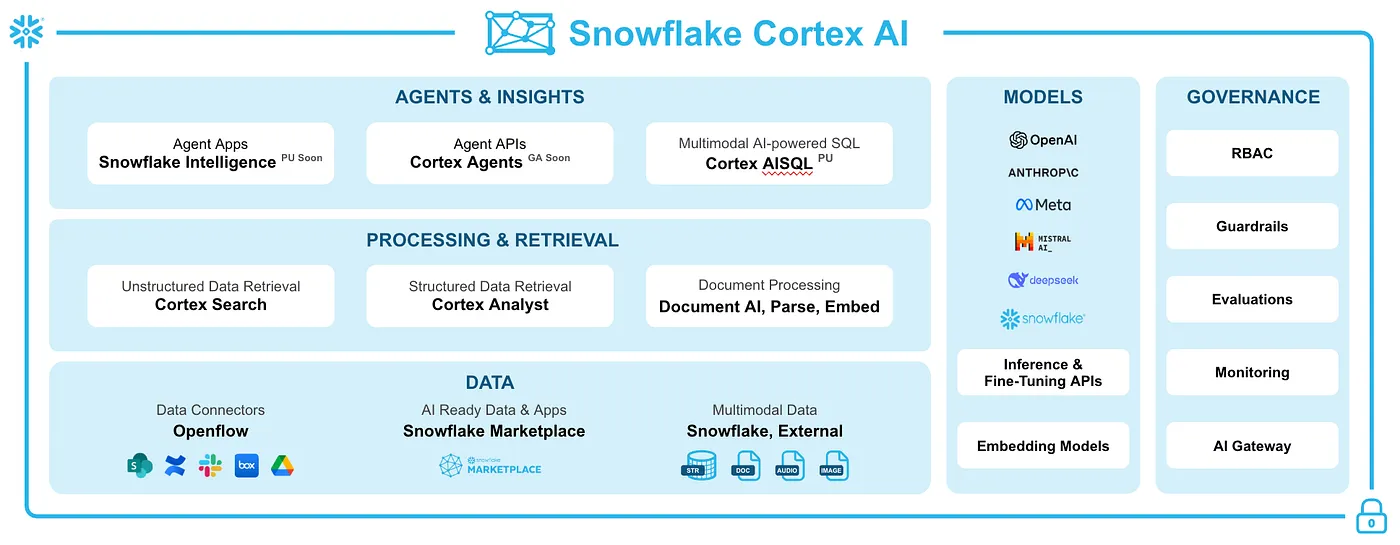
Snowflake Cortex is Snowflake’s managed AI capability set for structured and unstructured data. It includes tools like Cortex Analyst for natural-language analytics, Cortex Search for retrieval over indexed text, and Cortex Agents for orchestrating multi-step workflows inside Snowflake.
Cortex is built on three core pillars:
The real value here lies in the democratization of data. Your business users can finally ask questions in their own words and get trusted answers, governed within Snowflake’s security model, with access behavior depending on the underlying object and service configuration. No SQL degree required. ✨
📮 ClickUp Insight: 88% of our survey respondents use AI for their personal tasks, yet over 50% shy away from using it at work. The three main barriers? Lack of seamless integration, knowledge gaps, or security concerns.
But what if AI is built into your workspace and is already secure? ClickUp Brain, ClickUp’s built-in AI assistant, makes this a reality. It understands prompts in plain language, solving all three AI adoption concerns while connecting your chat, tasks, docs, and knowledge across the workspace. Find answers and insights with a single click!
Cortex isn’t a single tool—it’s a toolkit. Using it effectively means knowing which tool to grab for which job, while also knowing that using the wrong one leads to inefficient results.
Here are the core components so you can confidently choose the right capability for your specific analytics needs.
Your sales team wants to know which product was last quarter’s top performer, but they don’t speak SQL. Cortex Analyst acts as a translator in this case. It converts plain-language questions into verified SQL by referencing a semantic model you define.
A semantic model is a business-aware layer that describes your tables, metrics, relationships, and terminology so analysts can interpret questions using your company’s logic instead of guessing from raw schema alone.
It’s a file that tells the AI what your data actually means—defining business terms, clarifying relationships between tables, and providing synonyms. The workflow is simple: a user asks a question, an analyst uses the semantic model to understand the intent, generates the correct SQL, and returns an answer, sometimes with a chart. 🤩
This model acts as a control layer for interpretation by grounding Analyst in approved business definitions, relationships, and example queries. It improves consistency, but it still needs testing and iteration. You can include verified queries and business logic to ensure the metrics it returns are accurate and trustworthy. It also lets you embed Analyst into custom front-ends, such as Streamlit apps, or access it via a REST API.
Not all of your company’s wisdom lives in neat rows and columns. What about the thousands of support tickets, legal contracts, and product feedback docs? In this case, Cortex Search comes in as a hybrid retrieval service that combines the power of vector embeddings with traditional keyword search.
Cortex Search lets teams query indexed text stored in Snowflake, including free-text fields and content extracted into searchable tables. You create a Cortex Search service over a chosen text source, and Snowflake manages the indexing and retrieval layer. After that, you can query your documents using simple SQL or an API call.
This creates significant value for enterprise teams. Your legal department can surface specific clauses in contracts in seconds, and product teams can analyze themes across thousands of customer feedback entries.
😎 To understand how Snowflake Cortex Search compares to other enterprise search solutions in the market, watch this overview of leading enterprise search tools and their capabilities.
Sometimes, a single question isn’t enough. You need to perform a series of steps to get a complete answer. Cortex Agents are the orchestrators for workflow automation. They can chain multiple tools—including Analyst, Search, and even custom functions—to complete a complex task.
For example, you could build an agent that receives a broad question like, ‘How is our new feature performing?’
The agent could decide to first use Cortex Analyst to query performance metrics from your structured data, then use Cortex Search to find relevant customer feedback in support tickets. Finally, it could combine both results into a single, unified summary.
💡Pro Tip: Agents can even call external APIs via Snowflake’s External Access Integrations, enabling them to take action outside Snowflake, such as sending a Slack alert or updating a record in your CRM.
Here are concrete scenarios where Cortex delivers serious value for enterprise teams.
| Team | The challenge | The Cortex Solution |
| Sales ops | Waiting days for regional performance reports or revenue comparisons | Query ‘Revenue in West vs. East last quarter’ for instant, visualized answers without a data ticket |
| Customer service | Manually sifting through thousands of tickets to find recurring bugs | Surface trending issues like ‘login errors’ across all support history to catch incidents before they escalate |
| Finance | Bottlenecks during month-end close while calculating variances | Use natural language to compare actuals against forecasts for specific departments in seconds |
| Marketing | Relying on analysts to pull attribution data for every campaign | Explore sign-up drivers for specific promotions by asking direct questions of the attribution data |
| Legal and risk | Spending days on manual reviews to find specific contract clauses | Deploy Cortex Search to surface all documents containing specific liability language in one go |
All these use cases have one thing in common: they empower teams to get their own answers while keeping the data securely governed inside Snowflake. It removes the constant dependency on a small pool of SQL experts.
⚠️ These steps assume you have a Snowflake Enterprise Edition account (or higher) with Cortex features enabled in a supported region. You’ll also need a warehouse of an appropriate size, tables with the data you want to query, and a role with CREATE privileges on the target schema.
You need to make sure your setup is ready. Start by confirming your account region supports Cortex by checking Snowflake’s latest documentation. Next, create or designate a warehouse for Cortex to use—a MEDIUM Size is usually a good starting point for testing.
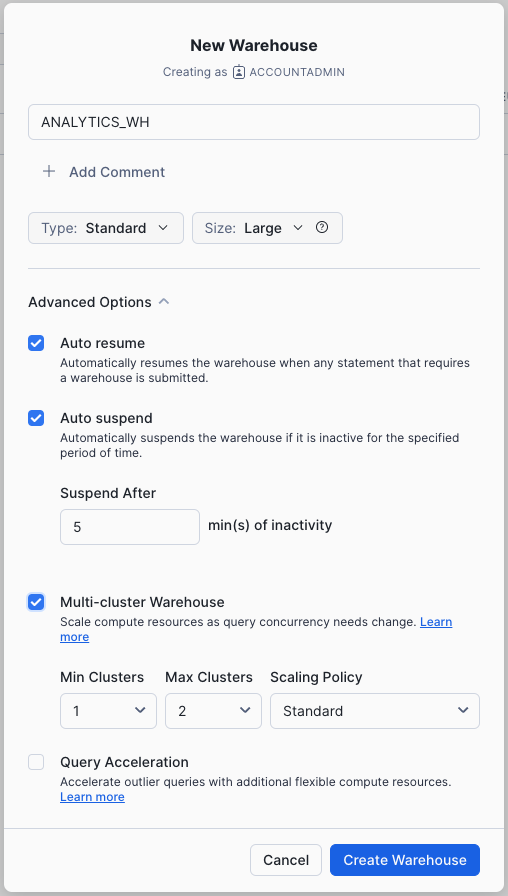
Then, you’ll need to grant the necessary privileges to the role that will create your semantic models or search services. In addition to schema-level access, Cortex Search may also require Cortex embedding privileges such as SNOWFLAKE.CORTEX_USER or SNOWFLAKE.CORTEX_EMBED_USER, depending on your setup.
📌 Important note: Always test in a non-production schema first to avoid any accidental disruptions to your live workflows.
The semantic model is the heart of Cortex Analyst. It’s a YAML file that acts as a translator, teaching the AI your unique business language. For example, without it, the AI wouldn’t know that ‘ARR’ means ‘Annual Recurring Revenue.’ Or that the user_id column in one table relates to the customer_id in another.
This semantic layer defines your tables, columns, relationships, business-specific synonyms, and example logic so Analyst can generate SQL using approved business definitions instead of raw schema guesswork. Here are the key sections you’ll need to define:
📌 Our recommendation: Start small. Focus on a single, well-understood data domain, like one fact table and a few key dimensions, before you try to model your entire data warehouse. Snowflake also offers a semantic model generator tool that can help you create a starter YAML file from your existing tables.
With your semantic model in place, it’s time to ask your first question. You have two main paths to do this. You can use the Analyst chat panel directly in the Snowsight UI for quick, interactive queries, or call the REST API programmatically to embed the functionality in your own applications.
The request is simple: you just need to pass the file location of your semantic model and the user’s question in natural language. The response can include the generated SQL for verification, the result set, and conversation context that supports follow-up questions through the Analyst API or UI workflow.
📌 Pay attention: If you find that the Analyst is misinterpreting a term, iterate on your semantic model by adding a synonym or another verified query to guide it in the right direction.
Now you need to validate that it’s production-ready. To create a polished, professional user experience, we recommend embedding Cortex Analyst into a Streamlit app in Snowflake. This allows you to build a custom, user-friendly interface for your business teams.
Before you roll it out, you need to test it rigorously. Create a validation set of common business questions with known correct answers. Run these questions through Analyst and measure the accuracy of the results.
📌 Please note: Monitor adoption and spend with Cortex-specific observability and usage views, such as Analyst admin observability and ACCOUNT_USAGE.CORTEX_FUNCTIONS_USAGE_HISTORY, rather than relying only on generic query history.
Giving more people access to data raises legitimate security and AI governance concerns. But Cortex was designed with enterprise security in mind.
Cortex directly inherits Snowflake’s robust security model. This means your existing role-based access control (RBAC), row-level security policies, and dynamic data masking rules automatically apply to all Cortex queries. There’s no need to configure a separate set of permissions.
For best practice, create dedicated roles for Cortex users with the minimum privilege required for their jobs.
Cortex activity can be audited through Snowflake’s existing governance and history tooling, and Analyst also provides dedicated observability for request monitoring across semantic assets. You can see exactly who queried what and when. Furthermore, because Cortex processes data within your Snowflake region, the information never leaves your governed perimeter. Thus, ensuring data residency requirements are met.
💡Pro Tip: Be mindful when writing your semantic model definitions. Avoid including sensitive information in column descriptions or sample queries that could be inadvertently exposed to users.
Summarize this article with AI ClickUp Brain not only saves you precious time by instantly summarizing articles, it also leverages AI to connect your tasks, docs, people, and more, streamlining your workflow like never before.Benefits of Snowflake Cortex for Enterprise Teams
Investing in the initial setup delivers measurable returns by changing how teams interact with your data. Here is how Cortex shifts the operational baseline for enterprise teams like yours:
🔎 Did You Know? 78% of employees now bring their own AI tools to work (BYOAI). In small and medium-sized companies, that number jumps to 80%.
Simply put, if your team can’t easily get insights from your internal data, they will turn to external, unvetted LLMs. This creates a massive security gap. By implementing Cortex, you give your team the AI-driven speed they’re looking for while keeping your sensitive company data firmly within Snowflake’s governed environment.
Being aware of a tool’s limitations helps you plan your deployment effectively. Most of these aren’t roadblocks, but they do require a deliberate strategy:
You can mitigate most of these challenges by establishing clear ownership for your semantic model, starting with well-modeled data domains, and actively monitoring your usage and costs.
While Snowflake Cortex is an elite engine for querying and surfacing data from your warehouse, that data often remains static once it hits a BI dashboard. ClickUp handles the surrounding work and more!
ClickUp is a Converged AI Workspace. It keeps your tasks, projects, documentation, automations, and AI connected in one system, so your team avoids Work Sprawl and moves through planning and execution in a single flow.
Here’s a closer look! 👀
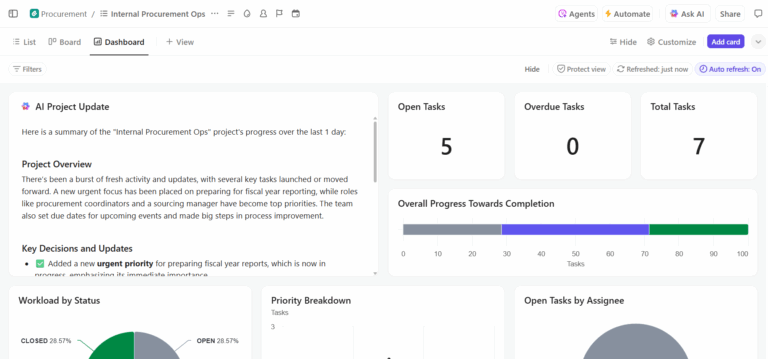
Snowflake Cortex identifies the what, like a sudden spike in project risks or a dip in resource efficiency, but the data stack often stops at the insight. ClickUp Dashboards serve as the execution layer for your Snowflake findings.
It brings your high-level metrics into the same workspace where your team works, eliminating the context tax of switching between a BI tool and a project plan.
Here’s how you can use ClickUp Dashboards:
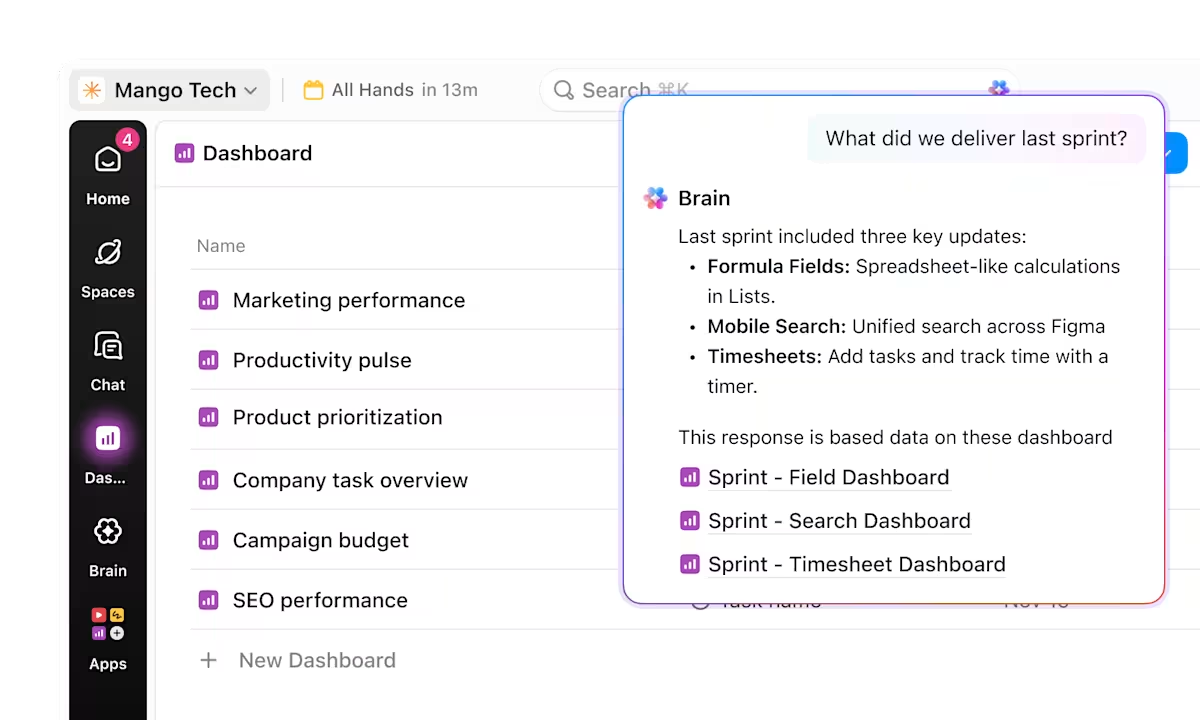
If Snowflake Cortex is the engine for your data warehouse, ClickUp Brain is the engine for your operational knowledge. It functions as a neural network across your projects, documents, and people, ensuring that the insights you find in Snowflake don’t get lost in a sea of tasks.
By connecting your workspace data, Brain provides the same natural language query power for your work that Cortex provides for your SQL tables.
Here’s how:
Once Snowflake Cortex surfaces an insight, you can delegate the follow-up work to ClickUp Super Agents. These agentic teammates operate with human-level skills, like messaging stakeholders, assigning tasks, and drafting documentation, to ensure data-driven findings are executed 24/7 without manual oversight.
It can help you with the following:
When Snowflake Cortex identifies a critical anomaly or trend, the delay between insight and action dilutes it. ClickUp Automations convert data-driven alerts into defined, repeatable tasks. You remove the manual handoffs that often cause insights to fall through the cracks by linking your analytical environment directly to your execution layer.
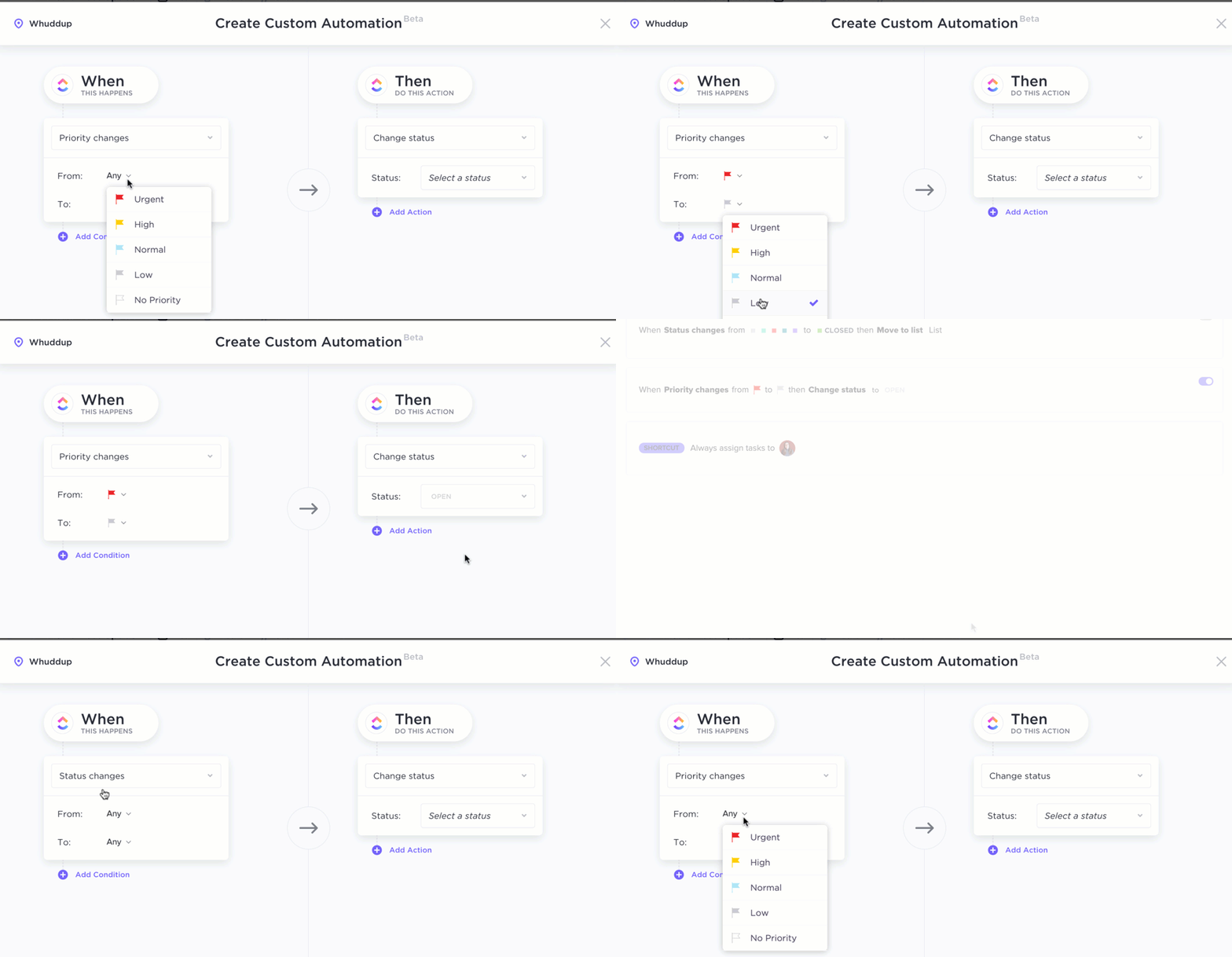
Use ClickUp Automations to:
A data insight from Snowflake Cortex is only as valuable as the plan it inspires. If your analytical findings live in one tool and your project execution lives in another, you risk blank page syndrome, where teams struggle to turn data into action.
ClickUp Docs acts as the connective tissue, allowing you to build verified wikis and SOPs that are natively linked to your workflows.
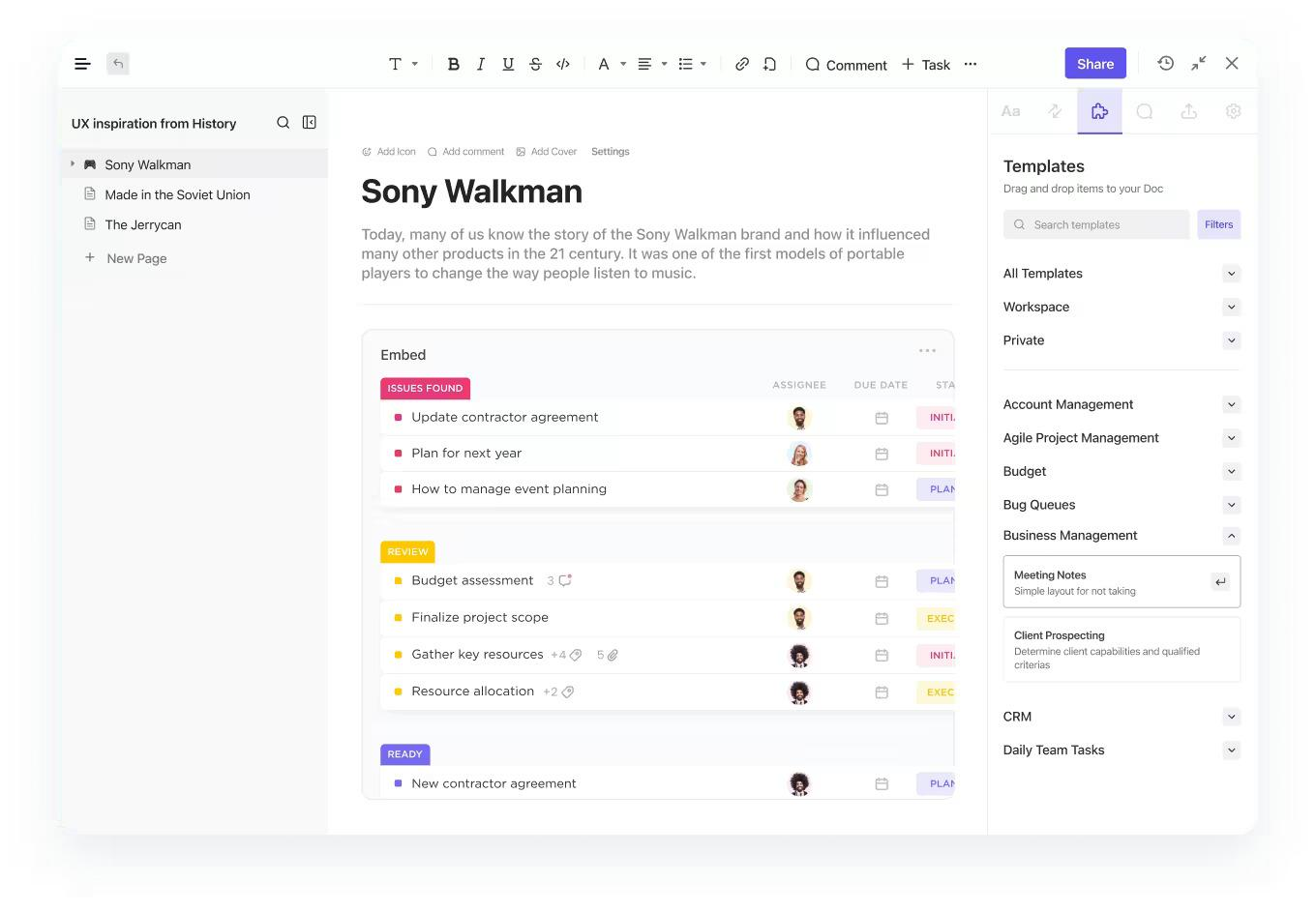
ClickUp Docs can help you:
We are not alone in saying ClickUp can make collaboration easier. Our customers also agree! Here’s what a ClickUp customer has to say:
Being on the Operations team, we are constantly having conversations about how to better collaborate between our different areas. ClickUp has given us a hub from which to manage, track, and report back on each of our different areas.
Snowflake Cortex lowers the barrier to entry for enterprise analytics. Your business users can ask questions in natural language while maintaining the strict security and governance that enterprises demand.
However, its success hinges on thoughtful semantic modeling, clear role definitions, and a commitment to ongoing maintenance.
As AI-native analytics becomes the new standard, the companies that thrive will be those that invest in governed self-service today. They will outpace competitors who are still routing every business question through a perpetually swamped data team.
That is where ClickUp fits: not as a replacement for Snowflake, but as the execution layer where insights turn into documented plans, assigned tasks, and follow-through. Snowflake Cortex helps teams get governed answers faster. ClickUp helps teams act on those answers by turning insights into tasks, docs, workflows, and accountability in one workspace. Get started for free with ClickUp to keep analytics and execution connected.
Cortex Analyst is designed for natural-language analytics over structured data, while Cortex Agents can coordinate multi-step workflows that combine capabilities like Analyst, Search, and other tools.
Yes, Cortex Analyst is built specifically for business users who don’t know SQL. They can ask questions in plain English, though the accuracy of the answers depends on a well-defined semantic model.
Cortex uses a consumption-based billing model tied to LLM token usage and compute resources. It’s important for enterprises to monitor query volume and set budgets using Snowflake’s resource monitors to avoid unexpected costs.
Cortex offers a managed, governed environment with built-in security, which simplifies deployment. Custom solutions provide more flexibility but require you to maintain your own LLM infrastructure, prompt engineering, and security controls, leading to significantly higher operational overhead.

© 2026 ClickUp

There’s an easier way. Try a free AI Agent in ClickUp that actually does the work for you—set up in minutes, save hours every week.