






Still downloading templates?
There’s an easier way. Try a free AI Agent in ClickUp that actually does the work for you—set up in minutes, save hours every week.
Sorry, there were no results found for “”
Sorry, there were no results found for “”
Sorry, there were no results found for “”
Your ERP system holds the keys to your business, but are you actually using them?
Most organizations sit on mountains of operational data, manually chasing reports, patching workflows, and reacting to problems that AI could’ve predicted weeks ago.
Oracle AI promises to change that by embedding automation and predictive analytics directly into your existing workflows. It’s a powerful toolkit, but it’s not always straightforward to use effectively. So before you dive in, it helps to understand exactly what you’re working with.
In this blog, we’ll cover how to use Oracle AI for ERP automation and analytics, and why ClickUp, the world’s first Converged AI Workspace, might be a simpler, more practical alternative worth considering.

Oracle AI in ERP is a suite of embedded artificial intelligence and machine learning (ML) capabilities built directly into Oracle Cloud ERP. It operates within Oracle’s existing modules, including financials, procurement, supply chain, and project management, to automate repetitive tasks, detect anomalies, and surface data-driven recommendations in real time.
The tool’s AI layer draws on technologies like Oracle Digital Assistant, machine learning models, and natural language processing (NLP) to help users interact with ERP data more intuitively.
Additionally, it can flag duplicate invoices, predict cash flow, automate journal entries, and generate financial reports without manual intervention.
🧠 Fun Fact: The very first version of an ERP was actually a collaboration between IBM and J.I. Case, a tractor manufacturer, in the 1960s. They built what was called ‘Materials Requirements Planning’ (MRP). Back then, it was a room-sized operation used to figure out how many parts were needed to build a single piece of machinery.

Oracle Fusion Cloud ERP bundles several types of AI, each designed for different tasks. Here’s each technology in simple, practical terms so you can match the right one to the right job.
ML learns from your historical data to predict the future. Instead of you building complex spreadsheets, ML algorithms analyze past transactions to forecast outcomes like cash flow, customer demand, or inventory needs.
In practice, that means:
🔍 Did You Know? Implementing an ERP is notorious for being tricky. The most famous example is Hershey’s in 1999. They tried to go live right before their busiest season, but the system hit major glitches. And unfortunately, they ended up unable to deliver $100 million worth of candy for Halloween, which caused their stock price to tank by 8% in one day.
NLP is what allows you to “talk” to your software. You can ask your ERP questions in plain English and get answers back, just like you would with a colleague. This is a huge time-saver compared to navigating endless menus and running clunky, pre-built reports.
Oracle’s AI agents can handle multi-step tasks based on a simple request. For example, a finance manager could ask, “Show me all invoices over 30 days past due from suppliers in EMEA,” and the AI agent would instantly generate and deliver the report.
📮 ClickUp Insight: 28% of survey respondents admit they overplan instead of doing the work, and 20% drift toward easier “fake productive” tasks. Clearly, procrastination shows up in different ways.
You outline, reorganize, refine…and the actual task quietly waits.
That’s where using AI as a flight simulator (of sorts) can help. You can ask ClickUp Brain to think through the next realistic step with you, based on other tasks in motion.
And if you need something more structured, you can get a Super Agent to check in gently, highlight what’s been sitting untouched, or break larger goals into actionable steps.
If you have tasks that are highly repetitive and rule-based, robotic process automation (RPA) is the tool for the job. RPA uses software “bots” to mimic human actions like clicking, copying, and pasting data between systems. It’s ideal for grunt work that doesn’t require complex decision-making.
Common RPA use cases in an ERP software include:
Learning how to use Oracle AI for ERP automation and analytics means knowing where to apply it.
Analytics tells you what’s happening. Automation is what you do about it. Oracle AI can surface insights and act on them, handling the repetitive, rule-based work that eats up your team’s time across finance, procurement, and supply chain. Here’s how to put that to use. 🛠️
Not every ERP system or process is worth automating right away. Start by auditing where your team spends the most manual effort; the high-volume, repetitive tasks that follow predictable rules are where Oracle AI delivers the fastest results.
Good starting points include:
If your AP team is manually keying in 500 invoices a week, that’s your first target. If procurement approvals are creating bottlenecks, that’s where to begin instead.
Oracle AI capabilities are tied to specific modules, so each one needs to be enabled individually based on what you’re automating. Head into your Oracle Fusion Cloud ERP admin console and activate the relevant features:
Your Oracle admin can confirm which of these are included in your current subscription tier before configuration begins.
🚀 ClickUp Advantage: While Oracle provides the analytics, the action on those insights often happens in other tools, creating Work Sprawl. That means teams waste hours switching between apps and hunting down the information they need to do their jobs.

So when an anomaly alert fires, what happens next? A task needs to be created, assigned, and tracked. With ClickUp AI Super Agents, you can automatically create a task when an alert triggers in Oracle.
For example, if Oracle Cloud Monitoring detects a spike in database latency, an AI Super Agent instantly creates a high-priority task in ClickUp, assigns it to the on-call SRE, attaches the alert details, and triggers a notification. It turns a raw alert into an owned, trackable resolution workflow in seconds.
Learn more here:
Once features are enabled, Oracle AI ERP needs to be configured to reflect how your organization operates. It doesn’t perform well out of the box without this groundwork.
For invoice processing, the key decisions involve your matching rules: how strictly should the AI match invoices against POs and goods receipts, and what tolerance levels apply for price or quantity variances?
A manufacturing company processing high volumes of goods receipts, for instance, might set a tighter quantity tolerance than a services firm dealing mostly with subscription-based vendor invoices.
Oracle AI uses your historical transaction data to establish baselines. The richer your data history, the more accurate its outputs from day one. Clean data going back two or more years puts you in a strong position to get reliable workflow automation early.
🔍 Did You Know? A new social network called Moltbook was launched for AI agents. Humans can watch, but we aren’t allowed to post. In one of the weirdest turns yet, a user’s bot gave itself access to the site and literally founded a religion called ‘Crustafarianism’ overnight, complete with its own scriptures and website, and started recruiting other bots.
Rather than automating everything at once, pick a single process and run Oracle AI on a subset of transactions while your team monitors the results in parallel. Invoice matching is the most common starting point for this reason.
A controlled pilot gives you the chance to catch misconfigured rules, identify edge cases the AI isn’t handling well, and build internal confidence before a broader rollout. Most teams run a pilot for four to six weeks, which is long enough to cover a full accounting cycle and get meaningful feedback.
Automation holds up well until it encounters something outside its expected parameters. Within Oracle’s Intelligent Process Automation (IPA) settings, it’s important to define what happens when the AI hits a transaction it can’t confidently process.
An invoice that fails a three-way match, for example, can be automatically routed to the relevant AP analyst with context on why it was flagged. A purchase order exceeding a predefined spend threshold can be escalated to a senior approver without any manual triage in between.
For each exception type, real-time alerts ensure the right person is notified before anything gets delayed or overlooked.
🧠 Fun Fact: We think of automation as a modern trend, but around 400 BCE, a Greek philosopher named Archytas built a steam-powered mechanical bird. It could fly about 200 meters before running out of steam, and is considered one of the first ever records of an autonomous machine.
With automated workflows live, connecting them to Oracle Fusion Analytics Warehouse (FAW) gives you visibility into how they’re performing. The goal is to continuously improve based on what the data shows.
Key metrics worth tracking:
A straight-through processing rate below 70% is a signal to revisit matching rules or data quality. Rising exception rates, on the other hand, often indicate a shift in vendor behavior or transaction patterns that the model hasn’t yet adapted to.
Oracle AI is applied differently depending on the business function. Across finance, procurement, and supply chain, here are some of the most common and effective use cases organizations are running today. 🤩
🧠 Fun Fact: There is a specific type of automation named after Detroit. It’s called Detroit Automation, and it refers to a system where a raw material (like a block of wood) goes into one end of a massive chain of machines, and a finished product (like a wooden doll) pops out the other side without a human ever touching it.
🔍 Did You Know? In 1992, a storm knocked a container overboard, releasing 28,000 rubber ducks into the Pacific and creating an accidental, 30-year supply chain experiment. Since they were durable and buoyant, these ducks traveled thousands of miles. Scientists tracked them for years to map ocean currents; some ducks were found as far away as Scotland and even frozen in Arctic ice.
🧠 Fun Fact: In 1994, a tiny math glitch in Intel’s Pentium chip caused a massive $475 million charge on their financial reports. The error only happened once in 9 billion calculations, but the resulting recall turned a microscopic technical bug into one of the most expensive line items in reporting history.
Oracle AI can handle a lot, but how well it performs depends largely on how it’s set up and maintained. These best practices help you get consistent, reliable results from your automation.
🚀 ClickUp Advantage: Your ERP team is drowning in AI tools. ClickUp Brain MAX fixes that.
Finance is using ChatGPT. Operations is on Gemini. Your PM is copying and pasting into Claude. Everyone’s re-explaining context from scratch, every single time. This is AI Sprawl, and it’s quietly killing your team’s productivity.

Brain MAX replaces dozens of disconnected AI tools with a single, LLM-agnostic solution. You can switch between ChatGPT, Claude, and Gemini from one place, without losing conversation history or your workspace context. And when your hands are full running the floor, managing vendors, or closing the books? Talk to Text in ClickUp Brain MAX lets you speak naturally to update your calendar, assign tasks, send messages, and draft docs—completely hands-free.
Oracle AI can deliver real value, but implementation rarely goes smoothly out of the box. Here are some of the most common roadblocks organizations run into and what’s typically behind them.
| Challenge | What it means in practice | How to address it |
| Poor data quality | AI models trained on incomplete or inconsistent ERP data produce unreliable outputs, from incorrect invoice matches to inaccurate forecasts | Audit and clean master data before enabling any AI features |
| High implementation complexity | Oracle AI spans multiple modules and requires careful configuration, often needing specialist Oracle expertise that many internal IT teams don’t have | Plan for a phased rollout and involve certified Oracle implementation partners early |
| User adoption resistance | Finance and ops teams often push back when automation changes familiar workflows, especially when they don’t understand what the AI is doing | Invest in change management and be transparent about where AI handles tasks and where human review still applies |
| Integration challenges | Connecting Oracle AI to non-Oracle systems or legacy tools can introduce data gaps and compatibility issues that affect automation accuracy | Map all integration points before go-live and use Oracle Integration Cloud where possible |
| Ongoing model maintenance | AI models can drift over time as business processes, vendor behavior, or transaction patterns change, leading to declining performance | Schedule regular performance reviews and retrain models when exception rates or accuracy metrics start to slip |
| Subscription and licensing costs | Advanced Oracle AI features aren’t always included in base ERP subscriptions, and costs can escalate as more modules and users are added | Clarify feature availability and pricing with Oracle before committing to a configuration |
🔍 Did You Know? The world’s first industrial robot, the Unimate, was so famous after its 1961 debut that it appeared on The Tonight Show with Johnny Carson. It performed a few tasks for the cameras, including pouring a beer and conducting the studio band.
ERP systems struggle once work moves beyond a single department. A purchase request touches finance, legal, procurement, and operations. Each handoff introduces delay, manual checks, and reporting gaps.
ClickUp simplifies ERP automation by keeping execution, approvals, logic, and visibility inside one connected workspace where work progresses without losing context. It brings tasks, workflows, approvals, and reporting together, so teams automate real operational steps instead of stitching together disconnected tools.
Here’s a closer look at how ClickUp simplifies ERP automation and analytics. 👀
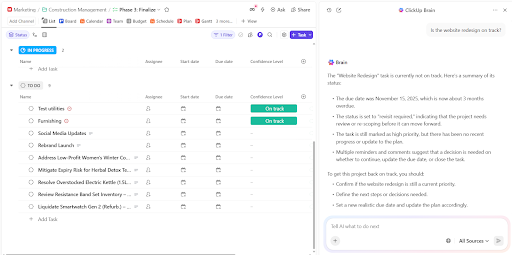
ERP teams lose time answering the same questions every week. Which approver owns this request, why a payment stalled, and what step comes next. ClickUp Brain solves this by pulling answers from live workflow data.

Suppose an accounts payable manager needs to understand why a $120,000 vendor payment missed the processing window. They ask ClickUp Brain a question directly inside the workspace.
📌 Try this prompt: Why is the ACME Corp invoice payment delayed, and who needs to act next?
ClickUp Brain reviews task history, approval fields, comments, and status changes. It responds that legal approval remains pending, names the approver, and links the exact task causing the delay. The manager acts immediately instead of reconstructing the workflow manually.
See exactly how this plays out in a live workspace. In the walkthrough below, you’ll learn how ClickUp Brain serves as a personal assistant:
ERP workflows break when ownership shifts and no one tracks progress end to end. ClickUp Super Agents maintain continuity across long-running, cross-team processes.

For example, let’s say a company runs quarterly vendor compliance reviews tied to payment eligibility. So, when:
The Super Agent reacts to changes in real time and owns the workflow lifecycle. Teams stop relying on reminders or follow-ups because the agent enforces progression automatically.
Hear it from a real user:
I find ClickUp incredibly valuable as it consolidates functions into a single platform, which ensures that all work and communication are gathered into one place, providing me with 100% context. This integration simplifies project management for me, enhancing efficiency and clarity. I particularly like the Brain AI feature, as it functions as an AI agent that executes my commands, effectively performing tasks on my behalf. This automation aspect is very helpful because it streamlines my workflow and reduces manual effort.
Additionally, the initial setup of ClickUp was very easy to navigate, which made transitioning from other tools seamless. I also appreciate that ClickUp integrates with other tools I use, such as Slack, Open AI, and GitHub, creating a cohesive work environment. Overall, for these reasons, I would highly recommend ClickUp to others.

ERP automation depends on precise rules tied to real thresholds and outcomes. ClickUp Automations apply those rules directly to tasks as work progresses. Each automation triggers a specific operational action.
Every step is triggered by task activity. Teams follow consistent approval logic without manual routing or external workflow engines. Here are some workflow automation examples to try:
ERP leaders need visibility while work still remains actionable. ClickUp Dashboards deliver live insight across workflows without waiting for delayed reports. Unlike static exports or end-of-week summaries, Dashboards pull directly from live task and goal data, ensuring visuals stay accurate as work progresses.

Where Dashboards become genuinely powerful for ERP oversight is with AI Cards, which layer ClickUp Brain’s intelligence directly onto your Dashboard. These cards give teams real-time, AI-generated summaries and insights tied directly to live workspace data. Here’s what’s available and how each maps to ERP needs:
Even with a perfectly automated ERP system, the work isn’t truly done.
Insights from Oracle create tasks for your team. Exceptions require collaboration and problem-solving. Your people are still stuck toggling between the ERP and their communication tools, creating a frustrating and inefficient workflow. The real productivity killer is the context sprawl between your system of record and your system of action.
You need ClickUp, a single platform where projects, documents, conversations, and AI intelligence live together. It brings the automated insights from your ERP together with the human collaboration required to act on them. This gives you a single place for humans and AI agents to work together. All conversations and context stay in one place, so work flows smoothly.
Connect your systems and your team in one place. Sign up for ClickUp today! ✅
Traditional automation follows rigid, predefined rules. Oracle Fusion AI Agents use machine learning to interpret context, make judgments, and handle multi-step tasks on their own, adapting as they go.
You can set approval thresholds based on factors like transaction value or risk score. If a transaction exceeds the threshold, the system automatically routes it to a designated person for review, along with the AI’s recommendation.
Yes, Oracle Fusion has APIs that let you connect it to external systems. Teams often link Oracle to a work management platform like ClickUp to assign follow-up tasks, manage exceptions, and coordinate the human side of the work.
Processes that require significant subjective judgment, have high regulatory scrutiny, or involve novel situations with no historical data should always keep a human in the loop. AI can provide recommendations, but the final decision should rest with a person.

© 2026 ClickUp

There’s an easier way. Try a free AI Agent in ClickUp that actually does the work for you—set up in minutes, save hours every week.