
Sorry, there were no results found for “”
Sorry, there were no results found for “”
Sorry, there were no results found for “”
In an Agile project, tackling every task on your to-do list can feel overwhelming unless you and your team have superhuman abilities.
It’s like being handed a treasure map with no “X” to mark the spot. Every spot looks promising, but you have no clue where to start digging.
So, what’s the secret to staying productive and tackling the most critical work first? It’s simple: backlog prioritization.
This clever strategy helps your team manage all the competing demands, ensuring that the most important tasks receive the spotlight.
In this article, we’ll look at the key ways to prioritize your product backlog and achieve your business goals.
A product backlog is an essential scrum artifact—a list of tasks, features, and improvements the team tackles to develop a product. The roadmap keeps the team organized and aligned, ensuring everyone knows what needs to be done.
Here’s why a product backlog is crucial:
Agile Scrum’s product backlog is a dynamic list of desired features or plans. The sprint backlog focuses on the tasks the team will tackle in a given sprint.
Each sprint pulls tasks from the product backlog that align with the product roadmap, ensuring steady progress and continuous business value.
The product backlog is crucial in managing a product’s development in Agile. But, not all tasks in the backlog are created equal.
Imagine you’re a chef in a busy restaurant with a pantry full of ingredients (tasks). You can’t cook everything at once, so you prioritize based on the orders—some need more time, and others are quicker to prepare.
This is how backlog prioritization works. It’s about deciding which tasks should be tackled first, which can wait, and which may no longer be needed. It’s a balancing act between short-term fixes and long-term improvements, ensuring the most critical features are addressed first without losing sight of the bigger picture.
But before starting, you need to know the factors that contribute to the prioritization process.
Prioritization focuses on tasks that will have the most significant impact on users and the business. Consider these factors:
👀 Did You Know: Businesses that focus on customer experience see an 80% increase in revenue, and those that prioritize it are 60% more profitable than those that don’t.
Product backlog prioritization isn’t a solo effort. It involves input from various product team members who each bring a unique perspective. Here’s how different team members contribute:
Product backlog prioritization is essential for ensuring your team focuses on the most critical tasks at opportune moments. It enables faster value delivery to customers while ensuring resources are used efficiently.
Here are some practical backlog prioritization techniques:
Stack ranking is a simple but effective method for ranking your backlog items from the most important to the least important.
Divide your tasks into:
This keeps things straightforward, helping your team focus on what truly matters and delivering value quickly.
📍Example:
Imagine you’re the product manager for a mobile banking app. Your team is juggling several feature requests, including:
By using stack ranking, you ensure the security update gets addressed first, followed by usability enhancements, while aesthetic updates wait until core functionalities are in place. This way, your team stays focused on delivering maximum value without getting sidetracked by less critical tasks.
The MoSCoW method is a straightforward way to categorize your backlog items. Add them into four categories:
With this, your team is better focused on timely features.
💡Pro Tip: MoSCoW is frequently combined with timeboxing, where a set deadline forces the focus to remain on the most critical requirements.
This method evaluates each item based on how much value it delivers and how much effort is required to implement it. Add your tasks into four quadrants:
💡Pro Tip: To get a more visual look into your quadrants, get your hands on the ClickUp Priority Matrix Template.
According to PwC, one in three customers (32%) would stop doing business with a brand they love after just one bad experience.
No wonder keeping customers happy is one of the top commandments for business success.
The Kano Model is a way of categorizing product features based on how they impact customer satisfaction.
It divides features into five categories:
Using the Kano Model helps prioritize what to work on next!
👀 Did You Know: A survey by the Scrum Institute revealed that teams that consistently hold grooming meetings see 50% fewer defects in their software releases compared to those that skip this essential practice.
The RICE Scoring Model can support backlog prioritization based on four key factors. Here’s how it works:
By assigning scores to each factor and calculating the total, you can quickly determine which initiatives are worth investing in.
User stories describe a feature or function from the perspective of the person using it. They help teams focus on what needs to be built and why it matters.
📌 For example: As a shopper, I want to save my credit card information so that I can check out faster next time.
User stories are vital because they focus on the user’s needs, ensuring that every feature contributes to solving a real problem.
While the specifics might vary from team to team, the following steps generally apply when it comes to effectively prioritizing a product backlog:
Before dipping into your backlog, it’s crucial to understand your product vision and goals. As a scrum artifact, your backlog must align with those goals to focus on the most impactful features.
Your vision must continue to be the north star that guides every decision. Ask yourself: How will each feature contribute to the bigger picture? Ruthless prioritization ensures that only the most valuable tasks reach the top.
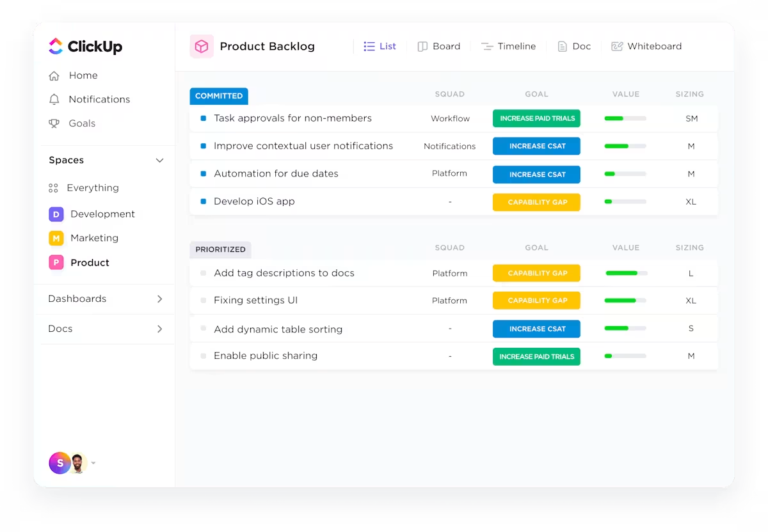
Setting up your project on a product backlog management tool like ClickUp simplifies this process. Add your roadmaps and sprints to this everything app for work to get started quickly.

ClickUp for Product Teams offers robust product management features, helping your team better define goals, track progress, and sync backlog items with your vision.
Need a hand getting started? Start working with the ClickUp Backlog Template. Perfect for beginners and seasoned users, it streamlines the PO’s backlog creation and categorization process.
Your team can use the Ticket Submission Form on the template to add their priority items within seconds. The PO—and the rest of the team—can then use six pre-built views to read through the items and prioritize them.
💡Pro Tip: If you’re new to backlog management, product backlog templates can be a helpful starting point. They give you readymade frameworks and best practices that you can start implementing right away, saving time and eliminating roadblocks.
Now that you know the most impactful Agile prioritization techniques, choose one, such as the MoSCoW or the Kano mode, to begin categorizing your backlog items.
Make sure to include feature prioritization in your project. This enables your team to analyze customer needs and requests, business goals, and technical feasibility.
These methods help you identify which features offer the most impact and which can be deferred, ensuring the most valuable features are delivered first.

ClickUp offers various tools to simplify prioritization. With ClickUp Task Priorities, you can easily assign tasks High, Medium, or Low priority levels and sort or filter them accordingly, so nothing important slips through the cracks.
With Clickup’s Custom Views, you can visualize tasks grouped by priority in Kanban Boards or Lists, use Gantt charts to analyze dependencies and timelines, and monitor workload and capacity planning with the Team view.
💡Pro Tip: Not sure where to begin? Let ClickUp’s prioritization templates do the heavy lifting for you!
Once you’ve prioritized your backlog, you’ll probably find out that some tasks are too large or complex to qualify as a single unit of work.
For scrum project management, breaking down these overwhelmingly large tasks into smaller, more manageable subtasks is essential. Build complex feature sets and deploy the more extensive bug fixes by creating ClickUp Tasks and subtasks that can be completed in a single sprint.
For instance, instead of pursuing a vague task like “Build payment gateway,” break it into actionable steps such as “Set up payment API,” “Design checkout page,” and “Test payment functionality.”
Smaller tasks are more straightforward to assign, track, and complete, keeping momentum high.

And once you’ve set your subtasks in place, leverage the magic of ClickUp Automations.
Set up automatic alerts and notifications to alert your team when vital tasks and subtasks have progressed. Automations can also remind team members of upcoming due dates so nothing falls through the cracks.
💡Pro Tip: Need a robust backlog template for tracking effort-intensive tasks and moving targets? The ClickUp Sprint Backlog Template will have you up and running in no time.
Tracking progress is key to managing your backlog and ensuring your team moves forward as planned. It’s not just about knowing what’s been completed but also about spotting potential roadblocks early and making adjustments as needed.

One way to do this effectively is to work with ClickUp Dashboards to give you a real-time overview of your team’s progress. You can create custom dashboards to track the status of each task, feature, or sprint. This allows you to measure sprint velocity, identify blockers, and adjust course as needed.
Effective communication and collaboration are at the heart of any successful agile project. Once you’ve prioritized and broken down tasks, keeping the conversation going is crucial. Regular check-ins, feedback loops, and open communication channels help ensure everyone stays aligned and focused on the same goals.
📮ClickUp Insight: About 41% of professionals prefer instant messaging for team communication. Although it offers quick and efficient exchanges, messages are often spread across multiple channels, threads, or direct messages, making it harder to retrieve information later.
With an integrated solution like ClickUp Chat, your chat threads are mapped to specific projects and tasks, keeping your conversations in context and readily available.
Each folder or project in ClickUp automatically receives its own chat channel. This organization allows for focused discussions related to specific projects without cluttering general chats.

ClickUp Chat leverages AI to enhance productivity. Features like AI CatchUp summarize missed conversations, while AI Task Creation can automatically generate tasks from chat messages, streamlining workflows.
You can pin important messages to tasks for easy reference, and FollowUps help track action items from conversations, ensuring that critical discussions lead to actionable tasks.
Agile teams know that flexibility is key. The product backlog isn’t a one-and-done task—it needs regular reviews and adjustments to stay aligned with changing priorities, market demands, or new insights.
Regular backlog grooming also aligns your priorities with your product vision and goal.

Consistent assessments allow you to re-prioritize items, add new tasks, or remove outdated ones. With ClickUp’s task management, you can easily adjust your backlog, move tasks around, and add new items.
Set up recurring reviews or sync with your sprint schedule to ensure your backlog stays relevant and current. Real-time updates and notifications inform your team of any changes, keeping everyone focused on the most critical tasks.
When all is said and done, setting up sprints can be just as challenging as running them. With the ClickUp Backlogs and Sprints Template, your PO can rest easy knowing all key tasks are covered.
If you’re a Scrum Master looking for a template that keeps your backlog aligned and runs sprints and sprint retrospectives in one place, this is perfect for you.
Its three-pronged approach helps you establish clear priorities, build organized backlogs, and share updates with teammates and developers—all within a single document.
We use ClickUp to track our software development projects in-house; managing multiple projects and teams makes things easier for me, this is one of the best tools I have used so far for handling my scrum and modern agile projects.
In an Agile team, your product backlog should be a powerful asset. But, without constant updates and proper prioritization, it can hold your team back. That’s where ClickUp steps in to make all the difference!
ClickUp takes the stress out of backlog management by offering intuitive tools for organizing, prioritizing, and updating tasks.
With features like drag-and-drop prioritization and customizable fields to highlight top priorities, ClickUp makes it easy to stay organized. Collaborative spaces also allow for seamless team input, turning your backlog into a powerful engine for success, not a roadblock.
Ready to elevate your backlog management and boost team productivity? Sign up for ClickUp today and start prioritizing like a pro!

Praburam Srinivasan
Max 16min read
Praburam Srinivasan
Max 12min read

Garima Behal
Max 12min read

© 2026 ClickUp





