Dubsado vs. HoneyBook: Which CRM is Best for Your Business?

Sorry, there were no results found for “”

Small business owners know the struggle: client emails flooding your inbox, unpaid invoices piling up, and contracts scattered across your desktop. By Friday, you’re drowning in admin work instead of doing what you love.
Dubsado and HoneyBook CRM systems flip this script. They capture leads, automate follow-ups, and collect payments while you sleep. Imagine finishing your workday with an empty to-do list and the mental space to actually grow your business.
But here’s the real question: Can these CRMs deliver as you expect? If you’re considering how to choose a CRM that fits your business needs, we’ve got the ultimate Dubsado vs. HoneyBook comparison for you here.
🌟 Spoiler Alert: Stick around until the end to see another option that’s better than both! 😉
Before we begin, here’s a quick table to compare the key features of Dubsado and HoneyBook:
| Feature | Dubsado | HoneyBook | ✨ Bonus: ClickUp ✨ |
| Client management | Custom workflows, lead tracking, and client portals to improve client experience | Centralized client dashboard, automated follow-ups | Centralized workspace with Custom Views to monitor sales pipeline, customer lifetime value, and average deal sizes Consolidated client outreach with email integration |
| Invoicing and payments | Custom invoices, payment plans, and automated reminders for payment processing | Online invoicing with credit card, bank transfer, and autopay payment options | Invoice templates with auto-fill fields to extract client data |
| Automation | Custom workflows for emails, forms, and task triggers | AI-driven automated follow-ups, email templates, and meeting summaries | AI-powered automation builder for trigger-based workflow automation |
| User interface | Feature-rich but has a learning curve | Intuitive and beginner-friendly interface | Custom, intelligent workflows that can be adjusted to meet your business goals |
| Free version | Free trial (no time limit) | Free trial (7 days) | Free plan with generous features and templates |
| Best for | Freelancers and businesses needing deep customization and automation | Small businesses looking for an easy-to-use, all-in-one CRM | Freelancers and businesses looking for an all-in-one solution for client management, task automation, and advanced analytics |
Dubsado is a CRM designed for small business owners, freelancers, and service-based professionals. It helps manage client onboarding, contracts, invoicing, and workflows—all in one place.
Dubsado’s customized contact forms and a built-in scheduler enable businesses to manage client interactions effortlessly and give you more time to focus on business growth.

Dubsado simplifies business operations by combining client management, automation, and financial tools. Let’s explore its features.

Dubsado’s customizable templates and forms simplify client paperwork at every stage of the client journey. You can easily customize and reuse lead capture forms, client proposals, business agreements, and questionnaires for consistent client communication and capturing leads quickly.
Clients can review, sign, and pay in one seamless step, reducing back-and-forth for a freelance business.
💡 Pro Tip: Your customer intake flow sets the tone for your relationship going forward. Here’s how ClickUp Forms does it! 👇🏼

Small businesses often have a hard time tracking client invoices and payment status. Dubsado makes it easier with custom invoicing, automated payment reminders, and recurring billing.
You can create commercial invoices, connect a payment processor, and send them directly to clients—no manual follow-ups needed.

Dubsado’s workflow automation takes care of client communication, scheduling, and invoicing without losing the personal touch.
It enables you to set up automated emails, payment reminders, and task triggers to keep projects moving. Smart fields automatically fill in client details to reduce manual effort. Meanwhile, custom workflows keep follow-ups, contracts, and key tasks on track.
A structured CRM process like this helps businesses create more efficient client management workflows.

Dubsado also offers a built-in scheduler to automate appointment bookings. Simply connect your calendar, set availability, and let clients book sessions directly from your website.
The system checks for conflicts before offering free time slots and attaches intake forms to appointments to gather client details in advance. This ensures smoother, more efficient meetings.
🧠 Did you know? According to the U.S. Bureau of Labor Statistics, 23% of small businesses fail within their first year, and nearly half don’t make it past five—often due to poor financial and client management systems.
HoneyBook is a CRM solution for managing proposals, contracts, invoicing, and client communication.
As a cloud-based CRM software, HoneyBook allows you to manage client interactions from anywhere. This way, you get seamless collaboration without being tied to a single device.

HoneyBook combines client management and invoicing tools to help small businesses streamline operations and improve client interactions. You can use it to capture leads, send business proposals, manage client projects, generate client invoices, and accept payments easily.
Let’s explore its features in detail.

Scattered lead data across multiple platforms and the lack of a centralized information repository can make it difficult for businesses to identify high-quality leads. That’s where HoneyBook’s AI assistant steps in.
It finds high-value leads, gathers contact details, social links, and other relevant information, and predicts conversion chances.
Plus, the AI tool helps you prepare for discovery calls by summarizing client information and discussions. You can also use the AI composer to generate personalized emails.

Scheduling meetings shouldn’t feel like a guessing game. HoneyBook’s scheduling tool lets you set your availability, share booking links, and sync with Google Calendar in real time.
You can customize meeting types, durations, and buffer times to avoid conflicts, while automated reminders and rescheduling options help reduce no-shows. This makes booking effortless for both you and your clients.

HoneyBook lets you create, customize, and send contracts for eSignatures in just a few clicks. Clients can review and sign from any device, while an interactive guide ensures they complete every step.
With branding customization, signature tracking, and access to lawyer-approved templates, you can streamline agreements while keeping them professional and legally sound.

Keeping up with client communication shouldn’t take all your time. HoneyBook’s automation tools let you create custom workflows that automatically send emails, files, and follow-ups. You can set triggers based on client actions or key dates to schedule responses, share booking links, or send marketing materials immediately.

Invoices should speed up your cash flow, not slow you down. With the HoneyBook mobile app, you can send professional invoices in just a few clicks. It also enables you to accept credit card, bank transfer, or autopay payments from any device.
No more chasing payments! Direct deposits help you get paid faster by cutting wait times from days to minutes. Along with invoices, you also have the option to send client proposals directly through HoneyBook.
You might also want to explore HoneyBook alternatives that offer different features and flexibility based on your business model.
🧠 Did you know? HoneyBook offers a free concierge service to help you upload your existing proposal and contract templates, making it seamless to get your business running smoothly.
Both HoneyBook and Dubsado are strong real-world CRM examples but serve different needs.
Dubsado excels in customization and automation, which is ideal for businesses needing tailored workflows. HoneyBook focuses on simplicity, streamlining invoicing, scheduling, and payments for a more intuitive customer experience throughout.
Now, it’s time to analyze HoneyBook vs. Dubsado, feature by feature. Let’s see how they stack up.
Dubsado offers a highly customizable client onboarding experience, making it ideal for businesses that require detailed intake processes. You can set up custom workflows to automate onboarding steps, such as sending welcome emails, contracts, invoices, and questionnaires as soon as a new client is added.
For businesses and other service providers that need complete control over their client journey, Dubsado’s structured workflow automation can be a major advantage.
HoneyBook takes a more streamlined approach to client onboarding, focusing on ease of use. It provides pre-built customer templates for proposals, contracts, and invoices, helping businesses get started quickly.
The platform’s pipeline view helps you track each client’s onboarding status at a glance. Instead of manually managing steps, HoneyBook automates key touchpoints like follow-up emails, reminders, and payment requests.
For businesses and service providers that prefer a hands-off, guided approach, HoneyBook’s simplicity makes client management effortless.
🏆 Winner: Dubsado wins if you want full control and customization over your onboarding process. However, if you prefer a ready-to-go, intuitive system, HoneyBook wins with its guided onboarding.
Dubsado account is designed for businesses that need deep automation control. You can create custom workflows that trigger emails, contracts, invoices, and reminders based on specific actions, like a new client inquiry or a completed payment.
One standout feature is conditional logic, which adjusts the workflow based on client actions. For example, if a client signs a contract, the next step could be automatically sending an invoice. If they don’t, Dubsado can trigger a follow-up email instead.
Dubsado also integrates automation with task management, allowing users to assign internal tasks, set deadlines, and receive reminders within projects.
HoneyBook takes a more intuitive approach to automation. Instead of complex workflows, it offers pre-built sequences that automate client communications, follow-ups, and payment reminders.
Its smart notifications keep you updated on client activity without requiring you to track tasks manually. While HoneyBook doesn’t offer conditional logic like Dubsado, it provides a more structured, beginner-friendly system that automates every day, client-side interactions without overwhelming users.
🏆 Winner: Choose HoneyBook for a straightforward, hands-off system for automating client interactions. If you need advanced, customizable workflows with conditional logic, go with Dubsado.
Dubsado client portal provides in-depth reporting tools that allow businesses to track income, outstanding invoices, and lead sources. You can generate financial reports to analyze revenue trends and identify which services or clients generate the most income.
Another helpful feature is custom tags and filters, which help businesses segment clients based on criteria like lead sources, project types, or payment history.
However, Dubsado’s reporting is comprehensive but requires a manual setup for deeper insights. Users who want automated analytics dashboards may find the platform slightly less intuitive.
HoneyBook keeps reporting straightforward and accessible. The platform provides pre-built financial reports that display total revenue, outstanding payments, and monthly earnings in an easy-to-read format.
Its client activity tracking shows interactions, pending contracts, and upcoming payments, making it useful for businesses that want a quick overview of their operations without deep customization.
While HoneyBook’s reporting lacks the depth and flexibility of Dubsado, it provides a more user-friendly, plug-and-play experience that requires little manual setup.
🏆 Winner: Dubsado for in-depth analytics. If you prefer ready-made, easy-to-read financial summaries, HoneyBook is the more user-friendly option.
Real user experiences can provide valuable insights beyond feature lists. To understand how Dubsado and HoneyBook perform in everyday business operations, we explored Reddit discussions in which users shared their firsthand experiences. Here’s what they had to say.
One Reddit user praised Dubsado for its high level of customization and flexibility, especially for businesses that need detailed workflows:
We adore Dubsado, but it really depends on your personality and level of detail. We wanted a lot of detail and the ability to customize everything, and Dubsado has really provided that for us. Dubsado allows multiple brands, a built-in scheduler and client portal, and a pretty incredible drag-and-drop form builder which we loved setting up.
Similarly, a small business owner who has used HoneyBook for a few months highlighted its contract customization and overall ease of use:
I’ve used HoneyBook for a few months and it’s pretty good. There are some improvements I’d recommend but overall I don’t have any real complaints. The contract features are pretty nice and they are customizable. It can take a bit of time to customize to your liking, but you can save a template to speed up the process next time.
🏆 Final verdict? While Dubsado offers customization, HoneyBook focuses on simplicity for quick setup. The choice depends on whether you value flexibility or ease of use.
But what if you could use software that combines client management, project tracking, and automation?
ClickUp eliminates this ‘either-or’ dilemma. It is the everything app for work that offers both customization and ease of use.
ClickUp goes beyond handling CRM tasks and integrates project management capabilities, automation, and team collaboration into one platform.
Let’s see how ClickUp stands out in comparison to Dubsado and HoneyBook and why many businesses choose it as their everything app for work!

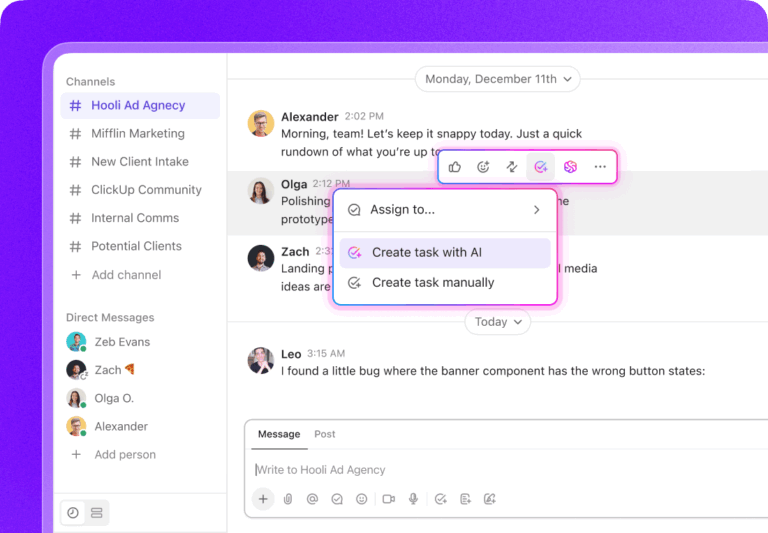
ClickUp Forms makes it easy to collect responses from clients and instantly route tasks to the right workflow. Whether it’s sales inquiries, IT requests, creative approvals, or customer feedback, ClickUp turns form submissions into trackable tasks for immediate action.
With ClickUp’s new intuitive form-building experience, informational blocks, question descriptions, centralized Forms Hub, and enhanced customization options, collecting and utilizing information has never been easier. Do more than just gather data—put it to work with ClickUp Forms’ AI-powered analysis while providing clear instructions and visual elements for your respondents.

With ClickUp Forms, businesses can move lead forms from request to resolution effortlessly, keeping operations smooth and efficient.

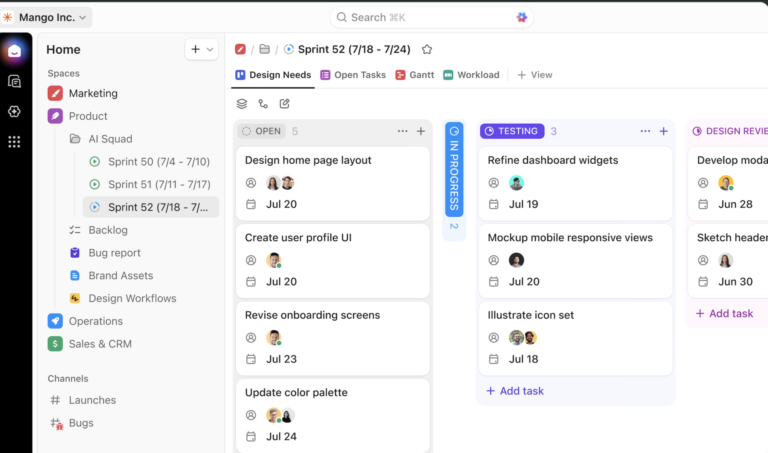
Managing client relationships requires more than tracking deals. You need to streamline workflows, improve collaboration, and keep customer data organized. Unlike traditional CRMs, ClickUp CRM allows businesses to visualize the project pipeline, track customer interactions, and manage accounts—all in one place.
With the flexibility of customizable CRM software, you can tailor workflows, dashboards, and automations to match their unique processes—ensuring efficiency without rigid limitations.
With ClickUp CRM, businesses can ditch rigid, one-size-fits-all platforms and build a scalable system that grows with their needs.
ClickUp is the best project management and CRM tool that I’ve come across. The versatility allows you to truly tackle all of your tasks in one place without numerous subscriptions to other services.

Repetitive tasks slow teams down—but what if you could automate them in seconds? With ClickUp Automations, businesses can eliminate manual work, streamline processes, and save time for high-impact tasks.
Whether you’re managing projects, marketing campaigns, financial workflows, or client handoffs, ClickUp ensures everything runs smoothly and efficiently with easy-to-use “When-Then automation rules.

📮ClickUp Insight: 18% of our survey respondents want to use AI to organize their lives through calendars, tasks, and reminders. Another 15% want AI to handle routine tasks and administrative work.
To do this, an AI needs to be able to: understand the priority levels for each task in a workflow, run the necessary steps to create tasks or adjust tasks, and set up automated workflows.
Most tools have one or two of these steps worked out.
However, ClickUp has helped users consolidate up to 5+ apps using our platform! Experience AI-powered scheduling, where tasks and meetings can be easily allocated to open slots in your calendar based on priority levels. You can also set up custom automation rules via ClickUp Brain to handle routine tasks. Say goodbye to busy work!
Managing clients and automating workflows is just one part of the equation—getting paid on time is just as crucial. While Dubsado and HoneyBook offer invoicing features, ClickUp takes it a step further by integrating billing within project workflows.
The ClickUp Invoices Template simplifies invoicing. Its auto-fill fields extract client and project information from the CRM database, so you don’t have to spend hours manually adding each detail.
This template enables you to:
It certainly has simplified our productivity, and a large part of that is thanks to all the different integrations and ClickApps that ClickUp offers. The automations that can make our lives easier and let us focus on the actual projects at hand are really beneficial to us and the entire company.
Both Dubsado and HoneyBook are strong contenders for client management, but they’re limited to CRM functions—leaving gaps in workflow automation, collaboration, and project management.
ClickUp goes beyond customer relationship management. It’s an all-in-one platform that helps you manage client relationships and integrates tasks, automation, reporting, invoicing, and team collaboration—everything in a centralized database.
With features like ClickUp CRM, Automations, Form View, and built-in invoicing, ClickUp ensures that every client interaction connects seamlessly with your work. If you want a solution that simplifies client management while supercharging productivity, ClickUp is the clear winner.
One platform, endless possibilities. Sign up for ClickUp for free and take control of your business like never before.
© 2025 ClickUp