A CRM template usually breaks the day a second person starts using it. The columns aren’t the issue. What goes wrong is ownership. Data gets messy, follow-ups slip, and the sales process stops being shared.
Johnny Grow’s 2025 CRM Failure Report puts the broader CRM failure rate at 55%. Templates fail at a smaller scale for the same reasons.
This guide covers 10 free CRM templates for Excel, Google Sheets, and ClickUp. The CRM template you choose should match how your sales process actually runs. If one person owns your pipeline, a spreadsheet template will likely do the job. If a few people need to log calls, update contacts, assign follow-ups, and report on what’s happening, the five ClickUp templates are built for that.
10 Free CRM Templates for Excel, Google Sheets, and ClickUp
Summarize this article with AI ClickUp Brain not only saves you precious time by instantly summarizing articles, it also leverages AI to connect your tasks, docs, people, and more, streamlining your workflow like never before.
Summarize this article for me please
What Is a CRM Template?
A CRM template is a ready-made structure for tracking customer contacts, deals, conversations, follow-ups, and owners. It usually includes fields for name, company, deal stage, deal value, next action, owner, and notes.
The right template depends on three things:
Team size: Is one person updating the CRM, or several?
Sales process maturity: Are your deal stages clear, or still changing?
Workflow needs: Do records only need to store information, or should they trigger tasks, reminders, handoffs, and reports?
A freelancer tracking 30 prospects may only need a spreadsheet CRM. A five-person sales team forecasting quarterly revenue needs clearer ownership, stages, and follow-up tracking.
Summarize this article with AI ClickUp Brain not only saves you precious time by instantly summarizing articles, it also leverages AI to connect your tasks, docs, people, and more, streamlining your workflow like never before.
Summarize this article with AI ClickUp Brain not only saves you precious time by instantly summarizing articles, it also leverages AI to connect your tasks, docs, people, and more, streamlining your workflow like never before.
Summarize this article for me please
10 Free CRM Templates Explained
Some templates below are simple contact trackers. Others are sales workspaces with stages, owners, dashboards, and automated follow-ups. Start with the simplest template that can handle your current sales process. Moving too early into a complex CRM creates busywork. Staying too long in a spreadsheet creates missed follow-ups, unclear ownership, and stale records.
Manage contacts, deals, follow-ups, owners, and reports in one workspace
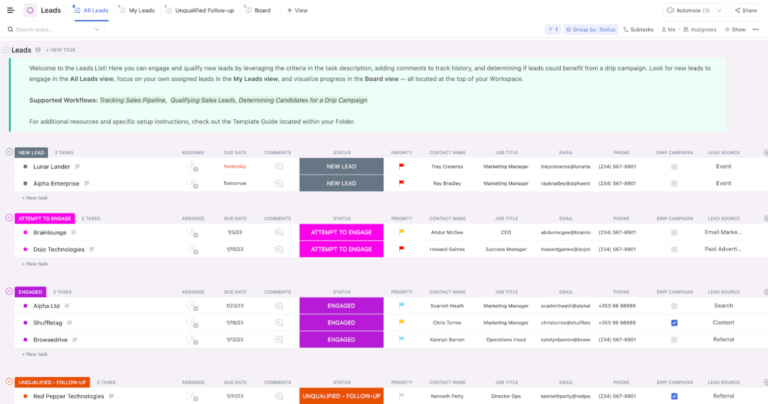
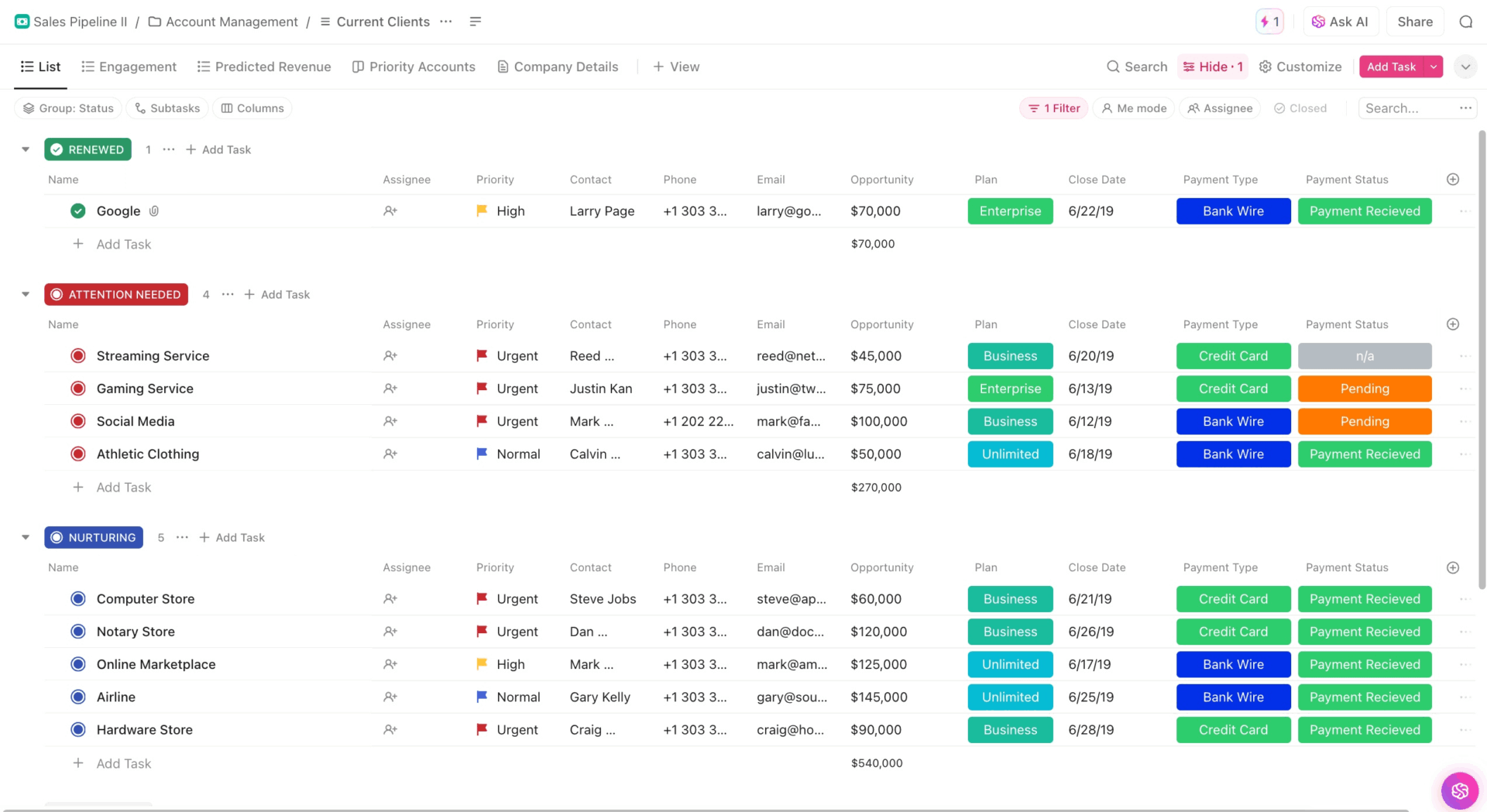
The CRM Template by ClickUp is built for teams that have outgrown spreadsheets. It brings contacts, deals, tasks, and customer work into one workspace, so sales activity no longer lives across tabs, docs, and Slack threads.
The key difference from a spreadsheet is action. A deal record can connect to tasks, owners, automations, dashboards, onboarding steps, and customer deliverables. When a deal moves stages, the next follow-up can become a task instead of a note someone has to remember.
Use case: Your team tracks leads in Google Sheets, onboarding tasks in Asana, customer notes in Docs, and deal updates in Slack. Nobody has the full picture. Use this template to bring everything together so you have a single shared source of truth. Use it to manage contacts, accounts, deals, owners, and follow-ups in ClickUp, then use Dashboards to see stalled deals, overdue work, and pipeline activity.
Why use this CRM template?
Track deal value, stage, lead source, contact info, account tier, and owner with ClickUp Custom Fields
Move deals across pipeline stages in Board View
Keep a spreadsheet-style view with Table View while adding owners, reminders, automations, and reports
Trigger follow-up tasks, owner alerts, and onboarding steps with ClickUp Automations
See pipeline value, deals by rep, and customer activity with ClickUp Dashboards
Connect deals to tasks, Docs, onboarding steps, and customer deliverables
Best for: Teams that want contacts, deals, tasks, follow-ups, and reporting in one workspace.
Skip it if: You need built-in email sequencing, lead scoring, or the deeper revenue reporting you’d get from Salesforce or HubSpot.
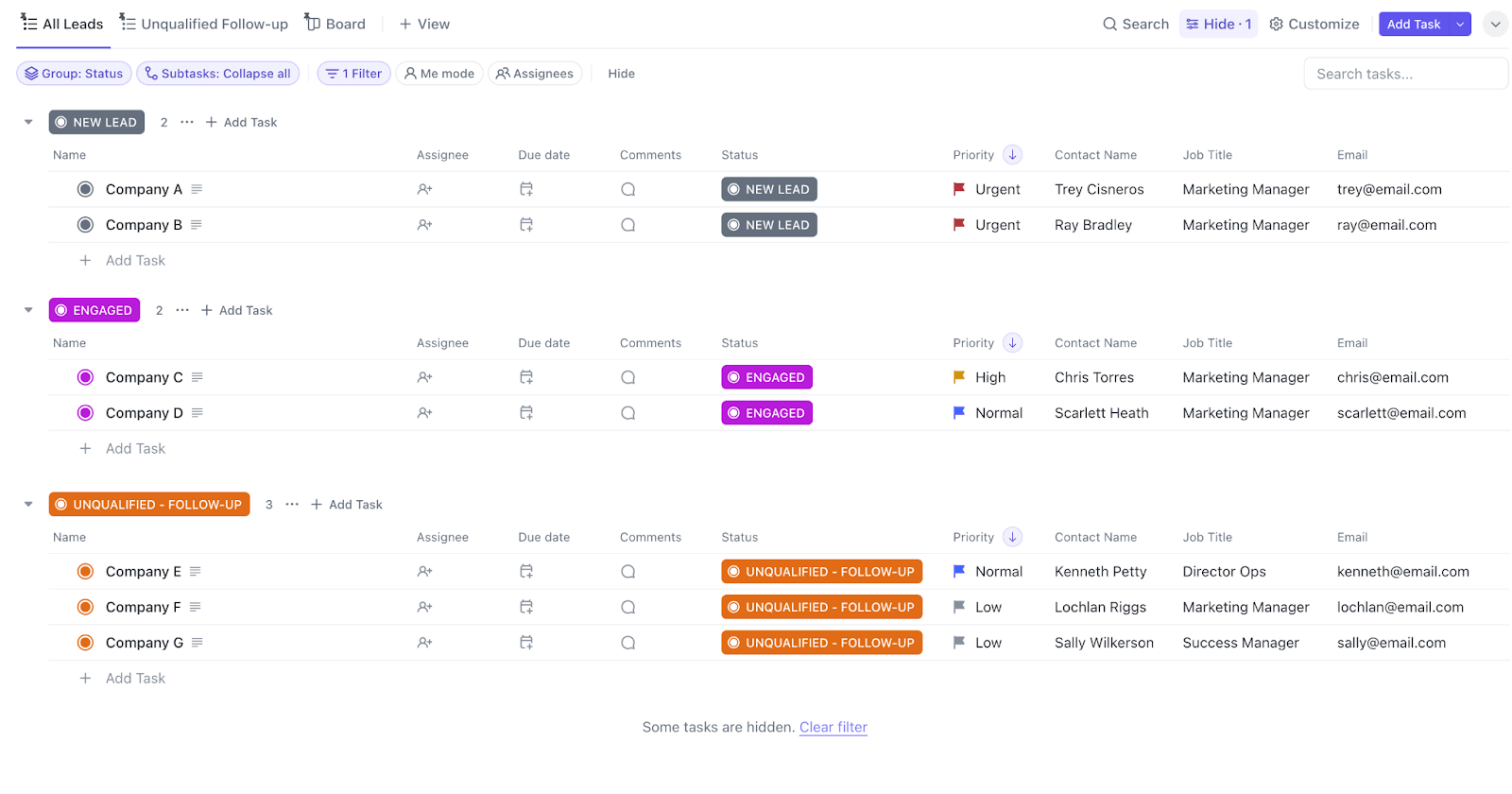
The Simple CRM Template by ClickUp sits between a messy spreadsheet and a full CRM. It tracks clients, deals, follow-ups, owners, and stages in one ClickUp List.
You still get task ownership and ClickUp views. You skip account hierarchies, onboarding workflows, and heavier sales reports. That tradeoff makes it useful for simple relationship tracking.
Use case: You are a freelance designer with 15 prospects, 10 active clients, and a few past customers who may return next quarter. A full CRM would be overkill. Use this template to track every contact, follow-up date, deal value, and next step in one List.
Why use this CRM template?
Store basic details for each customer and prospect
Track leads, opportunities, closed deals, lost deals, and unqualified prospects
Sort contacts by owner, stage, value, or next follow-up date in List View
See your pipeline by stage in Board View
Turn customer follow-ups into tasks with owners
Best for: Freelancers, consultants, and very small teams that want a lightweight CRM inside ClickUp.
Skip it if: You manage multiple deals per account or need to separate accounts, contacts, and onboarding work. Use the full CRM Template by ClickUp (#1 on this list) instead.
Built for sales managers who need rep-level visibility before pipeline reviews
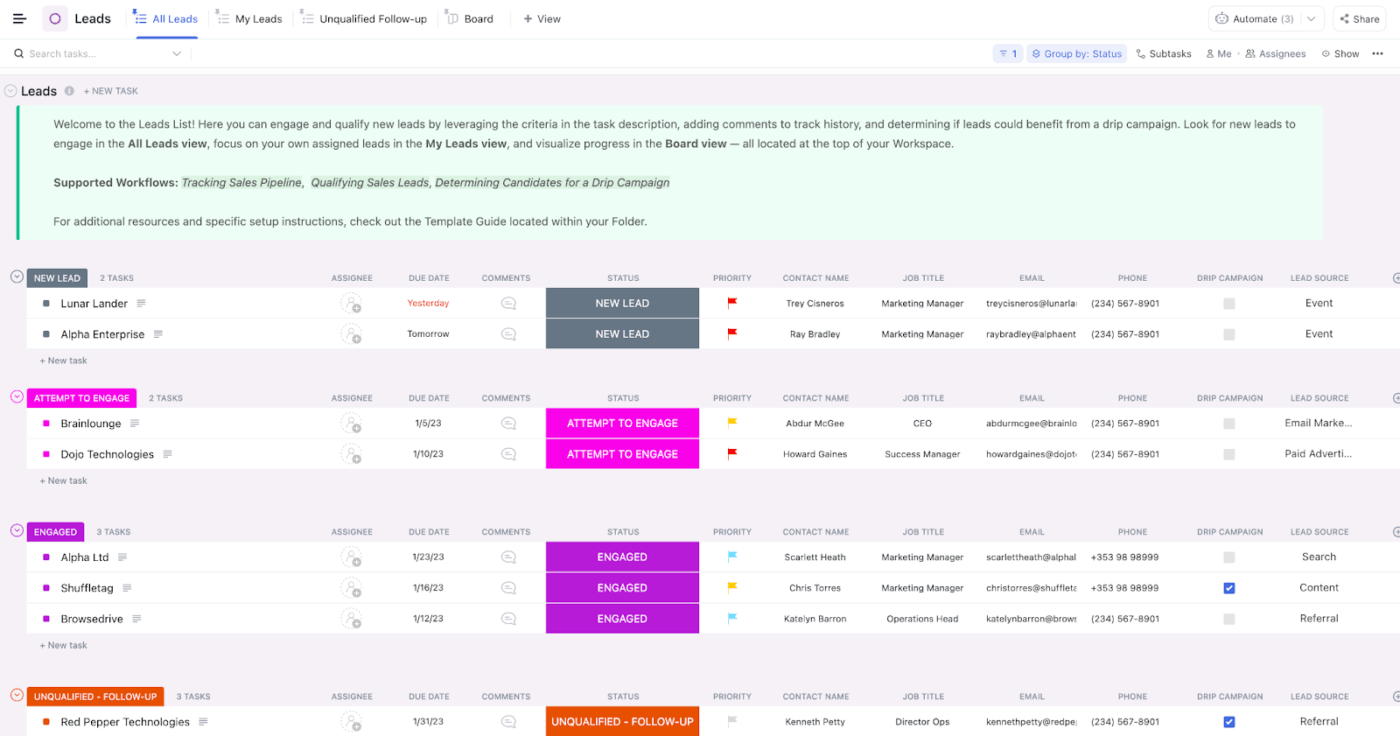
The Sales CRM Template by ClickUp is built for sales managers who need to track leads, opportunities, deal stages, rep activity, and stuck deals before pipeline reviews.
It works best when the sales process is already defined, and the team needs better visibility into what changed, which deals are slipping, and where reps need support.
Use case: You manage a five-person sales team. Deals move through discovery, demo, proposal, negotiation, and closed stages. You need to see each rep’s activity, the next step on every deal, deal probability, and weekly pipeline changes. Use this template to track sales work as tasks, move deals across stages, and review Dashboards before every pipeline meeting.
Why use this CRM template?
Manage prospects from first contact to close
Track every deal by sales stage
Add value, probability, close date, owner, priority, and loss reason
Track conversations, follow-ups, and next steps
Review pipeline value, win rate, deal cycle, and rep performance in Dashboards
Use ClickUp Brain to summarize pipeline changes, flag inactive deals, and draft follow-up messages from deal context
Best for: Sales teams that need pipeline numbers, rep visibility, and a real follow-up system.
Skip it if: You only need a basic client list. The Simple CRM Template (#2 on this list) will be faster to set up.
A pure deal-stage tracker for teams who only need to know “where is every deal right now?”
Use the Sales Pipeline Template by ClickUp when every deal needs a clear stage, owner, value, and close date. Each task is a deal, and the workflow centers on moving deals between stages.
This template works best when contact storage is not the main problem. The main question is: where is every deal right now?
Use case: Your team has 40 active opportunities and a clear sales process. You do not need account-level complexity yet. You need a visual board that shows which deals are new, qualified, in proposal, in negotiation, and closed. Use this template to drag deals across stages, track value, assign owners, and spot quiet opportunities.
Why use this CRM template?
Move deals through stages in Board View
Track deal value, close date, owner, stage, and priority
See which deals are due to close soon
Flag deals that have stayed too long in one stage
Review deal movement through the sales cycle
Best for: Teams that want a focused deal-stage tracker without a full CRM database.
Skip it if: You need to manage contacts, companies, onboarding, or customer message history. Use the CRM Template by ClickUp (#1) instead.
It is the best fit when your sales process exists, but the system around it is still being built.
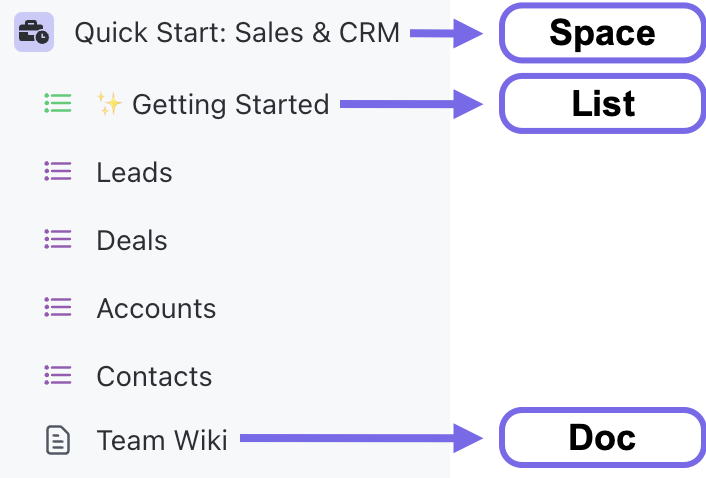
Use case: You are setting up sales for a small startup. Leads come from referrals, demos, content, and outbound. Customer notes live in different docs. Your sales process mostly lives in people’s heads. Use this template to create a shared sales workspace with leads, deals, accounts, contacts, and a team wiki.
Why use this CRM template?
Capture and sort incoming prospects
Move opportunities through a clear sales process
Keep company-level customer details in account records
Track buyers, champions, and other contacts in each deal
Document qualification rules, messaging, handoff notes, and sales process details in a team wiki
Start with a working sales workspace instead of building every List yourself
Best for: Teams that want a fast, beginner-friendly CRM setup inside ClickUp.
Skip it if: You already have a settled sales process and need deeper reporting, automation, or pipeline management. The Sales CRM Template (#3) or full CRM Template (#1) will fit better.
Get a structured CRM in Excel or Google Sheets without building from scratch
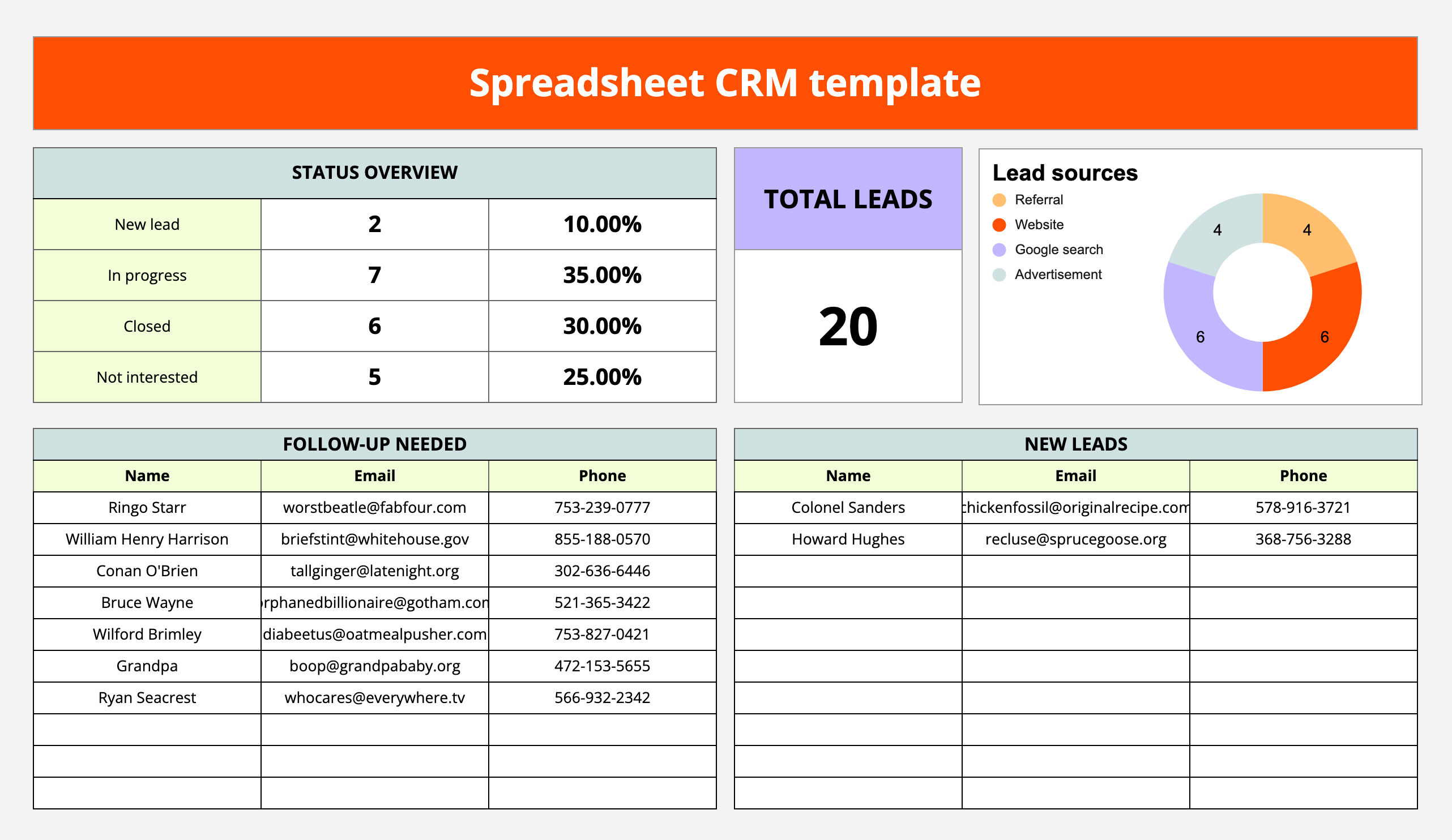
The HubSpot Free CRM Spreadsheet Template works well when scattered contact data is your main problem. It gives small teams enough structure for contacts, sales activity, and follow-ups without requiring a full CRM setup.
Use case: You are a freelance consultant with 40 active and past clients. You need one place for contact details, last conversation, next follow-up date, deal status, and notes. Add every contact, sort by next follow-up date each Monday, and use the sheet as a lightweight follow-up tracker.
A useful rule of thumb: when reps forget to log calls, deals get double-claimed, or pipeline review takes 45 minutes, the spreadsheet isn’t enough anymore.
Why use this CRM template?
Store names, companies, emails, phone numbers, and notes
Track where each customer or prospect stands
Keep upcoming follow-ups visible
Use the template in Excel or Google Sheets
Learn which fields, stages, and follow-up habits matter before paying for CRM software
Best for: Freelancers, solo founders, and small teams tracking their first customer relationships in Excel or Google Sheets.
Skip it if: You already have multiple reps, multiple deal owners, or a clear sales pipeline. This template helps you get organized, but it’s not built to run a full sales process.
Standardize your sales spreadsheet with a CRM-native structure
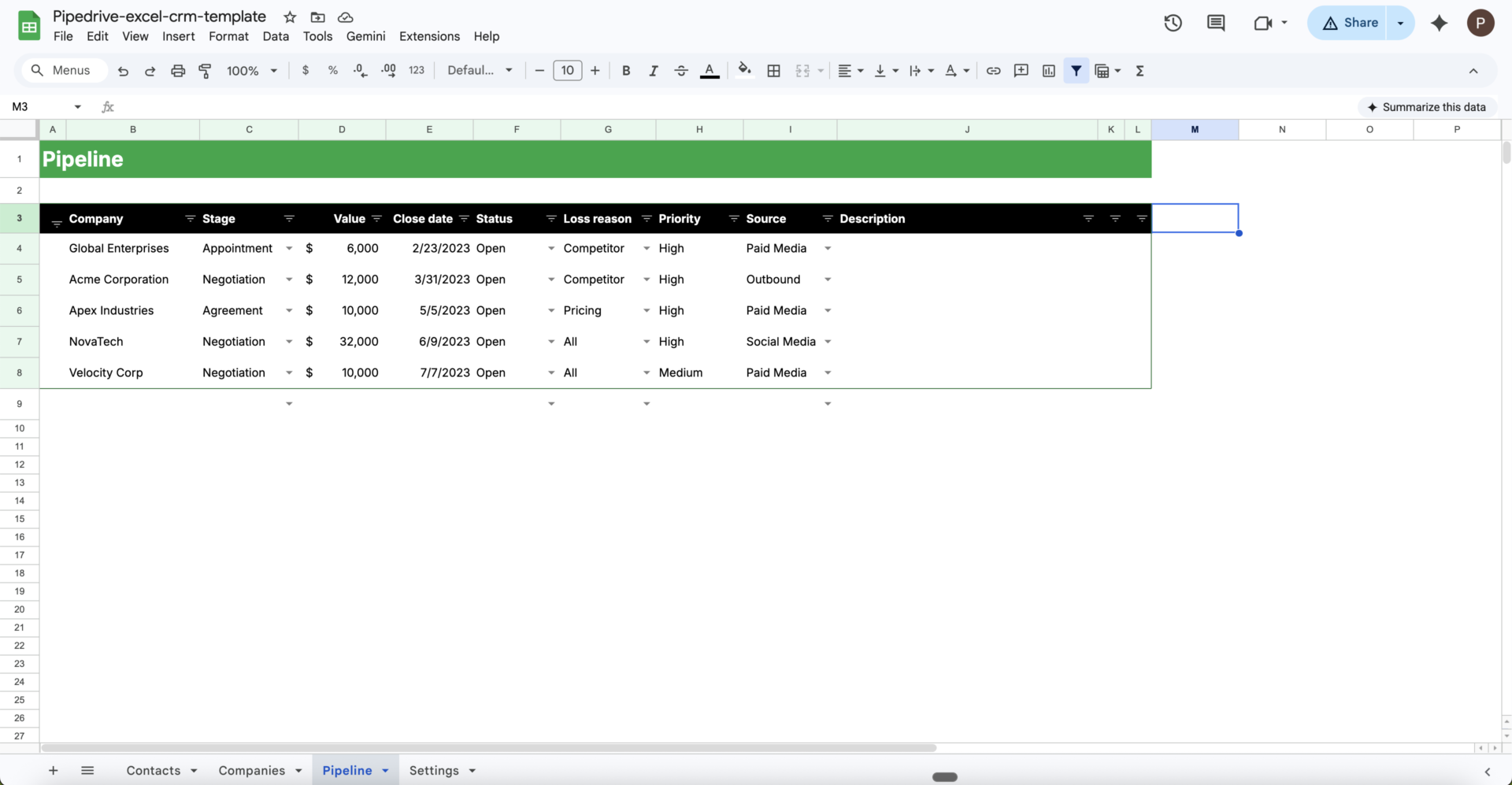
The Pipedrive Excel CRM Template is useful for teams that want an Excel CRM from a sales software company. It gives customer data, leads, and deals a cleaner structure than a blank workbook.
Use case: You run a small B2B agency, and the founder’s lead tracker has become messy. Some deals have close dates. Some have notes. Some only have names and emails. Use this template to give every lead the same fields, stages, and deal notes.
Why use this CRM template?
Organize prospect and customer information in Excel
Track leads before they become opportunities
Group sales opportunities for easier review
Replace ad-hoc spreadsheets with consistent fields and stages
Keep Excel as the main CRM tool while improving its structure
Best for: Small teams already in Microsoft Excel who want a spreadsheet template built around a real sales process.
Skip it if: Your team needs to edit at the same time. Excel works best with one clear owner. Once a few people need to update records together, Google Sheets or ClickUp will be cleaner.
Build a shared Google Sheets CRM with interaction tracking and dashboards
The Zapier Google Sheets CRM Template works well when your team needs a shared CRM in Google Sheets. It covers customer data, interaction tracking, data validation, and basic dashboards.
Use case: You are a remote team of three managing inbound leads from referrals, LinkedIn, and website forms. Everyone needs the same customer records without emailing files back and forth. Use this template to track contacts, log calls and emails, and review activity in a shared spreadsheet.
Why use this CRM template?
Store customer and prospect records in Google Sheets
Log calls, emails, meetings, and follow-ups
Use data validation to keep fields clean
Build a simple CRM dashboard from spreadsheet data
Connect Google Sheets to forms, email tools, and follow-up reminders through Zapier once your process is clear
Best for: Remote teams that want a shared Google Sheets CRM with basic reports and interaction tracking.
Skip it if: You need record-level permissions, sales task ownership, or pipeline movement that runs on its own. Google Sheets is great for sharing, but it still needs someone to keep the process honest.
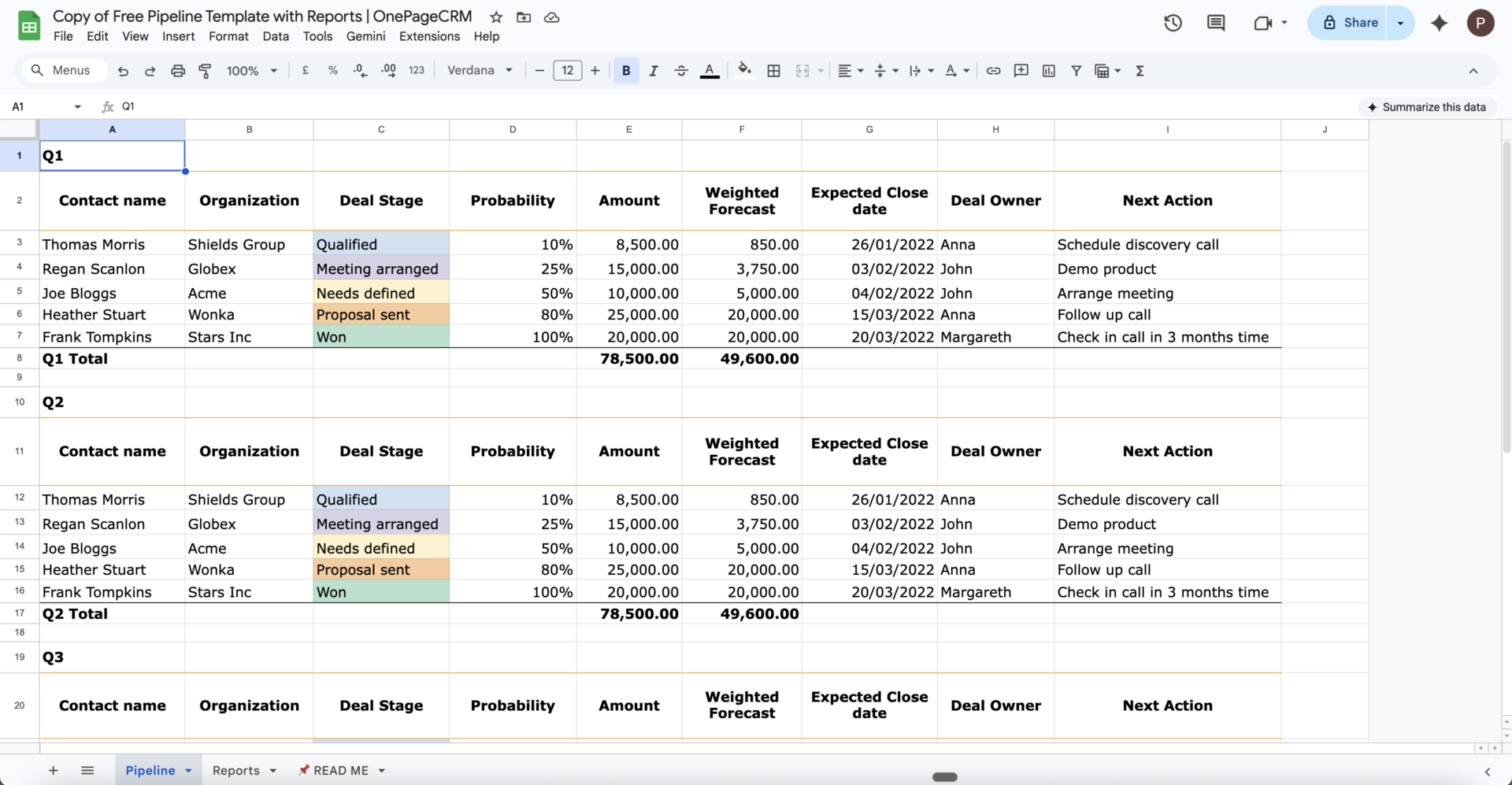
The OnePageCRM Free Sales Pipeline Template is useful when pipeline stages matter more than a full customer database. It tracks a clear sales process in Excel or Google Sheets.
Use case: Your team uses five stages: New Lead, Qualified, Proposal Sent, Negotiation, and Closed. Contact storage is not the issue. The issue is that nobody can tell which deals are stuck. Use this template to add each deal, set its stage, add deal value, and review the pipeline weekly.
Why use this CRM template?
Map deals through a clear sales process
Track where each opportunity sits
See which stages are too full or too empty
Estimate revenue from active opportunities
Work in Excel or Google Sheets
Best for: Sales teams that think in pipeline stages and need a simple way to track deal movement.
Skip it if: You need a full customer database. This template handles opportunities well, but it’s not built to manage every contact, account, and conversation.
The most advanced spreadsheet option, with multi-tab support for the full sales workflow
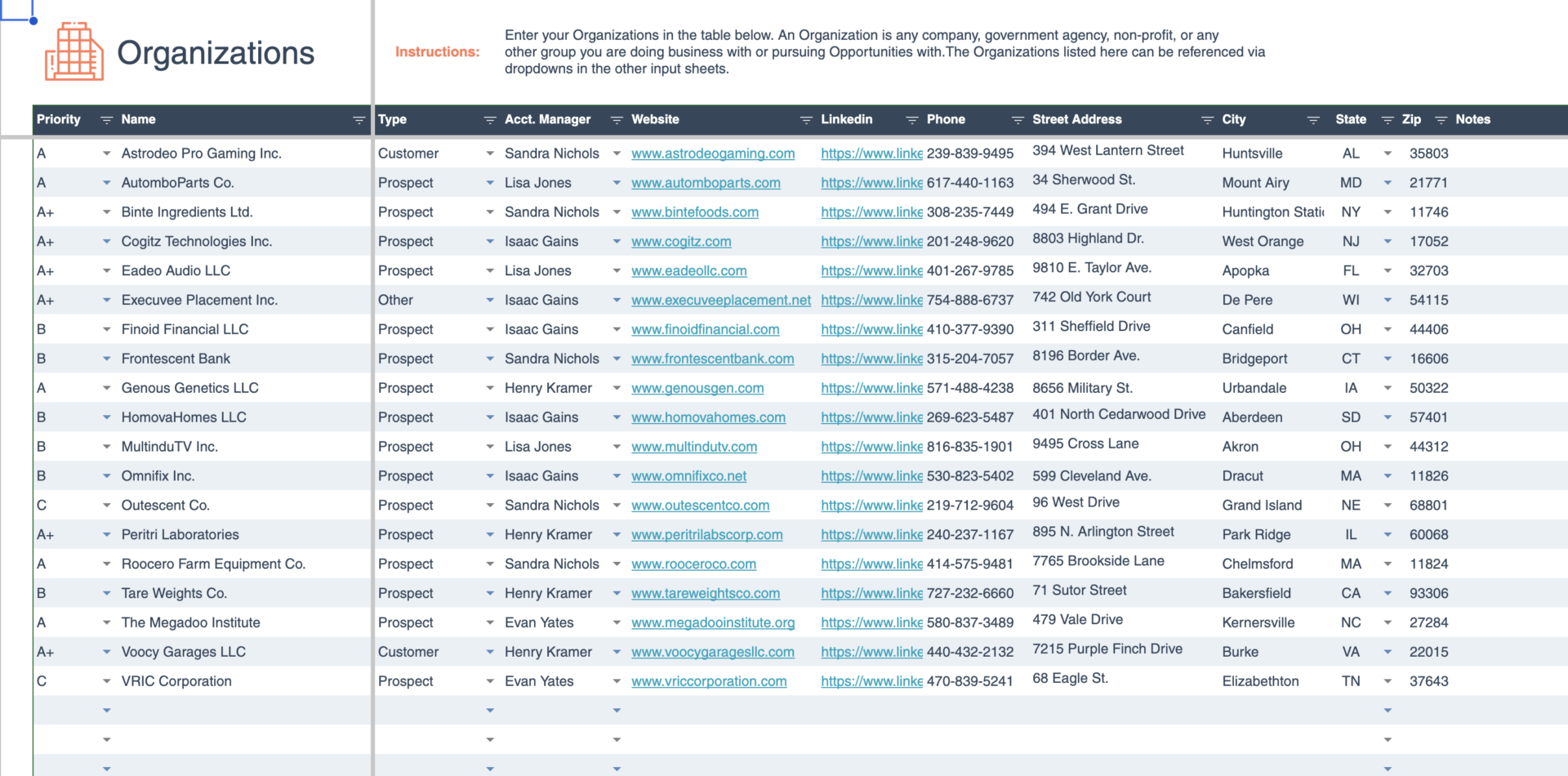
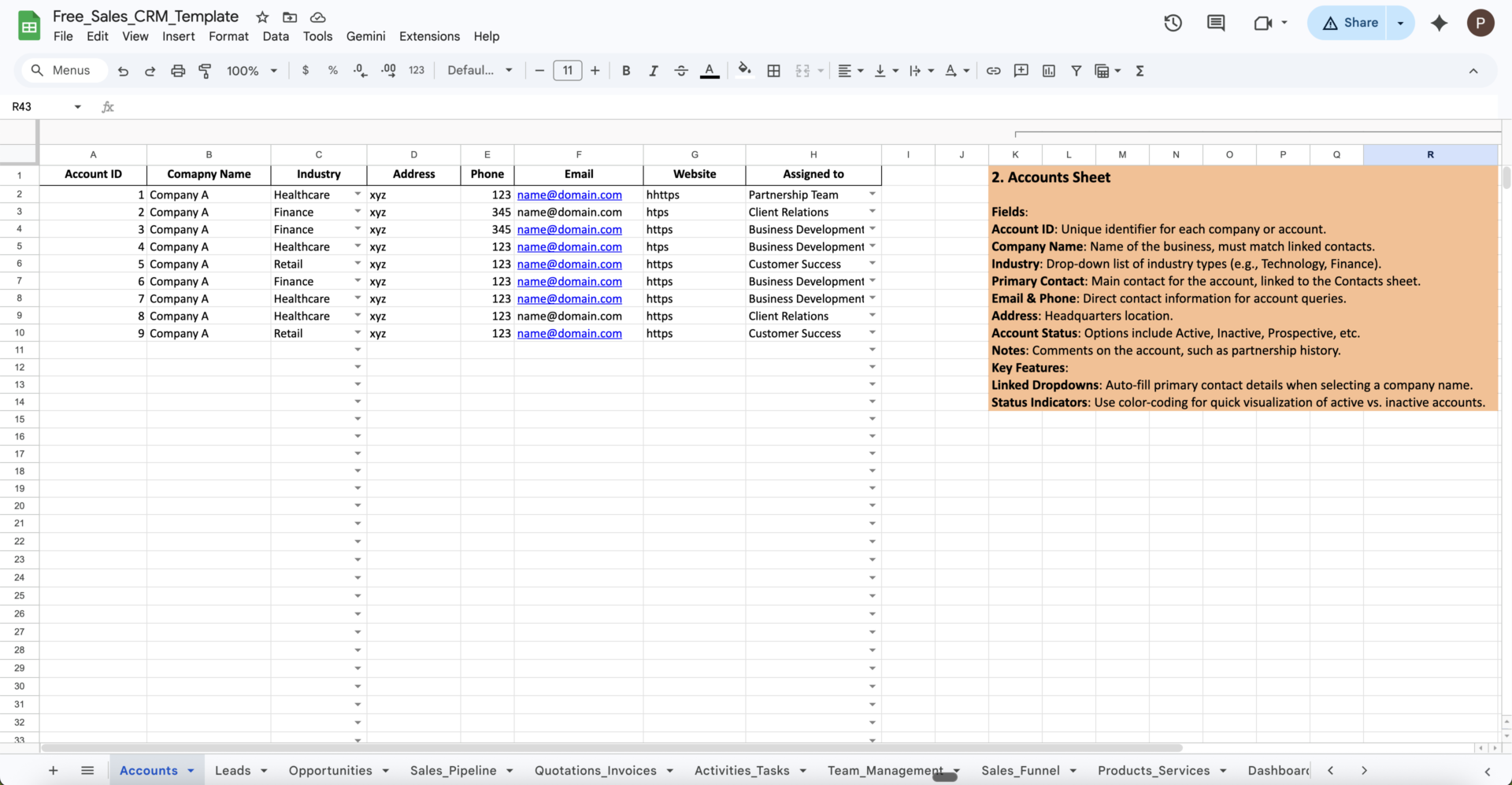
The Pipeline CRM Free Sales CRM Template is the most complete spreadsheet option on this list. It covers contacts, accounts, leads, opportunities, quotes, invoices, and dashboards across separate tabs.
Use case: You run sales for a small services business and need contacts, accounts, leads, opportunities, quotes, and invoices in one workbook. A basic CRM sheet feels too thin. A paid CRM platform feels too heavy. Use this template to manage each record type in a separate tab without starting from scratch.
Why use this CRM template?
Store individual prospect and customer details
Keep company-level records separate from contacts
Track early-stage leads before they become opportunities
Manage qualified deals through the pipeline
See active opportunities by stage, value, and expected close date
Use built-in dashboards to review sales activity
Keep quotes and invoices close to CRM data
Best for: Small businesses that want a heavier Excel or Google Sheets CRM without paying for full CRM software yet.
Skip it if: You want something lightweight. A multi-tab workbook is more than most teams need if all they want is a contact list or a basic pipeline tracker.
Summarize this article with AI ClickUp Brain not only saves you precious time by instantly summarizing articles, it also leverages AI to connect your tasks, docs, people, and more, streamlining your workflow like never before.
Summarize this article for me please
Which CRM Template Should You Use First?
If you need to…
Start with this template
Move contacts, deals, tasks, and reporting into one workspace
Summarize this article with AI ClickUp Brain not only saves you precious time by instantly summarizing articles, it also leverages AI to connect your tasks, docs, people, and more, streamlining your workflow like never before.
Summarize this article for me please
When Should You Use a ClickUp CRM Template vs. a Spreadsheet CRM Template?
Use a spreadsheet while one person owns the pipeline, and the record count stays manageable. Once multiple people update contacts, assign follow-ups, or review pipeline health, move to a workspace template with owners, reminders, and live reporting.
A ClickUp CRM template makes more sense when several people need to update records, deals need owners and follow-ups, dashboards need live data, stale deals need reminders, or customer work continues after the sale.
Use this split:
Choose a spreadsheet CRM when your CRM is mainly a record.
Choose a ClickUp CRM template when your CRM needs to assign work, trigger follow-ups, and show live pipeline activity.
In a G2 review of ClickUp, one verified small-business user described the shift this way:
The ability to have a complete overview of my entire business in one workspace. I can track all open projects across multiple brands, monitor my finances, follow long-term goals, and manage prospects through a built-in CRM, all without switching tools. Once everything is properly configured, it becomes a genuine command center for a solo creative professional.
Verified small-business user
That is the real difference. The CRM lives where the rest of the work already happens, instead of sitting in a separate file that someone has to remember to open.
Summarize this article with AI ClickUp Brain not only saves you precious time by instantly summarizing articles, it also leverages AI to connect your tasks, docs, people, and more, streamlining your workflow like never before.
Summarize this article for me please
Why Most CRM Templates Fail in the First Quarter
Most CRM failures do not start with missing features. They start when a team adds a system but keeps working around it.
Hershey’s 1999 rollout of Siebel CRM, SAP, and Manugistics shows how this issue impacts enterprise giants. The company rushed a major systems project ahead of Y2K and went live before the Halloween candy rush. As CIO Magazine documented, Hershey could not fulfill $100 million in orders for Kisses and Jolly Ranchers during one of its biggest sales periods.
The lesson still applies to smaller teams: a new system changes how people work. If the workflow around it stays unclear, the CRM turns into a stale address book.
Bill Band, Principal Analyst at Forrester Research, described the pattern directly:
Many businesses, post implementing an online CRM software solution immediately assume that their sales and efficiency levels will rise. They operate their business operations as usual, waiting to see what happens. After a few months when the expected results fail to materialize, CRM is dismissed as a failure. It falls into neglect, or becomes an over-glorified address book.
Bill Band, Analyst, Forrester Research
Sales reps describe the same thing from the front lines. In an r/sales thread, one territory manager covering about 1,100 stores described moving from Excel notes to a CRM that actually slowed the work down:
It takes me 10 seconds just to get to the splash page, and when I search things that are CLEARLY in our system, it doesn’t come up right away.
Another commenter on r/CRMSoftware put it even more plainly: small business owners often run into trouble “because they try to set it up like an enterprise system too early.” Early on, simple stages and steady habits matter more than features.
Three failure modes show up again and again:
The template is a list, not a workflow A rep adds a contact and fills in fields, but nothing happens next. There is no follow-up task, stale deal alert, or link between the contact and the next action
Stage definitions drift “Qualified” means different things to different reps. By month two, pipeline numbers stop matching reality, and forecasts become guesswork
Nobody owns data hygiene Records get duplicated. Free-text fields multiply. “Closed Won,” “won,” and “WON” break filters and reports. The team trusts the CRM less, updates it less, and the cycle keeps going
CRM templates can work when the habits around them are clear: one owner per deal, shared stage definitions, a next action on every opportunity, and a weekly review.
A ClickUp survey found that 92% of knowledge workers risk losing important decisions across chat, email, and spreadsheets. CRM follow-ups create the same risk: if a rep flags a lead in Slack but nobody creates a task, the next step disappears.
This is where workspace-native CRM templates help. In ClickUp, teams can convert chat messages, task comments, Docs, and emails into trackable tasks, so follow-ups get an owner and a due date.
For a deeper walkthrough, watch how CRM setup mistakes turn useful systems into stale contact lists:
Summarize this article with AI ClickUp Brain not only saves you precious time by instantly summarizing articles, it also leverages AI to connect your tasks, docs, people, and more, streamlining your workflow like never before.
Summarize this article for me please
How Do You Make a CRM Template Stick?
CRM templates fail for predictable reasons: unclear stages, stale records, missed follow-ups, and weak ownership. These fixes work whether you use Excel, Google Sheets, or ClickUp.
1. Set your deal stages before you open the template
Most templates ship with generic stages. Rename them to match your actual sales process before the team starts using the template.
A template that mirrors your sales process gets used. A template that forces your team into someone else’s process gets dropped fast.
2. Add a “Next Action” field to every deal
The single most useful field in any CRM template is Next Action with a due date.
Without it, your CRM is a record of what happened. With it, your CRM is a list of what to do today.
3. Set a weekly pipeline review cadence
A CRM template stays accurate only when someone reviews it. Block time each week to update pipeline stages, drop dead deals, and check next actions.
Pipeline value, win rate, average deal cycle, and conversion rates only matter when the data behind them is current.
4. Use dropdowns for every category field
Free-text fields make reports messy. “Closed,” “Closed Won,” “Won,” and “Closed” might mean the same thing to a person, but they break filters, formulas, and dashboards.
Use data validation in Excel or Google Sheets. Use ClickUp Custom Fields with set options inside ClickUp.
5. Delete fields you will not use
Every field in your CRM template should support a decision or action. If you collect “Industry” but never sort, report, or prioritize by it, delete the field.
A clean CRM beats a busy one.
6. Automate the follow-ups first
Start with one automation.
In ClickUp, create a follow-up task when a deal moves stages, or alert the owner when a close date is past due.
In spreadsheets, use conditional formatting to flag stale contacts, overdue follow-ups, and high-value deals going cold.
7. Plan your migration path early
Spreadsheet CRM templates are usually a starting point. Before you reach a few hundred records, decide what comes next: stay in the sheet, move to ClickUp, or pay for dedicated CRM software.
Do not wait until the spreadsheet is full of duplicates, broken formulas, and dead deals. Migration becomes harder once the data is messy.
Summarize this article with AI ClickUp Brain not only saves you precious time by instantly summarizing articles, it also leverages AI to connect your tasks, docs, people, and more, streamlining your workflow like never before.
Summarize this article for me please
Build a CRM Template Your Team Will Keep Using
A CRM template works when it helps your team answer four questions quickly:
Who are we talking to?
What stage is the relationship in?
What needs to happen next?
Who owns that next step?
Spreadsheet templates can answer those questions for simple teams. ClickUp templates answer them while connecting CRM records to tasks, owners, dashboards, documents, and messages.
Use a spreadsheet when your CRM is mainly a record. Use ClickUp when your CRM needs to manage the work that follows.
Summarize this article with AI ClickUp Brain not only saves you precious time by instantly summarizing articles, it also leverages AI to connect your tasks, docs, people, and more, streamlining your workflow like never before.
Summarize this article for me please
Frequently Asked Questions About CRM Templates
1. What’s the difference between a CRM template and a CRM tool?
A CRM template is a pre-built structure for tracking contacts, deals, follow-ups, and customer notes. It can live in a spreadsheet, ClickUp workspace, or workbook.
A CRM tool is dedicated software with deeper features like email tracking, lead scoring, automation, and revenue reporting. Templates are faster to start. CRM tools are stronger when your process is mature.
2. Do I need a CRM if I only have a few clients?
You may not need a full CRM tool if you only have a few clients. A simple CRM template is usually enough to track contact details, last conversations, next follow-ups, and open opportunities.
Move to a more structured CRM when you start missing follow-ups, sharing accounts with teammates, or managing multiple deals at once.
3. What should a CRM template include?
At minimum, a CRM template should include contact name, company, email, phone, lead source, deal stage, deal value, next action, next action date, and owner.
Anything beyond these fields should support a specific decision. Tracking “industry” is wasteful if you never filter, prioritize, or report by it. The most overlooked field is Next Action with a due date because it turns the CRM from a record into a follow-up system.
4. How do I create my own CRM template from scratch?
Start with a single sheet and add these columns: Contact, Company, Stage, Value, Next Action, Next Action Date, Owner, Notes. Use dropdown data validation for Stage and Owner. Sort by Next Action Date as your default view. Add a weekly review block on your calendar.
5. What’s the difference between a CRM template and a sales pipeline template?
A CRM template tracks the full customer relationship: contacts, accounts, every interaction, and post-sale work. A sales pipeline template tracks only deals through stages. If you need to know exactly who you’re talking to, you need a CRM. If you only need to know the status of every deal right now, then a pipeline template is faster and simpler.
Everything you need to stay organized and get work done.