






Still downloading templates?
There’s an easier way. Try a free AI Agent in ClickUp that actually does the work for you—set up in minutes, save hours every week.
Sorry, there were no results found for “”
Sorry, there were no results found for “”
Sorry, there were no results found for “”
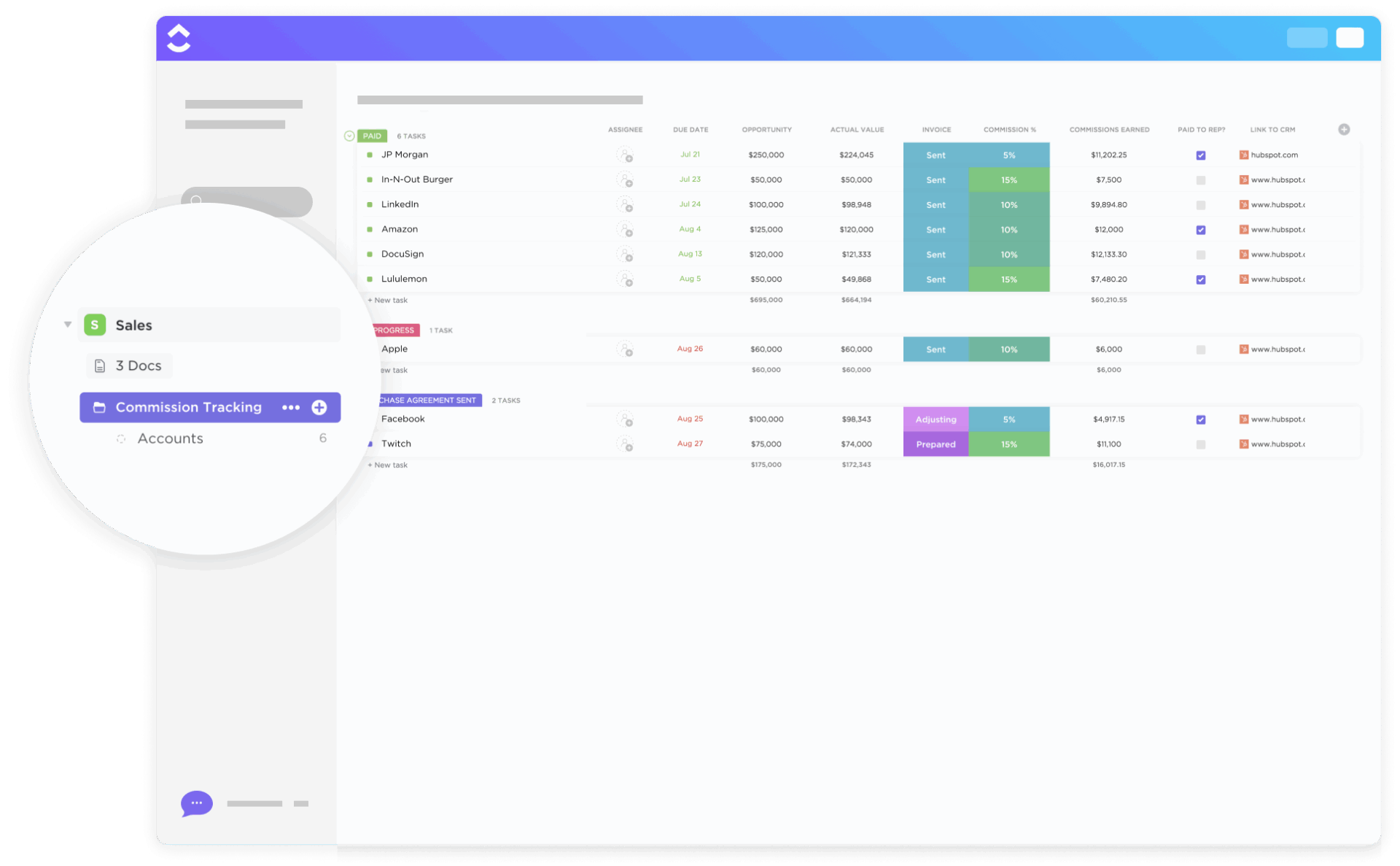
According to CaptivateIQ’s 2025 State of Incentive Compensation Management research, 66% of companies have overpaid and/or underpaid commissions in the past year. That’s the core problem with commission pay today: the process is often manual, fragmented, and error-prone, which creates distrust faster than it creates motivation.
This guide covers everything you need to know about commission pay. You’ll learn how to choose the right structure, stay compliant with tax laws, automate calculations, and resolve disputes. The goal is to help you build a system that motivates your team and keeps administrative work manageable, not one that creates friction, errors, and mistrust.
Commission pay is a form of performance-based compensation where earnings are tied directly to results. Unlike a fixed salary, this variable compensation links what someone earns to what they sell. Close a deal, earn a percentage. Miss your targets, and your paycheck reflects that reality.
You’ll find this compensation structure in roles where performance is easily measured by revenue. Sales representatives, real estate agents, account executives, and insurance brokers all commonly work under commission-based plans. The model creates a direct line between individual effort and individual reward, which is precisely why it’s so powerful as a motivational tool.
A commission-based compensation plan can be an employee’s sole income source or it can supplement a base salary. Businesses use it to align employee motivation directly with company revenue goals. When the sales team succeeds, the company succeeds. The incentives point in the same direction.
The challenge, however, is managing commission pay effectively. When you’re tracking deals and calculating payouts across disconnected spreadsheets, errors become inevitable. Disputes follow, trust erodes, and what should be a motivational system becomes a source of frustration. Effective sales project management requires systems that handle this complexity without creating administrative nightmares.
The process seems straightforward on paper, but the details get complicated quickly. An employee makes a sale. The sale gets verified. The commission is calculated based on the agreed-upon rate. The payment is processed. Simple enough, until you factor in tiered rates, split commissions, clawbacks, and the reality that your sales data lives in multiple systems that don’t talk to each other.
This is where most teams hit a wall. They spend hours verifying data instead of focusing on growth. They field constant questions from reps asking, “Where’s my commission?” They discover errors after payments have already gone out. The work sprawl of managing commissions across scattered tools creates more problems than it solves.
The core calculation itself is simple. You have a sale amount, which is the total value of the closed deal. You have a commission rate, which is the percentage or flat fee you’ve agreed to pay. The commission earned equals the sale amount multiplied by the commission rate. A $10,000 deal at 10% equals a $1,000 commission.
The commission base, the number your rate is applied to, can be the gross revenue, the net profit, or the total sale price. Each approach has implications. Gross revenue is simpler to calculate but doesn’t account for profitability. Net profit aligns incentives with company margins but requires more complex tracking. Your choice depends on your business model and what behaviors you want to encourage.
Commission rates and payout schedules vary widely. Some companies pay monthly, others quarterly, some with every paycheck. The timing affects cash flow for both the business and the employee. Without a reliable system, tracking which deals qualify, applying the correct rates, and managing payout timing becomes a constant source of friction.
🧐 Did You Know? According to the Gartner Sales Goals Survey, 87% of sales teams struggle to meet quota targets. A well-designed commission structure can help close that gap by aligning incentives with achievable goals.
Choosing the wrong commission structure is one of the most common mistakes companies make. You might accidentally demotivate your top performers by capping their earnings. You might incentivize unprofitable deals by paying on gross revenue when margins are thin. You might create a plan that works great for your business model but terrible for your team’s financial security.
The right structure depends on your sales cycle length, team composition, product margins, and business goals. There’s no universal answer, but understanding your options helps you make an informed choice.
Straight commission, sometimes called 100% commission, means earnings come entirely from sales. There’s no base salary, no safety net. Every dollar earned is a direct result of deals closed. This high-risk, high-reward model appears most commonly among independent contractors and in industries with high-margin products where a single sale can generate substantial income.
The appeal for businesses is obvious: you only pay when revenue comes in. The risk for employees is equally obvious: income can swing dramatically from month to month. A slow quarter doesn’t just mean disappointing numbers; it means struggling to pay rent.
This structure demands flawless tracking. When every dollar of someone’s income depends on accurate sales records, there’s no margin for error. A missed commission or a calculation mistake isn’t just an administrative inconvenience. It’s someone’s livelihood.
This hybrid model combines a fixed salary with performance-based commission, providing financial stability while still rewarding results. It’s the most popular approach for a reason: it balances the business’s need for motivation with the employee’s need for security.
You’ll typically see split ratios like 60/40 or 70/30, where the first number represents the base salary as a percentage of on-target earnings. A 70/30 split for a $100,000 OTE means $70,000 guaranteed base plus $30,000 in potential commission.
The trade-off is administrative complexity. Now you’re tracking and managing two separate pay components for every employee. You need systems that handle both fixed payroll and variable commission calculations, and ideally those systems should talk to each other. Using payroll templates can help standardize this process.
📮 ClickUp Insight: 92% of knowledge workers risk losing important decisions scattered across chat, email, and spreadsheets. Without a unified system for capturing and tracking decisions, critical business insights get lost in the digital noise. With ClickUp’s Task Management capabilities, you never have to worry about this. Create tasks from chat, task comments, docs, and emails with a single click.
A tiered commission structure uses accelerators to increase commission rates as salespeople hit higher performance thresholds. The logic is straightforward: reward your top performers for exceptional results and give everyone a reason to push past their quotas.
A typical tiered structure might work like this: 5% on the first $50,000 in sales, 7% on sales from $50,001 to $100,000, and 10% on everything above $100,000. The rep who sells $150,000 earns $2,500 on the first tier, $3,500 on the second tier, and $5,000 on the third tier, totaling $11,000 rather than the $7,500 they would have earned at a flat 5% rate.
The tracking complexity here is significant. You need a system that automatically recognizes when a rep crosses into a new tier and applies the correct multiplier without manual intervention. Do this in spreadsheets, and errors are almost guaranteed.
A draw against commission is an advance paid to an employee, which gets deducted from their earned commissions later. Think of it as a loan against future performance. Companies often use this approach when onboarding new reps who haven’t had time to build their pipeline, or during predictable seasonal slowdowns.
Recoverable draws must be paid back if the rep doesn’t earn enough commission to cover them. Non-recoverable draws are forgiven if earnings fall short, functioning more like a guaranteed minimum.
The administrative burden is heavy. You have to track draw balances for each rep individually and reconcile them against actual earnings over time. Clear policies matter enormously here. What happens if someone leaves with an outstanding balance? How long do you carry negative balances before writing them off?
Residual commission provides ongoing payments for as long as a customer remains active. This structure appears most commonly in subscription-based businesses where customer retention matters as much as initial acquisition. SaaS companies, insurance agencies, and financial services firms often use residual models.
The appeal is that it rewards salespeople for bringing in loyal, long-term customers rather than just closing deals that might churn quickly. A rep who lands a customer that stays for five years continues earning from that relationship.
This creates a long-term tracking requirement. You need systems that can monitor customer lifetime value and attribute recurring revenue back to the original salesperson, potentially for years after the initial deal closed.
💡 Pro Tip: Before choosing a commission structure, map out your sales cycle and identify the behaviors you want to incentivize. If customer retention matters more than acquisition volume, residual commissions might make more sense than straight commission, even if they’re more complex to administer.
Jumping into a commission plan without clear rules creates predictable problems. When terms are vague or buried in scattered emails and spreadsheets, disputes become inevitable. Reps argue about whether a deal qualified. Finance questions whether the rate was applied correctly. The absence of a single source of truth erodes trust and makes scaling your sales team nearly impossible.
Getting your commission pay structure right from the start is foundational. A clear, documented plan builds the trust necessary for the system to actually motivate performance.
Start by deciding what you’re paying commission on. Is it the total contract value (gross sales), or the profit after costs (net profit)? Your answer depends on your industry, profit margins, and sales cycle length. High-margin businesses might pay on gross revenue without worrying too much about profitability. Low-margin businesses typically need to pay on net profit to avoid incentivizing unprofitable deals.
Clear definitions prevent confusion later. What officially counts as a qualified sale? At what point is a deal considered “closed”: at contract signing or upon first payment? What are the exclusions, such as returns, cancellations, or non-paying clients? Answer these questions before you launch the plan, not after disputes arise.
Establish the rhythm of your payouts. Will you pay commissions with every paycheck, monthly, or quarterly? Consistency matters because reps need to know when to expect their earnings. Unpredictable timing creates anxiety and erodes trust.
Define your eligibility rules clearly. Does a new hire earn commission from day one, or is there a probationary period? What happens if a customer cancels their contract or requests a refund? Without a clear clawback policy, you’ll handle these situations inconsistently, which feels arbitrary and unfair to your team.
Never rely on verbal agreements. A formal commission agreement creates a single source of truth that protects both the company and the employee. When disputes arise, and they will, you need documentation to reference.
Your written policy should include commission rates and tiers with exact percentages and thresholds, the payment schedule showing when commissions are calculated and paid, eligibility rules defining what qualifies a deal and a rep for commission, a dispute resolution process outlining the steps to take if someone questions their payout, and plan modification terms explaining how and when the plan can be changed.
📖 Also Read: 15 Free Sales Plan Templates
Relying on spreadsheets for commission calculations is asking for trouble. A single formula error can lead to incorrect payouts, costing the company money or short-changing your reps. Manual processes are not just risky; they’re also incredibly time-consuming. Every hour spent verifying calculations is an hour not spent on revenue-generating activities.
The answer is automation. When deal data, commission rates, and calculation logic live in a connected system, you eliminate the manual handoffs where errors creep in. You create an audit trail that makes disputes easier to resolve. You give everyone visibility into where they stand without fielding constant questions.
📮 ClickUp Insight: The average professional spends 30+ minutes a day searching for work-related information. That’s over 120 hours a year lost to digging through emails, chat threads, and scattered files. An intelligent AI assistant embedded in your workspace can change that. ClickUp Brain delivers instant insights and answers by surfacing the right documents, conversations, and task details in seconds, so you can stop searching and start working.
Ignoring tax and compliance rules for commission pay is one of the fastest ways to get into legal trouble. Many businesses mistakenly treat commission like a simple bonus, forgetting that it’s considered supplemental wages with its own withholding and reporting requirements. This oversight can lead to audits, fines, and lawsuits, creating substantial financial and reputational risk.
Commission is taxable income and must be handled correctly to stay compliant. For W-2 employees, employers are responsible for withholding taxes just like with regular wages. For 1099 independent contractors, the individual manages their own tax obligations. The classification matters enormously for compliance.
Because commissions are often classified as supplemental wages, they may be taxed at a flat 22% on cumulative supplemental wages up to $1 million. Beyond federal taxes, several other compliance considerations apply.
Overtime rules under the Fair Labor Standards Act mean some commission-based employees may still be eligible for overtime pay, depending on their classification and total compensation. Minimum wage requirements mandate that your compensation plan ensures all employees earn at least the applicable minimum wage for all hours worked, even if commission is their primary income source. State-specific laws add another layer of complexity, with many states having their own regulations governing commission-only employment, written agreement requirements, and payment timing.
To avoid compliance issues, consult with an HR professional or legal counsel before finalizing your commission structure. Using HR software that tracks compensation and maintains compliance records can help protect your business with a detailed audit trail for every deal and payment. Having documentation that shows exactly how commissions were calculated and paid can save you significant headaches if questions arise.
💡 Pro Tip: Create a compliance checklist as part of your commission plan documentation. Review it quarterly to ensure you’re staying current with changing regulations, especially if you have employees in multiple states.
For many teams, the end of the month triggers chaos. Finance and sales ops scramble to verify deals from the CRM, reconcile numbers in spreadsheets, and chase down approvals via email. This manual process is slow, inefficient, and prone to human error. Delayed or incorrect payments frustrate your top performers, exactly the people you most want to keep happy.
A consistent, documented process transforms that chaos into a predictable workflow. Here’s how to build one that actually works.
Before any calculation happens, confirm that each deal is legitimate and meets the criteria in your commission plan. This typically involves checking that the deal is marked as closed-won, that the customer has paid (if payment is required for commission eligibility), and that no exclusions like cancellations apply.
This verification process usually involves both the sales manager and the finance team. The sales manager confirms the deal details are accurate. Finance confirms the payment was received. Without a clear handoff between these parties, deals fall through the cracks or get paid incorrectly.
Streamline this by building a clear approval workflow with defined stages. “Pending Verification” means the deal needs review. “Approved” means it’s ready for calculation. “Rejected” means it didn’t qualify. Everyone can see exactly where each deal stands without asking.
Once a deal is verified, apply the calculation. This involves using the correct commission rate on the commission base. Simple enough for a single flat-rate plan. Far more complex when you have tiered structures, split commissions for team-based sales, or different rates for different product lines.
The key is creating a perfect audit trail. Every calculation should be traceable back to the source data: what was the deal value, what rate was applied, and how was the final number derived? When disputes arise, you need to show your work.
Formula fields that automatically calculate based on deal value and commission rate eliminate manual math and ensure consistency across every transaction. The same logic applies every time, removing the variability that comes from different people doing calculations differently.
With commissions calculated and approved, the final step is getting money to your reps. This involves a handoff to your payroll department. You can align commission payouts with regular payroll cycles or run separate commission-only pay runs, depending on your systems and preferences.
Make this handoff clean by exporting a filtered view of all approved commissions. Your payroll team receives accurate, finalized numbers without digging through spreadsheets or reconciling different data sources. The fewer manual steps in this process, the fewer opportunities for errors.
Meticulous record-keeping is essential for compliance and for resolving future disputes. For every commission payment, you should have clear documentation of the deal, the rate applied, the calculation performed, the approvals obtained, and the payment details.
Think of this documentation as protection for both the company and the employee. When questions arise months later, you need to recreate exactly what happened and why. Activity logs and comment history that create timestamped records of every action make this possible without requiring additional manual documentation.
💫 Real Results: Teams like QubicaAMF reclaimed 5+ hours weekly using ClickUp by eliminating outdated knowledge management processes. That’s over 250 hours annually per person, time that can be redirected toward revenue-generating activities.
Setting up a commission plan is just the beginning. The real challenge is managing it effectively over time. Treat your plan as a “set it and forget it” document, and it will quickly become outdated, misaligned with business goals, and a source of frustration for everyone involved. Top performers leave. Disputes multiply. What should motivate becomes what demoralizes.
A commission structure is a living system that requires ongoing attention to maintain trust, motivation, and operational efficiency.
Unrealistic quotas demotivate teams faster than almost anything else. When targets feel impossible, reps disengage before they even start trying. They assume they’ll miss regardless of effort, so they stop putting in effort. The prophecy fulfills itself.
Use data to set achievable goals. Look at historical performance, market conditions, and your team’s actual capacity. Involve sales leadership in the quota-setting process to build buy-in. A target that leadership helped create is a target they’ll help their team achieve. Understanding how to set effective team goals is essential for commission success.
Turn sales data into actionable insights by visualizing past performance and tracking progress toward new targets. A sales dashboard that shows where everyone stands creates healthy transparency and enables early intervention when someone’s falling behind.
🧐 Did You Know? In response to economic volatility, 62% of organizations have shifted to performance-based pay structures, while 87% of sales teams struggle to meet quota targets. The gap between compensation design and quota achievement represents a major opportunity for companies that get it right.
Transparency is the foundation of a successful commission plan. Your reps should never have to guess what their commission rate is, how they’re tracking toward quota, or what their next paycheck will look like. Ambiguity breeds mistrust, and mistrust kills motivation.
Give your reps real-time visibility into their deals and commission status. When they can see exactly where they stand at any moment, they stay engaged. They also stop asking finance for status updates, freeing up your team to focus on higher-value work.
Consider how self-service access to commission data and performance metrics can streamline operations. When reps can answer their own questions, everyone wins. Similarly, effective lead tracking ensures the deals feeding into your commission system are accurate from the start.
Markets change. Products evolve. Business strategies shift. Your commission plan needs to adapt accordingly. A plan that worked perfectly two years ago might be completely misaligned with current priorities today.
Review your plan at least annually, or whenever there’s a significant change in your business model, product mix, or market conditions. Look for warning signs that indicate needed adjustments.
High turnover might signal that reps feel the plan is unfair or unattainable. Consistently missed quotas across the entire team suggest targets are unrealistic. Frequent complaints about fairness indicate a perception problem, whether or not the underlying math is correct.
When you make changes, document them clearly and communicate the reasoning. People accept changes more easily when they understand why. Maintain a record of all previous plan iterations so you can reference historical context when questions arise.
Even with the best systems, disputes happen. Someone believes a deal should have qualified that didn’t. A calculation seems wrong. A rate was applied differently than expected. The key is having a clear, fair, and efficient process for resolution.
Establish a defined escalation path and timeline. When a dispute arises, who reviews it first? How quickly should they respond? What’s the appeal process if the rep disagrees with the initial resolution?
Having all the facts in one place is critical. Complete deal context, including task history, comments, attached contracts, and approval logs, lets you resolve disputes based on evidence rather than competing recollections.
📖 Also Read: How to Do Project Management for Sales Teams
Many companies still handle commission pay by juggling a CRM, multiple spreadsheets, and endless email threads. This fragmentation, what we call work sprawl, is a productivity killer. It creates manual data entry, high error rates, and zero visibility for your sales team or leadership. As your organization grows, this approach simply cannot scale.
The solution is bringing your entire commission workflow into one connected platform. A converged AI workspace, where all your work, data, and workflows live together with embedded contextual AI, eliminates the context switching that creates errors and wastes time. ClickUp lets you manage everything from deal tracking and calculations to approvals and reporting in a single, automated system.
Stop relying on disconnected spreadsheet columns by storing commission rates, deal values, contract dates, and calculated earnings as structured data directly on each deal’s task with ClickUp Custom Fields.
This approach means your commission data lives alongside your deal data. When a rep closes a deal, all the information needed to calculate their commission is already attached to that task. No copying and pasting between systems. No reconciling different data sources. One source of truth for everything.
Create fields for deal value, commission rate, commission earned, payment status, and any other data points your plan requires. Filter and sort by any of these fields to generate the reports you need.
Let automation handle the busy work. ClickUp Automations can trigger calculations, notify managers for approval, and update task status without manual intervention.
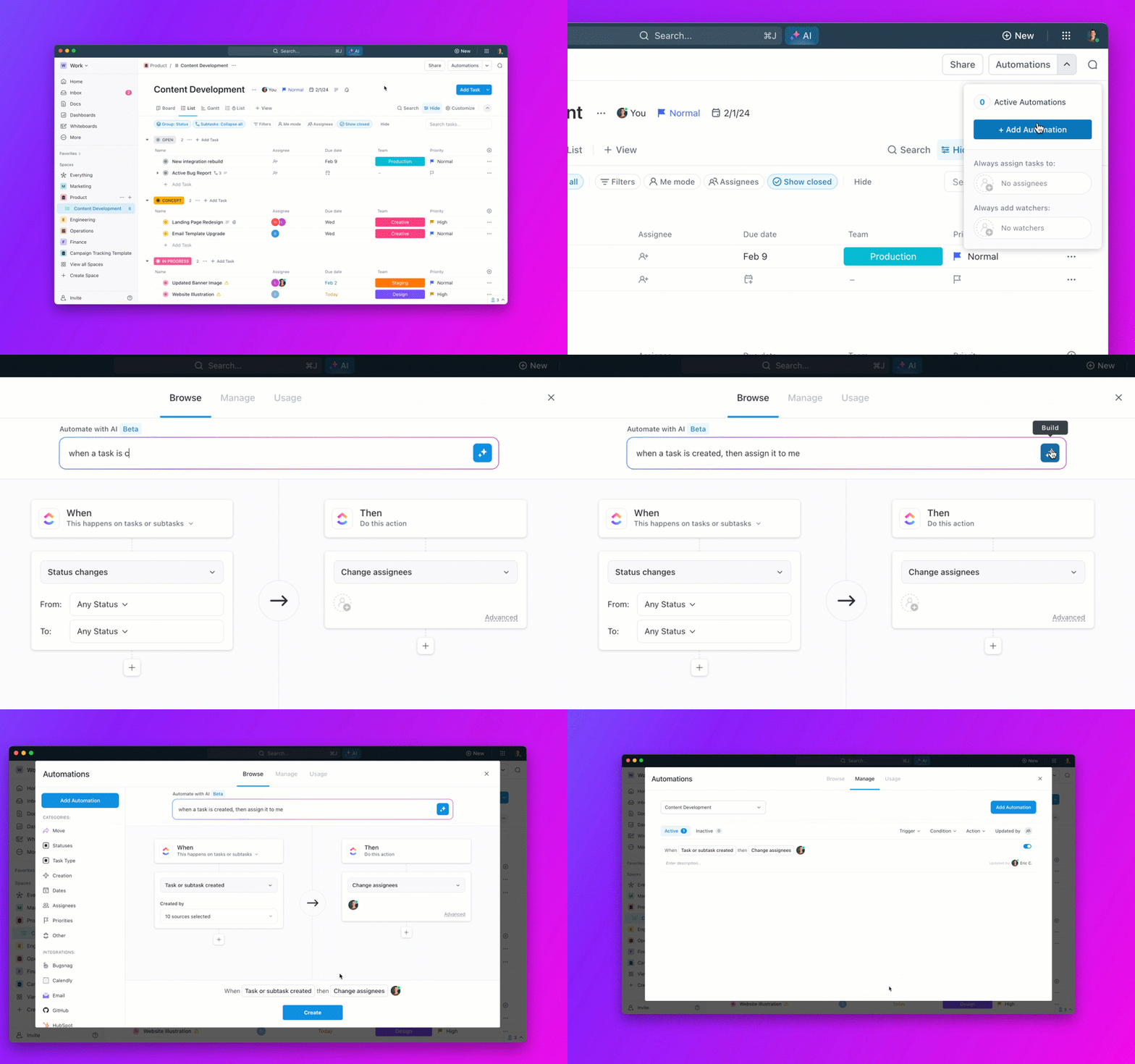
When a deal’s status changes to “Closed-Won,” automatically calculate the commission based on your formula, assign the task to the appropriate approver, and move it to the verification queue. When approved, automatically notify payroll that there’s a commission ready for processing.
This removes the manual handoffs where errors creep in and ensures consistent application of your commission rules. The same automation fires every time, applying the same logic regardless of who closed the deal or when.
Manual math is the enemy of accurate commission tracking. ClickUp Formula Fields use data from other Custom Fields, like deal value and commission rate, to automatically determine the commission earned.
Set up the formula once, and it calculates correctly every time. For tiered structures, build formulas that apply different rates based on where the deal falls within the rep’s cumulative sales. The complexity lives in the formula definition, not in manual calculations that someone has to perform correctly every single time.
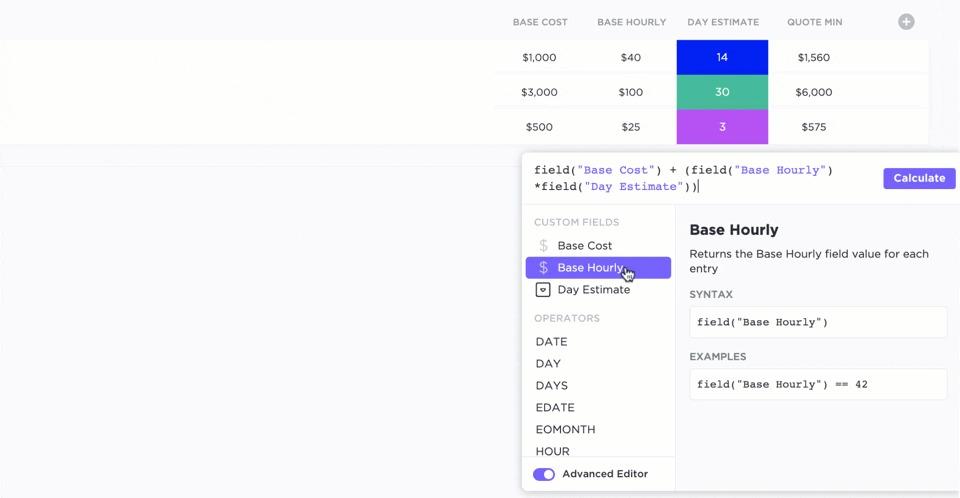
This creates a perfect audit trail. When someone questions a commission amount, you can show them exactly how it was calculated: this deal value, times this rate, equals this commission. No mysteries, no guesswork.
One of the biggest sources of friction in commission management is lack of visibility. Reps don’t know where they stand. Managers can’t see team performance at a glance. Finance gets bombarded with status questions.
ClickUp Dashboards solve this by creating real-time views of individual and team earnings, progress toward quota, and the status of upcoming payouts. Build dashboards for different audiences: reps see their own performance, managers see their team’s performance, finance sees payment processing status.
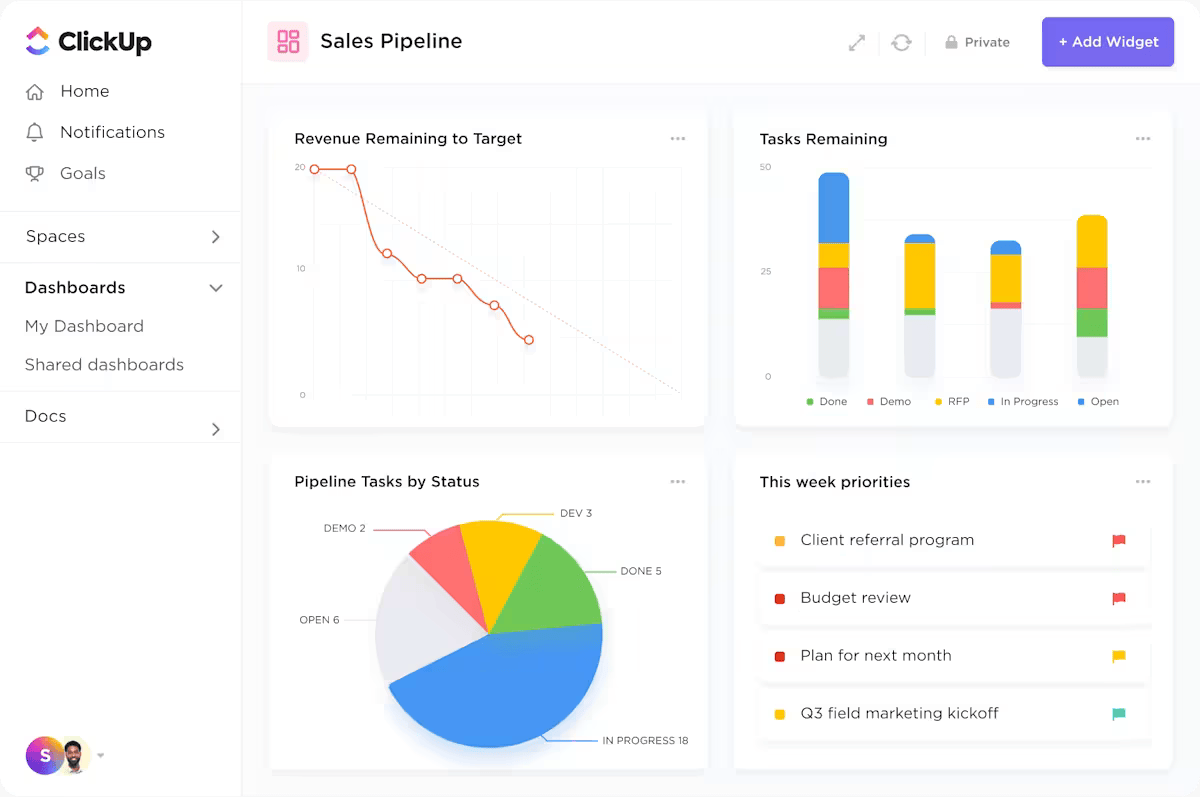
When everyone can see the information they need without asking, the entire process runs more smoothly. Reps stay motivated because they know exactly where they stand. Managers can coach effectively because they see who’s struggling. Finance isn’t interrupted constantly because the answers are self-service.
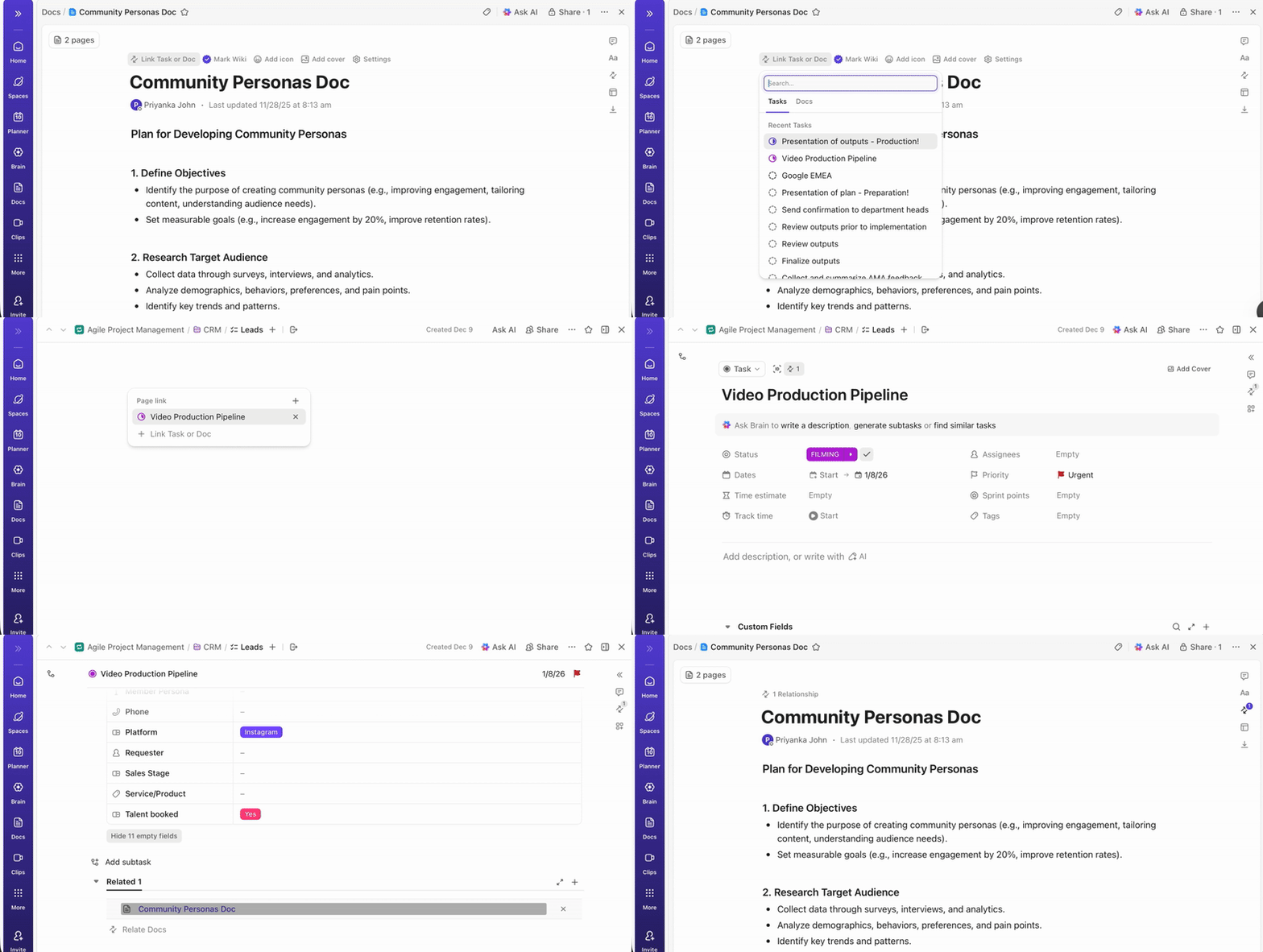
Your official commission plan documents, signed agreements, and historical records shouldn’t be scattered across email attachments and shared drives. ClickUp Docs lets you house everything in a searchable, centralized knowledge base.
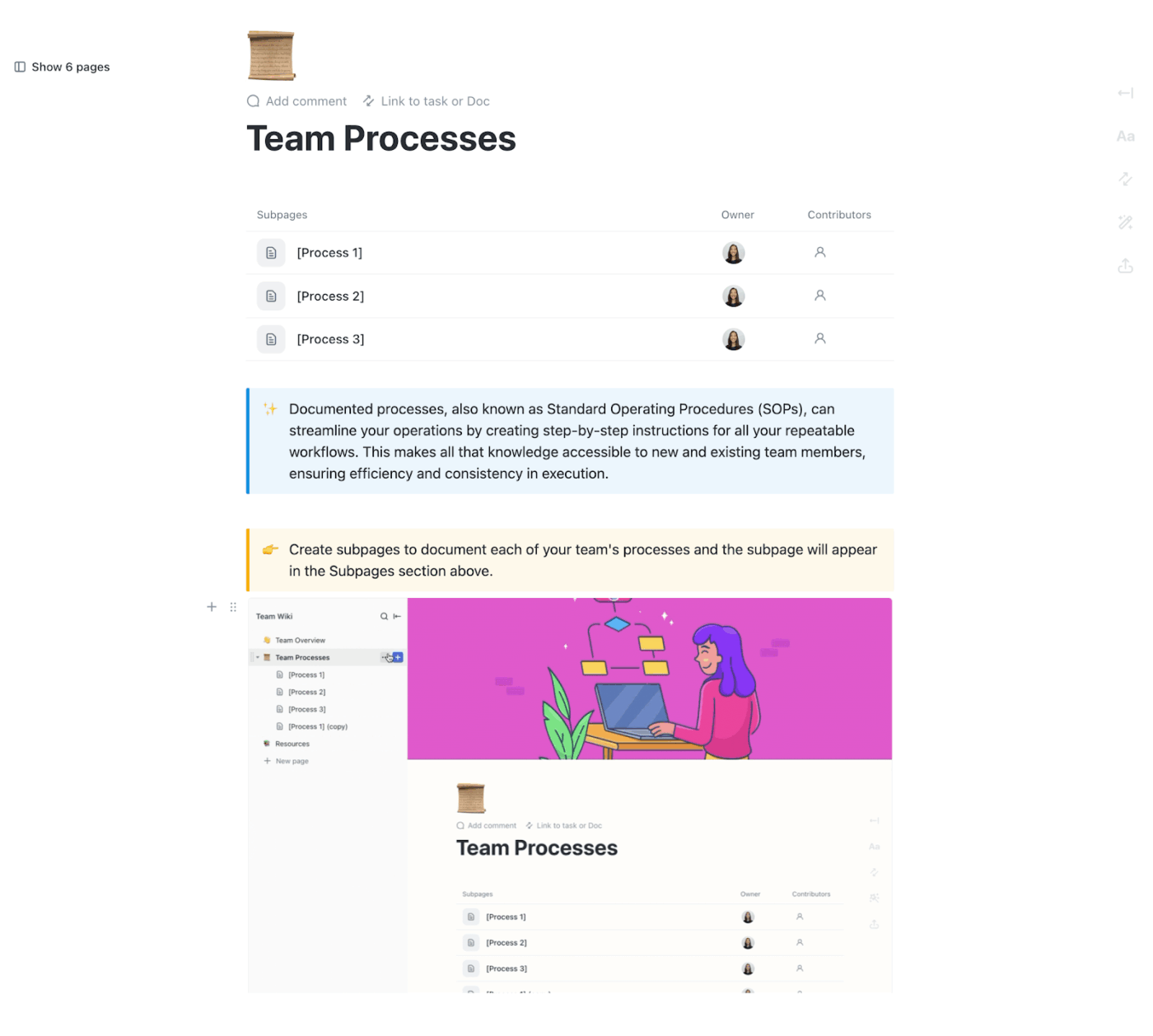
Create a compensation plans wiki with your current commission structure, policy documents, and FAQs. When reps have questions about how the plan works, direct them to the documentation. When you update the plan, version history tracks exactly what changed and when.
This centralization is especially valuable when disputes arise. You can point to the documented policy that was in effect when a particular deal closed, eliminating arguments about what the terms actually were.
ClickUp Brain, the AI layer built into ClickUp’s workspace, can answer commission questions, generate team performance summaries, and draft commission statements in seconds.
Ask Brain questions like “What’s the total commission owed to the sales team this month?” or “Show me Sarah’s commission history for Q3.” Brain searches across your tasks, docs, and Custom Fields to provide answers based on your actual data.
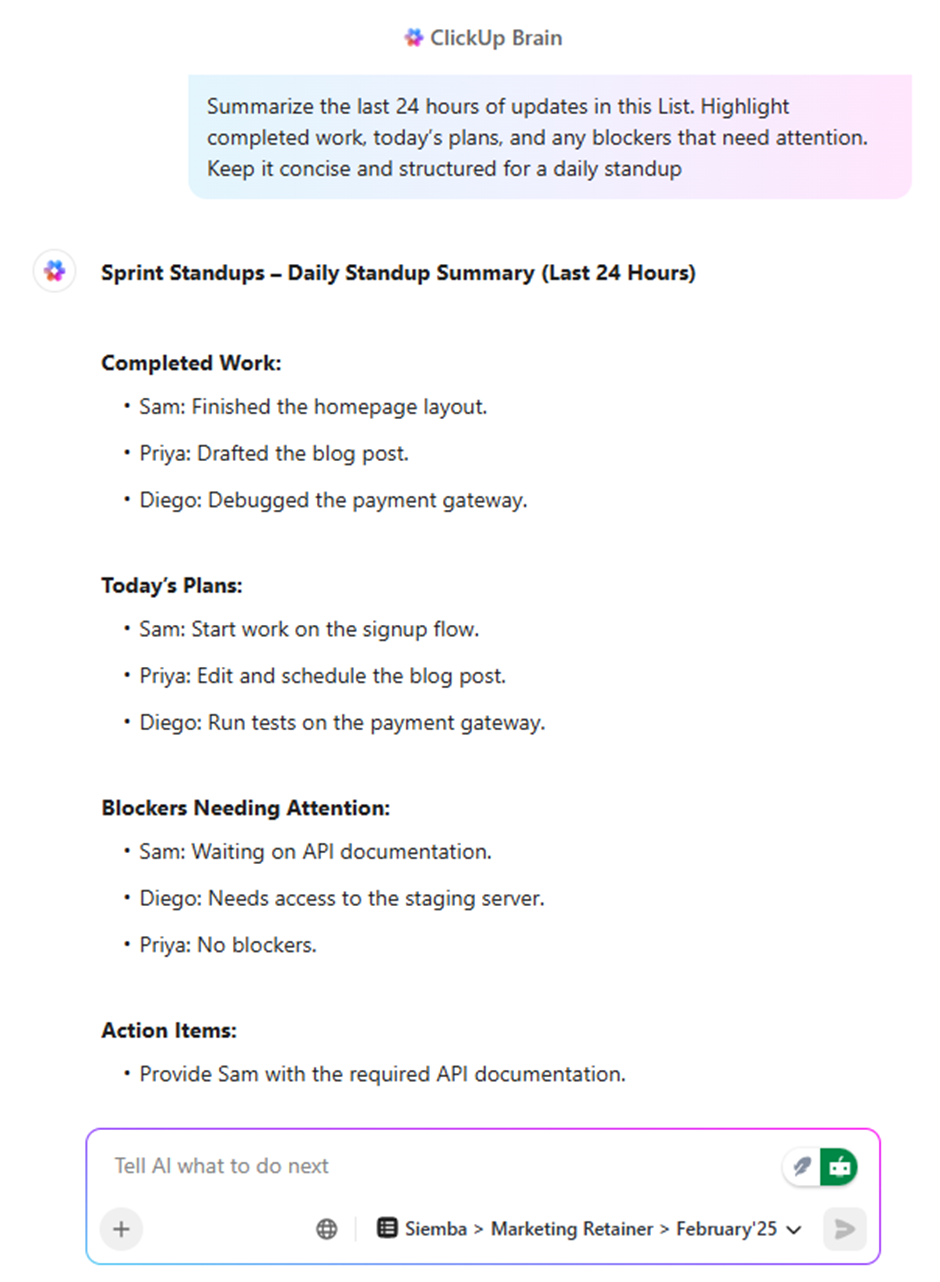
This saves enormous time for sales ops and finance teams who would otherwise be running manual reports or digging through spreadsheets. The answers come instantly, based on live data, without requiring someone to stop what they’re doing to pull a report.
The true test of any commission system is whether it scales. A process that works for a five-person sales team might completely break down at fifty people. ClickUp’s approach scales because the underlying structure is consistent regardless of team size.
Templates let you replicate your commission workflow for new reps instantly. Automations apply the same rules consistently across the entire organization. Dashboards aggregate data across any number of people. The system that tracks commissions for five people works identically for five hundred.
By automating your commission process in ClickUp, you eliminate manual calculations, reduce disputes with complete audit trails, and save hours of administrative time. You give everyone the visibility they need while maintaining the control and accuracy that finance requires.
Commission pay is a powerful tool for aligning employee incentives with business goals, but only when it’s structured and managed with care. The right commission structure depends on your unique sales cycle, team dynamics, and business model. Success requires clear documentation, consistent processes, and a commitment to transparency.
The principles are universal, but the real transformation happens when you move away from manual, error-prone methods. Spreadsheet-based tracking creates financial risks and erodes the trust of your sales team. As your organization grows, the cost of these errors, both in dollars and in morale, compounds.
Investing in a scalable, automated system isn’t just an operational upgrade. It’s a strategic move that builds the foundation for growth. When you create a single source of truth for your commission process, you empower your sales team to focus on what they do best: selling.
Ready to leave the spreadsheet headaches behind? Bring your commission tracking, calculations, and reporting into one unified workspace. Get started for free with ClickUp and transform how you manage commission pay.
📖 Also Read:
Commission is a form of variable pay earned on specific, transactional sales. You close a deal, you earn a percentage. A bonus is typically a one-time payment for achieving broader, non-transactional goals over a set period, like hitting a quarterly target or contributing to a successful product launch.
The most effective approach uses a centralized system that connects deal data to commission calculations and maintains a clear audit trail for every payment. This eliminates the errors and disputes that come from managing commissions across disconnected spreadsheets and tools.
It depends on the role and business model. Commission rewards high performance and can lead to greater earnings for top performers. Hourly pay offers more income stability, which can reduce turnover and stress. Many organizations find that a hybrid approach, combining base salary with commission, provides the best balance.
A recoverable draw can create debt if a rep doesn’t earn enough commission to cover their advance. This creates financial stress for the employee and administrative complexity for the company. Clear policies about how long draws can carry and what happens if someone leaves with an outstanding balance are essential.
At a minimum, review your commission plan annually. However, any significant change in your business model, product mix, market conditions, or sales strategy should trigger a review. Signs that indicate needed adjustments include high turnover, consistently missed quotas across the team, or frequent disputes about fairness.

© 2026 ClickUp

There’s an easier way. Try a free AI Agent in ClickUp that actually does the work for you—set up in minutes, save hours every week.