

Sorry, there were no results found for “”
Sorry, there were no results found for “”
Sorry, there were no results found for “”
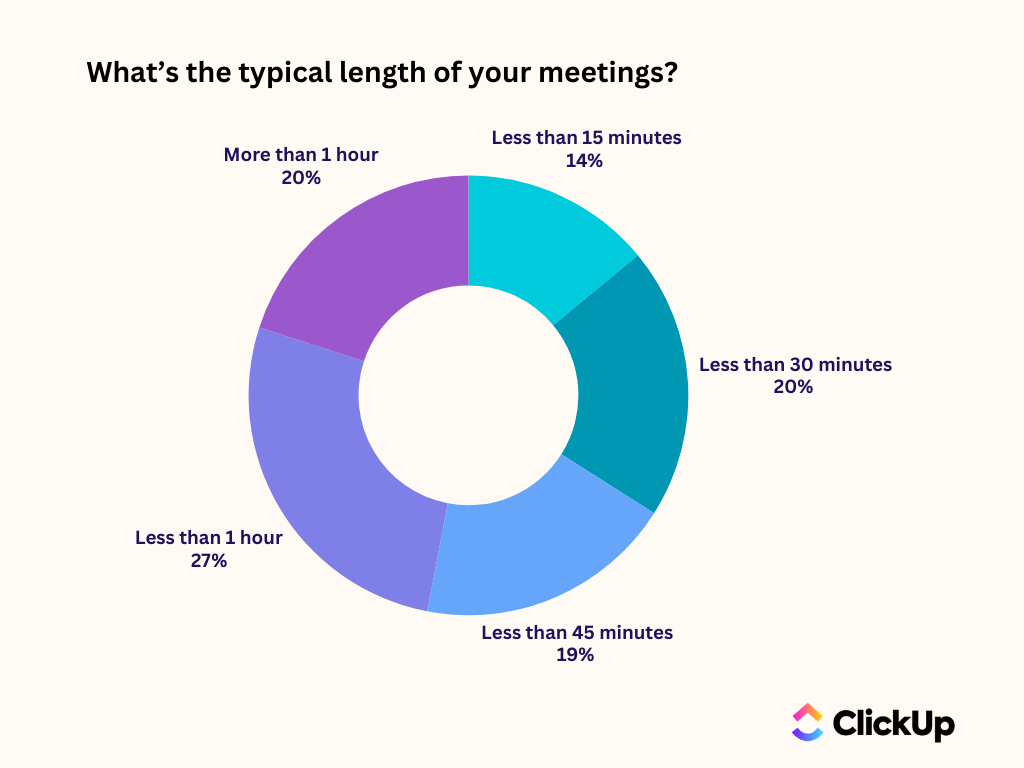
According to our meeting effectiveness survey, 12% of respondents find meetings overcrowded, 17% say they run too long, and 10% believe they’re mostly unnecessary.
And can you blame them when nearly 50% of meetings last an hour or more?
But do they have to be that long? Can we not substitute these long and often unproductive meetings with quick, focused “meetings “SyncUps” instead?
The short answer: Yes, we can.
The long answer, or the how-to? That’s what this blog post is about!
Below, we show you how to replace all-hands check-ins on Zoom with a ClickUp SyncUp.
Before we talk about replacing all-hands meetings, let’s understand why Zoom meetings are no longer delivering consistent team alignment.
According to a Microsoft Work Trend survey, year-over-year meetings scheduled after 8 PM have increased by 16% among employees working across global time zones.
While workplace collaboration has become easier than ever, managing Zoom meetings across time zones has become exponentially harder. Someone on your team is always compromising their work hours to attend all-hands meetings.
Nearly 67% of the employees are distracted during virtual meetings. They are either checking phone emails, texting, daydreaming, surfing the Internet, or performing household chores.
Far from being interactive, most all-hands meetings end up dominated by the loudest voices. A small group speaks, a few react, and the rest stay muted.
What are the similarities between the least productive meetings?
As per Calendly, they’re consistent across both internal and external meetings.
In other words, after a Zoom meeting, someone has to manually enter the action items, assign responsibilities, set deadlines, and add context to the project management tool.
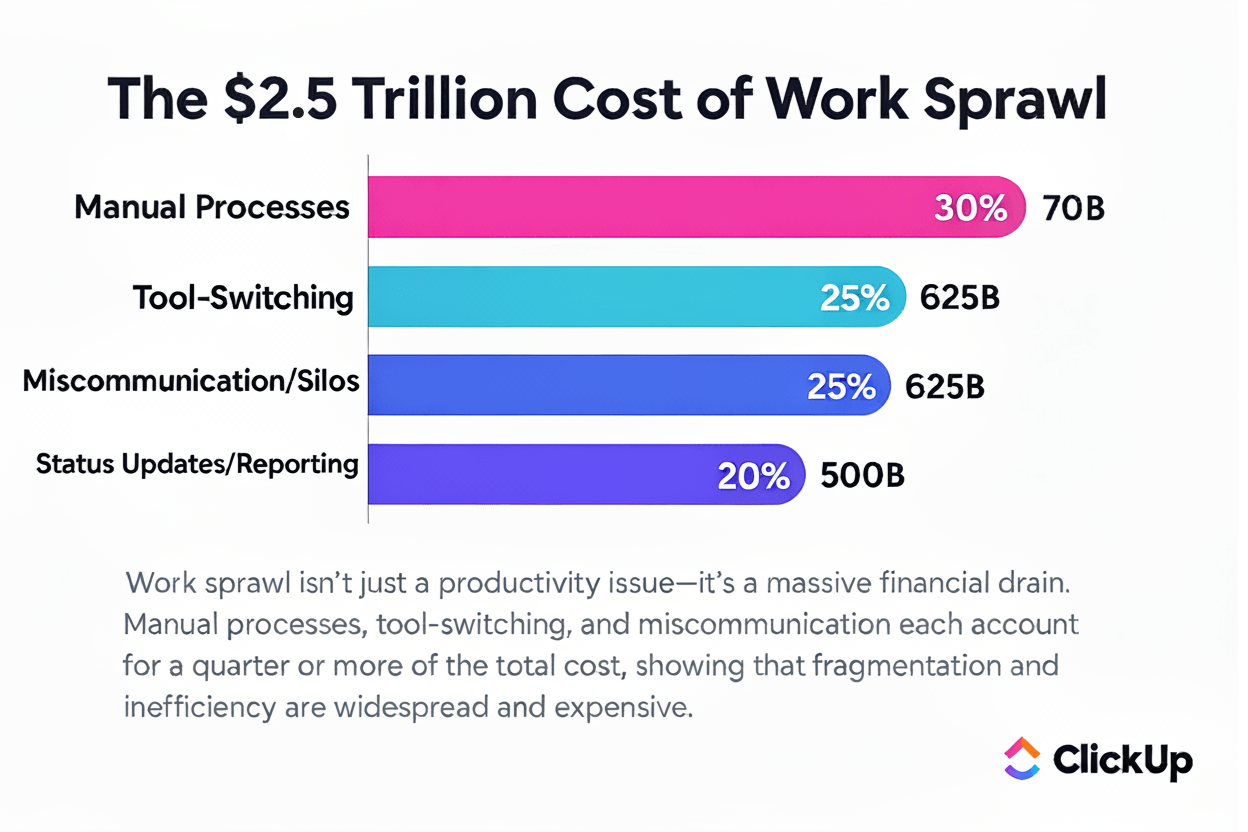
This copy-pasting and context switching results in what we like to call Work Sprawl, where ideas, to-dos, and follow-ups are scattered across a jumble of tools—and which ends up costing teams over four hours per employee per week!
📮 ClickUp Insight: The results from our meeting effectiveness survey indicate that 42% of teams use recorded clips (21%) or project management tools (21%) for asynchronous work.
But these tools may often require additional tools, separate subscriptions, logins, and learning curves.
As the everything app for work, ClickUp makes asynchronous communication easier. Access video clips, voice messages, project workflows, collaborative docs, and a built-in AI notetaker—all within a single workspace.
Why manage multiple subscriptions and scattered information when a single solution can streamline your entire workflow?
💫 Real Results: Teams using ClickUp’s meeting management features report a whopping 50% reduction in unnecessary conversations and meetings!
Not everyone can attend live. And even when they do, not everyone feels comfortable speaking up.
Key updates get shared once, in a single time-bound moment. Anyone who misses the meeting relies on second-hand summaries or incomplete recordings. Questions surface later in private chats, side threads, or follow-up calls.
Most all-hands remote meetings function as broadcasts. Leadership shares quarterly results, product announcements, or policy changes while everyone else listens.
This format forces people out of deep work to consume information that could have been reviewed asynchronously. A slide deck, a recorded update, or a short written brief would deliver the same message—without interrupting the day.
This wasted time doesn’t include the price of context switching. Research shows that it may take as long as 23 minutes to regain focus on a task once you’re pulled out of deep work.
👀 Did You Know? A seemingly harmless Zoom meeting is causing five distinct types of meeting fatigue: general, visual, social, motivational, and emotional. The Zoom Exhaustion & Fatigue Scale (ZEF Scale), developed by Stanford researchers, scientifically measures this phenomenon.
So what’s the solution to Zoom fatigue?
Below, we show you how to host an all-hands check-in asynchronously.
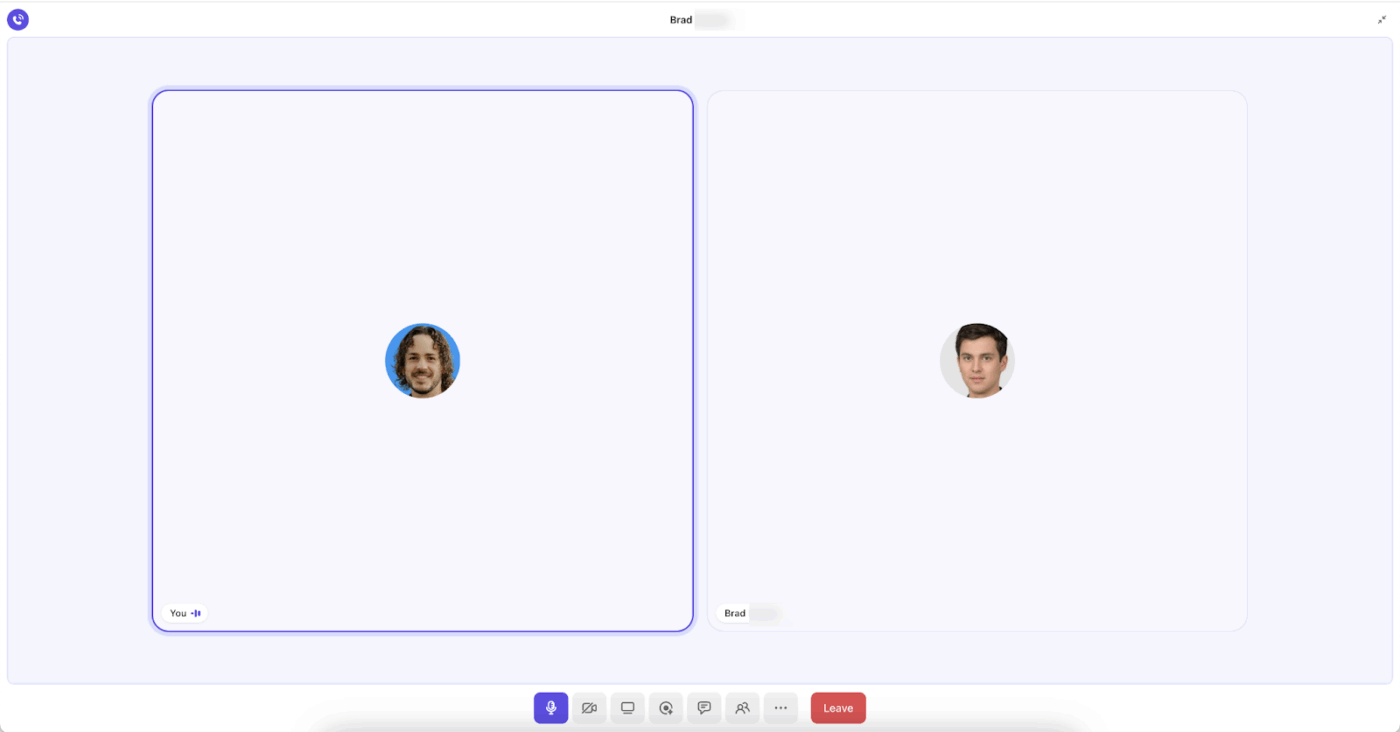
A ClickUp SyncUp is an AI-powered meeting and collaboration tool that lets you start instant audio and video calls with your team within your ClickUp Workspace.
Launch one-on-one and group calls with your team to quickly resolve queries and blockers.
SyncUps are part of ClickUp Chat and are available on all plans, including the free plan. You can start a SyncUp from any ClickUp Chat DM or Channel. And also record the discussion and transcribe it with the ClickUp AI Notetaker.
Every recording stays tied to the relevant chat, ClickUp Task, or project. Turn discussions into trackable outcomes so they don’t get lost or forgotten.
Here’s how this aids clearer communication for your all-hands meetings:
The best part about SyncUps is their integration with your actual work. You can initiate a SyncUp within a specific Chat channel or direct message and keep your conversations anchored.
You can also share files and reference docs on a SyncUp call and attach specific Tasks relevant to the discussion.
📌 Example: The IT team is implementing new two-factor authentication requirements. During an all-hands SyncUp call, they demonstrate the setup process by sharing their screen and walking through common issues employees might face.
After the call, the SyncUp recording link is added to the IT security task and embedded directly inside a ClickUp Doc that serves as the official rollout guide. The Doc includes step-by-step instructions, screenshots, and FAQs, all kept in one place.
As updates come in, the Doc is revised instead of starting new conversations. Employees know exactly where to go for the latest guidance. The IT team avoids repeat questions or follow-up meetings. The result is a single, self-serve source of truth that stays connected to the work behind the rollout.
Even team members who weren’t on the call can watch the recording and pull up the exact document leadership referenced.
📮 ClickUp Insight: Knowledge workers send an average of 25 messages daily, searching for information and context. This indicates a fair amount of time wasted scrolling, searching, and deciphering fragmented conversations across emails and chats. 😱
If only you had a smart platform that connects task management, projects, chat, and emails (plus AI!) in one place. But you do: Try ClickUp!
The best part about SyncUps is that everyone gets to see the same SyncUp without needing to be online at the same time.
They can go through the recording, transcript, or summary to get context.
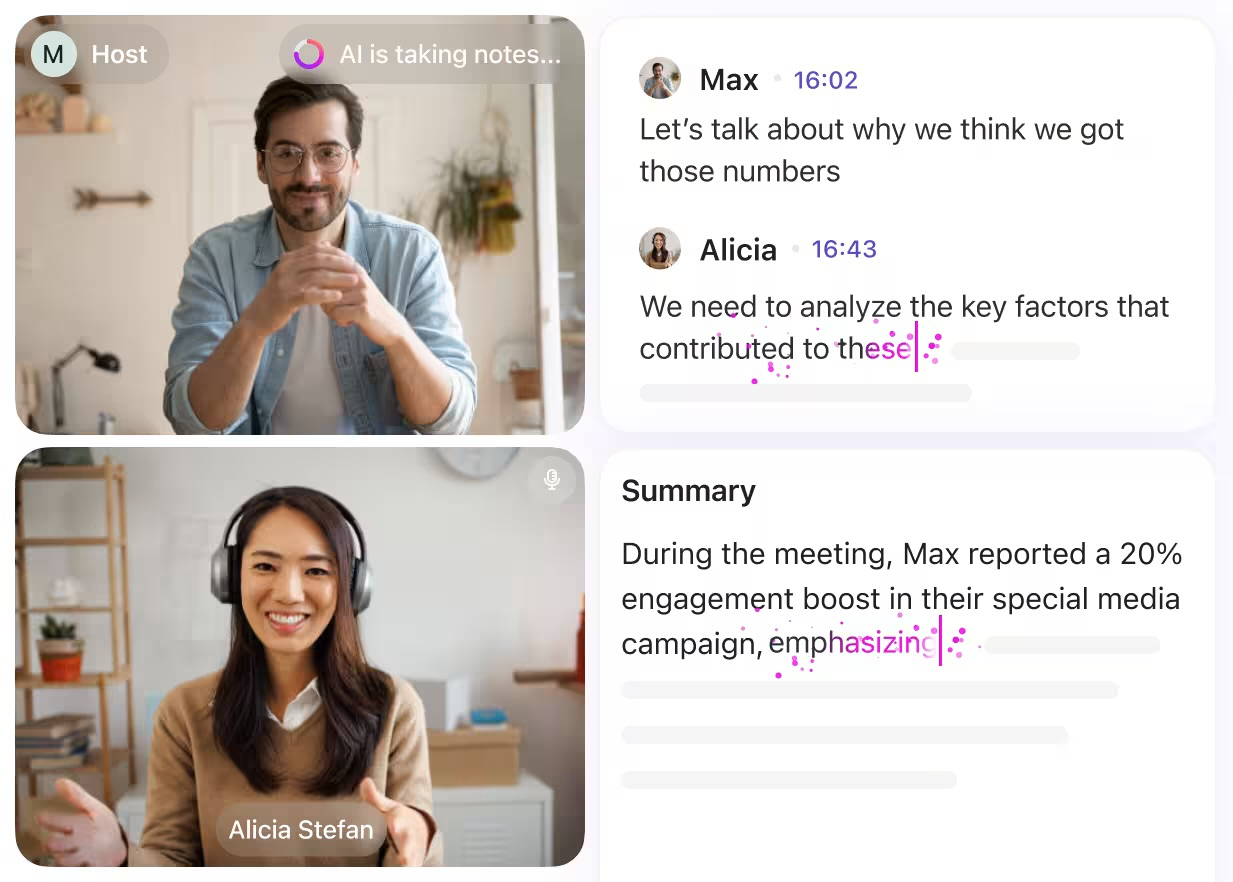
Everything, including updates, progress, and blockers, is accessible inside your ClickUp Tasks, Docs, and Chat.
⭐ Bonus: With ClickUp Enterprise AI Search, you can retrieve information from your notes inside your ClickUp workspace in seconds, and that too, using natural language prompts.
For instance, if you’ve been OOO for a week, you can just ask the AI assistant to get you meeting details and action items from last week’s SyncUp.
Accountability vanishes once your call ends on the Zoom app. But with ClickUp SyncUps, discussions can be quickly linked to trackable tasks, as everything lives inside the same workspace.
For example, if a meeting summary includes an action item, you can ask ClickUp Brain, ClickUp’s native AI assistant to create the relevant task using Workspace context.
👀 Did You Know? Back-to-back video meetings can cause cumulative stress in your brain. According to Microsoft’s neuroscience lab using EEG technology, just 10-minute breaks between meetings bring stress levels back to baseline. Traditional all-hands meetings rob your team of these crucial mental recovery periods.
Not every update requires everyone in the company to attend the meeting.
📌 Example: Instead of scheduling a recurring design review meeting, the design lead records a short SyncUp video directly inside the Design Team Chat channel.
What happens:
How the team responds:
Why this works for design teams:
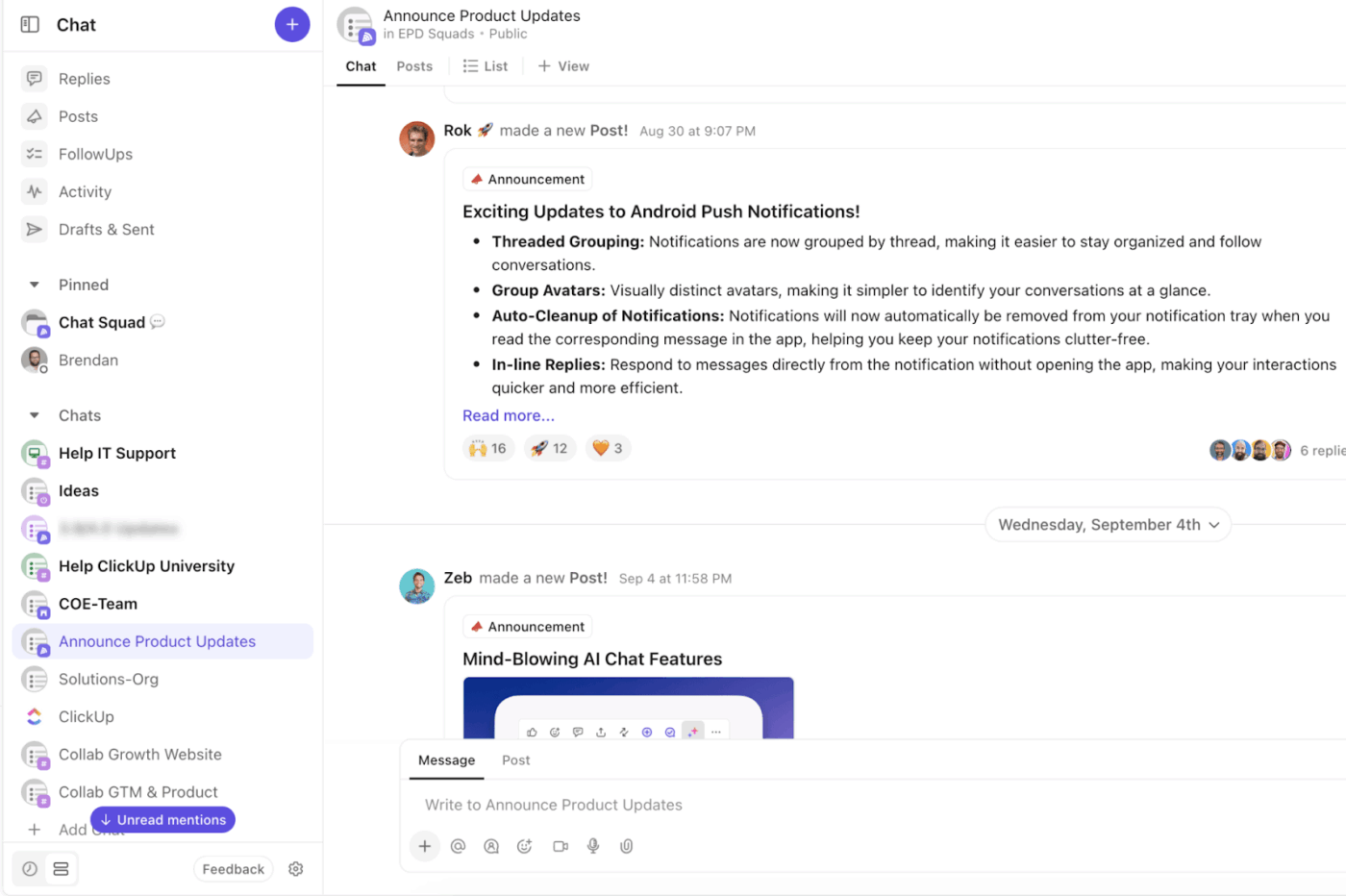
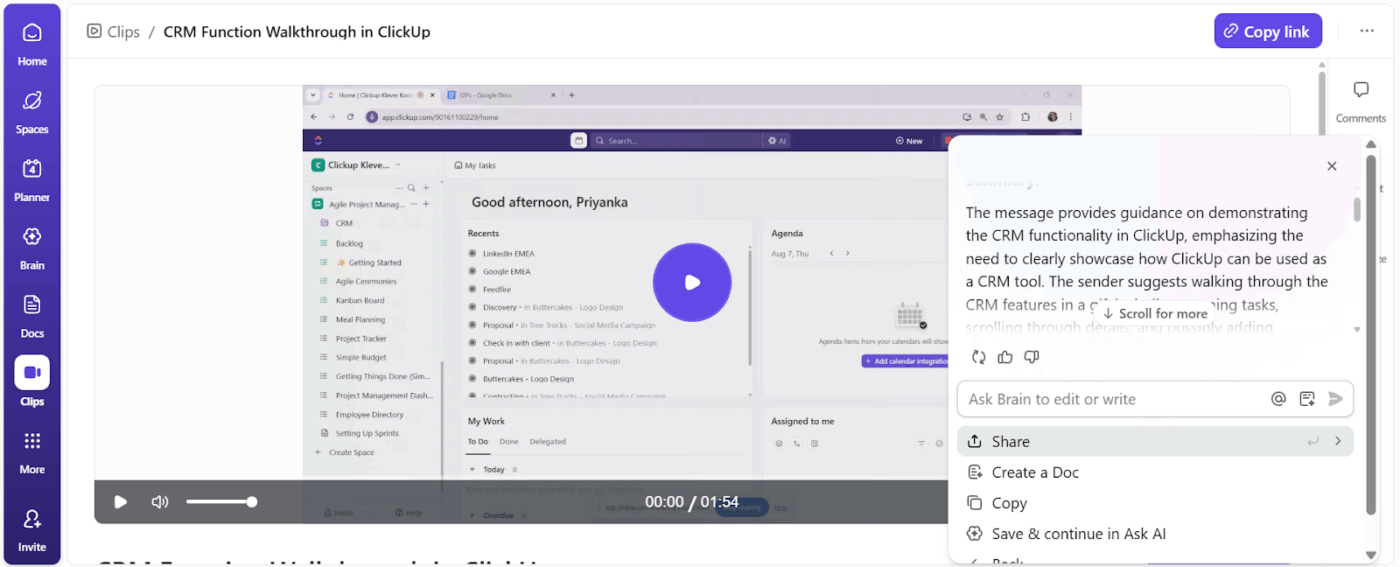
Anyone in the organization can open the recording to view the transcript or generate a summary. They can even drop questions directly in the Chat thread.
What do employees do when they have concerns while watching recorded SyncUps?
They can leave a timestamped comment on the video and assign it to the person who can specifically resolve that query. These comments remain visible on Clips Activity for everyone to refer to.
That said, all recorded SyncUps remain in the Clips Hub as ClickUp Clips.
Here’s how Clips help move async communication forward:
👀 Did You Know? 66% of meetings turn unproductive the moment employees stop sharing ideas. And it doesn’t take much—dismiss someone’s suggestion once during an all-hands, and they’ll stay quiet in the next five. That single discouragement creates a ripple effect, turning all your meetings unproductive.
📚 Read More: Morale-Boosting Employee Engagement Activities
Here’s how you can use a ClickUp SyncUp to share company-wide updates, without mandating everyone’s presence at an all-hands meeting.
To make async communication successful, set clear communication guidelines.
Create a structured ClickUp Doc setting clear communication guidelines. Clarify:
Once that’s documented, map out which communication strategies (Clips, SyncUp, Chat message) fit different scenarios. Here’s a framework:
| Update type | Format | How is it effective? |
| Quarterly results, strategic pivots | Clips and Docs | Gives people time to analyze numbers and think through implications before asking questions |
| Product demos, feature walkthroughs | Clips with screen share | Teams can pause, replay complex steps, and reference the exact workflow when implementing |
| Organizational restructuring, leadership changes | Live SyncUp (short) + follow-up Clip | Real-time Q&A addresses concerns immediately, Clip provides a permanent reference for those who missed it |
| Weekly wins and milestones | Chat message or live SyncUp | Depending on how your team is structured and what they prefer—quick async updates work for distributed teams, live celebrations suit tight-knit groups |
| Urgent policy changes | Optional all-hands SyncUp with recordings | Time-sensitive decisions need immediate clarification and alignment across the organization |
⚡ Template Archive: Free Project Communication Plan Templates: Excel, Word, & ClickUp
Share a clear meeting agenda with your team members at least 48-72 hours prior over email and Chat channels.
Your agenda should include:
⭐ Bonus: Don’t lose your stellar ideas to sticky notes and voice recordings. Dictate your meeting agenda using ClickUp Talk to Text and have it transcribed and formatted instantly in a ClickUp Doc.
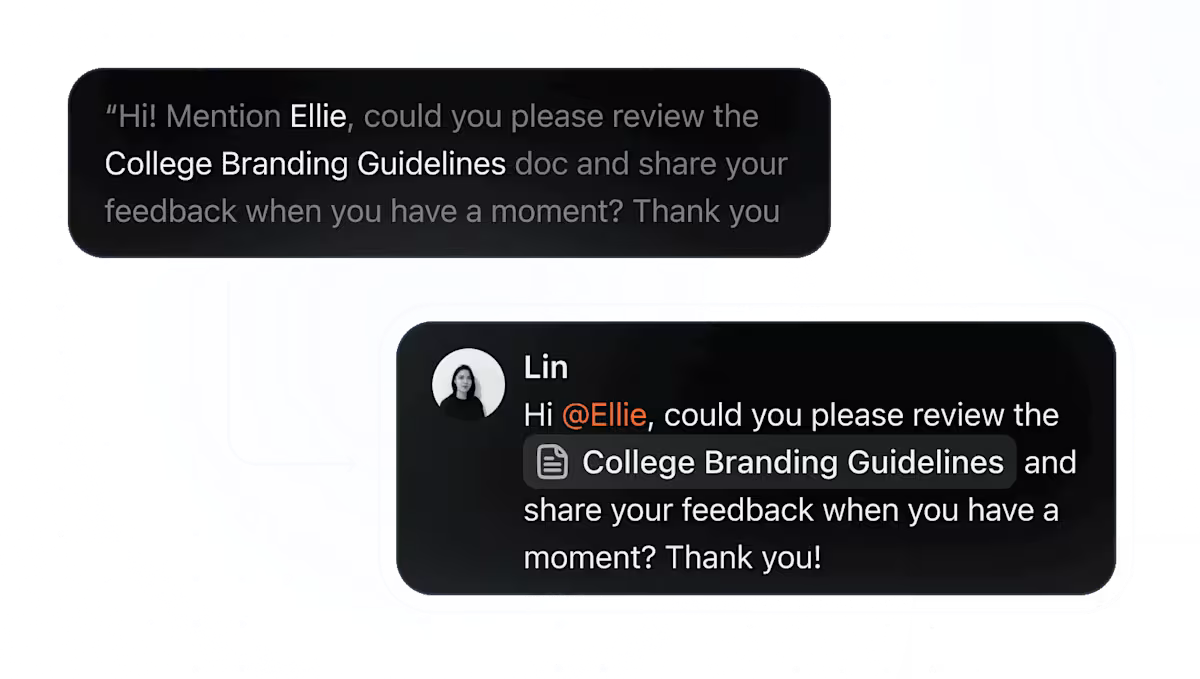
Start a SyncUp straight from:
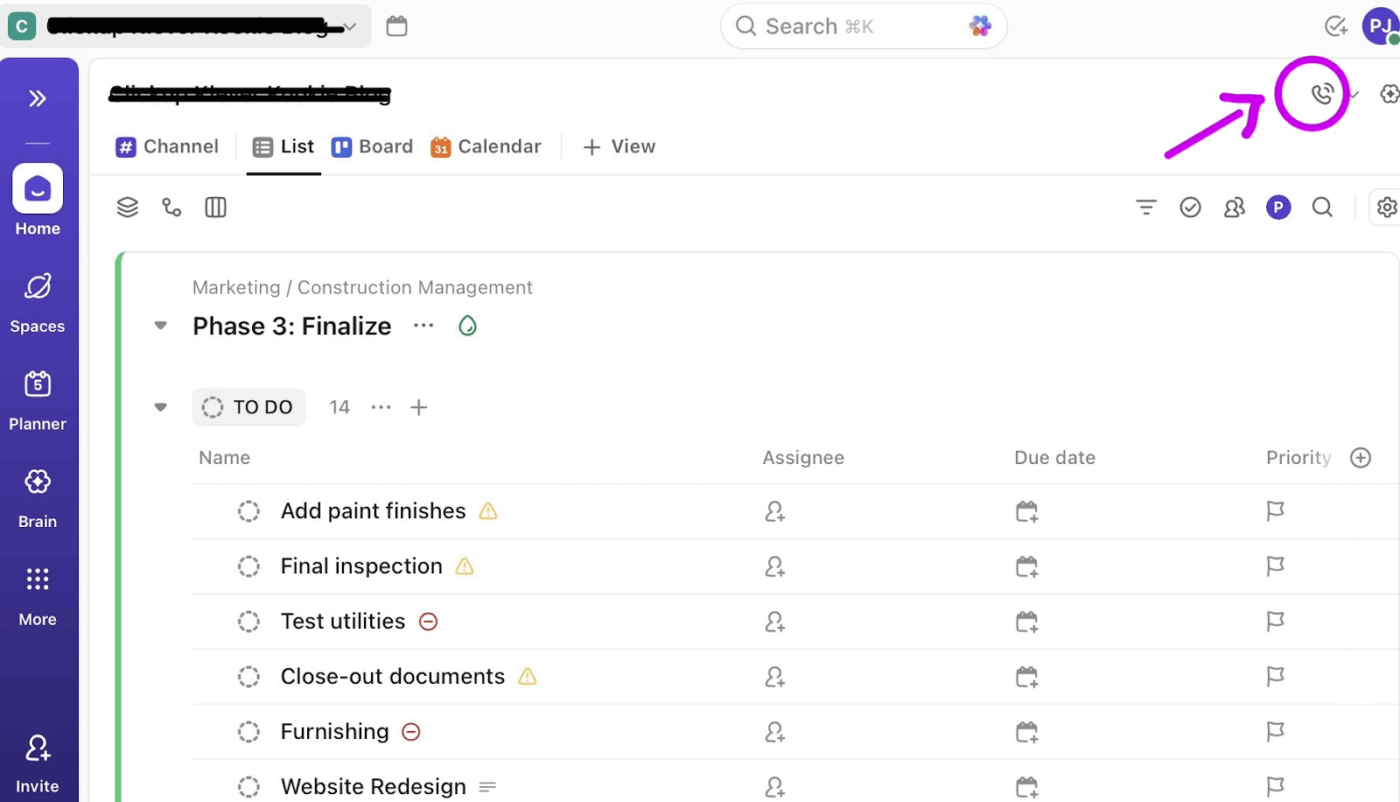
To capture your session, hit the record icon.
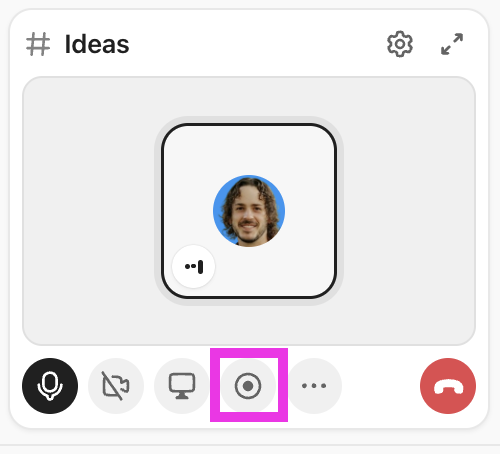
You can add participants by sharing the SyncUp link or inviting them.
✏️ Note: If you’re hosting an all-hands with more than 200 people, you may want to use the ClickUp Zoom integration to schedule a Zoom meeting instead.
Just type /Zoom in the ClickUp Chat channel, and it’ll generate a meeting link that integrates with your workspace.
⚡ Template Archive: Free Project Management Templates for All Types of Projects
After your SyncUp is recorded, open it in the Clips Hub and click Summarize to have ClickUp Brain or BrainGPT generate a concise summary of the discussion.
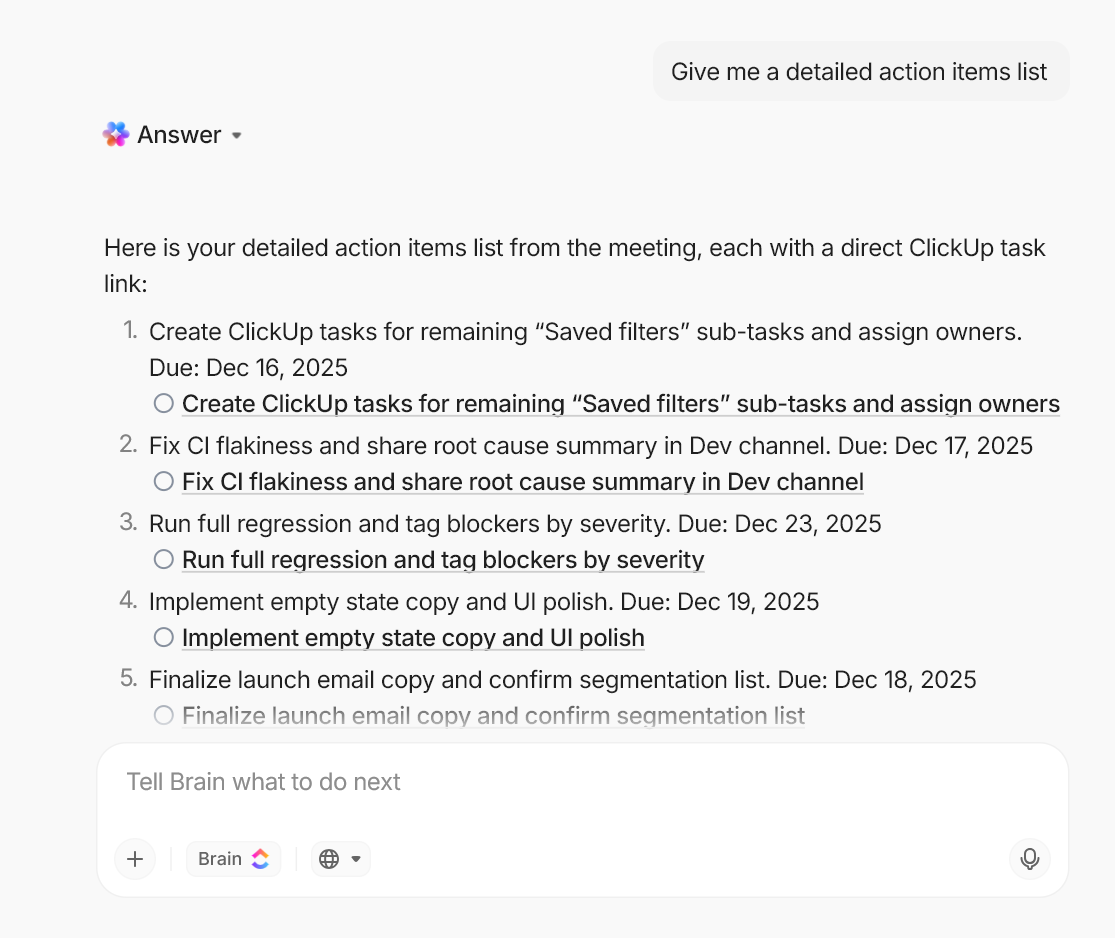
Use ClickUp Brain to:
💡 Pro Tip: Use Super Agents, ClickUp’s AI-powered teammates, to save time, boost productivity, and adapt to your Workspace with intelligence and human-like interactions.
Super Agents excel at meeting management workflows like these:
Check out more such meeting agents for your team:
Here’s why ClickUp SyncUps are the best Zoom alternative:
⚡ Template Archive: Org Chart Templates in PPT, Word, & ClickUp
👀 Did You Know? People nodding on camera isn’t a sign of agreement—it’s often conformity. Research shows that individuals conform to majority opinions during professional online meetings when their cameras are on. Apparently, Zoom fatigue amplifies significantly when employees are forced to keep their cameras on.
Async communication is practical, and leading companies across the world have implemented async approaches to deliver company-wide updates:
GitLab is known for a handbook-first, async-by-default communication model, with clear guidance on how company-wide information should be shared and consumed. Key principles include:
Zapier is a fully remote, distributed company with a long-standing culture of asynchronous communication designed to support teams across time zones. Their communication practices include:
📚 Read More: Best OKR Software for Teams
Async communication frees your team from the need to be online all the time.
That said, we’ve converted the best practices into a checklist—refer to it when you’re sharing company-wide updates asynchronously:
🤝 Set clear expectations
🧠 Centralize company-wide updates
📆 Standardize recurring updates
💬 Match the format to the message
✅ Automate follow-ups
Traditional all-hands meetings exclude people by design. Whoever can’t make the time slot misses out.
With remote work and geographically distributed teams, asynchronous communication has become equally important.
Companies thrive when they balance synchronous conversations with asynchronous workflows, tailored to each situation.
ClickUp SyncUps allows you to get the best of both worlds. Ready to replace all-hands Zoom meetings with SyncUps? Sign up on ClickUp for free to get started.
© 2026 ClickUp



