






Still downloading templates?
There’s an easier way. Try a free AI Agent in ClickUp that actually does the work for you—set up in minutes, save hours every week.
Sorry, there were no results found for “”
Sorry, there were no results found for “”
Sorry, there were no results found for “”
Ever feel lost trying to figure out how much of your loan payment actually goes toward interest vs. principal? For individuals, small business owners, and finance teams, that lack of clarity can lead to poor planning and costly surprises.
An amortization schedule template solves seamlessly. It gives you a clear breakdown of each payment, showing exactly how your loan is paid down over time.
Whether you’re managing personal debt or tracking business loans, these templates help you stay organized and in control. Let’s explore some free amortization schedule templates to simplify your loan management.
🧠 Fun Fact: The word ‘amortization’ comes from the Latin ‘admortire,’ meaning ‘to kill off’—referring to gradually paying off debt until it’s completely gone.
Amortization schedule templates are pre-formatted tools (typically in Excel, Google Sheets, or PDFs) that help you track loan repayments over time. They break down each payment into two parts: principal (the amount you borrowed) and interest (the cost of borrowing).
These templates show how much you owe after each payment, when payments are due, and how your loan balance decreases over time. They provide a clear visual representation of your repayment schedule, making budgeting and loan planning easier.
💰 They typically include:
➡️ Read More: Free Bookkeeping Templates in Excel and ClickUp
| Template name | Download template | Ideal for | Best features | Visual format |
| ClickUp Simple Budget Template | Get free template | Individuals, small business owners, finance teams | Income/expense tracking, custom fields for loan payments, net cash view | ClickUp List/Table |
| ClickUp Financial Management Template | Get free template | Teams, businesses, finance managers | Track payments, invoices, automations, status workflows | ClickUp List/Board |
| ClickUp Expenses Report Template | Get free template | Teams, employees, managers | Expense logging, receipt uploads, AI analysis, printable/sharable | ClickUp List/Table |
| ClickUp Invoice Template | Get free template | Freelancers, agencies, teams | Invoice tracking, payment status, recurring tasks, Calendar View | ClickUp List/Board/Calendar |
| ClickUp Accounting Operations Template | Get free template | Small businesses, finance teams | Account grouping, cash flow, ledgers, AI automations | ClickUp List/Board |
| ClickUp Payment History Template | Get free template | Freelancers, small business teams | Payment records, receipt uploads, status tracking | ClickUp List/Table |
| ClickUp Project Budget with WBS Template | Get free template | Project managers, teams | Income/expense tracking, Custom Fields for loan payments, net cash view | ClickUp List/Board/Gantt |
| ClickUp Timeline View Template | Get free template | Small business owners, freelancers | Visual timeline, collaboration, principal/interest tracking | ClickUp Timeline/Whiteboard |
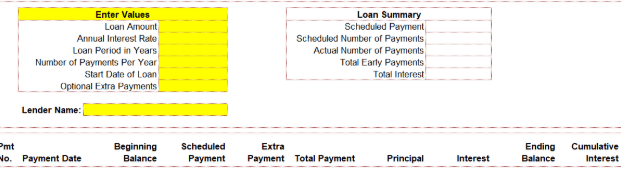
| Loan Payment Schedule Template by Mission Investors | Download this template | Borrowers, financial advisors | Payment breakdown, extra payments, loan summary, progress tracking | Excel Spreadsheet |
| Excel Loan Payment Schedule by CFI | Download this template | Financial professionals, business owners, students | Full amortization, adjustable terms, visual balance tracking | Excel Spreadsheet |
A good loan amortization schedule template helps you organize your finances and get a picture of your repayment journey. Here’s what to look for:
👀 Did You Know? Straight-line amortization pays down debt faster, but costs more upfront.
With straight-line (or constant amortization), your monthly principal payments stay the same, but the overall monthly amount is higher. It’s more expensive initially, but you save significantly on interest over the life of the loan.
Tired of juggling loan repayment details across scattered spreadsheets?
Here are the best amortization schedule templates to help you track payments, break down interest vs. principal, and stay on top of your payoff plan for variable as well as fixed rate loans, minus the stress.
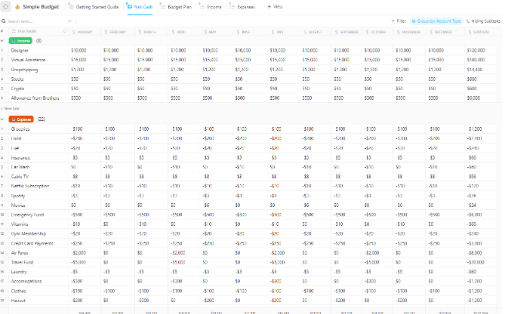
Keeping track of your cash inflows and outflows is a whole lot easier with the ClickUp Simple Budget Template. It gives you a clear view of your income and expenses, laid out in a way that makes sense. Each section is organized to help you spot patterns, plan ahead, and stay focused on your goals. With views sorted by type and month, everything feels structured and easy to follow.
Use it to categorize each payment under a specific loan or debt name to monitor multiple obligations simultaneously. You can add Custom Fields like Payment Date, Payment Amount, Principal Paid, Interest Paid, and Remaining Balance to be amortized. Use the Table or Budget Plan view to display these side by side with existing expense categories.
🔑 Ideal for: Individuals, small business owners, or finance teams who want a no-fuss way to organize their income and spending
➡️ Read More: Best CRM for Banking
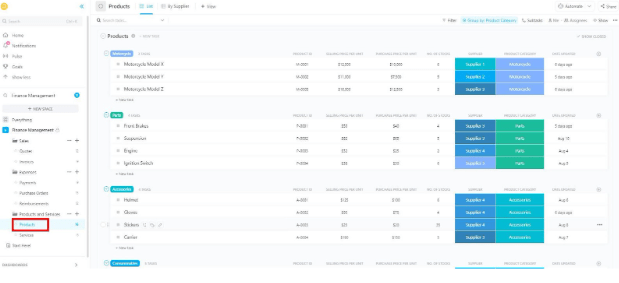
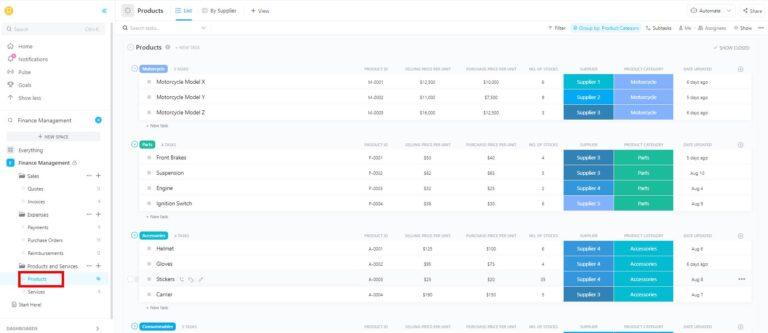
With the right accounting tools, managing business finances doesn’t feel like a never-ending challenge. And the ClickUp Finance Management Template is one such tool!
It gives you a full workspace built to handle sales, invoices, expenses, reimbursements, and even product details—all in one place. You get clean layouts, smart automation, and plenty of tools to keep your money matters moving smoothly.
For example, you can track your interest and principal payments month-on-month with Custom Task Statuses in ClickUp as follows:
🔑 Ideal for: Teams and businesses looking for a smarter way to manage finances without jumping between tools
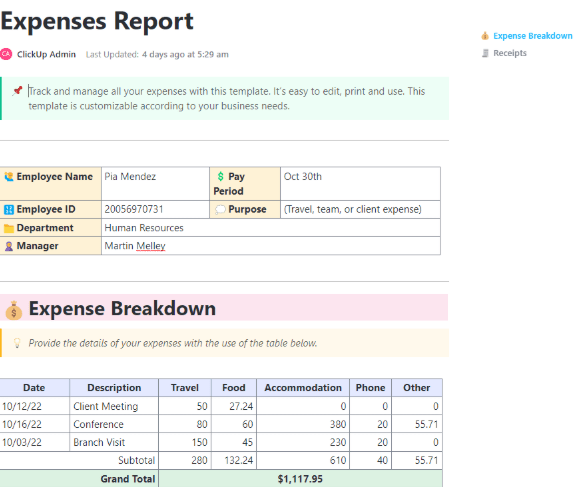
The ClickUp Expenses Report Template is your go-to for tracking your and your employees’ expenses with zero confusion. It provides a ready-made layout for logging expenses by date, type, and amount, so there is no need to start from scratch.
You can fill in the pre-made sections, from travel to food to phone bills, with this template. You can also attach receipts, add short descriptions, and include manager approvals right on the page.
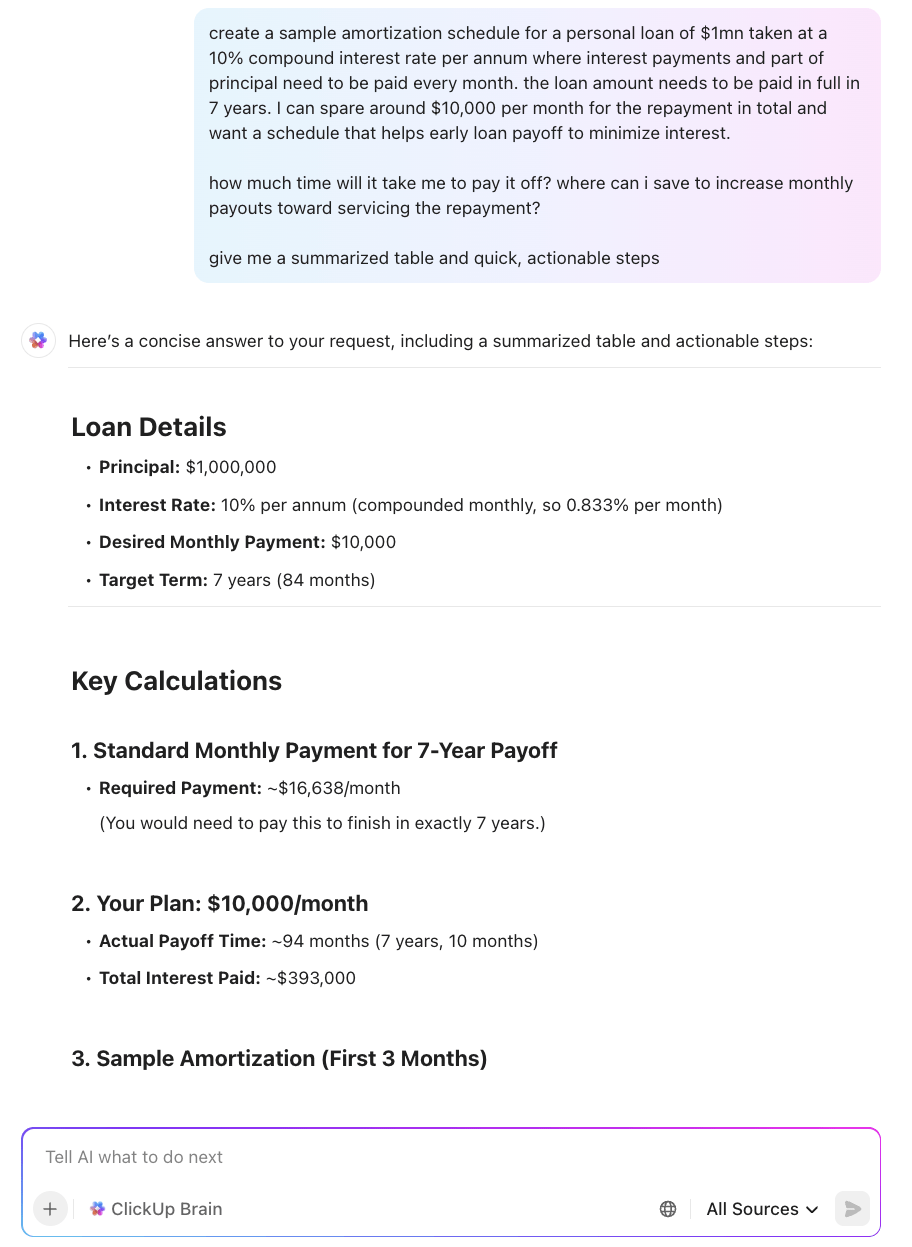
You can customize it to track individual loans or periodic payments and visualize payment timelines. Pair it with ClickUp Brain’s advanced AI capabilities to analyze historical spending patterns and forecast remaining obligations.
🔑 Ideal for: Teams and employees who need a quick way to log expenses, submit reports, and keep everything well-documented
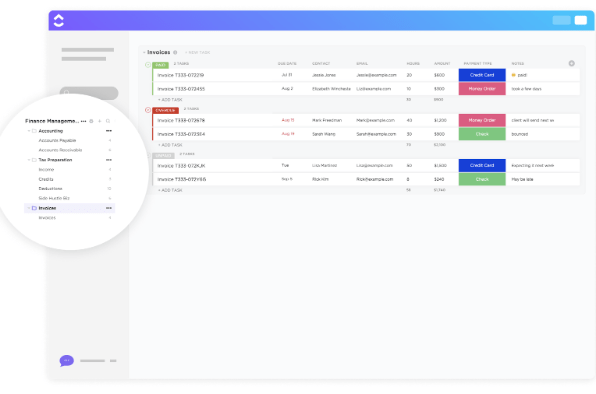
Need a faster way to manage invoices without losing track of who owes you what? The ClickUp Invoices Template helps you stay on top of client payments without digging through emails or spreadsheets.
It lets you save each invoice as a task, complete with details such as client name, contact info, amount, and due date. You get multiple views to stay organized and see what’s repaid, what’s overdue, and what’s on the way with this billing tool.
The template can also double as a living record of an amortization schedule. Each “invoice” you log can represent a specific installment in a loan or repayment plan, with your invoice fields pulling double duty:
Over time, the template’s Calendar View becomes a visual repayment map—every paid invoice is one more tick down the balance, and every upcoming invoice is your next step in the plan.
🔑 Ideal for: Freelancers, agencies, and teams who want to stay on top of billing and get paid, plus pay their loans back on time
Check out this video to learn more about all the ways you can track time in ClickUp!
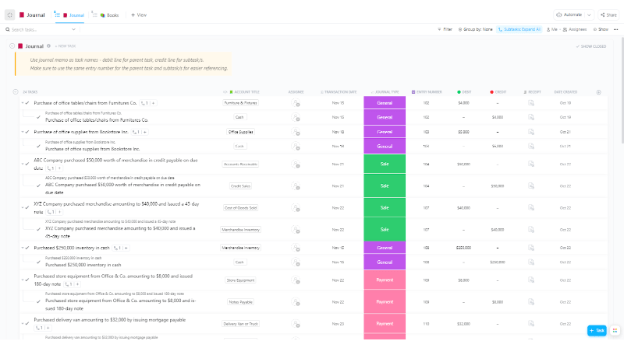
The ClickUp Accounting Operations Template brings all your core finance operations into a structured space that evolves with your business. From organizing account groups to tracking journals, ledgers, and cash flow, it gives you clarity without complexity.
Structured for standard accounting workflows, it includes sections for account grouping, cash flows, ledgers, and end-of-period reports. What’s more? It lets you use AI in accounting to offload routine tasks like entry classification, anomaly detection, or summary generation.
Within the template, each amortization entry becomes an accounting task—representing one installment of a loan or repayment schedule. Instead of a separate loan tracker, you’re simply logging each payment as part of your broader accounting operations.
🔑 Ideal for: Small businesses, finance teams, or operations leads who want to organize their accounting records
📮 ClickUp Insight: 47% of our survey respondents have never tried using AI to handle manual tasks, yet 23% of those who have adopted AI say it has significantly reduced their workload. This contrast might be more than just a technology gap. While early adopters are unlocking measurable gains, the majority may be underestimating how transformative AI can be in reducing cognitive load and reclaiming time. 🔥
ClickUp Brain bridges this gap by seamlessly integrating AI into your workflow. From summarizing threads and drafting content to breaking down complex projects and generating subtasks, our AI can do it all. No need to switch between tools or start from scratch.
💫 Real Results: STANLEY Security reduced time spent building reports by 50% or more with ClickUp’s customizable reporting tools—freeing their teams to focus less on formatting and more on forecasting.
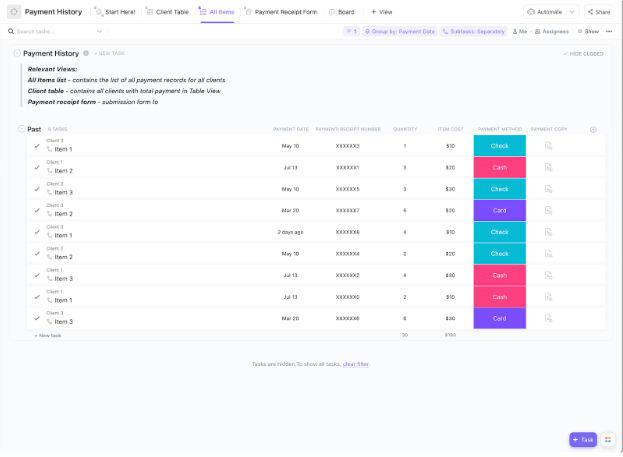
If you’re looking for an effortless way to log, view, and verify your personal or business payment records, the ClickUp Payment History Template is your solution!
With simple views like payment forms, detailed lists, and client summaries, you’ll always know who paid what, when, and how. Plus, built-in calculations help you spot totals at a glance, while receipt uploads and payment methods ensure accurate documentation.
💡 Pro Tip: Instead of thinking of your amortization as a separate tool, use this template to meld it into your existing payment history workflow. Each loan installment becomes just another payment task, enriched with principal/interest tracking and fitting seamlessly into your current fields, views, and automations.
🔑 Ideal for: Freelancers and small business teams looking for an organized, shareable system for logging and reviewing payments, including loan installments
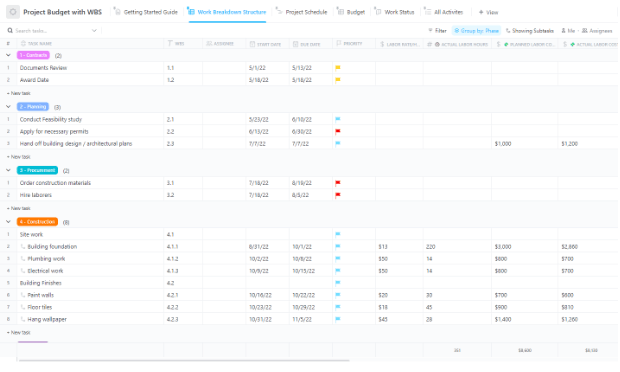
Need a structured, granular approach to managing scope, budget, and progress? Try the ClickUp Project Budget with WBS Template. It uses a work breakdown structure to assign costs, monitor actuals, and visualize progress against planned milestones in one unified space. This makes it the perfect ground for embedding an amortization schedule naturally within your budget structure.
The template links budget lines directly to activities, ensuring full alignment between financial planning and project execution. Since this template supports various views—including Gantt, list, and board—you can visually track when payments are due, alongside project milestones. This gives a clear, temporal picture of repayment tied to project structure.
🔑 Ideal for: Project managers and teams managing large-scale projects with multiple budget streams
🔍 Did You Know? Amortization isn’t just for loans. Businesses, too, use it to spread out the cost of assets and investments, like equipment, over time.
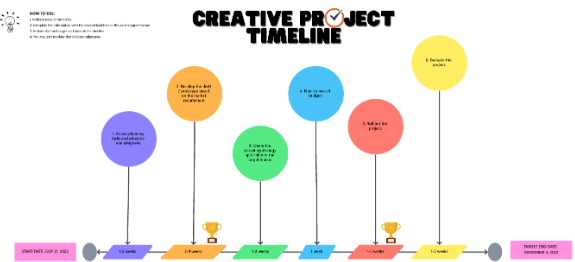
Map your entire amortization timeline in one fluid, visual workspace with the ClickUp Timeline View Template. It gives individuals and teams a flexible timeline structure to organize amortization phases and plot due dates. Each point carries its amount, broken down into principal and interest, with the balance after payment reflected in the sticky notes or a Custom Field.
With this template, you get the freedom to map, adjust, and track every phase of your amortization schedule without rigid boundaries. It turns a loan payoff plan into a clear, visual road that runs straight to zero.
🔑 Ideal for: Small business owners or freelancers, especially those managing equipment loans, startup capital, or client-financed projects where repayment dates matter as much as cash flow planning
Tracking repayment schedules across multiple loans, each with different terms, frequencies, and amounts, can quickly become overwhelming. The Loan Payment Schedule Template by Mission Investors offers a customizable spreadsheet designed to simplify loan management and enhance portfolio transparency.
It visualizes each payment’s breakdown, including principal amount, interest, extra payments, and balances, all in one comprehensive schedule.
🔑 Ideal for: Borrowers and financial advisors who need to maintain easy-to-understand loan payment records.
💡 Bonus Tip: Here are some tips for effective loan amortization:
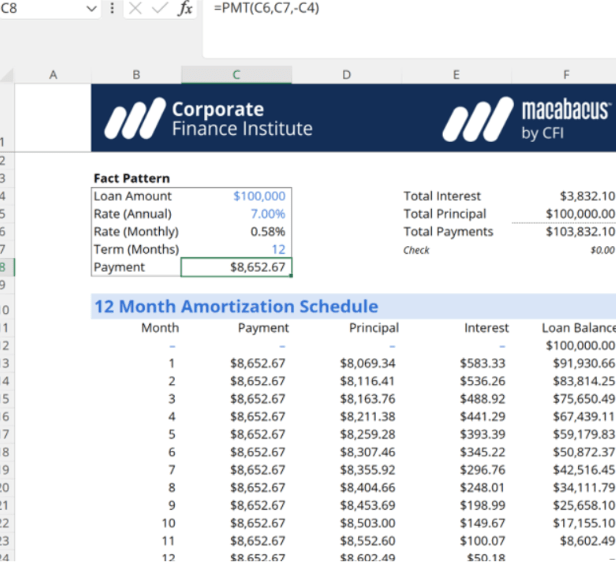
The Excel Loan Payment Schedule Template by CFI offers a full amortization schedule that covers everything from equal monthly payments to extra contributions and changing interest rates.
This ready-made spreadsheet helps you calculate accurate loan payments, principal, interest, and balances for any loan term and interest rate. It simplifies building a complete amortization schedule, saving you time and effort.
🔑 Ideal for: Financial professionals, business owners, or students who want to track their amortization schedule using Excel
➡️ Read More: Free Balanced Scorecard Templates for Your Business
Managing a loan doesn’t have to be a guessing game. With the right loan amortization schedule template, you can clearly see how every payment chips away at your balance, month by month, dollar by dollar.
With customizable views and automation, ClickUp helps you build a smart loan tracking system from scratch or plug into pre-built ones. Track payment schedules, set reminders, and even share forms with clients or teammates. Plus, everything updates in real time, so you miss out on nothing.
Ready to take control of your loan strategy? Start with ClickUp and watch your numbers finally make sense. Sign up for ClickUp for free today!

© 2026 ClickUp

There’s an easier way. Try a free AI Agent in ClickUp that actually does the work for you—set up in minutes, save hours every week.