






Still downloading templates?
There’s an easier way. Try a free AI Agent in ClickUp that actually does the work for you—set up in minutes, save hours every week.
Sorry, there were no results found for “”
Sorry, there were no results found for “”
Sorry, there were no results found for “”


Managers and knowledge workers want AI that boosts knowledge-based work without adding complexity. Flexible, easy to use, and built to fit existing workflows.
The question “Amazon Q vs. ClickUp” comes up often in that search.
One is deeply embedded in the AWS ecosystem. The other brings projects, knowledge, and automation into a single converged AI workspace.
Between ClickUp vs. Amazon Q, which enterprise AI platform is right for you? Let’s evaluate the pros and cons of both to help you make an informed decision.
If you want a quick take on ClickUp vs. Amazon Q before you get into the feature details, start here.
This snapshot shows where each tool fits best and what complex problems it solves 👇
| Aspect | ClickUp | Amazon Q |
| Primary use case | Unified workspace for project management and AI-powered productivity | AI assistant for enterprise knowledge retrieval and software development |
| AI philosophy | Embedded AI that acts as an assistant or ‘Super Agent’ within workflows | Built on Amazon Bedrock to route queries to the best-fit foundation models |
| Ecosystem dependency and integration capabilities | Works independently while offering integration with 1000+ apps | Deeply embedded with the AWS ecosystem and offers 40+ pre-built data source connectors |
| Code capabilities | Codegen Agent for implementation, bug scanning, and code review within the workspace Syncs Git commits, branches, and issues from GitHub/GitLab directly into tasks BrainGPT for code snippets, code-related questions, and context across linked tasks and docs | Full agentic code generation, security scanning, legacy modernization, and AWS infrastructure management |
| Search capabilities | Finds information across internal tasks, docs, and connected apps like Google Drive, Figma, Dropbox | Finds and synthesises answers from multiple data sources and the company’s knowledge base |
| Specialized AI agents | Specialized as a Project Manager, Standup Writer, or Campaign Manager | Specialized in code implementation (/dev), Java upgrades, and AWS troubleshooting |
| AI tools and models | Powered by multiple AI models; supports ChatGPT, Claude, Gemini, and DeepSeek | Dynamically routes tasks to the optimal foundation model via Amazon Bedrock |
| Natural language processing | Build automations, query dashboards, search workspace, and interact with AI agents—all through a conversational interface | Natural language querying for BI dashboards in QuickSight, enterprise search across connected data sources, and code generation from plain language prompts |
| Collaboration | Built-in Docs, Chat, Whiteboards, SyncUps (meetings), and Task Comments all in one place | Enhances existing communication tools like Slack, Teams, and Microsoft 365 with no native collaboration layer |
| Mobile apps | Available. However, advanced AI workflows are limited on mobile devices | Available via browser extensions and integrated apps |
| Free plans | ✅ | Only Amazon Q Developer offers a free version |
| Setup complexity | Guided onboarding, help center articles, and customer support—moderate learning curve | Requires AWS infrastructure, IAM configuration, and developer involvement—steep learning curve |
| Security and Governance | Adheres to GDPR, HIPAA, and AICPA SOC 2; forbids third-party AI training on user data | Respects existing AWS identities and permissions; HIPAA eligible and ISO 42001 certified |
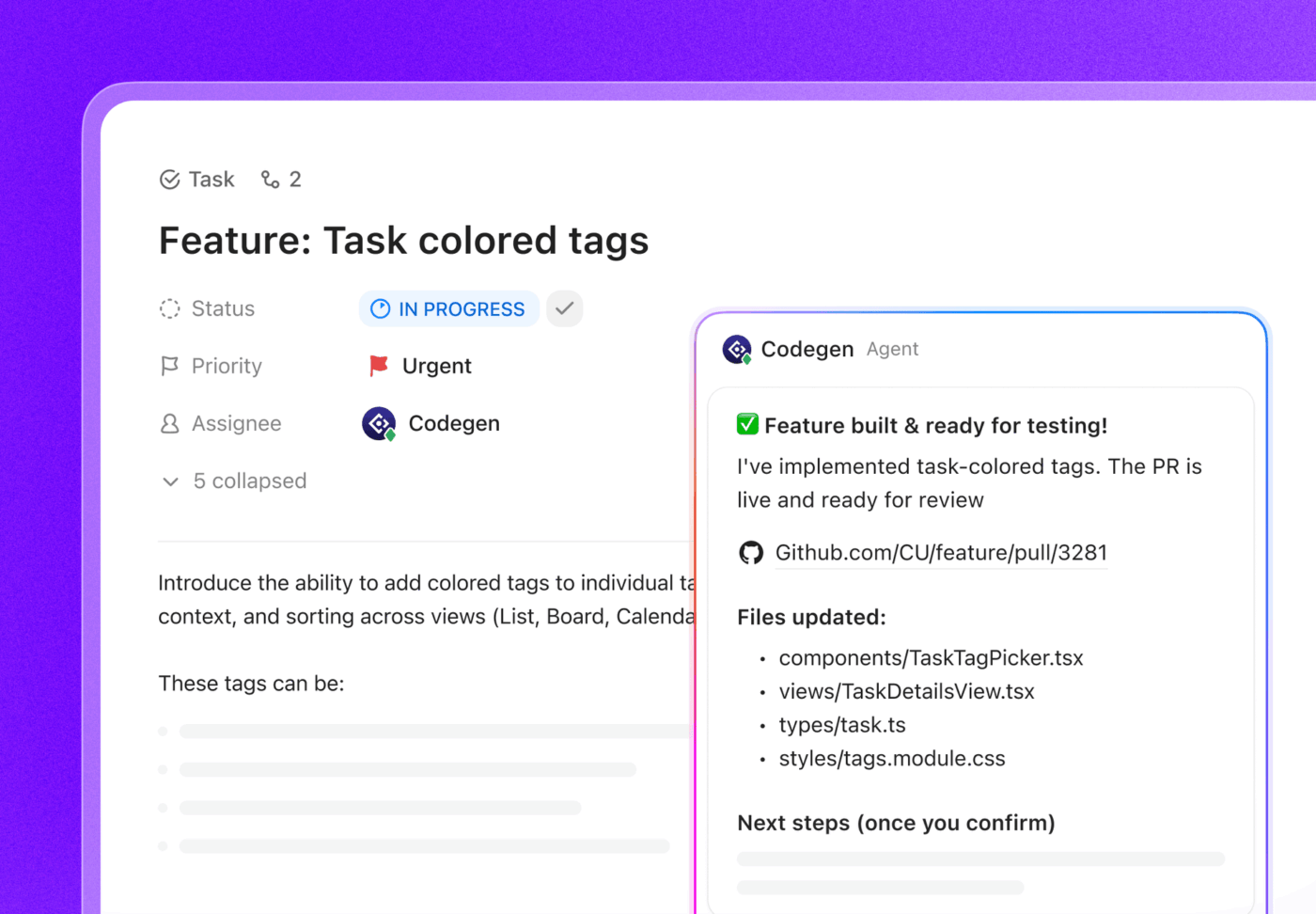
ClickUp is a converged AI workspace that integrates your tasks, docs, projects, communication, and company knowledge into a single, unified platform.
It integrates with 1000+ tools, giving developers and teams a single place to manage work without switching between endless apps.
The key features of ClickUp for Software Teams that set it apart as an Amazon Q alternative are:
When systems break or releases stall, engineers often spend more time searching for context than fixing the problem. ClickUp Brain removes that friction by letting you query your workspace in plain language.
Instead of manually scanning tickets, documentation, and chat threads, you can ask direct questions, and the contextual AI surfaces the relevant information from across your workspace.
📌 For example:
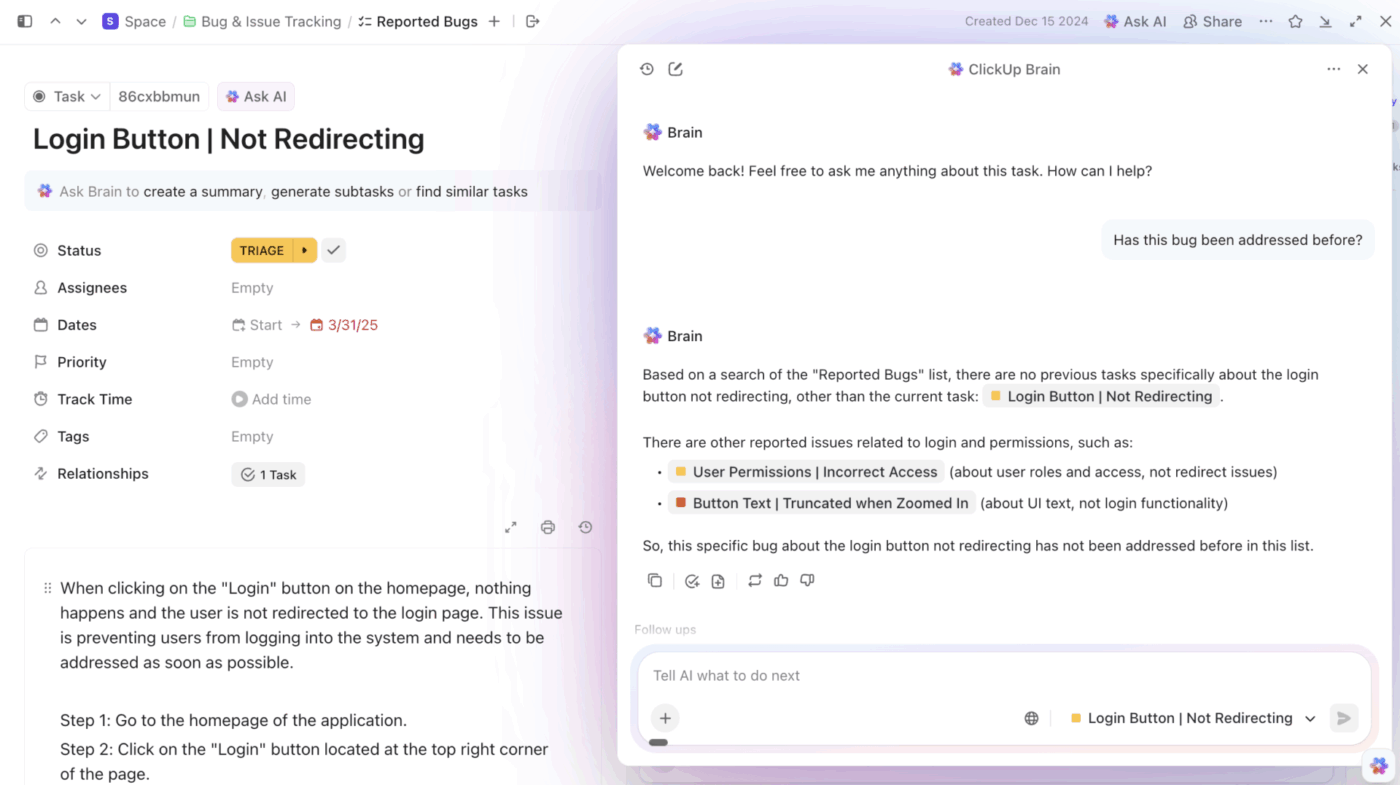
Since ClickUp Brain can pull context from tasks, docs, and connected tools, you get clear answers with execution context intact, not as isolated snippets.
Additionally, ClickUp Brain can assist with implementation and technical writing. It helps your technical teams generate code, scripts, and documentation without leaving the workspace.
This means developers can move from planning → execution → documentation in the same system using this AI for software teams. No need to jump between an IDE assistant, documentation tool, and project tracker.
📌 For example:
On that note, here’s how you can automate documentation using AI with ClickUp’s converged AI workspace.
Several AI coding assistants can suggest fixes or generate snippets. But once the suggestion appears, you still need to move that work through reviews, documentation, and deployment workflows.
ClickUp approaches this differently by combining AI agents that manage coordination with a code-focused AI teammate that helps implement changes.
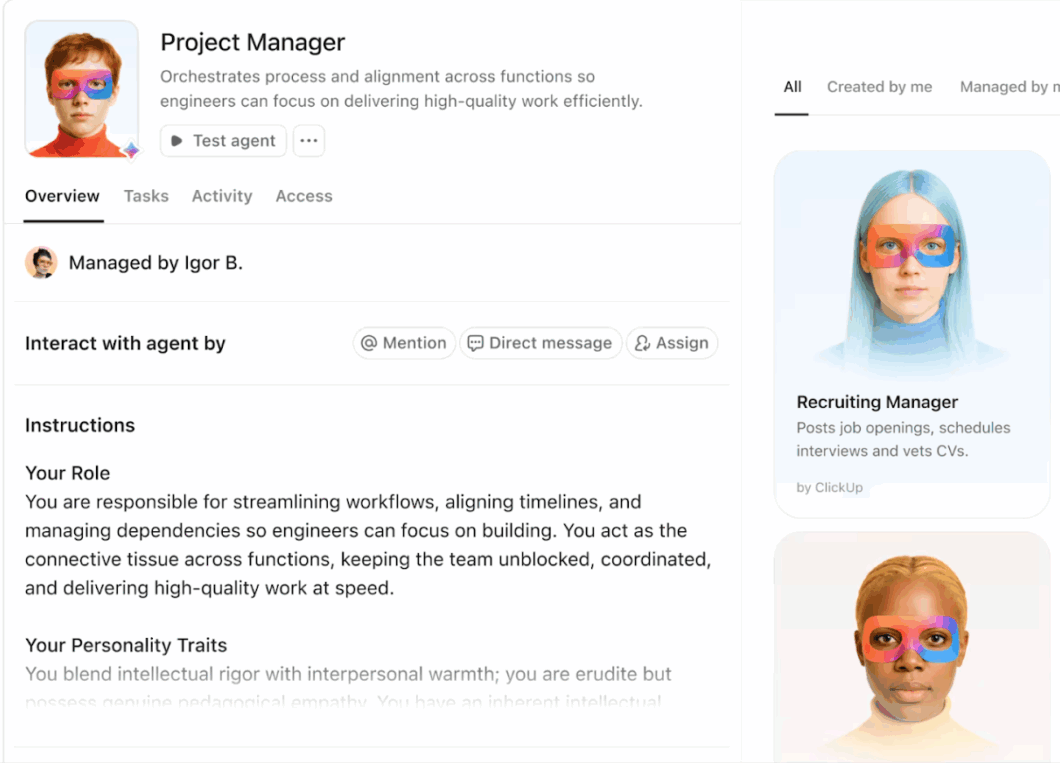
ClickUp Super Agents operate directly inside your workspace. You can configure them to monitor tasks, summarize discussions, draft updates, and keep engineering workflows moving without manual follow-ups. Instead of tracking changes across scattered threads or tools, these agents maintain context directly within the task or project where the work is happening.
For implementation tasks, ClickUp Codegen steps in as an AI developer assistant. Mention it inside a task to ask technical questions, generate code suggestions, or draft pull request content in natural language.
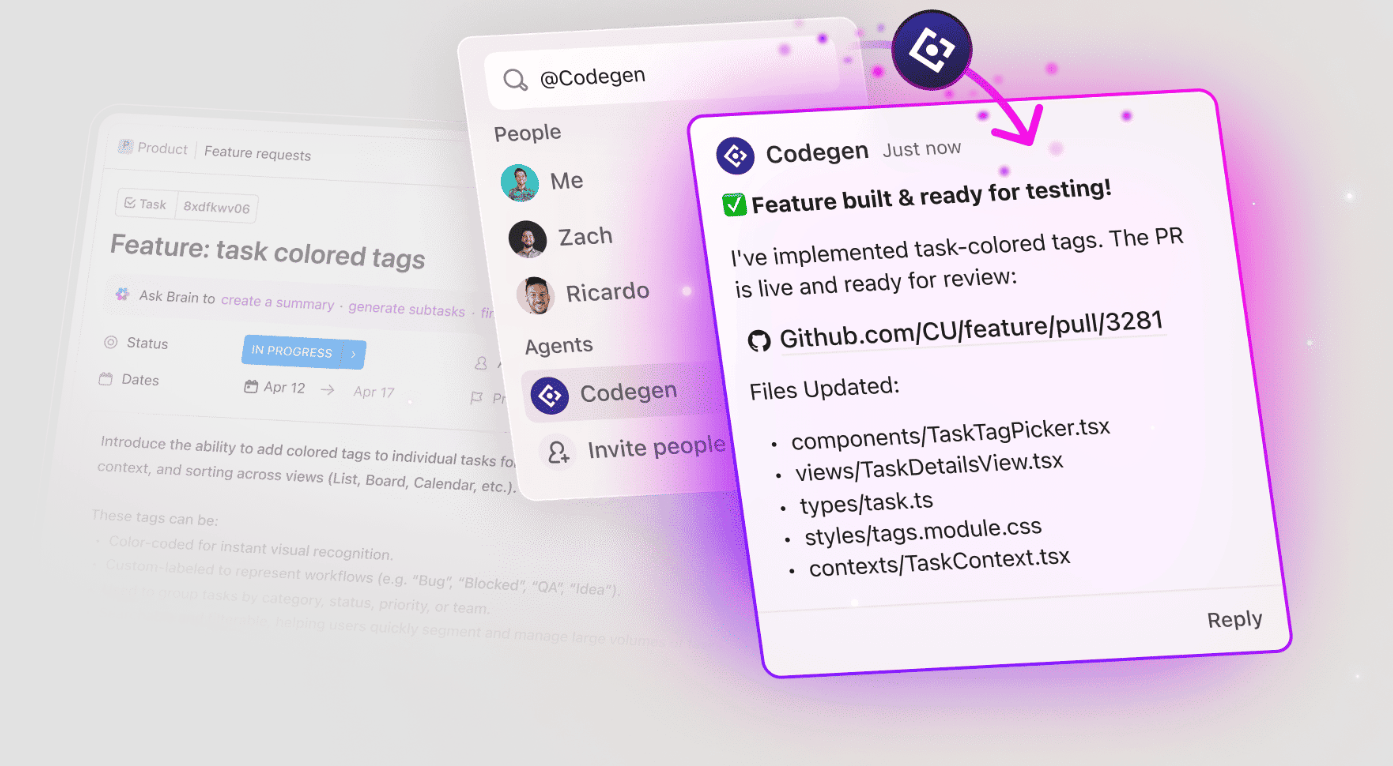
📌 For example:
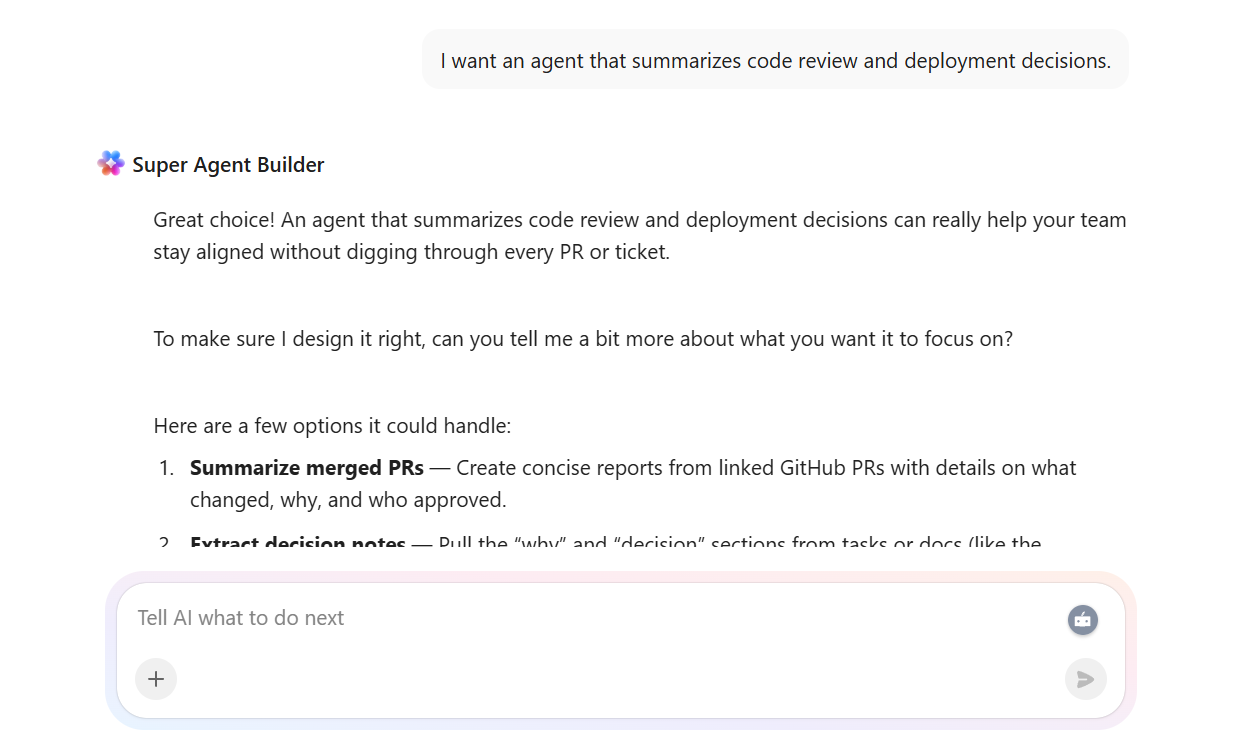
Here’s a mini guide that shows you how ClickUp’s Super Agent does the work for you.👇
💡 Pro Tip: After generating a pull request, ask ClickUp Brain to summarize the change, explain why the modification was made, and list what needs to be tested next. Save that summary inside the task so future teammates can quickly understand the reasoning behind the update.
You can also configure an AI agent to monitor code review threads and deployment discussions, then automatically summarize key decisions and add them to the associated task or documentation.
What happens after work is generated by AI or completed by a developer?
ClickUp Automations removes that dependency by automatically triggering the next step when work progresses.
You can configure triggers, conditions, and outcomes so that routine steps occur automatically as work progresses.
Start with ready-made automation templates or design your own workflows to assign tasks, update statuses, apply documentation templates, or notify stakeholders when key milestones occur.
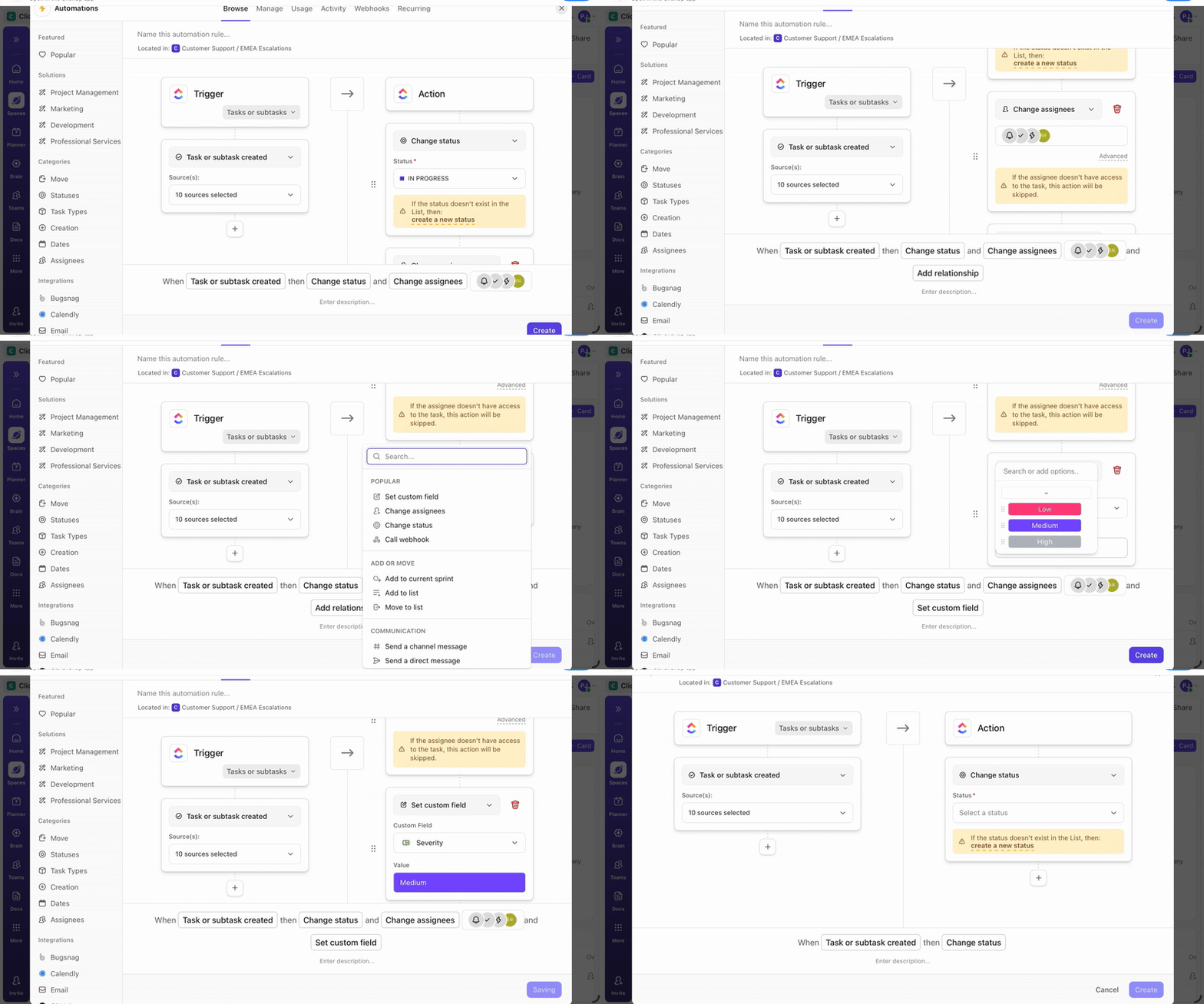
📌 For example:
⭐ Bonus: ClickUp Brain MAX is the AI-powered desktop companion that brings this context-aware intelligence outside the browser and into a dedicated app.
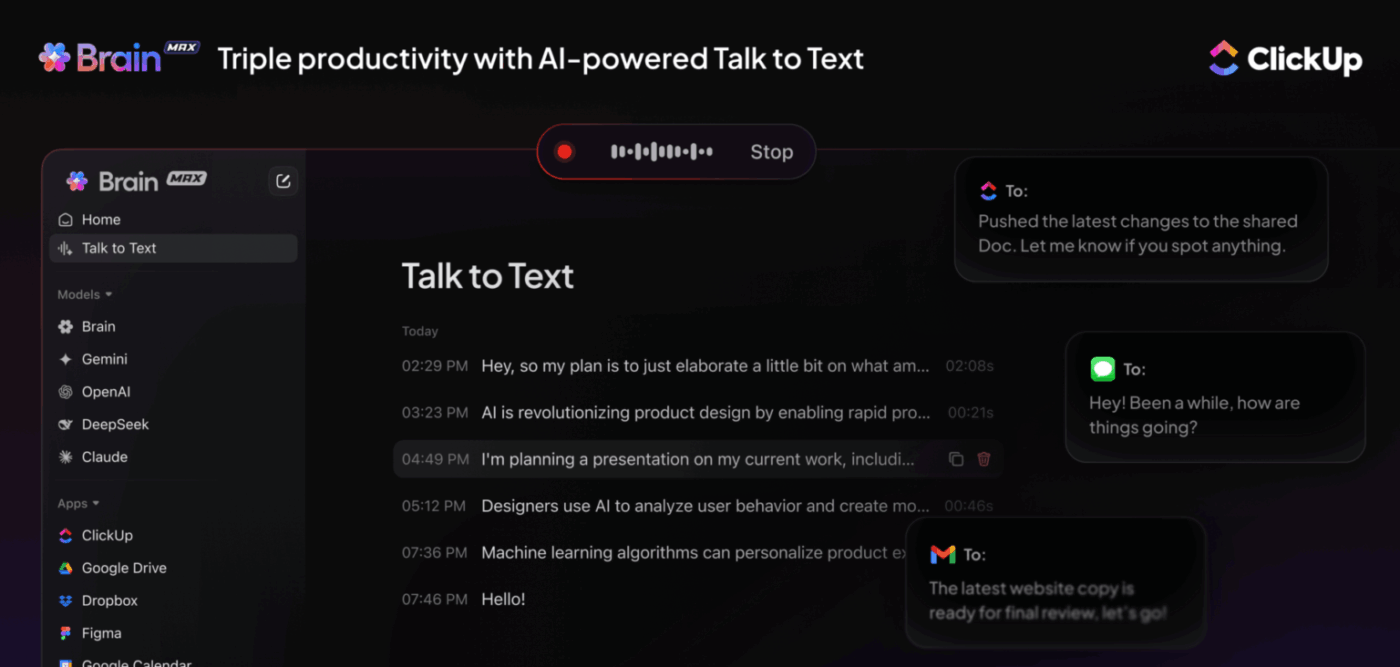
With it, you can:
👀 Did You Know? 52% of executives in their organizations are actively using AI agents, and more than 39% report their companies have launched more than 10 agents.
ClickUp lets you organize work hierarchically through Workspaces, Spaces, Folders, Lists, and Tasks. Each level supports granular customization—Custom Statuses, permissions, automations, and fields—a structure that adapts to your engineering workflows.
Cross-functional teams can view the same work in multiple formats depending on their role and workflow needs. Product managers may prefer roadmap timelines, engineers focus on task flow, and leadership tracks delivery metrics.
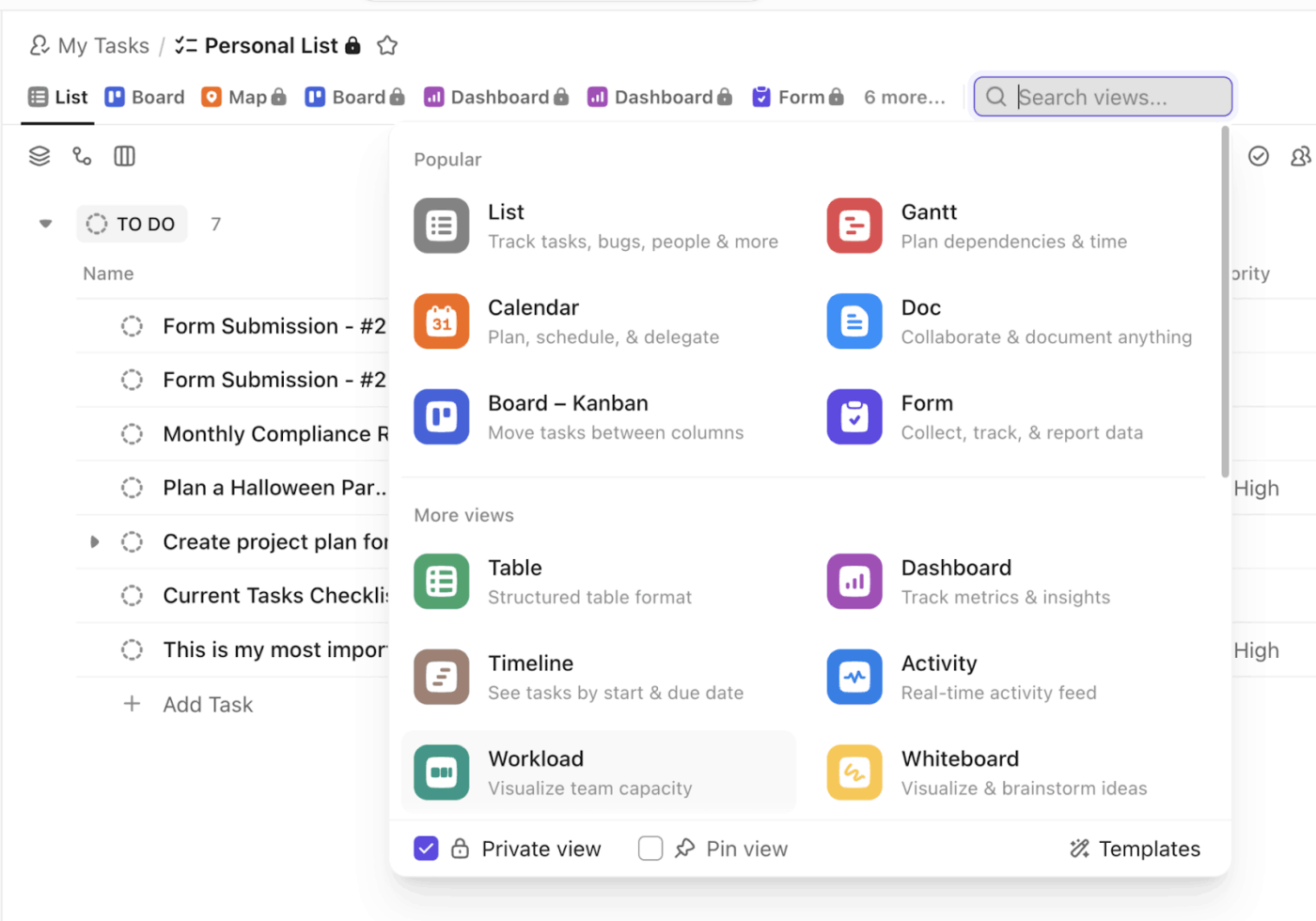
For instance, with 15+ ClickUp Views, you can switch perspectives instantly:
⚡ Template Archive: Free Software Development Plan Templates to Use
📮 ClickUp Insight: 44% of our survey respondents stick to 1–5 tabs when browsing, but 8% live in “chaos mode” with 31+ tabs.
While not always intentional, it happens to the best of us: a Miro board for brainstorming, a Google Doc for SOP, a project management tab, and then ChatGPT for extra support. 👀
But every switch between apps or windows adds toggle tax, aka a hidden mental toll that chips away at your mental bandwidth and leaves you feeling scattered.
With ClickUp, you can centralize all your tools: think whiteboards, docs, tasks, web search, AI models like ChatGPT, Gemini, and Claude, and more under one Converged AI Workspace. Time to ban context switching and close those extra tabs down for good!
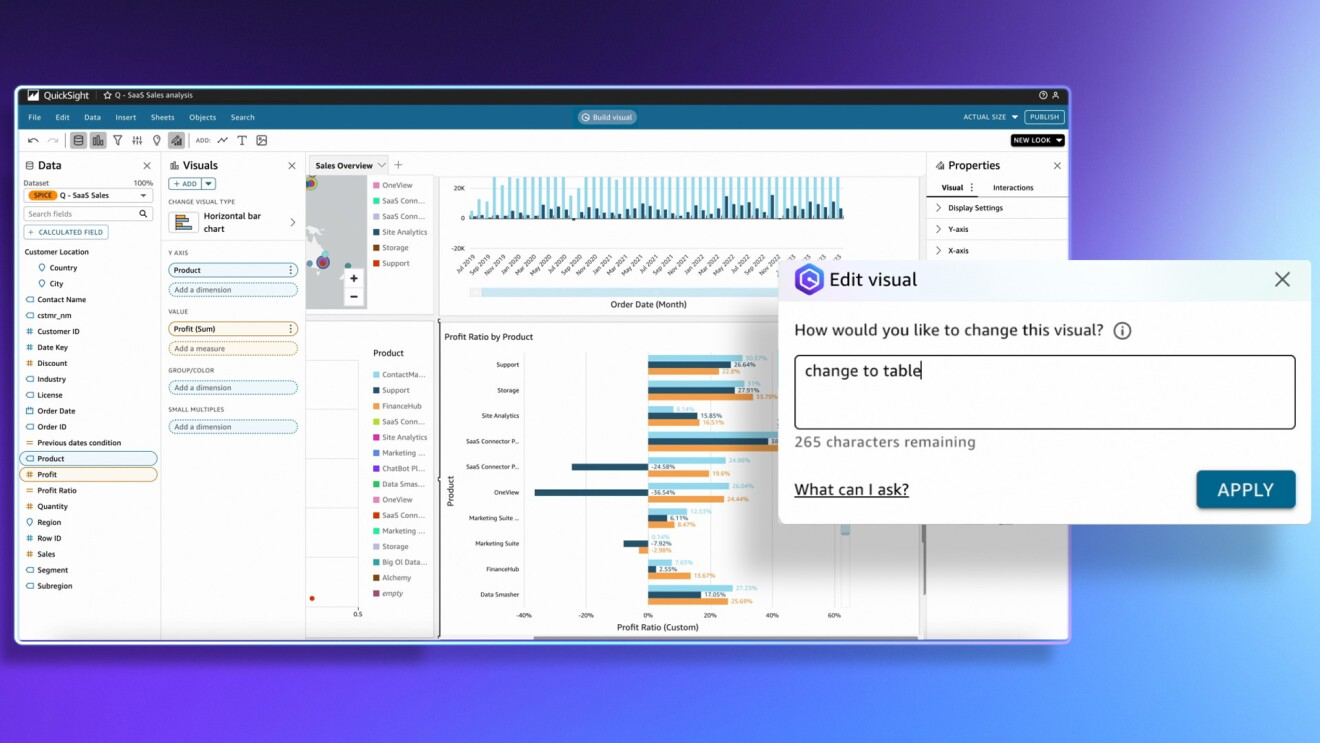
Amazon Q is a generative AI assistant designed to accelerate software development and leverage internal enterprise data. It lets users find answers across the company’s knowledge base in natural language and turn them into actions using its advanced agentic capabilities.
Amazon Q caters to both developers (via Amazon Q Developer) and business users (via Amazon Q Business). It integrates tightly with AWS Services, making it a strong fit for enterprises already operating within the AWS ecosystem.
Amazon Q’s interactive AI assistant lets users hold tailored conversations, solve problems, generate content, write and debug code, take actions, and troubleshoot issues—all within their existing workflows. Here are the core features enterprises can actually benefit from.
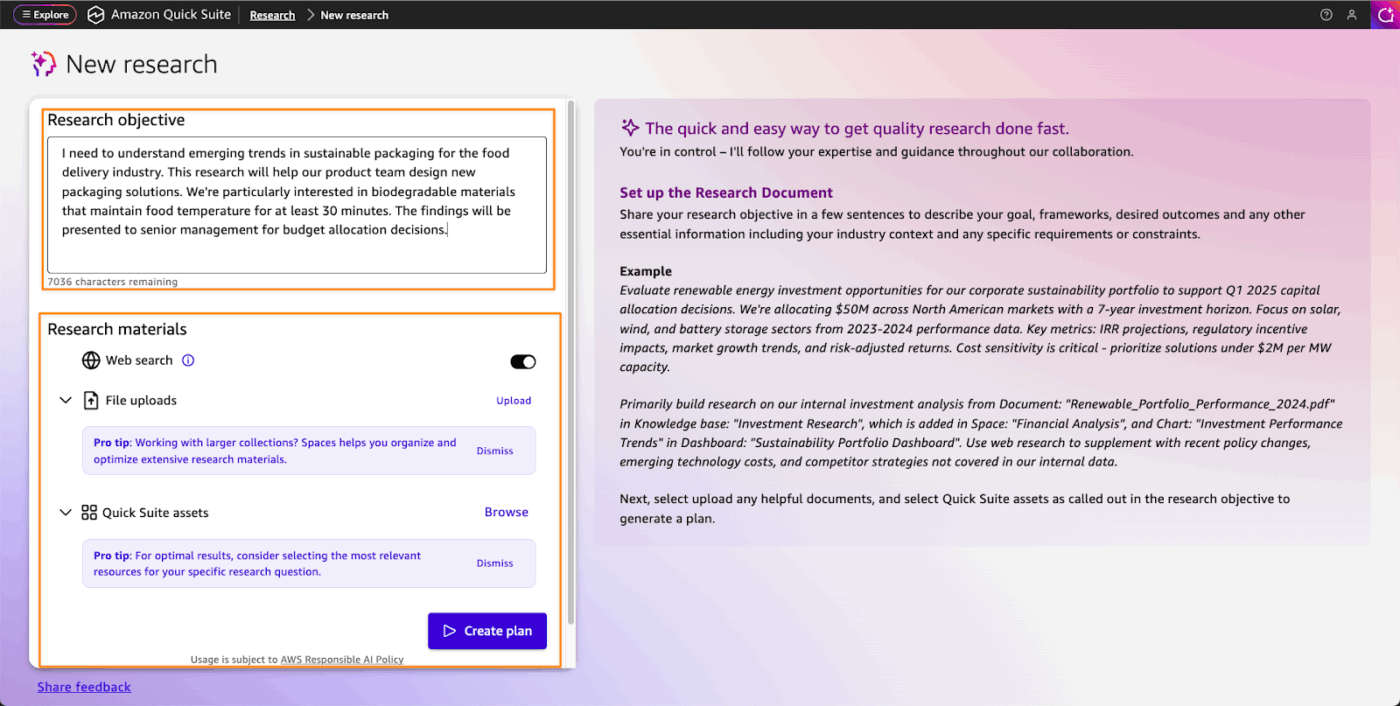
Amazon Quick Suite is an evolution of Amazon Q Business—an agentic workspace that brings together AI functionality for research, business intelligence, and automation.
It provides five integrated API sets: QuickSight, Quick Flows, Quick Automate, Quick Index, and Quick Search. These features work together across your data and connected apps to automate multi-system workflows.
Here’s what you can do within Quick Suite:
| Capability | What it does? | Use cases |
| Organize your workspace | Use spaces to aggregate files, dashboards, knowledge bases, and app actions into a unified knowledge center for your team | Sharing and summarizing customer feedback across teams Onboarding new hires with docs and processes Analyzing hundreds of annual reports Searching meeting recordings for action items |
| AI-powered conversations | Build custom chat agents tied to specific goals, knowledge sources, and connected tools | Ask “What were the top complaints from enterprise customers last quarter?” and get a summarized answer pulled from your CRM and support tickets Generate a first draft of a client proposal by pulling from past deals and product docs |
| Accelerate research | Combines internal knowledge with real-time public internet data to surface expert-level insights | Competitive landscape and financial market analysis Patent research and compliance audits PE due diligence Understanding buyer needs from raw market data |
| Business intelligence | Turn raw data into advanced analytics, dashboards, charts, and actionable insights | Run what-if scenario analysis Forecast revenue by region or segment Track KPIs across departments in real time |
| Automate repetitive tasks | Handle recurring tasks across apps without manual intervention | Pull a weekly sales report from your CRM and push it to Slack automatically Navigate websites, fill forms, and capture data using UI and API integrations |
| Multi-agent automations | Transform complex business processes into automations using plain language or existing documentation | Automate end-to-end processes like vendor onboarding or compliance reporting Coordinate multiple AI agents working in parallel across systems |
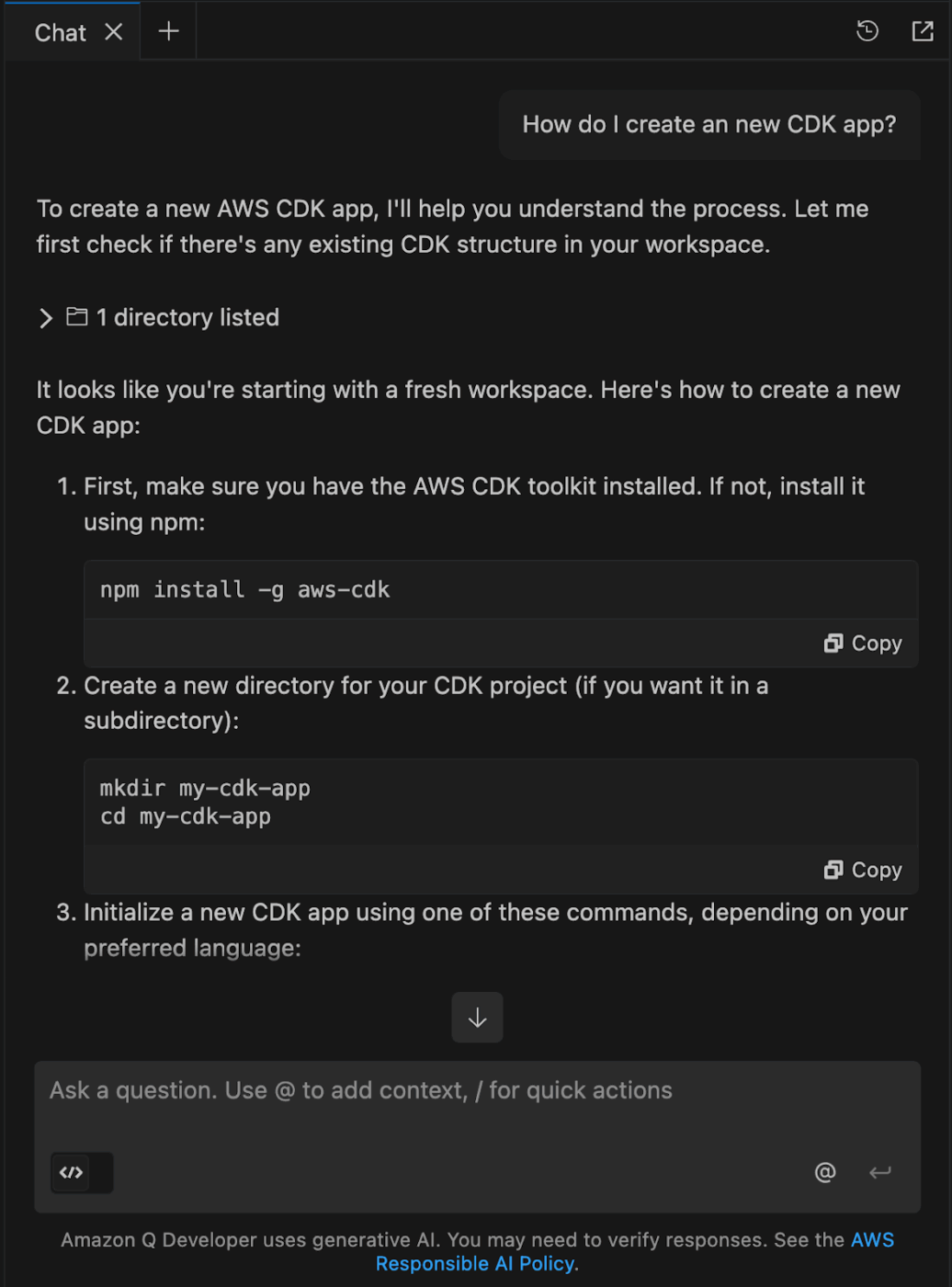
Amazon Q developer is an AI-powered coding assistant that offers an agentic coding experience, spanning beyond simple coding tasks.
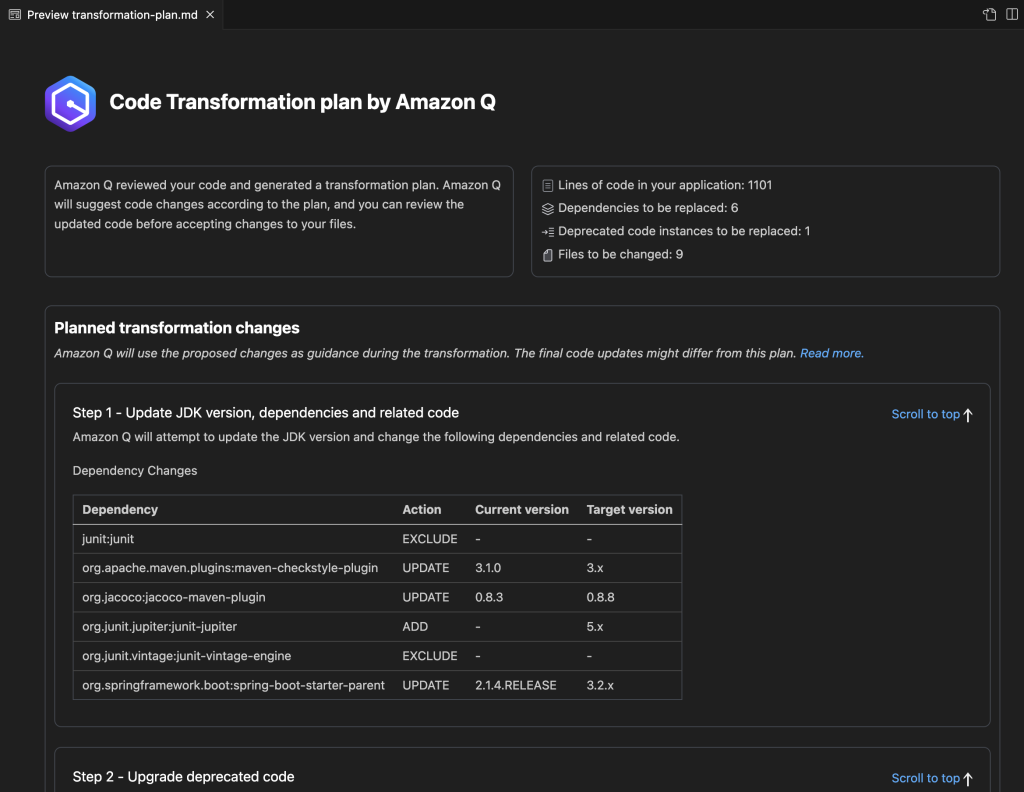
This agent can autonomously read your codebase, plan implementation steps across multiple files, develop project-level READMEs, create and run tests, refactor existing logic, and perform software upgrades.
Here’s how it works under the hood:
These capabilities are bundled into five specialized agents, each handling a distinct phase of development:
| Agent | What it does? |
| /dev | Implement development features by automatically reading and writing files in your repository |
| /doc | Scans source files, builds a knowledge graph, and generates READMEs and data-flow diagrams |
| /test | Creates unit tests to boost code coverage |
| /review | Detects and fixes bugs, security vulnerabilities, logic errors, and code smells |
| /transform | Modernizes legacy code—Java version upgrades, .NET porting from Windows to Linux |
💡 Pro Tip: If your team needs to operationalize machine learning workflows, use Amazon Q Developer’s integration with Amazon SageMaker to build, test, and deploy ML models directly within your AWS environment. It can also answer questions, generate relevant code, and surface AWS-native tool recommendations as you work through each stage.
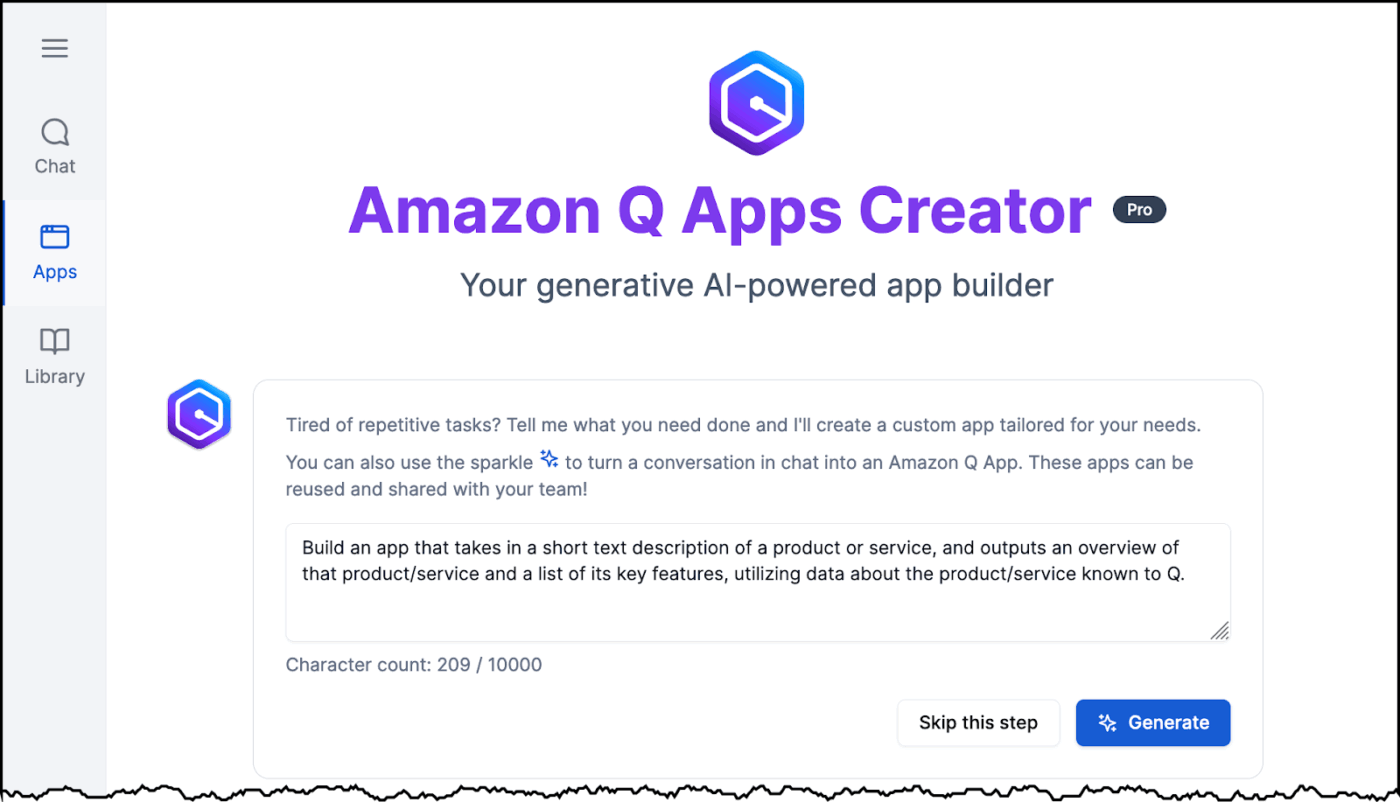
Amazon Q Apps lets users build secure, lightweight AI apps using their enterprise data. They can specify data sources at the individual card level and share apps across the organization—privately or with specific users.
There are two ways to build them:
The conversational interface of Amazon Q apps lets non-technical users build fully customizable apps. Users can rearrange components, add or remove cards, adjust data sources per card, and tailor the experience to their workflow.
📚 Read More: How to Become a Better Programmer
Amazon Q Developer brings static application security testing (SAST) directly into your development workflow. It scans code across multiple programming languages for vulnerabilities such as exposed credentials, log injection, and security anti-patterns before they become severe problems. It also reviews code quality to surface logical errors, duplication, and coding style inconsistencies.
Each code review includes detailed context, such as:
👀 Did You Know? 63% of global organizations ship code changes without fully testing them—costing anywhere between $500,000 and $5M USD annually. Yet most teams are still prioritizing delivery speed over software quality.
📚 Read More: Best Code Editors for Developers
Amazon Q Business
Amazon Q Developer
Amazon Quick Sight
While both ClickUp and Amazon Q bring AI to enterprise workflows, they’re built around fundamentally different assumptions.
While Amazon Q is purpose-built for the AWS ecosystem, ClickUp offers a converged AI workspace where AI is deeply embedded in every task, doc, project, and conversation your team already uses.
ClickUp’s Enterprise Search lets you find information across your ClickUp workspace and connected apps through natural language.
Simply ask questions like “Where is the final approval documented for this release?” and it returns answers, related files, and links and citations to sources, based on how your work is actually organized. This is especially helpful in large workspaces where information is fragmented across projects, teams, and third-party tools.
Amazon Q Business can pull answers from documents, images, audio, and video files, databases, data warehouses, and connected enterprise apps. It indexes data across disparate systems and generates summaries, recommendations, and content from that unified index.
For transparency, responses include citations and source references. You can access Amazon Q directly inside Slack, Microsoft Teams, Outlook, and Word for Microsoft 365.
🏆 Winner: Both tools excel at returning detailed search results with citations and attributions.
ClickUp allows users to automate busywork, such as task assignments, status updates, deadline alerts, and handoff notifications, through rule-based Automations. Beyond that, ClickUp Super Agents respond to changes in tasks, timelines, dependencies, and data patterns.
They can automate complex, multi-step workflows across systems and tools without requiring a trigger every time.
Amazon Q’s automation is focused on technical development and cloud infrastructure workflows. It lives within Amazon Quick Suite via Quick Flows and Quick Automate, enabling users to turn conversational responses into direct actions across enterprise systems. Business users can perform actions in third-party apps such as Salesforce or Slack directly from the chat interface using prebuilt or custom plugins.
🏆 Winner: ClickUp, if you want to automate the full lifecycle of tasks and projects. Amazon Q, if you need an intelligence layer to automate technical workflows or build lightweight AI apps that work across existing software silos.
ClickUp integrates with 1000+ tools spanning project management, communication, DevOps, CRM, and productivity. ClickUp Integrations allow teams to sync tasks, trigger automations, and act on information without switching context.
For developers specifically, Git integrations connect commits, branches, and pull requests directly to ClickUp tasks.
Amazon Q Business offers 40+ pre-built data source connectors like S3, SharePoint, Salesforce, Confluence, and Jira—primarily focused on indexing enterprise content for search and AI responses. It also integrates into Slack, Microsoft Teams, Outlook, and Word for Microsoft 365 as an AI assistant layer. The ecosystem is deeply AWS-native, which adds friction for teams not already operating within AWS infrastructure.
🏆 Winner: ClickUp’s broader integrations and less setup friction make it the stronger choice for cross-functional teams working across multiple tools. Amazon Q edges ahead only if your stack is already AWS-native.
ClickUp Dashboards lets you visualize workload, sprint velocity, time tracking, goal progress, and project performance across your workspace.
Furthermore, AI Cards analyze live workspace data to answer questions. They can generate standup reports, surface blockers, and recommend KPIs right within your ClickUp workspace.
Amazon Q Business primarily handles reporting through Amazon QuickSight, its dedicated BI tool. Build interactive dashboards, analyze data in real time to run what-if scenario analysis, forecast revenue, and track KPIs across departments. You can even create customizable data stories, receive AI-driven executive summaries, and get multi-visual responses to data queries.
🏆 Winner: ClickUp when you want insights focused on project performance and operational reporting. Amazon Q is when you need a dedicated BI layer for cross-system data analysis and executive-level visualization.
ClickUp offers granular role-based access control (RBAC) at every level of its hierarchy.
Admins can set custom roles, control editing and viewing rights, and restrict access to sensitive projects and docs. Critically, Brain MAX and Super Agents respect the same permission model, surfacing only what the user triggering them is authorized to see.
Amazon Q is built on Amazon Bedrock’s security foundation and supports AWS-native governance controls. It respects document-level ACLs from connected data sources, meaning users only get answers from content they’re already authorized to access.
For enterprises already on AWS, this is a significant advantage—no separate permission layer to configure on top of existing infrastructure.
🏆 Winner: Both ClickUp and Amazon Q offer enterprise-grade security suited for organizations where data privacy is of the utmost importance
👀 Did You Know? 78% of developers spend at least 30% of their time on manual, repetitive tasks such as writing compliance policies, quality assurance testing, and error remediation.
We turned to Reddit for insights into how real users feel about Amazon Q vs. ClickUp.
While there aren’t any specific threads directly comparing the two, here’s what users have said about each tool. ClickUp’s granular task management and macro-level project visibility are recurring topics across Reddit threads. According to one ClickUp user:
We have successfully used ClickUp for companies of all sizes (think solopreneurs to massive teams) and in various industries, many of which generate multi-million dollar revenue. Yes, ClickUp has issues just like literally every other platform out there, but the capabilities are superb, especially for such a large team…Team leaders will likely enjoy it because it will give them a birds-eye-view of what’s happening without feeling like they are micromanaging their direct reports.
ClickUp’s Super Agents are still catching early interest on Reddit. While users are still figuring out the best use cases, the initial responses are intriguing. According to one ClickUp user:
I created a few to test out. Once a PM agent n it got set to run every weekday morning. It burned through 80% of my credits just in the testing phase. But interesting results. Another one I created was to create knowledge base articles for our internal wiki from video transcripts or rough instructions. That one was really well. Especially coz it will create the content n add it to the wiki n learn from it while using ClickUp Brain (which apparently doesn’t burn credits) I’m still testing it out n trying to understand the use cases. But it is really intriguing. Also clickup bought codegen. Maybe that would be interesting to review bug tasks.
On the Amazon Q side, software developers highlight how much it compresses development time — particularly for complex AWS workflows. According to one AWS user:
After attaching AWS documentation and AWS agentcore MCP servers to kiro, I was able to create an agent with streamlit and have it running, add memory to it and understand it, test it with gateway, have kiro create lambdas, host in agentcore and create dockerfile for it and the whole thing and the whole coding structure in like 2 hours and that’s because I was trying to understand the logic of it step by step. It would have taken me days to code the front end and understand how to even approach this by my own
The votes are in, and we have a winner! 👑
While Amazon Q offers powerful enterprise search and BI capabilities for teams already deep in the AWS ecosystem, it remains largely siloed within that infrastructure.
It doesn’t bridge the gap between data retrieval and a business’s broader operational needs.
ClickUp’s converged AI workspace gives enterprises a single platform to centralize work, eliminate silos, and act on information in real time.
Teams can create documentation, manage projects, hold meetings, visualize data, automate complex workflows, and deploy AI agents—all while integrating structured and unstructured data across every connected tool and system. It’s the all-in-one platform where AI actively works alongside your team.
Sign up for ClickUp for free today and experience the AI workspace built for modern teams.

© 2026 ClickUp

There’s an easier way. Try a free AI Agent in ClickUp that actually does the work for you—set up in minutes, save hours every week.